battery LINCOLN MKZ HYBRID 2019 User Guide
[x] Cancel search | Manufacturer: LINCOLN, Model Year: 2019, Model line: MKZ HYBRID, Model: LINCOLN MKZ HYBRID 2019Pages: 575, PDF Size: 4.77 MB
Page 76 of 575
Note:Before driving your vehicle, check theinstrument cluster for a trunk ajar or doorajar message or warning indicator. Failureto do this could result in unintentionallyleaving the decklid open while driving.
The decklid will stop and three chimes willsound if it detects an obstacle while opening.Remove the obstacle to operate the decklid.
Resetting the Power Decklid
The decklid may not operate correctly andyou may need to reset it if:
•The vehicle battery charge is low.
•You disconnect the battery.
•You manually close the decklid and leaveit unlatched.
To reset the power decklid:
1. Disconnect the battery for 20 secondsthen reconnect the battery.
2. Manually close the decklid making sureit is fully closed.
3.Power open the decklid using the remotecontrol or instrument panel button.
KEYLESS ENTRY
SECURICODE™ KEYLESS ENTRYKEYPAD
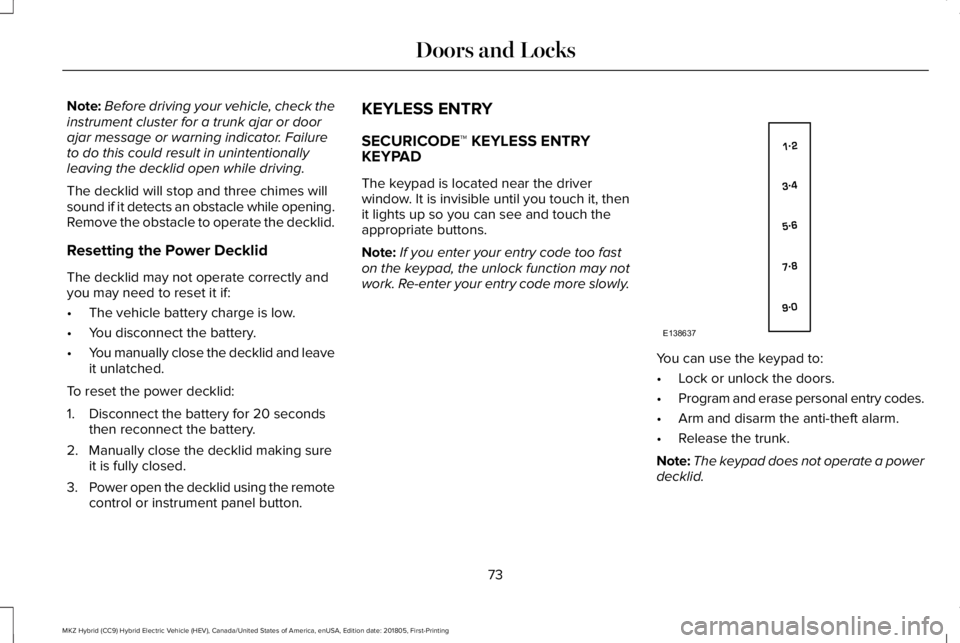
The keypad is located near the driverwindow. It is invisible until you touch it, thenit lights up so you can see and touch theappropriate buttons.
Note:If you enter your entry code too faston the keypad, the unlock function may notwork. Re-enter your entry code more slowly.
You can use the keypad to:
•Lock or unlock the doors.
•Program and erase personal entry codes.
•Arm and disarm the anti-theft alarm.
•Release the trunk.
Note:The keypad does not operate a powerdecklid.
73
MKZ Hybrid (CC9) Hybrid Electric Vehicle (HEV), Canada/United States of America, enUSA, Edition date: 201805, First-Printing
Doors and LocksE138637
Page 91 of 575
Windshield Wiper Activated Headlamps
When you switch the autolamps on, theheadlamps turn on within 10 seconds ofswitching the wipers on. They turn offapproximately 60 seconds after you switchthe windshield wipers off.
The headlamps do not turn on with thewipers:
•During a single wipe.
•When using the windshield washers.
•If the wipers are in intermittent mode.
Note:If you switch the autolamps and theautowipers on, the headlamps turn on whenthe windshield wipers continuously operate.
INSTRUMENT LIGHTING DIMMER
Note:If you disconnect and connect thebattery, or fully discharge and charge thebattery, the illuminated components switchto the maximum setting.
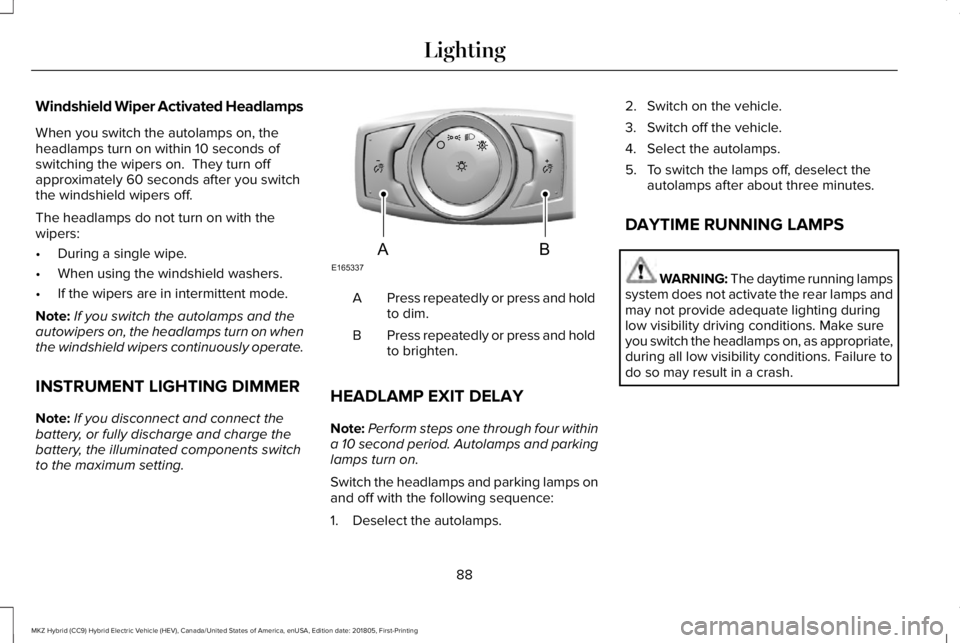
Press repeatedly or press and holdto dim.A
Press repeatedly or press and holdto brighten.B
HEADLAMP EXIT DELAY
Note:Perform steps one through four withina 10 second period. Autolamps and parkinglamps turn on.
Switch the headlamps and parking lamps onand off with the following sequence:
1. Deselect the autolamps.
2. Switch on the vehicle.
3. Switch off the vehicle.
4. Select the autolamps.
5. To switch the lamps off, deselect theautolamps after about three minutes.
DAYTIME RUNNING LAMPS
WARNING: The daytime running lampssystem does not activate the rear lamps andmay not provide adequate lighting duringlow visibility driving conditions. Make sureyou switch the headlamps on, as appropriate,during all low visibility conditions. Failure todo so may result in a crash.
88
MKZ Hybrid (CC9) Hybrid Electric Vehicle (HEV), Canada/United States of America, enUSA, Edition date: 201805, First-Printing
LightingE165337AB
Page 106 of 575
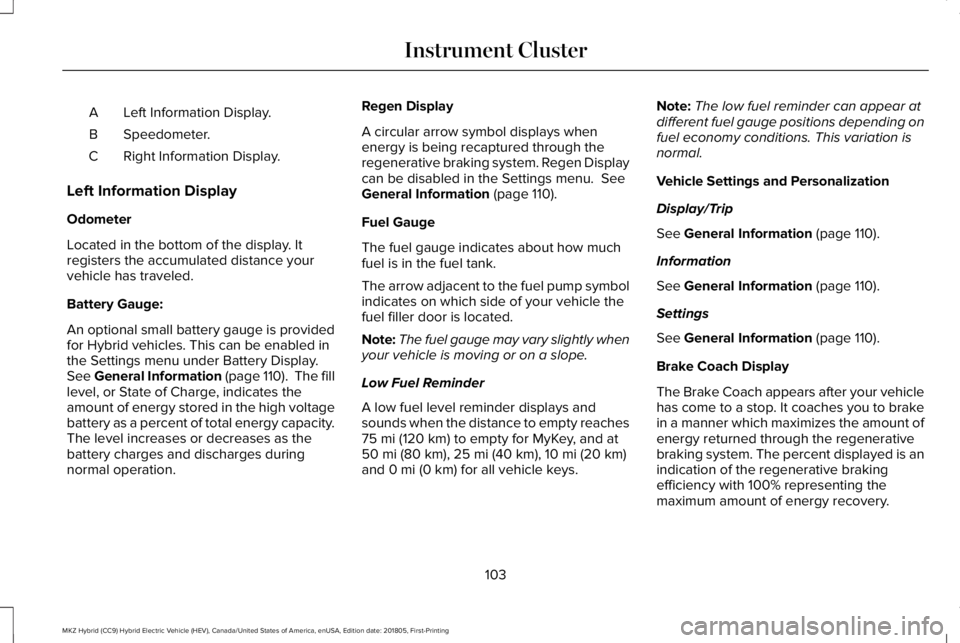
Left Information Display.A
Speedometer.B
Right Information Display.C
Left Information Display
Odometer
Located in the bottom of the display. Itregisters the accumulated distance yourvehicle has traveled.
Battery Gauge:
An optional small battery gauge is providedfor Hybrid vehicles. This can be enabled inthe Settings menu under Battery Display.See General Information (page 110). The filllevel, or State of Charge, indicates theamount of energy stored in the high voltagebattery as a percent of total energy capacity.The level increases or decreases as thebattery charges and discharges duringnormal operation.
Regen Display
A circular arrow symbol displays whenenergy is being recaptured through theregenerative braking system. Regen Displaycan be disabled in the Settings menu. SeeGeneral Information (page 110).
Fuel Gauge
The fuel gauge indicates about how muchfuel is in the fuel tank.
The arrow adjacent to the fuel pump symbolindicates on which side of your vehicle thefuel filler door is located.
Note:The fuel gauge may vary slightly whenyour vehicle is moving or on a slope.
Low Fuel Reminder
A low fuel level reminder displays andsounds when the distance to empty reaches75 mi (120 km) to empty for MyKey, and at50 mi (80 km), 25 mi (40 km), 10 mi (20 km)and 0 mi (0 km) for all vehicle keys.
Note:The low fuel reminder can appear atdifferent fuel gauge positions depending onfuel economy conditions. This variation isnormal.
Vehicle Settings and Personalization
Display/Trip
See General Information (page 110).
Information
See General Information (page 110).
Settings
See General Information (page 110).
Brake Coach Display
The Brake Coach appears after your vehiclehas come to a stop. It coaches you to brakein a manner which maximizes the amount ofenergy returned through the regenerativebraking system. The percent displayed is anindication of the regenerative brakingefficiency with 100% representing themaximum amount of energy recovery.
103
MKZ Hybrid (CC9) Hybrid Electric Vehicle (HEV), Canada/United States of America, enUSA, Edition date: 201805, First-Printing
Instrument Cluster
Page 107 of 575
This feature can be switched on or off in theinformation displays settings menu. SeeGeneral Information (page 110).
Trip Summary
Trip Summary displays upon shutting off yourvehicle. The information is cumulative overthe last trip. A new trip begins each time yourstart your vehicle (when the Ready to Drivemessage comes on). Corresponding tripefficiency leaves appear on the rightinformation display.
•Distance - Displays the total distancetraveled, distance traveled on batterypower only (EV distance) and Regendistance. Regen distance is the estimatedrange gained from energy recapturedthrough regenerative braking.
•Energy Use - Displays the average fueleconomy.
•Brake Score - The percent displayed isan indication of the regenerative brakingefficiency for the trip.
Right Information Display
Entertainment
See General Information (page 371).
Phone
See General Information (page 371).
Navigation or Compass
See General Information (page 371).
Fuel Economy
See General Information (page 110).
Vehicle Range
Located at the bottom of the display. Itindicates the estimated distance to emptybased on the fuel remaining in the tank.Changes in your driving pattern and climatecontrol use may cause the value to vary.
Trip Efficiency Leaves
Trip Efficiency Leaves display upon shuttingoff your vehicle. The number of leavesrepresent the average for the last trip. A newtrip begins each time you start your vehicle(when the Ready to Drive message comeson). Corresponding Trip Summary datadisplays on the left information display.
WARNING LAMPS AND
INDICATORS
The following warning lamps and indicatorsalert you to a vehicle condition that maybecome serious. Some lamps illuminatewhen you start your vehicle to make surethey work. If any lamps remain on afterstarting your vehicle, refer to the respectivesystem warning lamp for further information.
Note:Some warning indicators appear inthe information display and operate thesame as a warning lamp but do notilluminate when you start your vehicle.
104
MKZ Hybrid (CC9) Hybrid Electric Vehicle (HEV), Canada/United States of America, enUSA, Edition date: 201805, First-Printing
Instrument Cluster
Page 108 of 575
Adaptive Cruise Control Indicator (If
Equipped)
The speed control system indicatorlight changes color to indicatewhat mode the system is in: SeeUsing Adaptive Cruise Control (page 223).
On (white light): Lights when you turn theadaptive cruise control system on. Turns offwhen you turn the speed control system off.
Engaged (green light): Lights when theadaptive cruise control system engages.Turns off when the speed control systemdisengages.
Anti-Lock Brake System Warning Lamp
If it lights when you are driving, thisindicates a malfunction. You willcontinue to have the normalbraking system (without Anti-lock brakingsystem) unless the brake system warninglamp also lights. Have an authorized dealercheck the system.
Auto Hold Active
It illuminates when the systemholds your vehicle stationary.
Auto Hold Unavailable
It illuminates when the system ison, but unavailable to hold yourvehicle stationary.
Automatic Headlamp High BeamIndicator (If Equipped)
It illuminates when the systemautomatically turns the headlamphigh beam on.
See Automatic High Beam Control (page89).
Battery
If it lights while driving, it indicatesa malfunction. Switch off allunnecessary electrical equipmentand have an authorized dealer check thesystem immediately.
Blind Spot Monitor (If Equipped)
Lights when you switch this featureoff or with a blind spot message.See Blind Spot InformationSystem (page 239). See InformationMessages (page 121).
Brake System Warning Lamp
WARNING: Driving your vehicle withthe warning lamp on is dangerous. Asignificant decrease in braking performancemay occur. It may take you longer to stopyour vehicle. Have your vehicle checked assoon as possible. Driving extended distanceswith the parking brake engaged can causebrake failure and the risk of personal injury.
Note:Indicators vary depending on region.
This lamp is a dual function lamp and willilluminate when:
105
MKZ Hybrid (CC9) Hybrid Electric Vehicle (HEV), Canada/United States of America, enUSA, Edition date: 201805, First-Printing
Instrument ClusterE144524 E197933 E197934 E151262
Page 115 of 575
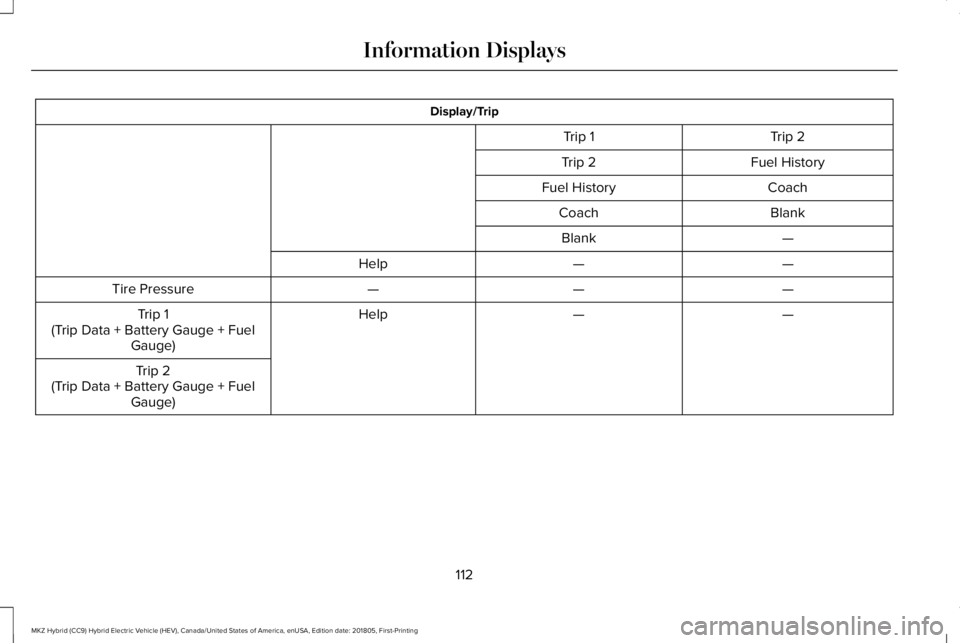
Display/Trip
Trip 2Trip 1
Fuel HistoryTrip 2
CoachFuel History
BlankCoach
—Blank
——Help
———Tire Pressure
——HelpTrip 1(Trip Data + Battery Gauge + FuelGauge)
Trip 2(Trip Data + Battery Gauge + FuelGauge)
112
MKZ Hybrid (CC9) Hybrid Electric Vehicle (HEV), Canada/United States of America, enUSA, Edition date: 201805, First-Printing
Information Displays
Page 116 of 575
Engage
Engage provides separate gauges for enginepower and high voltage battery power inkilowatts (kW). The engine power gauge fillis white and the high voltage battery powergauge fill is blue. You can also see aninstantaneous fuel economy gauge. Whenyour vehicle is operating on battery poweronly, you will see EV displayed and thegauges will appear in blue.
Note:Hold OK to reset average fueleconomy.
Empower
Empower provides a power demand gaugein kilowatts (kW) which includes an engineon or off threshold.
•When your vehicle is operating withbattery power only (below the threshold),you will see EV displayed and the gaugefill is blue.
•When your vehicle is operating with boththe engine and the high voltage batteryproviding power the gauge fill is white.
•When power demand surpasses theamber indicator, this level of demand andassociated fuel economy displays inamber.
•When the engine is on, reducing powerdemand to less than the threshold willallow the engine to turn off.
You can also see an instantaneous fueleconomy gauge.
Note:Hold OK to reset average fueleconomy.
MyView
You can choose what to display in this view.Selecting Change MyView in the optionsmenu allows you to scroll through twocolumns of content choices.
•Press the up or down arrow to viewcontent.
•Press OK to save your selected content
•You must select content in both columnsbefore you can save your new MyView.
Unique content available in MyView:
•Accessory Power— Indicates electricalpower demands from your vehicle’saccessory systems. Accessories usepower but do not contribute to propellingyour vehicle. The gauge separatelydisplays power demand in kilowatts (kW)for climate and other accessories.Climate includes the power being usedby high voltage climate controlcomponents such as the electric A/Ccompressor. Other includes all powerbeing used by the low voltageaccessories (cabin fans, headlights andheated seats).
•Coolant Temp – Indicates engine coolanttemperature. At normal operatingtemperature, the level indicator will bewhite and will be in the normal range(between H and C). If the engine coolanttemperature exceeds the normal range,the level indicator will change to red toindicate that the engine is overheating.Stop your vehicle as soon as safelypossible, turn your vehicle off and let theengine cool.
113
MKZ Hybrid (CC9) Hybrid Electric Vehicle (HEV), Canada/United States of America, enUSA, Edition date: 201805, First-Printing
Information Displays
Page 117 of 575
•Tach rpm x 1000 — When the gasolineengine is running, the tachometer gaugedisplays the engine speed in revolutionsper minute (RPM). When your vehicle isoperating on battery power only with theengine off, EV displays and thetachometer is greyed out.
Note:The trip data, and average fueleconomy cannot be reset in MyView.
Trip 1 & 2
Provides trip odometer, trip average fueleconomy and trip timer.
Distance traveled on battery power only withthe engine off is shown in blue next to totaltrip distance.
Information
In this mode, you can viewdifferent vehicle systeminformation and perform a systemcheck.
Information
Displays a number of different system tutorials. Use the up or down arrows to scrollthrough the tutorials. Then press OK to view.TutorialWarnings
Displays the associated driver alert graphic.Driver Alert
MyKeys (Number of MyKeys programmed)MyKey
MyKey Miles (km) (Distance traveled using a programmed MyKey)
Admin Keys (Number of admin keys)
Settings
In this mode, you can configuredifferent driver setting choices.
Note:Some items are optional and may notappear.
Note:Some MyKey items will only appear ifa MyKey is set.
114
MKZ Hybrid (CC9) Hybrid Electric Vehicle (HEV), Canada/United States of America, enUSA, Edition date: 201805, First-Printing
Information DisplaysE144642 E100023
Page 121 of 575
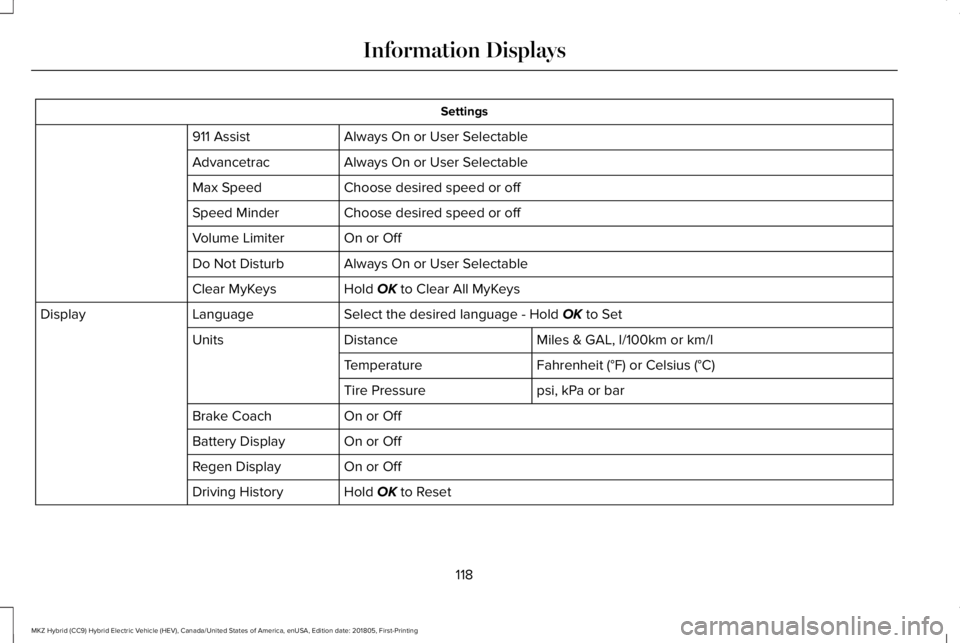
Settings
Always On or User Selectable911 Assist
Always On or User SelectableAdvancetrac
Choose desired speed or offMax Speed
Choose desired speed or offSpeed Minder
On or OffVolume Limiter
Always On or User SelectableDo Not Disturb
Hold OK to Clear All MyKeysClear MyKeys
Select the desired language - Hold OK to SetLanguageDisplay
Miles & GAL, l/100km or km/lDistanceUnits
Fahrenheit (°F) or Celsius (°C)Temperature
psi, kPa or barTire Pressure
On or OffBrake Coach
On or OffBattery Display
On or OffRegen Display
Hold OK to ResetDriving History
118
MKZ Hybrid (CC9) Hybrid Electric Vehicle (HEV), Canada/United States of America, enUSA, Edition date: 201805, First-Printing
Information Displays
Page 124 of 575
Note:Fuel economy is not always a measureof appropriate driving behavior. For example,when driving uphill and maintaining anappropriate speed, your instant fueleconomy may not be good (losing leaves)but the Coach may show a blue bar forAcceleration and Cruising.
Common Displays
Both Average fuel economy and aninstantaneous fuel economy gauge areincluded in Engage, Empower and MyView(if selected) on the left information display.They are also included in Fuel History on theright information display.
Average Fuel Economy
Average Fuel Economy is continuouslyaveraged since the last reset. You can resetyour average fuel economy by pressing andholding the OK button on the correspondingsteering wheel controls.
Note:Average fuel economy cannot be resetin MyView.
Instantaneous Fuel Economy
If your instantaneous fuel economy is greaterthan the maximum value displayed, a + signwill be shown next to the maximum scalenumber. When your vehicle is operating onbattery power only, EV will display and thegauge fill will show in blue.
INFORMATION MESSAGES
Note: Depending on your vehicle optionsand instrument cluster type, not all of themessages will display or be available. Certain messages may be abbreviated orshortened depending upon which clustertype you have.
Press the OK button to acknowledge andremove some messages from the informationdisplay. Other messages will be removedautomatically after a short time.
Certain messages need to be confirmedbefore you can access the menus.
121
MKZ Hybrid (CC9) Hybrid Electric Vehicle (HEV), Canada/United States of America, enUSA, Edition date: 201805, First-Printing
Information DisplaysE145981