reset LINCOLN MKZ HYBRID 2020 User Guide
[x] Cancel search | Manufacturer: LINCOLN, Model Year: 2020, Model line: MKZ HYBRID, Model: LINCOLN MKZ HYBRID 2020Pages: 544, PDF Size: 5.26 MB
Page 116 of 544
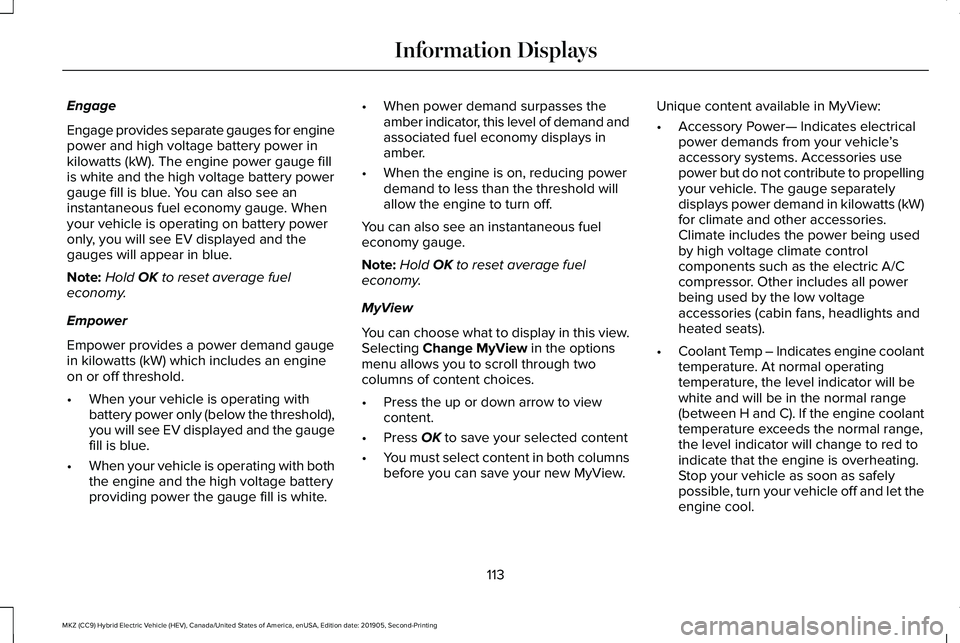
Engage
Engage provides separate gauges for engine
power and high voltage battery power in
kilowatts (kW). The engine power gauge fill
is white and the high voltage battery power
gauge fill is blue. You can also see an
instantaneous fuel economy gauge. When
your vehicle is operating on battery power
only, you will see EV displayed and the
gauges will appear in blue.
Note:
Hold OK to reset average fuel
economy.
Empower
Empower provides a power demand gauge
in kilowatts (kW) which includes an engine
on or off threshold.
• When your vehicle is operating with
battery power only (below the threshold),
you will see EV displayed and the gauge
fill is blue.
• When your vehicle is operating with both
the engine and the high voltage battery
providing power the gauge fill is white. •
When power demand surpasses the
amber indicator, this level of demand and
associated fuel economy displays in
amber.
• When the engine is on, reducing power
demand to less than the threshold will
allow the engine to turn off.
You can also see an instantaneous fuel
economy gauge.
Note: Hold OK to reset average fuel
economy.
MyView
You can choose what to display in this view.
Selecting
Change MyView in the options
menu allows you to scroll through two
columns of content choices.
• Press the up or down arrow to view
content.
• Press
OK to save your selected content
• You must select content in both columns
before you can save your new MyView. Unique content available in MyView:
•
Accessory Power— Indicates electrical
power demands from your vehicle ’s
accessory systems. Accessories use
power but do not contribute to propelling
your vehicle. The gauge separately
displays power demand in kilowatts (kW)
for climate and other accessories.
Climate includes the power being used
by high voltage climate control
components such as the electric A/C
compressor. Other includes all power
being used by the low voltage
accessories (cabin fans, headlights and
heated seats).
• Coolant Temp – Indicates engine coolant
temperature. At normal operating
temperature, the level indicator will be
white and will be in the normal range
(between H and C). If the engine coolant
temperature exceeds the normal range,
the level indicator will change to red to
indicate that the engine is overheating.
Stop your vehicle as soon as safely
possible, turn your vehicle off and let the
engine cool.
113
MKZ (CC9) Hybrid Electric Vehicle (HEV), Canada/United States of America, enUSA, Edition date: 201905, Second-Printing Information Displays
Page 117 of 544
•
Tach rpm x 1000 — When the gasoline
engine is running, the tachometer gauge
displays the engine speed in revolutions
per minute (RPM). When your vehicle is
operating on battery power only with the
engine off, EV displays and the
tachometer is greyed out.
Note: The trip data, and average fuel
economy cannot be reset in MyView. Trip 1 & 2
Provides trip odometer, trip average fuel
economy and trip timer.
Distance traveled on battery power only with
the engine off is shown in blue next to total
trip distance.
Information In this mode, you can view
different vehicle system
information and perform a system
check. Information
Displays a number of different system tutorials. Use the up or down arro\
ws to scroll
through the tutorials. Then press OK to view.
Tutorial
Warnings
MyKeys (Number of MyKeys programmed)
MyKey
MyKey Miles (km) (Distance traveled using a programmed MyKey)
Admin Keys (Number of admin keys)
Settings In this mode, you can configure
different driver setting choices.
Note:
Some items are optional and may not
appear.
Note: Some MyKey items will only appear if
a MyKey is set.
114
MKZ (CC9) Hybrid Electric Vehicle (HEV), Canada/United States of America, enUSA, Edition date: 201905, Second-Printing Information DisplaysE144642 E100023
Page 118 of 544
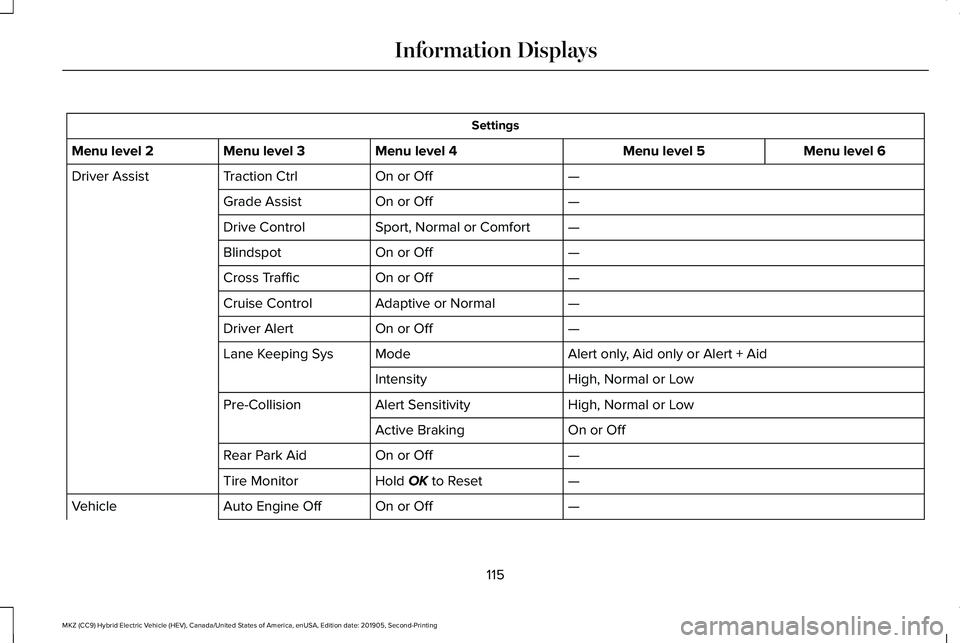
Settings
Menu level 6
Menu level 5
Menu level 4
Menu level 3
Menu level 2
—
On or Off
Traction Ctrl
Driver Assist
—
On or Off
Grade Assist
—
Sport, Normal or Comfort
Drive Control
—
On or Off
Blindspot
—
On or Off
Cross Traffic
—
Adaptive or Normal
Cruise Control
—
On or Off
Driver Alert
Alert only, Aid only or Alert + Aid
Mode
Lane Keeping Sys
High, Normal or Low
Intensity
High, Normal or Low
Alert Sensitivity
Pre-Collision
On or Off
Active Braking
—
On or Off
Rear Park Aid
—
Hold OK to Reset
Tire Monitor
—
On or Off
Auto Engine Off
Vehicle
115
MKZ (CC9) Hybrid Electric Vehicle (HEV), Canada/United States of America, enUSA, Edition date: 201905, Second-Printing Information Displays
Page 119 of 544
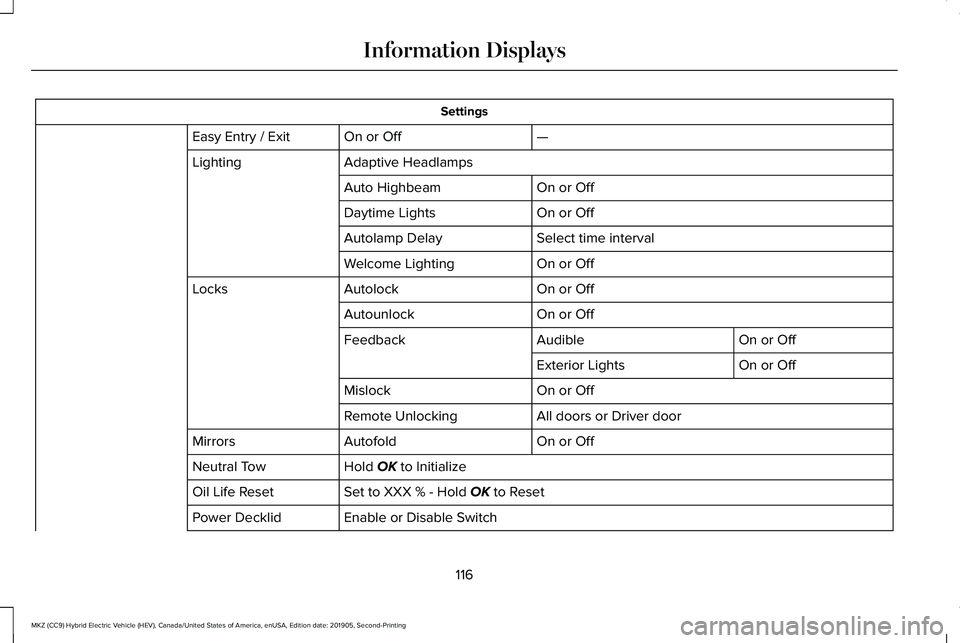
Settings
—
On or Off
Easy Entry / Exit
Adaptive Headlamps
Lighting
On or Off
Auto Highbeam
On or Off
Daytime Lights
Select time interval
Autolamp Delay
On or Off
Welcome Lighting
On or Off
Autolock
Locks
On or Off
Autounlock
On or Off
Audible
Feedback
On or Off
Exterior Lights
On or Off
Mislock
All doors or Driver door
Remote Unlocking
On or Off
Autofold
Mirrors
Hold OK to Initialize
Neutral Tow
Set to XXX % - Hold
OK to Reset
Oil Life Reset
Enable or Disable Switch
Power Decklid
116
MKZ (CC9) Hybrid Electric Vehicle (HEV), Canada/United States of America, enUSA, Edition date: 201905, Second-Printing Information Displays
Page 121 of 544
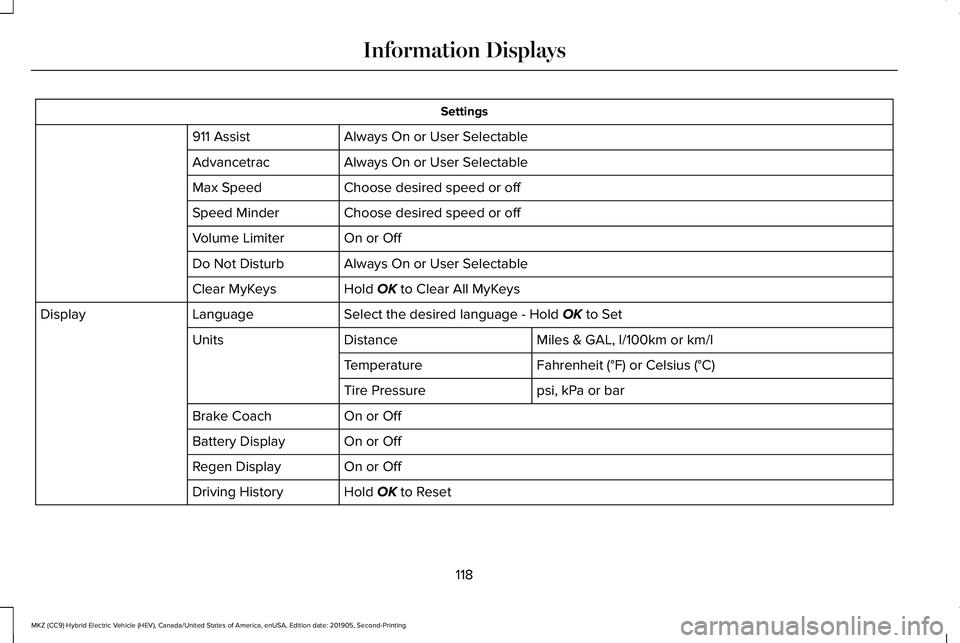
Settings
Always On or User Selectable
911 Assist
Always On or User Selectable
Advancetrac
Choose desired speed or off
Max Speed
Choose desired speed or off
Speed Minder
On or Off
Volume Limiter
Always On or User Selectable
Do Not Disturb
Hold OK to Clear All MyKeys
Clear MyKeys
Select the desired language - Hold
OK to Set
Language
Display
Miles & GAL, l/100km or km/l
Distance
Units
Fahrenheit (°F) or Celsius (°C)
Temperature
psi, kPa or bar
Tire Pressure
On or Off
Brake Coach
On or Off
Battery Display
On or Off
Regen Display
Hold
OK to Reset
Driving History
118
MKZ (CC9) Hybrid Electric Vehicle (HEV), Canada/United States of America, enUSA, Edition date: 201905, Second-Printing Information Displays
Page 123 of 544
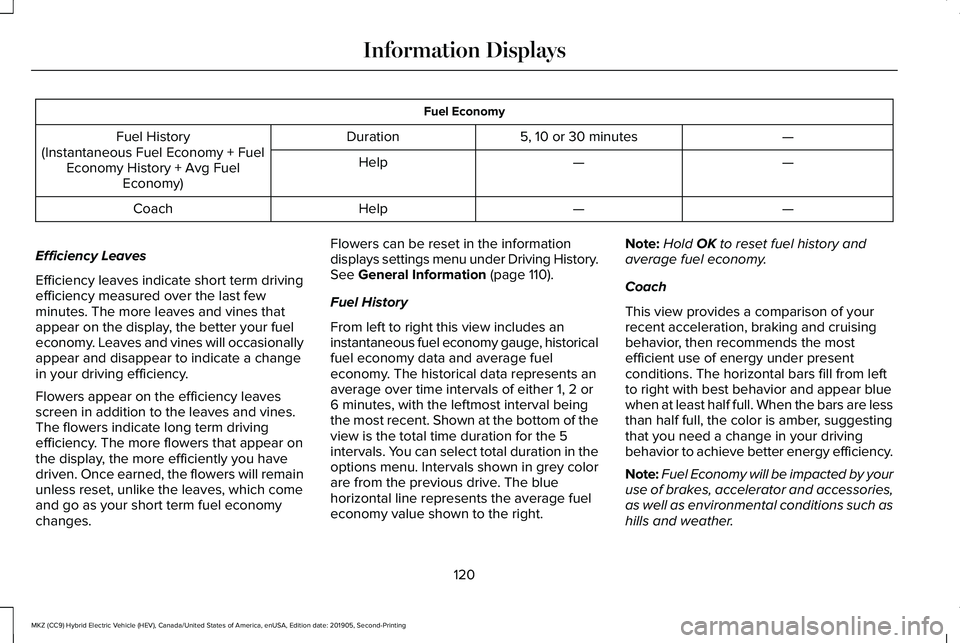
Fuel Economy
—
5, 10 or 30 minutes
Duration
Fuel History
(Instantaneous Fuel Economy + Fuel Economy History + Avg Fuel Economy) —
—
Help
—
—
Help
Coach
Efficiency Leaves
Efficiency leaves indicate short term driving
efficiency measured over the last few
minutes. The more leaves and vines that
appear on the display, the better your fuel
economy. Leaves and vines will occasionally
appear and disappear to indicate a change
in your driving efficiency.
Flowers appear on the efficiency leaves
screen in addition to the leaves and vines.
The flowers indicate long term driving
efficiency. The more flowers that appear on
the display, the more efficiently you have
driven. Once earned, the flowers will remain
unless reset, unlike the leaves, which come
and go as your short term fuel economy
changes. Flowers can be reset in the information
displays settings menu under Driving History.
See General Information (page 110).
Fuel History
From left to right this view includes an
instantaneous fuel economy gauge, historical
fuel economy data and average fuel
economy. The historical data represents an
average over time intervals of either 1, 2 or
6 minutes, with the leftmost interval being
the most recent. Shown at the bottom of the
view is the total time duration for the 5
intervals. You can select total duration in the
options menu. Intervals shown in grey color
are from the previous drive. The blue
horizontal line represents the average fuel
economy value shown to the right. Note:
Hold
OK to reset fuel history and
average fuel economy.
Coach
This view provides a comparison of your
recent acceleration, braking and cruising
behavior, then recommends the most
efficient use of energy under present
conditions. The horizontal bars fill from left
to right with best behavior and appear blue
when at least half full. When the bars are less
than half full, the color is amber, suggesting
that you need a change in your driving
behavior to achieve better energy efficiency.
Note: Fuel Economy will be impacted by your
use of brakes, accelerator and accessories,
as well as environmental conditions such as
hills and weather.
120
MKZ (CC9) Hybrid Electric Vehicle (HEV), Canada/United States of America, enUSA, Edition date: 201905, Second-Printing Information Displays
Page 124 of 544
Note:
Fuel economy is not always a measure
of appropriate driving behavior. For example,
when driving uphill and maintaining an
appropriate speed, your instant fuel
economy may not be good (losing leaves)
but the Coach may show a blue bar for
Acceleration and Cruising.
Common Displays
Both Average fuel economy and an
instantaneous fuel economy gauge are
included in Engage, Empower and MyView
(if selected) on the left information display.
They are also included in Fuel History on the
right information display.
Average Fuel Economy
Average Fuel Economy is continuously
averaged since the last reset. You can reset
your average fuel economy by pressing and
holding the OK button on the corresponding
steering wheel controls. Note:
Average fuel economy cannot be reset
in MyView.
Instantaneous Fuel Economy
If your instantaneous fuel economy is greater
than the maximum value displayed, a + sign
will be shown next to the maximum scale
number. When your vehicle is operating on
battery power only, EV will display and the
gauge fill will show in blue.
INFORMATION MESSAGES
Depending on your vehicle options and
instrument cluster type, not all messages
display or are available.
Note: Certain messages may be abbreviated
or shortened depending upon which cluster
type you have. Press the OK button to acknowledge and
remove some messages from the information
display. Other messages will be removed
automatically after a short time.
Certain messages need to be confirmed
before you can access the menus.
121
MKZ (CC9) Hybrid Electric Vehicle (HEV), Canada/United States of America, enUSA, Edition date: 201905, Second-Printing Information DisplaysE145981
Page 130 of 544

Action
Message
Displays when the door switches have been disabled.
Switches Inhibited Security Mode
Displays when there is a system malfunction with the child locks. Contac\
t your authorized dealeras soon as possible.
Child Lock Malfunction Service Required
Displays the factory keypad code after the keypad has been reset. See Keyless Entry (page
73).
Factory Keypad Code {X X X X X}
Driver Alert Action
Message
Stop and rest as soon as it is safe to do so.
Driver Alert Warning Rest Now
Take a rest soon.
Driver Alert Warning Rest Suggested
Fuel Action
Message
Displayed as an early reminder of a low fuel condition.
Fuel Level Low
Displayed when the fuel fill inlet may not be properly closed.
Check Fuel Fill Inlet
Wait for up to 15 seconds while the fuel system depressurizes.
Fuel Door Opening
127
MKZ (CC9) Hybrid Electric Vehicle (HEV), Canada/United States of America, enUSA, Edition date: 201905, Second-Printing Information Displays
Page 155 of 544
MEMORY FUNCTION
WARNING: Before activating the
memory seat, make sure that the area
immediately surrounding the seat is clear
of obstructions and that all occupants are
clear of moving parts. WARNING:
Do not use the memory
function when your vehicle is moving.
This feature automatically recalls the position
of the following features:
• Driver seat.
• Power mirrors.
• Power steering column.
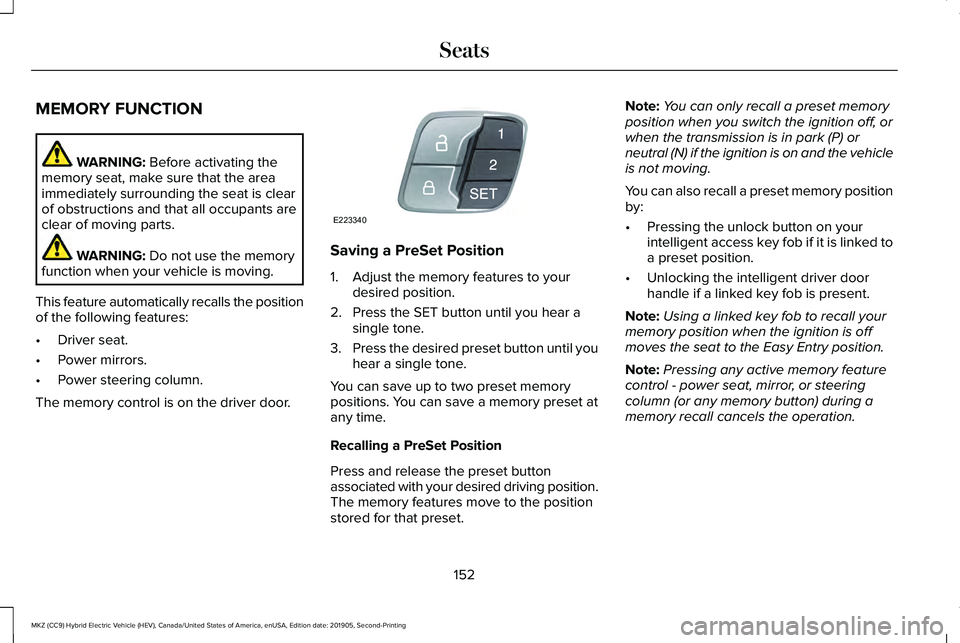
The memory control is on the driver door. Saving a PreSet Position
1. Adjust the memory features to your
desired position.
2. Press the SET button until you hear a single tone.
3. Press the desired preset button until you
hear a single tone.
You can save up to two preset memory
positions. You can save a memory preset at
any time.
Recalling a PreSet Position
Press and release the preset button
associated with your desired driving position.
The memory features move to the position
stored for that preset. Note:
You can only recall a preset memory
position when you switch the ignition off, or
when the transmission is in park (P) or
neutral (N) if the ignition is on and the vehicle
is not moving.
You can also recall a preset memory position
by:
• Pressing the unlock button on your
intelligent access key fob if it is linked to
a preset position.
• Unlocking the intelligent driver door
handle if a linked key fob is present.
Note: Using a linked key fob to recall your
memory position when the ignition is off
moves the seat to the Easy Entry position.
Note: Pressing any active memory feature
control - power seat, mirror, or steering
column (or any memory button) during a
memory recall cancels the operation.
152
MKZ (CC9) Hybrid Electric Vehicle (HEV), Canada/United States of America, enUSA, Edition date: 201905, Second-Printing SeatsE223340
Page 156 of 544
Linking a PreSet Position to your
Remote Control or Intelligent Access
Key Fob
Your vehicle can save the preset memory
positions for up to two remote controls or
intelligent access (IA) keys.
After you have saved your desired memory
preset positions:
1.
Press and hold the desired preset button
for about three seconds until you hear a
single tone.
2. Within three seconds, press the lock button on the remote control you are
linking.
To unlink a remote control, follow the same
procedure – except in step 2, press the
unlock button on the remote control.
Note: If more than one linked remote control
or intelligent access key is in range, the
memory function moves to the settings of
the first key to initiate a memory recall. Easy Entry and Exit Feature
If you enable the easy entry and exit feature,
it automatically moves the driver seat
position rearward up to 2 in (5 cm) when you
switch the ignition off.
The driver seat returns to the previous
position when you switch the ignition on.
You can enable or disable this feature in the
information display.
See General
Information (page 110).
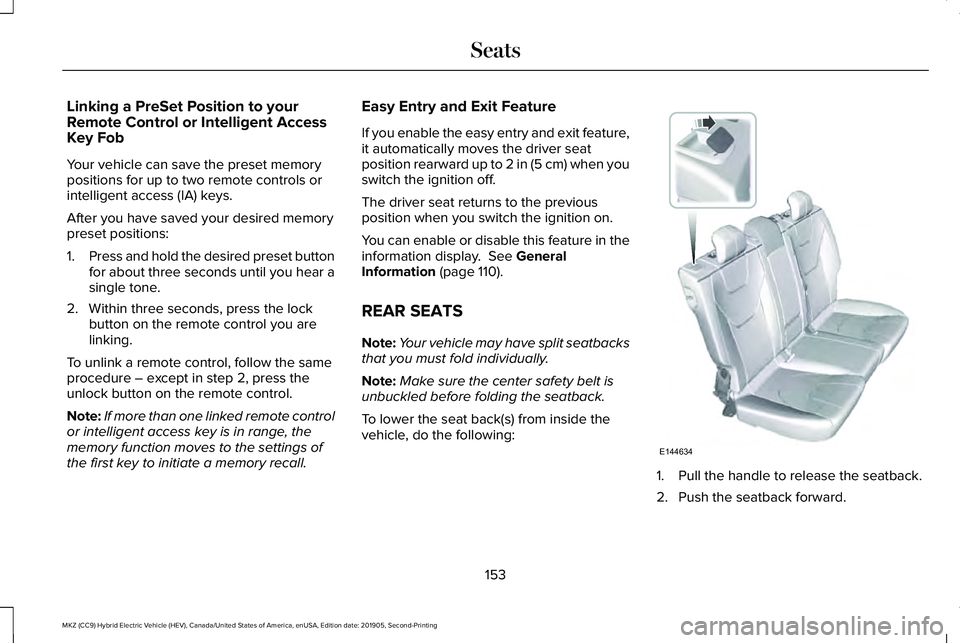
REAR SEATS
Note: Your vehicle may have split seatbacks
that you must fold individually.
Note: Make sure the center safety belt is
unbuckled before folding the seatback.
To lower the seat back(s) from inside the
vehicle, do the following: 1. Pull the handle to release the seatback.
2. Push the seatback forward.
153
MKZ (CC9) Hybrid Electric Vehicle (HEV), Canada/United States of America, enUSA, Edition date: 201905, Second-Printing SeatsE144634