instrument cluster LINCOLN MKZ HYBRID 2020 Owner's Manual
[x] Cancel search | Manufacturer: LINCOLN, Model Year: 2020, Model line: MKZ HYBRID, Model: LINCOLN MKZ HYBRID 2020Pages: 544, PDF Size: 5.26 MB
Page 298 of 544
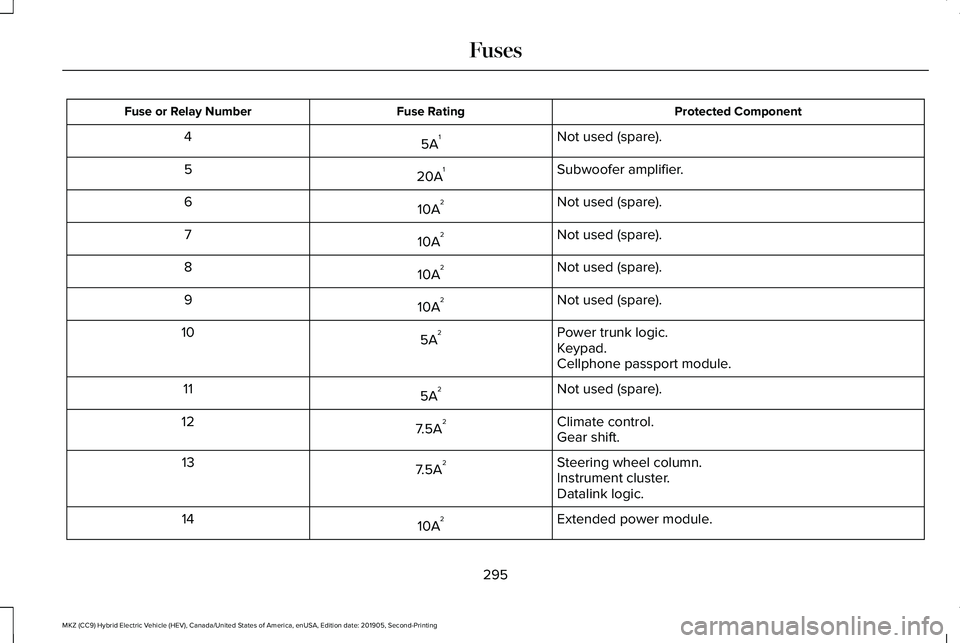
Protected Component
Fuse Rating
Fuse or Relay Number
Not used (spare).
5A 1
4
Subwoofer amplifier.
20A 1
5
Not used (spare).
10A 2
6
Not used (spare).
10A 2
7
Not used (spare).
10A 2
8
Not used (spare).
10A 2
9
Power trunk logic.
5A 2
10
Keypad.
Cellphone passport module.
Not used (spare).
5A 2
11
Climate control.
7.5A 2
12
Gear shift.
Steering wheel column.
7.5A 2
13
Instrument cluster.
Datalink logic.
Extended power module.
10A 2
14
295
MKZ (CC9) Hybrid Electric Vehicle (HEV), Canada/United States of America, enUSA, Edition date: 201905, Second-Printing Fuses
Page 308 of 544
Only use oils certified for gasoline engines
by the American Petroleum Institute (API).
An oil with this trademark symbol conforms
to the current engine and emission system
protection standards and fuel economy
requirements of the International Lubricants
Specification Advisory Committee (ILSAC).
1. Remove the filler cap.
2. Add engine oil that meets our
specifications. See Capacities and
Specifications (page 359).
3. Replace the filler cap. Turn it until you feel a strong resistance.
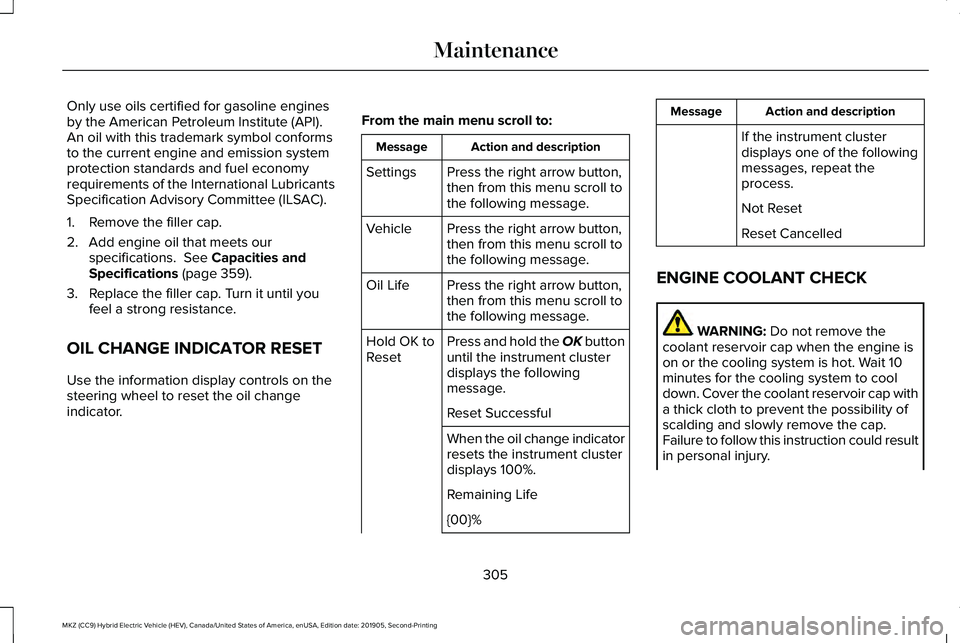
OIL CHANGE INDICATOR RESET
Use the information display controls on the
steering wheel to reset the oil change
indicator. From the main menu scroll to: Action and description
Message
Press the right arrow button,
then from this menu scroll to
the following message.
Settings
Press the right arrow button,
then from this menu scroll to
the following message.
Vehicle
Press the right arrow button,
then from this menu scroll to
the following message.
Oil Life
Press and hold the OK button
until the instrument cluster
displays the following
message.
Hold OK to
Reset
Reset Successful
When the oil change indicator
resets the instrument cluster
displays 100%.
Remaining Life
{00}% Action and description
Message
If the instrument cluster
displays one of the following
messages, repeat the
process.
Not Reset
Reset Cancelled
ENGINE COOLANT CHECK WARNING:
Do not remove the
coolant reservoir cap when the engine is
on or the cooling system is hot. Wait 10
minutes for the cooling system to cool
down. Cover the coolant reservoir cap with
a thick cloth to prevent the possibility of
scalding and slowly remove the cap.
Failure to follow this instruction could result
in personal injury.
305
MKZ (CC9) Hybrid Electric Vehicle (HEV), Canada/United States of America, enUSA, Edition date: 201905, Second-Printing Maintenance
Page 327 of 544
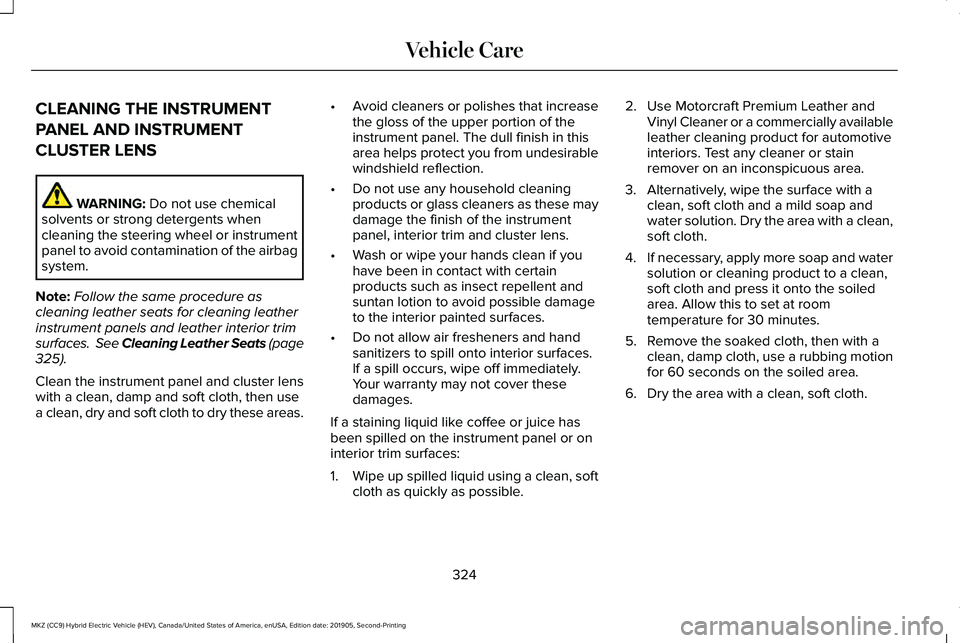
CLEANING THE INSTRUMENT
PANEL AND INSTRUMENT
CLUSTER LENS
WARNING: Do not use chemical
solvents or strong detergents when
cleaning the steering wheel or instrument
panel to avoid contamination of the airbag
system.
Note: Follow the same procedure as
cleaning leather seats for cleaning leather
instrument panels and leather interior trim
surfaces. See Cleaning Leather Seats
(page
325).
Clean the instrument panel and cluster lens
with a clean, damp and soft cloth, then use
a clean, dry and soft cloth to dry these areas. •
Avoid cleaners or polishes that increase
the gloss of the upper portion of the
instrument panel. The dull finish in this
area helps protect you from undesirable
windshield reflection.
• Do not use any household cleaning
products or glass cleaners as these may
damage the finish of the instrument
panel, interior trim and cluster lens.
• Wash or wipe your hands clean if you
have been in contact with certain
products such as insect repellent and
suntan lotion to avoid possible damage
to the interior painted surfaces.
• Do not allow air fresheners and hand
sanitizers to spill onto interior surfaces.
If a spill occurs, wipe off immediately.
Your warranty may not cover these
damages.
If a staining liquid like coffee or juice has
been spilled on the instrument panel or on
interior trim surfaces:
1. Wipe up spilled liquid using a clean, soft
cloth as quickly as possible. 2. Use Motorcraft Premium Leather and
Vinyl Cleaner or a commercially available
leather cleaning product for automotive
interiors. Test any cleaner or stain
remover on an inconspicuous area.
3. Alternatively, wipe the surface with a clean, soft cloth and a mild soap and
water solution. Dry the area with a clean,
soft cloth.
4. If necessary, apply more soap and water
solution or cleaning product to a clean,
soft cloth and press it onto the soiled
area. Allow this to set at room
temperature for 30 minutes.
5. Remove the soaked cloth, then with a clean, damp cloth, use a rubbing motion
for 60 seconds on the soiled area.
6. Dry the area with a clean, soft cloth.
324
MKZ (CC9) Hybrid Electric Vehicle (HEV), Canada/United States of America, enUSA, Edition date: 201905, Second-Printing Vehicle Care
Page 534 of 544
Changing the Wi-Fi Hotspot Name or
Password......................................................379
Changing the Wiper Blades........................314
Checking MyKey System Status.................64 MyKey Distance.....................................................64
Number of Admin Keys.......................................65
Number of MyKeys...............................................65
Checking the Wiper Blades........................314
Child Restraint and Seatbelt Maintenance..................................................42
Child Restraint Positioning...........................33
Child Safety.......................................................21
General Information..............................................21
Child Safety Locks..........................................35 Left-Hand Side.......................................................35
Right-Hand Side....................................................35
Cleaning Leather Seats..............................325
Cleaning Products.........................................318 Materials................................................................318
Cleaning the Engine.....................................321
Cleaning the Exterior ....................................
319
Cleaning the Headlamps...................................319
Exterior Chrome Parts.......................................320
Exterior Plastic Parts..........................................320
Stripes or Graphics............................................320
Underbody...........................................................320
Under Hood.........................................................320 Cleaning the Instrument Panel and
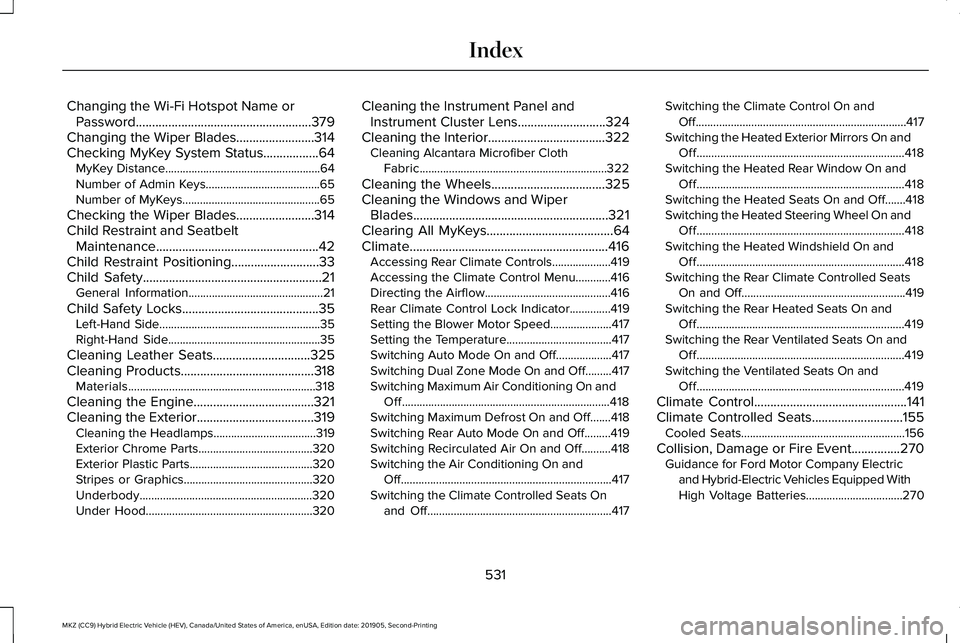
Instrument Cluster Lens...........................324
Cleaning the Interior....................................322 Cleaning Alcantara Microfiber Cloth
Fabric................................................................322
Cleaning the Wheels...................................325
Cleaning the Windows and Wiper Blades............................................................321
Clearing All MyKeys.......................................64
Climate.............................................................416 Accessing Rear Climate Controls....................419
Accessing the Climate Control Menu............416
Directing the Airflow...........................................416
Rear Climate Control Lock Indicator..............419
Setting the Blower Motor Speed.....................417
Setting the Temperature....................................417
Switching Auto Mode On and Off...................417
Switching Dual Zone Mode On and Off.........417
Switching Maximum Air Conditioning On and
Off.......................................................................418
Switching Maximum Defrost On and Off.......418
Switching Rear Auto Mode On and Off.........419
Switching Recirculated Air On and Off..........418
Switching the Air Conditioning On and Off........................................................................\
417
Switching the Climate Controlled Seats On and Off...............................................................417 Switching the Climate Control On and
Off........................................................................\
417
Switching the Heated Exterior Mirrors On and Off.......................................................................418
Switching the Heated Rear Window On and Off.......................................................................418
Switching the Heated Seats On and Off.......418
Switching the Heated Steering Wheel On and Off.......................................................................418
Switching the Heated Windshield On and Off.......................................................................418
Switching the Rear Climate Controlled Seats On and Off........................................................419
Switching the Rear Heated Seats On and Off.......................................................................419
Switching the Rear Ventilated Seats On and Off.......................................................................419
Switching the Ventilated Seats On and Off.......................................................................419
Climate Control...............................................141
Climate Controlled Seats............................155
Cooled Seats........................................................156
Collision, Damage or Fire Event...............270 Guidance for Ford Motor Company Electric
and Hybrid-Electric Vehicles Equipped With
High Voltage Batteries.................................270
531
MKZ (CC9) Hybrid Electric Vehicle (HEV), Canada/United States of America, enUSA, Edition date: 201905, Second-Printing Index
Page 538 of 544
Driving:...................................................................173
Driving to Optimize Fuel Economy.................175
Engine:....................................................................174
Starting:..................................................................173
Stopping:................................................................173
Transmission Operation:....................................174
I
In California (U.S. Only)...............................274
Information Display Control.........................83
Information Displays......................................110 General Information.............................................110
Information Messages..................................121 Active Park............................................................122
Adaptive Cruise Control....................................122
Adaptive Headlamps..........................................123
AdvanceTrac ™.......................................................123
Airbag.....................................................................124
Alarm......................................................................124
Automatic Engine Shutdown............................124
Battery and Charging System (12 volt)...........125
Battery and Charging System (High Voltage).............................................................125
Blind Spot Information and Cross Traffic Alert System...............................................................126
Doors and Locks..................................................126
Driver Alert............................................................127 Fuel........................................................................\
..127
Hill Start Assist.....................................................128
Keys and Intelligent Access.............................128
Lane Keeping System........................................130
Maintenance.........................................................130
MyKey.....................................................................132
Park Aid..................................................................133
Park Brake.............................................................133
Power Steering.....................................................134
Pre-Collision Assist.............................................135
Remote Start.........................................................135
Seats.......................................................................136
Starting System ...................................................136
Tire Pressure Monitoring System....................
137
Traction Control....................................................137
Transmission.........................................................138
Installing Child Restraints.............................23 Child Seats..............................................................23
Using Lap and Shoulder Belts...........................23
Using Lower Anchors and Tethers for
CHildren (LATCH).............................................26
Using Tether Straps..............................................28
Instrument Cluster
........................................102
Instrument Lighting Dimmer........................89
Instrument Panel..............................................19
Interior Lamps
...................................................91
Front Interior Lamp................................................91
Rear Interior Lamps..............................................92 Interior Luggage Compartment
Release
...........................................................75
Interior Mirror...................................................98
Auto-Dimming Mirror...........................................98
Introduction
.........................................................7
J
Jump Starting the Vehicle..........................267 Connecting the Jumper Cables.....................268
Jump Starting......................................................269
Preparing Your Vehicle.....................................267
Removing the Jumper Cables........................269
K
Keyless Entry
....................................................73
SECURICODE™ KEYLESS ENTRY
KEYPAD...............................................................73
Keyless Starting.............................................167 Ignition Modes......................................................167
Keys and Remote Controls
...........................57
L
Lane Keeping System..................................237 Switching the System On and Off..................238
535
MKZ (CC9) Hybrid Electric Vehicle (HEV), Canada/United States of America, enUSA, Edition date: 201905, Second-Printing Index