automatic transmission LINCOLN NAUTILUS 2020 Owner's Manual
[x] Cancel search | Manufacturer: LINCOLN, Model Year: 2020, Model line: NAUTILUS, Model: LINCOLN NAUTILUS 2020Pages: 596, PDF Size: 5.88 MB
Page 217 of 596
PRINCIPLE OF OPERATION
WARNING: To help avoid personal
injury, always use caution when in reverse
(R) and when using the sensing system. WARNING:
The system may not
detect objects with surfaces that absorb
reflection. Always drive with due care and
attention. Failure to take care may result
in a crash. WARNING:
Traffic control systems,
inclement weather, air brakes, external
motors and fans may affect the correct
operation of the sensing system.This may
cause reduced performance or false alerts. WARNING:
The system may not
detect small or moving objects, particularly
those close to the ground.
Note: If your vehicle has MyKey™, the sensing
system cannot be switched off when a
MyKey™ is present.
See Principle of
Operation (page 65). Note:
Keep the sensors on the bumper or
fascia free from snow, ice and large
accumulations of dirt. If the sensors are
covered, the system’ s accuracy can be
affected. Do not clean the sensors with sharp
objects.
Note: If your vehicle sustains damage to the
bumper or fascia, leaving it misaligned or
bent, the sensing zone may be altered
causing inaccurate measurement of
obstacles or false alerts.
Note: Certain add-on devices installed
around the bumper or fascia may create
false alerts. For example, large trailer
hitches, bike or surfboard racks, license plate
brackets, bumper covers or any other device
that may block the normal detection zone
of the system. Remove the add-on device to
prevent false alerts.
Note: When you connect a trailer to your
vehicle, the rear parking aid may detect the
trailer and therefore provide an alert. Disable
the rear parking aid when you connect a
trailer to prevent the alert. The sensing system warns the driver of
obstacles within a certain range of your
vehicle. The system turns on automatically
whenever you switch the ignition on.
You can switch the system off through the
information display menu or from the pop-up
message that appears once you shift the
transmission into reverse (R).
See Using
Traction Control (page 210). If your vehicle
has a parking aid button, you can switch the
system off by pressing the button.
If a fault is present in the system, a warning
message appears in the information display.
See
Information Messages (page 122).
REAR PARKING AID WARNING:
The system may not
detect objects with surfaces that absorb
reflection. Always drive with due care and
attention. Failure to take care may result
in a crash.
214
Nautilus (CD9) Canada/United States of America, enUSA, Edition date: 201907, First-Printing Parking Aids
Page 234 of 596
Manual Zoom
WARNING: When manual zoom is
on, the full area behind your vehicle may
not show. Be aware of your surroundings
when using the manual zoom feature.
Note: Manual zoom is only available when
the transmission is in reverse (R).
Note: When you enable manual zoom, only
the centerline is shown.
Selectable settings for this feature are Zoom
in (+) and Zoom out (-). Press the symbol in
the camera screen to change the view. The
default setting is Zoom OFF.
This allows you to get a closer view of an
object behind your vehicle. The zoomed
image keeps the bumper in the image to
provide a reference. The zoom is only active
while the transmission is in reverse (R).
Rear Camera Delay
Selectable settings for this feature are ON
and OFF. The default setting for the rear
camera delay is OFF. When shifting the transmission out of reverse
(R) and into any gear other than park (P), the
camera image remains in the display until:
•
Your vehicle speed sufficiently increases.
• You shift your vehicle into park (P)
(automatic transmission).
• You apply the parking brake (manual
transmission).
360 DEGREE CAMERA
(IF EQUIPPED) WARNING:
The 360 degree camera
system still requires the driver to use it in
conjunction with looking out of the
windows, and checking the interior and
exterior mirrors for maximum coverage. WARNING: Use caution when turning
camera features on or off when the
transmission is not in park (P). Make sure
your vehicle is not moving. WARNING: Do not switch the camera
features on or off when your vehicle is
moving.
Note: You may not see objects that are close
to either corner of the bumper or under the
bumper due to the limited coverage of the
camera system.
The 360 degree camera system consists of
front, side and rear cameras. The system:
• Allows you to see what is directly in front
or behind your vehicle.
• Provides cross traffic view in front and
behind your vehicle.
• Allows you to see a top-down view of the
area outside your vehicle, including the
blind spots.
• Provides visibility around your vehicle to
you in parking maneuvers such as:
•Centering in a parking space.
• Obstacles near vehicle.
• Parallel parking.
231
Nautilus (CD9) Canada/United States of America, enUSA, Edition date: 201907, First-Printing Parking Aids
Page 256 of 596
BLIND SPOT INFORMATION
SYSTEM
WARNING: Do not use the blind spot
information system as a replacement for
using the interior and exterior mirrors or
looking over your shoulder before
changing lanes. The blind spot information
system is not a replacement for careful
driving. WARNING: The system may not
operate properly during severe weather
conditions, for example snow, ice, heavy
rain and spray. Always drive with due care
and attention. Failure to take care may
result in a crash. The system is designed to detect vehicles
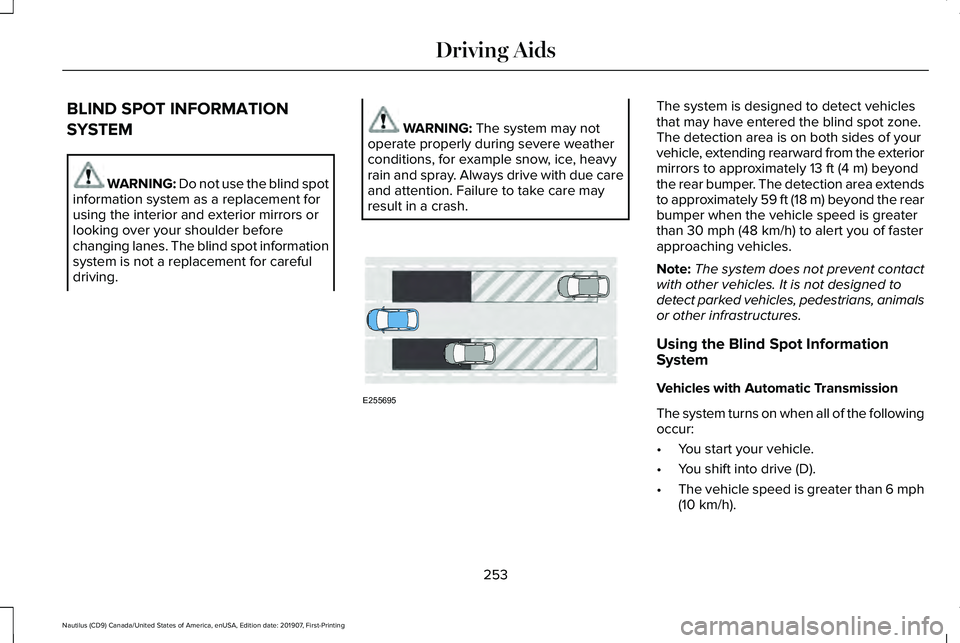
that may have entered the blind spot zone.
The detection area is on both sides of your
vehicle, extending rearward from the exterior
mirrors to approximately
13 ft (4 m) beyond
the rear bumper. The detection area extends
to approximately 59 ft (18 m) beyond the rear
bumper when the vehicle speed is greater
than
30 mph (48 km/h) to alert you of faster
approaching vehicles.
Note: The system does not prevent contact
with other vehicles. It is not designed to
detect parked vehicles, pedestrians, animals
or other infrastructures.
Using the Blind Spot Information
System
Vehicles with Automatic Transmission
The system turns on when all of the following
occur:
• You start your vehicle.
• You shift into drive (D).
• The vehicle speed is greater than
6 mph
(10 km/h).
253
Nautilus (CD9) Canada/United States of America, enUSA, Edition date: 201907, First-Printing Driving AidsE255695
Page 272 of 596
Note:
Vehicles with an automatic
transmission do not have a bar for gear
shifting.
Use the information display controls to view
the trip summary. See General Information
(page 116).
269
Nautilus (CD9) Canada/United States of America, enUSA, Edition date: 201907, First-Printing Driving Aids
Page 285 of 596
Trailer lamps are required on most towed
vehicles. Make sure all running lights, brake
lights, turn signals and hazard lights are
working.
Before Towing a Trailer
Practice turning, stopping and backing up to
get the feel of your vehicle-trailer
combination before starting on a trip. When
turning, make wider turns so the trailer
wheels clear curbs and other obstacles.
When Towing a Trailer
•
Do not drive faster than 70 mph
(113 km/h) during the first 500 mi
(800 km).
• Do not make full-throttle starts.
• Check your hitch, electrical connections
and trailer wheel lug nuts thoroughly after
you have traveled
50 mi (80 km).
• When stopped in congested or heavy
traffic during hot weather, place the
transmission in park (P) to aid engine and
transmission cooling and to help A/C
performance. •
Turn off the speed control with heavy
loads or in hilly terrain. The speed control
may turn off automatically when you are
towing on long, steep grades.
• Shift to a lower gear when driving down
a long or steep hill. Do not apply the
brakes continuously, as they may
overheat and become less effective.
• If your transmission is equipped with a
Grade Assist or Tow/Haul feature, use
this feature when towing. This provides
engine braking and helps eliminate
excessive transmission shifting for
optimum fuel economy and transmission
cooling.
• Allow more distance for stopping with a
trailer attached. Anticipate stops and
brake gradually.
• Avoid parking on a grade. However, if
you must park on a grade:
1. Turn the steering wheel to point your vehicle tires away from traffic flow.
2. Set your vehicle parking brake.
3. Place the transmission in park (P). 4. Place wheel chocks in front and back of
the trailer wheels. Chocks are not
included with your vehicle.
Launching or Retrieving a Boat or
Personal Watercraft (PWC)
Note: Disconnect the wiring to the trailer
before
backing the trailer into the water.
Note: Reconnect the wiring to the trailer
after
removing the trailer from the water.
When backing down a ramp during boat
launching or retrieval:
• Do not allow the static water level to rise
above the bottom edge of the rear
bumper.
• Do not allow waves to break higher than
6 in (15 cm)
above the bottom edge of
the rear bumper.
Exceeding these limits may allow water to
enter vehicle components:
• Causing internal damage to the
components.
• Affecting driveability, emissions, and
reliability.
282
Nautilus (CD9) Canada/United States of America, enUSA, Edition date: 201907, First-Printing Towing
Page 286 of 596
Replace the rear axle lubricant anytime you
submerge the rear axle in water. Water may
contaminate the rear axle lubricant, which is
not a normal maintenance inspection item
unless there is a possibility of a leak or other
axle repair is required.
TOWING THE VEHICLE ON FOUR
WHEELS - 2.0L
Emergency Towing
WARNING: If your vehicle has a
steering wheel lock make sure the ignition
is in the accessory or on position when
being towed. If your vehicle becomes inoperable without
access to wheel dollies or a vehicle transport
trailer, it can be flat-towed with all wheels on
the ground, regardless of the powertrain and
transmission configuration, under the
following conditions:
•
Your vehicle is facing forward for towing
in a forward direction.
• Refer to the Manual Park Release
procedure. See Automatic Transmission
(page
192). Failing to do so may result in
damage to the transmission.
• Maximum speed is
35 mph (56 km/h).
• Maximum distance is
50 mi (80 km).
Recreational Towing
Front-wheel Drive Vehicles
You cannot recreational tow your vehicle
with all wheels on the ground because
vehicle or transmission damage may occur.
Place the front wheels on a two-wheel tow
dolly. If you are using a tow dolly, follow the
instructions specified by the equipment
provider. All-wheel Drive Vehicles
You cannot recreational tow your vehicle
with all wheels on the ground because
vehicle or transmission damage may occur.
We recommend towing your vehicle with all
four wheels off the ground such as when
using a car-hauling trailer. Otherwise, you
cannot recreational tow your vehicle.
TOWING THE VEHICLE ON FOUR
WHEELS - 2.7L
Emergency Towing
WARNING:
If your vehicle has a
steering wheel lock make sure the ignition
is in the accessory or on position when
being towed.
283
Nautilus (CD9) Canada/United States of America, enUSA, Edition date: 201907, First-Printing Towing
Page 287 of 596
If your vehicle becomes inoperable without
access to wheel dollies or a vehicle transport
trailer, it can be flat-towed with all wheels on
the ground, regardless of the powertrain and
transmission configuration, under the
following conditions:
•
Your vehicle is facing forward for towing
in a forward direction.
• Refer to the Manual Park Release
procedure. See Automatic Transmission
(page 192). Failing to do so may result in
damage to the transmission.
• Maximum speed is
35 mph (56 km/h).
• Maximum distance is
50 mi (80 km).
Recreational Towing
Note: Put your climate control system in
recirculated air mode to prevent exhaust
fumes from entering the vehicle.
See
Climate Control (page 142).
Follow these guidelines if you have a need
for recreational towing. An example of
recreational towing would be towing your
vehicle behind a motorhome. We designed
these guidelines to prevent damage to your
transmission. You can recreational tow your vehicle with
all four wheels on the ground using the
Manual Park Release procedure, or with all
four wheels off the ground using a vehicle
transport trailer. If you are using a vehicle
transport trailer, follow the instructions
specified by the equipment provider.
If you recreational tow your vehicle with all
four wheels on the ground:
•
Only tow your vehicle in the forward
direction.
• Refer to the Manual Park Release
procedure. See Automatic Transmission
(page
192). Failing to do so may result in
damage to the transmission.
• Do not exceed
65 mph (105 km/h).
284
Nautilus (CD9) Canada/United States of America, enUSA, Edition date: 201907, First-Printing Towing
Page 293 of 596
The fuel pump shutoff stops the flow of fuel
to the engine in the event of a moderate to
severe crash. Not every impact causes a
shutoff.
Should your vehicle shut off after a crash,
you may restart your vehicle.
1. Press START/STOP to switch off your
vehicle.
2. Press the brake pedal and
START/STOP
to switch on your vehicle.
3. Remove your foot from the brake pedal and press
START/STOP to switch off
your vehicle.
4. You can attempt to start the vehicle by pressing the brake pedal and
START/STOP
, or press START/STOP
without pressing the brake pedal.
5. If the vehicle does not start, repeat steps
1 through 4. JUMP STARTING THE VEHICLE WARNING:
Batteries normally
produce explosive gases which can cause
personal injury. Therefore, do not allow
flames, sparks or lighted substances to
come near the battery. When working near
the battery, always shield your face and
protect your eyes. Always provide correct
ventilation. WARNING:
Keep batteries out of
reach of children. Batteries contain sulfuric
acid. Avoid contact with skin, eyes or
clothing. Shield your eyes when working
near the battery to protect against possible
splashing of acid solution. In case of acid
contact with skin or eyes, flush immediately
with water for a minimum of 15 minutes and
get prompt medical attention. If acid is
swallowed, call a physician immediately. WARNING:
Use only adequately
sized cables with insulated clamps. Preparing Your Vehicle
Do not attempt to push-start your automatic
transmission vehicle.
Note:
Attempting to push-start a vehicle with
an automatic transmission may cause
transmission damage.
Note: Use only a 12-volt supply to start your
vehicle.
Note: Do not disconnect the battery of the
disabled vehicle as this could damage the
vehicle electrical system.
Park the booster vehicle close to the hood
of the disabled vehicle, making sure the two
vehicles do not touch.
290
Nautilus (CD9) Canada/United States of America, enUSA, Edition date: 201907, First-Printing Roadside Emergencies
Page 336 of 596
Engine Coolant Temperature
Management (If Equipped)
WARNING:
To reduce the risk of
crash and injury, be prepared that the
vehicle speed may reduce and the vehicle
may not be able to accelerate with full
power until the coolant temperature
reduces.
If you tow a trailer with your vehicle, the
engine may temporarily reach a higher
temperature during severe operating
conditions, for example ascending a long or
steep grade in high ambient temperatures.
At this time, you may notice the coolant
temperature gauge moves toward the red
zone and a message may appear in the
information display. You may notice a reduction in vehicle speed
caused by reduced engine power in order
to manage the engine coolant temperature.
Your vehicle may enter this mode if certain
high-temperature and high-load conditions
take place. The amount of speed reduction
depends on vehicle loading, grade and
ambient temperature. If this occurs, there is
no need to stop your vehicle. You can
continue to drive.
The air conditioning may automatically turn
on and off during severe operating
conditions to protect the engine from
overheating. When the coolant temperature
decreases to the normal operating
temperature, the air conditioning turns on.
If the coolant temperature gauge moves fully
into the red zone, or if the coolant
temperature warning or service engine soon
messages appear in your information display,
do the following:
1.
Stop your vehicle as soon as it is safe to
do so. Fully apply the parking brake, shift
into park (P) or neutral (N). 2. Leave the engine running until the
coolant temperature gauge needle
returns to the normal position. If the
temperature does not drop after several
minutes, follow the remaining steps.
3. Switch the engine off and wait for it to cool. Check the coolant level.
4. If the coolant level is at or below the minimum mark, add prediluted coolant
immediately.
5. If the coolant level is normal, restart the engine and continue.
AUTOMATIC TRANSMISSION
FLUID CHECK
The automatic transmission does not have
a transmission fluid dipstick.
Have an authorized dealer check and change
the transmission fluid at the correct service
interval. See Scheduled Maintenance (page
495
). Your transmission does not consume
fluid. However, if the transmission slips, shifts
slowly or if you notice a sign of leaking fluid,
contact an authorized dealer.
333
Nautilus (CD9) Canada/United States of America, enUSA, Edition date: 201907, First-Printing Maintenance
Page 393 of 596
TRANSMISSION CODE
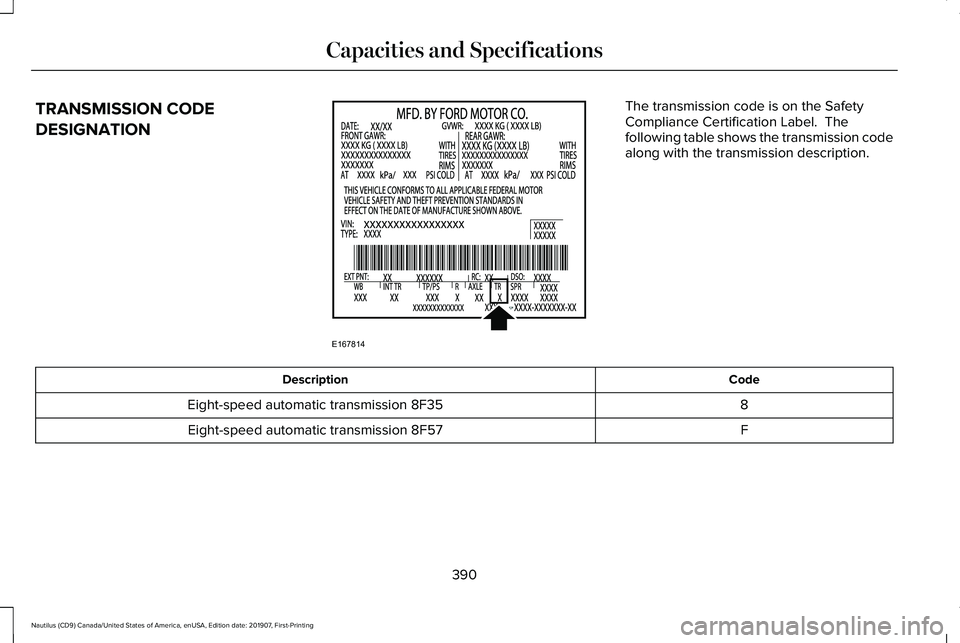
DESIGNATION The transmission code is on the Safety
Compliance Certification Label. The
following table shows the transmission code
along with the transmission description.
Code
Description
8
Eight-speed automatic transmission 8F35
F
Eight-speed automatic transmission 8F57
390
Nautilus (CD9) Canada/United States of America, enUSA, Edition date: 201907, First-Printing Capacities and SpecificationsE167814