weight LINCOLN NAUTILUS 2020 Owner's Manual
[x] Cancel search | Manufacturer: LINCOLN, Model Year: 2020, Model line: NAUTILUS, Model: LINCOLN NAUTILUS 2020Pages: 596, PDF Size: 5.88 MB
Page 282 of 596
RV & Trailer Towing Guide Online
http://www.fleet.ford.com/towing-guides/
Website
TRAILER SWAY CONTROL WARNING: Turning off trailer sway
control increases the risk of loss of vehicle
control, serious injury or death. Ford does
not recommend disabling this feature
except in situations where speed reduction
may be detrimental (such as hill climbing),
the driver has significant trailer towing
experience, and can control trailer sway
and maintain safe operation.
Note: This feature does not prevent trailer
sway, but reduces it once it begins.
Note: This feature cannot stop all trailers
from swaying.
Note: In some cases, if vehicle speed is too
high, the system may activate multiple times,
gradually reducing vehicle speed. This feature applies your vehicle brakes at
individual wheels and, if necessary, reduces
engine power. If the trailer begins to sway,
the stability control light flashes and the
message TRAILER SWAY REDUCE SPEED
appears in the information display. The first
thing to do is slow your vehicle down, then
pull safely to the side of the road and check
for proper tongue load and trailer load
distribution.
See Load Carrying (page 270).
RECOMMENDED TOWING
WEIGHTS
Note: Do not exceed the trailer weight
for your vehicle configuration listed in
the chart below. Note:
Make sure to take into
consideration trailer frontal area. Do not
exceed 20 ft² (1.86 m²) for vehicles
without towing package, or 30 ft² (2.79
m²) for vehicles with towing package.
Note: For high altitude operation,
reduce the gross combined weight by
2% per
1,000 ft (300 m) starting at the
1,000 ft (300 m) elevation point.
Note: Certain states require electric
trailer brakes for trailers over a specified
weight. Be sure to check state
regulations for this specified weight. The
maximum trailer weights listed may be
limited to this specified weight, as the
vehicle ’s electrical system may not
include the wiring connector needed to
activate electric trailer brakes.
279
Nautilus (CD9) Canada/United States of America, enUSA, Edition date: 201907, First-Printing Towing
Page 283 of 596
Your vehicle may tow a trailer provided
the maximum trailer weight is less than
or equal to the maximum trailer weight
listed for your vehicle configuration on
the following chart. Maximum Trailer Weight
1
Powertrain
1,500 lb (680 kg)
2.0L 2
3,500 lb (1,587 kg)
2.0L 3
2,000 lb (907 kg)
2.7L 2
3,500 lb (1,587 kg)
2.7L 3
1 Calculated with SAE J2807 method.
2 Vehicle without towing package.
3 Vehicle with towing package.
280
Nautilus (CD9) Canada/United States of America, enUSA, Edition date: 201907, First-Printing Towing
Page 284 of 596
ESSENTIAL TOWING CHECKS
Follow these guidelines for safe towing:
•
Do not tow a trailer until you drive your
vehicle at least 1,000 mi (1,600 km).
• Consult your local motor vehicle laws for
towing a trailer.
• See the instructions included with towing
accessories for the proper installation
and adjustment specifications.
• Service your vehicle more frequently if
you tow a trailer. See your scheduled
maintenance information.
• If you use a rental trailer, follow the
instructions the rental agency gives you.
You can find information on load
specification terms found on the tire label
and Safety Compliance label as well as
instructions on calculating your vehicle's load
in the Load Carrying chapter. See Load Limit
(page
273).
Remember to account for the trailer tongue
weight as part of your vehicle load when
calculating the total vehicle weight. Hitches
Do not use a hitch that either clamps onto
the bumper or attaches to the axle.
Distribute the trailer load so 10-15% of the
total trailer weight is on the tongue.
Safety Chains
Note:
Never attach safety chains to the
bumper.
Always connect the safety chains to the hook
retainers of your vehicle hitch.
To connect the safety chains, cross them
under the trailer tongue and allow enough
slack for turning tight corners. Do not allow
the chains to drag on the ground.
Trailer Brakes WARNING: Do not connect a trailer's
hydraulic brake system directly to your
vehicle's brake system. Your vehicle may
not have enough braking power and your
chances of having a collision greatly
increase. Electric brakes and manual, automatic or
surge-type trailer brakes are safe if you install
them properly and adjust them to the
manufacturer's specifications. The trailer
brakes must meet local and federal
regulations.
The rating for the tow vehicle's braking
system operation is at the gross vehicle
weight rating, not the gross combined
weight rating.
Separate functioning brake systems are
required for safe control of towed vehicles
and trailers weighing more than 1500 lb
(680 kg) when load.
Trailer Lamps
WARNING: Never connect any trailer
lamp wiring to the vehicle's tail lamp wiring;
this may damage the electrical system
resulting in fire. Contact your authorized
dealer as soon as possible for assistance
in proper trailer tow wiring installation.
Additional electrical equipment may be
required.
281
Nautilus (CD9) Canada/United States of America, enUSA, Edition date: 201907, First-Printing Towing
Page 289 of 596

There are also some things you may want to
avoid doing because they reduce your fuel
economy:
•
Avoid sudden or hard accelerations.
• Avoid revving the engine before turning
off the car.
• Avoid long idle periods.
• Do not warm up your vehicle on cold
mornings.
• Reduce the use of air conditioning and
heat.
• Avoid using speed control in hilly terrain.
• Do not rest your foot on the brake pedal
while driving.
• Avoid carrying unnecessary weight.
• Avoid adding particular accessories to
your vehicle (e.g. bug deflectors,
rollbars/light bars, running boards, ski
racks).
• Avoid driving with the wheels out of
alignment. COLD WEATHER PRECAUTIONS
The functional operation of some
components and systems can be affected at
temperatures below -13°F (-25°C).
DRIVING THROUGH WATER WARNING:
Do not drive through
flowing or deep water as you may lose
control of your vehicle.
Note: Driving through standing water can
cause vehicle damage.
Note: Engine damage can occur if water
enters the air filter.
Before driving through standing water, check
the depth. Never drive through water that is
higher than the bottom of the front rocker
area of your vehicle. When driving through standing water, drive
very slowly and do not stop your vehicle.
Your brake performance and traction may
be limited. After driving through water and
as soon as it is safe to do so:
•
Lightly press the brake pedal to dry the
brakes and to check that they work.
• Check that the horn works.
• Check that the exterior lights work.
• Turn the steering wheel to check that the
steering power assist works.
286
Nautilus (CD9) Canada/United States of America, enUSA, Edition date: 201907, First-Printing Driving HintsE259345
Page 361 of 596
Treadwear
The treadwear grade is a comparative
rating based on the wear rate of the tire
when tested under controlled conditions
on a specified government test course.
For example, a tire graded 150 would
wear 1 ½ times as well on the
government course as a tire graded 100.
The relative performance of tires
depends upon the actual conditions of
their use, however, and may depart
significantly from the norm due to
variations in driving habits, service
practices, and differences in road
characteristics and climate.
Traction AA A B C
WARNING: The traction grade
assigned to this tire is based on
straight-ahead braking traction tests,
and does not include acceleration,
cornering, hydroplaning or peak
traction characteristics. The traction grades, from highest to
lowest are AA, A, B, and C. The grades
represent the tire
’s ability to stop on wet
pavement as measured under controlled
conditions on specified government test
surfaces of asphalt and concrete. A tire
marked C may have poor traction
performance.
Temperature A B C WARNING:
The temperature
grade for this tire is established for a
tire that is properly inflated and not
overloaded. Excessive speed,
underinflation, or excessive loading,
either separately or in combination,
can cause heat buildup and possible
tire failure.
The temperature grades are A (the
highest), B and C, representing the tire ’s
resistance to the generation of heat and
its ability to dissipate heat when tested
under controlled conditions on a
specified indoor laboratory test wheel.
Sustained high temperature can cause the material of the tire to degenerate
and reduce tire life, and excessive
temperature can lead to sudden tire
failure. The grade C corresponds to a
level of performance which all
passenger car tires must meet under the
Federal Motor Vehicle Safety Standard
No. 139. Grades B and A represent
higher levels of performance on the
laboratory test wheel than the minimum
required by law.
Glossary of Tire Terminology
*
Tire label: A label showing the original
equipment tire sizes, recommended
inflation pressure and the maximum
weight the vehicle can carry.
*
Tire Identification Number (TIN): A
number on the sidewall of each tire
providing information about the tire
brand and manufacturing plant, tire size
and date of manufacture. Also referred
to as DOT code.
*
Inflation pressure: A measure of the
amount of air in a tire.
358
Nautilus (CD9) Canada/United States of America, enUSA, Edition date: 201907, First-Printing Wheels and Tires
Page 363 of 596
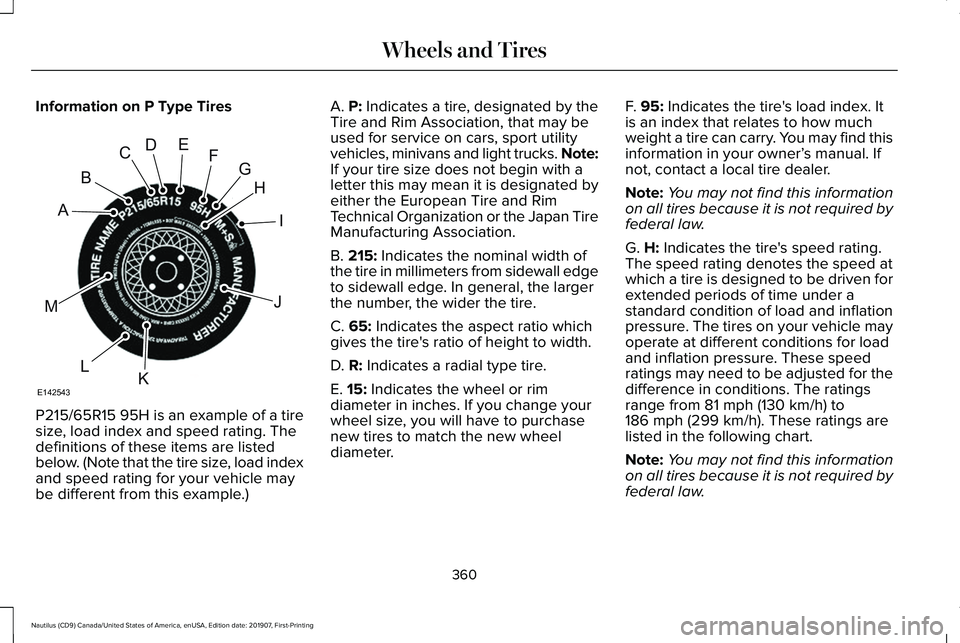
Information on P Type Tires
P215/65R15 95H is an example of a tire
size, load index and speed rating. The
definitions of these items are listed
below. (Note that the tire size, load index
and speed rating for your vehicle may
be different from this example.) A. P: Indicates a tire, designated by the
Tire and Rim Association, that may be
used for service on cars, sport utility
vehicles, minivans and light trucks.
Note:
If your tire size does not begin with a
letter this may mean it is designated by
either the European Tire and Rim
Technical Organization or the Japan Tire
Manufacturing Association.
B.
215: Indicates the nominal width of
the tire in millimeters from sidewall edge
to sidewall edge. In general, the larger
the number, the wider the tire.
C.
65: Indicates the aspect ratio which
gives the tire's ratio of height to width.
D.
R: Indicates a radial type tire.
E.
15: Indicates the wheel or rim
diameter in inches. If you change your
wheel size, you will have to purchase
new tires to match the new wheel
diameter. F.
95: Indicates the tire's load index. It
is an index that relates to how much
weight a tire can carry. You may find this
information in your owner’ s manual. If
not, contact a local tire dealer.
Note: You may not find this information
on all tires because it is not required by
federal law.
G.
H: Indicates the tire's speed rating.
The speed rating denotes the speed at
which a tire is designed to be driven for
extended periods of time under a
standard condition of load and inflation
pressure. The tires on your vehicle may
operate at different conditions for load
and inflation pressure. These speed
ratings may need to be adjusted for the
difference in conditions. The ratings
range from
81 mph (130 km/h) to
186 mph (299 km/h). These ratings are
listed in the following chart.
Note: You may not find this information
on all tires because it is not required by
federal law.
360
Nautilus (CD9) Canada/United States of America, enUSA, Edition date: 201907, First-Printing Wheels and TiresH
I
J
KL
M
A
B
CDEFG
E142543
Page 382 of 596
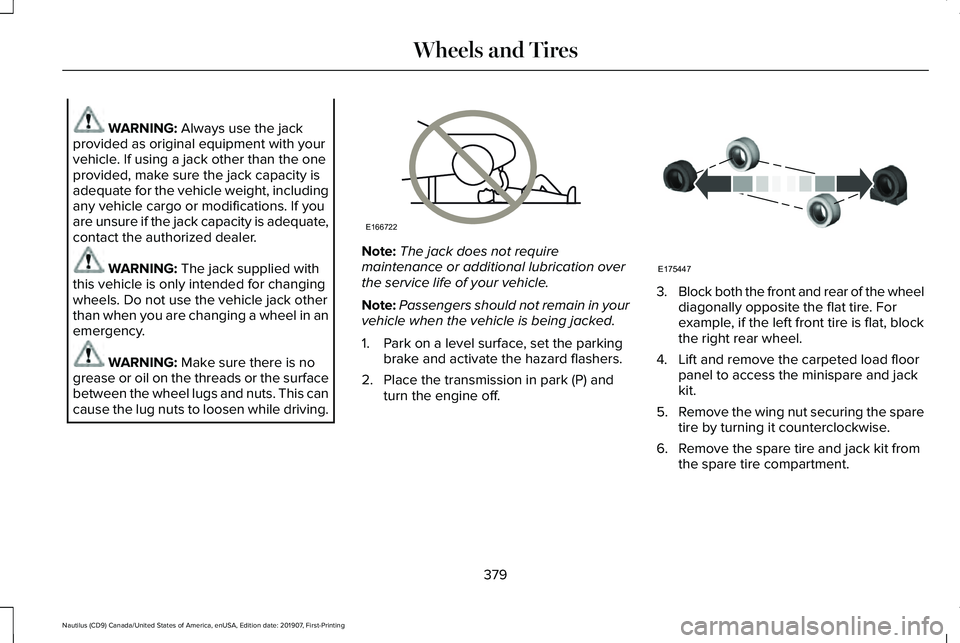
WARNING: Always use the jack
provided as original equipment with your
vehicle. If using a jack other than the one
provided, make sure the jack capacity is
adequate for the vehicle weight, including
any vehicle cargo or modifications. If you
are unsure if the jack capacity is adequate,
contact the authorized dealer. WARNING:
The jack supplied with
this vehicle is only intended for changing
wheels. Do not use the vehicle jack other
than when you are changing a wheel in an
emergency. WARNING:
Make sure there is no
grease or oil on the threads or the surface
between the wheel lugs and nuts. This can
cause the lug nuts to loosen while driving. Note:
The jack does not require
maintenance or additional lubrication over
the service life of your vehicle.
Note: Passengers should not remain in your
vehicle when the vehicle is being jacked.
1. Park on a level surface, set the parking brake and activate the hazard flashers.
2. Place the transmission in park (P) and turn the engine off. 3.
Block both the front and rear of the wheel
diagonally opposite the flat tire. For
example, if the left front tire is flat, block
the right rear wheel.
4. Lift and remove the carpeted load floor panel to access the minispare and jack
kit.
5. Remove the wing nut securing the spare
tire by turning it counterclockwise.
6. Remove the spare tire and jack kit from the spare tire compartment.
379
Nautilus (CD9) Canada/United States of America, enUSA, Edition date: 201907, First-Printing Wheels and TiresE166722 E175447
Page 392 of 596
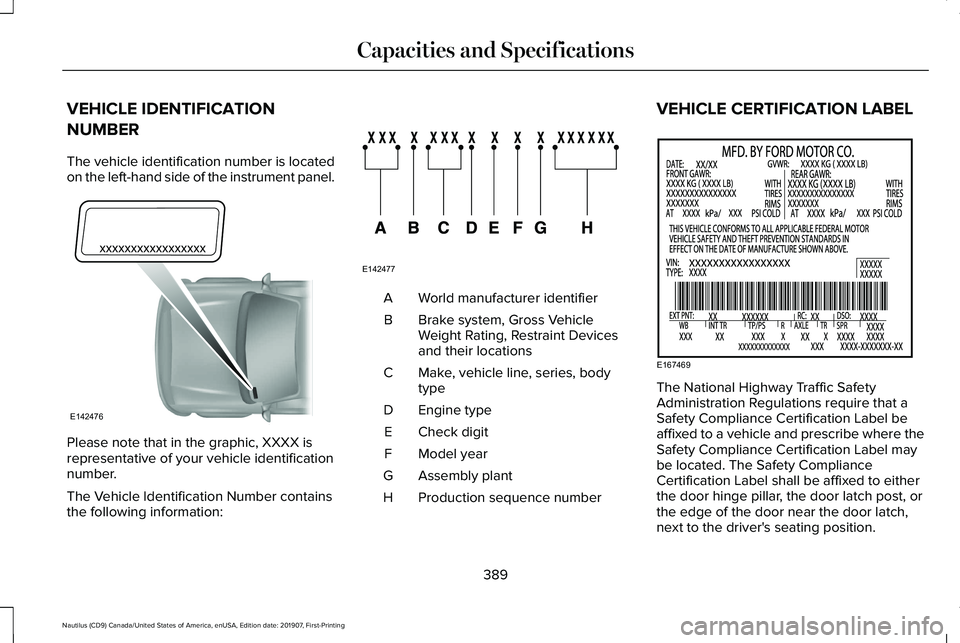
VEHICLE IDENTIFICATION
NUMBER
The vehicle identification number is located
on the left-hand side of the instrument panel.
Please note that in the graphic, XXXX is
representative of your vehicle identification
number.
The Vehicle Identification Number contains
the following information: World manufacturer identifier
A
Brake system, Gross Vehicle
Weight Rating, Restraint Devices
and their locations
B
Make, vehicle line, series, body
type
C
Engine type
D
Check digit
E
Model year
F
Assembly plant
G
Production sequence number
H VEHICLE CERTIFICATION LABEL
The National Highway Traffic Safety
Administration Regulations require that a
Safety Compliance Certification Label be
affixed to a vehicle and prescribe where the
Safety Compliance Certification Label may
be located. The Safety Compliance
Certification Label shall be affixed to either
the door hinge pillar, the door latch post, or
the edge of the door near the door latch,
next to the driver's seating position.
389
Nautilus (CD9) Canada/United States of America, enUSA, Edition date: 201907, First-Printing Capacities and SpecificationsE142476 E142477 E167469
Page 493 of 596
For a complete listing of the accessories that
are available for your vehicle, please contact
your authorized dealer or visit the online
store website:
Web Address (United States)
www.Accessories.Lincoln.com Web Address (Canada)
www.LincolnCanada.com
We will repair or replace any properly
authorized dealer-installed Lincoln Original
Accessory found to be defective in
factory-supplied materials or workmanship
during the warranty period, as well as any
component damaged by the defective
accessories.
We will warrant your Lincoln Original
Accessory through the warranty that provides
the greatest benefit:
• 24 months, unlimited mileage.
• The remainder of your new vehicle
limited warranty. *Lincoln Licensed Accessory. The accessory
manufacturer designs, develops and
therefore warrants Lincoln Licensed
Accessories, and does not design or test
these accessories to Lincoln Motor Company
engineering requirements. Contact an
authorized Lincoln dealer for the accessory
manufacturer's limited warranty details and
request a copy of the Lincoln Licensed
Accessories product limited warranty from
the accessory manufacturer.
For maximum vehicle performance, keep the
following information in mind when adding
accessories or equipment to your vehicle:
•
When adding accessories, equipment,
passengers and luggage to your vehicle,
do not exceed the total weight capacity
of the vehicle or of the front or rear axle
(GVWR or GAWR as indicated on the
Safety Compliance Certification label).
Ask an authorized dealer for specific
weight information.
• The Federal Communications
Commission (FCC) and Canadian Radio
Telecommunications Commission (CRTC)
regulate the use of mobile
communications systems that have radio
transmitters, for example two-way radios,
telephones and theft alarms. Any such
equipment installed in your vehicle
should comply with Federal
Communications Commission (FCC) and
Canadian Radio Telecommunications
Commission (CRTC) regulations and
should only be installed by an authorized
dealer.
490
Nautilus (CD9) Canada/United States of America, enUSA, Edition date: 201907, First-Printing Accessories
Page 591 of 596
Using Your Cell Phone......................................459
Post-Crash Alert System............................292
Power Door Locks See: Locking and Unlocking..............................
70
Power Liftgate..................................................78 Hands-Free Feature..............................................81
Obstacle Detection...............................................81
Opening and Closing the Liftgate....................79
Setting the Liftgate Open Height.....................80
Stopping the Liftgate Movement......................
80
Switching the Power Liftgate On or Off...........81
Power Seats
.....................................................151
Adjusting the Lumbar Support.........................153
Adjusting the Multi-Contour Front Seats With Active Motion ..................................................153
Power Windows
.............................................103
Accessory Delay..................................................104
Bounce-Back........................................................103
One-Touch Down................................................103
One-Touch Up......................................................103
Window Lock........................................................104
Pre-Collision Assist
.......................................261
Adjusting the Pre-Collision Assist
Settings............................................................264
Blocked Sensors................................................264
Distance Indication and Alert..........................262
Evasive Steer Assist..........................................264
Using the Pre-Collision Assist System...........261 Protecting the Environment
..........................18
Puncture See: Changing a Road Wheel.........................376
R
Rear Parking Aid............................................214 Object Distance Indicator.................................216
Rear Seat Armrest..........................................171 Type One ...............................................................171
Type Two ...............................................................171
Rear Seats
.......................................................158
Adjusting the Rear Seats...................................158
Rear Under Floor Storage..........................270 Cargo Management System............................270
In-Floor Storage - Second Row.......................270
Rear View Camera.......................................228 Camera Guidelines............................................229
Manual Zoom........................................................231
Obstacle Distance Indicator............................230
Rear Camera Delay.............................................231
Using the Rear View Camera System...........229
Rear View Camera See: Rear View Camera...................................228
Rear Window Wiper and Washers..............92 Rear Camera Washer...........................................93
Rear Window Washer..........................................93
Rear Window Wiper.............................................92 Recommended Towing Weights...............279
Reduced Engine Performance..................285
Refueling..........................................................184
Refueling System Overview.............................184
Refueling System Warning................................186
Refueling Your Vehicle.......................................185
Remote Control
...............................................58
Global Opening and Closing..............................61
Intelligent Access Key.........................................58
Linking a Preset Position to Your Remote Control.................................................................61
Locating Your Vehicle...........................................61
Memory Feature....................................................63
Remote Control Information Messages..........
63
Remote Start...........................................................61
Replacing the Battery..........................................59
Sounding the Panic Alarm...................................61
Remote Start
...................................................145
Automatic Settings..............................................145
Repairing Minor Paint Damage.................350
Replacement Parts Recommendation........15 Collision Repairs....................................................15
Scheduled Maintenance and Mechanical
Repairs.................................................................15
Warranty on Replacement Parts........................15
Replacing a Lost Key or Remote Control............................................................64
588
Nautilus (CD9) Canada/United States of America, enUSA, Edition date: 201907, First-Printing Index