belt LINCOLN NAUTILUS 2020 Service Manual
[x] Cancel search | Manufacturer: LINCOLN, Model Year: 2020, Model line: NAUTILUS, Model: LINCOLN NAUTILUS 2020Pages: 596, PDF Size: 5.88 MB
Page 161 of 596
REAR SEATS
Adjusting the Rear Seats
WARNING: To prevent possible
damage to the seat or safety belts, make
sure that the safety belts are not buckled
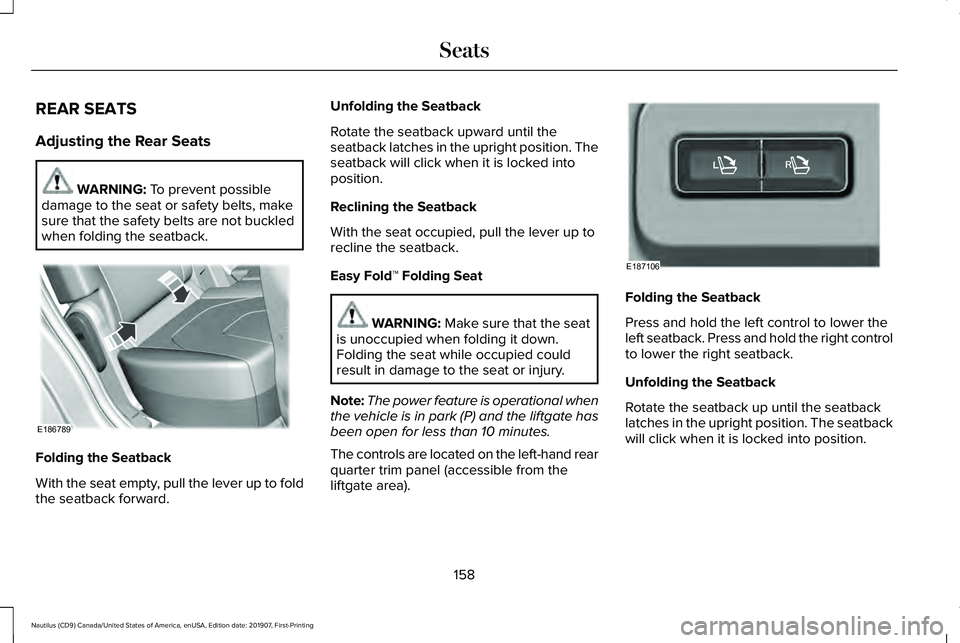
when folding the seatback. Folding the Seatback
With the seat empty, pull the lever up to fold
the seatback forward. Unfolding the Seatback
Rotate the seatback upward until the
seatback latches in the upright position. The
seatback will click when it is locked into
position.
Reclining the Seatback
With the seat occupied, pull the lever up to
recline the seatback.
Easy Fold™ Folding Seat
WARNING:
Make sure that the seat
is unoccupied when folding it down.
Folding the seat while occupied could
result in damage to the seat or injury.
Note: The power feature is operational when
the vehicle is in park (P) and the liftgate has
been open for less than 10 minutes.
The controls are located on the left-hand rear
quarter trim panel (accessible from the
liftgate area). Folding the Seatback
Press and hold the left control to lower the
left seatback. Press and hold the right control
to lower the right seatback.
Unfolding the Seatback
Rotate the seatback up until the seatback
latches in the upright position. The seatback
will click when it is locked into position.
158
Nautilus (CD9) Canada/United States of America, enUSA, Edition date: 201907, First-Printing SeatsE186789 E187106
Page 176 of 596
•
Without applying the brake pedal, press
and release the button once when the
ignition is in the on mode, or when the
engine is running but the vehicle is not
moving.
On: All electrical circuits are operational and
the warning lamps and indicators illuminate.
• Without applying the brake pedal, press
and release the button once.
Note: You may have to press the push
button ignition switch twice to switch the
ignition on.
Start:
Starts the engine.
• Press the brake pedal, and then press
the button for any length of time. An
indicator light on the button illuminates
when then ignition is on and when the
engine starts. STARTING A GASOLINE ENGINE
When you start the engine, the idle speed
increases. This helps to warm up the
engine. If the engine idle speed does not
slow down automatically, have your vehicle
checked by an authorized dealer.
Note:
You can crank the engine for a total
of 60 seconds without the engine starting
before the starting system temporarily
disables. The 60 seconds does not have to
be all at once. For example, if you crank the
engine three times for 20 seconds each time,
without the engine starting, you reached the
60-second time limit. A message appears
in the information display alerting you that
you exceeded the cranking time. You
cannot attempt to start the engine for at
least 15 minutes. After 15 minutes, you are
limited to a 15-second engine cranking time.
You need to wait 60 minutes before you can
crank the engine for 60 seconds again. Before starting the engine check the
following:
•
Make sure all occupants have fastened
their seatbelts.
• Make sure the headlamps and electrical
accessories are off.
• Make sure the parking brake is on.
• Make sure the transmission is in park (P)
or neutral (N).
Keyless Starting
Note: Do not touch the accelerator pedal.
Note: A valid passive key must be located
inside your vehicle to switch the power on
and start your vehicle.
1. Fully depress the brake pedal.
2. Briefly press the push button ignition switch.
The system does not function if:
• The passive key frequencies are jammed.
• The key battery has no charge.
If you are unable to start the engine, do the
following:
173
Nautilus (CD9) Canada/United States of America, enUSA, Edition date: 201907, First-Printing Starting and Stopping the Engine
Page 182 of 596
•
The engine coolant is at operating
temperature.
• Elevation is below about 10,000 ft
(3,048 m).
• Ambient temperature is moderate. The green Auto-Start-Stop
indicator light on the instrument
cluster will illuminate to indicate
when the automatic engine stop occurs. If the instrument cluster is
equipped with a grey
Auto-Start-Stop indicator light, it is
illuminated when automatic engine stop is
not available due to one of the above noted
conditions not being met.
Automatic Engine Restart
Any of the following conditions will result in
an automatic restart of the engine:
• You have removed your foot from the
brake pedal in drive (D) unless AutoHold
has been engaged.
• You press the accelerator pedal. •
The driver safety belt becomes
unfastened or the driver door is ajar.
• You have moved the transmission from
drive (D).
• Your vehicle is moving.
• The interior compartment does not meet
customer climate control comfort settings
when air conditioning or heat is on.
• Fogging of the windows could occur and
the air conditioning is on.
• The battery is not within optimal
operating conditions.
• You have exceeded the maximum engine
off time.
• When you press the Auto-Start-Stop
button while the engine is stopped.
• Either the front or rear defroster is turned
on.
Any of the following conditions may result in
an automatic restart of the engine:
• The blower fan speed is increased or the
climate control temperature is changed.
• You have an electrical accessory turned
on or plugged in. Disabling Auto-Start-Stop
Note:
If the system detects a malfunction, it
turns off. If this remains inactive after an
ignition cycle, have your vehicle checked by
an authorized dealer.
Note: For vehicles with Auto-Start-Stop, the
battery requirement is different. Replace it
with one of exactly the same specification
as the original.
179
Nautilus (CD9) Canada/United States of America, enUSA, Edition date: 201907, First-Printing Unique Driving Characteristics E146361 E183186
Page 196 of 596
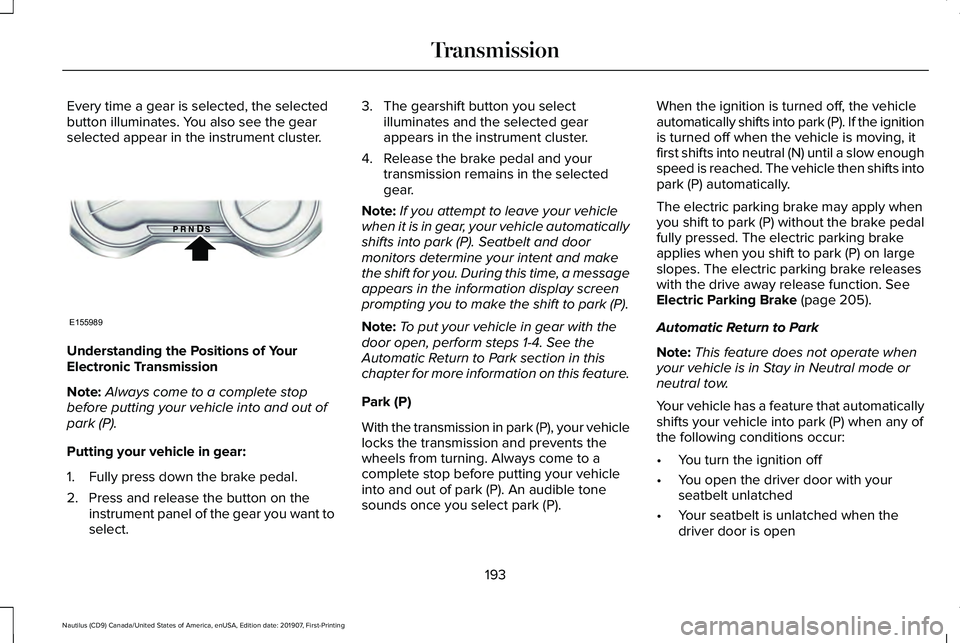
Every time a gear is selected, the selected
button illuminates. You also see the gear
selected appear in the instrument cluster.
Understanding the Positions of Your
Electronic Transmission
Note:
Always come to a complete stop
before putting your vehicle into and out of
park (P).
Putting your vehicle in gear:
1. Fully press down the brake pedal.
2. Press and release the button on the instrument panel of the gear you want to
select. 3. The gearshift button you select
illuminates and the selected gear
appears in the instrument cluster.
4. Release the brake pedal and your transmission remains in the selected
gear.
Note: If you attempt to leave your vehicle
when it is in gear, your vehicle automatically
shifts into park (P). Seatbelt and door
monitors determine your intent and make
the shift for you. During this time, a message
appears in the information display screen
prompting you to make the shift to park (P).
Note: To put your vehicle in gear with the
door open, perform steps 1-4. See the
Automatic Return to Park section in this
chapter for more information on this feature.
Park (P)
With the transmission in park (P), your vehicle
locks the transmission and prevents the
wheels from turning. Always come to a
complete stop before putting your vehicle
into and out of park (P). An audible tone
sounds once you select park (P). When the ignition is turned off, the vehicle
automatically shifts into park (P). If the ignition
is turned off when the vehicle is moving, it
first shifts into neutral (N) until a slow enough
speed is reached. The vehicle then shifts into
park (P) automatically.
The electric parking brake may apply when
you shift to park (P) without the brake pedal
fully pressed. The electric parking brake
applies when you shift to park (P) on large
slopes. The electric parking brake releases
with the drive away release function. See
Electric Parking Brake (page 205).
Automatic Return to Park
Note: This feature does not operate when
your vehicle is in Stay in Neutral mode or
neutral tow.
Your vehicle has a feature that automatically
shifts your vehicle into park (P) when any of
the following conditions occur:
• You turn the ignition off
• You open the driver door with your
seatbelt unlatched
• Your seatbelt is unlatched when the
driver door is open
193
Nautilus (CD9) Canada/United States of America, enUSA, Edition date: 201907, First-Printing TransmissionE155989
Page 197 of 596
If you turn the ignition off when your vehicle
is moving, your vehicle first shifts into neutral
(N) until it slows down enough to shift into
park (P) automatically.
Note:
If you have waited an extended period
of time, 2-15 minutes before starting your
vehicle, unlatching your seatbelt causes this
feature to activate, even with the driver door
closed.
Note: This feature may not work properly if
the door ajar switch is malfunctioning. If your
door ajar indicator does not illuminate when
you open the driver door or the indicator
illuminates with the driver door closed, see
your authorized dealer.
Reverse (R)
With the transmission in reverse (R), your
vehicle moves backward. Always come to a
complete stop before shifting into and out
of reverse (R). Neutral (N) WARNING: In neutral (N) your vehicle
has the ability to roll freely. If you intend to
leave your vehicle, make sure you apply
the parking brake.
With the transmission in neutral (N), you can
start your vehicle and it is free to roll. Hold
the brake pedal down when in this position.
Stay in Neutral Mode
Note: Stay in neutral mode is a temporary
vehicle state with the ignition off. Once in
this mode, the battery must maintain
sufficient voltage or your vehicle returns to
park.
Note: When entering an automatic car wash,
always shift to Neutral (N). If you are exiting
the vehicle before the car wash, Stay in
Neutral Mode is available.
Extended usage of Stay in Neutral mode may
result in a battery voltage reduction to a level
where the vehicle may no longer start.
Do not tow your vehicle in this mode. Failure to follow this instruction could result
in vehicle damage not covered by the vehicle
Warranty.
To enter Stay in Neutral mode, do the
following:
1. Bring your vehicle to a complete stop.
2. Shift into neutral (N).
Note:
A message appears in the information
display.
3. Press the neutral (N) button.
Note: A confirmation message appears in
the information display when your vehicle
has entered Stay in Neutral mode and the
neutral (N) button on the transmission
selector blinks slowly.
To exit Stay in Neutral mode, press the brake
pedal and shift into another gear.
Drive (D)
The normal driving position for the best fuel
economy.
Sport (S)
Putting the vehicle in sport (S):
194
Nautilus (CD9) Canada/United States of America, enUSA, Edition date: 201907, First-Printing Transmission
Page 211 of 596
AUTO HOLD
WARNING: The system does not
replace the parking brake. When you leave
your vehicle, always apply the parking
brake. WARNING: You must remain in your
vehicle when the system turns on. At all
times, you are responsible for controlling
your vehicle, supervising the system and
intervening, if required. Failure to take care
may result in the loss of control of your
vehicle, serious personal injury or death. WARNING:
The system turns off if
there is a malfunction or if you excessively
rev the engine.
The system is designed to apply the brakes
to hold your vehicle at a standstill after you
stop your vehicle and release the brake
pedal. This could be beneficial in certain
situations, for example when waiting on a hill
or in traffic. Switching Auto Hold On and Off
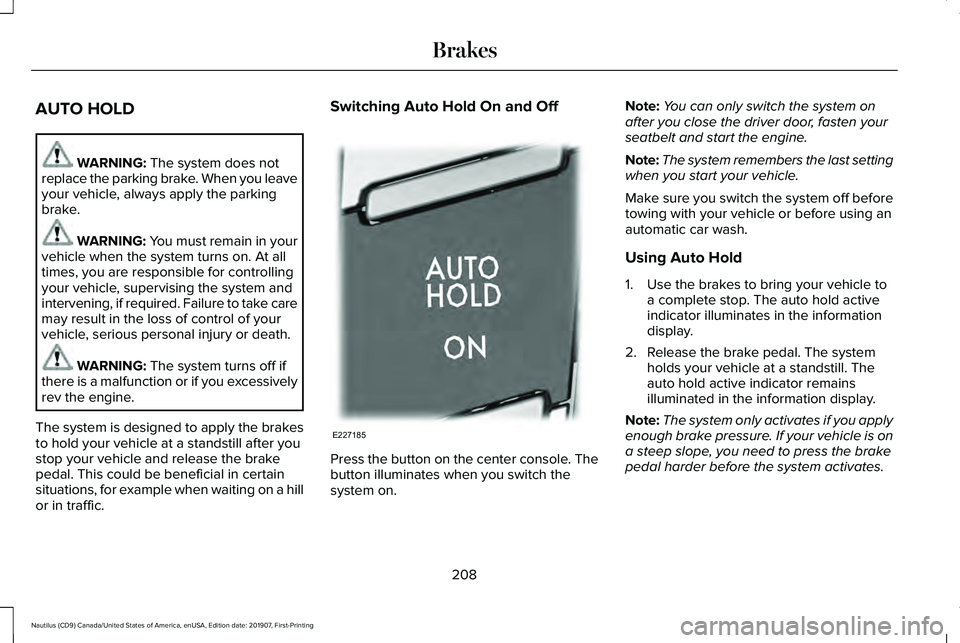
Press the button on the center console. The
button illuminates when you switch the
system on.Note:
You can only switch the system on
after you close the driver door, fasten your
seatbelt and start the engine.
Note: The system remembers the last setting
when you start your vehicle.
Make sure you switch the system off before
towing with your vehicle or before using an
automatic car wash.
Using Auto Hold
1. Use the brakes to bring your vehicle to a complete stop. The auto hold active
indicator illuminates in the information
display.
2. Release the brake pedal. The system holds your vehicle at a standstill. The
auto hold active indicator remains
illuminated in the information display.
Note: The system only activates if you apply
enough brake pressure. If your vehicle is on
a steep slope, you need to press the brake
pedal harder before the system activates.
208
Nautilus (CD9) Canada/United States of America, enUSA, Edition date: 201907, First-Printing BrakesE227185
Page 212 of 596
Note:
Under certain conditions, the system
could apply the electric parking brake. The
brake system warning lamp illuminates. The
electric parking brake releases when you
press the accelerator pedal. See Electric
Parking Brake (page 205).
Note: If auto-start-stop turns off the engine,
auto hold remains active.
Note: The system deactivates if you shift into
reverse (R) and press the brake pedal.
3. Pull away in the normal manner. The system releases the brakes and the auto
hold active indicator turns off.
Auto Hold Indicator
The auto hold indicator illuminates in the
information display when the system is on
and is either active or unavailable. Illuminates when the system is
active. Your vehicle remains
stationary after you release the
brake pedal. Illuminates when the system is on
but unavailable to hold your
vehicle at a standstill. The system could be unavailable when any
of the following occur:
•
During an active park assist maneuver.
• Your vehicle is in stay in neutral mode.
• The driver door is open.
• You do not fasten your seatbelt.
• You shift into reverse (R) before the
system is active.
209
Nautilus (CD9) Canada/United States of America, enUSA, Edition date: 201907, First-Printing BrakesE197933 E197934
Page 242 of 596
The system may apply the brakes to slow
the vehicle to the new set speed. The set
speed displays continuously in the
information display when the system is
active.
Canceling the Set Speed
Press and release the button or tap
the brake pedal.
Note: The system remembers the set speed.
Resuming the Set Speed Press and release the button.
Your vehicle speed returns to the previously
set speed and gap setting. The set speed
displays continuously in the information
display when the system is active.
Note: Only use resume if you are aware of
the set speed and intend to return to it. Automatic Cancellation
Automatic cancellation can also occur when:
•
The tires lose traction.
• You apply the parking brake.
Park Brake Application
Automatic parking brake application and
cancellation occurs if:
• You unbuckle the seatbelt and open the
driver door after you stop your vehicle.
• You hold your vehicle at a stop
continuously for more than three minutes.
Hilly Condition Usage
You should select a lower gear when the
system is active in situations such as
prolonged downhill driving on steep grades,
for example in mountainous areas. The
system needs additional engine braking in
these situations to reduce the load on the
vehicle ’s regular brake system to prevent it
from overheating. Note:
An audible alarm sounds and the
system shuts down if it applies brakes for an
extended period of time. This allows the
brakes to cool. The system functions
normally again after the brakes cool.
Switching Adaptive Cruise Control Off Press and release the button when
the system is in standby mode or
switch the ignition off.
Note: You erase the set speed when you
switch the system off.
Detection Issues WARNING: On rare occasions,
detection issues can occur due to the road
infrastructures, for example bridges,
tunnels and safety barriers. In these cases,
the system may brake late or
unexpectedly. At all times, you are
responsible for controlling your vehicle,
supervising the system and intervening, if
required.
239
Nautilus (CD9) Canada/United States of America, enUSA, Edition date: 201907, First-Printing Cruise Control E265299 E294678
Page 295 of 596
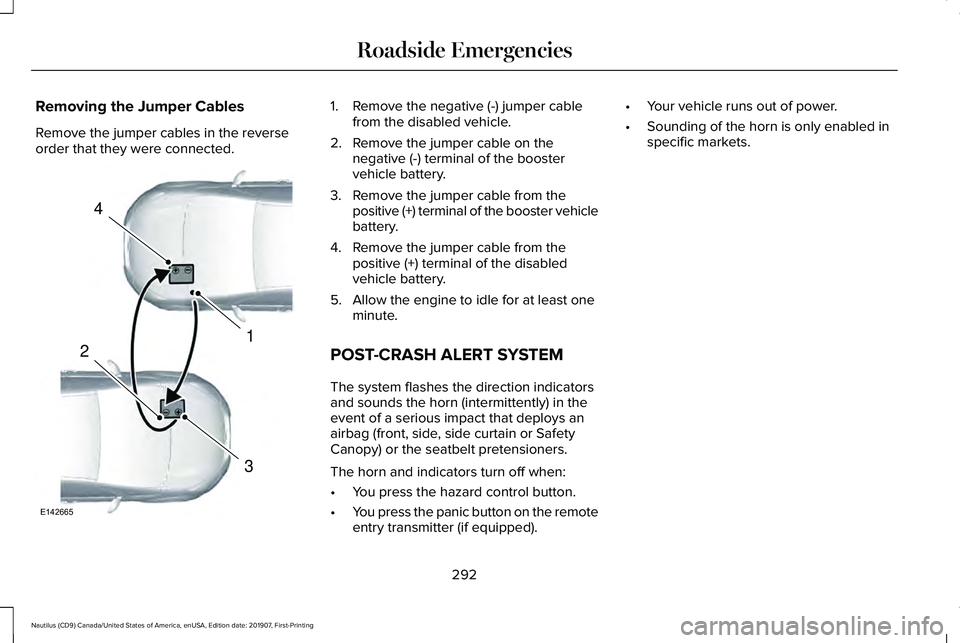
Removing the Jumper Cables
Remove the jumper cables in the reverse
order that they were connected. 1. Remove the negative (-) jumper cable
from the disabled vehicle.
2. Remove the jumper cable on the negative (-) terminal of the booster
vehicle battery.
3. Remove the jumper cable from the positive (+) terminal of the booster vehicle
battery.
4. Remove the jumper cable from the positive (+) terminal of the disabled
vehicle battery.
5. Allow the engine to idle for at least one minute.
POST-CRASH ALERT SYSTEM
The system flashes the direction indicators
and sounds the horn (intermittently) in the
event of a serious impact that deploys an
airbag (front, side, side curtain or Safety
Canopy) or the seatbelt pretensioners.
The horn and indicators turn off when:
• You press the hazard control button.
• You press the panic button on the remote
entry transmitter (if equipped). •
Your vehicle runs out of power.
• Sounding of the horn is only enabled in
specific markets.
292
Nautilus (CD9) Canada/United States of America, enUSA, Edition date: 201907, First-Printing Roadside Emergencies4
1
3
2
E142665
Page 296 of 596
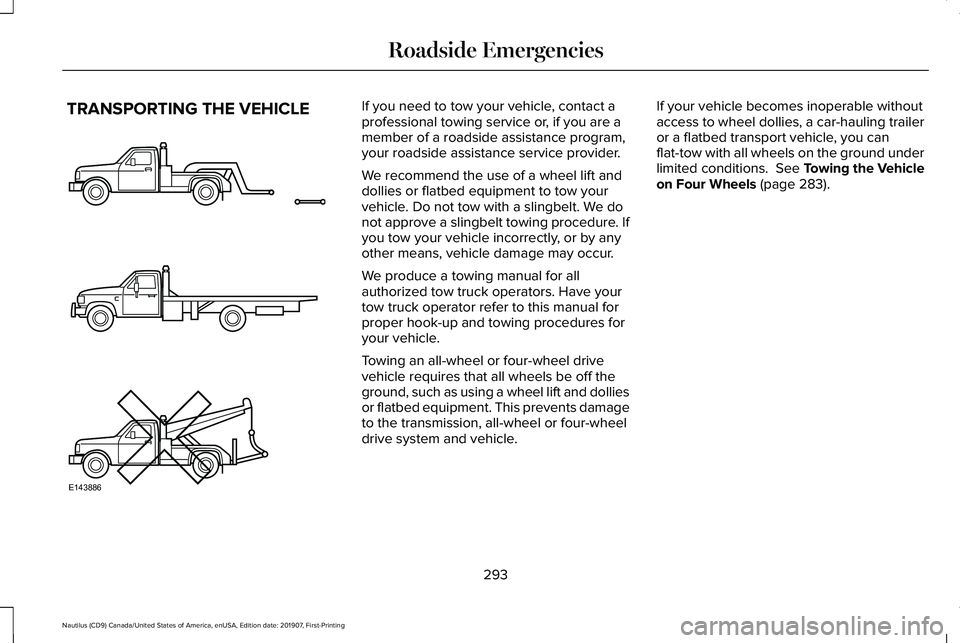
TRANSPORTING THE VEHICLE If you need to tow your vehicle, contact a
professional towing service or, if you are a
member of a roadside assistance program,
your roadside assistance service provider.
We recommend the use of a wheel lift and
dollies or flatbed equipment to tow your
vehicle. Do not tow with a slingbelt. We do
not approve a slingbelt towing procedure. If
you tow your vehicle incorrectly, or by any
other means, vehicle damage may occur.
We produce a towing manual for all
authorized tow truck operators. Have your
tow truck operator refer to this manual for
proper hook-up and towing procedures for
your vehicle.
Towing an all-wheel or four-wheel drive
vehicle requires that all wheels be off the
ground, such as using a wheel lift and dollies
or flatbed equipment. This prevents damage
to the transmission, all-wheel or four-wheel
drive system and vehicle.
If your vehicle becomes inoperable without
access to wheel dollies, a car-hauling trailer
or a flatbed transport vehicle, you can
flat-tow with all wheels on the ground under
limited conditions. See Towing the Vehicle
on Four Wheels (page 283).
293
Nautilus (CD9) Canada/United States of America, enUSA, Edition date: 201907, First-Printing Roadside EmergenciesE143886