roof rack LINCOLN NAUTILUS 2020 Owners Manual
[x] Cancel search | Manufacturer: LINCOLN, Model Year: 2020, Model line: NAUTILUS, Model: LINCOLN NAUTILUS 2020Pages: 596, PDF Size: 5.88 MB
Page 7 of 596
Brakes
General Information
...................................204
Hints on Driving With Anti-Lock Brakes ......................................................................
205
Electric Parking Brake ...............................
205
Hill Start Assist .............................................
207
Auto Hold ......................................................
208
Traction Control
Principle of Operation .................................
210
Using Traction Control ................................
210
Stability Control
Principle of Operation ..................................
211
Using Stability Control ................................
212
Parking Aids
Principle of Operation .................................
214
Rear Parking Aid ...........................................
214
Front Parking Aid .........................................
216
Side Sensing System ..................................
218
Active Park Assist .......................................
220
Rear View Camera ......................................
228360 Degree Camera
...................................
231
Cruise Control
What Is Cruise Control ...............................
234
Switching Cruise Control On and Off .....
234
Setting the Cruise Control Speed ...........
234
Canceling the Set Speed ..........................
235
Resuming the Set Speed ..........................
235
Cruise Control Indicators ..........................
235
Using Adaptive Cruise Control - Vehicles With: Adaptive Cruise Control With Lane
Centering ..................................................
235
Driving Aids
Driver Alert ....................................................
246
Lane Keeping System ................................
247
Blind Spot Information System ................
253
Cross Traffic Alert ........................................
255
Steering .........................................................
260
Pre-Collision Assist ......................................
261
Drive Control ................................................
267Load Carrying
Rear Under Floor Storage
.........................
270
Cargo Nets ....................................................
270
Luggage Covers ...........................................
271
Roof Racks and Load Carriers .................
272
Load Limit ......................................................
273
Towing
Towing a Trailer ............................................
278
Trailer Sway Control ...................................
279
Recommended Towing Weights .............
279
Essential Towing Checks ...........................
281
Towing the Vehicle on Four Wheels - 2.0L ......................................................................
283
Towing the Vehicle on Four Wheels - 2.7L ......................................................................
283
Driving Hints
Breaking-In ...................................................
285
Reduced Engine Performance ................
285
Economical Driving .....................................
285
Cold Weather Precautions ........................
286
Driving Through Water ..............................
286
4
Nautilus (CD9) Canada/United States of America, enUSA, Edition date: 201907, First-Printing Table of Contents
Page 214 of 596
PRINCIPLE OF OPERATION
WARNING: Vehicle modifications
involving braking system, aftermarket roof
racks, suspension, steering system, tire
construction and wheel and tire size may
change the handling characteristics of your
vehicle and may adversely affect the
performance of the electronic stability
control system. In addition, installing any
stereo loudspeakers may interfere with
and adversely affect the electronic stability
control system. Install any aftermarket
stereo loudspeaker as far as possible from
the front center console, the tunnel, and
the front seats in order to minimize the risk
of interfering with the electronic stability
control sensors. Reducing the
effectiveness of the electronic stability
control system could lead to an increased
risk of loss of vehicle control, vehicle
rollover, personal injury and death. WARNING:
Remember that even
advanced technology cannot defy the laws
of physics. It’ s always possible to lose
control of a vehicle due to inappropriate
driver input for the conditions. Aggressive
driving on any road condition can cause
you to lose control of your vehicle
increasing the risk of personal injury or
property damage. Activation of the
electronic stability control system is an
indication that at least some of the tires
have exceeded their ability to grip the
road; this could reduce the operator’ s
ability to control the vehicle potentially
resulting in a loss of vehicle control, vehicle
rollover, personal injury and death. If your
electronic stability control system activates,
SLOW DOWN.
The system automatically turns on each time
you switch the ignition on.
If a fault occurs in either the stability control
or the traction control system, you may
experience the following conditions: •
The stability and traction control light
illuminates steadily.
• The stability control and traction control
systems do not enhance your vehicle's
ability to maintain traction of the wheels.
If a driving condition activates either the
stability control or the traction control system
you may experience the following conditions:
• The stability and traction control light
flashes.
• Your vehicle slows down.
• Reduced engine power.
• A vibration in the brake pedal.
• The brake pedal is stiffer than usual.
• If the driving condition is severe and your
foot is not on the brake, the brake pedal
may move as the system applies higher
brake force.
The stability control system has several
features built into it to help you maintain
control of your vehicle:
211
Nautilus (CD9) Canada/United States of America, enUSA, Edition date: 201907, First-Printing Stability Control
Page 224 of 596
Note:
If you change any tires, the system
must recalibrate and may not correctly
operate for a short time.
Active park assist is a multi-step process and
may require you to shift the transmission
multiple times. Follow the onscreen
instructions until the parking maneuver is
complete.
If you are uncomfortable with the proximity
to any vehicle or object, you may choose to
override the system by grabbing the steering
wheel, or by taking full control of your vehicle
after pressing the active park assist button.
Keep your hands, hair, clothing and any
loose items clear of the steering wheel when
using active park assist.
The sensors are on the front and rear
bumpers.
The system may not correctly operate in any
of the following conditions:
• You use a spare tire or a tire that is
significantly worn more than the other
tires.
• One or more tires are incorrectly inflated.
• You try to park on a tight curve. •
Something passes between the front
bumper and the parking space. For
example, a pedestrian or cyclist.
• The edge of the neighboring parked
vehicle is high off the ground. For
example, a bus, tow truck or flatbed
truck.
• The weather conditions are poor. For
example, during heavy rain, snow, fog,
high humidity and high temperatures.
Do not use the system if:
• You have attached an add-on accessory
close to the sensors on the front or rear
of your vehicle. For example, a bike rack
or trailer.
• You have attached an overhanging
object to the roof. For example, a
surfboard.
• The front bumper, rear bumper or the
side sensors are damaged.
• The correct tire size is not in use on your
vehicle. For example, a mini-spare tire. Using Active Park Assist
Selecting an Active Park Assist Mode Press the button once to activate
parallel parking. Press the button
a second time to activate
perpendicular parking. If you press the
button again the system switches off.
If your vehicle is parked and after you switch
the ignition on, you can use the information
display to toggle through the modes. Press
the button to switch the system on and open
the system menu in the information display.
Note: If your vehicle is parked, the default
mode is parallel park out assist. However, if
you did not use active park assist to parallel
park your vehicle, use the information
display to select park out assist.
Note: You can repeatedly press the active
park assist button to toggle through the
modes only after moving your vehicle
approximately 33 ft (10 m).
221
Nautilus (CD9) Canada/United States of America, enUSA, Edition date: 201907, First-Printing Parking AidsE146186
Page 275 of 596
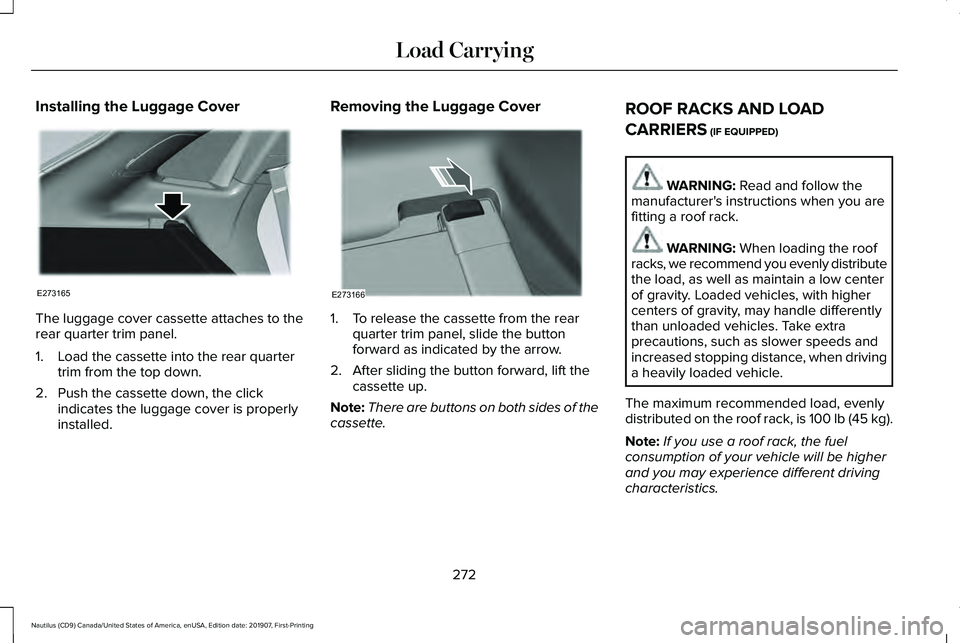
Installing the Luggage Cover
The luggage cover cassette attaches to the
rear quarter trim panel.
1. Load the cassette into the rear quarter
trim from the top down.
2. Push the cassette down, the click indicates the luggage cover is properly
installed. Removing the Luggage Cover
1. To release the cassette from the rear
quarter trim panel, slide the button
forward as indicated by the arrow.
2. After sliding the button forward, lift the cassette up.
Note: There are buttons on both sides of the
cassette. ROOF RACKS AND LOAD
CARRIERS (IF EQUIPPED) WARNING:
Read and follow the
manufacturer's instructions when you are
fitting a roof rack. WARNING:
When loading the roof
racks, we recommend you evenly distribute
the load, as well as maintain a low center
of gravity. Loaded vehicles, with higher
centers of gravity, may handle differently
than unloaded vehicles. Take extra
precautions, such as slower speeds and
increased stopping distance, when driving
a heavily loaded vehicle.
The maximum recommended load, evenly
distributed on the roof rack, is 100 lb (45 kg).
Note: If you use a roof rack, the fuel
consumption of your vehicle will be higher
and you may experience different driving
characteristics.
272
Nautilus (CD9) Canada/United States of America, enUSA, Edition date: 201907, First-Printing Load CarryingE273165 E273166
Page 276 of 596
Note:
Never place loads directly on the roof
panel. The roof panel is not designed to
directly carry a load.
You must place loads directly on the
crossbars fitted to the roof rack side rails.
When using the roof rack system, we
recommend that you use genuine Ford
accessory crossbars specifically designed
for your vehicle.
Make sure that you securely fasten the load.
Check the tightness of the load before
driving and at each fuel stop.
LOAD LIMIT
Vehicle Loading - with and without a
Trailer
This section guides you in the proper
loading of your vehicle, trailer, or both.
Keep your loaded vehicle weight within
its design rating capability, with or
without a trailer. Properly loading your
vehicle provides maximum return of
vehicle design performance. Before you load your vehicle, become familiar with
the following terms for determining your
vehicle
’s weight rating, with or without
a trailer, from the vehicle ’s Tire and
Loading Information label or Safety
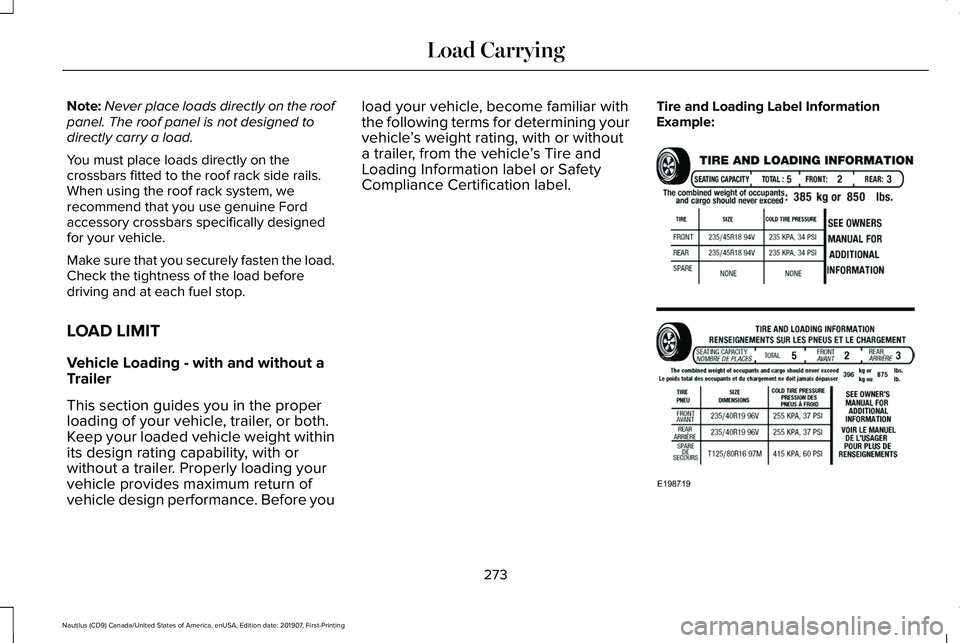
Compliance Certification label. Tire and Loading Label Information
Example:
273
Nautilus (CD9) Canada/United States of America, enUSA, Edition date: 201907, First-Printing Load CarryingE198719
Page 280 of 596
198 - 540 = -103 kilograms. You will need
to reduce the load weight by at least
240 pounds (104 kilograms). If you
remove three 100-pound (45-kilogram)
cement bags, then the load calculation
would be:1400 - (2 x 220) - (9 x 100) =
1400 - 440 - 900 = 60 pounds. Now you
have the load capacity to transport the
cement and your friend home. In metric
units, the calculation would be: 635
kilograms - (2 x 99 kilograms) - (9 x 45
kilograms) = 635 - 198 - 405 = 32
kilograms.
The above calculations also assume that
the loads are positioned in your vehicle
in a manner that does not overload the
front or the rear gross axle weight rating
specified for your vehicle on the Safety
Compliance Certification label.
Special Loading Instructions for
Owners of Pick-up Trucks and Utility-
type Vehicles WARNING: When loading the
roof racks, we recommend you evenly
distribute the load, as well as maintain
a low center of gravity. Loaded
vehicles, with higher centers of gravity,
may handle differently than unloaded
vehicles. Take extra precautions, such
as slower speeds and increased
stopping distance, when driving a
heavily loaded vehicle.
277
Nautilus (CD9) Canada/United States of America, enUSA, Edition date: 201907, First-Printing Load Carrying
Page 349 of 596
•
Do not allow wax to come in contact with
any non-body (low-gloss black) colored
trim. The wax will discolor or stain the
parts over time.
•Roof racks.
• Bumpers.
• Grained door handles.
• Side moldings.
• Mirror housings.
• Windshield cowl area.
• Do not apply wax to glass areas.
• After waxing, your car's paint should feel
smooth, and be free of streaks and
smudges.
CLEANING THE ENGINE
Engines are more efficient when they are
clean because grease and dirt buildup keep
the engine warmer than normal. When washing:
•
Take care when using a power washer
to clean the engine. The high-pressure
fluid could penetrate the sealed parts
and cause damage.
• Do not spray a hot engine with cold water
to avoid cracking the engine block or
other engine components.
• Spray Motorcraft Engine Shampoo and
Degreaser on all parts that require
cleaning and pressure rinse clean. In
Canada, use Motorcraft Engine Shampoo.
Note: If your vehicle has an engine cover
remove the cover before application of
Motorcraft Engine Shampoo and Degreaser.
Immediately rinse away any over spray.
• Never wash or rinse the engine while it
is hot or running; water in the running
engine may cause internal damage.
• Never wash or rinse any ignition coil,
spark plug wire or spark plug well, or the
area in and around these locations.
• Cover the battery, power distribution box,
and air filter assembly to prevent water
damage when cleaning the engine. CLEANING THE WINDOWS AND
WIPER BLADES
Car wash chemicals and environmental
fallout can result in windshield and wiper
blade contamination. Dirty windshield and
wipers will result in poor windshield wiper
operation. Keep the windshield and wiper
blades clean to maintain windshield wiper
performance.
To clean the windshield and wiper blades:
•
Clean the windshield with a non-abrasive
glass cleaner. When cleaning the interior
of the windshield, avoid getting any glass
cleaner on the instrument panel or door
panels. Wipe any glass cleaner off these
surfaces immediately.
• For windshields contaminated with tree
sap, chemicals, wax or bugs, clean the
entire windshield using steel wool (no
greater than 0000 grade) in a circular
motion and rinse with water.
• Clean the wiper blades with isopropyl
rubbing alcohol or windshield washer
concentrate.
346
Nautilus (CD9) Canada/United States of America, enUSA, Edition date: 201907, First-Printing Vehicle Care
Page 589 of 596
Power Steering....................................................136
Pre-Collision Assist..............................................137
Remote Start.........................................................137
Seats.......................................................................137
Stability Control....................................................138
Starting System ...................................................138
Tire Pressure Monitoring System....................139
Transmission.........................................................139
Installing Child Restraints.............................23 Child Seats..............................................................23
Using Lap and Shoulder Belts...........................23
Using Lower Anchors and Tethers for
CHildren (LATCH).............................................26
Using Tether Straps..............................................28
Instrument Cluster........................................109
Instrument Lighting Dimmer........................96
Instrument Panel..............................................19
Interior Lamps
..................................................98
Front Interior Lamp...............................................98
Interior Lamp Function........................................99
Rear Interior Lamps..............................................99
Switching All of the Interior Lamps Off...........99
Switching All of the Interior Lamps On...........99
Switching the Individual Map Lamps On and
Off........................................................................\
.99
Interior Mirror
.................................................106
Auto-Dimming Mirror..........................................106
Introduction
.........................................................7 J
Jump Starting the Vehicle..........................290
Connecting the Jumper Cables......................
291
Jump Starting.......................................................291
Preparing Your Vehicle.....................................290
Removing the Jumper Cables........................292
K
Keyless Entry....................................................74 SECURICODE™ Keyless Entry Keypad.............
74
Keyless Starting
.............................................172
Ignition Modes......................................................172
Keys and Remote Controls..........................58
L
Lane Keeping System
..................................247
Switching the System On and Off..................248
Liftgate...............................................................78
Lighting Control
...............................................94
Flashing the Headlamp High Beam.................95
Headlamp High Beam.........................................95
Lighting..............................................................94 General Information.............................................94
Lincoln Automotive Financial Services......14 Lincoln Protect
..............................................492
Lincoln Protect (CANADA ONLY)....................493
Lincoln Protect Extended Service Plans (U.S.
Only)..................................................................492
Load Carriers See: Roof Racks and Load Carriers...............272
Load Carrying
................................................270
Load Limit.......................................................273
Special Loading Instructions for Owners of
Pick-up Trucks and Utility-type
Vehicles............................................................277
Vehicle Loading - with and without a Trailer.................................................................273
Locking and Unlocking..................................70 Activating Intelligent Access..............................
72
Autolock..................................................................73
Auto Relock............................................................73
Autounlock..............................................................74
Battery Saver..........................................................74
Illuminated Entry....................................................74
Illuminated Exit.......................................................74
Locking and Unlocking the Doors with the Key Blade.............................................................71
Power Door Locks................................................70
Remote Control.....................................................70
Smart Unlocks for Intelligent Access Keys......................................................................73
586
Nautilus (CD9) Canada/United States of America, enUSA, Edition date: 201907, First-Printing Index
Page 592 of 596
Reporting Safety Defects (Canada
Only)...............................................................301
Reporting Safety Defects (U.S. Only).......301
Resuming the Set Speed...........................235
Roadside Assistance...................................288 Vehicles Sold in Canada: Getting Roadside
Assistance.......................................................289
Vehicles sold in the United States: Getting Roadside Assistance.....................................288
Vehicles Sold in the United States: Using Roadside Assistance.....................................288
Roadside Emergencies
...............................288
Roof Racks and Load Carriers...................272
Running-In See: Breaking-In.................................................285
Running Out of Fuel.....................................183 Adding Fuel From a Portable Fuel
Container..........................................................183
Filling a Portable Fuel Container.....................183
S
Safety Canopy™
...............................................52
Safety Precautions.........................................181
Satellite Radio...............................................424 Satellite Radio Electronic Serial Number
(ESN)..................................................................425
Satellite Radio Reception Factors..................424 SiriusXM Satellite Radio Service....................425
Troubleshooting..................................................426
Scheduled Maintenance Record..............507
Scheduled Maintenance............................495
Seatbelt Extensions
........................................43
Seatbelt Height Adjustment.........................39
Seatbelt Reminder
...........................................41
Belt-Minder™............................................................41
Seatbelts...........................................................36 Principle of Operation..........................................36
Seatbelt Warning Lamp and Indicator Chime..............................................................40
Conditions of operation......................................40
Seats.................................................................147
Security.............................................................82
Settings............................................................471 911 Assist................................................................471
Ambient Lighting................................................472
Audio.......................................................................471
Automatic Updates.............................................471
Bluetooth...............................................................471
Charge Settings...................................................471
Clock.......................................................................471
Display....................................................................471
Driver Assist..........................................................471
General...................................................................471
Lincoln Way...........................................................471
Message Center.................................................472 Mobile Apps..........................................................471
Multi Contour Seats...........................................472
Navigation.............................................................471
Personal Profiles.................................................472
Phone......................................................................471
Seats......................................................................472
Sound......................................................................471
Valet Mode...........................................................472
Vehicle....................................................................471
Voice Control........................................................471
Setting the Cruise Control Speed............234 Changing the Set Speed..................................234
Side Airbags
......................................................51
Side Sensing System...................................218 Object Distance Indicator.................................219
Sitting in the Correct Position.....................147
Snow Chains See: Using Snow Chains..................................
370
Spare Wheel See: Changing a Road Wheel.........................376
Special Notices
................................................15
New Vehicle Limited Warranty...........................15
Notice to Owners of Pickup Trucks and Utility
Type Vehicles.....................................................16
On Board Diagnostics Data Link Connector...........................................................16
Special Instructions...............................................15
Using Your Vehicle as an Ambulance..............
16
589
Nautilus (CD9) Canada/United States of America, enUSA, Edition date: 201907, First-Printing Index