using key LINCOLN NAUTILUS 2020 Owners Manual
[x] Cancel search | Manufacturer: LINCOLN, Model Year: 2020, Model line: NAUTILUS, Model: LINCOLN NAUTILUS 2020Pages: 596, PDF Size: 5.88 MB
Page 4 of 596
Introduction
About This Manual
...........................................7
Symbols Glossary .............................................
7
Data Recording ...............................................
10
Perchlorate .......................................................
14
Lincoln Automotive Financial Services ........................................................................\
..
14
Replacement Parts Recommendation ........................................................................\
..
15
Special Notices ...............................................
15
Mobile Communications Equipment .........
16
Export Unique Options ..................................
17
Environment
Protecting the Environment .........................
18
At a Glance
Instrument Panel .............................................
19
Child Safety
General Information .......................................
21
Installing Child Restraints ............................
23
Booster Seats .................................................
30Child Restraint Positioning
..........................
32
Child Safety Locks .........................................
34
Seatbelts
Principle of Operation ..................................
36
Fastening the Seatbelts ...............................
37
Seatbelt Height Adjustment .......................
39
Seatbelt Warning Lamp and Indicator Chime ...........................................................
40
Seatbelt Reminder ..........................................
41
Child Restraint and Seatbelt Maintenance ........................................................................\
.
42
Seatbelt Extensions ......................................
43
Personal Safety System ™
Personal Safety System ™.............................
44
Supplementary Restraints System
Principle of Operation ..................................
45
Driver and Passenger Airbags ...................
46
Front Passenger Sensing System .............
48
Side Airbags .....................................................
51Driver and Passenger Knee Airbags
........
52
Safety Canopy™ ..............................................
52
Crash Sensors and Airbag Indicator .........
54
Airbag Disposal ..............................................
55
911 Assist
What Is 911 Assist ...........................................
56
Emergency Call Requirements ..................
56
Emergency Call Limitations .........................
57
Keys and Remote Controls
General Information on Radio Frequencies ........................................................................\
58
Remote Control ..............................................
58
Replacing a Lost Key or Remote Control ........................................................................\
.
64
MyKey™
Principle of Operation ..................................
65
Creating a MyKey ..........................................
66
Clearing All MyKeys ......................................
67
Checking MyKey System Status ................
67
Using MyKey With Remote Start Systems ........................................................................\
68
1
Nautilus (CD9) Canada/United States of America, enUSA, Edition date: 201907, First-Printing Table of Contents
Page 6 of 596
Instrument Cluster
Gauges
...........................................................109
Warning Lamps and Indicators ...................
111
Audible Warnings and Indicators ..............
115
Information Displays
General Information ......................................
116
Information Messages ................................
122
Climate Control
Automatic Climate Control ........................
142
Hints on Controlling the Interior Climate .......................................................................
143
Heated Windshield ......................................
144
Heated Rear Window ..................................
144
Heated Exterior Mirrors ..............................
144
Cabin Air Filter ..............................................
145
Remote Start ..................................................
145
Seats
Sitting in the Correct Position ...................
147
Head Restraints ............................................
148
Power Seats ....................................................
151Memory Function
.........................................
154
Rear Seats ......................................................
158
Heated Seats ................................................
159
Climate Controlled Seats ...........................
160
Garage Door Opener
Universal Garage Door Opener ...............
162
Auxiliary Power Points
Auxiliary Power Points ................................
166
Wireless Accessory Charging ...................
167
Storage Compartments
Glove Compartment ....................................
170
Center Console .............................................
170
Overhead Console ........................................
171
Rear Seat Armrest .........................................
171
Starting and Stopping the Engine
General Information .....................................
172
Keyless Starting ............................................
172
Starting a Gasoline Engine ........................
173Engine Block Heater
...................................
176
Unique Driving Characteristics
Auto-Start-Stop .............................................
178
Fuel and Refueling
Safety Precautions ........................................
181
Fuel Quality ....................................................
182
Fuel Filler Funnel Location ........................
182
Running Out of Fuel ....................................
183
Refueling ........................................................
184
Fuel Consumption ........................................
187
Engine Emission Control
Emission Law .................................................
188
Catalytic Converter ......................................
189
Transmission
Automatic Transmission .............................
192
All-Wheel Drive
Using All-Wheel Drive .................................
199
3
Nautilus (CD9) Canada/United States of America, enUSA, Edition date: 201907, First-Printing Table of Contents
Page 63 of 596
WARNING: If the battery
compartment does not securely close, stop
using the remote control and replace it as
soon as possible. In the meantime, keep
the remote control away from children.
Failure to follow this instruction could result
in personal injury or death.
Note: Refer to local regulations when
disposing of remote control batteries.
Note: Do not wipe off any grease on the
battery terminals or on the back surface of
the circuit board.
Note: Replacing the battery does not erase
the programmed key from your vehicle. The
remote control should operate normally.
A message appears in the information
display when the remote control battery is
low.
See General Information (page 116).
The remote control uses one coin-type
three-volt lithium battery CR2450 or
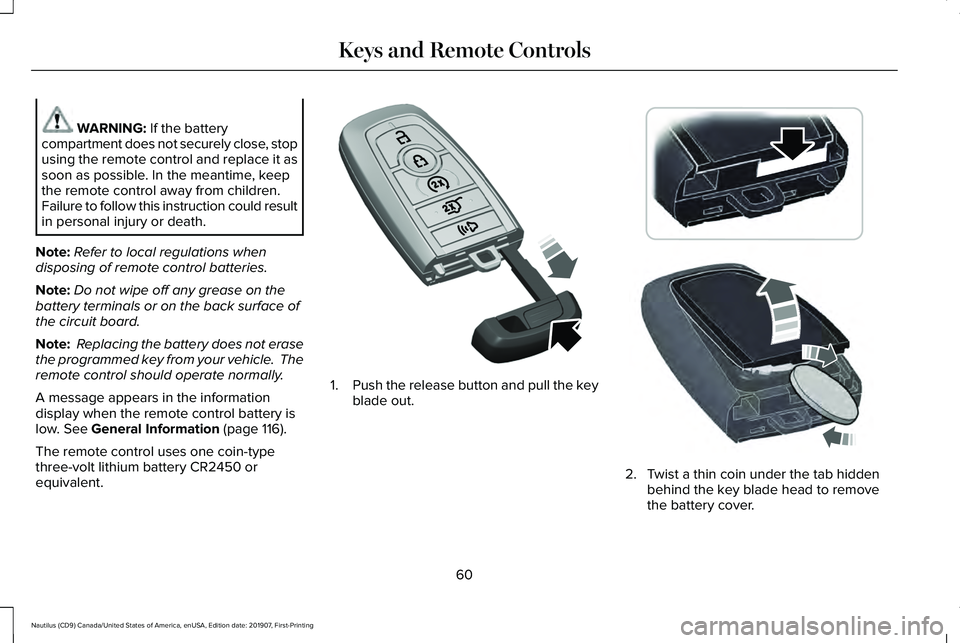
equivalent. 1.
Push the release button and pull the key
blade out. 2. Twist a thin coin under the tab hidden
behind the key blade head to remove
the battery cover.
60
Nautilus (CD9) Canada/United States of America, enUSA, Edition date: 201907, First-Printing Keys and Remote ControlsE305199 E303824
Page 64 of 596
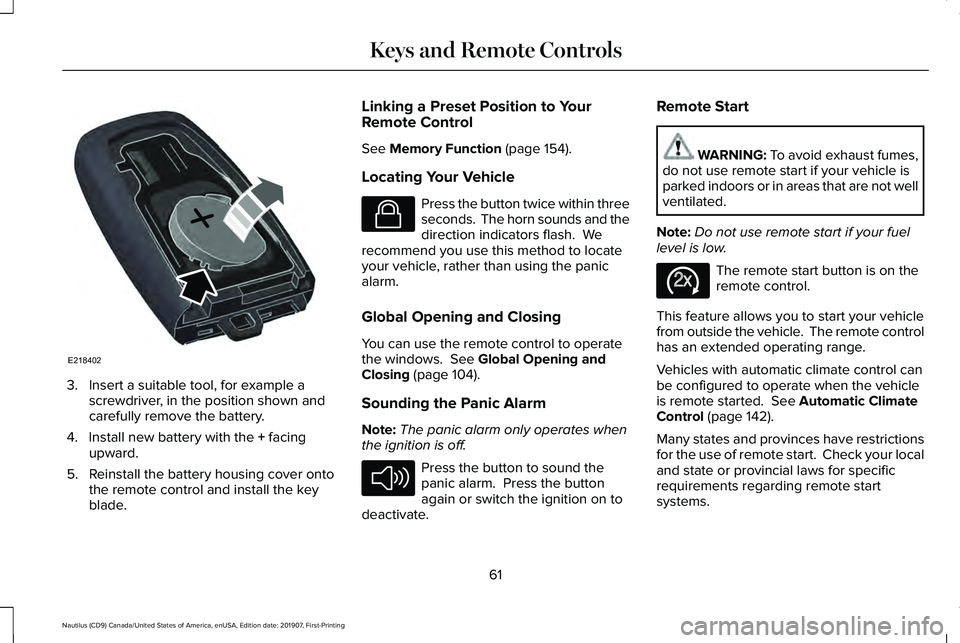
3. Insert a suitable tool, for example a
screwdriver, in the position shown and
carefully remove the battery.
4. Install new battery with the + facing
upward.
5. Reinstall the battery housing cover onto the remote control and install the key
blade. Linking a Preset Position to Your
Remote Control
See
Memory Function (page 154).
Locating Your Vehicle Press the button twice within three
seconds. The horn sounds and the
direction indicators flash. We
recommend you use this method to locate
your vehicle, rather than using the panic
alarm.
Global Opening and Closing
You can use the remote control to operate
the windows.
See Global Opening and
Closing (page 104).
Sounding the Panic Alarm
Note: The panic alarm only operates when
the ignition is off. Press the button to sound the
panic alarm. Press the button
again or switch the ignition on to
deactivate. Remote Start WARNING:
To avoid exhaust fumes,
do not use remote start if your vehicle is
parked indoors or in areas that are not well
ventilated.
Note: Do not use remote start if your fuel
level is low. The remote start button is on the
remote control.
This feature allows you to start your vehicle
from outside the vehicle. The remote control
has an extended operating range.
Vehicles with automatic climate control can
be configured to operate when the vehicle
is remote started.
See Automatic Climate
Control (page 142).
Many states and provinces have restrictions
for the use of remote start. Check your local
and state or provincial laws for specific
requirements regarding remote start
systems.
61
Nautilus (CD9) Canada/United States of America, enUSA, Edition date: 201907, First-Printing Keys and Remote ControlsE218402 E138623 E138624 E138625
Page 68 of 596
PRINCIPLE OF OPERATION
MyKey allows you to program keys with
restricted driving modes to promote good
driving habits. All but one of the keys can be
activated with these restricted modes.
Any keys that remain unprogrammed are
referred to as administrator keys or admin
keys. They can be used to:
•
Create a MyKey.
• Program configurable MyKey settings.
• Clear all MyKey features.
When you have created a MyKey, you can
access the following information by using
the information display to determine:
• How many admin keys and MyKeys are
programmed to your vehicle.
• The total distance your vehicle traveled
with a MyKey.
Note: Switch the vehicle on to use the
system.
Note: All MyKeys are programmed to the
same settings. You cannot program them
individually. Note:
For vehicles equipped with
push-button start, when both a MyKey and
an admin remote transmitter are present,
the admin remote transmitter will be
recognized by the vehicle while switching
the vehicle on to start the vehicle.
Non-configurable Settings
The following settings cannot be changed
by an admin key user:
• Safety belt reminder. You cannot disable
this feature. The audio system will mute
when the driver and front seat
passengers ’ safety belts are not fastened.
• Early low fuel or charge. The low-fuel or
low charge warning activates earlier,
giving the MyKey user more time to refuel
or recharge.
• Restricted touchscreen operation in some
markets. For example, MyKey may
prevent manual navigation destination
input while the vehicle is in any gear
other than park (P) or when the vehicle
reaches a certain rate of speed.
• Satellite radio adult content restrictions,
if equipped on your vehicle. Note:
Audio system may not mute on
vehicles equipped with a basic AM/FM radio.
Note: You may be able to turn the lane
departure warning feature off, but feature
will automatically re-activate with every new
key cycle.
Configurable Settings
With an admin key, you can configure certain
MyKey settings when you first create a
MyKey and before you recycle the key or
restart the vehicle. You can also change the
settings afterward with an admin key.
Note: Available vehicle features will appear
in your information display, providing choices
to switch them on or off, or to select a more
specific setting.
• A vehicle speed limit can be set.
Warnings will be shown in the display
followed by an audible tone when your
vehicle reaches the set speed. You
cannot override the set speed by fully
depressing the accelerator pedal or by
setting cruise control.
65
Nautilus (CD9) Canada/United States of America, enUSA, Edition date: 201907, First-Printing MyKey™
Page 70 of 596
Programming and Changing
Configurable Settings
Use the information display to access your
configurable MyKey settings.
1.
Switch the ignition on using an admin key
or transmitter you want to program.
2. Access the main menu in the information
display and then scroll through the
menus to change the settings of your
MyKey. See Information Displays (page
116).
3. Follow the instructions in the display. The
programmed restrictions apply when you
switch the vehicle off, open and close the
driver door and restart your vehicle with
the programmed key or transmitter.
Note: You can clear or change your MyKey
settings at any time during the same key
cycle as you created the MyKey. Once you
have switched the vehicle off, however, you
will need an admin key to change or clear
your MyKey settings. When you make any
changes to your MyKey settings, you change
the settings for every MyKey. You cannot
make individual changes to apply to certain
MyKeys. CLEARING ALL MYKEYS
When you clear your MyKeys, you remove
all restrictions and return all MyKeys to their
original admin key status at once. To clear
all MyKeys of all MyKey settings, use the
information display.
1. Switch the ignition on using an admin
key.
2. Access the main menu in the information
display and then scroll through the
menus to begin clearing your MyKey
programming. See Information Displays
(page
116).
3. Follow the instructions in the display.
4. A confirmation message appears in the display after you finish clearing your
MyKeys.
Note: When you clear your MyKeys, you
remove all restrictions and return all MyKeys
to their original admin key status. You cannot
remove the MyKey restrictions individually. CHECKING MYKEY SYSTEM
STATUS
You can find information about your
programmed MyKeys by using the
information display.
See Information
Displays (page 116).
MyKey Distance
Tracks the distance when drivers use a
MyKey. The only way to delete the
accumulated distance is by using an admin
key to clear all MyKeys. If the distance does
not accumulate as expected, then the
intended user is not using the MyKey, or an
admin key user recently cleared and then
recreated a MyKey.
Number of MyKeys
Indicates the number of MyKeys
programmed to your vehicle. Use this feature
to detect how many MyKeys you have for
your vehicle and determine when all MyKeys
have been deleted.
67
Nautilus (CD9) Canada/United States of America, enUSA, Edition date: 201907, First-Printing MyKey™
Page 71 of 596
Number of Admin Keys
Indicates how many admin keys are
programmed to your vehicle. Use this feature
to determine how many admin keys you have
for your vehicle, and detect if an additional
MyKey has been programmed.
USING MYKEY WITH REMOTE
START SYSTEMS
MyKey is not compatible with non
Lincoln-approved, aftermarket remote start
systems. If you choose to install a remote
start system, see an authorized dealer for a
Lincoln-approved remote start system.
MYKEY – TROUBLESHOOTING Potential Causes
Condition
The key or transmitter used to start the vehicle does not have admin privileg\
es.
I cannot create a MyKey.
Vehicles with keyless start: Make sure you place the transmitter into the backup slot. See Passive
Anti-Theft System (page 82).
The key or transmitter used to start the vehicle is the only admin key. There always has to be at
least one admin key.
The passive anti-theft system is disabled or in unlimited mode.
The transmitter used to start your vehicle does not have admin privilege\
s.
I cannot program the configurable
settings. There are no MyKeys programmed to the vehicle.
See Creating a MyKey (page 66).
The key or transmitter used to start the vehicle does not have admin privileg\
es.
I cannot clear the MyKeys.
No MyKeys are created.
See Creating a MyKey (page 66).
Purchase a new key or transmitter from an authorized dealer.
I lost the only admin key.
68
Nautilus (CD9) Canada/United States of America, enUSA, Edition date: 201907, First-Printing MyKey™
Page 72 of 596
Potential Causes
Condition
Program a spare key or transmitter. You may need to see an authorized dealer. See Passive Anti-
Theft System (page 82).
I lost a key.
The MyKey user is not using the MyKey.
The MyKey distance does not accumu-
late. An admin key holder cleared the MyKeys and created new MyKeys.
The key system has been reset.
An admin transmitter is present at vehicle start.
No MyKey functions with the trans-
mitter. There are no MyKeys programmed to your vehicle.
See Creating a MyKey (page 66).
69
Nautilus (CD9) Canada/United States of America, enUSA, Edition date: 201907, First-Printing MyKey™
Page 73 of 596
LOCKING AND UNLOCKING
You can use the power door lock control or
the remote control to lock and unlock your
vehicle.
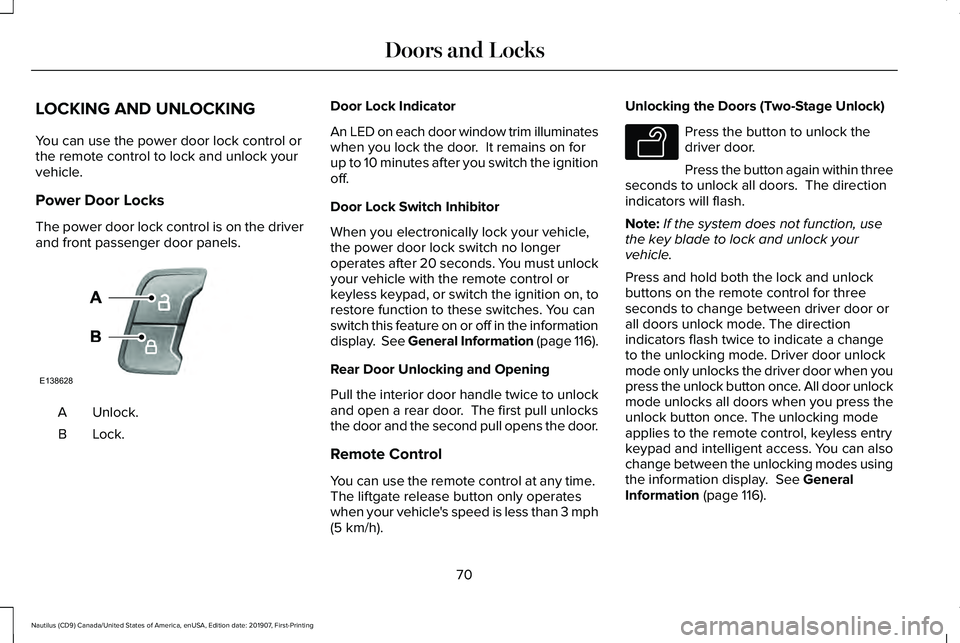
Power Door Locks
The power door lock control is on the driver
and front passenger door panels.
Unlock.
A
Lock.B Door Lock Indicator
An LED on each door window trim illuminates
when you lock the door. It remains on for
up to 10 minutes after you switch the ignition
off.
Door Lock Switch Inhibitor
When you electronically lock your vehicle,
the power door lock switch no longer
operates after 20 seconds. You must unlock
your vehicle with the remote control or
keyless keypad, or switch the ignition on, to
restore function to these switches. You can
switch this feature on or off in the information
display. See General Information (page 116).
Rear Door Unlocking and Opening
Pull the interior door handle twice to unlock
and open a rear door. The first pull unlocks
the door and the second pull opens the door.
Remote Control
You can use the remote control at any time.
The liftgate release button only operates
when your vehicle's speed is less than 3 mph
(5 km/h). Unlocking the Doors (Two-Stage Unlock) Press the button to unlock the
driver door.
Press the button again within three
seconds to unlock all doors. The direction
indicators will flash.
Note: If the system does not function, use
the key blade to lock and unlock your
vehicle.
Press and hold both the lock and unlock
buttons on the remote control for three
seconds to change between driver door or
all doors unlock mode. The direction
indicators flash twice to indicate a change
to the unlocking mode. Driver door unlock
mode only unlocks the driver door when you
press the unlock button once. All door unlock
mode unlocks all doors when you press the
unlock button once. The unlocking mode
applies to the remote control, keyless entry
keypad and intelligent access. You can also
change between the unlocking modes using
the information display.
See General
Information (page 116).
70
Nautilus (CD9) Canada/United States of America, enUSA, Edition date: 201907, First-Printing Doors and LocksE138628 E138629
Page 74 of 596
Reprogramming the Unlocking Function
Note:
When you press the unlock button,
either all the doors are unlocked or only the
driver door is unlocked. Pressing the unlock
button again unlocks all the doors.
Press and hold the unlock and lock buttons
on the remote control simultaneously for at
least four seconds with the ignition off. The
direction indicators flash twice to confirm the
change.
To return to the original unlocking function,
repeat the process.
Locking the Doors Press the button to lock all doors.
The direction indicators will flash.
Press the button again within three
seconds to confirm that all the doors are
closed. The doors will lock again, a tone
sounds and the direction indicators will flash
if all the doors and the liftgate are closed.
Note: If the system does not function, use
the key blade to lock and unlock your
vehicle. Mislock
If any door or the liftgate is open, or if the
hood is open on vehicles with an anti-theft
alarm or remote start, a tone sounds and the
direction indicators do not flash. You can
switch this feature on or off in the information
display. See General Information (page 116).
Opening the Liftgate
Press twice within three seconds
to open the liftgate.
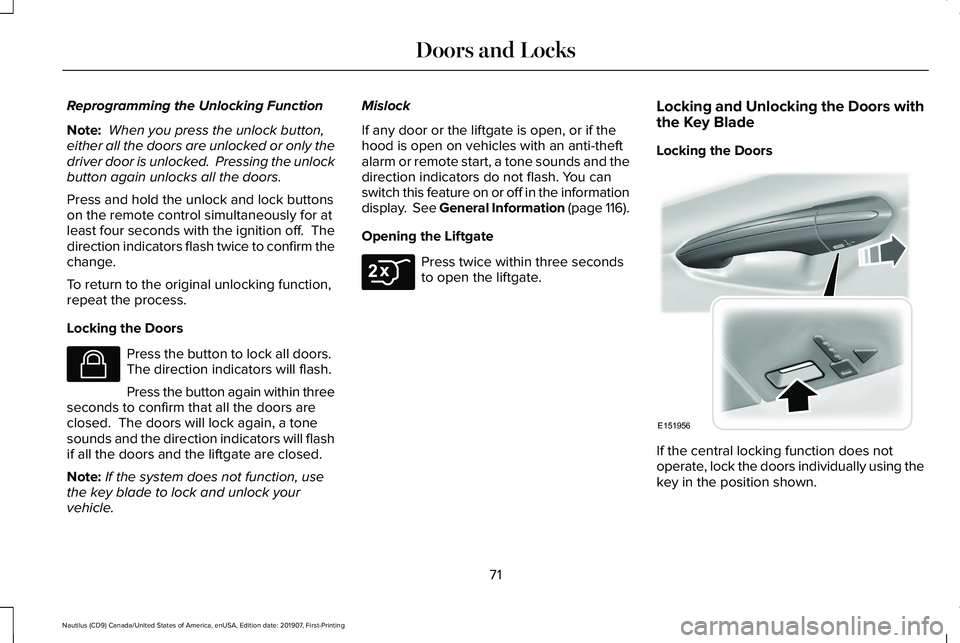
Locking and Unlocking the Doors with
the Key Blade
Locking the Doors
If the central locking function does not
operate, lock the doors individually using the
key in the position shown.
71
Nautilus (CD9) Canada/United States of America, enUSA, Edition date: 201907, First-Printing Doors and LocksE138623 E306276 E151956