wheel LINCOLN NAUTILUS 2021 Owners Manual
[x] Cancel search | Manufacturer: LINCOLN, Model Year: 2021, Model line: NAUTILUS, Model: LINCOLN NAUTILUS 2021Pages: 579, PDF Size: 6.9 MB
Page 399 of 579
11. Loosen each wheel lug nut one-half
turn counterclockwise, but do not
remove them until the wheel is raised
off the ground.
12. If your vehicle has a warning triangle and you are jacking the vehicle on the
roadside shoulder, set the warning
triangle upright on the shoulder of the
road facing the direction of oncoming
traffic. 13.
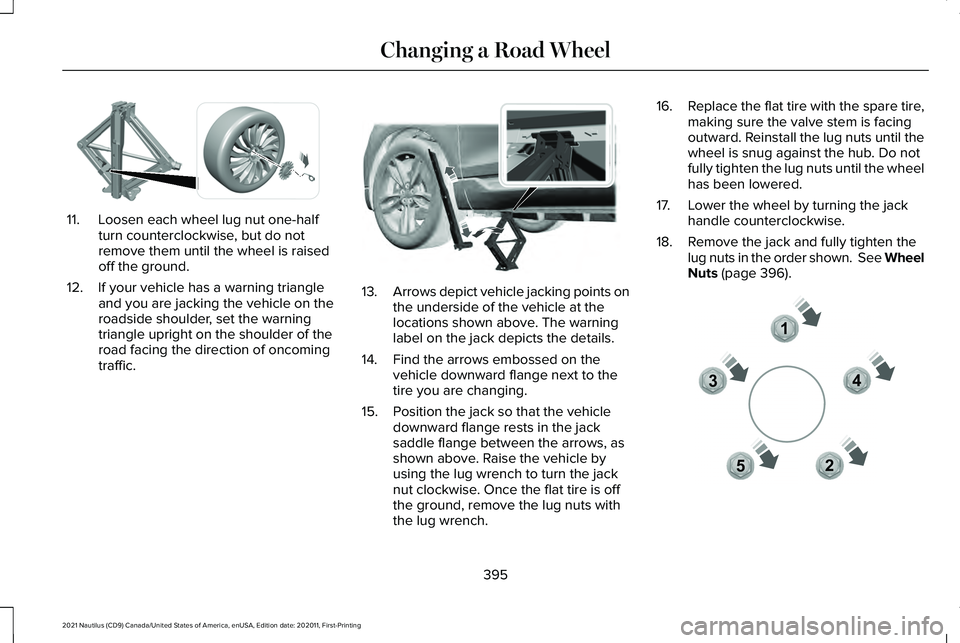
Arrows depict vehicle jacking points on
the underside of the vehicle at the
locations shown above. The warning
label on the jack depicts the details.
14. Find the arrows embossed on the vehicle downward flange next to the
tire you are changing.
15. Position the jack so that the vehicle downward flange rests in the jack
saddle flange between the arrows, as
shown above. Raise the vehicle by
using the lug wrench to turn the jack
nut clockwise. Once the flat tire is off
the ground, remove the lug nuts with
the lug wrench. 16.
Replace the flat tire with the spare tire,
making sure the valve stem is facing
outward. Reinstall the lug nuts until the
wheel is snug against the hub. Do not
fully tighten the lug nuts until the wheel
has been lowered.
17. Lower the wheel by turning the jack handle counterclockwise.
18. Remove the jack and fully tighten the lug nuts in the order shown. See Wheel
Nuts (page 396). 395
2021 Nautilus (CD9) Canada/United States of America, enUSA, Edition date: 202011, First-Printing Changing a Road WheelE294584 E336095 12
3
4
5E306781
Page 400 of 579
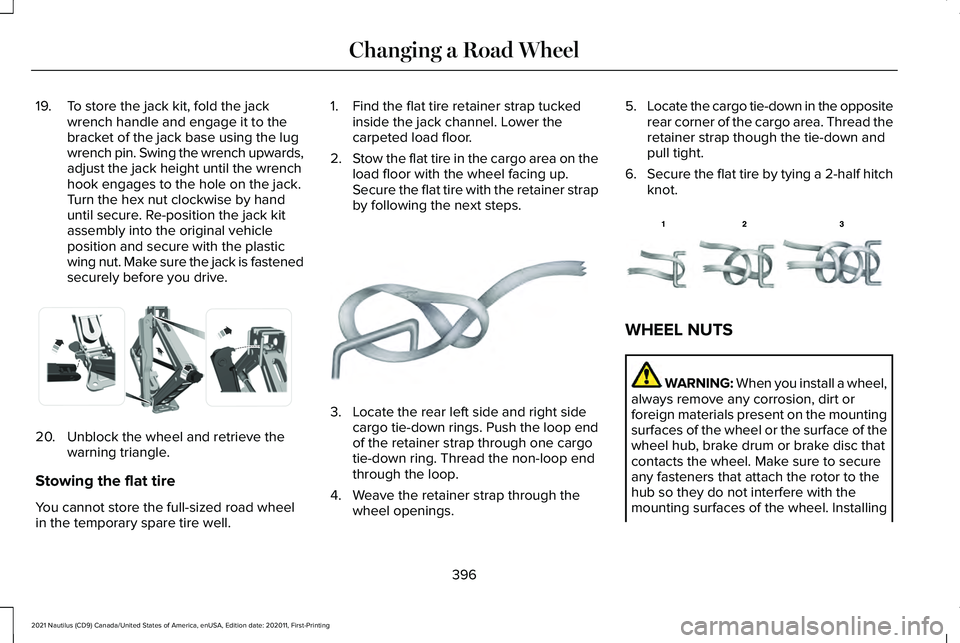
19. To store the jack kit, fold the jack
wrench handle and engage it to the
bracket of the jack base using the lug
wrench pin. Swing the wrench upwards,
adjust the jack height until the wrench
hook engages to the hole on the jack.
Turn the hex nut clockwise by hand
until secure. Re-position the jack kit
assembly into the original vehicle
position and secure with the plastic
wing nut. Make sure the jack is fastened
securely before you drive.20. Unblock the wheel and retrieve the
warning triangle.
Stowing the flat tire
You cannot store the full-sized road wheel
in the temporary spare tire well. 1. Find the flat tire retainer strap tucked
inside the jack channel. Lower the
carpeted load floor.
2. Stow the flat tire in the cargo area on the
load floor with the wheel facing up.
Secure the flat tire with the retainer strap
by following the next steps. 3. Locate the rear left side and right side
cargo tie-down rings. Push the loop end
of the retainer strap through one cargo
tie-down ring. Thread the non-loop end
through the loop.
4. Weave the retainer strap through the wheel openings. 5.
Locate the cargo tie-down in the opposite
rear corner of the cargo area. Thread the
retainer strap though the tie-down and
pull tight.
6. Secure the flat tire by tying a 2-half hitch
knot. WHEEL NUTS
WARNING: When you install a wheel,
always remove any corrosion, dirt or
foreign materials present on the mounting
surfaces of the wheel or the surface of the
wheel hub, brake drum or brake disc that
contacts the wheel. Make sure to secure
any fasteners that attach the rotor to the
hub so they do not interfere with the
mounting surfaces of the wheel. Installing
396
2021 Nautilus (CD9) Canada/United States of America, enUSA, Edition date: 202011, First-Printing Changing a Road WheelE294121 E142906 E143746
Page 401 of 579
wheels without correct metal-to-metal
contact at the wheel mounting surfaces
can cause the wheel nuts to loosen and
the wheel to come off while your vehicle
is in motion, resulting in loss of vehicle
control, personal injury or death.
lb.ft (Nm)
1
Bolt Size
162 lb.ft (220 Nm)
M14 x 1.5
1 Torque specifications are for nut and bolt
threads free of dirt and rust. Use only our
recommended replacement wheel nuts and
or wheel bolts.
Retighten the wheel nuts to the specified
torque within 100 mi (160 km) after any wheel
disturbance, such as tire rotation, changing
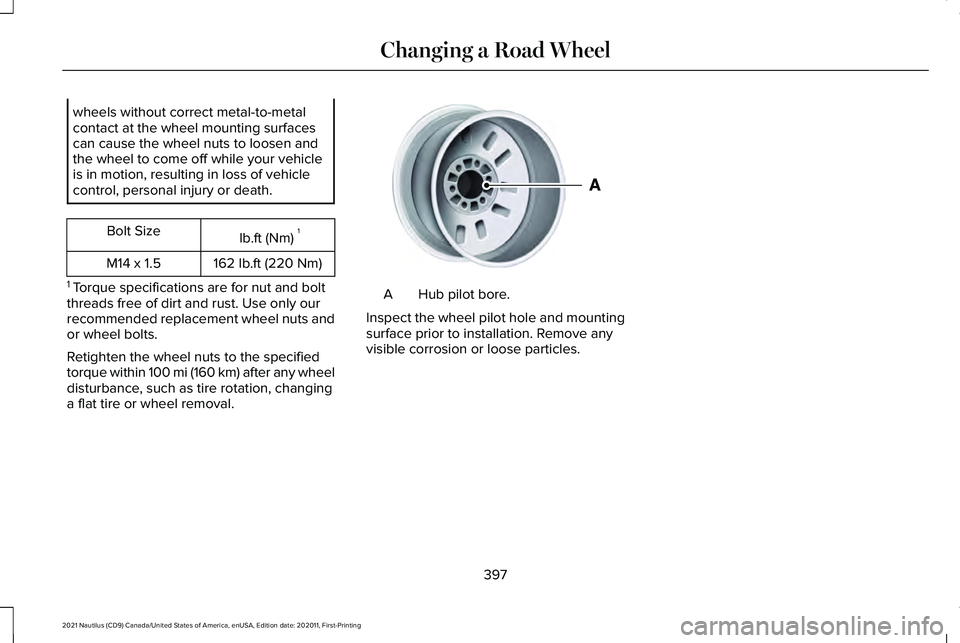
a flat tire or wheel removal. Hub pilot bore.
A
Inspect the wheel pilot hole and mounting
surface prior to installation. Remove any
visible corrosion or loose particles.
397
2021 Nautilus (CD9) Canada/United States of America, enUSA, Edition date: 202011, First-Printing Changing a Road WheelE145950
Page 413 of 579
FUEL TANK CAPACITY
Capacities
Quantity
Variant
18.4 gal (69.7 L)
Front-wheel drive.
18.5 gal (70 L)
All-wheel drive.
409
2021 Nautilus (CD9) Canada/United States of America, enUSA, Edition date: 202011, First-Printing Capacities and Specifications
Page 427 of 579
AUDIO SYSTEM PRECAUTIONS
WARNING: Driving while distracted
can result in loss of vehicle control, crash
and injury. We strongly recommend that
you use extreme caution when using any
device that may take your focus off the
road. Your primary responsibility is the safe
operation of your vehicle. We recommend
against the use of any hand-held device
while driving and encourage the use of
voice-operated systems when possible.
Make sure you are aware of all applicable
local laws that may affect the use of
electronic devices while driving.
Listening to loud audio for long periods of
time could damage your hearing.
SWITCHING THE AUDIO UNIT ON
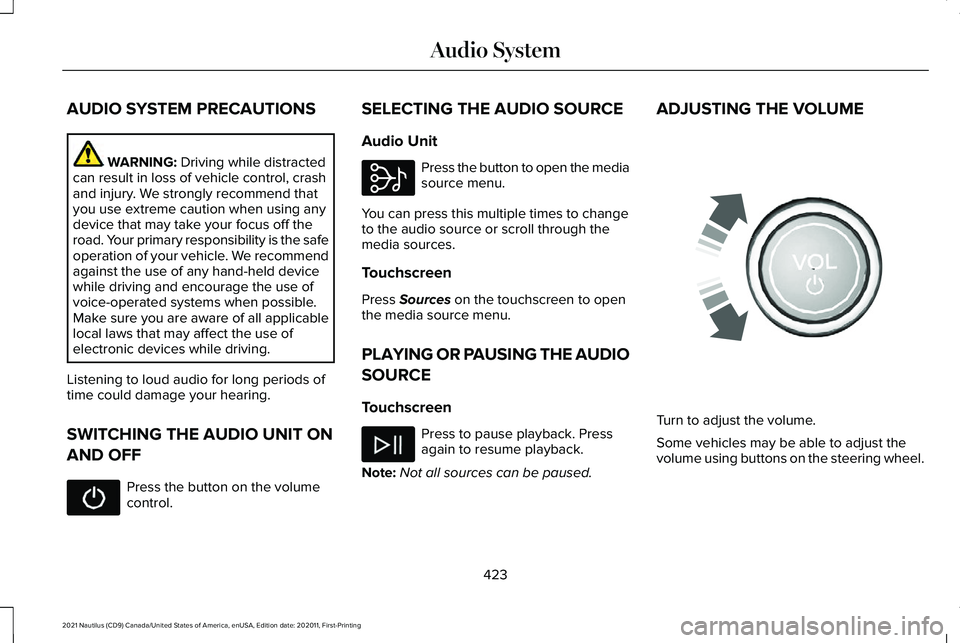
AND OFF Press the button on the volume
control. SELECTING THE AUDIO SOURCE
Audio Unit Press the button to open the media
source menu.
You can press this multiple times to change
to the audio source or scroll through the
media sources.
Touchscreen
Press
Sources on the touchscreen to open
the media source menu.
PLAYING OR PAUSING THE AUDIO
SOURCE
Touchscreen Press to pause playback. Press
again to resume playback.
Note: Not all sources can be paused. ADJUSTING THE VOLUME
Turn to adjust the volume.
Some vehicles may be able to adjust the
volume using buttons on the steering wheel.
423
2021 Nautilus (CD9) Canada/United States of America, enUSA, Edition date: 202011, First-Printing Audio System E308143 E248939
Page 428 of 579
SWITCHING SHUFFLE MODE ON
AND OFF
Press the button on the
touchscreen to switch shuffle
mode on or off.
Note: Not all sources have shuffle mode.
SWITCHING REPEAT MODE ON
AND OFF Press the button on the
touchscreen to switch repeat mode
on or off.
Note: Not all sources have repeat mode.
SETTING A MEMORY PRESET
1. Select a station or channel.
2. Press and hold a memory preset button on the touchscreen.
Note: The audio mutes briefly while the
system saves the preset and returns once it
is stored. Note:
You can save presets from multiple
sources to the memory preset bar.
MUTING THE AUDIO Press the button on the steering
wheel to mute the audio.
Press to mute the signal. Press
again to restore the signal.
ADJUSTING THE SOUND
SETTINGS
Balance and Fade (If Equipped)
1. Press
Settings on the touchscreen.
2. Press
Sound Settings.
3. Press
Balance / Fade.
4. Press the arrows to adjust the settings.
Tone Settings
1. Press
Settings on the touchscreen.
2. Press
Sound Settings. 3. Press
Tone Settings.
4. Press the arrows or slider bar to adjust the settings.
Speed Compensated Volume
1. Press
Settings on the touchscreen.
2. Press
Sound Settings.
3. Press
Speed Compensated Volume.
4. Press a setting.
Occupancy Mode
(If Equipped)
1. Press
Settings on the touchscreen.
2. Press
Sound Settings.
3. Press
Occupancy Mode.
4. Press a setting.
Sound Mode
(If Equipped)
1. Press
Settings on the touchscreen.
2. Press
Sound Settings.
3. Press
Sound Mode.
4. Press a setting.
424
2021 Nautilus (CD9) Canada/United States of America, enUSA, Edition date: 202011, First-Printing Audio System
Page 439 of 579
WHAT IS VOICE INTERACTION
Voice Interaction allows you to control
vehicle features using conversational
requests.
SETTING THE WAKE WORD
1. Access the feature drawer on the
touchscreen.
2. Press Settings.
3. Press the Voice button.
4. Select a wake word.
BEGINNING A VOICE
INTERACTION
Say the selected wake word. Press the voice interaction button
on the steering wheel. VOICE INTERACTION EXAMPLES
General Examples Result
Command
The system resetsthe current voice interaction.
Start Over.
The system ends the
current voice interac-tion.
Cancel.
The system goes tothe next page.
Next Page.
The system goes tothe previous page.
Previous Page.
The system displaysa list of available
commands you can use on the current screen.
Help. Entertainment Examples Result
Command
The system playsmusic by the
selected artist.
Play The Beatles.
The system showsmusic by the
selected artist.
Show music by The
Beatles.
The system tunes
the radio to 101.9 FM.
Set the station to
101.9 FM.
The system tunesthe radio to Sirius Channel 2.
Set the station to
Sirius Channel 2.
435
2021 Nautilus (CD9) Canada/United States of America, enUSA, Edition date: 202011, First-Printing Voice InteractionE142599
Page 443 of 579
MAKING AND RECEIVING A
PHONE CALL
Making Calls
To call a number in your contacts, select:
Action and Description
Menu Item
You can then select the
name of the contact you
want to call. Any numbers
stored for that contact
display along with any
stored contact photos. You
can then select the number
that you want to call. The
system begins the call.
Contacts
To call a number from your recent calls,
select: Action and Description
Menu Item
You can then select an entry
that you want to call. The
system begins the call.
Recent Call
List To call a number from your favorites, select: Action and Description
Menu Item
You can then select an entry
that you want to call. The
system begins the call.
Favorites
To call a number that is not stored in your
phone, select: Action and Description
Menu Item
Select the digits of the
number you wish to call.
Phone
Keypad
The system begins the call.
Call
Pressing the backspace button deletes the
last digit you typed.
Receiving Calls
During an incoming call, an audible tone
sounds. Caller information appears in the
display if it is available. To accept the call, select: Menu Item
Accept
Note: You can also accept the call by
pressing the phone button on the steering
wheel.
To reject the call, select: Menu Item
Reject
Ignore the call by doing nothing. The system
logs it as a missed call.
During a Phone Call
During a phone call, the contacts name and
number display on the screen along with the
call duration.
The phone status items are also visible:
• Signal Strength.
• Battery.
439
2021 Nautilus (CD9) Canada/United States of America, enUSA, Edition date: 202011, First-Printing Phone
Page 444 of 579
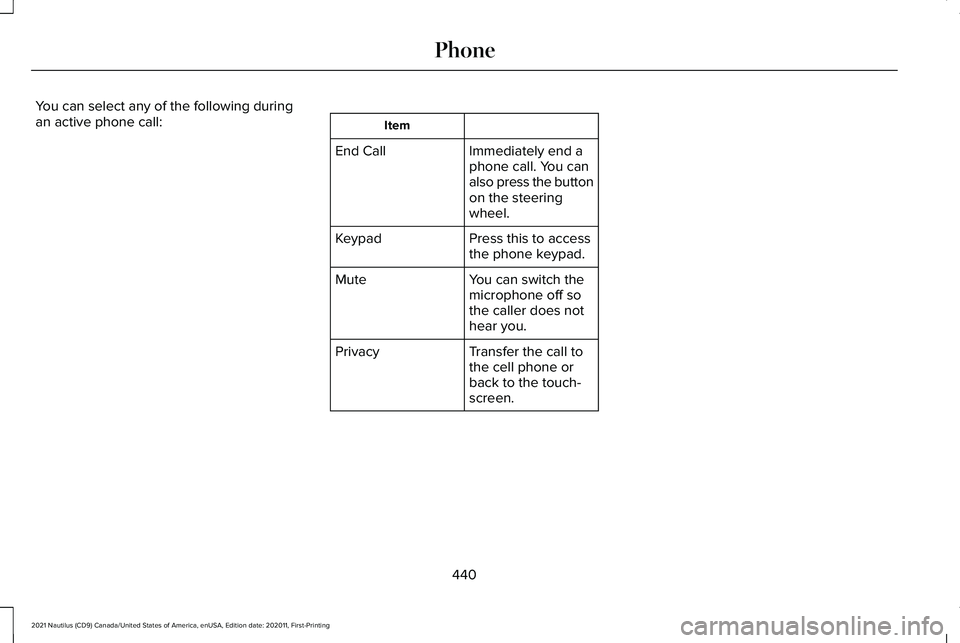
You can select any of the following during
an active phone call:
Item
Immediately end a
phone call. You can
also press the button
on the steering
wheel.
End Call
Press this to access
the phone keypad.
Keypad
You can switch the
microphone off so
the caller does not
hear you.
Mute
Transfer the call to
the cell phone or
back to the touch-
screen.
Privacy
440
2021 Nautilus (CD9) Canada/United States of America, enUSA, Edition date: 202011, First-Printing Phone
Page 469 of 579
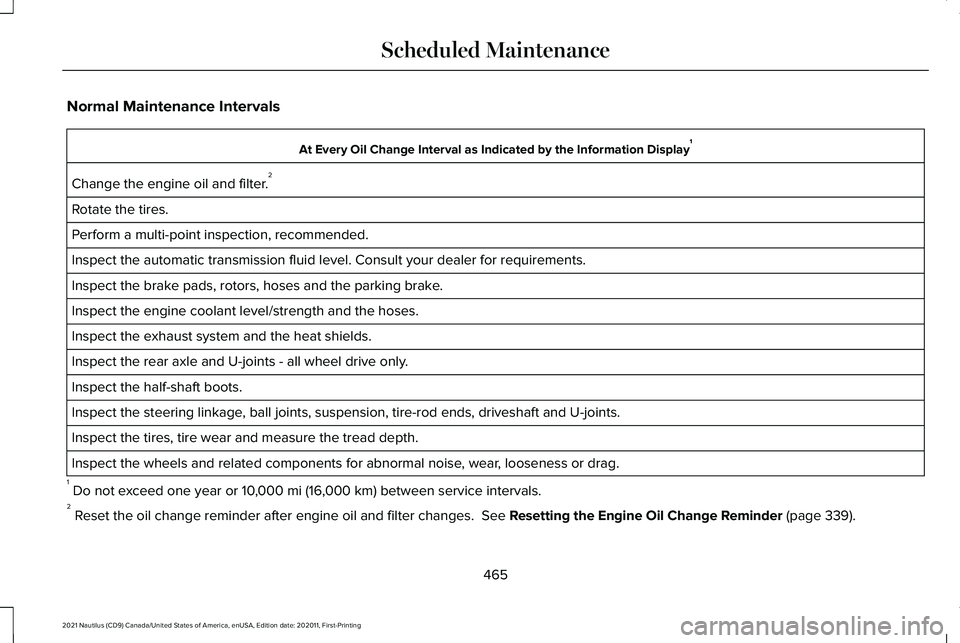
Normal Maintenance Intervals
At Every Oil Change Interval as Indicated by the Information Display
1
Change the engine oil and filter. 2
Rotate the tires.
Perform a multi-point inspection, recommended.
Inspect the automatic transmission fluid level. Consult your dealer for \
requirements.
Inspect the brake pads, rotors, hoses and the parking brake.
Inspect the engine coolant level/strength and the hoses.
Inspect the exhaust system and the heat shields.
Inspect the rear axle and U-joints - all wheel drive only.
Inspect the half-shaft boots.
Inspect the steering linkage, ball joints, suspension, tire-rod ends, driveshaft and U-joints.
Inspect the tires, tire wear and measure the tread depth.
Inspect the wheels and related components for abnormal noise, wear, looseness or drag.
1 Do not exceed one year or 10,000 mi (16,000 km) between service intervals.
2 Reset the oil change reminder after engine oil and filter changes.
See Resetting the Engine Oil Change Reminder (page 339).
465
2021 Nautilus (CD9) Canada/United States of America, enUSA, Edition date: 202011, First-Printing Scheduled Maintenance