tire pressure reset LINCOLN NAUTILUS 2021 Owners Manual
[x] Cancel search | Manufacturer: LINCOLN, Model Year: 2021, Model line: NAUTILUS, Model: LINCOLN NAUTILUS 2021Pages: 579, PDF Size: 6.9 MB
Page 16 of 579
Using the Tire Sealant and Inflator Kit
......................................................................379
Tire Pressure Monitoring System
What Is the Tire Pressure Monitoring System .......................................................
385
Tire Pressure Monitoring System Overview ......................................................................
385
Tire Pressure Monitoring System Precautions ..............................................
386
Tire Pressure Monitoring System Limitations .................................................
387
Viewing the Tire Pressures .......................
387
Resetting Tire Pressure Monitoring System ......................................................................
387
Tire Pressure Monitoring System – Troubleshooting ......................................
388
Changing a Road Wheel
Changing a Flat Tire ....................................
391
Wheel Nuts ...................................................
396
Capacities and Specifications
Engine Specifications - 2.0L .....................
398Engine Specifications - 2.7L
.....................
399
Motorcraft Parts - 2.0L ...............................
400
Motorcraft Parts - 2.7L .................................
401
Engine Oil Capacity and Specification - 2.0L .............................................................
402
Engine Oil Capacity and Specification - 2.7L .............................................................
404
Cooling System Capacity and Specification - 2.0L ..........................................................
407
Cooling System Capacity and Specification - 2.7L ...........................................................
408
Fuel Tank Capacity .....................................
409
Air Conditioning System Capacity and Specification - 2.0L ..................................
410
Air Conditioning System Capacity and Specification - 2.7L ..................................
412
Washer Fluid Specification ........................
413
Brake Fluid Specification ...........................
414
Vehicle Identification
Vehicle Identification Number ..................
416
Connected Vehicle
What Is a Connected Vehicle ....................
417Connected Vehicle Requirements
...........
417
Connected Vehicle Limitations .................
417
Connecting the Vehicle to a Mobile Network ......................................................
417
Connecting the Vehicle to a Wi-Fi Network .......................................................................
417
Connected Vehicle – Troubleshooting .......................................................................
418
Vehicle Wi-Fi Hotspot
Creating a Vehicle Wi-Fi Hotspot .............
421
Changing the Vehicle Wi-Fi Hotspot Name or Password ...............................................
421
Audio System
Audio System Precautions ........................
423
Switching the Audio Unit On and Off ......
423
Selecting the Audio Source .....................
423
Playing or Pausing the Audio Source .....
423
Adjusting the Volume .................................
423
Switching Shuffle Mode On and Off ......
424
Switching Repeat Mode On and Off ......
424
Setting a Memory Preset ...........................
424
Muting the Audio .........................................
424
12
2021 Nautilus (CD9) Canada/United States of America, enUSA, Edition date: 202011, First-Printing Table of Contents
Page 24 of 579
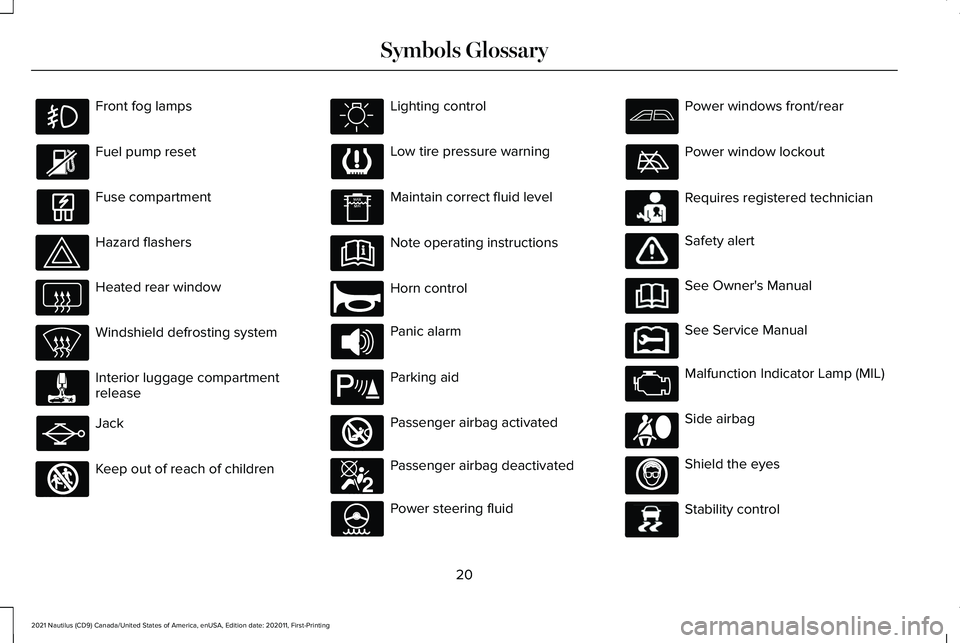
Front fog lamps
Fuel pump reset
Fuse compartment
Hazard flashers
Heated rear window
Windshield defrosting system
Interior luggage compartment
release
Jack
Keep out of reach of children Lighting control
Low tire pressure warning
Maintain correct fluid level
Note operating instructions
Horn control
Panic alarm
Parking aid
Passenger airbag activated
Passenger airbag deactivated
Power steering fluid Power windows front/rear
Power window lockout
Requires registered technician
Safety alert
See Owner's Manual
See Service Manual
Malfunction Indicator Lamp (MIL)
Side airbag
Shield the eyes
Stability control
20
2021 Nautilus (CD9) Canada/United States of America, enUSA, Edition date: 202011, First-Printing Symbols Glossary E161353 E270945 E139213 E270849 E270850 E231159 E231158 E167012 E138639
Page 26 of 579
WARNING: Do not connect wireless
plug-in devices to the data link connector.
Unauthorized third parties could gain
access to vehicle data and impair the
performance of safety related systems.
Only allow repair facilities that follow our
service and repair instructions to connect
their equipment to the data link connector.
We respect your privacy and are committed
to protecting it. The information contained
in this manual was correct at the time of
publication but as technology rapidly
changes, we recommend that you visit the
local Lincoln website for the latest
information.
Your vehicle has electronic control units that
have data recording functionality and the
ability to permanently or temporarily store
data. This data could include information on
the condition and status of your vehicle,
vehicle maintenance requirements, events
and malfunctions. The types of data that can
be recorded are described in this section.
Some of the data recorded is stored in event
logs or error logs. Note:
Error logs are reset following a service
or repair.
Note: We may provide information in
response to requests from law enforcement,
other government authorities and third
parties acting with lawful authority or through
a legal process. Such information could be
used by them in legal proceedings.
Data recorded includes, for example:
• Operating states of system components,
for example fuel level, tire pressure and
battery charge level.
• Vehicle and component status, for
example wheel speed, deceleration,
lateral acceleration and seatbelt status.
• Events or errors in essential systems, for
example headlamps and brakes.
• System responses to driving situations,
for example airbag deployment and
stability control.
• Environmental conditions, for example
temperature. Some of this data, when used in combination
with other information, for example an
accident report, damage to a vehicle or
eyewitness statements, could be associated
with a specific person.
Services That We Provide
If you use our services, we collect and use
data, for example account information,
vehicle location and driving characteristics,
that could identify you. We transmit this data
through a dedicated, protected connection.
We only collect and use data to enable your
use of our services to which you have
subscribed, with your consent or where
permitted by law. For additional information,
see the terms and conditions of the services
to which you have subscribed.
For additional information about our privacy
policy, refer to the local Lincoln website.
22
2021 Nautilus (CD9) Canada/United States of America, enUSA, Edition date: 202011, First-Printing Data Privacy
Page 366 of 579
Hybrid Battery Systems
We recommend the following actions for your
vehicle:
•
When storing your vehicle for greater
than 30 days the state of charge should
be approximately 50%. Additionally we
recommend disconnecting the 12V
battery which will reduce system loads
on the HV battery.
12 Volt Battery
• Check and recharge as necessary. Keep
connections clean.
Note: It is necessary to reset memory
features if you disconnect the battery cables.
Brakes
Make sure the brakes and parking brake
release fully.
Note: If you intend on parking your vehicle
for an extended period after cleaning the
wheels with a wheel cleaner, drive your
vehicle for a few minutes before doing so to
reduce the risk of increased corrosion of the
brake discs, brake pads and linings. Tires
•
Maintain recommended air pressure.
Note: If you intend on parking your vehicle
for an extended period after cleaning the
wheels with a wheel cleaner, drive your
vehicle for a few minutes before doing so.
This reduces the risk of corrosion of the
brake discs, brake pads and linings.
REMOVING YOUR VEHICLE FROM
STORAGE
When your vehicle is ready to come out of
storage, do the following:
• We recommend that you change the
engine oil before you use your vehicle
again.
• Wash your vehicle to remove any dirt or
grease film build-up on window surfaces.
• Check windshield wipers for any
deterioration.
• Check under the hood for any foreign
material that may have collected during
storage such as mice or squirrel nests. •
Check the exhaust for any foreign
material that may have collected during
storage.
• Check tire pressures and set tire inflation
per the Tire Label.
• Check brake pedal operation. Drive your
vehicle 15 ft (4.5 m) back and forth to
remove rust build-up.
• Check fluid levels (including coolant, oil
and gas) to make sure there are no leaks,
and fluids are at recommended levels.
• If you remove the battery, clean the
battery cable ends and check for
damage.
Contact an authorized dealer if you have any
concerns or issues.
362
2021 Nautilus (CD9) Canada/United States of America, enUSA, Edition date: 202011, First-Printing Storing Your Vehicle
Page 380 of 579
Highway Hazards
No matter how carefully you drive, there
is always the possibility that you could
eventually have a flat tire on the
highway. Drive slowly to the closest safe
area out of traffic. This could further
damage the flat tire, but your safety is
more important.
If you feel a sudden vibration or ride
disturbance while driving, or you suspect
your tire or vehicle has been damaged,
immediately reduce your speed. Drive
with caution until you can safely pull off
the road. Stop and inspect the tires for
damage. If a tire is under-inflated or
damaged, deflate it, remove the wheel
and replace it with your spare tire and
wheel. If you cannot detect a cause,
have the vehicle towed to the nearest
repair facility or tire dealer to have the
vehicle inspected.
Tire and Wheel Alignment
A bad jolt from hitting a curb or pothole
can cause the front end of your vehicle
to become misaligned or cause damage
to your tires. If your vehicle seems to
pull to one side when you are driving,
the wheels could be out of alignment.
Have an authorized dealer check the
wheel alignment periodically.
Wheel misalignment in the front or the
rear can cause uneven and rapid
treadwear of your tires and should be
corrected by an authorized dealer.
INSPECTING THE WHEEL VALVE
STEMS
Check the valve stems for holes, cracks,
or cuts that could permit air leakage.
TIRE ROTATION WARNING: If the tire label shows
different tire pressures for the front
and rear tires and the vehicle has a
tire pressure monitoring system, then
you need to update the settings for
the system sensors. Always perform
the system reset procedure after tire
rotation. If you do not reset the system,
it may not provide a low tire pressure
warning when necessary.
Rotating your tires at the recommended
interval will help your tires wear more
evenly, providing better tire performance
and longer tire life.
Note: If your tires show any uneven
wear have the alignment checked by
an authorized dealer before rotating
tires.
Note: If you have a dissimilar spare
wheel and tire assembly, it is intended
for temporary use only and should not
be used in a tire rotation.
376
2021 Nautilus (CD9) Canada/United States of America, enUSA, Edition date: 202011, First-Printing Tire Care
Page 391 of 579
TIRE PRESSURE MONITORING
SYSTEM LIMITATIONS
When the outside temperature drops
significantly, the tire pressure could decrease
and activate the low tire pressure warning
lamp.
The warning lamp could also illuminate when
you use a spare wheel, or tire sealant from
the inflator kit.
Note:
Regularly checking the vehicle tire
pressures can reduce the possibility for the
warning lamp to illuminate due to outside
air temperature changes.
Note: After you inflate the tires to the
recommended pressure it could take up to
two minutes of driving over 20 mph (32 km/h)
for the warning indicator to turn off. VIEWING THE TIRE PRESSURES
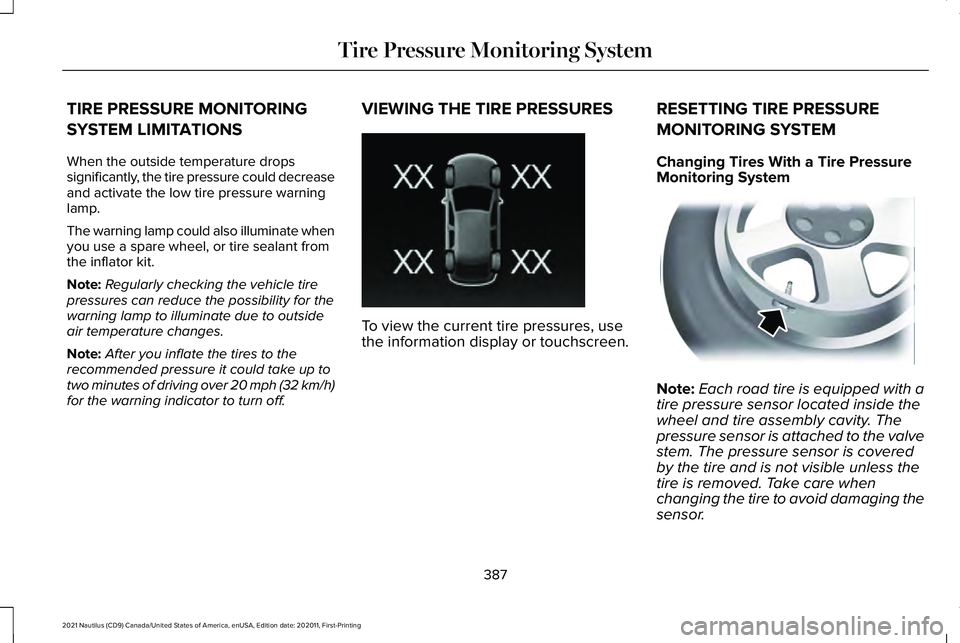
To view the current tire pressures, use
the information display or touchscreen.
RESETTING TIRE PRESSURE
MONITORING SYSTEM
Changing Tires With a Tire Pressure
Monitoring System
Note:
Each road tire is equipped with a
tire pressure sensor located inside the
wheel and tire assembly cavity. The
pressure sensor is attached to the valve
stem. The pressure sensor is covered
by the tire and is not visible unless the
tire is removed. Take care when
changing the tire to avoid damaging the
sensor.
387
2021 Nautilus (CD9) Canada/United States of America, enUSA, Edition date: 202011, First-Printing Tire Pressure Monitoring SystemE250820 E142549
Page 571 of 579
P
Parking Aid Indicators.................................238
Parking Aid Precautions.............................234
Parking Aids...................................................234
Front Parking Aid................................................236
Parking Aids – Troubleshooting.....................238
Rear Parking Aid.................................................235
Side Parking Aid.................................................237
Parking Aids – Troubleshooting...............238 Parking Aids – Information Messages..........238
Passive Anti-Theft System..........................108 How Does the Passive Anti-Theft System
Work...................................................................108
What Is the Passive Anti-Theft System..........108
Perchlorate......................................................514
Performing a Master Reset........................453
Personalized Settings..................................148 Changing the Instrument Cluster Display
Language..........................................................148
Changing the Measure Unit.............................148
Changing the Temperature Unit
......................149
Changing the Tire Pressure Unit.....................150
Personal Profiles...........................................447
Personal Safety System Components.......62
Personal Safety System ™
..............................62
Phone as a Key Limitations..........................80 Phone as a Key...............................................80
Phone as a Key – Troubleshooting..................82
Phone as a Key – Troubleshooting............82 Phone as a Key – Frequently Asked
Questions...........................................................82
Phone Menu
...................................................437
........................................................................\
.........437
Email.......................................................................437
Favorites...............................................................437
Messaging............................................................437
Phone List.............................................................437
Voice Control.......................................................438
Phone...............................................................437
Phone Precautions
.......................................437
Playing Media Using Bluetooth®..............443
Playing Media Using the USB Port...........178
Playing or Pausing the Audio Source..........................................................423
Touchscreen........................................................423
Post-Crash Alert System
...............................311
How Does the Post-Crash Alert System
Work....................................................................311
Post-Crash Alert System Limitations...............311
Switching the Post-Crash Alert System Off........................................................................\
311
What Is the Post-Crash Alert System..............311
Power Outlet Indicators
...............................180
Power Outlet..................................................180 Power Outlet Precautions...........................180
Power Seats...................................................160
Adjusting the Head Restraint...........................160
Adjusting the Lumbar Support.........................162
Adjusting the Seat Backrest.............................
162
Adjusting the Seat Cushion...............................161
Adjusting the Seat Height.................................162
Folding the Seat Backrest.................................167
Head Restraint Components............................160
Installing the Head Restraint.............................161
Moving the Seat Backward and Forward......161
Removing the Head Restraint..........................
160
Unfolding the Seat Backrest.............................167
Pre-Collision Assist Limitations................280 Pedestrian Detection Limitations....................281
Pre-Collision Assist Precautions...............279
Pre-Collision Assist
......................................279
Automatic Emergency Braking.......................284
Distance Alert......................................................283
Distance Indication............................................282
Evasive Steering Assist.....................................284
Pre-Collision Assist – Troubleshooting........285
Pre-Collision Assist – Troubleshooting.........................................285
Pre-Collision Assist – Frequently Asked Questions........................................................286
Pre-Collision Assist – Information Messages.........................................................285
567
2021 Nautilus (CD9) Canada/United States of America, enUSA, Edition date: 202011, First-Printing Index
Page 572 of 579

Preparing Your Vehicle for Storage..........361
12 Volt Battery.....................................................362
Body........................................................................\
361
Brakes...................................................................362
Engine....................................................................361
General..................................................................361
Hybrid Battery Systems ...................................362
Tires.......................................................................362
Programming the Garage Door Opener to Your Garage Door Opener Motor...........175
Programming the Garage Door Opener to Your Gate Opener Motor..........................175
Gate Operator / Canadian Programming......175
Programming the Garage Door Opener to Your Hand-Held Transmitter
.....................174
Programming the Remote Control..............77
Programming Your Phone............................80 Resetting Phone as a Key...................................80
Properly Adjusting the Driver and Front Passenger Seats
...........................................67
Puncture See: Changing a Flat Tire..................................391
Push Button Ignition Switch.......................186 Starting the Engine..............................................187
Switching the Ignition Off..................................186
Switching the Ignition to Accessory
Mode..................................................................186 R
Radio Frequency Certification
Labels ............................................................
476
Blind Spot Information System Sensors.......476
Body Control Module.........................................481
Cruise Control Module......................................484
Garage Door Opener........................................488
Keys and Remote Controls..............................
489
Radio Transceiver Module...............................492
Remote Function Actuator................................
481
SYNC.....................................................................495
Telematics Control Unit.....................................
501
Tire Pressure Monitoring System Sensors.............................................................501
Wireless Accessory Charging Module..........510
Rear Exterior.....................................................37
Rear Occupant Alert System Audible Warnings.......................................................170
Rear Occupant Alert System Indicators......................................................170
Rear Occupant Alert System Limitations....................................................169
Rear Occupant Alert System Precautions..................................................169
Rear Occupant Alert System......................169
Rear Parking Aid...........................................235 Locating the Rear Parking Aid Sensors........235 Rear Parking Aid Audible Warnings..............235
Rear Parking Aid Limitations...........................235
What is the Rear Parking Aid...........................235
Rear Seats
.......................................................165
Heated Seats........................................................167
Manual Seats........................................................165
Power Seats..........................................................167
Rear View Camera Guide Lines...............240
Rear View Camera Object Distance Indicators......................................................241
Rear View Camera Precautions...............240
Rear View Camera.......................................240 Rear View Camera Settings..............................241
Rear View Camera Settings........................241 Switching Rear View Camera Delay On and
Off......................................................................242
Zooming the Rear View Camera In and Out
......................................................................241
Recalling a Preset Position...........................171
Recreationally Towing Your Vehicle - 2.0L, AWD...............................................................314
Recreationally Towing Your Vehicle - 2.0L, FWD................................................................314
Recreationally Towing Your Vehicle - 2.7L.................................................................314
Reduced Engine Performance..................305
Refueling
........................................................200
Manually Opening the Fuel Filler Door........202
568
2021 Nautilus (CD9) Canada/United States of America, enUSA, Edition date: 202011, First-Printing Index
Page 573 of 579
Refueling System Overview............................200
Refueling Your Vehicle......................................200
Releasing the Electric Parking Brake if the Vehicle Battery Has Run Out of
Charge.........................................................222
Remote Control Limitations..........................75
Remotely Starting and Stopping the Vehicle............................................................151
Remotely Starting the Vehicle...........................151
Remotely Stopping the Vehicle.......................152
Remote Start Limitations..............................151
Remote Start Precautions............................151
Remote Start Remote Control Indicators......................................................152
Remote Control Feedback................................152
Remote Start....................................................151
Remote Start Settings........................................152
Remote Start Settings..................................152 Setting the Remote Start Duration..................153
Switching Climate Control Last Settings On
and Off...............................................................152
Switching the Heated Seat Settings On and Off.......................................................................152
Switching the Heated Steering Wheel Settings On and Off........................................................153
Removing Your Vehicle From Storage.........................................................362
Repairing Minor Paint Damage.................359 Replacement Parts
Recommendation.......................................
514
Collision Repairs..................................................515
Scheduled Maintenance and Mechanical
Repairs...............................................................514
Warranty on Replacement Parts......................515
Replacing a Lost Key or Remote Control.............................................................77
Replacing the Cabin Air Filter....................158
Replacing the Front Wiper Blades.............116
Replacing the Rear Wiper Blades
..............116
Reporting Safety Defects in Canada.......475
Reporting Safety Defects in the United States............................................................474
Reprogramming the Garage Door Opener..........................................................176
Resetting the Stopping Position - Vehicles With: Power Adjustable Steering
Column...........................................................113
Resetting Tire Pressure Monitoring System..........................................................387
Changing Tires With a Tire Pressure Monitoring System.........................................387
Restarting the Engine...................................194
Resuming the Set Speed...........................252 Resuming the Set Speed from a Complete
Stop...................................................................259 Reverse Wipe
..................................................115
Reverse Wipe Settings........................................115
What Is Reverse Wipe.........................................115
Roadside Assistance...................................308 Vehicles Sold in Canada: Getting Roadside
Assistance.......................................................309
Vehicles sold in the United States: Getting Roadside Assistance.....................................308
Vehicles Sold in the United States: Using Roadside Assistance.....................................308
Rollover Warning
..........................................472
Roof Rack.......................................................293 Roof Rack Load Capacities..............................293
Roof Rack Precautions......................................293
Route Guidance.............................................451 Adjusting the Guidance Prompt Volume.......451
Canceling Route Guidance...............................451
Repeating an Instruction...................................451
Running-In See: Breaking-In.................................................305
Running Out of Fuel
.....................................199
Adding Fuel From a Portable Fuel
Container..........................................................199
Filling a Portable Fuel Container.....................
199
569
2021 Nautilus (CD9) Canada/United States of America, enUSA, Edition date: 202011, First-Printing Index
Page 576 of 579
Switching Cross Traffic Alert On and
Off..................................................................277
Switching Cruise Control On and Off......251 Switching Cruise Control Off............................251
Switching Cruise Control On............................251
Switching Driver Alert On and Off...........288 Resetting Driver Alert........................................288
Switching Easy Entry and Exit On and Off....................................................................99
Switching From Adaptive Cruise Control to Cruise Control.......................................260
Switching Maximum Cooling On and Off...................................................................154
Switching Maximum Defrost On and Off...................................................................154
Switching Parking Aid On and Off...........235
Switching Rear Occupant Alert System On and Off...........................................................170
Semiannual Reminder........................................170
Switching Recirculated Air On and Off...................................................................154
Switching Repeat Mode On and Off.......424
Switching Shuffle Mode On and Off........424
Switching Stability Control On and Off
..................................................................230
Switching Text Message Notification On and Off
..........................................................442
Android.................................................................442 iOS........................................................................\
..442
Switching the Audio Unit On and Off..................................................................423
Switching the Display On and Off............426 Audio Unit............................................................426
Touchscreen........................................................426
Switching the Front Interior Lamps On and Off...................................................................127
Individual Map Lamps.........................................127
Switching the Hazard Flashers On and Off..................................................................309
Switching the Heated Mirrors On and Off...................................................................155
Switching the Heated Rear Window On and Off
..........................................................155
Switching the Heated Steering Wheel On and Off
............................................................113
Switching the Lane Keeping System Mode.............................................................266
Switching the Lane Keeping System On and Off.........................................................266
Switching the Rear Interior Lamps On and Off...................................................................127
Switching the Rear Window Wiper On and Off....................................................................115
Switching Traction Control On and Off
..................................................................228
Using a Switch....................................................228 Switching Trailer Sway Control On and
Off..................................................................304
Symbols Glossary
............................................19
Symbols Used on Your Vehicle....................19
T
Technical Specifications See: Capacities and Specifications...............398
Temporary Neutral Mode
...........................208
Entering Temporary Neutral Mode................209
Exiting Temporary Neutral Mode...................209
Temporary Neutral Mode Limitations...........208
What Is Temporary Neutral Mode..................208
The Better Business Bureau Auto Line Program........................................................472
The Mediation and Arbitration Program........................................................473
Tire Care
.........................................................374
Tire Pressure Monitoring System Limitations ....................................................
387
Tire Pressure Monitoring System Overview......................................................385
Tire Pressure Monitoring System Precautions.................................................386
Tire Pressure Monitoring System.............385 Tire Pressure Monitoring System –
Troubleshooting.............................................388
572
2021 Nautilus (CD9) Canada/United States of America, enUSA, Edition date: 202011, First-Printing Index