automatic transmission LINCOLN NAUTILUS 2021 User Guide
[x] Cancel search | Manufacturer: LINCOLN, Model Year: 2021, Model line: NAUTILUS, Model: LINCOLN NAUTILUS 2021Pages: 579, PDF Size: 6.9 MB
Page 216 of 579
6.
With your foot fully applied on the brake
pedal, start your vehicle. Confirm that
your vehicle is in the park (P) position and
that the instrument cluster indicates park
(P).
7. If the instrument cluster is not displaying
the park (P) position or there is a
message stating Park Not Available,
Transmission Not In Park or Shift System
Fault, apply the parking brake before
exiting your vehicle. Have the system
checked.
AUTOMATIC TRANSMISSION
AUDIBLE WARNINGS
Transmission Not In Park (P) Audible
Warning
Sounds if you open the driver door before
shifting into park (P).
Park (P) Selection Audible Warning
Sounds when you shift into park (P). AUTOMATIC TRANSMISSION –
TROUBLESHOOTING
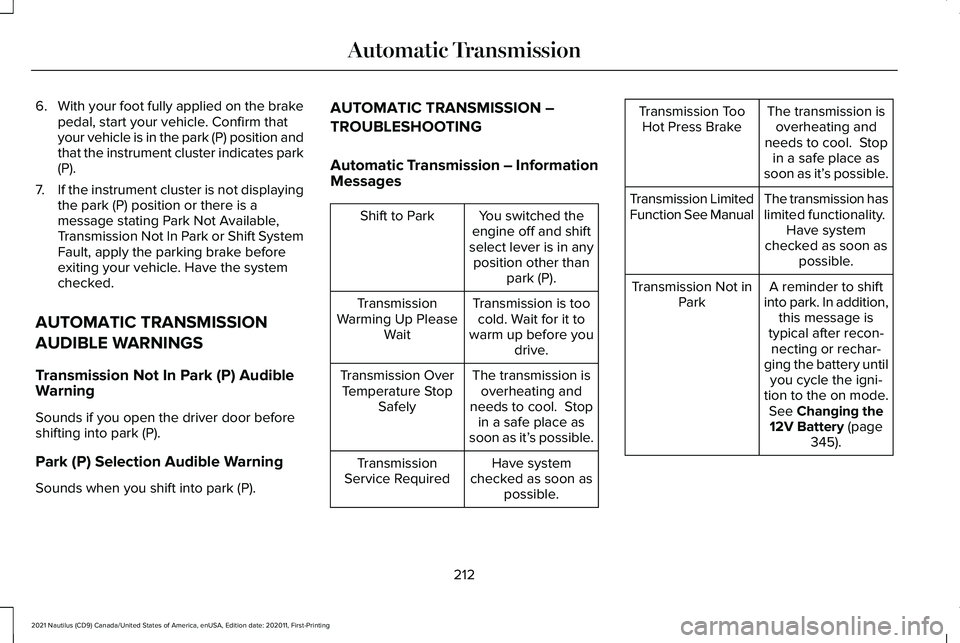
Automatic Transmission – Information
Messages You switched the
engine off and shift
select lever is in any position other than park (P).
Shift to Park
Transmission is toocold. Wait for it to
warm up before you drive.
Transmission
Warming Up Please Wait
The transmission isoverheating and
needs to cool. Stop in a safe place as
soon as it’ s possible.
Transmission Over
Temperature Stop Safely
Have system
checked as soon as possible.
Transmission
Service Required The transmission is
overheating and
needs to cool. Stop in a safe place as
soon as it’ s possible.
Transmission Too
Hot Press Brake
The transmission has
limited functionality. Have system
checked as soon as possible.
Transmission Limited
Function See Manual
A reminder to shift
into park. In addition, this message is
typical after recon- necting or rechar-
ging the battery until you cycle the igni-
tion to the on mode. See Changing the
12V Battery (page
345).
Transmission Not in
Park
212
2021 Nautilus (CD9) Canada/United States of America, enUSA, Edition date: 202011, First-Printing Automatic Transmission
Page 217 of 579
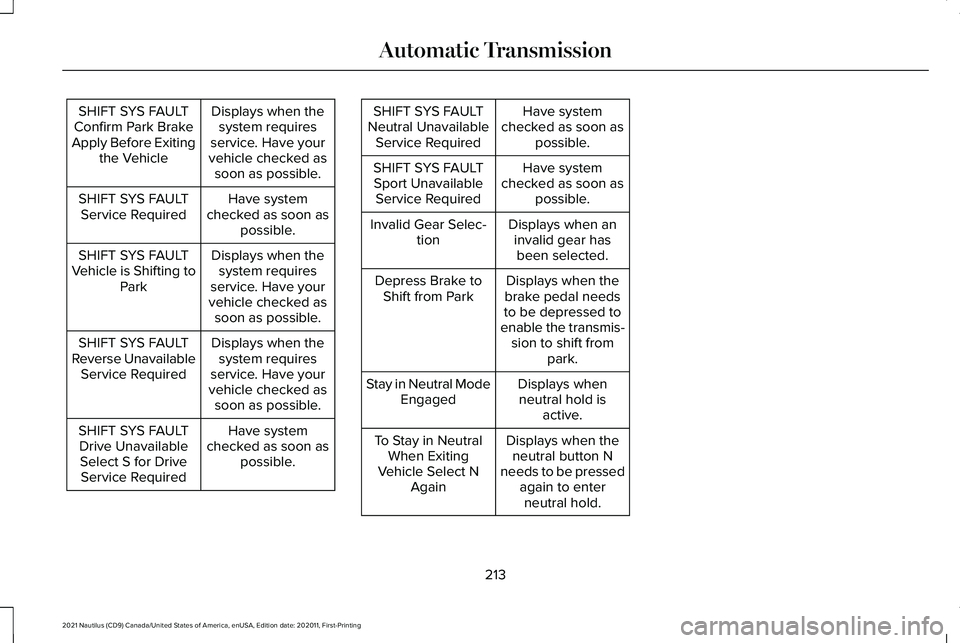
Displays when the
system requires
service. Have your
vehicle checked as soon as possible.
SHIFT SYS FAULT
Confirm Park Brake
Apply Before Exiting the Vehicle
Have system
checked as soon as possible.
SHIFT SYS FAULT
Service Required
Displays when thesystem requires
service. Have your
vehicle checked as soon as possible.
SHIFT SYS FAULT
Vehicle is Shifting to Park
Displays when thesystem requires
service. Have your
vehicle checked as soon as possible.
SHIFT SYS FAULT
Reverse Unavailable Service Required
Have system
checked as soon as possible.
SHIFT SYS FAULT
Drive Unavailable Select S for DriveService Required Have system
checked as soon as possible.
SHIFT SYS FAULT
Neutral Unavailable Service Required
Have system
checked as soon as possible.
SHIFT SYS FAULT
Sport Unavailable Service Required
Displays when aninvalid gear hasbeen selected.
Invalid Gear Selec-
tion
Displays when the
brake pedal needs
to be depressed to
enable the transmis- sion to shift from park.
Depress Brake to
Shift from Park
Displays whenneutral hold is active.
Stay in Neutral Mode
Engaged
Displays when theneutral button N
needs to be pressed again to enterneutral hold.
To Stay in Neutral
When Exiting
Vehicle Select N Again
213
2021 Nautilus (CD9) Canada/United States of America, enUSA, Edition date: 202011, First-Printing Automatic Transmission
Page 303 of 579
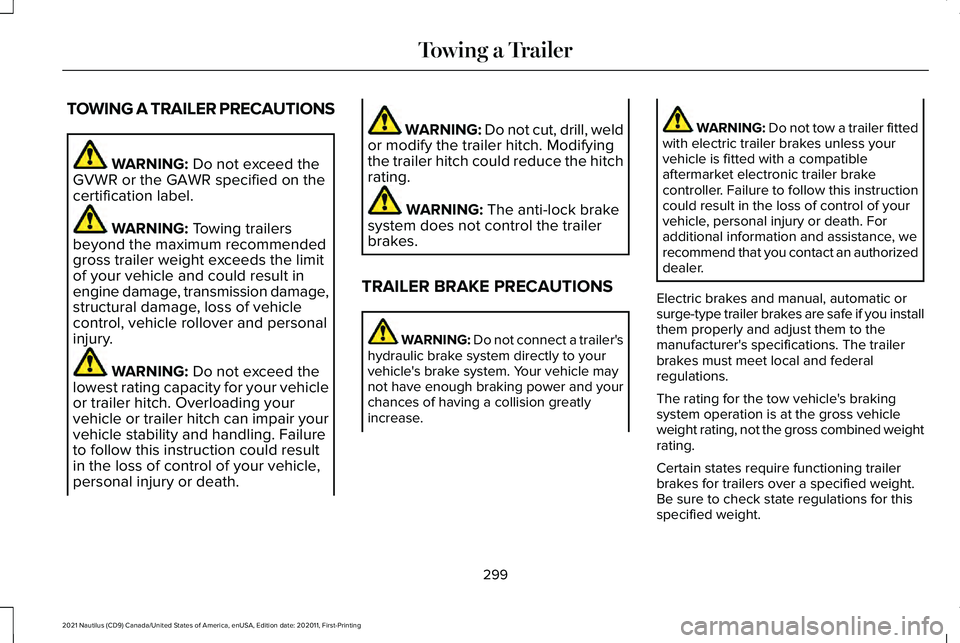
TOWING A TRAILER PRECAUTIONS
WARNING: Do not exceed the
GVWR or the GAWR specified on the
certification label. WARNING:
Towing trailers
beyond the maximum recommended
gross trailer weight exceeds the limit
of your vehicle and could result in
engine damage, transmission damage,
structural damage, loss of vehicle
control, vehicle rollover and personal
injury. WARNING:
Do not exceed the
lowest rating capacity for your vehicle
or trailer hitch. Overloading your
vehicle or trailer hitch can impair your
vehicle stability and handling. Failure
to follow this instruction could result
in the loss of control of your vehicle,
personal injury or death. WARNING: Do not cut, drill, weld
or modify the trailer hitch. Modifying
the trailer hitch could reduce the hitch
rating. WARNING:
The anti-lock brake
system does not control the trailer
brakes.
TRAILER BRAKE PRECAUTIONS WARNING:
Do not connect a trailer's
hydraulic brake system directly to your
vehicle's brake system. Your vehicle may
not have enough braking power and your
chances of having a collision greatly
increase. WARNING:
Do not tow a trailer fitted
with electric trailer brakes unless your
vehicle is fitted with a compatible
aftermarket electronic trailer brake
controller. Failure to follow this instruction
could result in the loss of control of your
vehicle, personal injury or death. For
additional information and assistance, we
recommend that you contact an authorized
dealer.
Electric brakes and manual, automatic or
surge-type trailer brakes are safe if you install
them properly and adjust them to the
manufacturer's specifications. The trailer
brakes must meet local and federal
regulations.
The rating for the tow vehicle's braking
system operation is at the gross vehicle
weight rating, not the gross combined weight
rating.
Certain states require functioning trailer
brakes for trailers over a specified weight.
Be sure to check state regulations for this
specified weight.
299
2021 Nautilus (CD9) Canada/United States of America, enUSA, Edition date: 202011, First-Printing Towing a Trailer
Page 314 of 579
WARNING: Keep batteries out of
reach of children. Batteries contain sulfuric
acid. Avoid contact with skin, eyes or
clothing. Shield your eyes when working
near the battery to protect against possible
splashing of acid solution. In case of acid
contact with skin or eyes, flush immediately
with water for a minimum of 15 minutes and
get prompt medical attention. If acid is
swallowed, call a physician immediately. WARNING:
Use only adequately
sized cables with insulated clamps. WARNING: Make sure that the cables
are clear of any moving parts and fuel
delivery system parts. WARNING:
Connect batteries with
only the same nominal voltage. WARNING:
If the engine is running
while the hood is open, stay clear of
moving engine components. Failure to
follow this warning could result in serious
personal injury or death. Do not attempt to push-start an automatic
transmission vehicle. This could cause
transmission damage.
Do not disconnect the battery of the disabled
vehicle. This could damage your vehicle's
electrical system.
Preparing the Vehicle
Use only a 12 volt supply to start your vehicle.
Park the booster vehicle close to the hood
of the disabled vehicle, making sure the two
vehicles do not touch.
Jump Starting the Vehicle
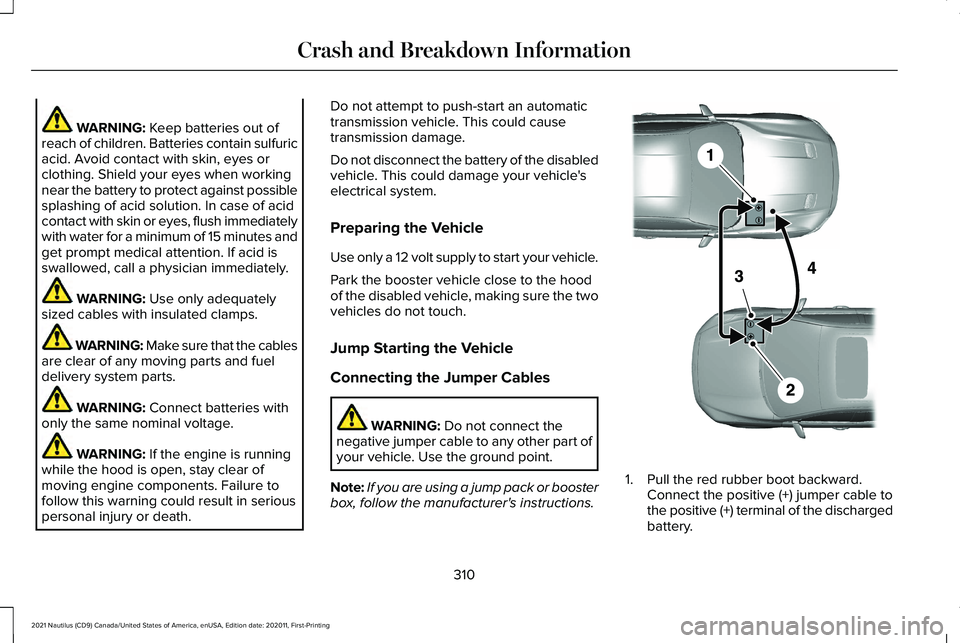
Connecting the Jumper Cables
WARNING:
Do not connect the
negative jumper cable to any other part of
your vehicle. Use the ground point.
Note: If you are using a jump pack or booster
box, follow the manufacturer's instructions. 1. Pull the red rubber boot backward.
Connect the positive (+) jumper cable to
the positive (+) terminal of the discharged
battery.
310
2021 Nautilus (CD9) Canada/United States of America, enUSA, Edition date: 202011, First-Printing Crash and Breakdown InformationE281345
Page 351 of 579
If you disconnect or replace the battery and
your vehicle has an automatic transmission,
it must relearn its adaptive strategy. Because
of this, the transmission may shift firmly when
first driven. This is normal operation while
the transmission fully updates its operation
to optimum shift feel.
Remove and Reinstall the Battery
To disconnect or remove the battery, do the
following:
1. Apply the parking brake and switch the
ignition off.
2. Switch all electrical equipment off, for example lights and radio.
3. Wait a minimum of two minutes before disconnecting the battery.
Note: The engine management system has
a power hold function and remains powered
for a period of time after you switch the
ignition off. This is to allow diagnostic and
adaptive tables to be stored. Disconnecting
the battery without waiting can cause
damage not covered by the vehicle
Warranty. 4. Disconnect the negative battery cable
terminal.
5. Disconnect the positive battery cable terminal.
6. Remove the battery securing clamp.
7. Remove the battery.
8. To install, reverse the removal procedure.
Note: Before reconnecting the battery, make
sure the ignition remains switched off.
Note: Make sure the battery cable terminals
are fully tightened.
Note: After cleaning or replacing the battery,
make sure you reinstall the battery cover or
shield.
If you disconnect or replace the vehicle
battery, you must reset the following
features:
• Window bounce-back. See Windows
(page 130).
• Clock Settings.
• Pre-set radio stations.
• Steering Angle Sensor. Note:
To calibrate the steering angle sensor,
drive the vehicle above
30 mph (50 km/h)
for a minimum of 1.2 mi (2 km). Make sure to
drive straight ahead for a minimum of 30
seconds. Several vehicle functions are
disabled and a warning light could appear
until the sensor is calibrated.
Battery Management System
The battery management system monitors
battery conditions and takes actions to
extend battery life. If excessive battery drain
is detected, the system temporarily disables
some of the following features:
• Heated rear window.
• Heated seats.
• Climate control.
• Heated steering wheel.
• Audio unit.
• Navigation system.
A message may appear in the information
display to alert you that battery protection
actions are active.
347
2021 Nautilus (CD9) Canada/United States of America, enUSA, Edition date: 202011, First-Printing Maintenance
Page 467 of 579
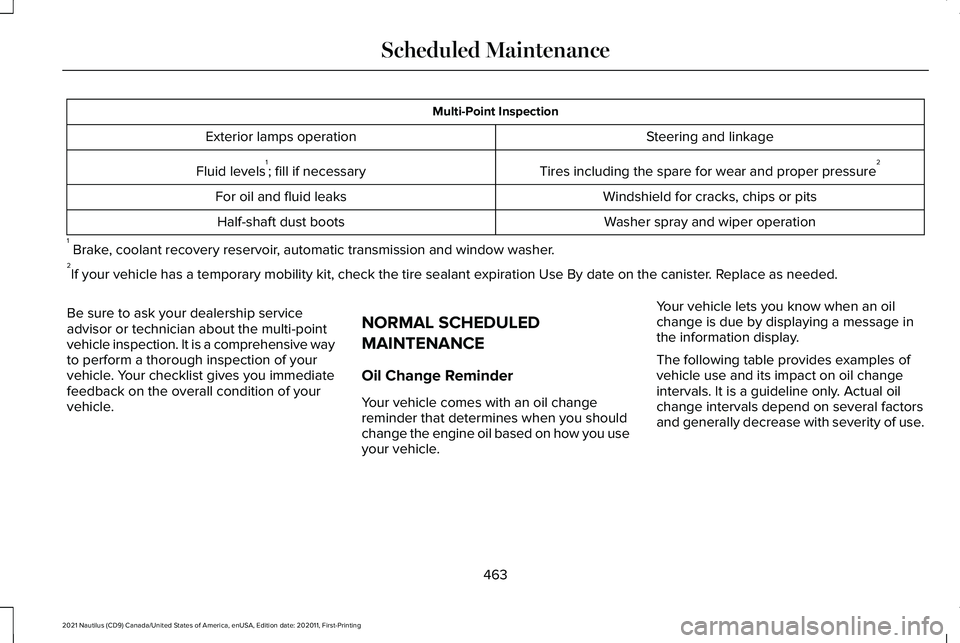
Multi-Point Inspection
Steering and linkage
Exterior lamps operation
Tires including the spare for wear and proper pressure 2
Fluid levels 1
; fill if necessary
Windshield for cracks, chips or pits
For oil and fluid leaks
Washer spray and wiper operation
Half-shaft dust boots
1 Brake, coolant recovery reservoir, automatic transmission and window washer.
2 If your vehicle has a temporary mobility kit, check the tire sealant exp\
iration Use By date on the canister. Replace as needed.
Be sure to ask your dealership service
advisor or technician about the multi-point
vehicle inspection. It is a comprehensive way
to perform a thorough inspection of your
vehicle. Your checklist gives you immediate
feedback on the overall condition of your
vehicle. NORMAL SCHEDULED
MAINTENANCE
Oil Change Reminder
Your vehicle comes with an oil change
reminder that determines when you should
change the engine oil based on how you use
your vehicle.Your vehicle lets you know when an oil
change is due by displaying a message in
the information display.
The following table provides examples of
vehicle use and its impact on oil change
intervals. It is a guideline only. Actual oil
change intervals depend on several factors
and generally decrease with severity of use.
463
2021 Nautilus (CD9) Canada/United States of America, enUSA, Edition date: 202011, First-Printing Scheduled Maintenance
Page 469 of 579
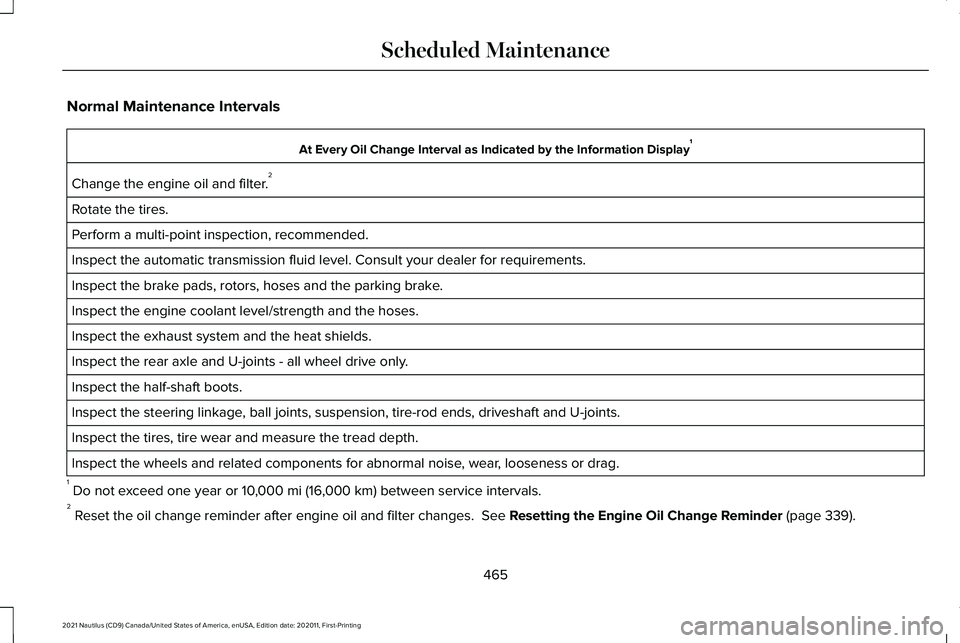
Normal Maintenance Intervals
At Every Oil Change Interval as Indicated by the Information Display
1
Change the engine oil and filter. 2
Rotate the tires.
Perform a multi-point inspection, recommended.
Inspect the automatic transmission fluid level. Consult your dealer for \
requirements.
Inspect the brake pads, rotors, hoses and the parking brake.
Inspect the engine coolant level/strength and the hoses.
Inspect the exhaust system and the heat shields.
Inspect the rear axle and U-joints - all wheel drive only.
Inspect the half-shaft boots.
Inspect the steering linkage, ball joints, suspension, tire-rod ends, driveshaft and U-joints.
Inspect the tires, tire wear and measure the tread depth.
Inspect the wheels and related components for abnormal noise, wear, looseness or drag.
1 Do not exceed one year or 10,000 mi (16,000 km) between service intervals.
2 Reset the oil change reminder after engine oil and filter changes.
See Resetting the Engine Oil Change Reminder (page 339).
465
2021 Nautilus (CD9) Canada/United States of America, enUSA, Edition date: 202011, First-Printing Scheduled Maintenance
Page 470 of 579
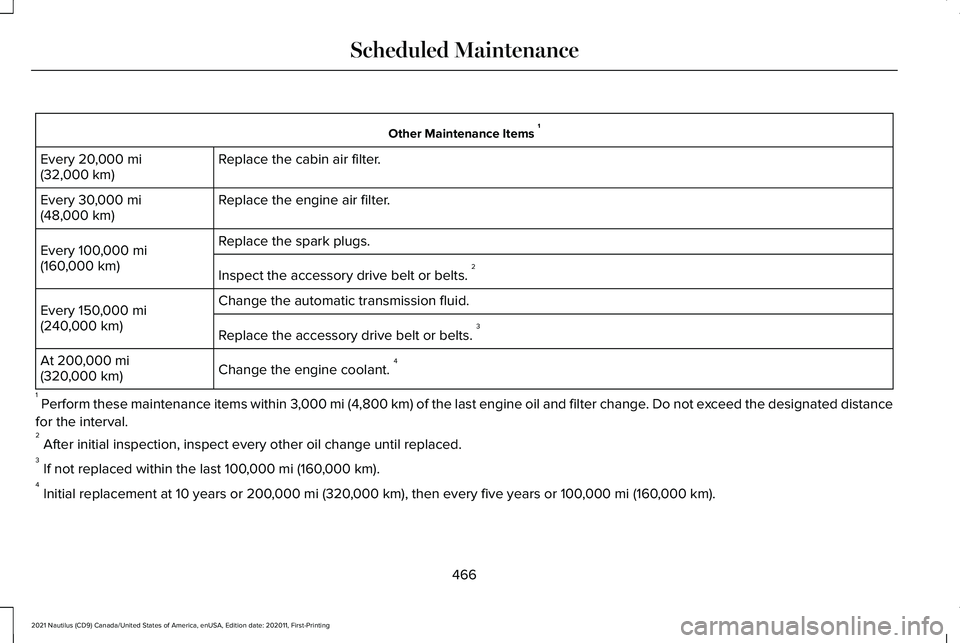
Other Maintenance Items
1
Replace the cabin air filter.
Every 20,000 mi
(32,000 km)
Replace the engine air filter.
Every
30,000 mi
(48,000 km)
Replace the spark plugs.
Every
100,000 mi
(160,000 km) Inspect the accessory drive belt or belts. 2
Change the automatic transmission fluid.
Every
150,000 mi
(240,000 km) Replace the accessory drive belt or belts. 3
Change the engine coolant. 4
At
200,000 mi
(320,000 km)
1 Perform these maintenance items within 3,000 mi (4,800 km) of the last engine oil and filter change. Do not exceed the designated distance
for the interval.
2 After initial inspection, inspect every other oil change until replaced\
.
3 If not replaced within the last
100,000 mi (160,000 km).
4 Initial replacement at 10 years or
200,000 mi (320,000 km), then every five years or 100,000 mi (160,000 km).
466
2021 Nautilus (CD9) Canada/United States of America, enUSA, Edition date: 202011, First-Printing Scheduled Maintenance
Page 472 of 579

Towing a trailer or using a car-top carrier
Change engine oil and filter as indicated by the information display and\
perform services listed in the Normal
Scheduled Maintenance chart.
As required
Inspect rear axle and U-joints (AWD only).
Inspect frequently, service
as required
Inspect half-shaft boots.
See axle maintenance items under Exceptions.
Change automatic transmission fluid.
Every
30,000 mi
(48,000 km)
Replace spark plugs.
Every
60,000 mi
(96,000 km)
468
2021 Nautilus (CD9) Canada/United States of America, enUSA, Edition date: 202011, First-Printing Scheduled Maintenance
Page 473 of 579

Extensive idling or low-speed driving for long distances, as in heavy co\
mmercial use
Change engine oil and filter as indicated by the information display and\
perform services listed in the Normal
Scheduled Maintenance chart.
As required
Replace cabin air filter.
Inspect frequently, service
as required
Replace engine air filter.
Change automatic transmission fluid.
Every 30,000 mi
(48,000 km)
Replace spark plugs.
Every
60,000 mi
(96,000 km) Extended Hot and Cold climate operation
Change engine oil and filter. *
Every
5,000 mi (8,000 km)
* Hot Climates only
469
2021 Nautilus (CD9) Canada/United States of America, enUSA, Edition date: 202011, First-Printing Scheduled Maintenance