change time LINCOLN NAUTILUS 2021 User Guide
[x] Cancel search | Manufacturer: LINCOLN, Model Year: 2021, Model line: NAUTILUS, Model: LINCOLN NAUTILUS 2021Pages: 579, PDF Size: 6.9 MB
Page 253 of 579
Why does active park assist not search for
a parking space?
The transmission is in reverse (R). Your
vehicle must be moving forward to be
able to detect a parking space.
Why does active park assist not offer a
parking space? The sensors could be blocked. For
example, snow, ice or large
accumulations of dirt. Blocked sensors
can affect how the system functions.
Why does active park assist not offer a
parking space? The sensors in the front or rear bumper
could be damaged.
Why does active park assist not offer a
parking space? There is not enough room in the parking
space for your vehicle to safely park.
Why does active park assist not offer a
parking space? There is not enough space for the
parking maneuver on the opposite side
of the parking space. Why does active park assist not offer a
parking space?
The parking space is more than 5 ft
(1.5 m) or less than 2 ft (0.5 m) away from
your vehicle.
Why does active park assist not offer a
parking space? Your vehicle's speed is greater than
22 mph (35 km/h)
for parallel parking or
greater than 19 mph (30 km/h) for
perpendicular parking.
Why does active park assist not offer a
parking space? You recently disconnected or replaced
the battery. After you reconnect the
battery you must drive your vehicle on
a straight road for a short period of time.
Why does active park assist not correctly
position the vehicle into a parking space? An irregular curb along the parking
space prevents the system from
correctly aligning your vehicle. Why does active park assist not correctly
position the vehicle into a parking space?
Vehicles or objects bordering the space
could not be correctly parked.
Why does active park assist not correctly
position the vehicle into a parking space? Your vehicle stopped too far past the
parking space.
Why does active park assist not correctly
position the vehicle into a parking space? The tires are not correctly installed or
maintained. For example, using a spare
tire, not inflated correctly, improper size,
or of different sizes.
Why does active park assist not correctly
position the vehicle into a parking space? A repair or alteration changed the
detection capabilities.
Why does active park assist not correctly
position the vehicle into a parking space? A parked vehicle has a high attachment.
For example, a salt sprayer, snowplow
or moving truck bed.
249
2021 Nautilus (CD9) Canada/United States of America, enUSA, Edition date: 202011, First-Printing Active Park Assist
(If Equipped)
Page 264 of 579
SWITCHING FROM ADAPTIVE
CRUISE CONTROL TO CRUISE
CONTROL
WARNING: Normal cruise control will
not brake when your vehicle is
approaching slower vehicles. Always be
aware of which mode you have selected
and apply the brakes when necessary.
You can change from adaptive cruise control
to normal cruise control through the
information display. The cruise control indicator light
replaces the adaptive cruise
control indicator light if you select
normal cruise control. The gap setting does
not display, and the system does not respond
to lead vehicles. Automatic braking remains
active to maintain set speed. LANE CENTERING
How Does Lane Centering Work
Adaptive cruise control with lane centering
uses radar and camera sensors to help keep
your vehicle in the lane by applying
continuous assistance steering torque input
toward the lane center on highways.
Note:
The adaptive cruise control gap setting
operates normally.
Lane Centering Precautions WARNING:
Do not use the system
when towing a trailer. Failure to follow this
instruction could result in the loss of
control of your vehicle, personal injury or
death. WARNING: Do not use the system if
any changes or modifications to the
steering wheel have been made. Any
changes or modifications to the steering
wheel could affect the functionality or
performance of the system. Failure to
follow this instruction could result in the
loss of control of your vehicle, personal
injury or death.
Adaptive cruise control precautions apply to
lane centering unless stated otherwise or
contradicted by a lane centering precaution.
See
Adaptive Cruise Control Precautions
(page 253).
Lane Centering Requirements
You must keep your hands on the steering
wheel at all times.
260
2021 Nautilus (CD9) Canada/United States of America, enUSA, Edition date: 202011, First-Printing Adaptive Cruise Control
(If Equipped)E71340
Page 265 of 579
The system only activates when all of the
following occur:
•
You have adaptive cruise control with
stop and go on.
• You have your hands on the steering
wheel.
• The system detects both lane markings.
Note: If it does not detect valid lane
markings, the system stays inactive until
valid markings are available.
Lane Centering Limitations
Adaptive cruise control limitations apply to
lane centering unless stated otherwise or
contradicted by a lane centering limitation.
See Adaptive Cruise Control Limitations
(page 254).
Lane Centering may not correctly operate in
any of the following conditions:
• Your vehicle is not centered in the lane.
• The lane is too narrow or wide.
• The system does not detect at least one
lane marking or when lanes merge or
split. •
Limited steering torque input is applied.
• Areas under construction or new
infrastructure.
• When modifications to the steering
system have been made.
• When using a spare tire.
• In high wind conditions.
Note: The driving assistance torque is limited
and may not be sufficient for all driving
situations such as driving through tight
curves or driving through curves at high
speeds.
Note: In exceptional conditions, the system
may deviate from the center line.
Switching Lane Centering On and Off
You must keep your hands on the steering
wheel at all times.
The controls are on the steering wheel. Press the button.The indicator appears in the information
display. When the system is on, the color of
the indicator changes to indicate the system
status.
You can override the system at any time by
steering your vehicle.
Note:
The correct requirements must be met
before you can switch the system on.
See
Lane Centering Requirements (page 260).
Lane Centering Alerts
When the system is active and detects no
steering activity for a certain period of time,
the system alerts you to put your hands on
the steering wheel. If you do not react to the
warnings the system cancels and slows your
vehicle down to idle speeds while
maintaining steering control.
The system also alerts you if your vehicle
crosses lane markings without detected
steering activity.
Note: The system may detect a light grip or
touch on the steering wheel as hands-off
driving.
261
2021 Nautilus (CD9) Canada/United States of America, enUSA, Edition date: 202011, First-Printing Adaptive Cruise Control
(If Equipped)E262175
Page 270 of 579
LANE KEEPING SYSTEM
LIMITATIONS
The lane keeping system only operates when
the vehicle speed is greater than 40 mph
(64 km/h).
The system works when the camera can
detect at least one lane marking.
The lane keeping system may not correctly
operate in any of the following conditions:
• The lane keeping system does not detect
at least one lane marking.
• You switch the turn signal on.
• You apply direct steering, accelerate fast
or brake hard.
• The vehicle speed is less than
40 mph
(64 km/h).
• The anti-lock brake, stability control or
traction control system activates.
• The lane is too narrow.
• Something is obscuring the camera or it
is unable to detect the lane markings due
to environment, traffic or vehicle
conditions. The lane keeping system may not correct
lane positioning in any of the following
conditions:
•
High winds.
• Uneven road surfaces.
• Heavy or uneven loads.
• Incorrect tire pressure.
SWITCHING THE LANE KEEPING
SYSTEM ON AND OFF To activate the lane keeping
system, press the button on the
turn signal lever.
Note: The system stores the on or off setting
until manually changed, unless it detects a
MyKey™. If the system detects a MyKey™, it
defaults to on and the mode is set to alert.
Note: If the system detects a MyKey™,
pressing the button does not affect the on
or off status of the system. You can only
change the mode and intensity settings. SWITCHING THE LANE KEEPING
SYSTEM MODE
The lane keeping system has different
settings that you can view or adjust using
the information display.
The system stores the last known selection
for each of these settings. You do not need
to readjust your settings each time you
switch on the system.
To change the lane keeping system mode,
use the instrument cluster display:
1. Using the instrument cluster display
controls on the steering wheel, select
SETTINGS
.
2. Select
Driver assistance.
3. Select
Lane keeping system.
4. Select
Mode.
5. Select a mode.
Note: The system remembers the last setting
when you start your vehicle. If the system
detects a MyKey™, it defaults to the last
setting for that MyKey™.
266
2021 Nautilus (CD9) Canada/United States of America, enUSA, Edition date: 202011, First-Printing Lane Keeping SystemE308131
Page 275 of 579
 when I can s\
ee the lane markings on the road?
Your vehicle speed is less than 40 mph (65")
Lane Keeping System – Frequently Asked Questions
Why is the feature not available (lane markings are gray) when I can s\
ee the lane markings on the road?
Your vehicle speed is less than 40 mph (65 km/h).
The sun is shining directly into the camera lens. A quick intentional lane change has occurred.
Your vehicle stays too close to the lane markings for an extended interva\
l of time. Driving at high speeds in curves.
The last alert warning or aid intervention occurred a short time ago. Ambiguous lane markings, for example, in construction zones. Rapid transition from light to dark, or from dark to light. Sudden offset in lane markings.ABS or AdvanceTrac ™ is active.
There is a camera blockage due to dirt, grime, fog, frost or water on the windshield. You are driving too close to the vehicle in front of you.
Transitioning between no lane markings to lane markings, or vice versa. There is standing water on the road.
Faint lane markings, for example, partial yellow lane markings on concrete roads.
271
2021 Nautilus (CD9) Canada/United States of America, enUSA, Edition date: 202011, First-Printing Lane Keeping System
Page 345 of 579
To top up the coolant level do the following:
1. Unscrew the cap slowly. Any pressure
escapes as you unscrew the cap.
2. Add enough prediluted coolant to reach
the correct level.
Note: We do not recommend the use of
recycled coolant.
3. Replace the coolant reservoir cap. Turn the cap clockwise until it contacts the
hard stop.
4. Check the coolant level in the coolant reservoir the next few times you drive
your vehicle. If necessary, repeat step 2.
If you have to add more than 1.1 qt (1 L) of
engine coolant per month, have your vehicle
checked as soon as possible. Operating an
engine with a low level of coolant can result
in engine overheating and possible engine
damage.
In case of emergency, you can add a large
amount of water without engine coolant in
order to reach a vehicle service location.
Service your vehicle as soon as possible. Water alone, without engine coolant, can
cause engine damage from corrosion,
overheating or freezing.
Do not use the following as a coolant
substitute, as they can cause engine damage
from overheating or freezing:
•
Alcohol.
• Methanol.
• Brine.
• Any coolant mixed with alcohol or
methanol antifreeze.
Do not add extra inhibitors or additives to
the coolant. These can be harmful and
compromise the corrosion protection of the
coolant.
Severe Climates
If you drive in extremely cold climates, you
may need to increase the coolant
concentration above 50%. Note:
A coolant concentration of 60%
provides improved freeze point protection.
Coolant concentrations above 60% decrease
the overheat protection characteristics of
the coolant and could cause engine
damage.
If you drive in extremely hot climates, you
may need to decrease the coolant
concentration to 40%.
Note: Coolant concentrations below 40%
decrease the freeze and corrosion protection
characteristics of the coolant and could
cause engine damage.
Coolant Change
Change the coolant at specific mileage
intervals. Refer to the scheduled
maintenance information.
See Normal
Scheduled Maintenance (page 463).
Note: Dispose of used coolant in the
appropriate manner.
Follow your community's regulations and
standards for recycling and disposing of
automotive fluids.
341
2021 Nautilus (CD9) Canada/United States of America, enUSA, Edition date: 202011, First-Printing Maintenance
Page 348 of 579
CHANGING THE ENGINE AIR
FILTER
WARNING: To reduce the risk of
vehicle damage and personal burn injuries,
do not start your engine with the air
cleaner removed and do not remove it
while the engine is running.
When changing the air filter element, use
only the air filter element listed.
See
Capacities and Specifications (page 400).
For turbocharged equipped vehicles: When
servicing the air cleaner, it is important that
no foreign material enter the air induction
system. The engine and turbocharger are
susceptible to damage from even small
particles.
Change the air filter element at the proper
interval. See Scheduled Maintenance (page
459
). Note:
Failure to use the correct air filter
element may result in severe engine
damage. The customer warranty may be
void for any damage to the engine if the
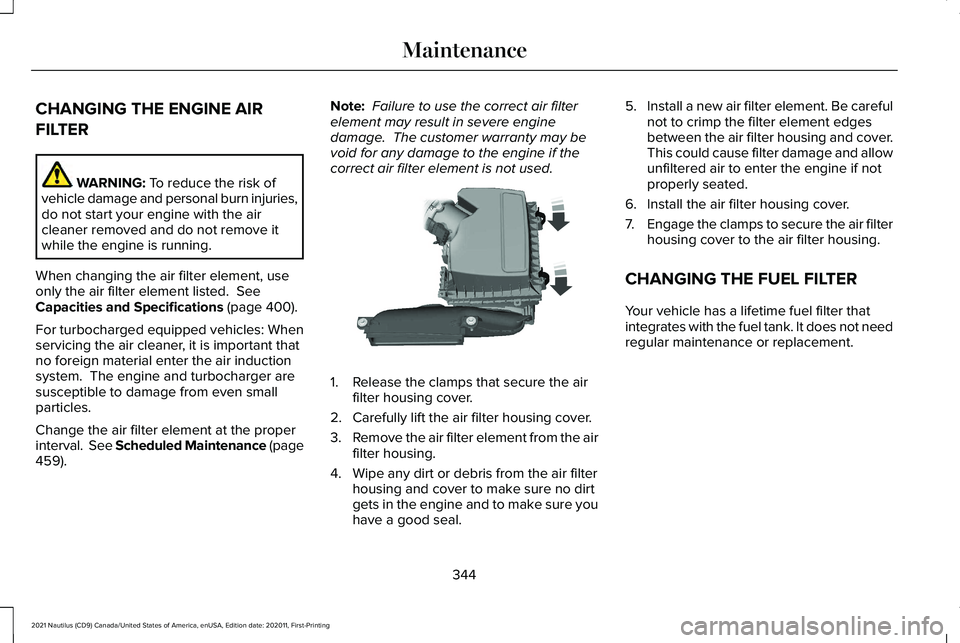
correct air filter element is not used. 1. Release the clamps that secure the air
filter housing cover.
2. Carefully lift the air filter housing cover.
3. Remove the air filter element from the air
filter housing.
4. Wipe any dirt or debris from the air filter housing and cover to make sure no dirt
gets in the engine and to make sure you
have a good seal. 5.
Install a new air filter element. Be careful
not to crimp the filter element edges
between the air filter housing and cover.
This could cause filter damage and allow
unfiltered air to enter the engine if not
properly seated.
6. Install the air filter housing cover.
7. Engage the clamps to secure the air filter
housing cover to the air filter housing.
CHANGING THE FUEL FILTER
Your vehicle has a lifetime fuel filter that
integrates with the fuel tank. It does not need
regular maintenance or replacement.
344
2021 Nautilus (CD9) Canada/United States of America, enUSA, Edition date: 202011, First-Printing MaintenanceE144365
Page 369 of 579
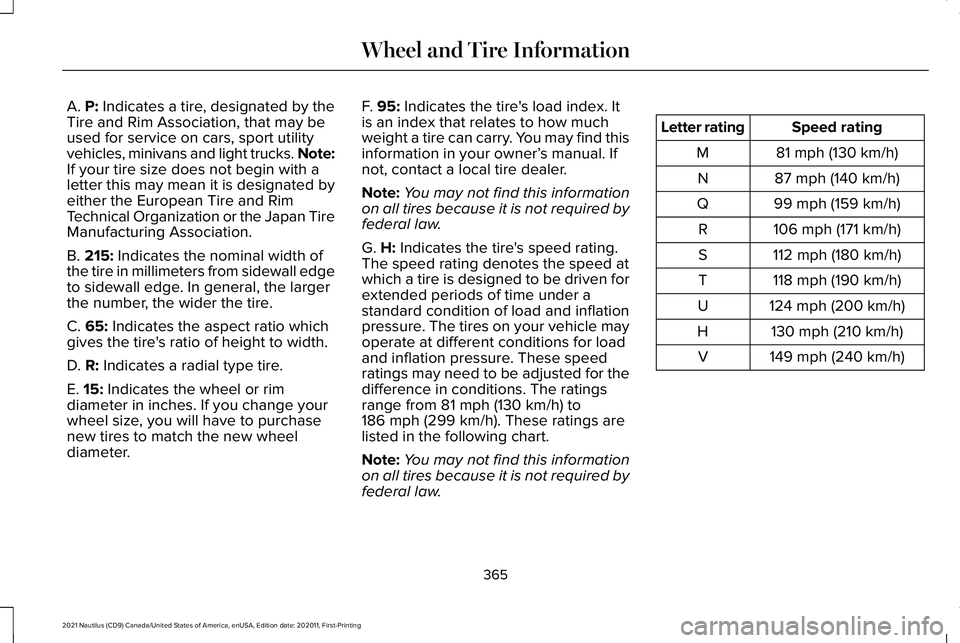
A. P: Indicates a tire, designated by the
Tire and Rim Association, that may be
used for service on cars, sport utility
vehicles, minivans and light trucks.
Note:
If your tire size does not begin with a
letter this may mean it is designated by
either the European Tire and Rim
Technical Organization or the Japan Tire
Manufacturing Association.
B.
215: Indicates the nominal width of
the tire in millimeters from sidewall edge
to sidewall edge. In general, the larger
the number, the wider the tire.
C.
65: Indicates the aspect ratio which
gives the tire's ratio of height to width.
D.
R: Indicates a radial type tire.
E.
15: Indicates the wheel or rim
diameter in inches. If you change your
wheel size, you will have to purchase
new tires to match the new wheel
diameter. F.
95: Indicates the tire's load index. It
is an index that relates to how much
weight a tire can carry. You may find this
information in your owner’ s manual. If
not, contact a local tire dealer.
Note: You may not find this information
on all tires because it is not required by
federal law.
G.
H: Indicates the tire's speed rating.
The speed rating denotes the speed at
which a tire is designed to be driven for
extended periods of time under a
standard condition of load and inflation
pressure. The tires on your vehicle may
operate at different conditions for load
and inflation pressure. These speed
ratings may need to be adjusted for the
difference in conditions. The ratings
range from
81 mph (130 km/h) to
186 mph (299 km/h). These ratings are
listed in the following chart.
Note: You may not find this information
on all tires because it is not required by
federal law. Speed rating
Letter rating
81 mph (130 km/h)
M
87 mph (140 km/h)
N
99 mph (159 km/h)
Q
106 mph (171 km/h)
R
112 mph (180 km/h)
S
118 mph (190 km/h)
T
124 mph (200 km/h)
U
130 mph (210 km/h)
H
149 mph (240 km/h)
V
365
2021 Nautilus (CD9) Canada/United States of America, enUSA, Edition date: 202011, First-Printing Wheel and Tire Information
Page 396 of 579
•
Use commercial car washing equipment.
• Try to repair the dissimilar spare tire.
Use of one of the dissimilar spare tires listed
above at any one wheel location can lead to
impairment of the following:
• Handling, stability and braking
performance.
• Comfort and noise.
• Ground clearance and parking at curbs.
• Winter weather driving capability.
• Wet weather driving capability.
• All-wheel driving capability, if applicable.
3. Full-size dissimilar spare without label
on wheel
When driving with the full-size dissimilar
spare wheel and tire assembly, do not:
• Exceed
70 mph (113 km/h).
• Use more than one dissimilar spare
wheel and tire assembly at a time.
• Use commercial car washing equipment.
• Use snow chains on the end of the
vehicle with the dissimilar spare wheel
and tire assembly. The usage of a full-size dissimilar spare
wheel and tire assembly can lead to
impairment of the following:
•
Handling, stability and braking
performance.
• Comfort and noise.
• Ground clearance and parking at curbs.
• Winter weather driving capability.
• Wet weather driving capability.
• All-wheel driving capability.
When driving with the full-size dissimilar
spare wheel and tire assembly additional
caution should be given to:
• Towing a trailer.
• Driving vehicles equipped with a camper
body.
• Driving vehicles with a load on the cargo
rack.
Drive cautiously when using a full-size
dissimilar spare wheel and tire assembly and
seek service as soon as possible. Tire Change Procedure WARNING:
Do not work on your
vehicle when the jack is the only support
as your vehicle could slip off the jack.
Failure to follow this instruction could result
in personal injury or death. WARNING:
To help prevent your
vehicle from moving when changing a
wheel, shift the transmission into park (P),
set the parking brake and use an
appropriate block or wheel chock to
secure the wheel diagonally opposite to
the wheel being changed. For example,
when changing the front left wheel, place
an appropriate block or wheel chock on
the right rear wheel. WARNING:
Never place anything
between the vehicle jack and your vehicle. WARNING:
Never place anything
between the vehicle jack and the ground.
392
2021 Nautilus (CD9) Canada/United States of America, enUSA, Edition date: 202011, First-Printing Changing a Road Wheel
Page 427 of 579
AUDIO SYSTEM PRECAUTIONS
WARNING: Driving while distracted
can result in loss of vehicle control, crash
and injury. We strongly recommend that
you use extreme caution when using any
device that may take your focus off the
road. Your primary responsibility is the safe
operation of your vehicle. We recommend
against the use of any hand-held device
while driving and encourage the use of
voice-operated systems when possible.
Make sure you are aware of all applicable
local laws that may affect the use of
electronic devices while driving.
Listening to loud audio for long periods of
time could damage your hearing.
SWITCHING THE AUDIO UNIT ON
AND OFF Press the button on the volume
control. SELECTING THE AUDIO SOURCE
Audio Unit Press the button to open the media
source menu.
You can press this multiple times to change
to the audio source or scroll through the
media sources.
Touchscreen
Press
Sources on the touchscreen to open
the media source menu.
PLAYING OR PAUSING THE AUDIO
SOURCE
Touchscreen Press to pause playback. Press
again to resume playback.
Note: Not all sources can be paused. ADJUSTING THE VOLUME
Turn to adjust the volume.
Some vehicles may be able to adjust the
volume using buttons on the steering wheel.
423
2021 Nautilus (CD9) Canada/United States of America, enUSA, Edition date: 202011, First-Printing Audio System E308143 E248939