height LINCOLN NAUTILUS 2021 User Guide
[x] Cancel search | Manufacturer: LINCOLN, Model Year: 2021, Model line: NAUTILUS, Model: LINCOLN NAUTILUS 2021Pages: 579, PDF Size: 6.9 MB
Page 64 of 579
This switches the feature on for that seating
position if it is currently off.
CHECKING THE SEATBELTS
Check the seatbelts and child restraints
periodically to make sure they work properly
and are not damaged. Make sure there are
no nicks, tears or cuts. Replace if necessary.
Check the following seatbelt assemblies after
a crash.
•
Retractors.
• Buckles.
• Front seatbelt buckle assemblies.
• Shoulder belt height adjusters.
• Shoulder belt guide on seat backrest.
• Child restraint LATCH and tether anchors.
• Attaching hardware.
Read the child restraint manufacturer's
instructions for additional inspection and
maintenance information specific to the child
restraint. We recommend that all seatbelt assemblies
in use in vehicles involved in a crash be
replaced. However, if the crash was minor
and an authorized dealer finds that the belts
do not show damage and continue to
operate properly, they do not need to be
replaced. Seatbelt assemblies not in use
during a crash should also be checked and
replaced if either damage or improper
operation is noted.
Properly care for seatbelts. See Cleaning
Seatbelts (page 358).
SEATBELT EXTENSIONS WARNING:
Persons who fit into the
vehicle's seatbelt should not use an
extension. Unnecessary use could result
in serious personal injury in the event of a
crash. WARNING:
Only use extensions
provided free of charge by our dealers.
The dealer will provide an extension
designed specifically for this vehicle, model
year and seating position. The use of an
extension intended for another vehicle,
model year or seating position may not
offer you the full protection of your
vehicle's seatbelt restraint system. WARNING:
Never use seatbelt
extensions to install child restraints. WARNING:
Do not use extensions
to change the way the seatbelt fits across
the torso, over the lap or to make the
seatbelt buckle easier to reach.
60
2021 Nautilus (CD9) Canada/United States of America, enUSA, Edition date: 202011, First-Printing Seatbelts
Page 106 of 579
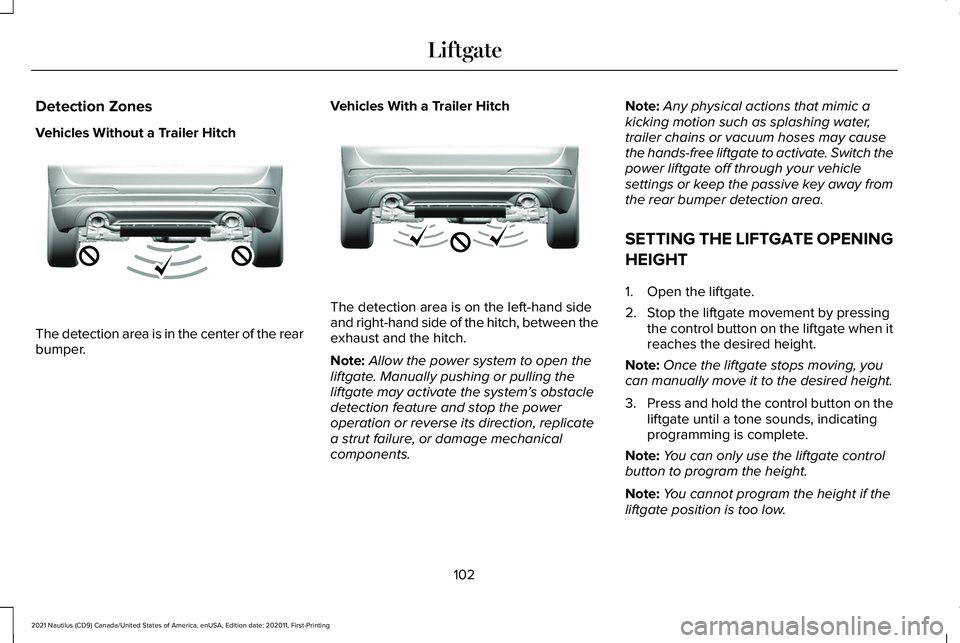
Detection Zones
Vehicles Without a Trailer Hitch
The detection area is in the center of the rear
bumper.
Vehicles With a Trailer Hitch The detection area is on the left-hand side
and right-hand side of the hitch, between the
exhaust and the hitch.
Note:
Allow the power system to open the
liftgate. Manually pushing or pulling the
liftgate may activate the system’ s obstacle
detection feature and stop the power
operation or reverse its direction, replicate
a strut failure, or damage mechanical
components. Note:
Any physical actions that mimic a
kicking motion such as splashing water,
trailer chains or vacuum hoses may cause
the hands-free liftgate to activate. Switch the
power liftgate off through your vehicle
settings or keep the passive key away from
the rear bumper detection area.
SETTING THE LIFTGATE OPENING
HEIGHT
1. Open the liftgate.
2. Stop the liftgate movement by pressing the control button on the liftgate when it
reaches the desired height.
Note: Once the liftgate stops moving, you
can manually move it to the desired height.
3. Press and hold the control button on the
liftgate until a tone sounds, indicating
programming is complete.
Note: You can only use the liftgate control
button to program the height.
Note: You cannot program the height if the
liftgate position is too low.
102
2021 Nautilus (CD9) Canada/United States of America, enUSA, Edition date: 202011, First-Printing LiftgateE310717 E310718
Page 107 of 579
4. The power liftgate now opens at the
programmed height. To change the
programmed height, repeat the steps.
Note: You can fully open the liftgate by
manually pushing it upward to the maximum
open position if it opens in a lower position.
Note: The system recalls the new
programmed height until you reprogram it,
even if you disconnect the battery.
CLOSING THE LIFTGATE
Closing the Liftgate From Inside Your
Vehicle WARNING: Make sure all persons
are clear of the power liftgate area before
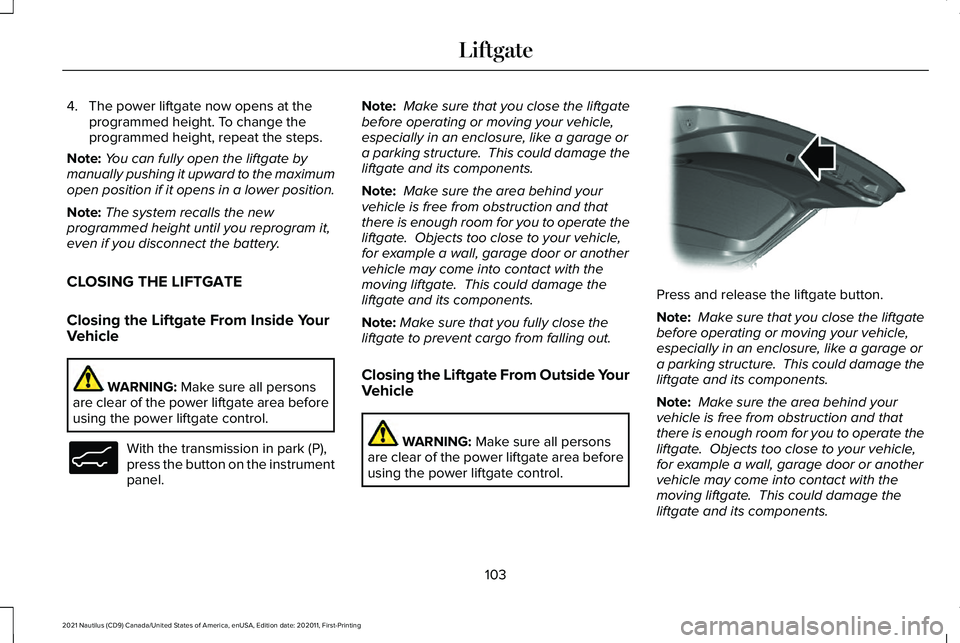
using the power liftgate control. With the transmission in park (P),
press the button on the instrument
panel. Note:
Make sure that you close the liftgate
before operating or moving your vehicle,
especially in an enclosure, like a garage or
a parking structure. This could damage the
liftgate and its components.
Note: Make sure the area behind your
vehicle is free from obstruction and that
there is enough room for you to operate the
liftgate. Objects too close to your vehicle,
for example a wall, garage door or another
vehicle may come into contact with the
moving liftgate. This could damage the
liftgate and its components.
Note: Make sure that you fully close the
liftgate to prevent cargo from falling out.
Closing the Liftgate From Outside Your
Vehicle WARNING:
Make sure all persons
are clear of the power liftgate area before
using the power liftgate control. Press and release the liftgate button.
Note:
Make sure that you close the liftgate
before operating or moving your vehicle,
especially in an enclosure, like a garage or
a parking structure. This could damage the
liftgate and its components.
Note: Make sure the area behind your
vehicle is free from obstruction and that
there is enough room for you to operate the
liftgate. Objects too close to your vehicle,
for example a wall, garage door or another
vehicle may come into contact with the
moving liftgate. This could damage the
liftgate and its components.
103
2021 Nautilus (CD9) Canada/United States of America, enUSA, Edition date: 202011, First-Printing LiftgateE138633 E138636
Page 166 of 579
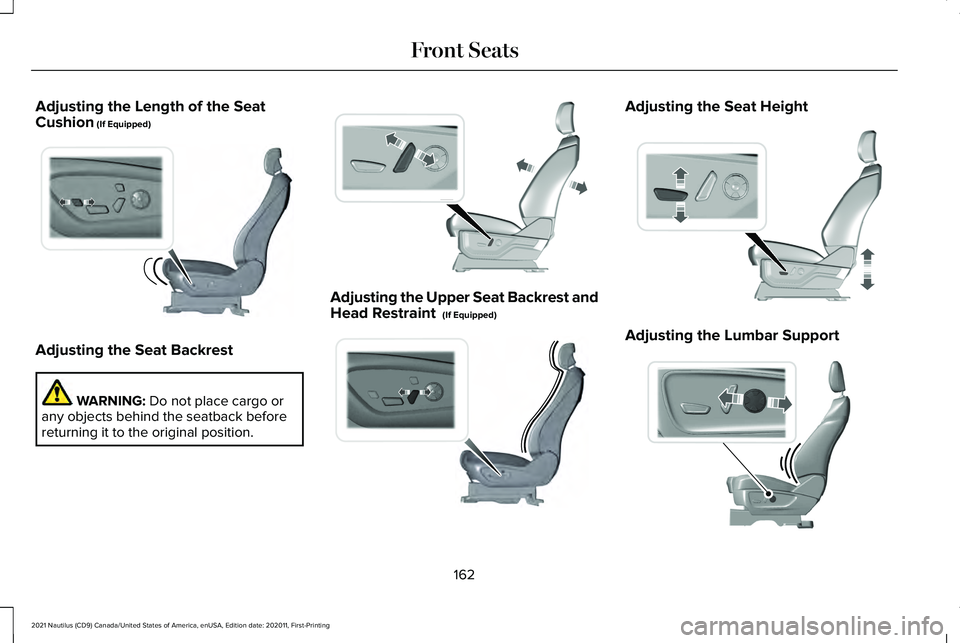
Adjusting the Length of the Seat
Cushion (If Equipped)
Adjusting the Seat Backrest
WARNING:
Do not place cargo or
any objects behind the seatback before
returning it to the original position. Adjusting the Upper Seat Backrest and
Head Restraint
(If Equipped) Adjusting the Seat Height
Adjusting the Lumbar Support
162
2021 Nautilus (CD9) Canada/United States of America, enUSA, Edition date: 202011, First-Printing Front SeatsE196924 E308338 E200950 E308337 E298774
Page 352 of 579
After battery replacement, or in some cases
after charging the battery with an external
charger, the battery management system
requires eight hours of vehicle sleep time to
relearn the battery state of charge. During
this time your vehicle must remain fully
locked with the ignition off.
Note:
If you add electrical accessories or
components to the vehicle, it may adversely
affect battery performance and durability.
This may also affect the performance of
other electrical systems in the vehicle.
Battery Disposal Make sure that you dispose of old
batteries in an environmentally
friendly way. Seek advice from
your local authority about recycling old
batteries. ADJUSTING THE HEADLAMPS
Vertical Aim Adjustment
The headlamps on your vehicle are properly
aimed at the assembly plant. If your vehicle
has been involved in a crash, have the aim
of the headlamp beam checked by an
authorized dealer.
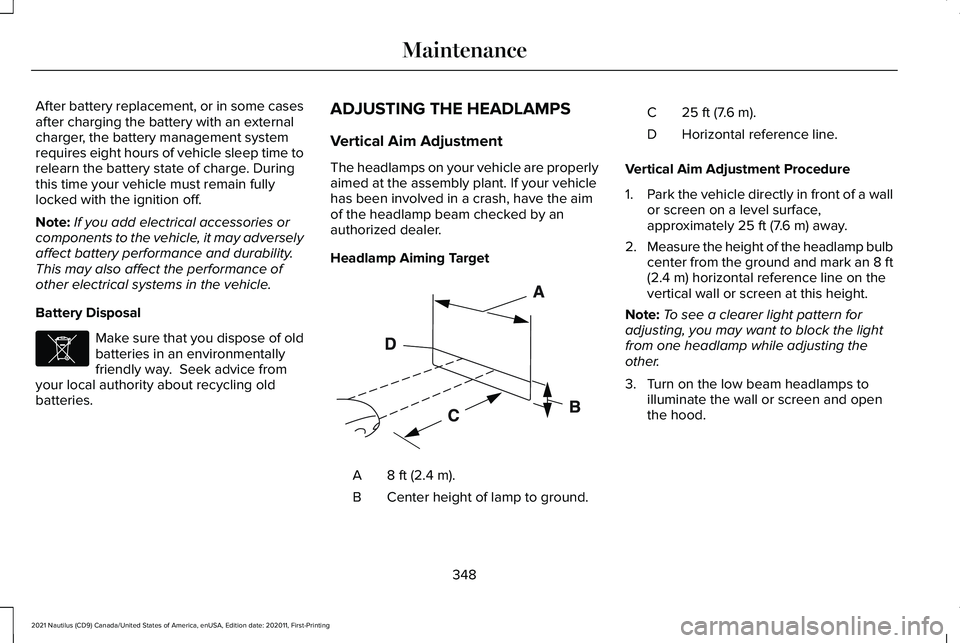
Headlamp Aiming Target
8 ft (2.4 m).
A
Center height of lamp to ground.
B 25 ft (7.6 m).
C
Horizontal reference line.
D
Vertical Aim Adjustment Procedure
1. Park the vehicle directly in front of a wall
or screen on a level surface,
approximately 25 ft (7.6 m) away.
2. Measure the height of the headlamp bulb
center from the ground and mark an 8 ft
(2.4 m)
horizontal reference line on the
vertical wall or screen at this height.
Note: To see a clearer light pattern for
adjusting, you may want to block the light
from one headlamp while adjusting the
other.
3. Turn on the low beam headlamps to illuminate the wall or screen and open
the hood.
348
2021 Nautilus (CD9) Canada/United States of America, enUSA, Edition date: 202011, First-Printing MaintenanceE107998 E142592
Page 369 of 579
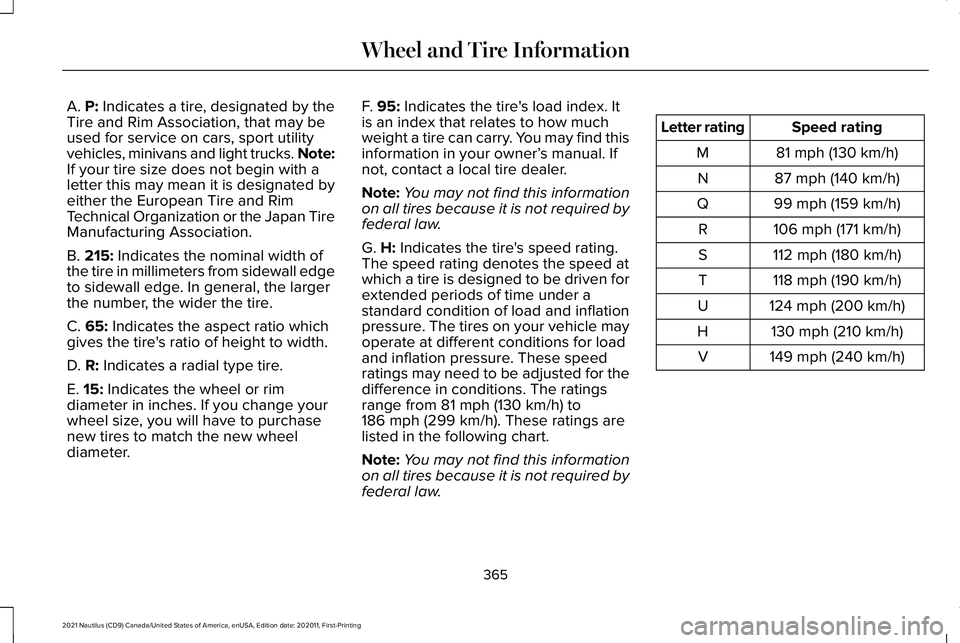
A. P: Indicates a tire, designated by the
Tire and Rim Association, that may be
used for service on cars, sport utility
vehicles, minivans and light trucks.
Note:
If your tire size does not begin with a
letter this may mean it is designated by
either the European Tire and Rim
Technical Organization or the Japan Tire
Manufacturing Association.
B.
215: Indicates the nominal width of
the tire in millimeters from sidewall edge
to sidewall edge. In general, the larger
the number, the wider the tire.
C.
65: Indicates the aspect ratio which
gives the tire's ratio of height to width.
D.
R: Indicates a radial type tire.
E.
15: Indicates the wheel or rim
diameter in inches. If you change your
wheel size, you will have to purchase
new tires to match the new wheel
diameter. F.
95: Indicates the tire's load index. It
is an index that relates to how much
weight a tire can carry. You may find this
information in your owner’ s manual. If
not, contact a local tire dealer.
Note: You may not find this information
on all tires because it is not required by
federal law.
G.
H: Indicates the tire's speed rating.
The speed rating denotes the speed at
which a tire is designed to be driven for
extended periods of time under a
standard condition of load and inflation
pressure. The tires on your vehicle may
operate at different conditions for load
and inflation pressure. These speed
ratings may need to be adjusted for the
difference in conditions. The ratings
range from
81 mph (130 km/h) to
186 mph (299 km/h). These ratings are
listed in the following chart.
Note: You may not find this information
on all tires because it is not required by
federal law. Speed rating
Letter rating
81 mph (130 km/h)
M
87 mph (140 km/h)
N
99 mph (159 km/h)
Q
106 mph (171 km/h)
R
112 mph (180 km/h)
S
118 mph (190 km/h)
T
124 mph (200 km/h)
U
130 mph (210 km/h)
H
149 mph (240 km/h)
V
365
2021 Nautilus (CD9) Canada/United States of America, enUSA, Edition date: 202011, First-Printing Wheel and Tire Information
Page 372 of 579
B. Load Range and Load Inflation
Limits: Indicates the tire's load-carrying
capabilities and its inflation limits.
C.
Maximum Load Dual lb (kg) at psi
(kPa) cold: Indicates the maximum load
and tire pressure when the tire is used
as a dual, defined as four tires on the
rear axle (a total of six or more tires on
the vehicle).
D.
Maximum Load Single lb (kg) at psi
(kPa) cold: Indicates the maximum load
and tire pressure when the tire is used
as a single, defined as two tires (total)
on the rear axle.
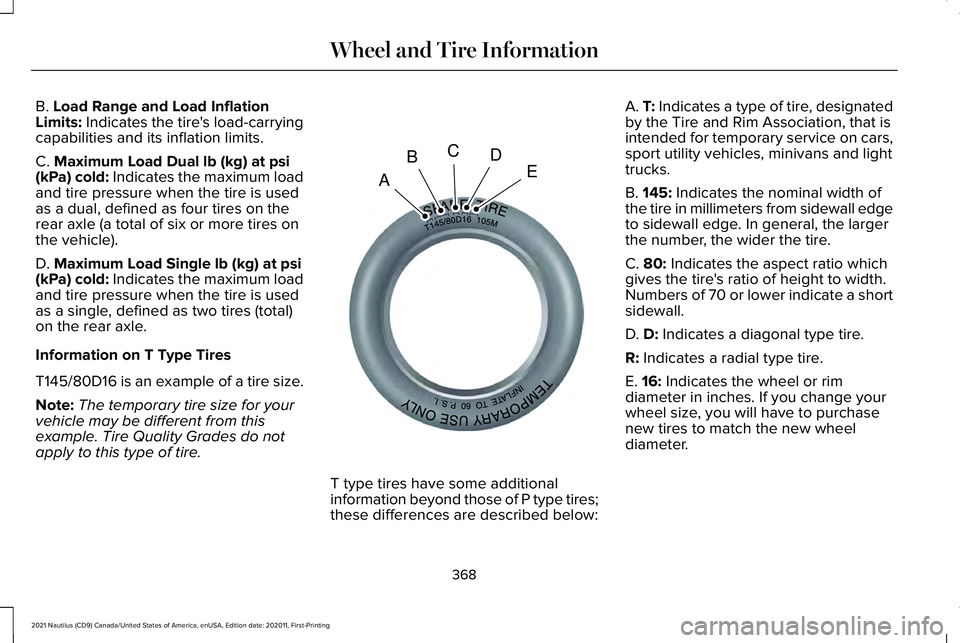
Information on T Type Tires
T145/80D16 is an example of a tire size.
Note: The temporary tire size for your
vehicle may be different from this
example. Tire Quality Grades do not
apply to this type of tire. T type tires have some additional
information beyond those of P type tires;
these differences are described below:A.
T: Indicates a type of tire, designated
by the Tire and Rim Association, that is
intended for temporary service on cars,
sport utility vehicles, minivans and light
trucks.
B.
145: Indicates the nominal width of
the tire in millimeters from sidewall edge
to sidewall edge. In general, the larger
the number, the wider the tire.
C.
80: Indicates the aspect ratio which
gives the tire's ratio of height to width.
Numbers of 70 or lower indicate a short
sidewall.
D.
D: Indicates a diagonal type tire.
R:
Indicates a radial type tire.
E.
16: Indicates the wheel or rim
diameter in inches. If you change your
wheel size, you will have to purchase
new tires to match the new wheel
diameter.
368
2021 Nautilus (CD9) Canada/United States of America, enUSA, Edition date: 202011, First-Printing Wheel and Tire InformationA
BCDEE142545
Page 379 of 579
INSPECTING THE TIRE FOR WEAR
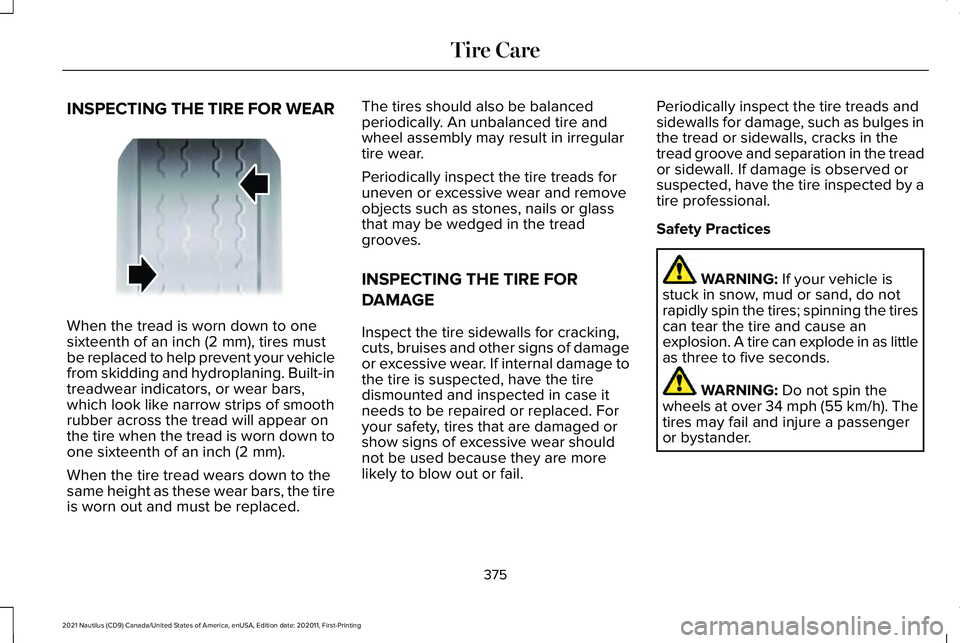
When the tread is worn down to one
sixteenth of an inch (2 mm), tires must
be replaced to help prevent your vehicle
from skidding and hydroplaning. Built-in
treadwear indicators, or wear bars,
which look like narrow strips of smooth
rubber across the tread will appear on
the tire when the tread is worn down to
one sixteenth of an inch (2 mm).
When the tire tread wears down to the
same height as these wear bars, the tire
is worn out and must be replaced. The tires should also be balanced
periodically. An unbalanced tire and
wheel assembly may result in irregular
tire wear.
Periodically inspect the tire treads for
uneven or excessive wear and remove
objects such as stones, nails or glass
that may be wedged in the tread
grooves.
INSPECTING THE TIRE FOR
DAMAGE
Inspect the tire sidewalls for cracking,
cuts, bruises and other signs of damage
or excessive wear. If internal damage to
the tire is suspected, have the tire
dismounted and inspected in case it
needs to be repaired or replaced. For
your safety, tires that are damaged or
show signs of excessive wear should
not be used because they are more
likely to blow out or fail.
Periodically inspect the tire treads and
sidewalls for damage, such as bulges in
the tread or sidewalls, cracks in the
tread groove and separation in the tread
or sidewall. If damage is observed or
suspected, have the tire inspected by a
tire professional.
Safety Practices
WARNING: If your vehicle is
stuck in snow, mud or sand, do not
rapidly spin the tires; spinning the tires
can tear the tire and cause an
explosion. A tire can explode in as little
as three to five seconds. WARNING:
Do not spin the
wheels at over 34 mph (55 km/h). The
tires may fail and injure a passenger
or bystander.
375
2021 Nautilus (CD9) Canada/United States of America, enUSA, Edition date: 202011, First-Printing Tire CareE142546
Page 400 of 579
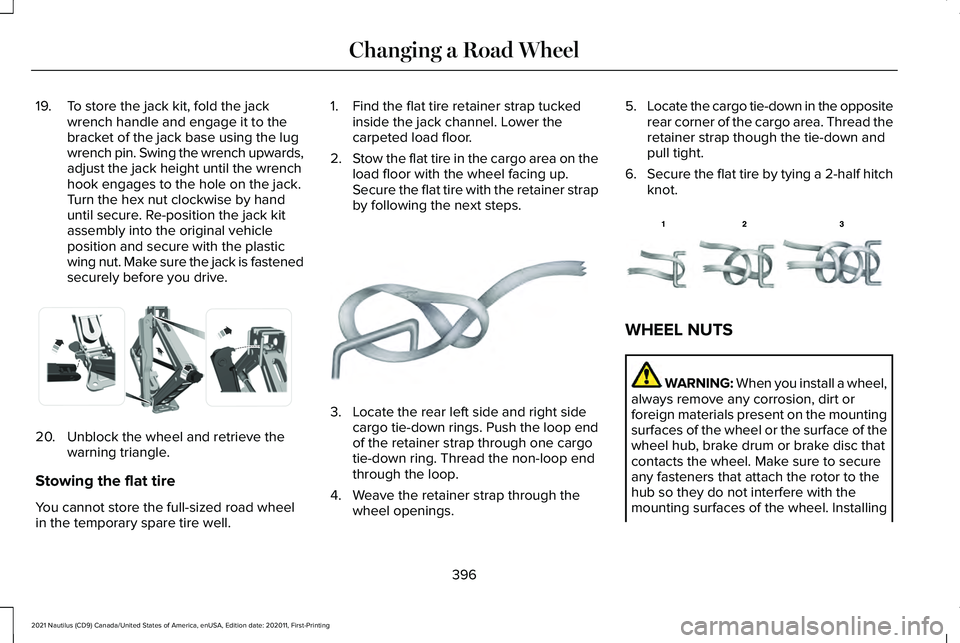
19. To store the jack kit, fold the jack
wrench handle and engage it to the
bracket of the jack base using the lug
wrench pin. Swing the wrench upwards,
adjust the jack height until the wrench
hook engages to the hole on the jack.
Turn the hex nut clockwise by hand
until secure. Re-position the jack kit
assembly into the original vehicle
position and secure with the plastic
wing nut. Make sure the jack is fastened
securely before you drive.20. Unblock the wheel and retrieve the
warning triangle.
Stowing the flat tire
You cannot store the full-sized road wheel
in the temporary spare tire well. 1. Find the flat tire retainer strap tucked
inside the jack channel. Lower the
carpeted load floor.
2. Stow the flat tire in the cargo area on the
load floor with the wheel facing up.
Secure the flat tire with the retainer strap
by following the next steps. 3. Locate the rear left side and right side
cargo tie-down rings. Push the loop end
of the retainer strap through one cargo
tie-down ring. Thread the non-loop end
through the loop.
4. Weave the retainer strap through the wheel openings. 5.
Locate the cargo tie-down in the opposite
rear corner of the cargo area. Thread the
retainer strap though the tie-down and
pull tight.
6. Secure the flat tire by tying a 2-half hitch
knot. WHEEL NUTS
WARNING: When you install a wheel,
always remove any corrosion, dirt or
foreign materials present on the mounting
surfaces of the wheel or the surface of the
wheel hub, brake drum or brake disc that
contacts the wheel. Make sure to secure
any fasteners that attach the rotor to the
hub so they do not interfere with the
mounting surfaces of the wheel. Installing
396
2021 Nautilus (CD9) Canada/United States of America, enUSA, Edition date: 202011, First-Printing Changing a Road WheelE294121 E142906 E143746
Page 557 of 579
3
360 Degree Camera...................................243
360 Degree Camera Settings.........................245
360 Degree Camera Guide Lines............244 Keep Out Zone....................................................245
360 Degree Camera Limitations..............243
360 Degree Camera Precautions............243
360 Degree Camera Settings...................245 Switching the 360 Degree Camera On and
Off......................................................................245
Switching the 360 Degree Camera View..................................................................245
9
911 Assist
...........................................................73
A
A/C See: Climate Control..........................................154
About This Publication
....................................17
Features and Options...........................................17
Illustrations...............................................................17
Location of Components......................................17
ABS See: Brakes...........................................................218 Accessing Apps
............................................444
Accessing Feature Drawers......................433 Application Drawer............................................433
Vehicle Drawer....................................................433
Accessing Navigation.................................449
Accessing the Passive Key Backup Position.........................................................190
Accessories...................................................454
Active Park Assist
.........................................246
Active Park Assist – Troubleshooting...........248
Active Park Assist Precautions
.................246
Active Park Assist – Troubleshooting.........................................248
Active Park Assist – Frequently Asked Questions.........................................................248
Active Park Assist – Information Messages.........................................................248
Adaptive Cruise Control.............................253 Adaptive Cruise Control –
Troubleshooting.............................................262
Lane Centering...................................................260
Adaptive Cruise Control Automatic Cancellation................................................257
Adaptive Cruise Control Indicators.........259
Adaptive Cruise Control Limitations.......254 Sensor Limitations..............................................254 Adaptive Cruise Control
Precautions.................................................253
Hilly Condition Usage.......................................254
When Following a Vehicle...............................253
Adaptive Cruise Control – Troubleshooting.........................................262
Adaptive Cruise Control – Information Messages.........................................................262
Adaptive Front Lighting
...............................125
How Does Adaptive Front Lighting
Work...................................................................125
Switching Adaptive Front Lighting On and Off.......................................................................126
Adjusting the Exterior Mirrors....................133
Adjusting the Headlamps...........................348 Vertical Aim Adjustment...................................
348
Adjusting the Instrument Panel Lighting Brightness....................................................128
Adjusting the Map........................................449 Changing the Format of the Map...................449
Zooming the Map In and Out..........................449
Adjusting the Seatbelt Height.....................57
Adjusting the Seatbelts During Pregnancy......................................................56
Adjusting the Sound Settings...................424 Balance and Fade..............................................424
Occupancy Mode...............................................424
Sound Mode........................................................424
553
2021 Nautilus (CD9) Canada/United States of America, enUSA, Edition date: 202011, First-Printing Index