light LINCOLN NAUTILUS 2021 User Guide
[x] Cancel search | Manufacturer: LINCOLN, Model Year: 2021, Model line: NAUTILUS, Model: LINCOLN NAUTILUS 2021Pages: 579, PDF Size: 6.9 MB
Page 98 of 579
With your passive key within 3 ft (1 m) of your
vehicle, touch the outer door handle lock
sensor for approximately one second to lock,
being careful not to touch the unlock sensor
on the back of the door handle at the same
time. After locking, you can immediately pull
on the door handle to confirm locking
occurred without inadvertently unlocking.
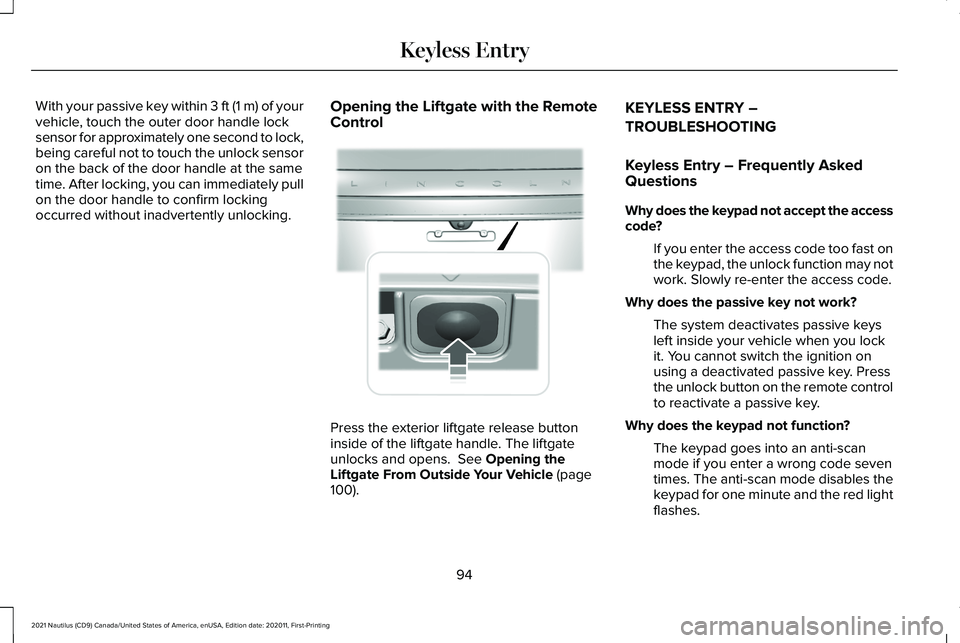
Opening the Liftgate with the Remote
Control Press the exterior liftgate release button
inside of the liftgate handle. The liftgate
unlocks and opens. See Opening the
Liftgate From Outside Your Vehicle (page
100). KEYLESS ENTRY –
TROUBLESHOOTING
Keyless Entry – Frequently Asked
Questions
Why does the keypad not accept the access
code?
If you enter the access code too fast on
the keypad, the unlock function may not
work. Slowly re-enter the access code.
Why does the passive key not work? The system deactivates passive keys
left inside your vehicle when you lock
it. You cannot switch the ignition on
using a deactivated passive key. Press
the unlock button on the remote control
to reactivate a passive key.
Why does the keypad not function? The keypad goes into an anti-scan
mode if you enter a wrong code seven
times. The anti-scan mode disables the
keypad for one minute and the red light
flashes.
94
2021 Nautilus (CD9) Canada/United States of America, enUSA, Edition date: 202011, First-Printing Keyless Entry E291416
Page 102 of 579

KEYLESS ENTRY KEYPAD –
TROUBLESHOOTING
Keyless Entry Keypad – Frequently
Asked Questions
Why does the keypad not accept the access
code?
If you enter the access code too fast on
the keypad, the unlock function may not
work. Slowly re-enter the access code.
Why does the keypad not function? The keypad goes into an anti-scan
mode if you enter a wrong code seven
times. The anti-scan mode disables the
keypad for one minute and the red light
flashes.
98
2021 Nautilus (CD9) Canada/United States of America, enUSA, Edition date: 202011, First-Printing Keyless Entry Keypad
Page 120 of 579
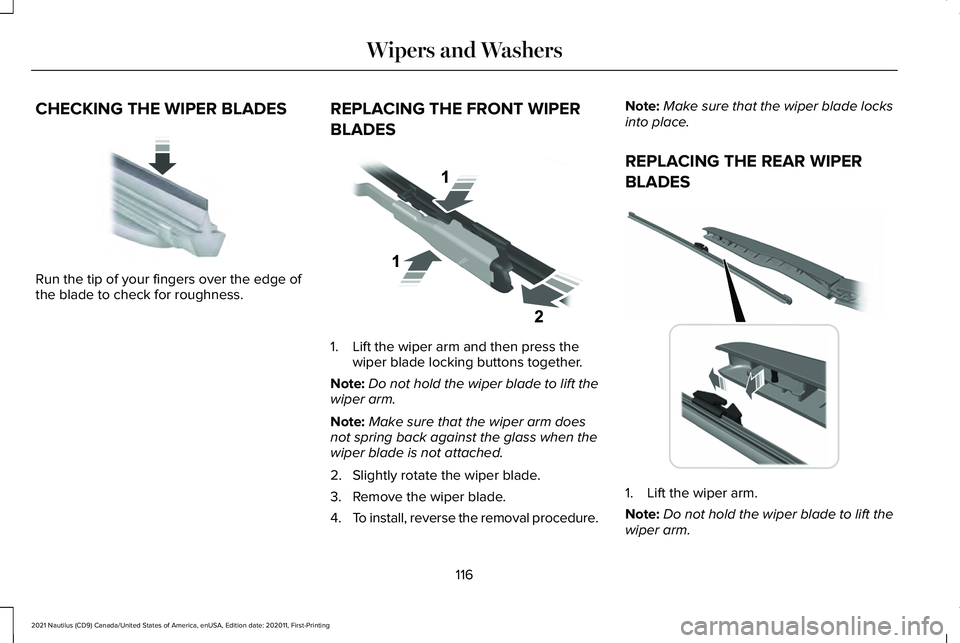
CHECKING THE WIPER BLADES
Run the tip of your fingers over the edge of
the blade to check for roughness.
REPLACING THE FRONT WIPER
BLADES 1. Lift the wiper arm and then press the
wiper blade locking buttons together.
Note: Do not hold the wiper blade to lift the
wiper arm.
Note: Make sure that the wiper arm does
not spring back against the glass when the
wiper blade is not attached.
2. Slightly rotate the wiper blade.
3. Remove the wiper blade.
4. To install, reverse the removal procedure. Note:
Make sure that the wiper blade locks
into place.
REPLACING THE REAR WIPER
BLADES 1. Lift the wiper arm.
Note:
Do not hold the wiper blade to lift the
wiper arm.
116
2021 Nautilus (CD9) Canada/United States of America, enUSA, Edition date: 202011, First-Printing Wipers and WashersE142463 E129990 E271380
Page 123 of 579
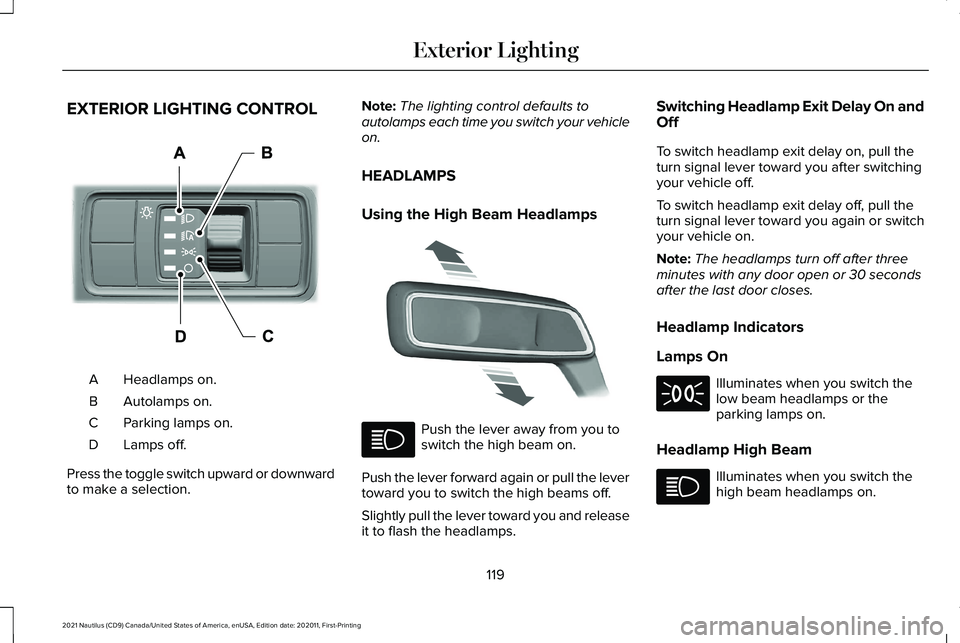
EXTERIOR LIGHTING CONTROL
Headlamps on.
A
Autolamps on.
B
Parking lamps on.
C
Lamps off.
D
Press the toggle switch upward or downward
to make a selection. Note:
The lighting control defaults to
autolamps each time you switch your vehicle
on.
HEADLAMPS
Using the High Beam Headlamps Push the lever away from you to
switch the high beam on.
Push the lever forward again or pull the lever
toward you to switch the high beams off.
Slightly pull the lever toward you and release
it to flash the headlamps. Switching Headlamp Exit Delay On and
Off
To switch headlamp exit delay on, pull the
turn signal lever toward you after switching
your vehicle off.
To switch headlamp exit delay off, pull the
turn signal lever toward you again or switch
your vehicle on.
Note:
The headlamps turn off after three
minutes with any door open or 30 seconds
after the last door closes.
Headlamp Indicators
Lamps On Illuminates when you switch the
low beam headlamps or the
parking lamps on.
Headlamp High Beam Illuminates when you switch the
high beam headlamps on.
119
2021 Nautilus (CD9) Canada/United States of America, enUSA, Edition date: 202011, First-Printing Exterior LightingE344567 E339556
Page 124 of 579
HEADLAMPS – TROUBLESHOOTING
Headlamps – Frequently Asked
Questions
Why is there condensation in the
headlamps?
Headlamps have vents to accommodate
normal changes in air pressure.
Condensation can be a natural
by-product of this design. When moist
air enters the lamp assembly through
the vents, there is a possibility that
condensation can occur when the
temperature is cold. When normal
condensation occurs, a fine mist can
form on the interior of the lens. The fine
mist eventually clears and exits through
the vents during normal operation.
How much condensation is acceptable? The presence of a fine mist, for example
no streaks, drip marks or large droplets.
A fine mist covers less than 50% of the
lens. How long may it take for the acceptable
condensation to be cleared?
Clearing time may take as long as 48
hours under dry weather conditions.
How much condensation is unacceptable? A water puddle inside the lamp. Streaks,
drip marks or large droplets present on
the interior of the lens.
What should I do if unacceptable
condensation is present? Have your vehicle checked as soon as
possible.
Why do my headlamps turn off when I have
them switched on when I switch my vehicle
off ? The battery saver turns the headlamps
off after a short period of time after you
switch your vehicle off. AUTOLAMPS
What Are Autolamps WARNING: The system does not
relieve you of your responsibility to drive
with due care and attention. You may need
to override the system if it does not turn
the headlamps on in low visibility
conditions, for example daytime fog.
Autolamps turn the headlamps on in low light
situations or when the windshield wipers
operate.
Autolamp Settings
1. Using the instrument cluster controls on the steering wheel, select
Settings.
2. Select
Vehicle.
3. Select
Lighting.
4. Select
Autolamp Delay.
5. Select a setting and press the OK button.
120
2021 Nautilus (CD9) Canada/United States of America, enUSA, Edition date: 202011, First-Printing Exterior Lighting
Page 125 of 579
EXTERIOR LAMPS
Switching the Turn Signal Lamps On
and Off
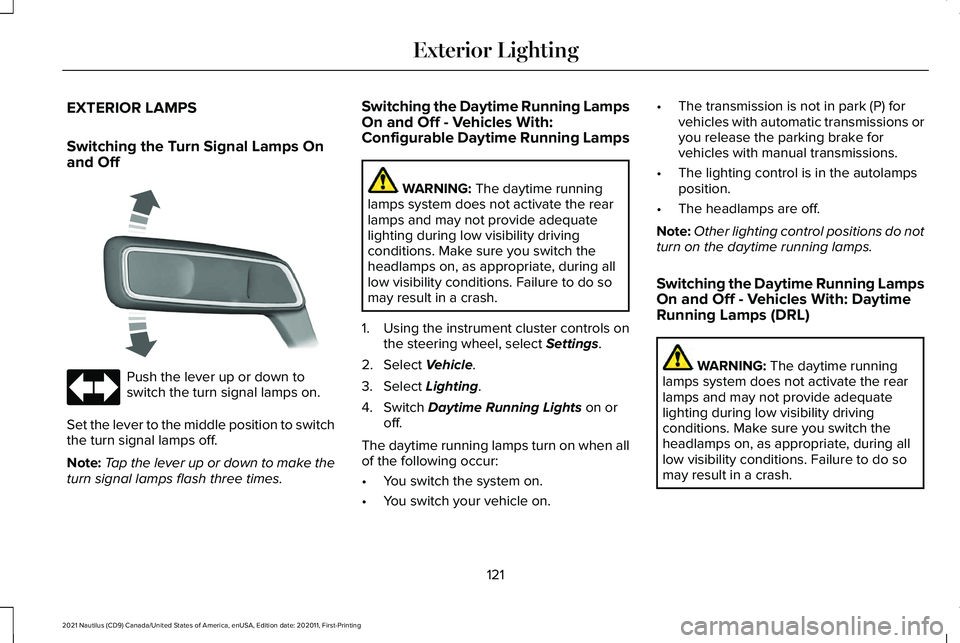
Push the lever up or down to
switch the turn signal lamps on.
Set the lever to the middle position to switch
the turn signal lamps off.
Note: Tap the lever up or down to make the
turn signal lamps flash three times. Switching the Daytime Running Lamps
On and Off - Vehicles With:
Configurable Daytime Running Lamps WARNING: The daytime running
lamps system does not activate the rear
lamps and may not provide adequate
lighting during low visibility driving
conditions. Make sure you switch the
headlamps on, as appropriate, during all
low visibility conditions. Failure to do so
may result in a crash.
1. Using the instrument cluster controls on the steering wheel, select
Settings.
2. Select
Vehicle.
3. Select
Lighting.
4. Switch
Daytime Running Lights on or
off.
The daytime running lamps turn on when all
of the following occur:
• You switch the system on.
• You switch your vehicle on. •
The transmission is not in park (P) for
vehicles with automatic transmissions or
you release the parking brake for
vehicles with manual transmissions.
• The lighting control is in the autolamps
position.
• The headlamps are off.
Note: Other lighting control positions do not
turn on the daytime running lamps.
Switching the Daytime Running Lamps
On and Off - Vehicles With: Daytime
Running Lamps (DRL) WARNING:
The daytime running
lamps system does not activate the rear
lamps and may not provide adequate
lighting during low visibility driving
conditions. Make sure you switch the
headlamps on, as appropriate, during all
low visibility conditions. Failure to do so
may result in a crash.
121
2021 Nautilus (CD9) Canada/United States of America, enUSA, Edition date: 202011, First-Printing Exterior Lighting E273180
Page 126 of 579
Daytime running lamps are always on unless
you switch on the headlamps or your vehicle
is in park (P).
Switching the Front Fog Lamps On and
Off (If Equipped)
The front fog lamp button is on the lighting
control. Press the button to switch the front
fog lamps on or off.
Note: Only switch the front fog lamps on
during reduced visibility.
Note: The brightness of the daytime running
lamps may decrease when the front fog
lamps are switched on.
Note: When the lighting control is in the
autolamps position, you cannot switch the
fog lamps on unless the headlamps are on.
Switching Welcome Lighting On and
Off
Lincoln Embrace: W elcome Lighting Welcome lighting slowly turns on the exterior
lamps when you approach your vehicle with
an authenticated device or unlock the doors.
1. Using the instrument cluster controls on
the steering wheel, select Settings.
2. Select
Vehicle.
3. Select
Lighting.
4. Switch
Welcome Lighting on or off.
Exterior Lamp Indicators
Front Fog Lamp It illuminates when you switch the
front fog lamps on.
Turn Signal Lamp It flashes when you switch the turn
signal lamps on.
Note: An increase in the rate of flashing
warns of a failed turn signal lamp bulb. Exterior Lamp Audible Warning
Exterior Lamps On
Sounds when you open the driver door and
the exterior lamps are on.
AUTOMATIC HIGH BEAM CONTROL
How Does Automatic High Beam
Control Work
Automatic high beam control turns the high
beams on if it is dark enough and no other
traffic is present. If it detects an approaching
vehicle
’s headlamps or tail lamps, or street
lighting ahead, the system turns the high
beams off.
A camera sensor, centrally mounted behind
the windshield of your vehicle, continuously
monitors conditions to turn the high beams
on and off.
122
2021 Nautilus (CD9) Canada/United States of America, enUSA, Edition date: 202011, First-Printing Exterior Lighting
Page 127 of 579
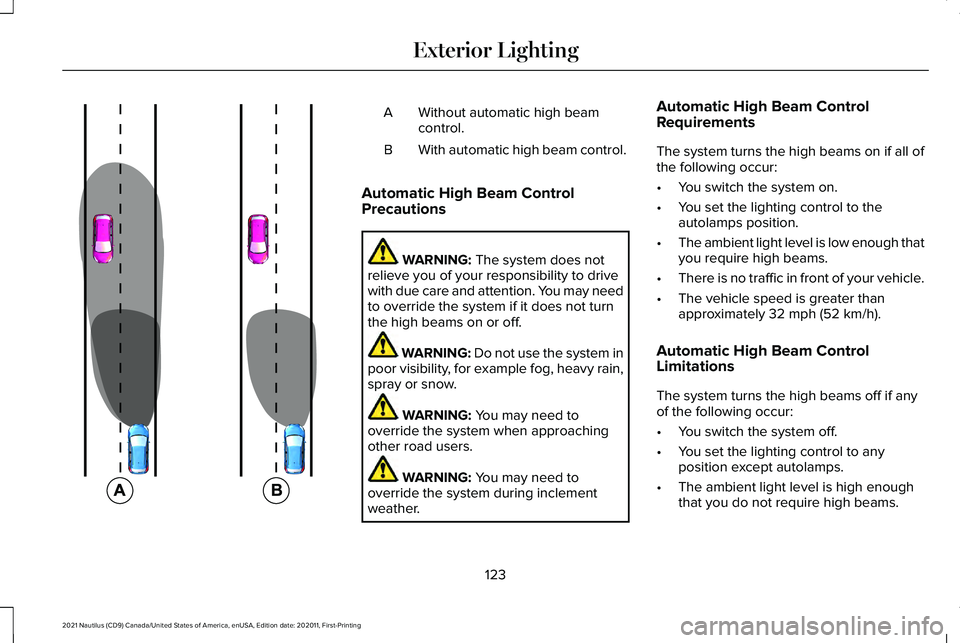
Without automatic high beam
control.
A
With automatic high beam control.
B
Automatic High Beam Control
Precautions WARNING: The system does not
relieve you of your responsibility to drive
with due care and attention. You may need
to override the system if it does not turn
the high beams on or off. WARNING:
Do not use the system in
poor visibility, for example fog, heavy rain,
spray or snow. WARNING:
You may need to
override the system when approaching
other road users. WARNING:
You may need to
override the system during inclement
weather. Automatic High Beam Control
Requirements
The system turns the high beams on if all of
the following occur:
•
You switch the system on.
• You set the lighting control to the
autolamps position.
• The ambient light level is low enough that
you require high beams.
• There is no traffic in front of your vehicle.
• The vehicle speed is greater than
approximately
32 mph (52 km/h).
Automatic High Beam Control
Limitations
The system turns the high beams off if any
of the following occur:
• You switch the system off.
• You set the lighting control to any
position except autolamps.
• The ambient light level is high enough
that you do not require high beams.
123
2021 Nautilus (CD9) Canada/United States of America, enUSA, Edition date: 202011, First-Printing Exterior Lighting E327596
Page 128 of 579
•
The system detects an approaching
vehicle's headlamps or rear lamps.
• The system detects severe rain, snow or
fog.
• The system detects street lighting.
• The camera has reduced visibility.
• The vehicle speed falls below
approximately 27 mph (44 km/h).
Switching Automatic High Beam
Control On and Off
1. Using the instrument cluster controls on the steering wheel, select
Settings.
2. Select
Vehicle.
3. Select
Lighting.
4. Switch
Auto High Beam on or off. Automatic High Beam Control
Indicators Illuminates to confirm when the
system is ready to assist.
Overriding Automatic High Beam
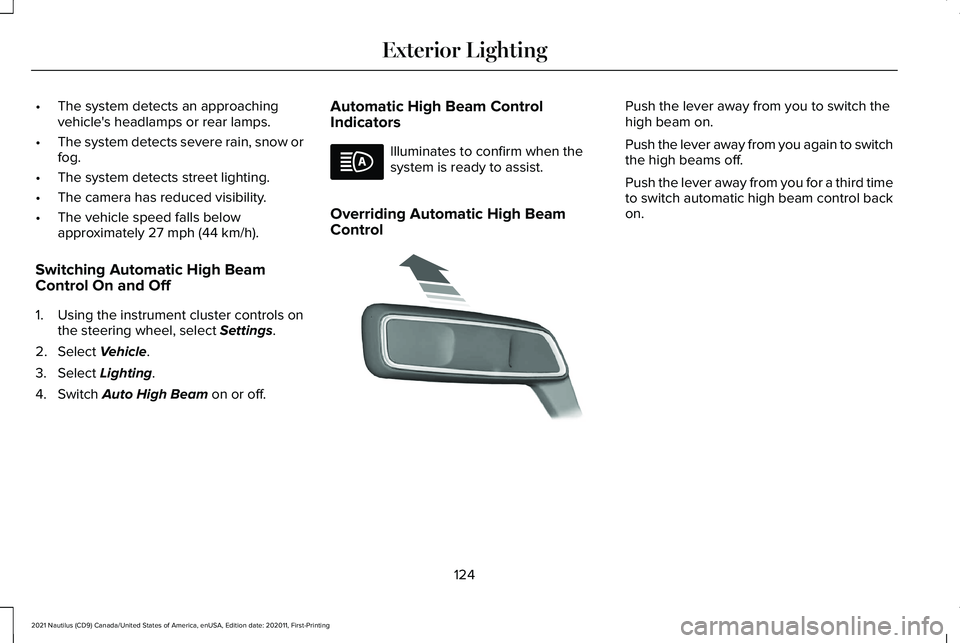
Control Push the lever away from you to switch the
high beam on.
Push the lever away from you again to switch
the high beams off.
Push the lever away from you for a third time
to switch automatic high beam control back
on.
124
2021 Nautilus (CD9) Canada/United States of America, enUSA, Edition date: 202011, First-Printing Exterior Lighting E273182
Page 129 of 579
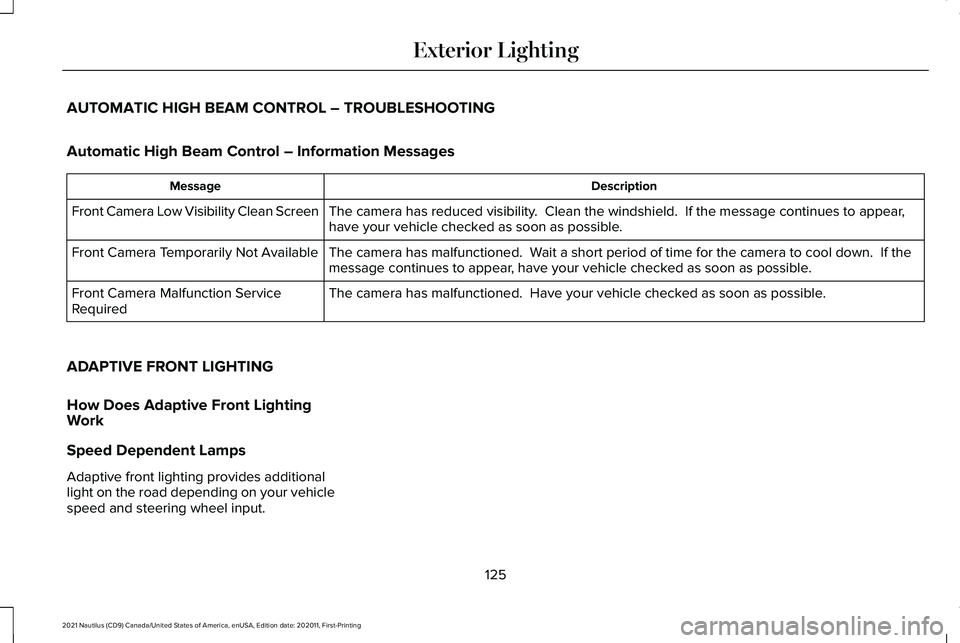
AUTOMATIC HIGH BEAM CONTROL – TROUBLESHOOTING
Automatic High Beam Control – Information Messages
Description
Message
The camera has reduced visibility. Clean the windshield. If the message continues to appear,
have your vehicle checked as soon as possible.
Front Camera Low Visibility Clean Screen
The camera has malfunctioned. Wait a short period of time for the camera to cool down. If the
message continues to appear, have your vehicle checked as soon as possible.
Front Camera Temporarily Not Available
The camera has malfunctioned. Have your vehicle checked as soon as possible.
Front Camera Malfunction Service
Required
ADAPTIVE FRONT LIGHTING
How Does Adaptive Front Lighting
Work
Speed Dependent Lamps
Adaptive front lighting provides additional
light on the road depending on your vehicle
speed and steering wheel input.
125
2021 Nautilus (CD9) Canada/United States of America, enUSA, Edition date: 202011, First-Printing Exterior Lighting