lock LINCOLN NAUTILUS 2021 User Guide
[x] Cancel search | Manufacturer: LINCOLN, Model Year: 2021, Model line: NAUTILUS, Model: LINCOLN NAUTILUS 2021Pages: 579, PDF Size: 6.9 MB
Page 49 of 579
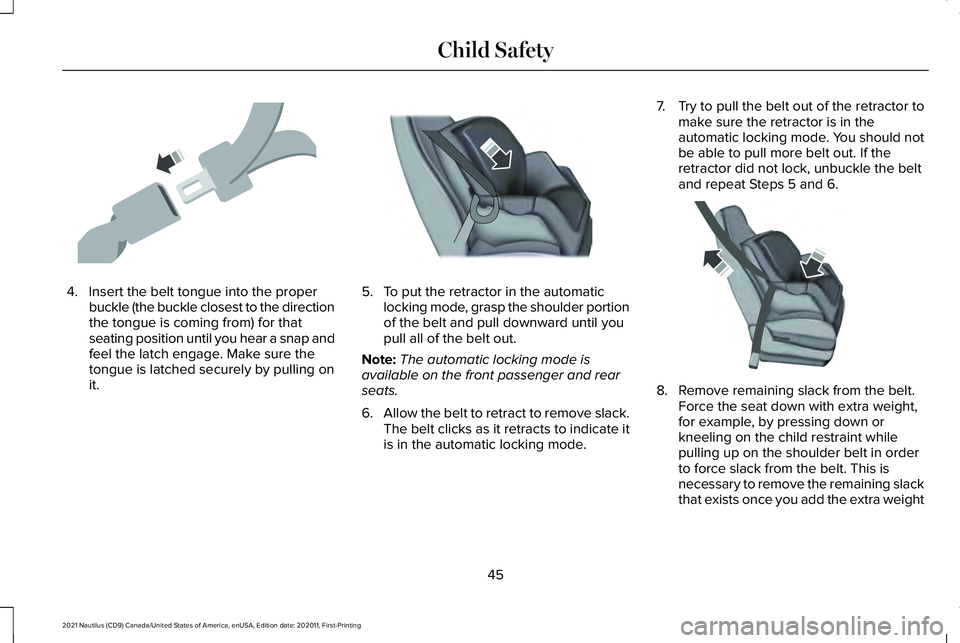
4. Insert the belt tongue into the proper
buckle (the buckle closest to the direction
the tongue is coming from) for that
seating position until you hear a snap and
feel the latch engage. Make sure the
tongue is latched securely by pulling on
it. 5. To put the retractor in the automatic
locking mode, grasp the shoulder portion
of the belt and pull downward until you
pull all of the belt out.
Note: The automatic locking mode is
available on the front passenger and rear
seats.
6. Allow the belt to retract to remove slack.
The belt clicks as it retracts to indicate it
is in the automatic locking mode. 7.
Try to pull the belt out of the retractor to
make sure the retractor is in the
automatic locking mode. You should not
be able to pull more belt out. If the
retractor did not lock, unbuckle the belt
and repeat Steps 5 and 6. 8. Remove remaining slack from the belt.
Force the seat down with extra weight,
for example, by pressing down or
kneeling on the child restraint while
pulling up on the shoulder belt in order
to force slack from the belt. This is
necessary to remove the remaining slack
that exists once you add the extra weight
45
2021 Nautilus (CD9) Canada/United States of America, enUSA, Edition date: 202011, First-Printing Child SafetyE142531 E142875 E142533
Page 50 of 579
of the child to the child restraint. It also
helps to achieve the proper snugness of
the child restraint to your vehicle.
Sometimes, a slight lean toward the
buckle will provide extra help to remove
remaining slack from the belt.
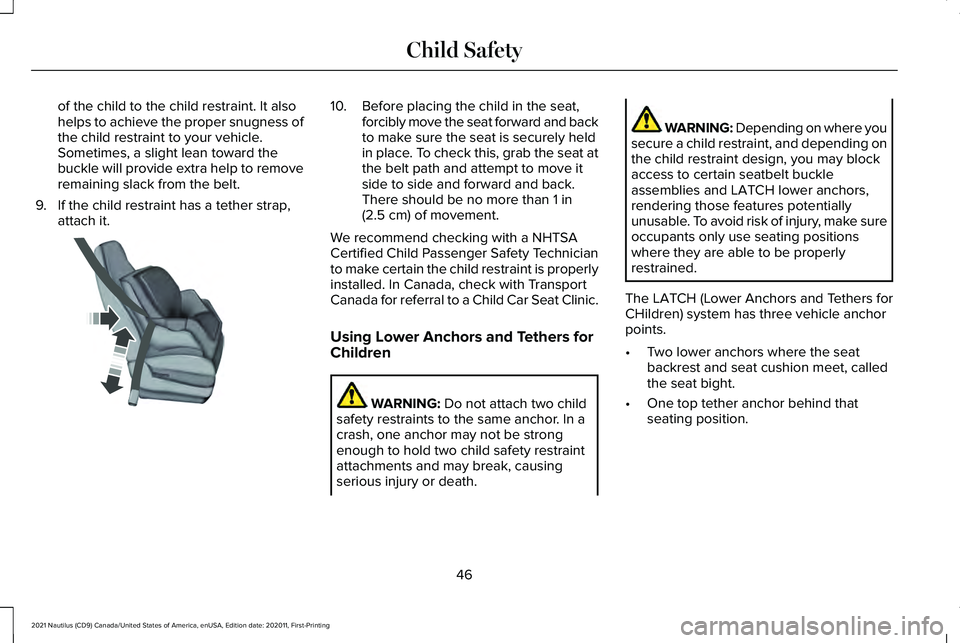
9. If the child restraint has a tether strap, attach it. 10. Before placing the child in the seat,
forcibly move the seat forward and back
to make sure the seat is securely held
in place. To check this, grab the seat at
the belt path and attempt to move it
side to side and forward and back.
There should be no more than 1 in
(2.5 cm) of movement.
We recommend checking with a NHTSA
Certified Child Passenger Safety Technician
to make certain the child restraint is properly
installed. In Canada, check with Transport
Canada for referral to a Child Car Seat Clinic.
Using Lower Anchors and Tethers for
Children WARNING:
Do not attach two child
safety restraints to the same anchor. In a
crash, one anchor may not be strong
enough to hold two child safety restraint
attachments and may break, causing
serious injury or death. WARNING: Depending on where you
secure a child restraint, and depending on
the child restraint design, you may block
access to certain seatbelt buckle
assemblies and LATCH lower anchors,
rendering those features potentially
unusable. To avoid risk of injury, make sure
occupants only use seating positions
where they are able to be properly
restrained.
The LATCH (Lower Anchors and Tethers for
CHildren) system has three vehicle anchor
points.
• Two lower anchors where the seat
backrest and seat cushion meet, called
the seat bight.
• One top tether anchor behind that
seating position.
46
2021 Nautilus (CD9) Canada/United States of America, enUSA, Edition date: 202011, First-Printing Child SafetyE142534
Page 56 of 579
If the booster seat slides on the vehicle seat
upon which it is being used, placing a
rubberized mesh sold as shelf or carpet liner
under the booster seat may improve this
condition. Do not use any item thicker than
this under the booster seat. Check with the
booster seat manufacturer's instructions.
CHILD SAFETY LOCKS
WARNING: You cannot open the rear
doors from inside if you have put the child
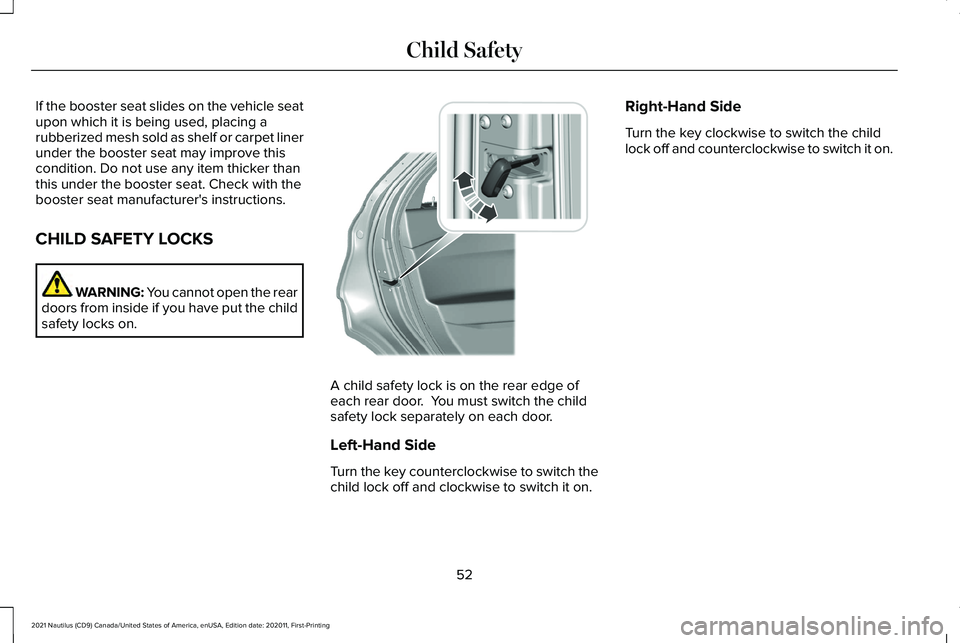
safety locks on. A child safety lock is on the rear edge of
each rear door. You must switch the child
safety lock separately on each door.
Left-Hand Side
Turn the key counterclockwise to switch the
child lock off and clockwise to switch it on.Right-Hand Side
Turn the key clockwise to switch the child
lock off and counterclockwise to switch it on.
52
2021 Nautilus (CD9) Canada/United States of America, enUSA, Edition date: 202011, First-Printing Child Safety E287259
Page 58 of 579
The seatbelt system consists of:
•
Lap and shoulder seatbelts.
• Shoulder seatbelt with automatic locking
mode, except driver seatbelt.
• Height adjuster at the front outermost
seating positions.
• Seatbelt pretensioners at the front
outermost and second row outermost
seating positions.
• Belt tension sensor at the front outermost
passenger seating position. •
Seatbelt warning light and chime. •
Crash sensors and monitoring system
with readiness indicator. The seatbelt pretensioners are designed to
tighten the seatbelts when activated. In
frontal and near-frontal crashes, the seatbelt
pretensioners may be activated alone or, if
the crash is of sufficient severity, together
with the front airbags. The pretensioners may
also activate when a Safety Canopy airbag
deploys.
FASTENING AND UNFASTENING
THE SEATBELTS
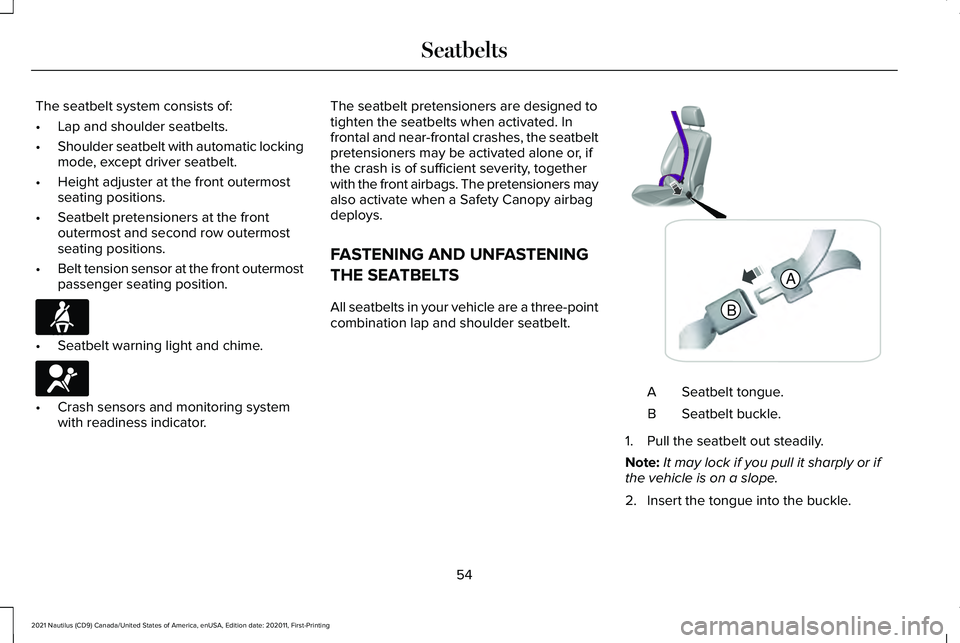
All seatbelts in your vehicle are a three-point
combination lap and shoulder seatbelt.
Seatbelt tongue.
A
Seatbelt buckle.
B
1. Pull the seatbelt out steadily.
Note: It may lock if you pull it sharply or if
the vehicle is on a slope.
2. Insert the tongue into the buckle.
54
2021 Nautilus (CD9) Canada/United States of America, enUSA, Edition date: 202011, First-Printing SeatbeltsE71880 E67017 B
A E338014
Page 59 of 579
3. Pull the seatbelt tight to remove any
slack.
Unfastening the Seatbelts
1. Press the red button on the buckle to release the seatbelt.
2. Hold the seatbelt tongue and let it retract
completely and smoothly to its stowed
position.
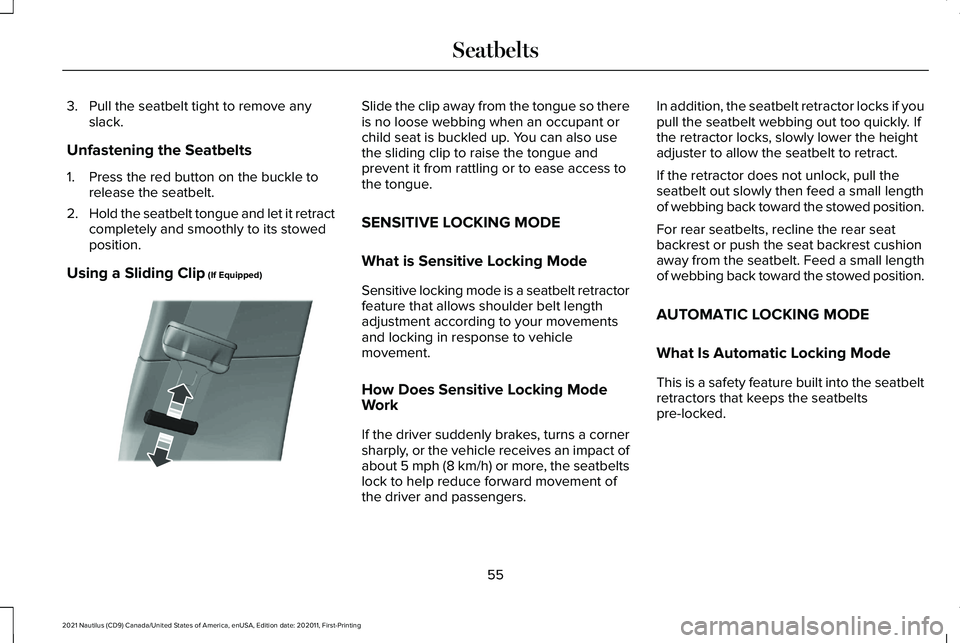
Using a Sliding Clip (If Equipped) Slide the clip away from the tongue so there
is no loose webbing when an occupant or
child seat is buckled up. You can also use
the sliding clip to raise the tongue and
prevent it from rattling or to ease access to
the tongue.
SENSITIVE LOCKING MODE
What is Sensitive Locking Mode
Sensitive locking mode is a seatbelt retractor
feature that allows shoulder belt length
adjustment according to your movements
and locking in response to vehicle
movement.
How Does Sensitive Locking Mode
Work
If the driver suddenly brakes, turns a corner
sharply, or the vehicle receives an impact of
about
5 mph (8 km/h) or more, the seatbelts
lock to help reduce forward movement of
the driver and passengers. In addition, the seatbelt retractor locks if you
pull the seatbelt webbing out too quickly. If
the retractor locks, slowly lower the height
adjuster to allow the seatbelt to retract.
If the retractor does not unlock, pull the
seatbelt out slowly then feed a small length
of webbing back toward the stowed position.
For rear seatbelts, recline the rear seat
backrest or push the seat backrest cushion
away from the seatbelt. Feed a small length
of webbing back toward the stowed position.
AUTOMATIC LOCKING MODE
What Is Automatic Locking Mode
This is a safety feature built into the seatbelt
retractors that keeps the seatbelts
pre-locked.
55
2021 Nautilus (CD9) Canada/United States of America, enUSA, Edition date: 202011, First-Printing SeatbeltsE200788
Page 60 of 579
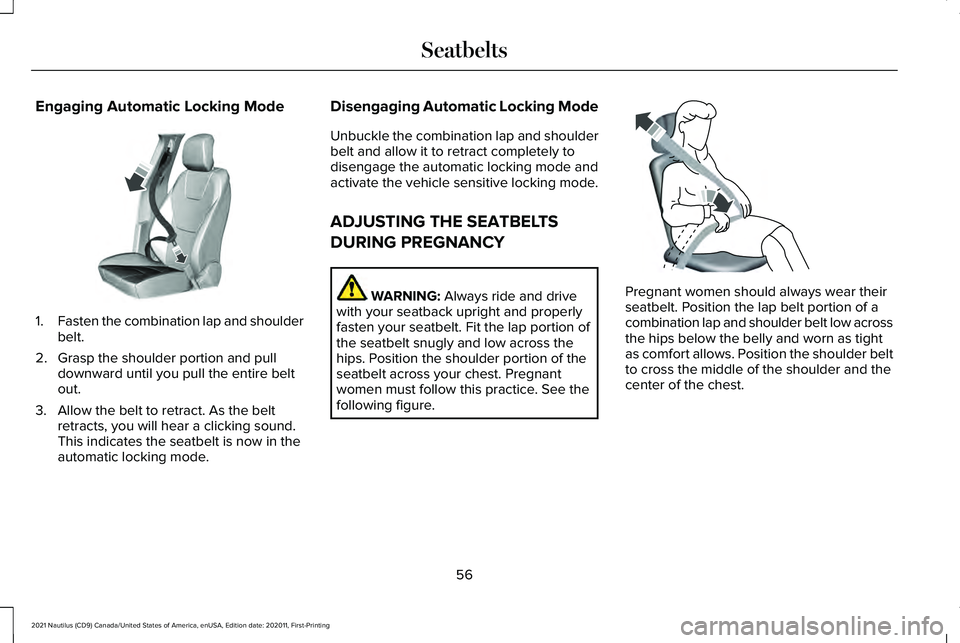
Engaging Automatic Locking Mode
1.
Fasten the combination lap and shoulder
belt.
2. Grasp the shoulder portion and pull downward until you pull the entire belt
out.
3. Allow the belt to retract. As the belt retracts, you will hear a clicking sound.
This indicates the seatbelt is now in the
automatic locking mode. Disengaging Automatic Locking Mode
Unbuckle the combination lap and shoulder
belt and allow it to retract completely to
disengage the automatic locking mode and
activate the vehicle sensitive locking mode.
ADJUSTING THE SEATBELTS
DURING PREGNANCY
WARNING: Always ride and drive
with your seatback upright and properly
fasten your seatbelt. Fit the lap portion of
the seatbelt snugly and low across the
hips. Position the shoulder portion of the
seatbelt across your chest. Pregnant
women must follow this practice. See the
following figure. Pregnant women should always wear their
seatbelt. Position the lap belt portion of a
combination lap and shoulder belt low across
the hips below the belly and worn as tight
as comfort allows. Position the shoulder belt
to cross the middle of the shoulder and the
center of the chest.
56
2021 Nautilus (CD9) Canada/United States of America, enUSA, Edition date: 202011, First-Printing SeatbeltsE142591 E142590
Page 61 of 579
ADJUSTING THE SEATBELT
HEIGHT
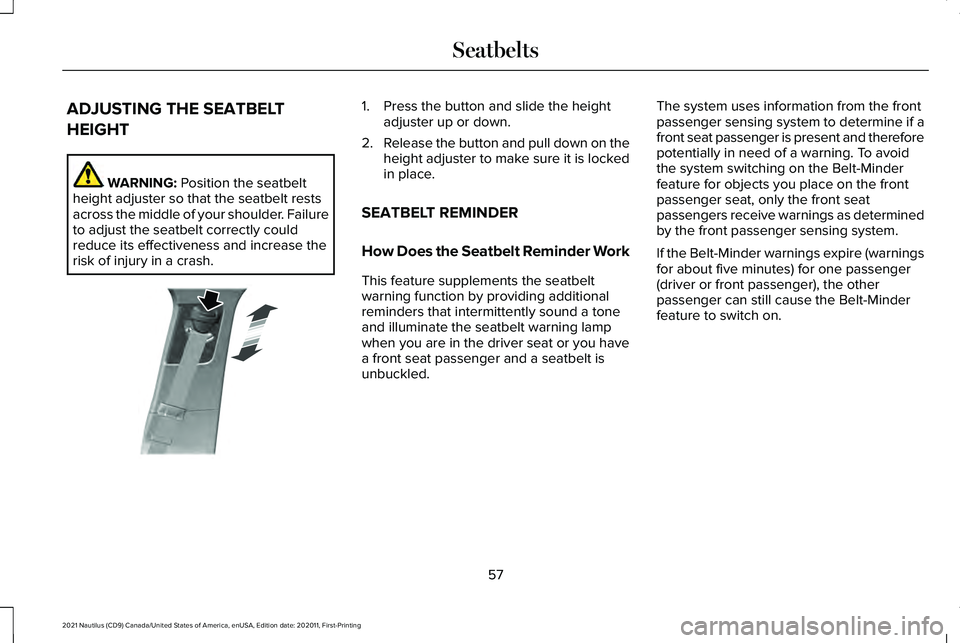
WARNING: Position the seatbelt
height adjuster so that the seatbelt rests
across the middle of your shoulder. Failure
to adjust the seatbelt correctly could
reduce its effectiveness and increase the
risk of injury in a crash. 1. Press the button and slide the height
adjuster up or down.
2. Release the button and pull down on the
height adjuster to make sure it is locked
in place.
SEATBELT REMINDER
How Does the Seatbelt Reminder Work
This feature supplements the seatbelt
warning function by providing additional
reminders that intermittently sound a tone
and illuminate the seatbelt warning lamp
when you are in the driver seat or you have
a front seat passenger and a seatbelt is
unbuckled. The system uses information from the front
passenger sensing system to determine if a
front seat passenger is present and therefore
potentially in need of a warning. To avoid
the system switching on the Belt-Minder
feature for objects you place on the front
passenger seat, only the front seat
passengers receive warnings as determined
by the front passenger sensing system.
If the Belt-Minder warnings expire (warnings
for about five minutes) for one passenger
(driver or front passenger), the other
passenger can still cause the Belt-Minder
feature to switch on.
57
2021 Nautilus (CD9) Canada/United States of America, enUSA, Edition date: 202011, First-Printing SeatbeltsE200161
Page 79 of 579
REMOTE CONTROL LIMITATIONS
WARNING: Changes or modifications
not expressively approved by the party
responsible for compliance could void the
user's authority to operate the equipment.
The term "IC:" before the radio certification
number only signifies that Industry Canada
technical specifications were met.
This device complies with Part 15 of the FCC
Rules and with Industry Canada
license-exempt RSS standard(s). Operation
is subject to the following two conditions: (1)
This device may not cause harmful
interference, and (2) This device must accept
any interference received, including
interference that may cause undesired
operation.
Make sure a valid remote control is within
5 ft (1.5 m) from the front door handles and
rear of vehicle. The system may not function if:
•
The remote control remains stationary
for about a minute.
• The vehicle battery has no charge.
• The remote control battery has no
charge.
• There is interference causing issues with
the remote control frequencies.
• The remote control is too close to metal
objects or electronic devices, for example
keys or a cell phone.
USING THE REMOTE CONTROL
Use your remote control to access various
vehicle systems.
Note: The buttons on your remote may vary
depending on the vehicle region or options.
Unlock Press the button to unlock all
doors.
See Unlocking and
Locking the Doors Using the
Remote Control
(page 89). Lock Press the button to lock all doors.
See
Unlocking and Locking the
Doors Using the Remote Control
(page
89).
Remote Start
(If Equipped) Press the button to remote start.
See
Remotely Starting and
Stopping the Vehicle (page 151).
Liftgate
(If Equipped) Press the button to open or close
the liftgate.
See Liftgate (page
100).
Panic Alarm
(If Equipped) Press the button to sound the
panic alarm.
See Sounding the
Panic Alarm (page 76).
75
2021 Nautilus (CD9) Canada/United States of America, enUSA, Edition date: 202011, First-Printing Keys and Remote ControlsE138629 E138623 E138625 E267940 E138624
Page 80 of 579
SOUNDING THE PANIC ALARM
Press the button to sound the
panic alarm. Press the button
again or switch the ignition on to
turn it off.
Note: The panic alarm only operates when
the ignition is off.
LOCATING YOUR VEHICLE Press the lock button twice within
three seconds. The turn signal
lamps flash. We recommend you
use this method to locate your vehicle. CHANGING THE REMOTE
CONTROL BATTERY WARNING: Keep batteries away from
children to prevent ingestion. Failure to
follow this instruction could result in
personal injury or death. If ingested,
immediately seek medical attention. WARNING: If the battery
compartment does not securely close, stop
using the remote control and replace it as
soon as possible. In the meantime, keep
the remote control away from children.
Failure to follow this instruction could result
in personal injury or death.
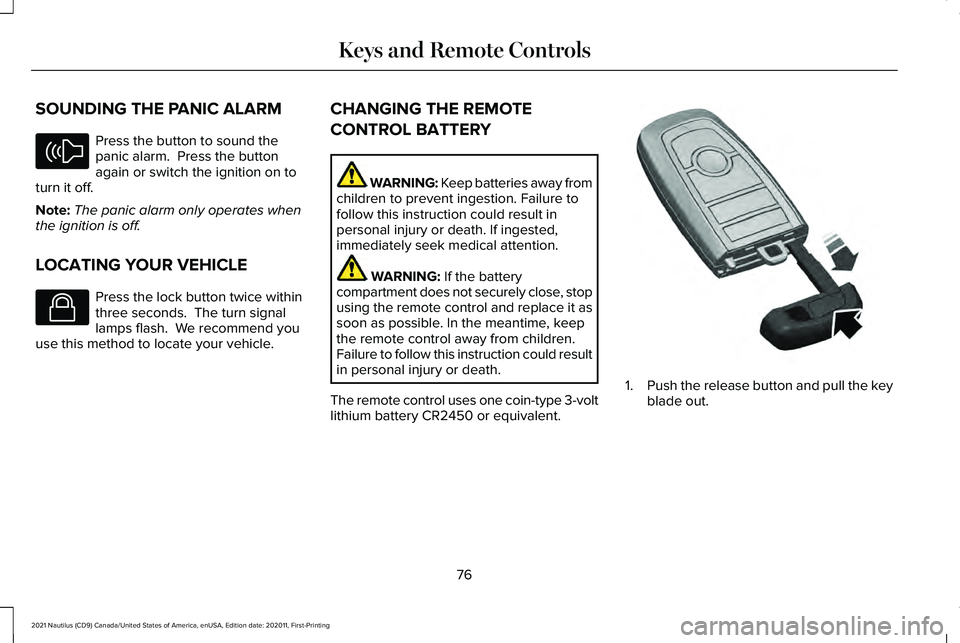
The remote control uses one coin-type 3-volt
lithium battery CR2450 or equivalent. 1.
Push the release button and pull the key
blade out.
76
2021 Nautilus (CD9) Canada/United States of America, enUSA, Edition date: 202011, First-Printing Keys and Remote ControlsE138624 E138623 E322866
Page 84 of 579
WHAT IS PHONE AS A KEY
Phone as a Key allows you to use your phone
in place of a passive key.
You can use your phone for the following
functions:
•
Remote locking and unlocking.
• Passive entry and exit.
• Passive start and drive the vehicle.
• Remote start.
• Memory function recall.
PHONE AS A KEY LIMITATIONS
Limitations can vary based on the make and
model of your phone, phone location and
physical obstructions.
The following items could impact Phone as
a Key performance or prevent functionality
in some cases:
• The typical operating range for Phone as
a Key is 131 ft (40 m). •
Your Bluetooth connection is not
enabled, is disrupted, or out of range.
• Your Phone as a Key is not active or
enabled on at least one phone.
• Your vehicle battery has depleted.
• Your phone battery has depleted.
• Interference from other devices using
radio frequencies or physical
obstructions.
• Your phone is too close to metal objects
or other electronic devices.
Note: Do not leave a duplicate coded key
in the vehicle. Always take your keys and
phone and lock all doors when leaving the
vehicle.
PROGRAMMING YOUR PHONE
To program your smartphone as Phone as a
Key:
1. Visit your device's app store to download
the Lincoln Way app. 2.
Create or sign-in to the Lincoln Way app
and add the vehicle identification number
to your account.
3. Once you add the vehicle identification number, follow the prompts in the Lincoln
Way app to complete the Sync Connect
Authorization process.
4. After the vehicle authorizes, you can setup Phone as a Key following the
prompts in the Lincoln Way app.
5. After Phone as a Key is setup, you can setup the Backup Start Passcode by
following the prompts on your
touchscreen.
Note: Keep your new Backup Start Passcode
with you in case of an emergency.
Resetting Phone as a Key
If the Phone as a Key belongs to your
account, you can delete it from your phone.
If not, reset Phone as a Key using the
following steps:
1. Press Settings on the touchscreen.
2. Press
General.
3. Press
Reset.
80
2021 Nautilus (CD9) Canada/United States of America, enUSA, Edition date: 202011, First-Printing Phone as a Key
(If Equipped)