service LINCOLN NAUTILUS 2021 User Guide
[x] Cancel search | Manufacturer: LINCOLN, Model Year: 2021, Model line: NAUTILUS, Model: LINCOLN NAUTILUS 2021Pages: 579, PDF Size: 6.9 MB
Page 73 of 579
Sitting improperly can increase the chance
of injury in a crash event. For example, if an
occupant slouches, lies down, turns
sideways, sits forward, leans forward or
sideways, or puts one or both feet up, the
chance of injury during a crash greatly
increases.
If you think that the state of the passenger
airbag status indicator lamp is incorrect,
check for the following:
•
Objects lodged underneath the seat.
• Objects between the seat cushion and
the center console.
• Objects hanging off the seat backrest.
• Objects stowed in the seat backrest map
pocket.
• Objects placed on the occupant's lap.
• Cargo interference with the seat
• Other passengers pushing or pulling on
the seat.
• Rear passenger feet and knees resting
or pushing on the seat. The listed conditions could cause the weight
of a properly seated occupant to be
incorrectly interpreted by the front passenger
sensing system. The person in the front
passenger seat could appear heavier or
lighter due to the conditions listed. Make sure the front passenger
sensing system is operating
properly. See Crash Sensors and
Airbag Indicator (page 71).
If the airbag readiness light is on, do the
following:
• Pull your vehicle over.
• Switch your vehicle off.
• Check for any objects lodged underneath
the front passenger seat or cargo
interfering with the seat.
• Remove the obstruction if found.
• Restart your vehicle. •
Wait at least two minutes and verify that
the airbag readiness light in the
instrument cluster is no longer
illuminated.
• If the airbag readiness light in the
instrument cluster remains illuminated,
there may be a problem due to the front
passenger sensing system.
Do not attempt to repair or service the
system. Take your vehicle in for service
immediately.
If it is necessary to modify an advanced front
airbag system to accommodate a person
with disabilities, contact your Customer
Relationship Center.
See Contacting Us
(page 15).
69
2021 Nautilus (CD9) Canada/United States of America, enUSA, Edition date: 202011, First-Printing AirbagsE67017
Page 75 of 579
CRASH SENSORS AND AIRBAG
INDICATOR
WARNING: Modifying or adding
equipment to the front end of your vehicle
(including hood, bumper system, frame,
front end body structure, tow hooks and
hood pins) may affect the performance of
the airbag system, increasing the risk of
injury. Do not modify or add equipment to
the front end of your vehicle.
Your vehicle has a collection of crash and
occupant sensors. These sensors provide
information to the restraints control module
which activates the following:
• Front and rear seatbelt pretensioners.
• Driver airbag.
• Passenger airbag.
• Knee airbag(s).
• Seat mounted side airbags.
• Safety Canopy. Based on the type of crash, the restraints
control module deploys the appropriate
safety devices.
The restraints control module also monitors
the readiness of the above safety devices
plus the crash and occupant sensors. The
readiness of the safety system is indicated
by a warning indicator light in the instrument
cluster or by a backup tone if the warning
light is not working. Routine maintenance of
the airbag is not required.
A difficulty with the system is indicated by
one or more of the following:
The readiness light will not
illuminate immediately after you
switch the ignition on.
• The readiness light either flashes or stays
on.
• You hear a series of five tones. The tone
pattern repeats periodically until the
problem, the light or both are repaired. If any of these things happen, even
intermittently, have the supplemental
restraint system serviced immediately.
Unless serviced, the system may not function
properly in the event of a crash.
The fact that the seatbelt pretensioners or
front airbags did not activate for both front
seat occupants in a crash does not mean
that something is wrong with the system.
Rather, it means the restraints control module
determined the accident conditions (crash
severity, seatbelt usage) were not
appropriate to activate these safety devices.
•
The front airbags activate only in frontal
and near-frontal crashes. Front airbags
may activate in rollovers, side impacts or
rear impacts if the crash causes sufficient
frontal deceleration.
• The seatbelt pretensioners activate in
frontal, near-frontal and side crashes, and
in rollovers.
• The knee airbag(s) deploy based on
crash severity and occupant conditions.
71
2021 Nautilus (CD9) Canada/United States of America, enUSA, Edition date: 202011, First-Printing AirbagsE67017
Page 77 of 579
HOW DOES 911 ASSIST WORK
If a crash deploys an airbag, excluding knee
airbags and rear inflatable seatbelts, or
activates the fuel pump shut-off, your vehicle
may be able to contact emergency services
by dialing 911 through a paired and
connected Bluetooth-enabled phone.
Not all crashes will deploy an airbag or
activate the fuel pump shut-off. If a
connected cell phone sustains damage or
loses its connection to SYNC during a crash,
SYNC will search for and try to connect to a
previously paired cell phone. SYNC will then
attempt to call the emergency services.
Before making the call:
•
SYNC provides about 10 seconds to
cancel the call. If you fail to cancel the
call, SYNC attempts to dial 911.
• SYNC says the following, or a similar
message: "SYNC will attempt to call 911,
to cancel the call, press Cancel on your
screen or press and hold the phone
button on your steering wheel." If you do not cancel the call and SYNC makes
a successful call a pre-recorded message
plays for the 911 operator. The occupants in
your vehicle are able to talk with the
operator. Be prepared to provide your name,
phone number and location immediately
because not all 911 systems are capable of
receiving this information electronically.
During an emergency call the system
transmits vehicle data to the emergency
service.
EMERGENCY CALL
REQUIREMENTS
WARNING: Do not wait for 911 Assist
to make an emergency call if you can do
it yourself. Dial emergency services
immediately to avoid delayed response
time which could increase the risk of
serious injury or death after a crash. If you
do not hear 911 Assist within five seconds
of the crash, the system or phone may be
damaged or non-functional. WARNING: Always place your phone
in a secure location in your vehicle so it
does not become a projectile or get
damaged in a crash. Failure to do so may
cause serious injury to someone or
damage the phone which could prevent
911 Assist from working properly. WARNING: Unless the 911 Assist
setting is set on before a crash, the system
will not dial for help which could delay
response time, potentially increasing the
risk of serious injury or death after a crash.
• SYNC must be powered and working
properly at the time of the incident and
throughout feature activation and use.
• The 911 Assist feature must be set on
before the incident.
• You must pair and connect a Bluetooth
enabled and compatible cell phone to
SYNC.
• A connected Bluetooth enabled phone
must have the ability to make and
maintain an outgoing call at the time of
the incident.
73
2021 Nautilus (CD9) Canada/United States of America, enUSA, Edition date: 202011, First-Printing 911 Assist
Page 129 of 579
AUTOMATIC HIGH BEAM CONTROL – TROUBLESHOOTING
Automatic High Beam Control – Information Messages
Description
Message
The camera has reduced visibility. Clean the windshield. If the message continues to appear,
have your vehicle checked as soon as possible.
Front Camera Low Visibility Clean Screen
The camera has malfunctioned. Wait a short period of time for the camera to cool down. If the
message continues to appear, have your vehicle checked as soon as possible.
Front Camera Temporarily Not Available
The camera has malfunctioned. Have your vehicle checked as soon as possible.
Front Camera Malfunction Service
Required
ADAPTIVE FRONT LIGHTING
How Does Adaptive Front Lighting
Work
Speed Dependent Lamps
Adaptive front lighting provides additional
light on the road depending on your vehicle
speed and steering wheel input.
125
2021 Nautilus (CD9) Canada/United States of America, enUSA, Edition date: 202011, First-Printing Exterior Lighting
Page 143 of 579
What Is Distance to Empty
Indicates the approximate distance your
vehicle can travel on the fuel remaining in
the tank. Changes in driving pattern can
cause the value to not only decrease but also
increase or stay constant for periods of time.
WHAT IS THE ENGINE COOLANT
TEMPERATURE GAUGE
Indicates the engine coolant temperature.
WHAT IS THE ENGINE OIL
PRESSURE GAUGE
Indicates the engine oil pressure.
Note:
This is a configurable gauge.
WHAT IS THE TRANSMISSION
FLUID TEMPERATURE GAUGE
Indicates the transmission fluid temperature. Special operating conditions can cause
higher than normal operating temperatures.
See Special Operating Conditions
Scheduled Maintenance (page 467).
Note: This is a configurable gauge.
WHAT IS THE 12V BATTERY
GAUGE
Indicates the power of the 12-volt battery.
WHAT ARE THE INSTRUMENT
CLUSTER WARNING LAMPS
Warning lamps alert you to a vehicle
condition that could become serious. Some
lamps illuminate when you start your vehicle
to make sure they work. If any lamps remain
on after starting your vehicle, refer to the
respective system warning lamp for further
information. INSTRUMENT CLUSTER WARNING
LAMPS
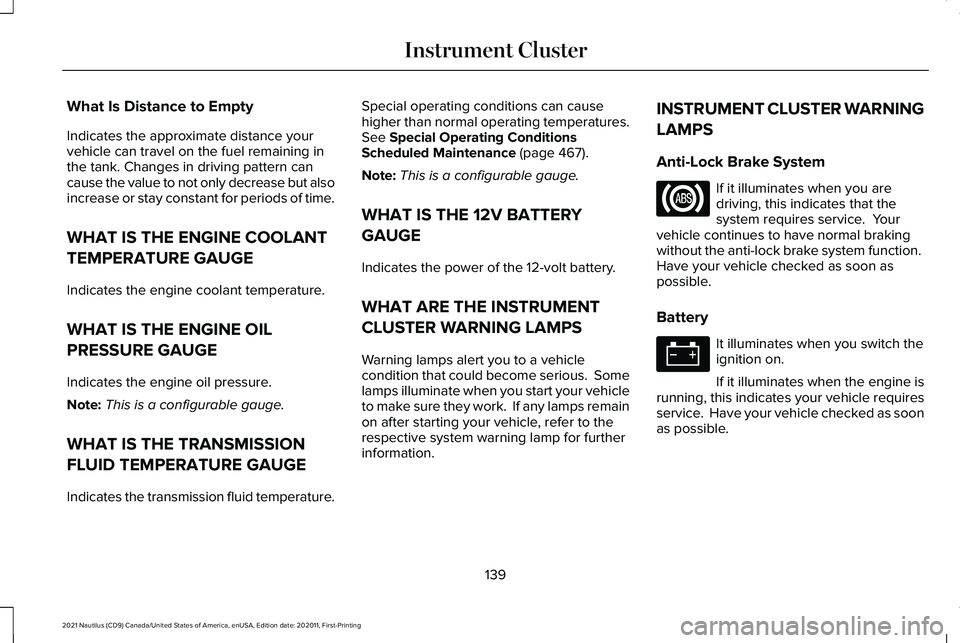
Anti-Lock Brake System If it illuminates when you are
driving, this indicates that the
system requires service. Your
vehicle continues to have normal braking
without the anti-lock brake system function.
Have your vehicle checked as soon as
possible.
Battery It illuminates when you switch the
ignition on.
If it illuminates when the engine is
running, this indicates your vehicle requires
service. Have your vehicle checked as soon
as possible.
139
2021 Nautilus (CD9) Canada/United States of America, enUSA, Edition date: 202011, First-Printing Instrument Cluster
Page 144 of 579
Brake System
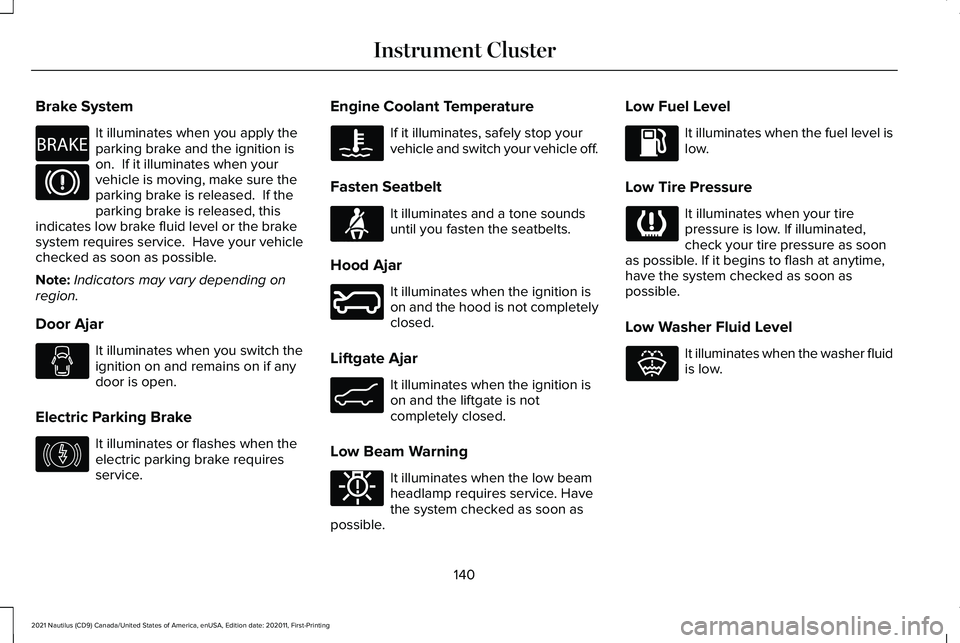
It illuminates when you apply the
parking brake and the ignition is
on. If it illuminates when your
vehicle is moving, make sure the
parking brake is released. If the
parking brake is released, this
indicates low brake fluid level or the brake
system requires service. Have your vehicle
checked as soon as possible.
Note: Indicators may vary depending on
region.
Door Ajar It illuminates when you switch the
ignition on and remains on if any
door is open.
Electric Parking Brake It illuminates or flashes when the
electric parking brake requires
service. Engine Coolant Temperature If it illuminates, safely stop your
vehicle and switch your vehicle off.
Fasten Seatbelt It illuminates and a tone sounds
until you fasten the seatbelts.
Hood Ajar It illuminates when the ignition is
on and the hood is not completely
closed.
Liftgate Ajar It illuminates when the ignition is
on and the liftgate is not
completely closed.
Low Beam Warning It illuminates when the low beam
headlamp requires service. Have
the system checked as soon as
possible. Low Fuel Level It illuminates when the fuel level is
low.
Low Tire Pressure It illuminates when your tire
pressure is low. If illuminated,
check your tire pressure as soon
as possible. If it begins to flash at anytime,
have the system checked as soon as
possible.
Low Washer Fluid Level It illuminates when the washer fluid
is low.
140
2021 Nautilus (CD9) Canada/United States of America, enUSA, Edition date: 202011, First-Printing Instrument ClusterE270480 E146190 E71880 E246598 E162453 E181350 E132353
Page 145 of 579
Malfunction Indicator Lamp
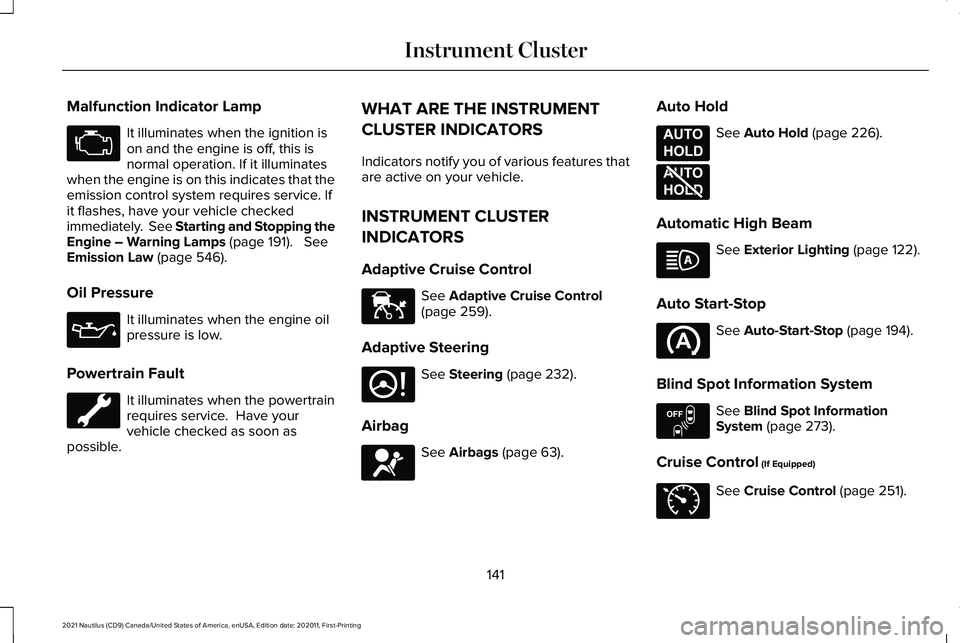
It illuminates when the ignition is
on and the engine is off, this is
normal operation. If it illuminates
when the engine is on this indicates that the
emission control system requires service. If
it flashes, have your vehicle checked
immediately. See Starting and Stopping the
Engine – Warning Lamps (page 191). See
Emission Law (page 546).
Oil Pressure It illuminates when the engine oil
pressure is low.
Powertrain Fault It illuminates when the powertrain
requires service. Have your
vehicle checked as soon as
possible. WHAT ARE THE INSTRUMENT
CLUSTER INDICATORS
Indicators notify you of various features that
are active on your vehicle.
INSTRUMENT CLUSTER
INDICATORS
Adaptive Cruise Control
See
Adaptive Cruise Control
(page 259).
Adaptive Steering See
Steering (page 232).
Airbag See
Airbags (page 63).Auto Hold See
Auto Hold (page 226).
Automatic High Beam See
Exterior Lighting (page 122).
Auto Start-Stop See
Auto-Start-Stop (page 194).
Blind Spot Information System See
Blind Spot Information
System (page 273).
Cruise Control
(If Equipped) See
Cruise Control (page 251).
141
2021 Nautilus (CD9) Canada/United States of America, enUSA, Edition date: 202011, First-Printing Instrument Cluster E144524 E223375 E67017 E197933 E197934 E151262 E71340
Page 186 of 579
WHAT IS THE WIRELESS
ACCESSORY CHARGER
Wireless Charging P
ad
The wireless accessory charger allows you
to charge one compatible Qi wireless
charging device on the charging area.
WIRELESS ACCESSORY CHARGER
PRECAUTIONS
WARNING: Wireless charging
devices can affect the operation of
implanted medical devices, including
cardiac pacemakers. If you have any
implanted medical devices, we recommend
that you consult with your physician. Tests on this equipment show that it
complies with part 18 of the FCC Rules.
•
This equipment generates, uses and can
radiate radio frequency energy and may
cause harmful interference to radio
communications. There is no guarantee
that the interference will not occur in a
particular installation. If this equipment
does cause harmful interference to radio
or television reception, please consult
the dealer.
• This product is not end-user serviceable. WARNING: Changes or modifications
not expressively approved by the party
responsible for compliance could void the
user's authority to operate the equipment.
The term "IC:" before the radio certification
number only signifies that Industry Canada
technical specifications were met. This device complies with Industry Canada
licence-exempt RSS standard(s). Operation
is subject to:
•
This device may not cause interference.
• This device must accept any interference,
including interference that may cause
undesired operation of the device.
Keep the charging area clean and remove
foreign objects prior to charging a device.
Do not place items with a magnetic strip, for
example passports, parking tickets or credit
cards, near the charging area when charging
a device. Damage may occur to the magnetic
strip.
Do not place metal objects, for example
remote controls, coins and candy wrappers,
on or near the charging area when charging
a device. Metal objects may heat up and
degrade the charging performance, in
addition to causing error messages and
interruptions in charging.
Note: During charging, the device and the
charger could heat up, this is normal. If the
battery gets hotter than usual, the device
may stop charging.
182
2021 Nautilus (CD9) Canada/United States of America, enUSA, Edition date: 202011, First-Printing Wireless Accessory Charger
(If Equipped)
Page 196 of 579
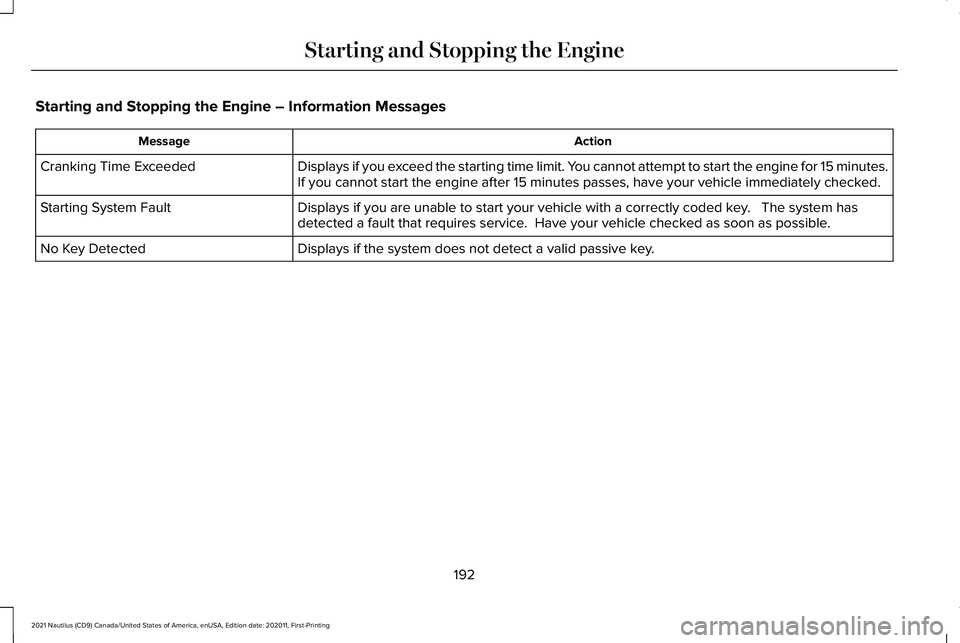
Starting and Stopping the Engine – Information Messages
Action
Message
Displays if you exceed the starting time limit. You cannot attempt to start the engine for 15 minutes.
If you cannot start the engine after 15 minutes passes, have your vehicl\
e immediately checked.
Cranking Time Exceeded
Displays if you are unable to start your vehicle with a correctly coded \
key. The system has
detected a fault that requires service. Have your vehicle checked as soon as possible.
Starting System Fault
Displays if the system does not detect a valid passive key.
No Key Detected
192
2021 Nautilus (CD9) Canada/United States of America, enUSA, Edition date: 202011, First-Printing Starting and Stopping the Engine
Page 198 of 579
WHAT IS AUTO-START-STOP
The system is designed to help reduce fuel
consumption and CO
2 emissions by stopping
the engine when it is idling, for example at
traffic lights.
AUTO-START-STOP PRECAUTIONS WARNING: Apply the parking brake,
shift into park (P), switch the ignition off
and remove the key before you leave your
vehicle. Failure to follow this instruction
could result in personal injury or death. WARNING: Apply the parking brake,
shift into park (P), switch the ignition off
and remove the key before you open the
hood or have any service or repair work
completed. If you do not switch the ignition
off, the engine could restart at any time.
Failure to follow this instruction could result
in personal injury or death. SWITCHING AUTO-START-STOP
ON AND OFF
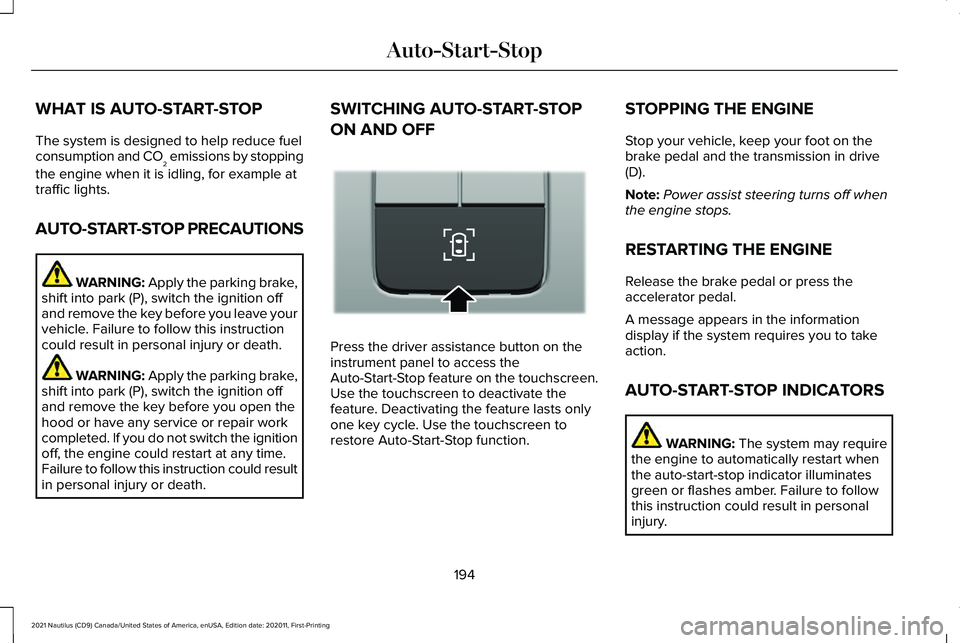
Press the driver assistance button on the
instrument panel to access the
Auto-Start-Stop feature on the touchscreen.
Use the touchscreen to deactivate the
feature. Deactivating the feature lasts only
one key cycle. Use the touchscreen to
restore Auto-Start-Stop function.STOPPING THE ENGINE
Stop your vehicle, keep your foot on the
brake pedal and the transmission in drive
(D).
Note:
Power assist steering turns off when
the engine stops.
RESTARTING THE ENGINE
Release the brake pedal or press the
accelerator pedal.
A message appears in the information
display if the system requires you to take
action.
AUTO-START-STOP INDICATORS WARNING: The system may require
the engine to automatically restart when
the auto-start-stop indicator illuminates
green or flashes amber. Failure to follow
this instruction could result in personal
injury.
194
2021 Nautilus (CD9) Canada/United States of America, enUSA, Edition date: 202011, First-Printing Auto-Start-StopE335855