brake light LINCOLN NAUTILUS 2021 Owner's Manual
[x] Cancel search | Manufacturer: LINCOLN, Model Year: 2021, Model line: NAUTILUS, Model: LINCOLN NAUTILUS 2021Pages: 579, PDF Size: 6.9 MB
Page 336 of 579
MAINTENANCE PRECAUTIONS
Service your vehicle regularly to help
maintain its roadworthiness and resale value.
There is a large network of authorized
dealers that are there to help you with their
professional servicing expertise. We believe
that their specially trained technicians are
best qualified to service your vehicle properly
and expertly. They are supported by a wide
range of highly specialized tools developed
specifically for servicing your vehicle.
If your vehicle requires professional service,
an authorized dealer can provide the
necessary parts and service. Check your
warranty information to find out which parts
and services are covered.
Use only recommended fuels, lubricants,
fluids and service parts conforming to
specifications. See Capacities and
Specifications (page 398).
• Do not work on a hot engine.
• Make sure that nothing gets caught in
moving parts. •
Do not work on a vehicle with the engine
running in an enclosed space, unless you
are sure you have enough ventilation.
• Keep all open flames and other burning
material, such as cigarettes, away from
the battery and all fuel related parts.
• Set the parking brake, shift the
transmission to park (P) and block the
wheels.
OPENING AND CLOSING THE
HOOD
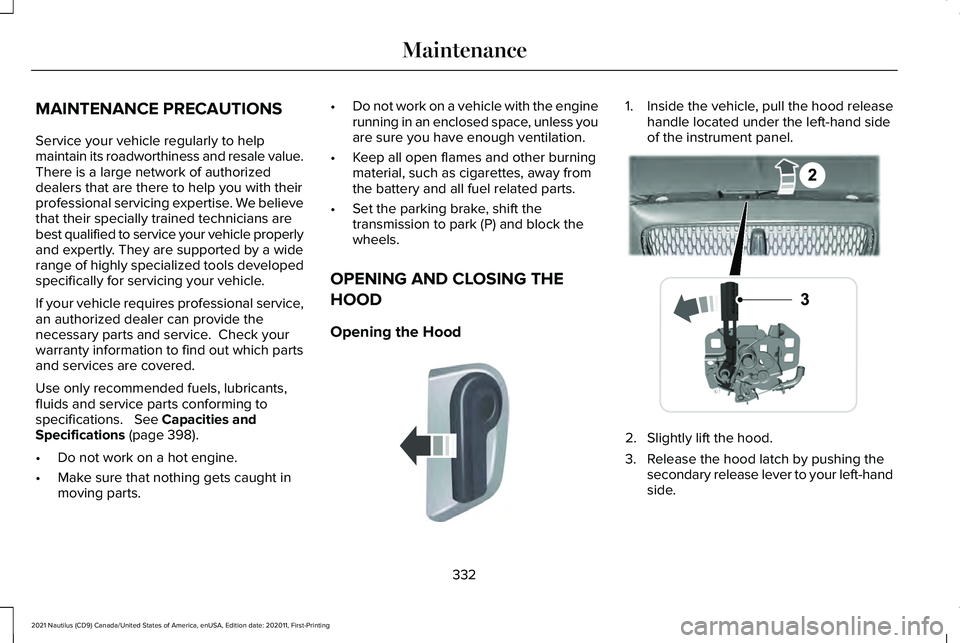
Opening the Hood 1. Inside the vehicle, pull the hood release
handle located under the left-hand side
of the instrument panel. 2. Slightly lift the hood.
3. Release the hood latch by pushing the
secondary release lever to your left-hand
side.
332
2021 Nautilus (CD9) Canada/United States of America, enUSA, Edition date: 202011, First-Printing MaintenanceE142457 E267365
Page 351 of 579
If you disconnect or replace the battery and
your vehicle has an automatic transmission,
it must relearn its adaptive strategy. Because
of this, the transmission may shift firmly when
first driven. This is normal operation while
the transmission fully updates its operation
to optimum shift feel.
Remove and Reinstall the Battery
To disconnect or remove the battery, do the
following:
1. Apply the parking brake and switch the
ignition off.
2. Switch all electrical equipment off, for example lights and radio.
3. Wait a minimum of two minutes before disconnecting the battery.
Note: The engine management system has
a power hold function and remains powered
for a period of time after you switch the
ignition off. This is to allow diagnostic and
adaptive tables to be stored. Disconnecting
the battery without waiting can cause
damage not covered by the vehicle
Warranty. 4. Disconnect the negative battery cable
terminal.
5. Disconnect the positive battery cable terminal.
6. Remove the battery securing clamp.
7. Remove the battery.
8. To install, reverse the removal procedure.
Note: Before reconnecting the battery, make
sure the ignition remains switched off.
Note: Make sure the battery cable terminals
are fully tightened.
Note: After cleaning or replacing the battery,
make sure you reinstall the battery cover or
shield.
If you disconnect or replace the vehicle
battery, you must reset the following
features:
• Window bounce-back. See Windows
(page 130).
• Clock Settings.
• Pre-set radio stations.
• Steering Angle Sensor. Note:
To calibrate the steering angle sensor,
drive the vehicle above
30 mph (50 km/h)
for a minimum of 1.2 mi (2 km). Make sure to
drive straight ahead for a minimum of 30
seconds. Several vehicle functions are
disabled and a warning light could appear
until the sensor is calibrated.
Battery Management System
The battery management system monitors
battery conditions and takes actions to
extend battery life. If excessive battery drain
is detected, the system temporarily disables
some of the following features:
• Heated rear window.
• Heated seats.
• Climate control.
• Heated steering wheel.
• Audio unit.
• Navigation system.
A message may appear in the information
display to alert you that battery protection
actions are active.
347
2021 Nautilus (CD9) Canada/United States of America, enUSA, Edition date: 202011, First-Printing Maintenance
Page 365 of 579
PREPARING YOUR VEHICLE FOR
STORAGE
If you plan on storing your vehicle for 30
days or more, the following maintenance
recommendations ensures your vehicle stays
in good operating condition.
Under various conditions, long-term storage
may lead to degraded engine performance
or failure unless you use specific precautions
to preserve your vehicle.
General
•
Store all vehicles in a dry, ventilated
place.
• If vehicles are stored outside, they
require regular maintenance to protect
against rust and weather damage.
• Make sure all linkages, cables, levers and
pins under your vehicle are covered with
grease to prevent rust. •
Move vehicles at least 25 ft (7.5 m) every
15 days to lubricate working parts and
prevent corrosion.
• Fill the fuel tank with high-quality fuel
until the first automatic shutoff of the fuel
pump nozzle.
Engine
• Change the engine oil and filter prior to
storage because used engine oil contains
contaminants which may cause engine
damage.
• Start the engine every 15 days for a
minimum of 15 minutes. Run at fast idle
with the climate controls set to defrost
until the engine reaches normal
operating temperature.
• With your foot on the brake, shift through
all the gears while the engine is running. Body
•
Wash your vehicle thoroughly to remove
dirt, grease, oil, tar or mud from exterior
surfaces, rear-wheel housings and the
underside of front fenders.
• Periodically wash your vehicle if it is
stored in exposed locations.
• Touch-up exposed or primed metal to
prevent rust.
• Cover chrome and stainless steel parts
with a thick coat of auto wax to prevent
discoloration. Re-wax as necessary when
you wash your vehicle.
• Lubricate all hood, door and luggage
compartment hinges and latches with a
light grade oil.
• Cover interior trim to prevent fading.
• Keep all rubber parts free from oil and
solvents.
361
2021 Nautilus (CD9) Canada/United States of America, enUSA, Edition date: 202011, First-Printing Storing Your Vehicle
Page 384 of 579
•
In the first stage, the tire will be reinflated
with a sealing compound and air. After
the tire has been inflated, you will need
to drive the vehicle a short distance
approximately 4 mi (6 km) to distribute
the sealant in the tire.
• In the second stage, you will need to
check the tire pressure and adjust, if
necessary, to the vehicle's specified tire
inflation pressure.
First Stage: Reinflating the Tire with
sealing compound and air WARNING: Do not stand directly over
the kit while inflating the tire. If you notice
any unusual bulges or deformations in the
tire's sidewall during inflation, stop and call
roadside assistance. WARNING:
If the tire does not inflate
to the recommended tire pressure within
15 minutes, stop and call roadside
assistance.
Park the vehicle in a safe, level and secure
area, away from moving traffic. Turn the hazard lights on. Apply the parking
brake and power off the vehicle. Inspect the
flat tire for visible damage.
If a puncture is located in the tire sidewall,
stop and call roadside assistance.
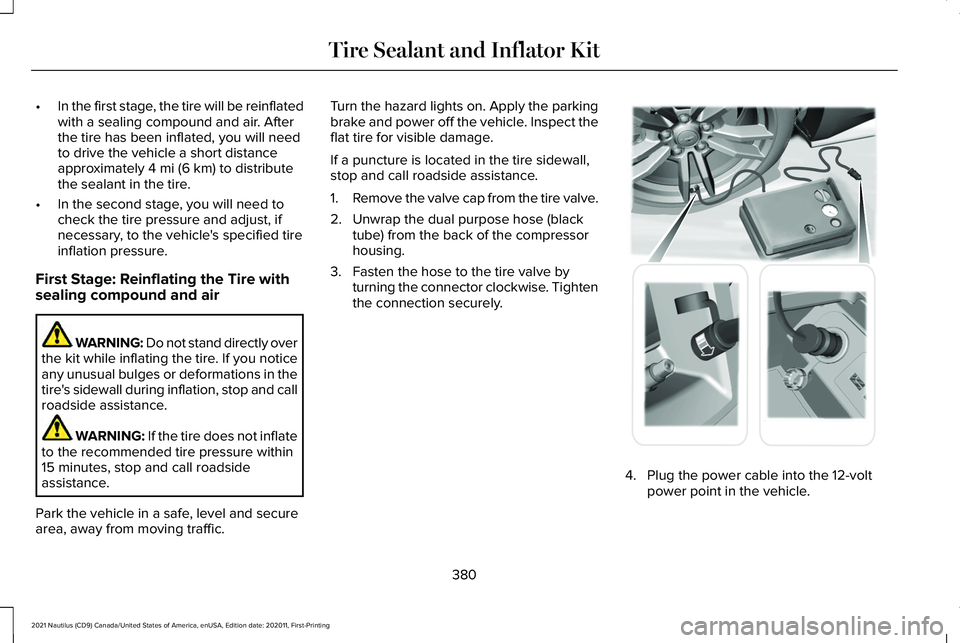
1.
Remove the valve cap from the tire valve.
2. Unwrap the dual purpose hose (black tube) from the back of the compressor
housing.
3. Fasten the hose to the tire valve by turning the connector clockwise. Tighten
the connection securely. 4. Plug the power cable into the 12-volt
power point in the vehicle.
380
2021 Nautilus (CD9) Canada/United States of America, enUSA, Edition date: 202011, First-Printing Tire Sealant and Inflator Kit E175979
Page 395 of 579
CHANGING A FLAT TIRE
WARNING: If the tire pressure
monitor sensor becomes damaged it may
not function.
Note: The use of tire sealant may damage
your tire pressure monitoring system and
should only be used in roadside
emergencies. If you must use a sealant, use
the Tire Mobility Kit sealant. Replace the tire
pressure monitoring system sensor and
valve stem on the wheel by an authorized
dealer after use of the sealant.
Note: The tire pressure monitoring system
indicator light will illuminate when the spare
tire is in use. To restore the full function of
the monitoring system, all road wheels
equipped with tire pressure monitoring
sensors must be mounted on the vehicle.
If you get a flat tire while driving, do not apply
the brake heavily. Instead, gradually
decrease your speed. Hold the steering
wheel firmly and slowly move to a safe place
on the side of the road. Have a flat serviced by an authorized dealer
in order to prevent damage to the tire
pressure monitoring system sensors.
See
Tire Pressure Monitoring System Overview
(page 385). Replace the spare tire with a road
tire as soon as possible. During repairing or
replacing of the flat tire, have an authorized
dealer inspect the tire pressure monitoring
system sensor for damage.
Dissimilar Spare Wheel and Tire
Assembly Information WARNING:
Failure to follow these
guidelines could result in an increased risk
of loss of vehicle control, injury or death.
If you have a dissimilar spare wheel and tire,
then it is intended for temporary use only.
This means that if you need to use it, you
should replace it as soon as possible with a
road wheel and tire assembly that is the
same size and type as the road tires and
wheels that were originally provided on your
vehicle. If the dissimilar spare tire or wheel
is damaged, replace it instead of repairing
it. A dissimilar spare wheel and tire assembly
is defined as a spare wheel and tire assembly
that is different in brand, size or appearance
from the road tires and wheels and can be
one of three types:
1.
T-type mini-spare: This spare tire begins
with the letter T for tire size and may have
Temporary Use Only molded in the sidewall.
2.
Full-size dissimilar spare with label on
wheel: This spare tire has a label on the
wheel that states: THIS WHEEL AND TIRE
ASSEMBLY FOR TEMPORARY USE ONLY.
When driving with one of the dissimilar spare
tires listed above, do not:
• Exceed
50 mph (80 km/h).
• Load the vehicle beyond maximum
vehicle load rating listed on the Safety
Compliance Label.
• Tow a trailer.
• Use snow chains on the end of the
vehicle with the dissimilar spare tire.
• Use more than one dissimilar spare tire
at a time.
391
2021 Nautilus (CD9) Canada/United States of America, enUSA, Edition date: 202011, First-Printing Changing a Road Wheel
Page 456 of 579
UPDATING THE VEHICLE SYSTEMS
WIRELESSLY
System software updates allow you
to update your vehicle system
software wirelessly. To make sure
you receive all updates, set a recurring
schedule and connect to Wi-Fi. Updates may
take longer if not connected to Wi-Fi, or may
not download at all.
System Update Requirements
Before updating, reference this list to make
sure your vehicle is ready be updated. If
these requirements are not met during a
scheduled update, the update will be
canceled and you can reschedule.
• Your vehicle is not running.
• Your vehicle is stopped.
• Your vehicle is parked.
• The hazard indicators are switched off.
• The alarm is not sounding.
• The doors are closed.
• The parking lights are switched off. •
You are not pressing the brake pedal.
• An emergency call is not in progress.
• Your vehicle is not in limp mode.
Scheduling an Update
Make sure Vehicle Connectivity and
Automatic Updates are switched on.
Using the Settings Menu Press the settings option on the
feature bar.
1. Press the System Update tile.
2. Press
Schedule Update.
3. Use the controls to set the time and day
of the update.
4. Save the schedule.
Note: You can set the updates to occur
every seven days.
Using the Status Bar Icon When an update is available, tap
the notification icon and follow the
prompts on the screen.Applying a Vehicle System Software
Update
You can schedule a convenient time for the
update to complete. During scheduled
updates you may not be able to use your
vehicle.
Note:
Updates may take up to 30 minutes
to complete.
You can see the progress of the update on
the touchscreen. An update cannot be
canceled once it has been started.
During an update you will not be able to
drive your vehicle, start the vehicle, use
remote controls to lock and unlock the
vehicle. The alarm, central locks, and door
tones are disabled. The electronic door lock
will not function during an update. You can
open the doors using the mechanical latch
if child locks are not on. Pull the handle until
it stops to use the mechanical latch.
Note: Double locking is switched off and
central locking is switched on during and
after an update.
452
2021 Nautilus (CD9) Canada/United States of America, enUSA, Edition date: 202011, First-Printing Vehicle System UpdatesE327789 E280315 E327785
Page 557 of 579
3
360 Degree Camera...................................243
360 Degree Camera Settings.........................245
360 Degree Camera Guide Lines............244 Keep Out Zone....................................................245
360 Degree Camera Limitations..............243
360 Degree Camera Precautions............243
360 Degree Camera Settings...................245 Switching the 360 Degree Camera On and
Off......................................................................245
Switching the 360 Degree Camera View..................................................................245
9
911 Assist
...........................................................73
A
A/C See: Climate Control..........................................154
About This Publication
....................................17
Features and Options...........................................17
Illustrations...............................................................17
Location of Components......................................17
ABS See: Brakes...........................................................218 Accessing Apps
............................................444
Accessing Feature Drawers......................433 Application Drawer............................................433
Vehicle Drawer....................................................433
Accessing Navigation.................................449
Accessing the Passive Key Backup Position.........................................................190
Accessories...................................................454
Active Park Assist
.........................................246
Active Park Assist – Troubleshooting...........248
Active Park Assist Precautions
.................246
Active Park Assist – Troubleshooting.........................................248
Active Park Assist – Frequently Asked Questions.........................................................248
Active Park Assist – Information Messages.........................................................248
Adaptive Cruise Control.............................253 Adaptive Cruise Control –
Troubleshooting.............................................262
Lane Centering...................................................260
Adaptive Cruise Control Automatic Cancellation................................................257
Adaptive Cruise Control Indicators.........259
Adaptive Cruise Control Limitations.......254 Sensor Limitations..............................................254 Adaptive Cruise Control
Precautions.................................................253
Hilly Condition Usage.......................................254
When Following a Vehicle...............................253
Adaptive Cruise Control – Troubleshooting.........................................262
Adaptive Cruise Control – Information Messages.........................................................262
Adaptive Front Lighting
...............................125
How Does Adaptive Front Lighting
Work...................................................................125
Switching Adaptive Front Lighting On and Off.......................................................................126
Adjusting the Exterior Mirrors....................133
Adjusting the Headlamps...........................348 Vertical Aim Adjustment...................................
348
Adjusting the Instrument Panel Lighting Brightness....................................................128
Adjusting the Map........................................449 Changing the Format of the Map...................449
Zooming the Map In and Out..........................449
Adjusting the Seatbelt Height.....................57
Adjusting the Seatbelts During Pregnancy......................................................56
Adjusting the Sound Settings...................424 Balance and Fade..............................................424
Occupancy Mode...............................................424
Sound Mode........................................................424
553
2021 Nautilus (CD9) Canada/United States of America, enUSA, Edition date: 202011, First-Printing Index
Page 558 of 579
Speed Compensated Volume.........................424
Tone Settings.......................................................424
Adjusting the Steering Wheel - Vehicles With: Manual Adjustable Steering
Column...........................................................112
Adjusting the Steering Wheel - Vehicles With: Power Adjustable Steering
Column...........................................................112
Adjusting the Volume..................................423
Aid Mode........................................................267
How Does Aid Mode Work..............................267
What Is Aid Mode...............................................267
Airbag Precautions
.........................................66
Airbags..............................................................63 Front Passenger Sensing System.....................
67
Air Conditioning See: Climate Control..........................................154
Air Conditioning System Capacity and Specification - 2.0L....................................410
Air Conditioning System Capacity and Specification - 2.7L
.....................................412
Air Filter See: Changing the Engine Air Filter..............344
Alert and Aid Mode.....................................268 How Does Alert and Aid Mode Work............268
What Is Alert and Aid Mode............................268
Alert Mode
.....................................................267
How Does Alert Mode Work............................267 What Is Alert Mode............................................267
All-Wheel Drive
..............................................214
All-Wheel Drive Driving Hints...........................214
All-Wheel Drive – Troubleshooting.................217
All-Wheel Drive Driving Hints
.....................214
Driving In Sand.....................................................215
Driving on Hilly or Sloping Terrain..................216
Driving on Snow and Ice...................................216
Driving Through Mud and Water.....................215
Emergency Maneuvers......................................214
All-Wheel Drive Limitations
.........................214
All-Wheel Drive Precautions.......................214
All-Wheel Drive – Troubleshooting...........217 All-Wheel Drive – Information
Messages..........................................................217
AM/FM Radio
.................................................425
AM/FM Radio Limitations.................................425
Selecting a Radio Station.................................425
Ambient Lighting...........................................128 Adjusting Ambient Lighting..............................128
Switching Ambient Lighting On and Off........128
Anti-Lock Braking System
...........................218
Anti-Lock Braking System Limitations...........218
Anti-Theft Alarm System.............................108 How Does the Anti-Theft Alarm System
Work...................................................................108
What Are the Inclination Sensors...................108
What Are the Interior Sensors.........................
108 What Is the Anti-Theft Alarm System.............108
What Is the Perimeter Alarm............................108
Anti-Theft Alarm System Settings.............109 Setting the Alarm Security Level.....................109
Switching Ask on Exit On and Off...................109
What are the Alarm Security Levels...............109
What Is Ask on Exit.............................................109
Appendices....................................................548
Applying the Electric Parking Brake
.........221
Applying the Electric Parking Brake in an Emergency...................................................221
App Precautions...........................................444
App Requirements.......................................444
Apps
.................................................................444
Audio System................................................423
AM/FM Radio.......................................................425
Digital Radio........................................................426
Satellite Radio......................................................427
Audio System Precautions.........................423
Auto-Dimming Exterior Mirror
....................134
What Is the Auto-Dimming Exterior
Mirror..................................................................134
Auto-Dimming Interior Mirror.....................132 Auto-Dimming Interior Mirror
Limitations.........................................................132
What Is the Auto-Dimming Interior Mirror..................................................................132
Auto Hold
.......................................................226
554
2021 Nautilus (CD9) Canada/United States of America, enUSA, Edition date: 202011, First-Printing Index
Page 564 of 579
Electric Parking Brake..................................221
Electric Parking Brake –
Troubleshooting.............................................222
Electric Parking Brake – Troubleshooting.........................................222
Electric Parking Brake – Information
Messages.........................................................223
Electric Parking Brake – Warning Lamps...............................................................222
Electric Power Steering..............................232 Electric Power Steering Precautions.............232
Electromagnetic Compatibility..................548
Emergency Call Limitations..........................74
Emergency Call Requirements
....................73
Emergency Call System Data......................26
Emergency Towing
.......................................315
Emission Law.................................................546 Noise Emissions Warranty, Prohibited
Tampering Acts and Maintenance.............547
Tampering With a Noise Control System..............................................................547
Enabling Apps on an Android Device...........................................................444
Enabling Apps on an iOS Device.............444
Enabling or Disabling Personal Profiles..........................................................447
Enabling Remote Start..................................151 End User License Agreement
....................516
VEHICLE SOFTWARE END USER LICENSE
AGREEMENT (EULA) .....................................
516
Engine Block Heater....................................188 Engine Block Heater Precautions...................188
How Does the Engine Block Heater
Work...................................................................188
Using the Engine Block Heater.......................189
Engine Oil Capacity and Specification - 2.0L...............................................................402
Alternative Engine Oil for Extremely Cold Climates............................................................403
Engine Oil Capacity and Specification - 2.7L................................................................404
Alternative Engine Oil for Extremely Cold Climates...........................................................406
Engine Oil
.......................................................338
Adding Engine Oil..............................................338
Checking the Engine Oil Level.......................338
Engine Oil Capacity and Specification..........339
Engine Oil Dipstick Overview..........................338
Resetting the Engine Oil Change
Reminder..........................................................339
Engine Specifications - 2.0L......................398
Engine Specifications - 2.7L......................399
Entering a Parallel Parking Space............247
Entering a Perpendicular Parking Space............................................................247 Evasive Steering Assist...............................284
Evasive Steering Assist Limitations...............284
Switching Evasive Steering Assist On and
Off......................................................................284
What Is Evasive Steering Assist......................284
Event Data
........................................................24
Exiting a Parking Space..............................248
Extending the Remote Start Duration........................................................152
Exterior Bulbs
................................................350
Changing a Front Turn Signal Lamp
Bulb...................................................................352
Changing a License Plate Lamp Bulb...........353
Exterior Bulb Specification Chart...................350
Removing a Headlamp Assembly..................352
Exterior Lamps................................................121 Exterior Lamp Audible Warning.......................122
Exterior Lamp Indicators....................................122
Switching the Daytime Running Lamps On
and Off................................................................121
Switching the Front Fog Lamps On and Off.......................................................................122
Switching the Turn Signal Lamps On and Off........................................................................\
121
Switching Welcome Lighting On and Off.......................................................................122
Exterior Lighting Control
..............................119
560
2021 Nautilus (CD9) Canada/United States of America, enUSA, Edition date: 202011, First-Printing Index