brake LINCOLN NAUTILUS 2021 Repair Manual
[x] Cancel search | Manufacturer: LINCOLN, Model Year: 2021, Model line: NAUTILUS, Model: LINCOLN NAUTILUS 2021Pages: 579, PDF Size: 6.9 MB
Page 262 of 579
You can also press the accelerator or brake
pedal until you reach the speed you prefer.
Press either button to select the current
speed as the set speed.
The system may apply the brakes to slow
the vehicle to the new set speed. The set
speed continuously displays in the
information display when the system is
active.
SETTING THE ADAPTIVE CRUISE
CONTROL GAP
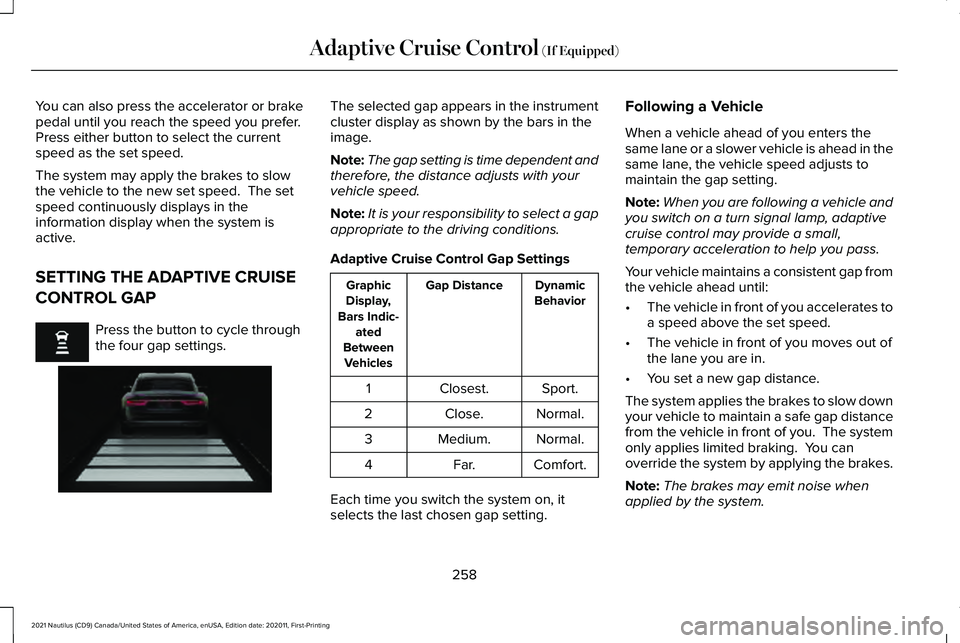
Press the button to cycle through
the four gap settings. The selected gap appears in the instrument
cluster display as shown by the bars in the
image.
Note:
The gap setting is time dependent and
therefore, the distance adjusts with your
vehicle speed.
Note: It is your responsibility to select a gap
appropriate to the driving conditions.
Adaptive Cruise Control Gap Settings Dynamic
Behavior
Gap Distance
Graphic
Display,
Bars Indic- ated
Between Vehicles
Sport.
Closest.
1
Normal.
Close.
2
Normal.
Medium.
3
Comfort.
Far.
4
Each time you switch the system on, it
selects the last chosen gap setting. Following a Vehicle
When a vehicle ahead of you enters the
same lane or a slower vehicle is ahead in the
same lane, the vehicle speed adjusts to
maintain the gap setting.
Note:
When you are following a vehicle and
you switch on a turn signal lamp, adaptive
cruise control may provide a small,
temporary acceleration to help you pass.
Your vehicle maintains a consistent gap from
the vehicle ahead until:
• The vehicle in front of you accelerates to
a speed above the set speed.
• The vehicle in front of you moves out of
the lane you are in.
• You set a new gap distance.
The system applies the brakes to slow down
your vehicle to maintain a safe gap distance
from the vehicle in front of you. The system
only applies limited braking. You can
override the system by applying the brakes.
Note: The brakes may emit noise when
applied by the system.
258
2021 Nautilus (CD9) Canada/United States of America, enUSA, Edition date: 202011, First-Printing Adaptive Cruise Control (If Equipped) E255686
Page 263 of 579
If the system determines that its maximum
braking level is not sufficient, an audible
warning sounds, a message appears in the
instrument cluster display and an indicator
flashes when the system continues to brake.
Take immediate action.
CANCELING THE SET SPEED
Press the button or tap the brake
pedal.
The set speed does not erase.
RESUMING THE SET SPEED Press the button.
Your vehicle speed returns to the previously
set speed and gap setting. The set speed
displays continuously in the information
display when the system is active.
Note: Only use resume if you are aware of
the set speed and intend to return to it. Resuming the Set Speed from a
Complete Stop
If your vehicle follows a vehicle to a complete
stop and remains stationary for less than
three seconds, your vehicle accelerates from
a stationary position to follow the vehicle
ahead.
If your vehicle follows a vehicle to
a complete stop and remains
stationary for more than three
seconds, press and release the button or
press the accelerator pedal to follow the
vehicle ahead.
OVERRIDING THE SET SPEED WARNING: If you override the system
by pressing the accelerator pedal, it does
not automatically apply the brakes to
maintain a gap from any vehicle ahead.
When you press the accelerator pedal, you
override the set speed and gap distance. Use the accelerator pedal to intentionally
exceed the set speed limit.
When you override the system, the green
indicator illuminates and the vehicle icon
does not appear in the instrument cluster
display.
The system resumes operation when you
release the accelerator pedal. The vehicle
speed decreases to the set speed, or a lower
speed if following a slower vehicle.
ADAPTIVE CRUISE CONTROL
INDICATORS
Illuminates when you switch
adaptive cruise control on. The
color of the indicator changes to
indicate the system status.
White indicates the system is on but inactive.
Green indicates that you set the speed and
the system is active.
259
2021 Nautilus (CD9) Canada/United States of America, enUSA, Edition date: 202011, First-Printing Adaptive Cruise Control (If Equipped) E144529
Page 264 of 579
SWITCHING FROM ADAPTIVE
CRUISE CONTROL TO CRUISE
CONTROL
WARNING: Normal cruise control will
not brake when your vehicle is
approaching slower vehicles. Always be
aware of which mode you have selected
and apply the brakes when necessary.
You can change from adaptive cruise control
to normal cruise control through the
information display. The cruise control indicator light
replaces the adaptive cruise
control indicator light if you select
normal cruise control. The gap setting does
not display, and the system does not respond
to lead vehicles. Automatic braking remains
active to maintain set speed. LANE CENTERING
How Does Lane Centering Work
Adaptive cruise control with lane centering
uses radar and camera sensors to help keep
your vehicle in the lane by applying
continuous assistance steering torque input
toward the lane center on highways.
Note:
The adaptive cruise control gap setting
operates normally.
Lane Centering Precautions WARNING:
Do not use the system
when towing a trailer. Failure to follow this
instruction could result in the loss of
control of your vehicle, personal injury or
death. WARNING: Do not use the system if
any changes or modifications to the
steering wheel have been made. Any
changes or modifications to the steering
wheel could affect the functionality or
performance of the system. Failure to
follow this instruction could result in the
loss of control of your vehicle, personal
injury or death.
Adaptive cruise control precautions apply to
lane centering unless stated otherwise or
contradicted by a lane centering precaution.
See
Adaptive Cruise Control Precautions
(page 253).
Lane Centering Requirements
You must keep your hands on the steering
wheel at all times.
260
2021 Nautilus (CD9) Canada/United States of America, enUSA, Edition date: 202011, First-Printing Adaptive Cruise Control
(If Equipped)E71340
Page 267 of 579
Adaptive Cruise Control – Information
Messages - Vehicles With: Stop and Go
Note:
Depending on your vehicle options
and instrument cluster type, not all messages
display or are available. Note:
The system could abbreviate or
shorten certain messages depending upon
which cluster type you have. Action
Message
A malfunction is preventing the adaptive cruise from engaging.
Adaptive Cruise Malfunction
Front Sensor Not Aligned Contact an authorized dealer to have the radar checked for proper coverage and operation. Conditions exist preventing the system from being available.
Adaptive Cruise Not Available
You have a blocked radar because of poor radar visibility due to inclement weather or ic\
e, mud,or water in front of the radar. You can typically clean the sensor to resolve this.
Adaptive Cruise Not Available Sensor
Blocked See Manual Due to the nature of radar technology, it is possible to get a blockage warning with no actual
block. This happens, for example, when driving in sparse rural or desert environments. A false blocked condition either self clears, or clears after you restart your vehicl\
e.
You have selected normal cruise control. The system does not brake or react to traffic.
Normal Cruise Active Adaptive Braking Off
Displays when the adaptive cruise control is going to cancel and you mus\
t take control.
Adaptive Cruise - Driver Resume Control
Displays when the vehicle speed is too slow to activate the adaptive cru\
ise control and there isno lead vehicle in range.
Adaptive Cruise Speed Too Low to
Activate
263
2021 Nautilus (CD9) Canada/United States of America, enUSA, Edition date: 202011, First-Printing Adaptive Cruise Control (If Equipped)
Page 270 of 579
LANE KEEPING SYSTEM
LIMITATIONS
The lane keeping system only operates when
the vehicle speed is greater than 40 mph
(64 km/h).
The system works when the camera can
detect at least one lane marking.
The lane keeping system may not correctly
operate in any of the following conditions:
• The lane keeping system does not detect
at least one lane marking.
• You switch the turn signal on.
• You apply direct steering, accelerate fast
or brake hard.
• The vehicle speed is less than
40 mph
(64 km/h).
• The anti-lock brake, stability control or
traction control system activates.
• The lane is too narrow.
• Something is obscuring the camera or it
is unable to detect the lane markings due
to environment, traffic or vehicle
conditions. The lane keeping system may not correct
lane positioning in any of the following
conditions:
•
High winds.
• Uneven road surfaces.
• Heavy or uneven loads.
• Incorrect tire pressure.
SWITCHING THE LANE KEEPING
SYSTEM ON AND OFF To activate the lane keeping
system, press the button on the
turn signal lever.
Note: The system stores the on or off setting
until manually changed, unless it detects a
MyKey™. If the system detects a MyKey™, it
defaults to on and the mode is set to alert.
Note: If the system detects a MyKey™,
pressing the button does not affect the on
or off status of the system. You can only
change the mode and intensity settings. SWITCHING THE LANE KEEPING
SYSTEM MODE
The lane keeping system has different
settings that you can view or adjust using
the information display.
The system stores the last known selection
for each of these settings. You do not need
to readjust your settings each time you
switch on the system.
To change the lane keeping system mode,
use the instrument cluster display:
1. Using the instrument cluster display
controls on the steering wheel, select
SETTINGS
.
2. Select
Driver assistance.
3. Select
Lane keeping system.
4. Select
Mode.
5. Select a mode.
Note: The system remembers the last setting
when you start your vehicle. If the system
detects a MyKey™, it defaults to the last
setting for that MyKey™.
266
2021 Nautilus (CD9) Canada/United States of America, enUSA, Edition date: 202011, First-Printing Lane Keeping SystemE308131
Page 283 of 579
WHAT IS PRE-COLLISION ASSIST
Pre-collision assist detects and warns of
approaching hazards in the roadway. If your
vehicle is rapidly approaching another
stationary vehicle, a vehicle traveling in the
same direction as yours, or a pedestrian
within your driving path, the system provides
multiple levels of assistance to help avoid a
collision.
HOW DOES PRE-COLLISION
ASSIST WORK
Pre-Collision Assist with Automatic
Emergency Braking
The system warns the driver of potential
hazards by providing three levels of
assistance.
If your vehicle is rapidly approaching
potential hazards, the system provides the
following levels of functionality:
1. Alert.
2. Brake Support.
3. Automatic Emergency Braking. Alert: When active, a flashing visual warning
appears and an audible warning tone
sounds.
Brake Support
: The system is designed to
help reduce the impact speed by preparing
the brakes for rapid braking. The system
does not automatically apply the brakes. If
you press the brake pedal, the system could
apply additional braking up to maximum
braking force, even if you lightly press the
brake pedal.
Automatic Emergency Braking
: Automatic
emergency braking could activate if the
system determines that a collision is
imminent. Note:
If you perceive pre-collision assist
alerts as being too frequent or disturbing,
then you could reduce the alert sensitivity.
The manufacturer recommends using the
highest sensitivity setting where possible.
Setting a lower sensitivity would lead to
fewer and later system warnings.
Each system has various levels of detection
capabilities.
See Pre-Collision Assist
Limitations (page 280).
PRE-COLLISION ASSIST
PRECAUTIONS WARNING:
You are responsible for
controlling your vehicle at all times. The
system is designed to be an aid and does
not relieve you of your responsibility to
drive with due care and attention. Failure
to follow this instruction could result in the
loss of control of your vehicle, personal
injury or death.
279
2021 Nautilus (CD9) Canada/United States of America, enUSA, Edition date: 202011, First-Printing Pre-Collision AssistE255268
Page 284 of 579
WARNING: The system does not
detect vehicles that are driving in a
different direction, cyclists or animals.
Apply the brakes when necessary. Failure
to follow this instruction could result in the
loss of control of your vehicle, personal
injury or death. WARNING:
The system does not
operate during hard acceleration or
steering. Failure to take care may lead to
a crash or personal injury. WARNING:
The system may fail or
operate with reduced function during cold
and severe weather conditions. Snow, ice,
rain, spray and fog can adversely affect the
system. Keep the front camera and radar
free of snow and ice. Failure to take care
may result in the loss of control of your
vehicle, serious personal injury or death. WARNING:
Take additional care if
your vehicle is heavily loaded or you are
towing a trailer. These conditions could
result in reduced performance of this
system. Failure to follow this instruction
could result in the loss of control of your
vehicle, personal injury or death. WARNING:
The system cannot help
prevent all crashes. Do not rely on this
system to replace driver judgment and the
need to maintain a safe distance and
speed. WARNING:
In situations where the
vehicle camera has limited detection
capability, this may reduce system
performance. These situations include but
are not limited to direct or low sunlight,
vehicles at night without tail lights,
unconventional vehicle types, pedestrians
with complex backgrounds, running pedestrians, partly obscured pedestrians,
or pedestrians that the system cannot
distinguish from a group. Failure to take
care may result in the loss of control of
your vehicle, serious personal injury or
death.
PRE-COLLISION ASSIST
LIMITATIONS
Pre-collision assist depends on the detection
ability of its camera and sensors. Any
obstructions or damage to these areas can
limit detection or prevent the system from
functioning. See Locating the Pre-Collision
Assist Sensors (page 281).
The system is active at speeds above 3 mph
(5 km/h)
Note: The pre-collision assist system
disables when you select four-wheel drive
low or manually disable AdvanceTrac ™.
280
2021 Nautilus (CD9) Canada/United States of America, enUSA, Edition date: 202011, First-Printing Pre-Collision Assist
Page 285 of 579
Note:
Brake support and automatic
emergency braking are active at speeds up
to 75 mph (120 km/h). If the vehicle has a
radar sensor included with adaptive cruise
control, then brake support and automatic
emergency braking are active up to the
maximum speed of the vehicle.
Pedestrian Detection Limitations
Pedestrian detection is active at speeds up
to
50 mph (80 km/h).
Pedestrian detection functions optimally
when detected hazards are clearly
identifiable. System performance may reduce
in situations where pedestrians are running,
partly obscured, have a complex
background, or cannot be distinguished from
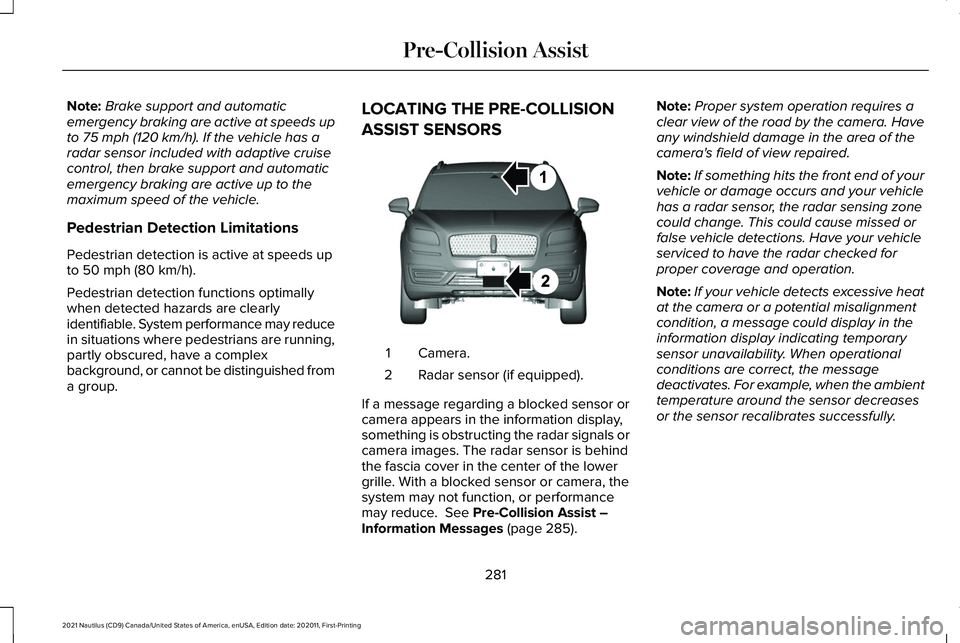
a group. LOCATING THE PRE-COLLISION
ASSIST SENSORS
Camera.
1
Radar sensor (if equipped).
2
If a message regarding a blocked sensor or
camera appears in the information display,
something is obstructing the radar signals or
camera images. The radar sensor is behind
the fascia cover in the center of the lower
grille. With a blocked sensor or camera, the
system may not function, or performance
may reduce.
See Pre-Collision Assist –
Information Messages (page 285). Note:
Proper system operation requires a
clear view of the road by the camera. Have
any windshield damage in the area of the
camera's field of view repaired.
Note: If something hits the front end of your
vehicle or damage occurs and your vehicle
has a radar sensor, the radar sensing zone
could change. This could cause missed or
false vehicle detections. Have your vehicle
serviced to have the radar checked for
proper coverage and operation.
Note: If your vehicle detects excessive heat
at the camera or a potential misalignment
condition, a message could display in the
information display indicating temporary
sensor unavailability. When operational
conditions are correct, the message
deactivates. For example, when the ambient
temperature around the sensor decreases
or the sensor recalibrates successfully.
281
2021 Nautilus (CD9) Canada/United States of America, enUSA, Edition date: 202011, First-Printing Pre-Collision AssistE268024
Page 288 of 579
AUTOMATIC EMERGENCY BRAKING
What Is Automatic Emergency Braking
Automatic emergency braking may activate
if the system determines that a collision is
imminent. The system may help reduce
impact damage to avoid the crash
completely.
Automatic emergency braking is only
available up to certain speeds. See
Pre-Collision Assist Limitations (page 280).
Switching Automatic Emergency
Braking On and Off
To switch the system on or off, use the
instrument cluster display:
1. Using the instrument cluster display controls on the steering wheel, select
SETTINGS
.
2. Select
Driver assistance.
3. Select
Pre-collision.
4. Switch
Auto Emergency Braking on or
off. Note:
Automatic emergency braking
switches on every time you switch the
ignition on.
EVASIVE STEERING ASSIST (If
Equipped)
What Is Evasive Steering Assist
If your vehicle is rapidly approaching a road
user, evasive steering assist helps you steer
around the road user.
After you turn the steering wheel in an
attempt to avoid a crash with the road user,
the system applies additional steering torque
to help you steer around the road user. After
you pass the road user, the system applies
steering torque when you turn the steering
wheel to steer back into the lane. The system
deactivates after you fully pass the road user.
Note: Road users are defined as obstacles
encountered on the road that the system is
able to detect.
See Pre-Collision Assist
Precautions (page 279). Evasive Steering Assist Limitations
Evasive steering assist only activates when
all the following occur:
•
Automatic emergency braking and
evasive steering assist are on.
• The system detects a road user ahead
and starts to apply the brakes.
• You significantly turn the steering wheel
to steer around a road user.
Note: The system does not automatically
steer around a road user. If you do not turn
the steering wheel, the system does not
activate.
Note: The system does not activate if the
distance to the road user ahead is too small
and the system cannot avoid a crash.
Switching Evasive Steering Assist On
and Off
To switch the system on or off, use the
instrument cluster display:
284
2021 Nautilus (CD9) Canada/United States of America, enUSA, Edition date: 202011, First-Printing Pre-Collision Assist
Page 294 of 579

LOCATING THE SAFETY
COMPLIANCE CERTIFICATION
LABELS
Safety Compliance Certification Label
Example:
The Safety Compliance Certification label is
located on the door hinge pillar, door-latch
post, or the door edge that meets the
door-latch post, next to the driver seating
position. WHAT IS THE GROSS AXLE
WEIGHT RATING
GAWR (Gross Axle Weight Rating)
GAWR is the maximum allowable weight
that a single axle (front or rear) can carry.
These numbers are on the Safety
Compliance Certification label.
WHAT IS THE GROSS VEHICLE
WEIGHT RATING
GVWR is the maximum allowable weight
of the fully loaded vehicle. This includes
all options, equipment, passengers and
cargo. It appears on the Safety
Compliance Certification label.
WHAT IS THE GROSS COMBINED
WEIGHT RATING
Gross Combined Weight Rating (GCWR)
is the maximum allowable weight of the
vehicle and the loaded trailer, including
all cargo and passengers, that the
vehicle can handle without risking
damage. (Important: The towing
vehicle
’s braking system is rated for
operation at Gross Vehicle Weight
Rating, not at Gross Combined Weight
Rating.) Separate functional brakes
should be used for safe control of towed
vehicles and for trailers where the Gross
Combined Weight of the towing vehicle
plus the trailer exceed the Gross Vehicle
Weight Rating of the towing vehicle.
Note: For trailer towing information refer
to the RV and Trailer Towing Guide
available at an authorized dealer, or
online at the website that follows. RV & Trailer Towing Guide Online
www . fleet. ford. com/towing-guidesWebsite
290
2021 Nautilus (CD9) Canada/United States of America, enUSA, Edition date: 202011, First-Printing Load CarryingE198828