lock LINCOLN NAUTILUS 2021 Manual PDF
[x] Cancel search | Manufacturer: LINCOLN, Model Year: 2021, Model line: NAUTILUS, Model: LINCOLN NAUTILUS 2021Pages: 579, PDF Size: 6.9 MB
Page 275 of 579
 when I can s\
ee the lane markings on the road?
Your vehicle speed is less than 40 mph (65")
Lane Keeping System – Frequently Asked Questions
Why is the feature not available (lane markings are gray) when I can s\
ee the lane markings on the road?
Your vehicle speed is less than 40 mph (65 km/h).
The sun is shining directly into the camera lens. A quick intentional lane change has occurred.
Your vehicle stays too close to the lane markings for an extended interva\
l of time. Driving at high speeds in curves.
The last alert warning or aid intervention occurred a short time ago. Ambiguous lane markings, for example, in construction zones. Rapid transition from light to dark, or from dark to light. Sudden offset in lane markings.ABS or AdvanceTrac ™ is active.
There is a camera blockage due to dirt, grime, fog, frost or water on the windshield. You are driving too close to the vehicle in front of you.
Transitioning between no lane markings to lane markings, or vice versa. There is standing water on the road.
Faint lane markings, for example, partial yellow lane markings on concrete roads.
271
2021 Nautilus (CD9) Canada/United States of America, enUSA, Edition date: 202011, First-Printing Lane Keeping System
Page 278 of 579
Note:
The system may not correctly operate
when towing a trailer. For vehicles with a
trailer tow module and tow bar approved by
us, the system turns off when you attach a
trailer. For vehicles with an aftermarket
trailer tow module or tow bar, we
recommend that you switch the system off
when you attach a trailer.
BLIND SPOT INFORMATION
SYSTEM REQUIREMENTS
Blind spot information system turns on when
all the following occur:
• You start your vehicle.
• You shift into drive (D).
• The vehicle speed is greater than 6 mph
(10 km/h).
SWITCHING BLIND SPOT
INFORMATION SYSTEM ON AND
OFF
To switch blind spot information system on
or off, use the instrument cluster display: 1. Using the instrument cluster display
controls on the steering wheel, select
SETTINGS
.
2. Select
Driver assistance.
3. Switch
Blindspot on or off.
When you switch blind spot information
system off, a warning lamp illuminates and
a message displays. When you switch the
system on or off, the alert indicators flash
twice.
Note: The system remembers the last setting
when you start your vehicle.
To permanently switch the system off,
contact an authorized dealer. LOCATING THE BLIND SPOT
INFORMATION SYSTEM SENSORS The sensors are behind the rear bumper on
both sides of your vehicle.
Note:
Keep the sensors free from snow, ice
and large accumulations of dirt.
Note: Do not cover the sensors with bumper
stickers, repair compound or other objects.
Note: Blocked sensors may affect system
accuracy.
If the sensors become blocked, a message
may appear in the information display. The
alert indicators remain illuminated but the
system does not alert you.
274
2021 Nautilus (CD9) Canada/United States of America, enUSA, Edition date: 202011, First-Printing Blind Spot Information SystemE205199
Page 279 of 579
BLIND SPOT INFORMATION
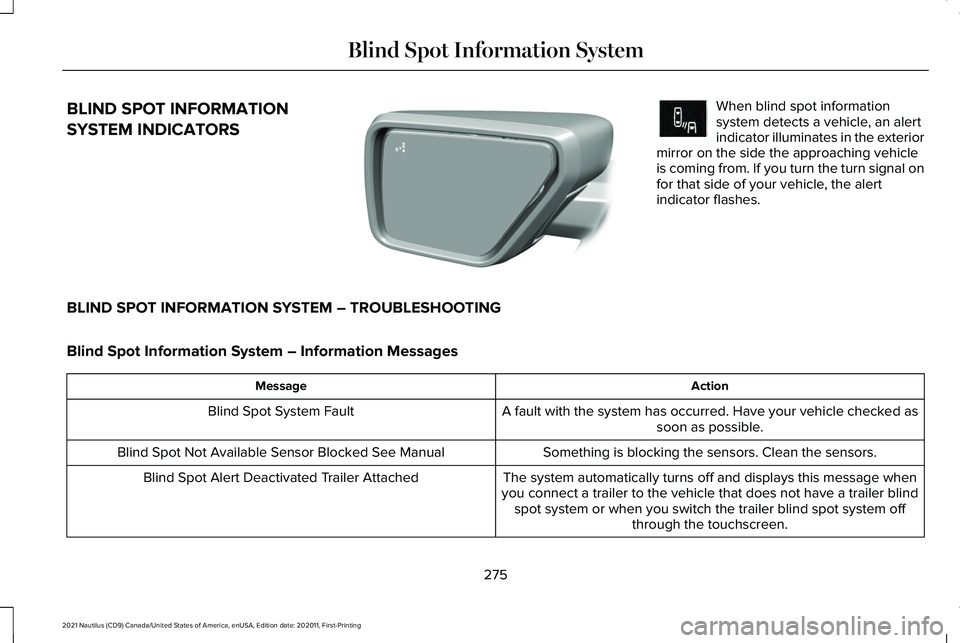
SYSTEM INDICATORS When blind spot information
system detects a vehicle, an alert
indicator illuminates in the exterior
mirror on the side the approaching vehicle
is coming from. If you turn the turn signal on
for that side of your vehicle, the alert
indicator flashes.
BLIND SPOT INFORMATION SYSTEM – TROUBLESHOOTING
Blind Spot Information System – Information Messages Action
Message
A fault with the system has occurred. Have your vehicle checked assoon as possible.
Blind Spot System Fault
Something is blocking the sensors. Clean the sensors.
Blind Spot Not Available Sensor Blocked See Manual
The system automatically turns off and displays this message when
you connect a trailer to the vehicle that does not have a trailer blind spot system or when you switch the trailer blind spot system off through the touchscreen.
Blind Spot Alert Deactivated Trailer Attached
275
2021 Nautilus (CD9) Canada/United States of America, enUSA, Edition date: 202011, First-Printing Blind Spot Information SystemE309137 E249861E249861
Page 281 of 579
CROSS TRAFFIC ALERT
LIMITATIONS
Cross Traffic Alert may not correctly operate
when any of the following occur:
•
Something is blocking the sensors.
• Adjacently parked vehicles or objects are
obstructing the sensors.
• Vehicles approach at speeds less than
4 mph (6 km/h) or greater than 37 mph
(60 km/h).
• Your vehicle speed is greater than 7 mph
(12 km/h)
.
• You reverse out of an angled parking
space.
SWITCHING CROSS TRAFFIC
ALERT ON AND OFF
To switch cross traffic alert on or off use the
instrument cluster display:
1. Using the instrument cluster display controls on the steering wheel, select
SETTINGS
. 2. Select
Driver assistance.
3. Switch
Cross traffic alert on or off.
LOCATING THE CROSS TRAFFIC
ALERT SENSORS The sensors are behind the rear bumper on
both sides of your vehicle.
Note:
Keep the sensors free from snow, ice
and large accumulations of dirt.
Note: Do not cover the sensors with bumper
stickers, repair compound or other objects.
Note: Blocked sensors may affect system
accuracy. If something is blocking the sensors, a
message may appear in the information
display when you shift into reverse (R).
CROSS TRAFFIC ALERT
INDICATORS
When the cross traffic alert detects
an approaching vehicle, a tone
sounds, a warning lamp illuminates
in the relevant exterior mirror and arrows
appear in the information display to show
which side the vehicle is approaching from.
If the system malfunctions, a warning lamp
illuminates in the instrument cluster and a
message appears in the information display.
Have your vehicle checked as soon as
possible.
Note: If arrows do not display, a message
appears in the information display.
Note: In some conditions, the system could
alert you, even when there is nothing in the
detection zone, for example a vehicle
passing further away from your vehicle.
277
2021 Nautilus (CD9) Canada/United States of America, enUSA, Edition date: 202011, First-Printing Cross Traffic AlertE205199 E268294
Page 282 of 579
CROSS TRAFFIC ALERT – TROUBLESHOOTING
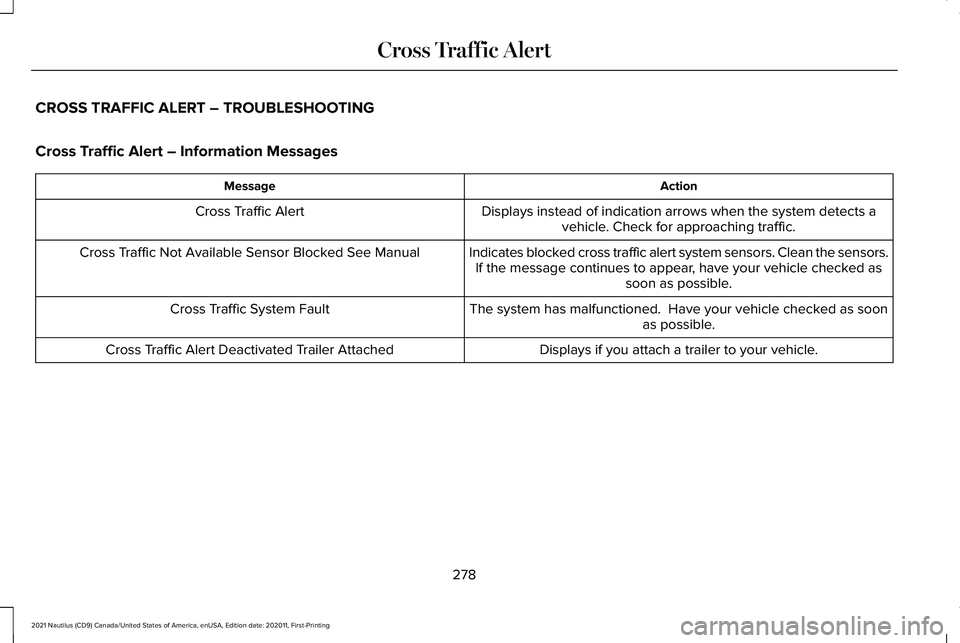
Cross Traffic Alert – Information Messages
Action
Message
Displays instead of indication arrows when the system detects avehicle. Check for approaching traffic.
Cross Traffic Alert
Indicates blocked cross traffic alert system sensors. Clean the sensors.If the message continues to appear, have your vehicle checked as soon as possible.
Cross Traffic Not Available Sensor Blocked See Manual
The system has malfunctioned. Have your vehicle checked as soonas possible.
Cross Traffic System Fault
Displays if you attach a trailer to your vehicle.
Cross Traffic Alert Deactivated Trailer Attached
278
2021 Nautilus (CD9) Canada/United States of America, enUSA, Edition date: 202011, First-Printing Cross Traffic Alert
Page 285 of 579
Note:
Brake support and automatic
emergency braking are active at speeds up
to 75 mph (120 km/h). If the vehicle has a
radar sensor included with adaptive cruise
control, then brake support and automatic
emergency braking are active up to the
maximum speed of the vehicle.
Pedestrian Detection Limitations
Pedestrian detection is active at speeds up
to
50 mph (80 km/h).
Pedestrian detection functions optimally
when detected hazards are clearly
identifiable. System performance may reduce
in situations where pedestrians are running,
partly obscured, have a complex
background, or cannot be distinguished from
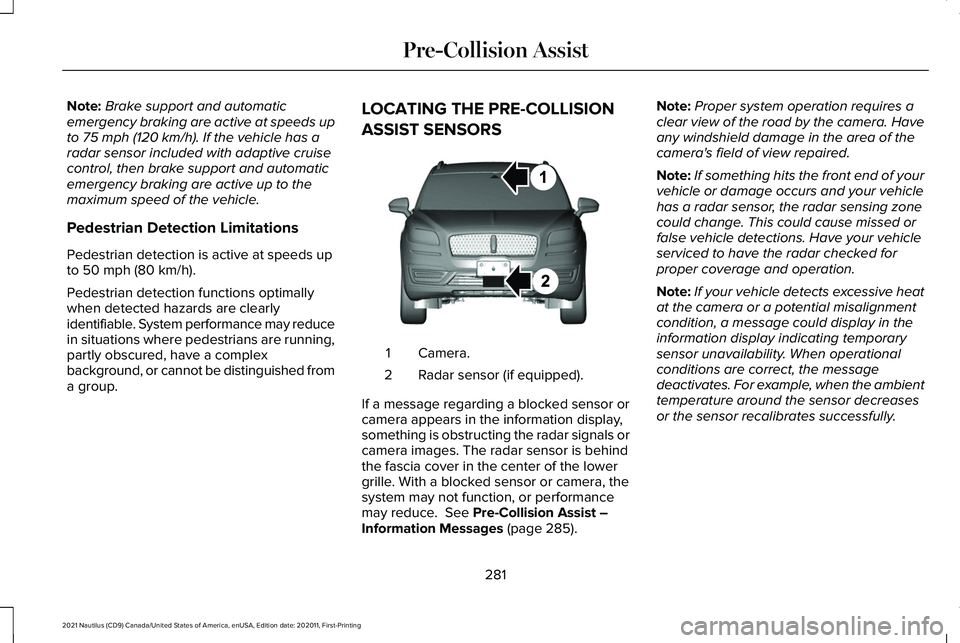
a group. LOCATING THE PRE-COLLISION
ASSIST SENSORS
Camera.
1
Radar sensor (if equipped).
2
If a message regarding a blocked sensor or
camera appears in the information display,
something is obstructing the radar signals or
camera images. The radar sensor is behind
the fascia cover in the center of the lower
grille. With a blocked sensor or camera, the
system may not function, or performance
may reduce.
See Pre-Collision Assist –
Information Messages (page 285). Note:
Proper system operation requires a
clear view of the road by the camera. Have
any windshield damage in the area of the
camera's field of view repaired.
Note: If something hits the front end of your
vehicle or damage occurs and your vehicle
has a radar sensor, the radar sensing zone
could change. This could cause missed or
false vehicle detections. Have your vehicle
serviced to have the radar checked for
proper coverage and operation.
Note: If your vehicle detects excessive heat
at the camera or a potential misalignment
condition, a message could display in the
information display indicating temporary
sensor unavailability. When operational
conditions are correct, the message
deactivates. For example, when the ambient
temperature around the sensor decreases
or the sensor recalibrates successfully.
281
2021 Nautilus (CD9) Canada/United States of America, enUSA, Edition date: 202011, First-Printing Pre-Collision AssistE268024
Page 289 of 579
1. Using the instrument cluster display
controls on the steering wheel, select
SETTINGS.
2. Select
Driver assistance. 3. Select
Pre-collision.
4. Switch
Evasive Steering on or off.
Note: If you switch automatic emergency
braking off, evasive steering assist turns off. Note:
Automatic emergency braking and
evasive steering assist turn on every time
you switch the ignition on.
PRE-COLLISION ASSIST – TROUBLESHOOTING
Pre-Collision Assist – Information Messages Action
Message
You have a blocked sensor due to bad weather, ice, mud or water in
front of the radar sensor. You can typically clean the sensor to resolve.
Pre-Collision Assist Not Available Sensor Blocked
A fault with the system has occurred. Have your vehicle checked assoon as possible.
Pre-Collision Assist Not Available
285
2021 Nautilus (CD9) Canada/United States of America, enUSA, Edition date: 202011, First-Printing Pre-Collision Assist
Page 291 of 579
WHAT IS DRIVER ALERT
Driver alert alerts you if it determines that
you are becoming drowsy or if your driving
deteriorates.
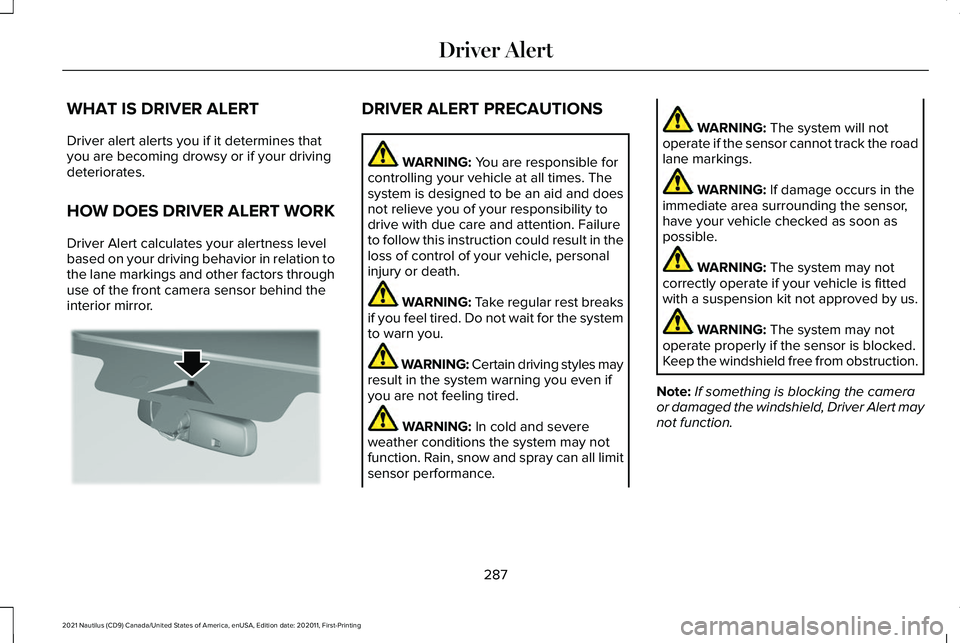
HOW DOES DRIVER ALERT WORK
Driver Alert calculates your alertness level
based on your driving behavior in relation to
the lane markings and other factors through
use of the front camera sensor behind the
interior mirror. DRIVER ALERT PRECAUTIONS
WARNING: You are responsible for
controlling your vehicle at all times. The
system is designed to be an aid and does
not relieve you of your responsibility to
drive with due care and attention. Failure
to follow this instruction could result in the
loss of control of your vehicle, personal
injury or death. WARNING: Take regular rest breaks
if you feel tired. Do not wait for the system
to warn you. WARNING:
Certain driving styles may
result in the system warning you even if
you are not feeling tired. WARNING:
In cold and severe
weather conditions the system may not
function. Rain, snow and spray can all limit
sensor performance. WARNING:
The system will not
operate if the sensor cannot track the road
lane markings. WARNING:
If damage occurs in the
immediate area surrounding the sensor,
have your vehicle checked as soon as
possible. WARNING:
The system may not
correctly operate if your vehicle is fitted
with a suspension kit not approved by us. WARNING:
The system may not
operate properly if the sensor is blocked.
Keep the windshield free from obstruction.
Note: If something is blocking the camera
or damaged the windshield, Driver Alert may
not function.
287
2021 Nautilus (CD9) Canada/United States of America, enUSA, Edition date: 202011, First-Printing Driver AlertE309385
Page 300 of 579
Installing the Luggage Cover
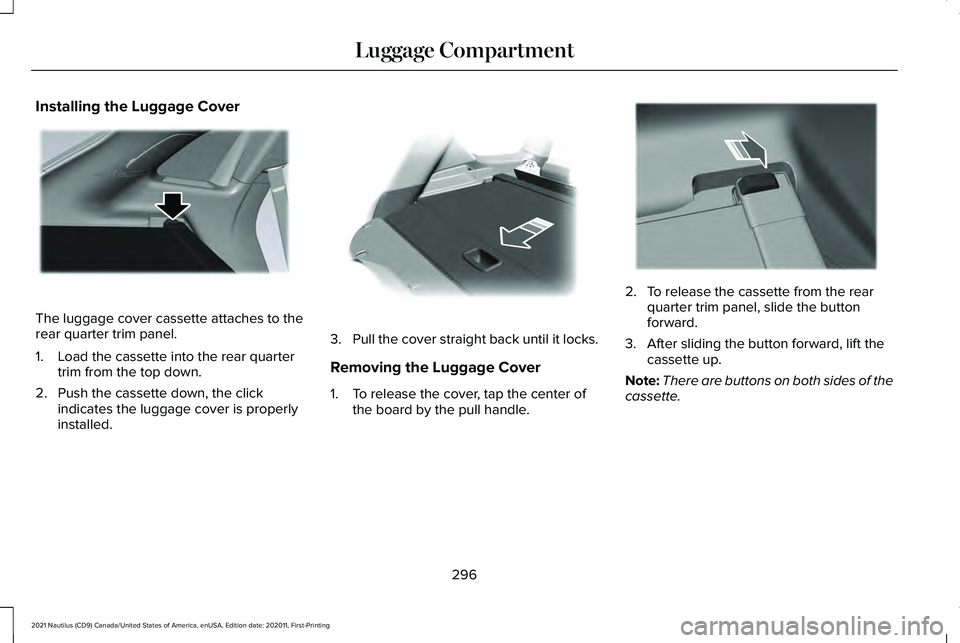
The luggage cover cassette attaches to the
rear quarter trim panel.
1. Load the cassette into the rear quarter
trim from the top down.
2. Push the cassette down, the click indicates the luggage cover is properly
installed. 3.
Pull the cover straight back until it locks.
Removing the Luggage Cover
1. To release the cover, tap the center of the board by the pull handle. 2. To release the cassette from the rear
quarter trim panel, slide the button
forward.
3. After sliding the button forward, lift the cassette up.
Note: There are buttons on both sides of the
cassette.
296
2021 Nautilus (CD9) Canada/United States of America, enUSA, Edition date: 202011, First-Printing Luggage CompartmentE273165 E272389 E273166
Page 303 of 579
TOWING A TRAILER PRECAUTIONS
WARNING: Do not exceed the
GVWR or the GAWR specified on the
certification label. WARNING:
Towing trailers
beyond the maximum recommended
gross trailer weight exceeds the limit
of your vehicle and could result in
engine damage, transmission damage,
structural damage, loss of vehicle
control, vehicle rollover and personal
injury. WARNING:
Do not exceed the
lowest rating capacity for your vehicle
or trailer hitch. Overloading your
vehicle or trailer hitch can impair your
vehicle stability and handling. Failure
to follow this instruction could result
in the loss of control of your vehicle,
personal injury or death. WARNING: Do not cut, drill, weld
or modify the trailer hitch. Modifying
the trailer hitch could reduce the hitch
rating. WARNING:
The anti-lock brake
system does not control the trailer
brakes.
TRAILER BRAKE PRECAUTIONS WARNING:
Do not connect a trailer's
hydraulic brake system directly to your
vehicle's brake system. Your vehicle may
not have enough braking power and your
chances of having a collision greatly
increase. WARNING:
Do not tow a trailer fitted
with electric trailer brakes unless your
vehicle is fitted with a compatible
aftermarket electronic trailer brake
controller. Failure to follow this instruction
could result in the loss of control of your
vehicle, personal injury or death. For
additional information and assistance, we
recommend that you contact an authorized
dealer.
Electric brakes and manual, automatic or
surge-type trailer brakes are safe if you install
them properly and adjust them to the
manufacturer's specifications. The trailer
brakes must meet local and federal
regulations.
The rating for the tow vehicle's braking
system operation is at the gross vehicle
weight rating, not the gross combined weight
rating.
Certain states require functioning trailer
brakes for trailers over a specified weight.
Be sure to check state regulations for this
specified weight.
299
2021 Nautilus (CD9) Canada/United States of America, enUSA, Edition date: 202011, First-Printing Towing a Trailer