steering LINCOLN NAUTILUS 2021 Manual Online
[x] Cancel search | Manufacturer: LINCOLN, Model Year: 2021, Model line: NAUTILUS, Model: LINCOLN NAUTILUS 2021Pages: 579, PDF Size: 6.9 MB
Page 397 of 579
WARNING: Park your vehicle so that
you do not obstruct the flow of traffic or
place yourself in any danger and set up a
warning triangle. WARNING:
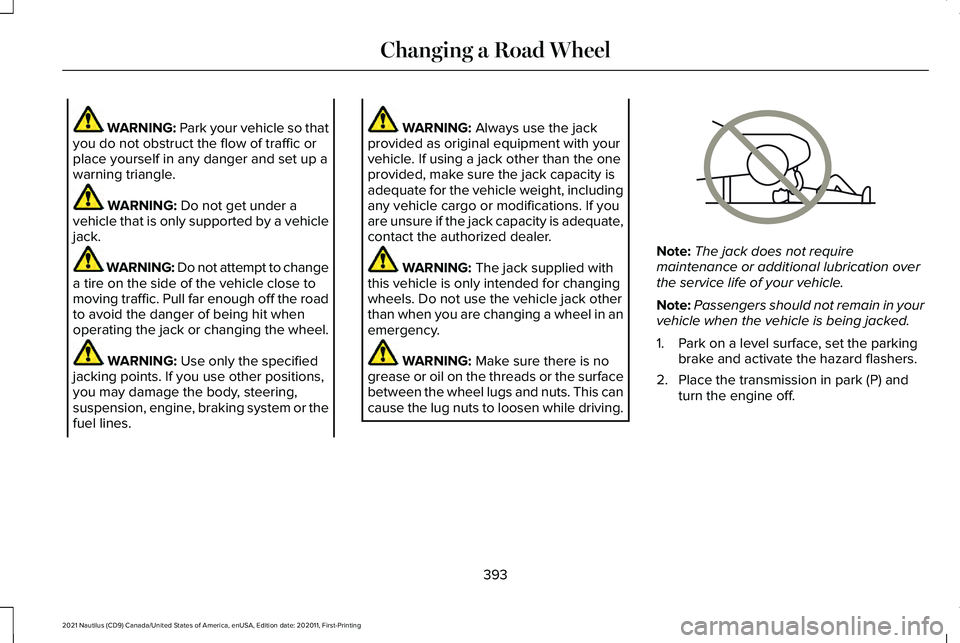
Do not get under a
vehicle that is only supported by a vehicle
jack. WARNING: Do not attempt to change
a tire on the side of the vehicle close to
moving traffic. Pull far enough off the road
to avoid the danger of being hit when
operating the jack or changing the wheel. WARNING:
Use only the specified
jacking points. If you use other positions,
you may damage the body, steering,
suspension, engine, braking system or the
fuel lines. WARNING:
Always use the jack
provided as original equipment with your
vehicle. If using a jack other than the one
provided, make sure the jack capacity is
adequate for the vehicle weight, including
any vehicle cargo or modifications. If you
are unsure if the jack capacity is adequate,
contact the authorized dealer. WARNING:
The jack supplied with
this vehicle is only intended for changing
wheels. Do not use the vehicle jack other
than when you are changing a wheel in an
emergency. WARNING:
Make sure there is no
grease or oil on the threads or the surface
between the wheel lugs and nuts. This can
cause the lug nuts to loosen while driving. Note:
The jack does not require
maintenance or additional lubrication over
the service life of your vehicle.
Note: Passengers should not remain in your
vehicle when the vehicle is being jacked.
1. Park on a level surface, set the parking brake and activate the hazard flashers.
2. Place the transmission in park (P) and turn the engine off.
393
2021 Nautilus (CD9) Canada/United States of America, enUSA, Edition date: 202011, First-Printing Changing a Road WheelE166722
Page 427 of 579
AUDIO SYSTEM PRECAUTIONS
WARNING: Driving while distracted
can result in loss of vehicle control, crash
and injury. We strongly recommend that
you use extreme caution when using any
device that may take your focus off the
road. Your primary responsibility is the safe
operation of your vehicle. We recommend
against the use of any hand-held device
while driving and encourage the use of
voice-operated systems when possible.
Make sure you are aware of all applicable
local laws that may affect the use of
electronic devices while driving.
Listening to loud audio for long periods of
time could damage your hearing.
SWITCHING THE AUDIO UNIT ON
AND OFF Press the button on the volume
control. SELECTING THE AUDIO SOURCE
Audio Unit Press the button to open the media
source menu.
You can press this multiple times to change
to the audio source or scroll through the
media sources.
Touchscreen
Press
Sources on the touchscreen to open
the media source menu.
PLAYING OR PAUSING THE AUDIO
SOURCE
Touchscreen Press to pause playback. Press
again to resume playback.
Note: Not all sources can be paused. ADJUSTING THE VOLUME
Turn to adjust the volume.
Some vehicles may be able to adjust the
volume using buttons on the steering wheel.
423
2021 Nautilus (CD9) Canada/United States of America, enUSA, Edition date: 202011, First-Printing Audio System E308143 E248939
Page 428 of 579
SWITCHING SHUFFLE MODE ON
AND OFF
Press the button on the
touchscreen to switch shuffle
mode on or off.
Note: Not all sources have shuffle mode.
SWITCHING REPEAT MODE ON
AND OFF Press the button on the
touchscreen to switch repeat mode
on or off.
Note: Not all sources have repeat mode.
SETTING A MEMORY PRESET
1. Select a station or channel.
2. Press and hold a memory preset button on the touchscreen.
Note: The audio mutes briefly while the
system saves the preset and returns once it
is stored. Note:
You can save presets from multiple
sources to the memory preset bar.
MUTING THE AUDIO Press the button on the steering
wheel to mute the audio.
Press to mute the signal. Press
again to restore the signal.
ADJUSTING THE SOUND
SETTINGS
Balance and Fade (If Equipped)
1. Press
Settings on the touchscreen.
2. Press
Sound Settings.
3. Press
Balance / Fade.
4. Press the arrows to adjust the settings.
Tone Settings
1. Press
Settings on the touchscreen.
2. Press
Sound Settings. 3. Press
Tone Settings.
4. Press the arrows or slider bar to adjust the settings.
Speed Compensated Volume
1. Press
Settings on the touchscreen.
2. Press
Sound Settings.
3. Press
Speed Compensated Volume.
4. Press a setting.
Occupancy Mode
(If Equipped)
1. Press
Settings on the touchscreen.
2. Press
Sound Settings.
3. Press
Occupancy Mode.
4. Press a setting.
Sound Mode
(If Equipped)
1. Press
Settings on the touchscreen.
2. Press
Sound Settings.
3. Press
Sound Mode.
4. Press a setting.
424
2021 Nautilus (CD9) Canada/United States of America, enUSA, Edition date: 202011, First-Printing Audio System
Page 439 of 579
WHAT IS VOICE INTERACTION
Voice Interaction allows you to control
vehicle features using conversational
requests.
SETTING THE WAKE WORD
1. Access the feature drawer on the
touchscreen.
2. Press Settings.
3. Press the Voice button.
4. Select a wake word.
BEGINNING A VOICE
INTERACTION
Say the selected wake word. Press the voice interaction button
on the steering wheel. VOICE INTERACTION EXAMPLES
General Examples Result
Command
The system resetsthe current voice interaction.
Start Over.
The system ends the
current voice interac-tion.
Cancel.
The system goes tothe next page.
Next Page.
The system goes tothe previous page.
Previous Page.
The system displaysa list of available
commands you can use on the current screen.
Help. Entertainment Examples Result
Command
The system playsmusic by the
selected artist.
Play The Beatles.
The system showsmusic by the
selected artist.
Show music by The
Beatles.
The system tunes
the radio to 101.9 FM.
Set the station to
101.9 FM.
The system tunesthe radio to Sirius Channel 2.
Set the station to
Sirius Channel 2.
435
2021 Nautilus (CD9) Canada/United States of America, enUSA, Edition date: 202011, First-Printing Voice InteractionE142599
Page 443 of 579
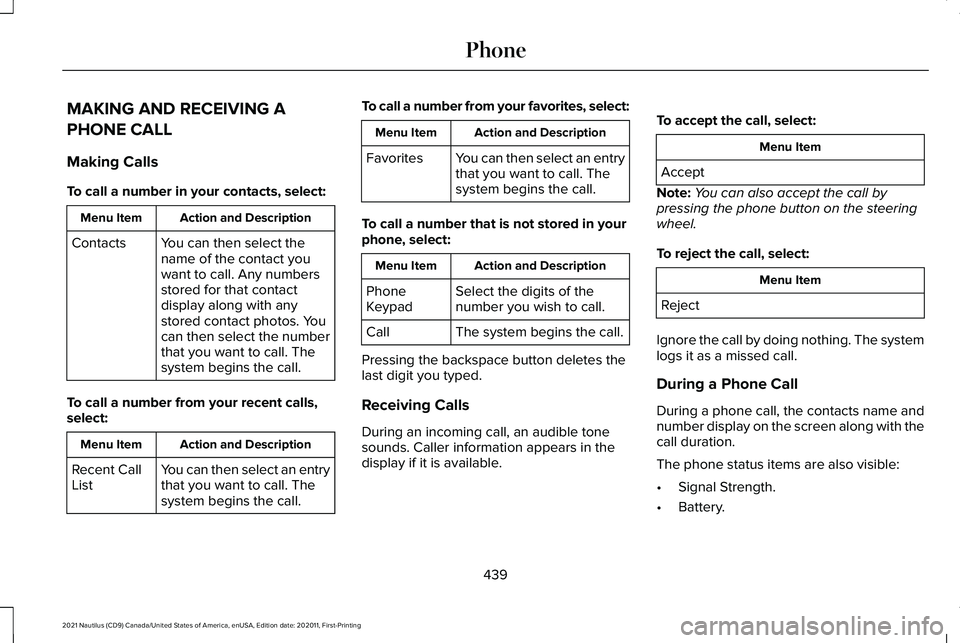
MAKING AND RECEIVING A
PHONE CALL
Making Calls
To call a number in your contacts, select:
Action and Description
Menu Item
You can then select the
name of the contact you
want to call. Any numbers
stored for that contact
display along with any
stored contact photos. You
can then select the number
that you want to call. The
system begins the call.
Contacts
To call a number from your recent calls,
select: Action and Description
Menu Item
You can then select an entry
that you want to call. The
system begins the call.
Recent Call
List To call a number from your favorites, select: Action and Description
Menu Item
You can then select an entry
that you want to call. The
system begins the call.
Favorites
To call a number that is not stored in your
phone, select: Action and Description
Menu Item
Select the digits of the
number you wish to call.
Phone
Keypad
The system begins the call.
Call
Pressing the backspace button deletes the
last digit you typed.
Receiving Calls
During an incoming call, an audible tone
sounds. Caller information appears in the
display if it is available. To accept the call, select: Menu Item
Accept
Note: You can also accept the call by
pressing the phone button on the steering
wheel.
To reject the call, select: Menu Item
Reject
Ignore the call by doing nothing. The system
logs it as a missed call.
During a Phone Call
During a phone call, the contacts name and
number display on the screen along with the
call duration.
The phone status items are also visible:
• Signal Strength.
• Battery.
439
2021 Nautilus (CD9) Canada/United States of America, enUSA, Edition date: 202011, First-Printing Phone
Page 444 of 579
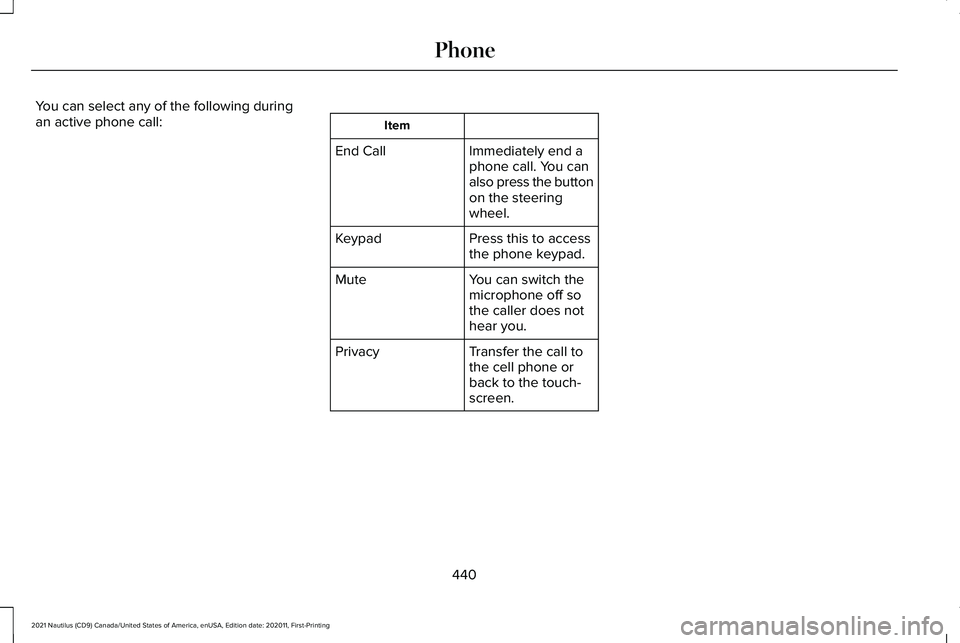
You can select any of the following during
an active phone call:
Item
Immediately end a
phone call. You can
also press the button
on the steering
wheel.
End Call
Press this to access
the phone keypad.
Keypad
You can switch the
microphone off so
the caller does not
hear you.
Mute
Transfer the call to
the cell phone or
back to the touch-
screen.
Privacy
440
2021 Nautilus (CD9) Canada/United States of America, enUSA, Edition date: 202011, First-Printing Phone
Page 467 of 579
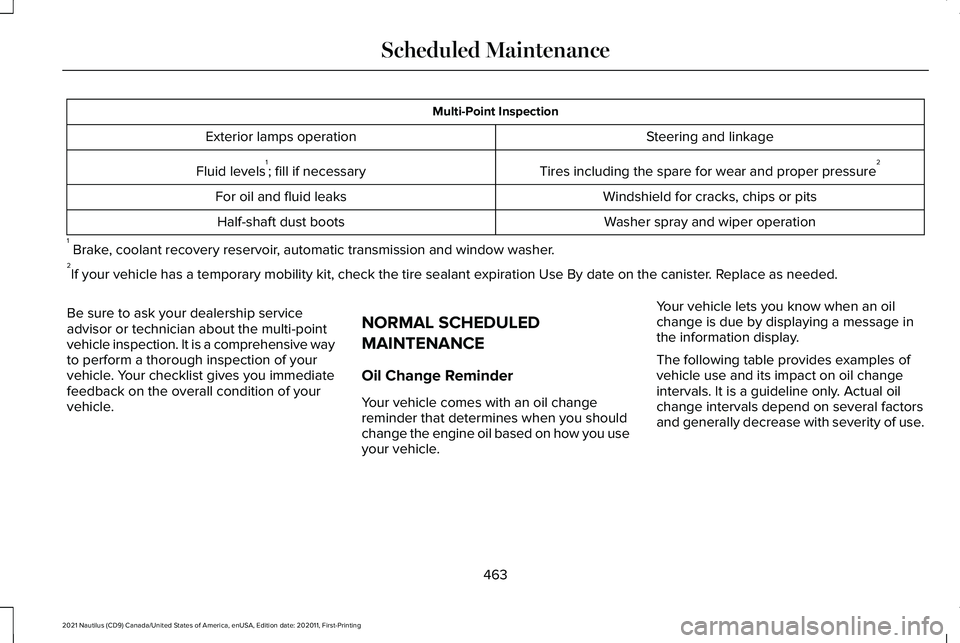
Multi-Point Inspection
Steering and linkage
Exterior lamps operation
Tires including the spare for wear and proper pressure 2
Fluid levels 1
; fill if necessary
Windshield for cracks, chips or pits
For oil and fluid leaks
Washer spray and wiper operation
Half-shaft dust boots
1 Brake, coolant recovery reservoir, automatic transmission and window washer.
2 If your vehicle has a temporary mobility kit, check the tire sealant exp\
iration Use By date on the canister. Replace as needed.
Be sure to ask your dealership service
advisor or technician about the multi-point
vehicle inspection. It is a comprehensive way
to perform a thorough inspection of your
vehicle. Your checklist gives you immediate
feedback on the overall condition of your
vehicle. NORMAL SCHEDULED
MAINTENANCE
Oil Change Reminder
Your vehicle comes with an oil change
reminder that determines when you should
change the engine oil based on how you use
your vehicle.Your vehicle lets you know when an oil
change is due by displaying a message in
the information display.
The following table provides examples of
vehicle use and its impact on oil change
intervals. It is a guideline only. Actual oil
change intervals depend on several factors
and generally decrease with severity of use.
463
2021 Nautilus (CD9) Canada/United States of America, enUSA, Edition date: 202011, First-Printing Scheduled Maintenance
Page 469 of 579
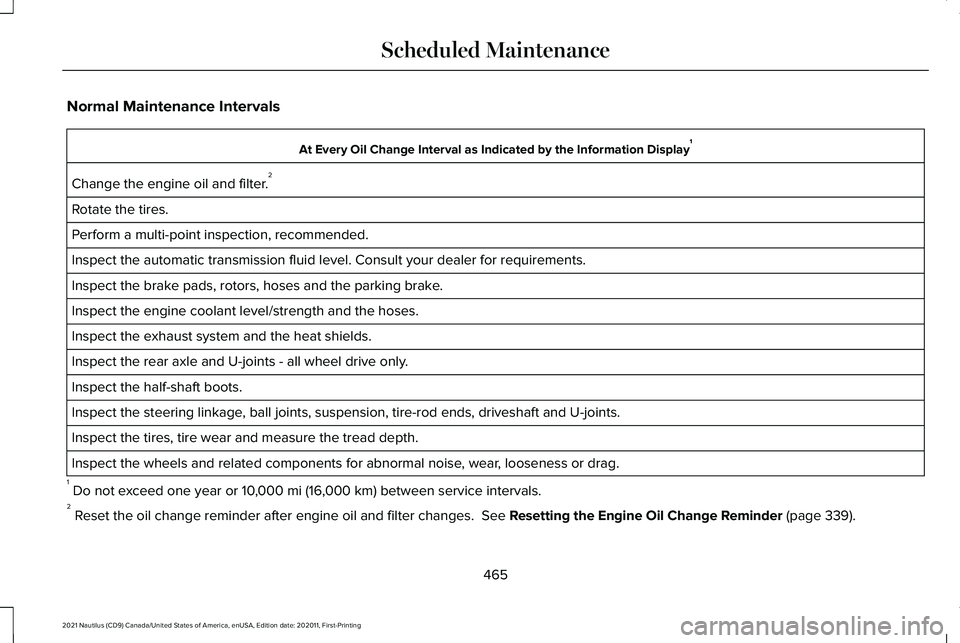
Normal Maintenance Intervals
At Every Oil Change Interval as Indicated by the Information Display
1
Change the engine oil and filter. 2
Rotate the tires.
Perform a multi-point inspection, recommended.
Inspect the automatic transmission fluid level. Consult your dealer for \
requirements.
Inspect the brake pads, rotors, hoses and the parking brake.
Inspect the engine coolant level/strength and the hoses.
Inspect the exhaust system and the heat shields.
Inspect the rear axle and U-joints - all wheel drive only.
Inspect the half-shaft boots.
Inspect the steering linkage, ball joints, suspension, tire-rod ends, driveshaft and U-joints.
Inspect the tires, tire wear and measure the tread depth.
Inspect the wheels and related components for abnormal noise, wear, looseness or drag.
1 Do not exceed one year or 10,000 mi (16,000 km) between service intervals.
2 Reset the oil change reminder after engine oil and filter changes.
See Resetting the Engine Oil Change Reminder (page 339).
465
2021 Nautilus (CD9) Canada/United States of America, enUSA, Edition date: 202011, First-Printing Scheduled Maintenance
Page 476 of 579
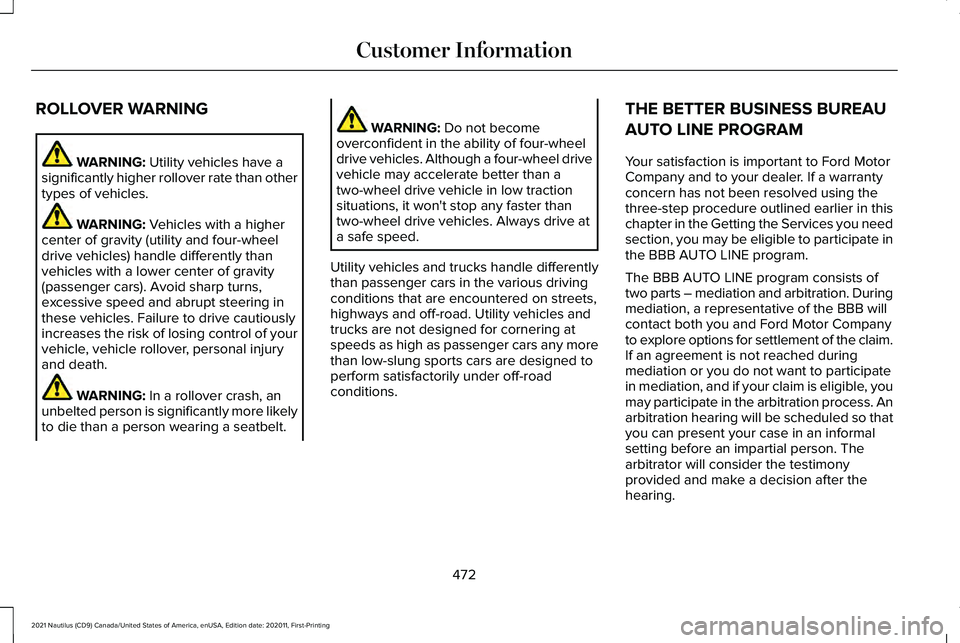
ROLLOVER WARNING
WARNING: Utility vehicles have a
significantly higher rollover rate than other
types of vehicles. WARNING:
Vehicles with a higher
center of gravity (utility and four-wheel
drive vehicles) handle differently than
vehicles with a lower center of gravity
(passenger cars). Avoid sharp turns,
excessive speed and abrupt steering in
these vehicles. Failure to drive cautiously
increases the risk of losing control of your
vehicle, vehicle rollover, personal injury
and death. WARNING:
In a rollover crash, an
unbelted person is significantly more likely
to die than a person wearing a seatbelt. WARNING:
Do not become
overconfident in the ability of four-wheel
drive vehicles. Although a four-wheel drive
vehicle may accelerate better than a
two-wheel drive vehicle in low traction
situations, it won't stop any faster than
two-wheel drive vehicles. Always drive at
a safe speed.
Utility vehicles and trucks handle differently
than passenger cars in the various driving
conditions that are encountered on streets,
highways and off-road. Utility vehicles and
trucks are not designed for cornering at
speeds as high as passenger cars any more
than low-slung sports cars are designed to
perform satisfactorily under off-road
conditions. THE BETTER BUSINESS BUREAU
AUTO LINE PROGRAM
Your satisfaction is important to Ford Motor
Company and to your dealer. If a warranty
concern has not been resolved using the
three-step procedure outlined earlier in this
chapter in the Getting the Services you need
section, you may be eligible to participate in
the BBB AUTO LINE program.
The BBB AUTO LINE program consists of
two parts – mediation and arbitration. During
mediation, a representative of the BBB will
contact both you and Ford Motor Company
to explore options for settlement of the claim.
If an agreement is not reached during
mediation or you do not want to participate
in mediation, and if your claim is eligible, you
may participate in the arbitration process. An
arbitration hearing will be scheduled so that
you can present your case in an informal
setting before an impartial person. The
arbitrator will consider the testimony
provided and make a decision after the
hearing.
472
2021 Nautilus (CD9) Canada/United States of America, enUSA, Edition date: 202011, First-Printing Customer Information
Page 558 of 579
Speed Compensated Volume.........................424
Tone Settings.......................................................424
Adjusting the Steering Wheel - Vehicles With: Manual Adjustable Steering
Column...........................................................112
Adjusting the Steering Wheel - Vehicles With: Power Adjustable Steering
Column...........................................................112
Adjusting the Volume..................................423
Aid Mode........................................................267
How Does Aid Mode Work..............................267
What Is Aid Mode...............................................267
Airbag Precautions
.........................................66
Airbags..............................................................63 Front Passenger Sensing System.....................
67
Air Conditioning See: Climate Control..........................................154
Air Conditioning System Capacity and Specification - 2.0L....................................410
Air Conditioning System Capacity and Specification - 2.7L
.....................................412
Air Filter See: Changing the Engine Air Filter..............344
Alert and Aid Mode.....................................268 How Does Alert and Aid Mode Work............268
What Is Alert and Aid Mode............................268
Alert Mode
.....................................................267
How Does Alert Mode Work............................267 What Is Alert Mode............................................267
All-Wheel Drive
..............................................214
All-Wheel Drive Driving Hints...........................214
All-Wheel Drive – Troubleshooting.................217
All-Wheel Drive Driving Hints
.....................214
Driving In Sand.....................................................215
Driving on Hilly or Sloping Terrain..................216
Driving on Snow and Ice...................................216
Driving Through Mud and Water.....................215
Emergency Maneuvers......................................214
All-Wheel Drive Limitations
.........................214
All-Wheel Drive Precautions.......................214
All-Wheel Drive – Troubleshooting...........217 All-Wheel Drive – Information
Messages..........................................................217
AM/FM Radio
.................................................425
AM/FM Radio Limitations.................................425
Selecting a Radio Station.................................425
Ambient Lighting...........................................128 Adjusting Ambient Lighting..............................128
Switching Ambient Lighting On and Off........128
Anti-Lock Braking System
...........................218
Anti-Lock Braking System Limitations...........218
Anti-Theft Alarm System.............................108 How Does the Anti-Theft Alarm System
Work...................................................................108
What Are the Inclination Sensors...................108
What Are the Interior Sensors.........................
108 What Is the Anti-Theft Alarm System.............108
What Is the Perimeter Alarm............................108
Anti-Theft Alarm System Settings.............109 Setting the Alarm Security Level.....................109
Switching Ask on Exit On and Off...................109
What are the Alarm Security Levels...............109
What Is Ask on Exit.............................................109
Appendices....................................................548
Applying the Electric Parking Brake
.........221
Applying the Electric Parking Brake in an Emergency...................................................221
App Precautions...........................................444
App Requirements.......................................444
Apps
.................................................................444
Audio System................................................423
AM/FM Radio.......................................................425
Digital Radio........................................................426
Satellite Radio......................................................427
Audio System Precautions.........................423
Auto-Dimming Exterior Mirror
....................134
What Is the Auto-Dimming Exterior
Mirror..................................................................134
Auto-Dimming Interior Mirror.....................132 Auto-Dimming Interior Mirror
Limitations.........................................................132
What Is the Auto-Dimming Interior Mirror..................................................................132
Auto Hold
.......................................................226
554
2021 Nautilus (CD9) Canada/United States of America, enUSA, Edition date: 202011, First-Printing Index