open hood LINCOLN NAUTILUS 2021 Owners Manual
[x] Cancel search | Manufacturer: LINCOLN, Model Year: 2021, Model line: NAUTILUS, Model: LINCOLN NAUTILUS 2021Pages: 579, PDF Size: 6.9 MB
Page 15 of 579
Recreationally Towing Your Vehicle - 2.0L,
FWD .............................................................314
Recreationally Towing Your Vehicle - 2.7L .......................................................................
314
Emergency Towing ......................................
315
Fuses
Fuse Precautions ..........................................
316
Under Hood Fuse Box ................................
316
Body Control Module Fuse Box ..............
326
Identifying Fuse Types ................................
331
Fuses – Troubleshooting ...........................
331
Maintenance
Maintenance Precautions .........................
332
Opening and Closing the Hood ..............
332
Under Hood Overview - 2.0L ...................
334
Under Hood Overview - 2.7L ...................
336
Engine Oil ......................................................
338
Checking the Coolant ................................
340
Changing the Engine Air Filter .................
344
Changing the Fuel Filter ............................
344
Drive Belt Routing Overview - 2.0L ........
345Drive Belt Routing Overview - 2.7L
.........
345
Changing the 12V Battery .........................
345
Adjusting the Headlamps ..........................
348
Exterior Bulbs ...............................................
350
Interior Bulbs ................................................
353
Vehicle Care
Cleaning Products .......................................
354
Cleaning the Exterior .................................
355
Waxing ............................................................
357
Cleaning the Interior ...................................
357
Repairing Minor Paint Damage ................
359
Body Styling Kits
Body Styling Kit Precautions ....................
360
Storing Your Vehicle
Preparing Your Vehicle for Storage .........
361
Removing Your Vehicle From Storage ......................................................................
362
Wheel and Tire Information
Locating the Tire label ...............................
363Department of Transportation Uniform Tire
Quality Grades .........................................
363
Information on the Tire Sidewall .............
364
Glossary of Tire Terminology ...................
369
Tire Replacement Requirements ............
369
Using Snow Chains .....................................
372
Tire Care
Checking the Tire Pressures ....................
374
Inflating the Tires .........................................
374
Inspecting the Tire for Wear .....................
375
Inspecting the Tire for Damage ...............
375
Inspecting the Wheel Valve Stems .........
376
Tire Rotation .................................................
376
Tire Sealant and Inflator Kit
What Is the Tire Sealant and Inflator Kit ......................................................................
378
Tire Sealant and Inflator Kit Precautions ......................................................................
378
Locating the Tire Sealant and Inflator Kit ......................................................................
378
Tire Sealant and Inflator Kit Components ......................................................................
379
11
2021 Nautilus (CD9) Canada/United States of America, enUSA, Edition date: 202011, First-Printing Table of Contents
Page 40 of 579
See Opening and Closing the Hood (page 332).
A
See
Replacing the Front Wiper Blades (page 116).
B
See
Locating the Keyless Entry Keypad (page 95).
C
See
Locating the Front Parking Aid Sensors (page 236).
D
See
Locating the 360 Degree Cameras (page 243).
E
36
2021 Nautilus (CD9) Canada/United States of America, enUSA, Edition date: 202011, First-Printing Visual Search
Page 69 of 579
Make sure the knee airbags are
operating properly. See Crash
Sensors and Airbag Indicator
(page
71).
HOW DOES THE SAFETY CANOPY™
WORK WARNING:
Do not place objects or
mount equipment on or near the headliner
at the siderail that may come into contact
with a deploying curtain airbag. Failure to
follow these instructions may increase the
risk of personal injury in the event of a
crash. WARNING:
Do not lean your head
on the door. The curtain airbag could injure
you as it deploys from the headliner. WARNING:
To reduce risk of injury,
do not obstruct or place objects in the
deployment path of the airbag. The Safety Canopy deploys during significant
side crashes or when a certain likelihood of
a rollover event is detected by the rollover
sensor. The Safety Canopy is mounted to
the roof side-rail sheet metal, behind the
headliner, above each row of seats. In certain
sideways crashes or rollover events, the
Safety Canopy will be activated, regardless
of which seats are occupied. The Safety
Canopy inflates between the side window
area and occupants to further enhance
protection provided in side impact crashes
and rollover events. The system consists of the following:
•
Safety Canopy curtain airbags above the
trim panels over the front and rear side
windows identified by a label or wording
on the headliner or roof-pillar trim.
• A flexible headliner which opens above
the side doors to allow air curtain
deployment · Crash sensors and monitoring
system with a readiness indicator.
See
Crash Sensors and Airbag
Indicator (page 71).
Properly restrain children 12 years old and
under in the rear seats. The Safety Canopy
will not interfere with children restrained
using a properly installed child or booster
seat because it is designed to inflate
downward from the headliner above the
doors along the side window opening.
65
2021 Nautilus (CD9) Canada/United States of America, enUSA, Edition date: 202011, First-Printing AirbagsE67017 E75004 E67017
Page 95 of 579
3. Select Vehicle.
4. Select
Locks.
5. Switch
Autounlock on or off.
AUTOLOCK
What Is Autolock
Autolock is a locking feature that locks your
vehicle doors when you start driving.
Autolock Requirements
Autolock locks all the doors when all of the
following occur:
• All doors are closed.
• The ignition is on.
• Your vehicle reaches a speed greater
than
12 mph (20 km/h). MISLOCK
What Is Mislock
Mislock is a locking feature that warns you
if your vehicle has not locked.
Mislock Limitations
When you press the lock button once, the
direction indicators do not flash if:
•
Any door or the liftgate is open.
• The hood is open.
If you switch mislock off, the horn does not
sound if you press the lock button on the
remote control when a door is open.
Switching Mislock On and Off
1. Press the menu button on the steering wheel to enter the information display
main menu.
2. Select
Settings. 3. Select
Vehicle.
4. Select
Locks.
5. Switch
Mislock Chirp on or off.
DOORS AND LOCKS AUDIBLE
WARNINGS
Door Ajar Audible Warning
Sounds when a door is not fully closed and
your vehicle is moving.
DOORS AND LOCKS –
TROUBLESHOOTING
Doors and Locks – Warning Lamps
Door Ajar Warning Lamp It illuminates when you switch the
ignition on and remains on if any
door or the hood is open.
91
2021 Nautilus (CD9) Canada/United States of America, enUSA, Edition date: 202011, First-Printing Doors and LocksE249859
Page 112 of 579
PASSIVE ANTI-THEFT SYSTEM
What Is the Passive Anti-Theft System
The passive anti-theft system prevents
someone from starting the vehicle with an
incorrectly coded key.
How Does the Passive Anti-Theft
System Work
The passive anti-theft system arms when you
switch the ignition off.
It disarms when the ignition is switched on
with a correctly coded key.
Note:
The system is not compatible with
non-Ford aftermarket remote start systems.
Note: Do not leave a duplicate coded key
in your vehicle. Always take the keys and
lock all doors when leaving your vehicle. ANTI-THEFT ALARM SYSTEM
What Is the Anti-Theft Alarm System
The Anti-Theft Alarm System warns you of
an unauthorized entry to your vehicle.
How Does the Anti-Theft Alarm System
Work
When armed, the anti-theft alarm is triggered
in any of the following ways:
•
If someone opens a door, the liftgate or
the hood without a correctly coded key
or remote control.
• If you turn the power on without a
correctly coded key.
• If the interior sensors detect movement
inside your vehicle.
• If the inclination sensors detect an
attempt to raise your vehicle.
• If someone disconnects the vehicle
battery or the battery backup alarm. If the anti-theft alarm is triggered, the alarm
horn sounds for 30 seconds and the
direction indicators flash for 5 minutes.
Any further attempts to carry out one of the
above sounds the alarm again.
What Is the Perimeter Alarm
The perimeter alarm is designed to detect
unauthorized access to your vehicle.
What Are the Interior Sensors
The interior sensors are designed to detect
any movement inside your vehicle.
The interior sensors are in the overhead
console.
Note:
Do not cover the interior sensors.
What Are the Inclination Sensors (If
Equipped)
The inclination sensor is designed to detect
an attempt to raise your vehicle, for example
to remove a wheel or to tow it away.
108
2021 Nautilus (CD9) Canada/United States of America, enUSA, Edition date: 202011, First-Printing Security
Page 144 of 579
Brake System
It illuminates when you apply the
parking brake and the ignition is
on. If it illuminates when your
vehicle is moving, make sure the
parking brake is released. If the
parking brake is released, this
indicates low brake fluid level or the brake
system requires service. Have your vehicle
checked as soon as possible.
Note: Indicators may vary depending on
region.
Door Ajar It illuminates when you switch the
ignition on and remains on if any
door is open.
Electric Parking Brake It illuminates or flashes when the
electric parking brake requires
service. Engine Coolant Temperature If it illuminates, safely stop your
vehicle and switch your vehicle off.
Fasten Seatbelt It illuminates and a tone sounds
until you fasten the seatbelts.
Hood Ajar It illuminates when the ignition is
on and the hood is not completely
closed.
Liftgate Ajar It illuminates when the ignition is
on and the liftgate is not
completely closed.
Low Beam Warning It illuminates when the low beam
headlamp requires service. Have
the system checked as soon as
possible. Low Fuel Level It illuminates when the fuel level is
low.
Low Tire Pressure It illuminates when your tire
pressure is low. If illuminated,
check your tire pressure as soon
as possible. If it begins to flash at anytime,
have the system checked as soon as
possible.
Low Washer Fluid Level It illuminates when the washer fluid
is low.
140
2021 Nautilus (CD9) Canada/United States of America, enUSA, Edition date: 202011, First-Printing Instrument ClusterE270480 E146190 E71880 E246598 E162453 E181350 E132353
Page 155 of 579
WHAT IS REMOTE START
The system allows you to remotely start your
vehicle and to adjust the interior temperature
according to the settings that you chose.
REMOTE START PRECAUTIONS
WARNING: Do not start the engine
in a closed garage or in other enclosed
areas. Exhaust fumes are toxic. Always
open the garage door before you start the
engine. Failure to follow this instruction
could result in personal injury or death.
REMOTE START LIMITATIONS
Remote start does not work under the
following conditions:
• The alarm horn is sounding.
• The hood is open.
• The transmission is not in park (P). •
The ignition is on.
• The battery voltage is below the
minimum operating voltage.
Note: Do not use remote start if your fuel
level is low.
Note: To use remote start with Lincoln Way
or Phone as a Key, enable the modem.
See
Connecting the Vehicle to a Wi-Fi Network
(page
417).
ENABLING REMOTE START
1. Using the instrument cluster display controls on the steering wheel, select
Settings
.
2. Select
Vehicle.
3. Select
Remote Start.
4. Switch
System on.
Note: To use remote start, make sure that
the modem is enabled.
See Enabling and
Disabling the Modem (page 417). REMOTELY STARTING AND
STOPPING THE VEHICLE
Remotely Starting the Vehicle Press the button on the remote
control.
Within three seconds, press the
button on the remote control.
Within three seconds, press the
button again.
Note: You can also use the Lincoln Way App
to start the vehicle.
Note: The direction indicators flash twice.
Note: The parking lamps turn on when the
vehicle is running.
Note: The horn sounds if the system fails to
start.
Note: All other vehicle systems remain off
when you have remotely started the vehicle.
Note: The vehicle remains secured when
you have remotely started the vehicle. A
valid key must be inside your vehicle to
switch the ignition on and drive your vehicle.
151
2021 Nautilus (CD9) Canada/United States of America, enUSA, Edition date: 202011, First-Printing Remote StartE138623 E138625
Page 198 of 579
WHAT IS AUTO-START-STOP
The system is designed to help reduce fuel
consumption and CO
2 emissions by stopping
the engine when it is idling, for example at
traffic lights.
AUTO-START-STOP PRECAUTIONS WARNING: Apply the parking brake,
shift into park (P), switch the ignition off
and remove the key before you leave your
vehicle. Failure to follow this instruction
could result in personal injury or death. WARNING: Apply the parking brake,
shift into park (P), switch the ignition off
and remove the key before you open the
hood or have any service or repair work
completed. If you do not switch the ignition
off, the engine could restart at any time.
Failure to follow this instruction could result
in personal injury or death. SWITCHING AUTO-START-STOP
ON AND OFF
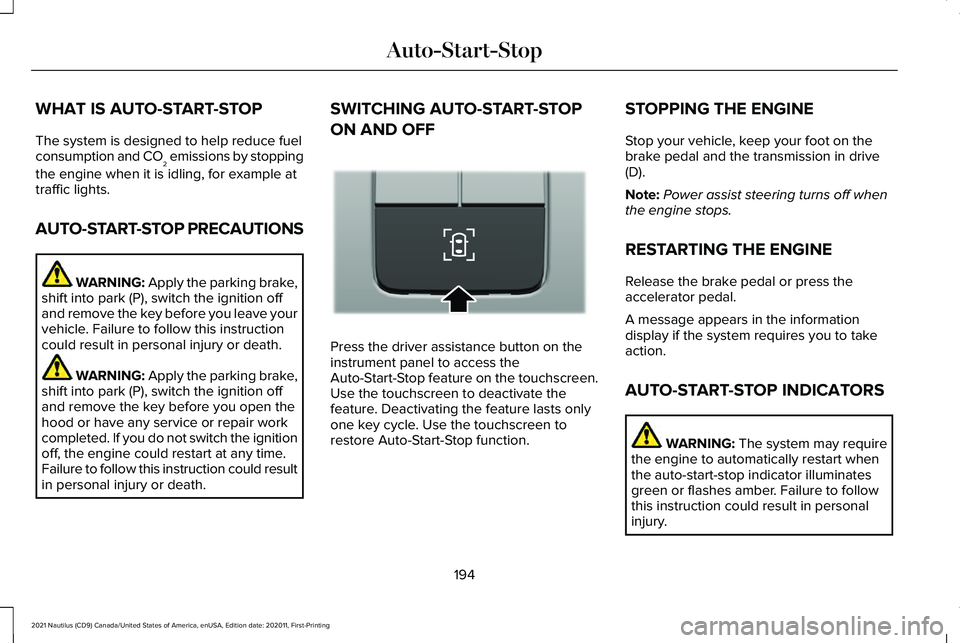
Press the driver assistance button on the
instrument panel to access the
Auto-Start-Stop feature on the touchscreen.
Use the touchscreen to deactivate the
feature. Deactivating the feature lasts only
one key cycle. Use the touchscreen to
restore Auto-Start-Stop function.STOPPING THE ENGINE
Stop your vehicle, keep your foot on the
brake pedal and the transmission in drive
(D).
Note:
Power assist steering turns off when
the engine stops.
RESTARTING THE ENGINE
Release the brake pedal or press the
accelerator pedal.
A message appears in the information
display if the system requires you to take
action.
AUTO-START-STOP INDICATORS WARNING: The system may require
the engine to automatically restart when
the auto-start-stop indicator illuminates
green or flashes amber. Failure to follow
this instruction could result in personal
injury.
194
2021 Nautilus (CD9) Canada/United States of America, enUSA, Edition date: 202011, First-Printing Auto-Start-StopE335855
Page 314 of 579
WARNING: Keep batteries out of
reach of children. Batteries contain sulfuric
acid. Avoid contact with skin, eyes or
clothing. Shield your eyes when working
near the battery to protect against possible
splashing of acid solution. In case of acid
contact with skin or eyes, flush immediately
with water for a minimum of 15 minutes and
get prompt medical attention. If acid is
swallowed, call a physician immediately. WARNING:
Use only adequately
sized cables with insulated clamps. WARNING: Make sure that the cables
are clear of any moving parts and fuel
delivery system parts. WARNING:
Connect batteries with
only the same nominal voltage. WARNING:
If the engine is running
while the hood is open, stay clear of
moving engine components. Failure to
follow this warning could result in serious
personal injury or death. Do not attempt to push-start an automatic
transmission vehicle. This could cause
transmission damage.
Do not disconnect the battery of the disabled
vehicle. This could damage your vehicle's
electrical system.
Preparing the Vehicle
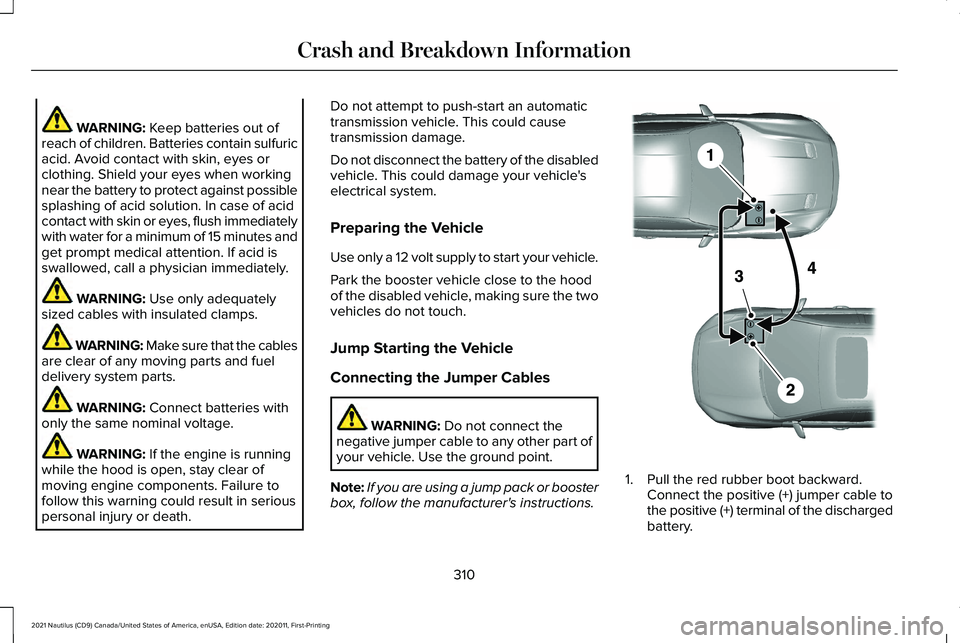
Use only a 12 volt supply to start your vehicle.
Park the booster vehicle close to the hood
of the disabled vehicle, making sure the two
vehicles do not touch.
Jump Starting the Vehicle
Connecting the Jumper Cables
WARNING:
Do not connect the
negative jumper cable to any other part of
your vehicle. Use the ground point.
Note: If you are using a jump pack or booster
box, follow the manufacturer's instructions. 1. Pull the red rubber boot backward.
Connect the positive (+) jumper cable to
the positive (+) terminal of the discharged
battery.
310
2021 Nautilus (CD9) Canada/United States of America, enUSA, Edition date: 202011, First-Printing Crash and Breakdown InformationE281345
Page 336 of 579
MAINTENANCE PRECAUTIONS
Service your vehicle regularly to help
maintain its roadworthiness and resale value.
There is a large network of authorized
dealers that are there to help you with their
professional servicing expertise. We believe
that their specially trained technicians are
best qualified to service your vehicle properly
and expertly. They are supported by a wide
range of highly specialized tools developed
specifically for servicing your vehicle.
If your vehicle requires professional service,
an authorized dealer can provide the
necessary parts and service. Check your
warranty information to find out which parts
and services are covered.
Use only recommended fuels, lubricants,
fluids and service parts conforming to
specifications. See Capacities and
Specifications (page 398).
• Do not work on a hot engine.
• Make sure that nothing gets caught in
moving parts. •
Do not work on a vehicle with the engine
running in an enclosed space, unless you
are sure you have enough ventilation.
• Keep all open flames and other burning
material, such as cigarettes, away from
the battery and all fuel related parts.
• Set the parking brake, shift the
transmission to park (P) and block the
wheels.
OPENING AND CLOSING THE
HOOD
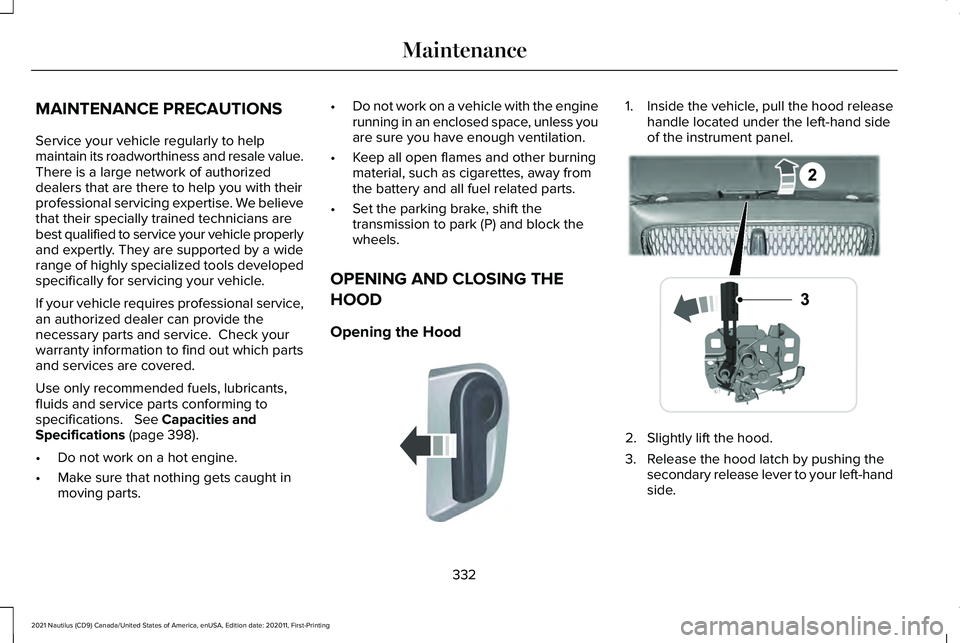
Opening the Hood 1. Inside the vehicle, pull the hood release
handle located under the left-hand side
of the instrument panel. 2. Slightly lift the hood.
3. Release the hood latch by pushing the
secondary release lever to your left-hand
side.
332
2021 Nautilus (CD9) Canada/United States of America, enUSA, Edition date: 202011, First-Printing MaintenanceE142457 E267365