wipers LINCOLN NAUTILUS 2021 Owners Manual
[x] Cancel search | Manufacturer: LINCOLN, Model Year: 2021, Model line: NAUTILUS, Model: LINCOLN NAUTILUS 2021Pages: 579, PDF Size: 6.9 MB
Page 7 of 579
Closing the Liftgate
.....................................103
Stopping the Liftgate Movement .............
105
Liftgate Obstacle Detection ......................
105
Liftgate – Troubleshooting ........................
105
Security
Passive Anti-Theft System .........................
108
Anti-Theft Alarm System ............................
108
Anti-Theft Alarm System Settings ............
109
Security – Troubleshooting ........................
110
Steering Wheel
Adjusting the Steering Wheel - Vehicles With: Manual Adjustable Steering
Column ........................................................
112
Adjusting the Steering Wheel - Vehicles With: Power Adjustable Steering Column
........................................................................\
112
Resetting the Stopping Position - Vehicles With: Power Adjustable Steering Column
........................................................................\
113
Horn ..................................................................
113
Switching the Heated Steering Wheel On and Off .........................................................
113Wipers and Washers
Wipers
..............................................................
114
Autowipers ......................................................
114
Switching the Rear Window Wiper On and Off .................................................................
115
Reverse Wipe .................................................
115
Checking the Wiper Blades ........................
116
Replacing the Front Wiper Blades ............
116
Replacing the Rear Wiper Blades .............
116
Washers ...........................................................
117
Wipers and Washers – Troubleshooting ........................................................................\
118
Exterior Lighting
Exterior Lighting Control .............................
119
Headlamps ......................................................
119
Headlamps – Troubleshooting .................
120
Autolamps ......................................................
120
Exterior Lamps ...............................................
121
Automatic High Beam Control ..................
122
Automatic High Beam Control – Troubleshooting .......................................
125
Adaptive Front Lighting ..............................
125Interior Lighting
Switching All of the Interior Lamps On and
Off ................................................................
127
Switching the Front Interior Lamps On and Off ................................................................
127
Switching the Rear Interior Lamps On and Off ................................................................
127
Interior Lamp Function ................................
128
Adjusting the Instrument Panel Lighting Brightness ..................................................
128
Ambient Lighting ..........................................
128
Interior Lighting – Troubleshooting .........
128
Windows
Opening and Closing the Windows ........
129
Global Opening and Closing .....................
130
Window Bounce-Back ................................
130
Locking the Rear Window Controls ..........
131
Interior Mirror
Interior Mirror Precautions .........................
132
Auto-Dimming Interior Mirror ....................
132
3
2021 Nautilus (CD9) Canada/United States of America, enUSA, Edition date: 202011, First-Printing Table of Contents
Page 118 of 579
WIPERS
Wiper Precautions
Do not operate the wipers on a dry
windshield. This could scratch the glass or
damage the wiper blades. Use the
windshield washers before wiping a dry
windshield.
Fully defrost the windshield before you
switch the windshield wipers on.
Switch the windshield wipers off before
entering a car wash.
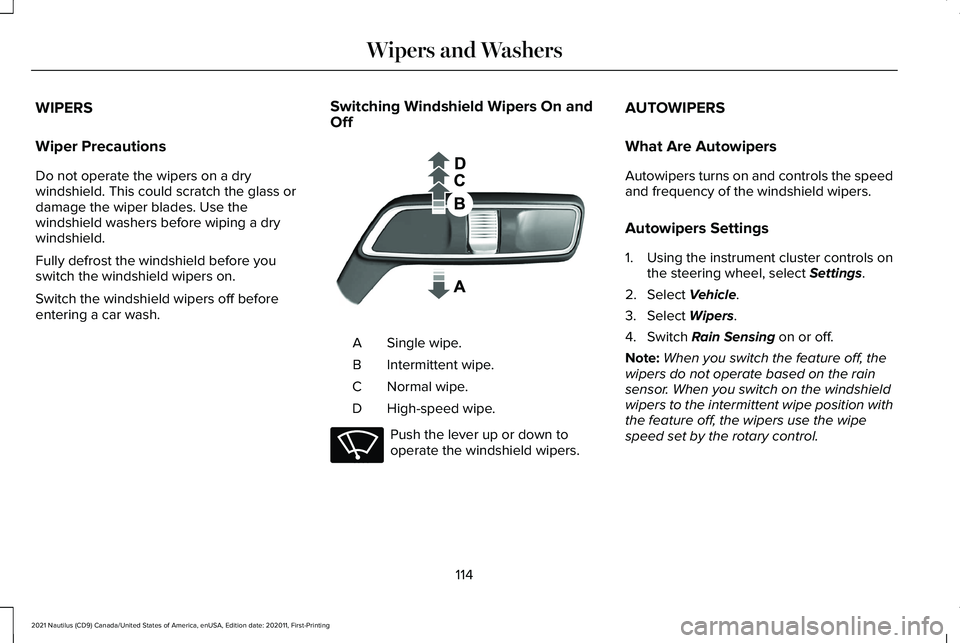
Switching Windshield Wipers On and
Off Single wipe.
A
Intermittent wipe.
B
Normal wipe.
C
High-speed wipe.
D Push the lever up or down to
operate the windshield wipers.AUTOWIPERS
What Are Autowipers
Autowipers turns on and controls the speed
and frequency of the windshield wipers.
Autowipers Settings
1. Using the instrument cluster controls on
the steering wheel, select Settings.
2. Select
Vehicle.
3. Select
Wipers.
4. Switch
Rain Sensing on or off.
Note: When you switch the feature off, the
wipers do not operate based on the rain
sensor. When you switch on the windshield
wipers to the intermittent wipe position with
the feature off, the wipers use the wipe
speed set by the rotary control.
114
2021 Nautilus (CD9) Canada/United States of America, enUSA, Edition date: 202011, First-Printing Wipers and Washers E269410 E270969
Page 119 of 579
Adjusting the Sensitivity of the Rain
Sensor
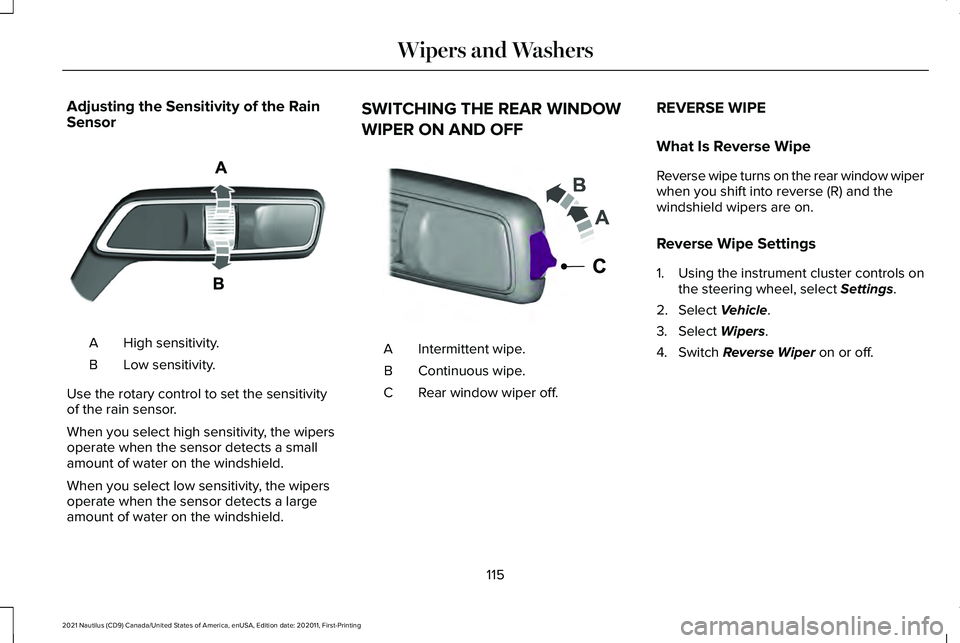
High sensitivity.
A
Low sensitivity.
B
Use the rotary control to set the sensitivity
of the rain sensor.
When you select high sensitivity, the wipers
operate when the sensor detects a small
amount of water on the windshield.
When you select low sensitivity, the wipers
operate when the sensor detects a large
amount of water on the windshield. SWITCHING THE REAR WINDOW
WIPER ON AND OFF
Intermittent wipe.
A
Continuous wipe.
B
Rear window wiper off.
C REVERSE WIPE
What Is Reverse Wipe
Reverse wipe turns on the rear window wiper
when you shift into reverse (R) and the
windshield wipers are on.
Reverse Wipe Settings
1. Using the instrument cluster controls on
the steering wheel, select Settings.
2. Select
Vehicle.
3. Select
Wipers.
4. Switch
Reverse Wiper on or off.
115
2021 Nautilus (CD9) Canada/United States of America, enUSA, Edition date: 202011, First-Printing Wipers and WashersE330179 E242324
Page 120 of 579
CHECKING THE WIPER BLADES
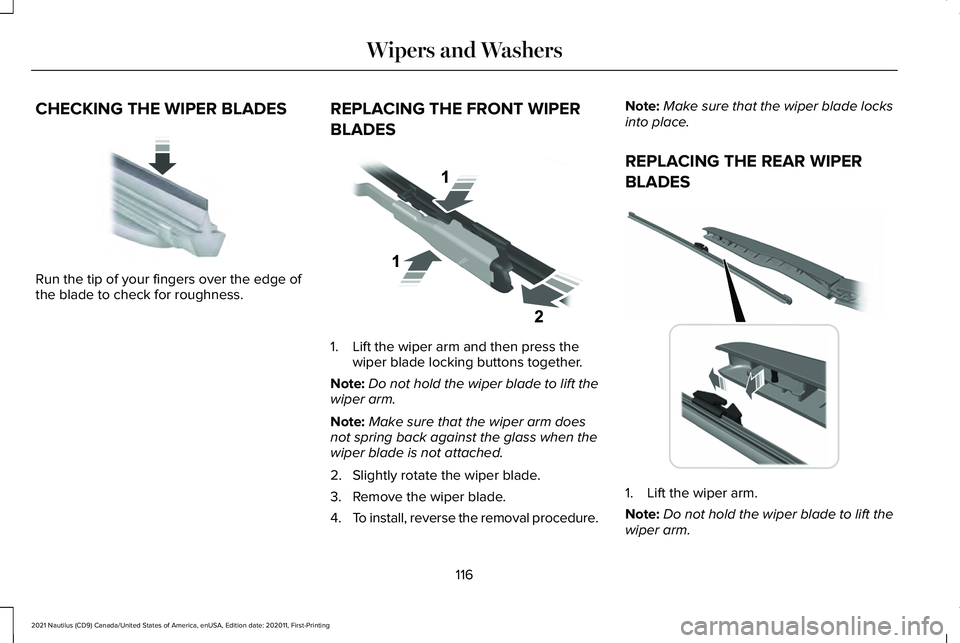
Run the tip of your fingers over the edge of
the blade to check for roughness.
REPLACING THE FRONT WIPER
BLADES 1. Lift the wiper arm and then press the
wiper blade locking buttons together.
Note: Do not hold the wiper blade to lift the
wiper arm.
Note: Make sure that the wiper arm does
not spring back against the glass when the
wiper blade is not attached.
2. Slightly rotate the wiper blade.
3. Remove the wiper blade.
4. To install, reverse the removal procedure. Note:
Make sure that the wiper blade locks
into place.
REPLACING THE REAR WIPER
BLADES 1. Lift the wiper arm.
Note:
Do not hold the wiper blade to lift the
wiper arm.
116
2021 Nautilus (CD9) Canada/United States of America, enUSA, Edition date: 202011, First-Printing Wipers and WashersE142463 E129990 E271380
Page 121 of 579
2. Remove the wiper blade.
Note:
Make sure that the wiper arm does
not spring back against the glass when the
wiper blade is not attached.
3. To install, reverse the removal procedure.
Note: Make sure that the wiper blade locks
into place.
WASHERS
Washer Precautions WARNING: If you operate your
vehicle in temperatures below 41°F (5°C),
use washer fluid with antifreeze protection.
Failure to use washer fluid with antifreeze
protection in cold weather could result in
impaired windshield vision and increase
the risk of injury or accident.
Do not operate the washers when the
washer reservoir is empty. This could cause
the washer pump to overheat. Keep the outside of the windshield clean.
The rain sensor is very sensitive and the
wipers may operate if dirt, mist or insects hit
the windshield.
Using the Windshield Washer
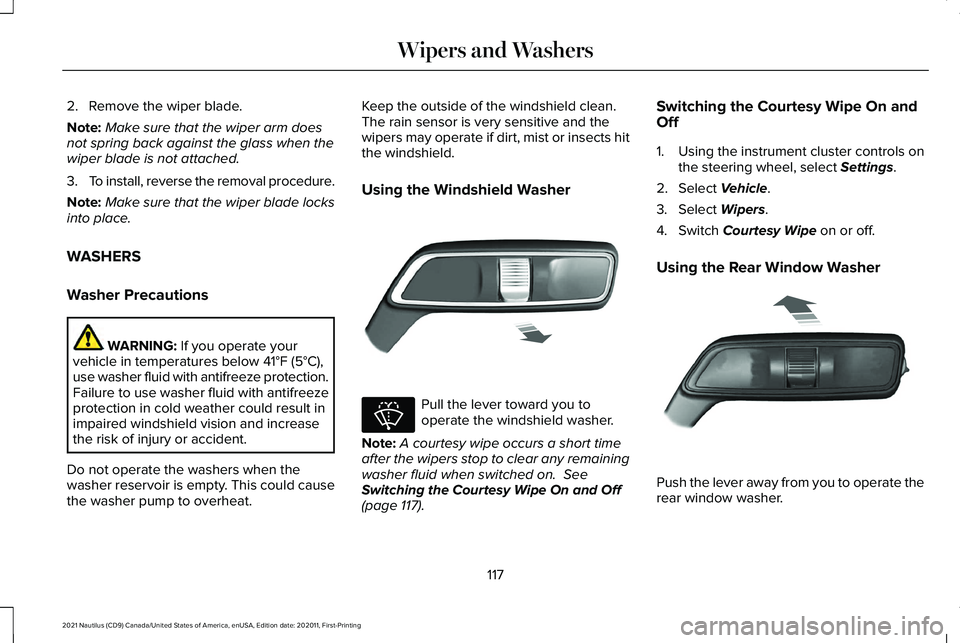
Pull the lever toward you to
operate the windshield washer.
Note: A courtesy wipe occurs a short time
after the wipers stop to clear any remaining
washer fluid when switched on.
See
Switching the Courtesy Wipe On and Off
(page
117). Switching the Courtesy Wipe On and
Off
1. Using the instrument cluster controls on
the steering wheel, select
Settings.
2. Select
Vehicle.
3. Select
Wipers.
4. Switch
Courtesy Wipe on or off.
Using the Rear Window Washer Push the lever away from you to operate the
rear window washer.
117
2021 Nautilus (CD9) Canada/United States of America, enUSA, Edition date: 202011, First-Printing Wipers and WashersE269412 E270967 E269727
Page 122 of 579
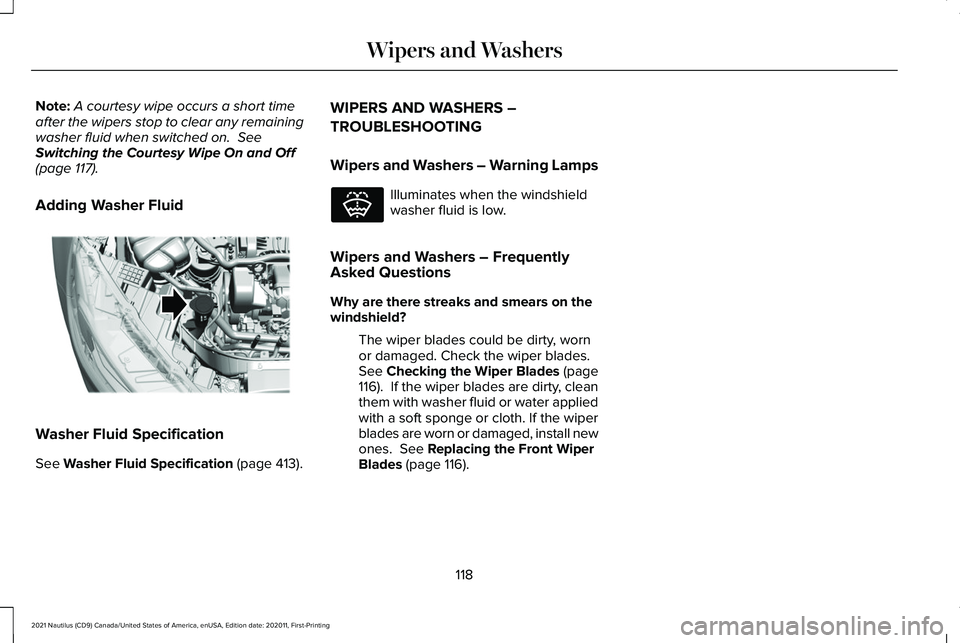
Note:
A courtesy wipe occurs a short time
after the wipers stop to clear any remaining
washer fluid when switched on. See
Switching the Courtesy Wipe On and Off
(page
117).
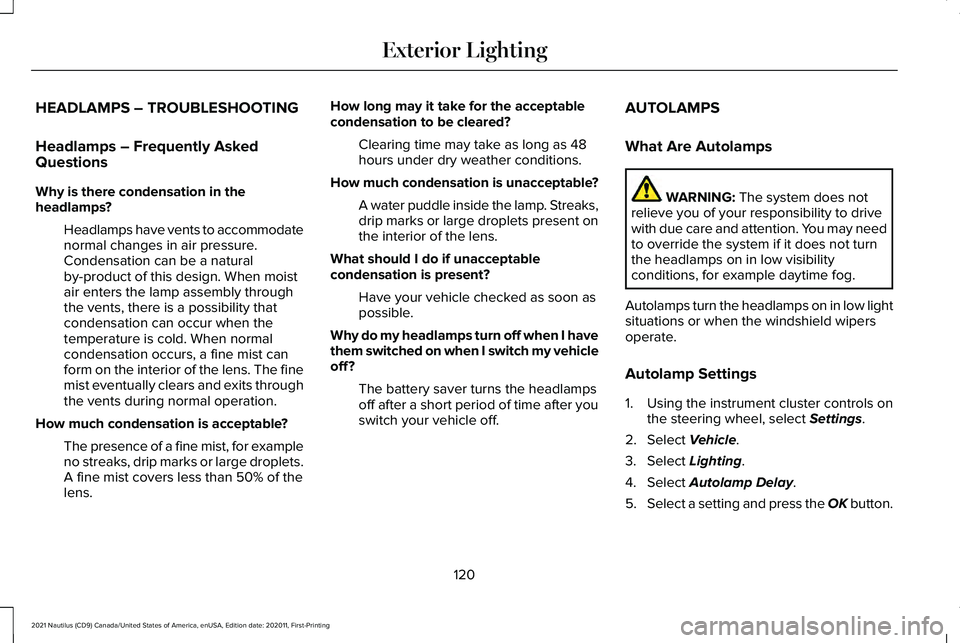
Adding Washer Fluid Washer Fluid Specification
See
Washer Fluid Specification (page 413). WIPERS AND WASHERS –
TROUBLESHOOTING
Wipers and Washers – Warning Lamps Illuminates when the windshield
washer fluid is low.
Wipers and Washers – Frequently
Asked Questions
Why are there streaks and smears on the
windshield? The wiper blades could be dirty, worn
or damaged. Check the wiper blades.
See
Checking the Wiper Blades (page
116). If the wiper blades are dirty, clean
them with washer fluid or water applied
with a soft sponge or cloth. If the wiper
blades are worn or damaged, install new
ones.
See Replacing the Front Wiper
Blades (page 116).
118
2021 Nautilus (CD9) Canada/United States of America, enUSA, Edition date: 202011, First-Printing Wipers and WashersE330184 E132353
Page 124 of 579
HEADLAMPS – TROUBLESHOOTING
Headlamps – Frequently Asked
Questions
Why is there condensation in the
headlamps?
Headlamps have vents to accommodate
normal changes in air pressure.
Condensation can be a natural
by-product of this design. When moist
air enters the lamp assembly through
the vents, there is a possibility that
condensation can occur when the
temperature is cold. When normal
condensation occurs, a fine mist can
form on the interior of the lens. The fine
mist eventually clears and exits through
the vents during normal operation.
How much condensation is acceptable? The presence of a fine mist, for example
no streaks, drip marks or large droplets.
A fine mist covers less than 50% of the
lens. How long may it take for the acceptable
condensation to be cleared?
Clearing time may take as long as 48
hours under dry weather conditions.
How much condensation is unacceptable? A water puddle inside the lamp. Streaks,
drip marks or large droplets present on
the interior of the lens.
What should I do if unacceptable
condensation is present? Have your vehicle checked as soon as
possible.
Why do my headlamps turn off when I have
them switched on when I switch my vehicle
off ? The battery saver turns the headlamps
off after a short period of time after you
switch your vehicle off. AUTOLAMPS
What Are Autolamps WARNING: The system does not
relieve you of your responsibility to drive
with due care and attention. You may need
to override the system if it does not turn
the headlamps on in low visibility
conditions, for example daytime fog.
Autolamps turn the headlamps on in low light
situations or when the windshield wipers
operate.
Autolamp Settings
1. Using the instrument cluster controls on the steering wheel, select
Settings.
2. Select
Vehicle.
3. Select
Lighting.
4. Select
Autolamp Delay.
5. Select a setting and press the OK button.
120
2021 Nautilus (CD9) Canada/United States of America, enUSA, Edition date: 202011, First-Printing Exterior Lighting
Page 366 of 579
Hybrid Battery Systems
We recommend the following actions for your
vehicle:
•
When storing your vehicle for greater
than 30 days the state of charge should
be approximately 50%. Additionally we
recommend disconnecting the 12V
battery which will reduce system loads
on the HV battery.
12 Volt Battery
• Check and recharge as necessary. Keep
connections clean.
Note: It is necessary to reset memory
features if you disconnect the battery cables.
Brakes
Make sure the brakes and parking brake
release fully.
Note: If you intend on parking your vehicle
for an extended period after cleaning the
wheels with a wheel cleaner, drive your
vehicle for a few minutes before doing so to
reduce the risk of increased corrosion of the
brake discs, brake pads and linings. Tires
•
Maintain recommended air pressure.
Note: If you intend on parking your vehicle
for an extended period after cleaning the
wheels with a wheel cleaner, drive your
vehicle for a few minutes before doing so.
This reduces the risk of corrosion of the
brake discs, brake pads and linings.
REMOVING YOUR VEHICLE FROM
STORAGE
When your vehicle is ready to come out of
storage, do the following:
• We recommend that you change the
engine oil before you use your vehicle
again.
• Wash your vehicle to remove any dirt or
grease film build-up on window surfaces.
• Check windshield wipers for any
deterioration.
• Check under the hood for any foreign
material that may have collected during
storage such as mice or squirrel nests. •
Check the exhaust for any foreign
material that may have collected during
storage.
• Check tire pressures and set tire inflation
per the Tire Label.
• Check brake pedal operation. Drive your
vehicle 15 ft (4.5 m) back and forth to
remove rust build-up.
• Check fluid levels (including coolant, oil
and gas) to make sure there are no leaks,
and fluids are at recommended levels.
• If you remove the battery, clean the
battery cable ends and check for
damage.
Contact an authorized dealer if you have any
concerns or issues.
362
2021 Nautilus (CD9) Canada/United States of America, enUSA, Edition date: 202011, First-Printing Storing Your Vehicle
Page 560 of 579
Auto Mode......................................................156
Auto Mode Indicators.........................................156
Switching Auto Mode On and Off...................
156
Auto-Start-Stop..............................................194 Auto-Start-Stop – Troubleshooting.................195
Auto-Start-Stop Indicators...........................194
Auto-Start-Stop Precautions.......................194
Auto-Start-Stop – Troubleshooting..........195 Auto-Start-Stop – Frequently Asked
Questions.........................................................196
Auto-Start-Stop – Information Messages..........................................................195
Autounlock.......................................................90 Autounlock Requirements..................................90
Switching Autounlock On and Off....................
90
What Is Autounlock..............................................90
Autowipers.......................................................114 Adjusting the Sensitivity of the Rain
Sensor.................................................................115
Autowipers Settings.............................................114
What Are Autowipers..........................................114
AWD See: All-Wheel Drive...........................................214
B
Battery See: Changing the 12V Battery.......................345 Beginning a Voice Interaction
...................435
Blind Spot Information System..................273 Blind Spot Information System –
Troubleshooting.............................................275
Blind Spot Information System Indicators.....................................................275
Blind Spot Information System Limitations....................................................273
Blind Spot Information System Precautions..................................................273
Blind Spot Information System Requirements..............................................274
Blind Spot Information System – Troubleshooting.........................................275
Blind Spot Information System – Information Messages.........................................................275
Bluetooth®
......................................................443
Body Control Module Fuse Box...............326 Accessing the Body Control Module Fuse
Box.....................................................................326
Identifying the Fuses in the Body Control Module Fuse Box...........................................327
Locating the Body Control Module Fuse Box.....................................................................326
Body Styling Kit Precautions.....................360
Body Styling Kits...........................................360
Bonnet Lock See: Opening and Closing the Hood............332 Booster Seats..................................................49
Types of Booster Seats.......................................49
Brake Fluid Specification............................219
Brake Over Accelerator...............................218
Brake Precautions
.........................................218
Brakes..............................................................218 Anti-Lock Braking System.................................
218
Brakes – Troubleshooting.................................219
Brakes – Troubleshooting..........................219 Brakes – Frequently Asked Questions........220
Brakes – Information Messages....................
220
Brakes – Warning Lamps..................................219
Breaking-In.....................................................305
C
Calculating Payload......................................291
Calculating the Load Limit..........................291 Helpful examples for calculating the available
amount of cargo and luggage load
capacity............................................................292
California Proposition 65............................514
Canceling the Set Speed...........................252
Capacities and Specifications
...................398
Catalytic Converter......................................204
Catalytic Converter – Troubleshooting........204
Catalytic Converter Precautions..............204
556
2021 Nautilus (CD9) Canada/United States of America, enUSA, Edition date: 202011, First-Printing Index
Page 578 of 579
Unlocking the Doors............................................97
Using the Remote Control............................75 Liftgate.....................................................................75
Lock........................................................................\
..75
Panic Alarm.............................................................75
Remote Start...........................................................75
Unlock......................................................................75
Using the Tire Sealant and Inflator Kit...................................................................379
First Stage: Reinflating the Tire with sealing compound and air.........................................380
Second Stage: Checking the tire pressure with the inflator kit.........................................382
Tips for use of the kit.........................................379
What to do after the tire has been sealed...............................................................382
What to do when a tire is punctured.............379
Using the Valet Mode.....................................81
Using This Publication....................................18
V
Vehicle Care..................................................354
Cleaning the Exterior.........................................355
Cleaning the Interior..........................................
357
Vehicle Identification Number...................416 Locating the Vehicle Identification
Number..............................................................416 Vehicle Identification Number Overview......416
Vehicle Identification
....................................416
Vehicle Identification Number ..........................416
Vehicle Interior
................................................33
Vehicle System Updates............................452
Vehicle Wi-Fi Hotspot...................................421
Ventilated Seats
.............................................164
Switching the Ventilated Seats On and
Off.......................................................................164
Ventilation See: Climate Control..........................................154
Venting the Moonroof..................................136
Viewing the Tire Pressures........................387
Visual Search...................................................27
Voice Interaction Examples.......................435
Voice Interaction
...........................................435
W
Washer Fluid Specification.........................413
Washers............................................................117 Adding Washer Fluid...........................................118
Switching the Courtesy Wipe On and Off......117
Using the Rear Window Washer.......................117
Using the Windshield Washer...........................117
Washer Fluid Specification................................118
Washer Precautions.............................................117 Washers
See: Wipers and Washers..................................114
Waxing.............................................................357
Waypoints.......................................................450 Adding a Waypoint............................................450
Editing Waypoints..............................................450
What Are the Instrument Cluster Indicators.......................................................141
What Are the Instrument Cluster Warning Lamps............................................................139
What Is a Connected Vehicle.....................417
What Is Active Park Assist..........................246
What Is Auto-Start-Stop...............................194
What Is Blind Spot Information System..........................................................273
What Is Cross Traffic Alert..........................276
What Is Cruise Control.................................251 Requirements.......................................................251
What Is Drive Mode Control......................264
What Is Driver Alert......................................287
What Is Hill Start Assist...............................225
What Is Lincoln Protect
...............................456
Lincoln Protect (Canada Only).........................457
Lincoln Protect Extended Service Plans
(United States Only)......................................456
What Is Phone As a Key................................80
What Is Pre-Collision Assist.......................279
What Is Remote Start.....................................151
574
2021 Nautilus (CD9) Canada/United States of America, enUSA, Edition date: 202011, First-Printing Index