automatic transmission LINCOLN NAUTILUS 2022 User Guide
[x] Cancel search | Manufacturer: LINCOLN, Model Year: 2022, Model line: NAUTILUS, Model: LINCOLN NAUTILUS 2022Pages: 586, PDF Size: 13.97 MB
Page 220 of 586
5.Pull the tether outward toward you. Movetether left and into the stowed position.
6.Start your vehicle. Confirm the instrumentcluster displays park (P).
Note:If the instrument cluster does notdisplay park (P) or if Park Not Available,Transmission Not In Park or Shift SystemFault message appears in the informationdisplay, contact an authorized dealer forservice. Switch the ignition off and apply theparking brake before you leave your vehicle.
7.Reinstall the access cover.
AUTOMATIC TRANSMISSION
AUDIBLE WARNINGS
Transmission Not In Park (P) AudibleWarning
Sounds if you open the driver door beforeshifting into park (P).
Park (P) Selection Audible Warning
Sounds when you shift into park (P).
AUTOMATIC TRANSMISSION –
TROUBLESHOOTING
AUTOMATIC TRANSMISSION –INFORMATION MESSAGES
You switched theengine off and shiftselect lever is in anyposition other thanpark (P).
Shift to Park
Transmission is toocold. Wait for it towarm up before youdrive.
TransmissionWarming Up PleaseWait
The transmission isoverheating andneeds to cool. Stopin a safe place assoon as it’s possible.
Transmission OverTemperature StopSafely
Have systemchecked as soon aspossible.
TransmissionService Required
The transmission isoverheating andneeds to cool. Stopin a safe place assoon as it’s possible.
Transmission TooHot Press Brake
The transmission haslimited functionality. Have systemchecked as soon aspossible.
Transmission LimitedFunction See Manual
A reminder to shiftinto park. In addition,this message istypical after recon-necting or rechar-ging the battery untilyou cycle the igni-tion to the on mode.See Changing the12V Battery (page353).
Transmission Not inPark
216
2022 Nautilus (CD9) Canada/United States of America, enUSA, Edition date: 202108, First-PrintingAutomatic Transmission
Page 221 of 586
Displays when thesystem requiresservice. Have yourvehicle checked assoon as possible.
SHIFT SYS FAULTConfirm Park BrakeApply Before Exitingthe Vehicle
Have systemchecked as soon aspossible.
SHIFT SYS FAULTService Required
Displays when thesystem requiresservice. Have yourvehicle checked assoon as possible.
SHIFT SYS FAULTVehicle is Shifting toPark
Displays when thesystem requiresservice. Have yourvehicle checked assoon as possible.
SHIFT SYS FAULTReverse UnavailableService Required
Have systemchecked as soon aspossible.
SHIFT SYS FAULTDrive UnavailableSelect S for DriveService Required
Have systemchecked as soon aspossible.
SHIFT SYS FAULTNeutral UnavailableService Required
Have systemchecked as soon aspossible.
SHIFT SYS FAULTSport UnavailableService Required
Displays when aninvalid gear hasbeen selected.
Invalid Gear Selec-tion
Displays when thebrake pedal needsto be depressed toenable the transmis-sion to shift frompark.
Depress Brake toShift from Park
Displays whenneutral hold isactive.
Stay in Neutral ModeEngaged
Displays when theneutral button Nneeds to be pressedagain to enterneutral hold.
To Stay in NeutralWhen ExitingVehicle Select NAgain
217
2022 Nautilus (CD9) Canada/United States of America, enUSA, Edition date: 202108, First-PrintingAutomatic Transmission
Page 308 of 586
TOWING A TRAILER PRECAUTIONS
WARNING: Do not exceed theGVWR or the GAWR specified on thecertification label.
WARNING: Towing trailersbeyond the maximum recommendedgross trailer weight exceeds the limitof your vehicle and could result inengine damage, transmission damage,structural damage, loss of vehiclecontrol, vehicle rollover and personalinjury.
WARNING: Do not exceed thelowest rating capacity for your vehicleor trailer hitch. Overloading yourvehicle or trailer hitch can impair yourvehicle stability and handling. Failureto follow this instruction could resultin the loss of control of your vehicle,personal injury or death.
WARNING: Make sure that thevertical load on the tow ball is betweenthe minimum and maximumrecommended weight at all times.Failure to follow this instruction couldresult in the loss of control of yourvehicle, personal injury or death.
WARNING: Do not cut, drill, weldor modify the trailer hitch. Modifyingthe trailer hitch could reduce the hitchrating.
WARNING: The anti-lock brakesystem does not control the trailerbrakes.
TRAILER BRAKE PRECAUTIONS
WARNING: Do not connect a trailer'shydraulic brake system directly to yourvehicle's brake system. Your vehicle maynot have enough braking power and yourchances of having a collision greatlyincrease.
WARNING: Do not tow a trailer fittedwith electric trailer brakes unless yourvehicle is fitted with a compatibleaftermarket electronic trailer brakecontroller. Failure to follow this instructioncould result in the loss of control of yourvehicle, personal injury or death. Foradditional information and assistance, werecommend that you contact an authorizeddealer.
Electric brakes and manual, automatic orsurge-type trailer brakes are safe if you installthem properly and adjust them to themanufacturer's specifications. The trailerbrakes must meet local and federalregulations.
304
2022 Nautilus (CD9) Canada/United States of America, enUSA, Edition date: 202108, First-PrintingTowing a Trailer
Page 321 of 586
WARNING: Keep batteries out ofreach of children. Batteries contain sulfuricacid. Avoid contact with skin, eyes orclothing. Shield your eyes when workingnear the battery to protect against possiblesplashing of acid solution. In case of acidcontact with skin or eyes, flush immediatelywith water for a minimum of 15 minutes andget prompt medical attention. If acid isswallowed, call a physician immediately.
WARNING: Use only adequatelysized cables with insulated clamps.
WARNING: Make sure that the cablesare clear of any moving parts and fueldelivery system parts.
WARNING: Connect batteries withonly the same nominal voltage.
WARNING: If the engine is runningwhile the hood is open, stay clear ofmoving engine components. Failure tofollow this warning could result in seriouspersonal injury or death.
Do not attempt to push-start an automatictransmission vehicle. This could causetransmission damage.
Do not disconnect the battery of the disabledvehicle. This could damage your vehicle'selectrical system.
PREPARING THE VEHICLE
Use only a 12 volt supply to start your vehicle.
Park the booster vehicle close to the hoodof the disabled vehicle, making sure the twovehicles do not touch.
JUMP STARTING THE VEHICLE
Connecting the Jumper Cables
WARNING: Do not connect thenegative jumper cable to any other part ofyour vehicle. Use the ground point.
Note:If you are using a jump pack or boosterbox, follow the manufacturer's instructions.
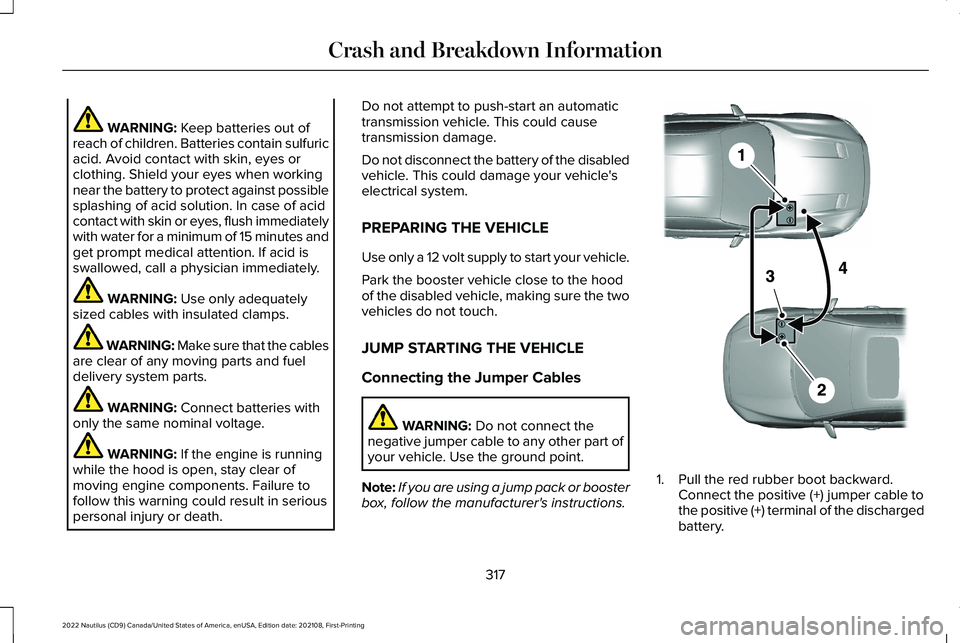
1.Pull the red rubber boot backward.Connect the positive (+) jumper cable tothe positive (+) terminal of the dischargedbattery.
317
2022 Nautilus (CD9) Canada/United States of America, enUSA, Edition date: 202108, First-PrintingCrash and Breakdown InformationE281345
Page 358 of 586
We recommend that you disconnect thenegative battery cable terminal from thebattery if you plan to store your vehicle foran extended period.
Note:If you only disconnect the negativebattery cable terminal, make sure it isisolated or placed away from the batteryterminal to avoid unintended connection orarcing.
To maintain correct operation of the batterymanagement system, if you add anyelectrical devices to your vehicle, do notconnect the ground connection directly tothe negative battery terminal. A connectionat the negative battery terminal can causeinaccurate measurements of the batterycondition and potential incorrect systemoperation.
Note:If you add electrical accessories orcomponents to your vehicle this mayadversely affect battery performance,durability and the performance of otherelectrical systems on your vehicle.
If you replace the battery make sure itmatches the electrical requirements of yourvehicle.
If you disconnect or replace the battery andyour vehicle has an automatic transmission,it must relearn its adaptive strategy. Becauseof this, the transmission may shift firmly whenfirst driven. This is normal operation whilethe transmission fully updates its operationto optimum shift feel.
Remove and Reinstall the Battery
To disconnect or remove the battery, do thefollowing:
1.Apply the parking brake and switch theignition off.
2.Switch all electrical equipment off, forexample lights and radio.
3.Wait a minimum of two minutes beforedisconnecting the battery.
Note:The engine management system hasa power hold function and remains poweredfor a period of time after you switch theignition off. This is to allow diagnostic andadaptive tables to be stored. Disconnectingthe battery without waiting can causedamage not covered by the vehicleWarranty.
4.Disconnect the negative battery cableterminal.
5.Disconnect the positive battery cableterminal.
6.Remove the battery securing clamp.
7.Remove the battery.
8.To install, reverse the removal procedure.
Note:Before reconnecting the battery, makesure the ignition remains switched off.
Note:Make sure the battery cable terminalsare fully tightened.
Note:After cleaning or replacing the battery,make sure you reinstall the battery cover orshield.
If you disconnect or replace the vehiclebattery, you must reset the followingfeatures:
•Window bounce-back. See Windows(page 131).
•Clock Settings.
•Pre-set radio stations.
•Steering Angle Sensor.
354
2022 Nautilus (CD9) Canada/United States of America, enUSA, Edition date: 202108, First-PrintingMaintenance
Page 471 of 586
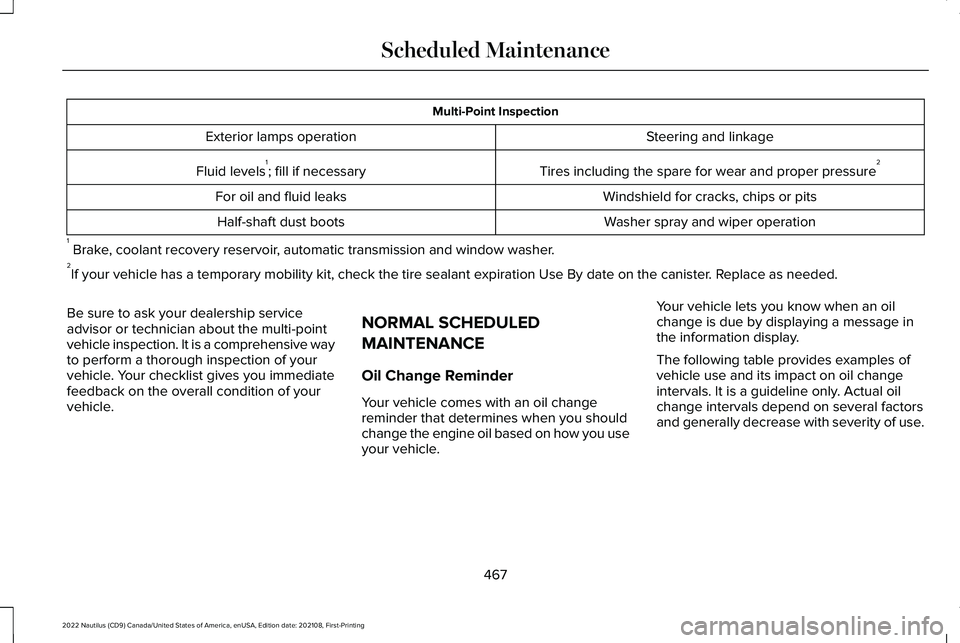
Multi-Point Inspection
Steering and linkageExterior lamps operation
Tires including the spare for wear and proper pressure2Fluid levels1; fill if necessary
Windshield for cracks, chips or pitsFor oil and fluid leaks
Washer spray and wiper operationHalf-shaft dust boots
1 Brake, coolant recovery reservoir, automatic transmission and window washer.2If your vehicle has a temporary mobility kit, check the tire sealant expiration Use By date on the canister. Replace as needed.
Be sure to ask your dealership serviceadvisor or technician about the multi-pointvehicle inspection. It is a comprehensive wayto perform a thorough inspection of yourvehicle. Your checklist gives you immediatefeedback on the overall condition of yourvehicle.
NORMAL SCHEDULED
MAINTENANCE
Oil Change Reminder
Your vehicle comes with an oil changereminder that determines when you shouldchange the engine oil based on how you useyour vehicle.
Your vehicle lets you know when an oilchange is due by displaying a message inthe information display.
The following table provides examples ofvehicle use and its impact on oil changeintervals. It is a guideline only. Actual oilchange intervals depend on several factorsand generally decrease with severity of use.
467
2022 Nautilus (CD9) Canada/United States of America, enUSA, Edition date: 202108, First-PrintingScheduled Maintenance
Page 473 of 586
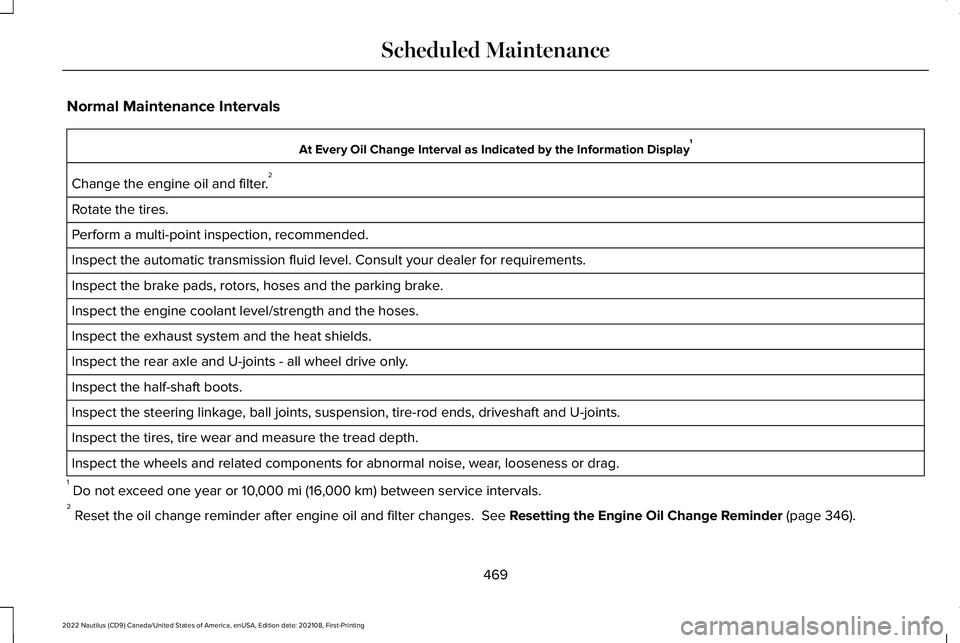
Normal Maintenance Intervals
At Every Oil Change Interval as Indicated by the Information Display1
Change the engine oil and filter.2
Rotate the tires.
Perform a multi-point inspection, recommended.
Inspect the automatic transmission fluid level. Consult your dealer for requirements.
Inspect the brake pads, rotors, hoses and the parking brake.
Inspect the engine coolant level/strength and the hoses.
Inspect the exhaust system and the heat shields.
Inspect the rear axle and U-joints - all wheel drive only.
Inspect the half-shaft boots.
Inspect the steering linkage, ball joints, suspension, tire-rod ends, driveshaft and U-joints.
Inspect the tires, tire wear and measure the tread depth.
Inspect the wheels and related components for abnormal noise, wear, looseness or drag.
1 Do not exceed one year or 10,000 mi (16,000 km) between service intervals.2 Reset the oil change reminder after engine oil and filter changes. See Resetting the Engine Oil Change Reminder (page 346).
469
2022 Nautilus (CD9) Canada/United States of America, enUSA, Edition date: 202108, First-PrintingScheduled Maintenance
Page 474 of 586
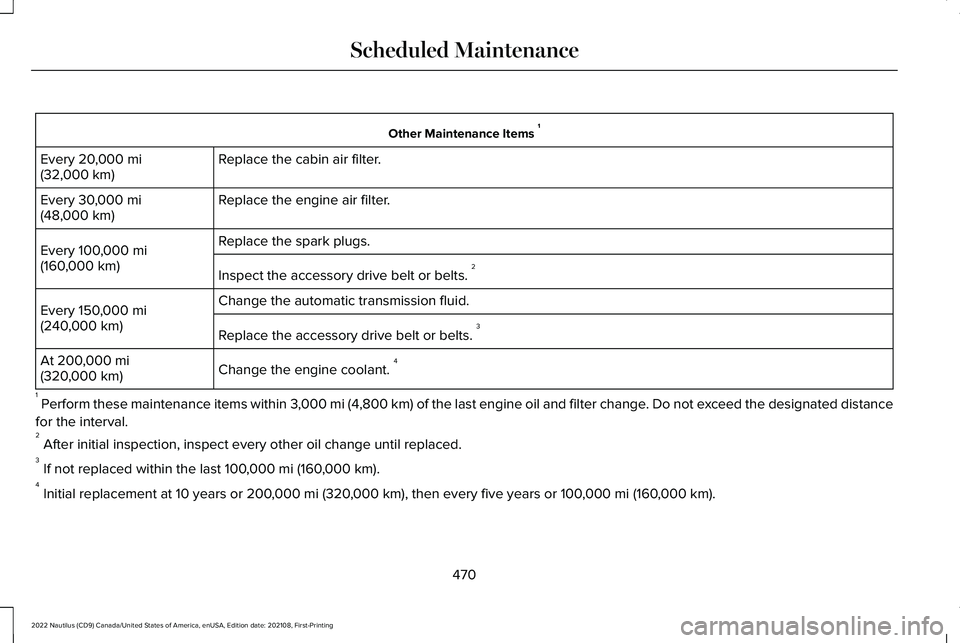
Other Maintenance Items 1
Replace the cabin air filter.Every 20,000 mi(32,000 km)
Replace the engine air filter.Every 30,000 mi(48,000 km)
Replace the spark plugs.Every 100,000 mi(160,000 km)Inspect the accessory drive belt or belts. 2
Change the automatic transmission fluid.Every 150,000 mi(240,000 km)Replace the accessory drive belt or belts. 3
Change the engine coolant. 4At 200,000 mi(320,000 km)
1 Perform these maintenance items within 3,000 mi (4,800 km) of the last engine oil and filter change. Do not exceed the designated distance
for the interval.2 After initial inspection, inspect every other oil change until replaced.3 If not replaced within the last 100,000 mi (160,000 km).4 Initial replacement at 10 years or 200,000 mi (320,000 km), then every five years or 100,000 mi (160,000 km).
470
2022 Nautilus (CD9) Canada/United States of America, enUSA, Edition date: 202108, First-PrintingScheduled Maintenance
Page 476 of 586
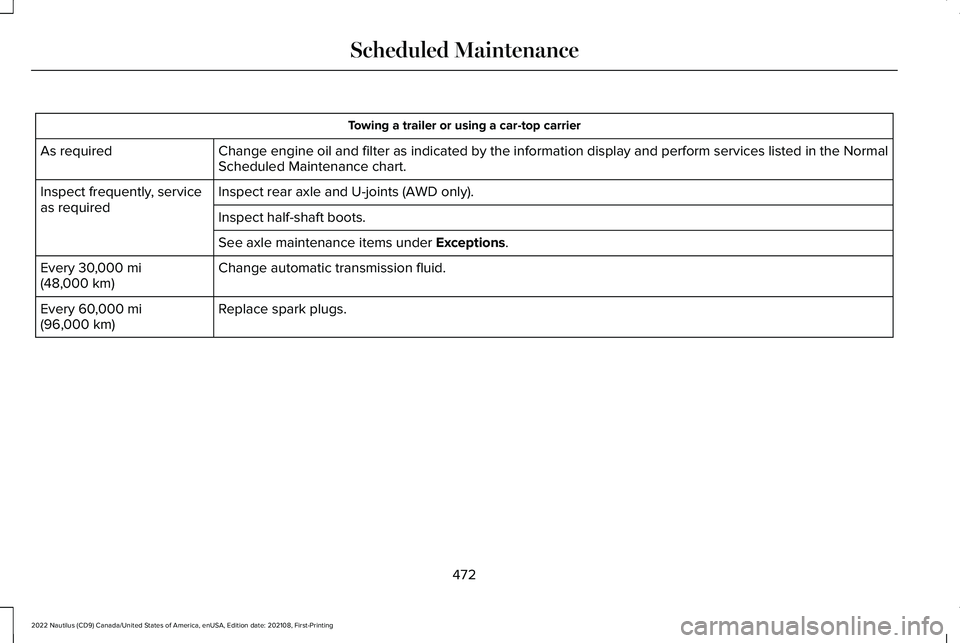
Towing a trailer or using a car-top carrier
Change engine oil and filter as indicated by the information display and perform services listed in the NormalScheduled Maintenance chart.As required
Inspect rear axle and U-joints (AWD only).Inspect frequently, serviceas requiredInspect half-shaft boots.
See axle maintenance items under Exceptions.
Change automatic transmission fluid.Every 30,000 mi(48,000 km)
Replace spark plugs.Every 60,000 mi(96,000 km)
472
2022 Nautilus (CD9) Canada/United States of America, enUSA, Edition date: 202108, First-PrintingScheduled Maintenance
Page 477 of 586
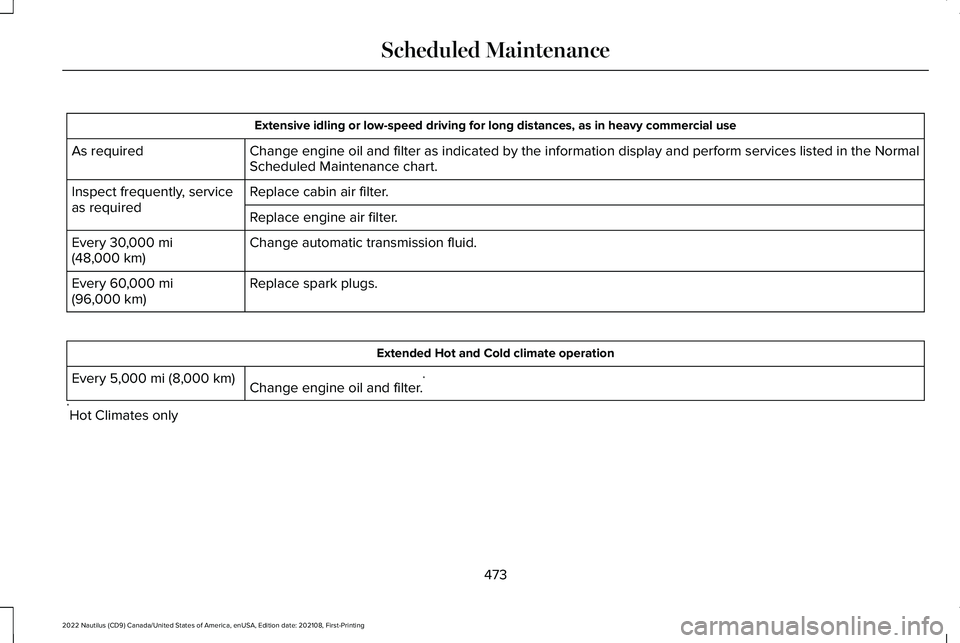
Extensive idling or low-speed driving for long distances, as in heavy commercial use
Change engine oil and filter as indicated by the information display and perform services listed in the NormalScheduled Maintenance chart.As required
Replace cabin air filter.Inspect frequently, serviceas requiredReplace engine air filter.
Change automatic transmission fluid.Every 30,000 mi(48,000 km)
Replace spark plugs.Every 60,000 mi(96,000 km)
Extended Hot and Cold climate operation
Change engine oil and filter.*Every 5,000 mi (8,000 km)
*Hot Climates only
473
2022 Nautilus (CD9) Canada/United States of America, enUSA, Edition date: 202108, First-PrintingScheduled Maintenance