trailer LINCOLN NAUTILUS 2022 User Guide
[x] Cancel search | Manufacturer: LINCOLN, Model Year: 2022, Model line: NAUTILUS, Model: LINCOLN NAUTILUS 2022Pages: 586, PDF Size: 13.97 MB
Page 260 of 586
HOW DOES ADAPTIVE CRUISE
CONTROL WITH STOP AND GO
WORK
Adaptive cruise control with stop and gouses radar and camera sensors to maintaina set gap between your vehicle and thevehicle in front of you while following it to acomplete stop. Stop and go can also be setto follow a vehicle directly in front of you andadjust the set speed, while you are at acomplete stop.
ADAPTIVE CRUISE CONTROL
PRECAUTIONS
WARNING: You are responsible forcontrolling your vehicle at all times. Thesystem is designed to be an aid and doesnot relieve you of your responsibility todrive with due care and attention. Failureto follow this instruction could result in theloss of control of your vehicle, personalinjury or death.
WARNING: Do not use adaptivecruise control on winding roads, in heavytraffic or when the road surface is slippery.This could result in loss of vehicle control,serious injury or death.
WARNING: Pay close attention tochanging road conditions such as enteringor leaving a highway, on roads withintersections or roundabouts, roadswithout visible lanes of travel, roads thatare unpaved, or steep slopes. Failure tofollow this instruction could result in theloss of control of your vehicle, personalinjury or death.
WARNING: The system is not a crashwarning or avoidance system.
WARNING: Do not use the systemwhen towing a trailer that has aftermarketelectronic trailer brake controls. Failure tofollow this instruction could result in theloss of control of your vehicle, personalinjury or death.
WARNING: Do not use tire sizesother than those recommended becausethis can affect the normal operation of thesystem. Failure to do so may result in a lossof vehicle control, which could result inserious injury.
WARNING: Do not use the systemwith a snow plow blade installed.
WARNING: Do not use the system inpoor visibility, for example fog, heavy rain,spray or snow.
When Following a Vehicle
WARNING: When following a vehiclethat is braking, your vehicle does notalways decelerate quickly enough to avoida crash without driver intervention. Applythe brakes when necessary. Failure tofollow this instruction could result inpersonal injury or death.
256
2022 Nautilus (CD9) Canada/United States of America, enUSA, Edition date: 202108, First-PrintingAdaptive Cruise Control (If Equipped)
Page 268 of 586
LANE CENTERING PRECAUTIONS
WARNING: Do not use the systemwhen towing a trailer. Failure to follow thisinstruction could result in the loss ofcontrol of your vehicle, personal injury ordeath.
WARNING: Do not use the system ifany changes or modifications to thesteering wheel have been made. Anychanges or modifications to the steeringwheel could affect the functionality orperformance of the system. Failure tofollow this instruction could result in theloss of control of your vehicle, personalinjury or death.
Adaptive cruise control precautions apply tolane centering unless stated otherwise orcontradicted by a lane centering precaution.See Adaptive Cruise Control Precautions(page 256).
LANE CENTERING REQUIREMENTS
You must keep your hands on the steeringwheel at all times.
The system only activates when all of thefollowing occur:
•You have adaptive cruise control withstop and go on.
•You have your hands on the steeringwheel.
•The system detects both lane markings.
Note:If it does not detect valid lanemarkings, the system stays inactive untilvalid markings are available.
Note:You can override the system at anytime by steering your vehicle.
LANE CENTERING LIMITATIONS
Adaptive cruise control limitations apply tolane centering unless stated otherwise orcontradicted by a lane centering limitation.See Adaptive Cruise Control Limitations(page 257).
Lane Centering may not correctly operate inany of the following conditions:
•Your vehicle is not centered in the lane.
•The lane is too narrow or wide.
•The system does not detect at least onelane marking or when lanes merge orsplit.
•Limited steering torque input is applied.
•Areas under construction or newinfrastructure.
•When modifications to the steeringsystem have been made.
•When using a spare tire.
•In high wind conditions.
Note:The driving assistance torque is limitedand may not be sufficient for all drivingsituations such as driving through tightcurves or driving through curves at highspeeds.
Note:In exceptional conditions, the systemmay deviate from the center line.
264
2022 Nautilus (CD9) Canada/United States of America, enUSA, Edition date: 202108, First-PrintingAdaptive Cruise Control (If Equipped)
Page 282 of 586
Note:The system may not correctly operatewhen towing a trailer. For vehicles with atrailer tow module and tow bar approved byus, the system turns off when you attach atrailer. For vehicles with an aftermarkettrailer tow module or tow bar, werecommend that you switch the system offwhen you attach a trailer.
BLIND SPOT INFORMATION
SYSTEM REQUIREMENTS
Blind spot information system turns on whenall the following occur:
•You start your vehicle.
•You shift into drive (D).
•The vehicle speed is greater than 6 mph(10 km/h).
SWITCHING BLIND SPOT
INFORMATION SYSTEM ON AND
OFF
To switch blind spot information system onor off, use the instrument cluster display:
1.Using the instrument cluster displaycontrols on the steering wheel, selectSETTINGS.
2.Select Driver assistance.
3.Switch Blindspot on or off.
When you switch blind spot informationsystem off, a warning lamp illuminates anda message displays. When you switch thesystem on or off, the alert indicators flashtwice.
Note:The system remembers the last settingwhen you start your vehicle.
To permanently switch the system off,contact an authorized dealer.
LOCATING THE BLIND SPOT
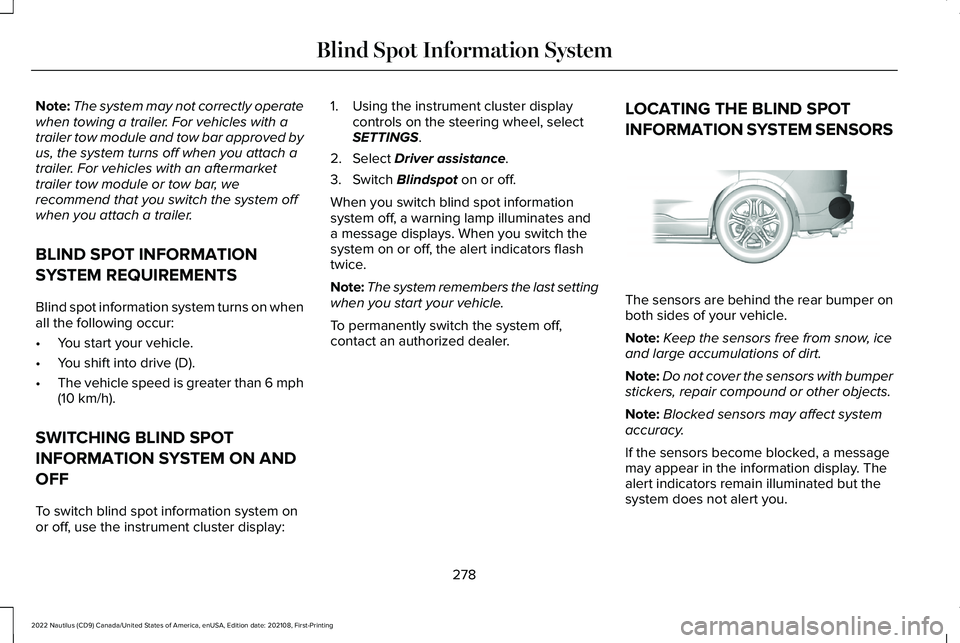
INFORMATION SYSTEM SENSORS
The sensors are behind the rear bumper onboth sides of your vehicle.
Note:Keep the sensors free from snow, iceand large accumulations of dirt.
Note:Do not cover the sensors with bumperstickers, repair compound or other objects.
Note:Blocked sensors may affect systemaccuracy.
If the sensors become blocked, a messagemay appear in the information display. Thealert indicators remain illuminated but thesystem does not alert you.
278
2022 Nautilus (CD9) Canada/United States of America, enUSA, Edition date: 202108, First-PrintingBlind Spot Information SystemE205199
Page 283 of 586
BLIND SPOT INFORMATION
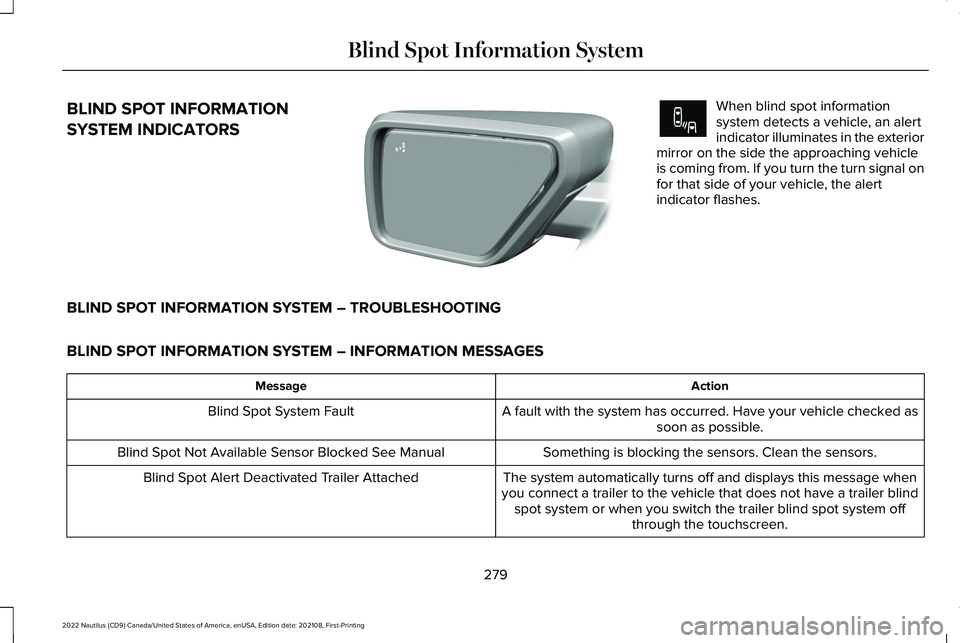
SYSTEM INDICATORS
When blind spot informationsystem detects a vehicle, an alertindicator illuminates in the exteriormirror on the side the approaching vehicleis coming from. If you turn the turn signal onfor that side of your vehicle, the alertindicator flashes.
BLIND SPOT INFORMATION SYSTEM – TROUBLESHOOTING
BLIND SPOT INFORMATION SYSTEM – INFORMATION MESSAGES
ActionMessage
A fault with the system has occurred. Have your vehicle checked assoon as possible.Blind Spot System Fault
Something is blocking the sensors. Clean the sensors.Blind Spot Not Available Sensor Blocked See Manual
The system automatically turns off and displays this message whenyou connect a trailer to the vehicle that does not have a trailer blindspot system or when you switch the trailer blind spot system offthrough the touchscreen.
Blind Spot Alert Deactivated Trailer Attached
279
2022 Nautilus (CD9) Canada/United States of America, enUSA, Edition date: 202108, First-PrintingBlind Spot Information SystemE309137 E249861E249861
Page 286 of 586
Note:In some conditions, the system couldalert you, even when there is nothing in thedetection zone, for example a vehiclepassing further away from your vehicle.
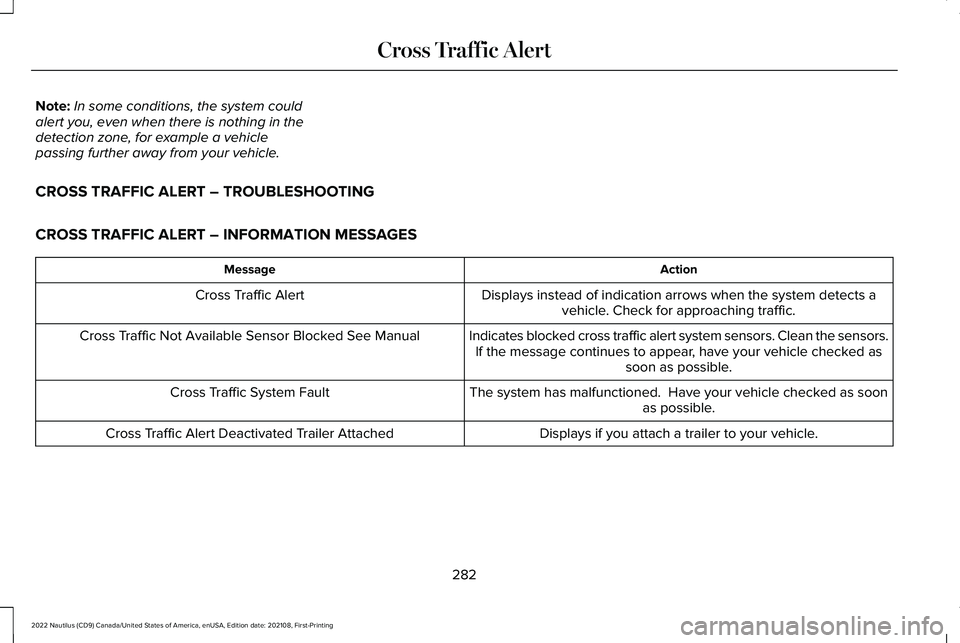
CROSS TRAFFIC ALERT – TROUBLESHOOTING
CROSS TRAFFIC ALERT – INFORMATION MESSAGES
ActionMessage
Displays instead of indication arrows when the system detects avehicle. Check for approaching traffic.Cross Traffic Alert
Indicates blocked cross traffic alert system sensors. Clean the sensors.If the message continues to appear, have your vehicle checked assoon as possible.
Cross Traffic Not Available Sensor Blocked See Manual
The system has malfunctioned. Have your vehicle checked as soonas possible.Cross Traffic System Fault
Displays if you attach a trailer to your vehicle.Cross Traffic Alert Deactivated Trailer Attached
282
2022 Nautilus (CD9) Canada/United States of America, enUSA, Edition date: 202108, First-PrintingCross Traffic Alert
Page 288 of 586
PRE-COLLISION ASSIST
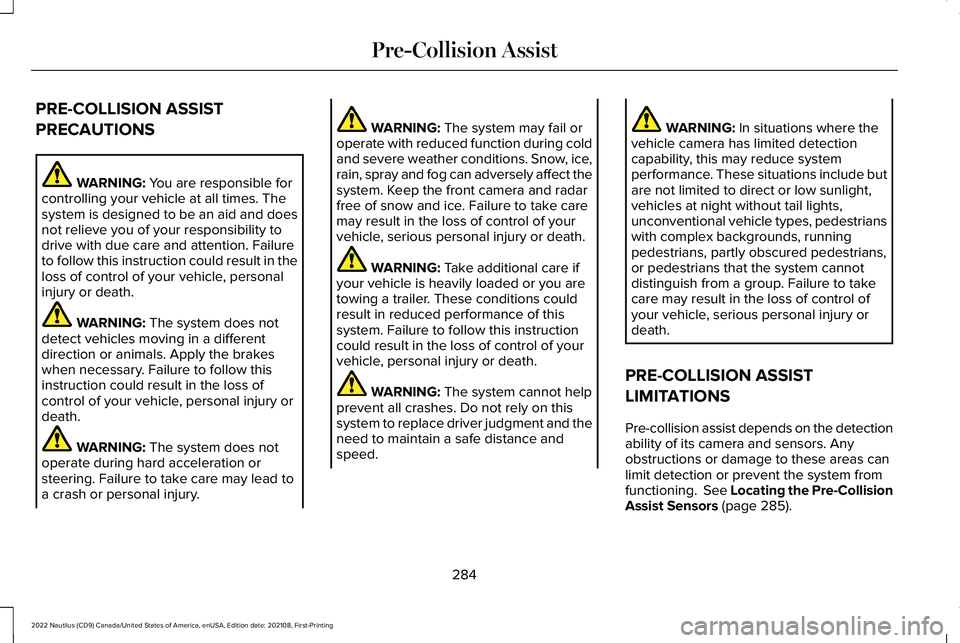
PRECAUTIONS
WARNING: You are responsible forcontrolling your vehicle at all times. Thesystem is designed to be an aid and doesnot relieve you of your responsibility todrive with due care and attention. Failureto follow this instruction could result in theloss of control of your vehicle, personalinjury or death.
WARNING: The system does notdetect vehicles moving in a differentdirection or animals. Apply the brakeswhen necessary. Failure to follow thisinstruction could result in the loss ofcontrol of your vehicle, personal injury ordeath.
WARNING: The system does notoperate during hard acceleration orsteering. Failure to take care may lead toa crash or personal injury.
WARNING: The system may fail oroperate with reduced function during coldand severe weather conditions. Snow, ice,rain, spray and fog can adversely affect thesystem. Keep the front camera and radarfree of snow and ice. Failure to take caremay result in the loss of control of yourvehicle, serious personal injury or death.
WARNING: Take additional care ifyour vehicle is heavily loaded or you aretowing a trailer. These conditions couldresult in reduced performance of thissystem. Failure to follow this instructioncould result in the loss of control of yourvehicle, personal injury or death.
WARNING: The system cannot helpprevent all crashes. Do not rely on thissystem to replace driver judgment and theneed to maintain a safe distance andspeed.
WARNING: In situations where thevehicle camera has limited detectioncapability, this may reduce systemperformance. These situations include butare not limited to direct or low sunlight,vehicles at night without tail lights,unconventional vehicle types, pedestrianswith complex backgrounds, runningpedestrians, partly obscured pedestrians,or pedestrians that the system cannotdistinguish from a group. Failure to takecare may result in the loss of control ofyour vehicle, serious personal injury ordeath.
PRE-COLLISION ASSIST
LIMITATIONS
Pre-collision assist depends on the detectionability of its camera and sensors. Anyobstructions or damage to these areas canlimit detection or prevent the system fromfunctioning. See Locating the Pre-CollisionAssist Sensors (page 285).
284
2022 Nautilus (CD9) Canada/United States of America, enUSA, Edition date: 202108, First-PrintingPre-Collision Assist
Page 297 of 586
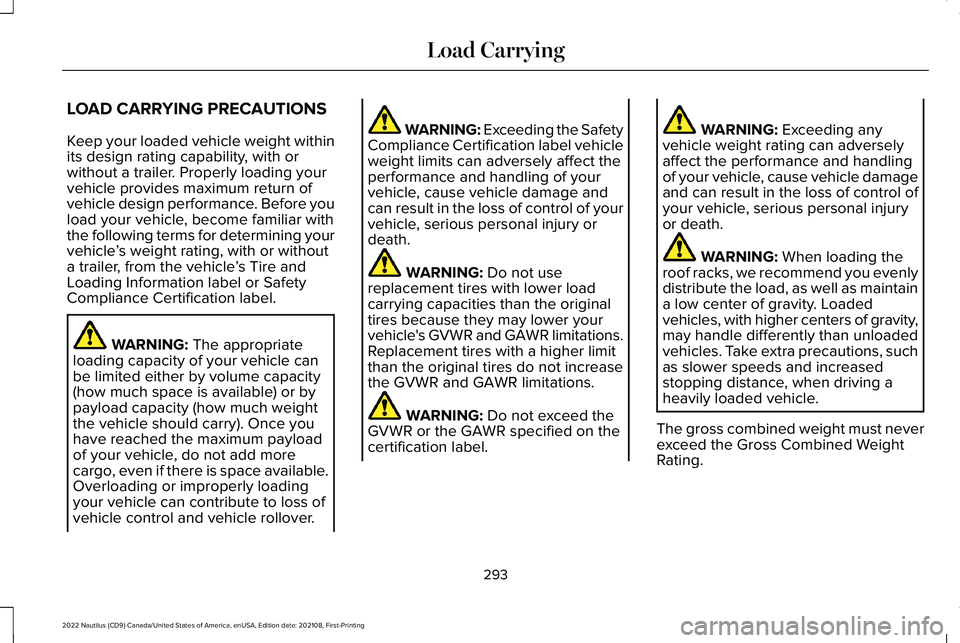
LOAD CARRYING PRECAUTIONS
Keep your loaded vehicle weight withinits design rating capability, with orwithout a trailer. Properly loading yourvehicle provides maximum return ofvehicle design performance. Before youload your vehicle, become familiar withthe following terms for determining yourvehicle’s weight rating, with or withouta trailer, from the vehicle’s Tire andLoading Information label or SafetyCompliance Certification label.
WARNING: The appropriateloading capacity of your vehicle canbe limited either by volume capacity(how much space is available) or by
payload capacity (how much weightthe vehicle should carry). Once youhave reached the maximum payloadof your vehicle, do not add morecargo, even if there is space available.Overloading or improperly loadingyour vehicle can contribute to loss ofvehicle control and vehicle rollover.
WARNING: Exceeding the SafetyCompliance Certification label vehicleweight limits can adversely affect theperformance and handling of yourvehicle, cause vehicle damage andcan result in the loss of control of yourvehicle, serious personal injury ordeath.
WARNING: Do not usereplacement tires with lower loadcarrying capacities than the originaltires because they may lower yourvehicle's GVWR and GAWR limitations.Replacement tires with a higher limitthan the original tires do not increasethe GVWR and GAWR limitations.
WARNING: Do not exceed theGVWR or the GAWR specified on thecertification label.
WARNING: Exceeding anyvehicle weight rating can adverselyaffect the performance and handlingof your vehicle, cause vehicle damageand can result in the loss of control ofyour vehicle, serious personal injuryor death.
WARNING: When loading theroof racks, we recommend you evenlydistribute the load, as well as maintaina low center of gravity. Loadedvehicles, with higher centers of gravity,may handle differently than unloadedvehicles. Take extra precautions, suchas slower speeds and increasedstopping distance, when driving aheavily loaded vehicle.
The gross combined weight must neverexceed the Gross Combined WeightRating.
293
2022 Nautilus (CD9) Canada/United States of America, enUSA, Edition date: 202108, First-PrintingLoad Carrying
Page 298 of 586
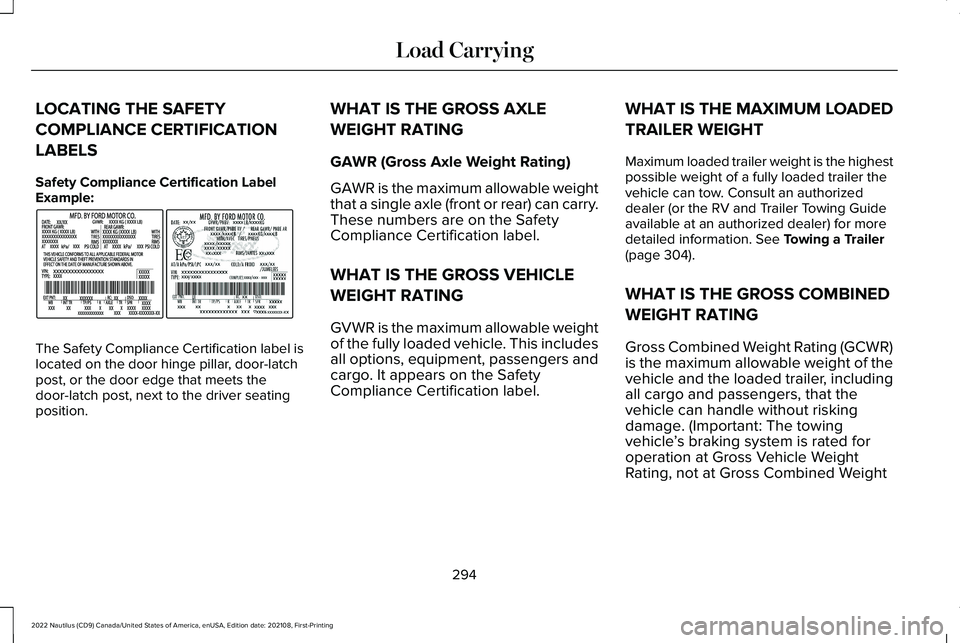
LOCATING THE SAFETY
COMPLIANCE CERTIFICATION
LABELS
Safety Compliance Certification LabelExample:
The Safety Compliance Certification label islocated on the door hinge pillar, door-latchpost, or the door edge that meets thedoor-latch post, next to the driver seatingposition.
WHAT IS THE GROSS AXLE
WEIGHT RATING
GAWR (Gross Axle Weight Rating)
GAWR is the maximum allowable weightthat a single axle (front or rear) can carry.These numbers are on the SafetyCompliance Certification label.
WHAT IS THE GROSS VEHICLE
WEIGHT RATING
GVWR is the maximum allowable weightof the fully loaded vehicle. This includesall options, equipment, passengers andcargo. It appears on the SafetyCompliance Certification label.
WHAT IS THE MAXIMUM LOADED
TRAILER WEIGHT
Maximum loaded trailer weight is the highestpossible weight of a fully loaded trailer thevehicle can tow. Consult an authorizeddealer (or the RV and Trailer Towing Guideavailable at an authorized dealer) for moredetailed information. See Towing a Trailer(page 304).
WHAT IS THE GROSS COMBINED
WEIGHT RATING
Gross Combined Weight Rating (GCWR)is the maximum allowable weight of thevehicle and the loaded trailer, includingall cargo and passengers, that thevehicle can handle without riskingdamage. (Important: The towingvehicle’s braking system is rated foroperation at Gross Vehicle WeightRating, not at Gross Combined Weight
294
2022 Nautilus (CD9) Canada/United States of America, enUSA, Edition date: 202108, First-PrintingLoad CarryingE198828
Page 299 of 586
Rating.) Separate functional brakesshould be used for safe control of towedvehicles and for trailers where the GrossCombined Weight of the towing vehicle
plus the trailer exceed the Gross VehicleWeight Rating of the towing vehicle.Note:For trailer towing information referto the RV and Trailer Towing Guideavailable at an authorized dealer, oronline at the website that follows.
RV & Trailer Towing Guide Online
www.fleet.ford.com/towing-guidesWebsite
295
2022 Nautilus (CD9) Canada/United States of America, enUSA, Edition date: 202108, First-PrintingLoad Carrying
Page 300 of 586
CALCULATING PAYLOAD
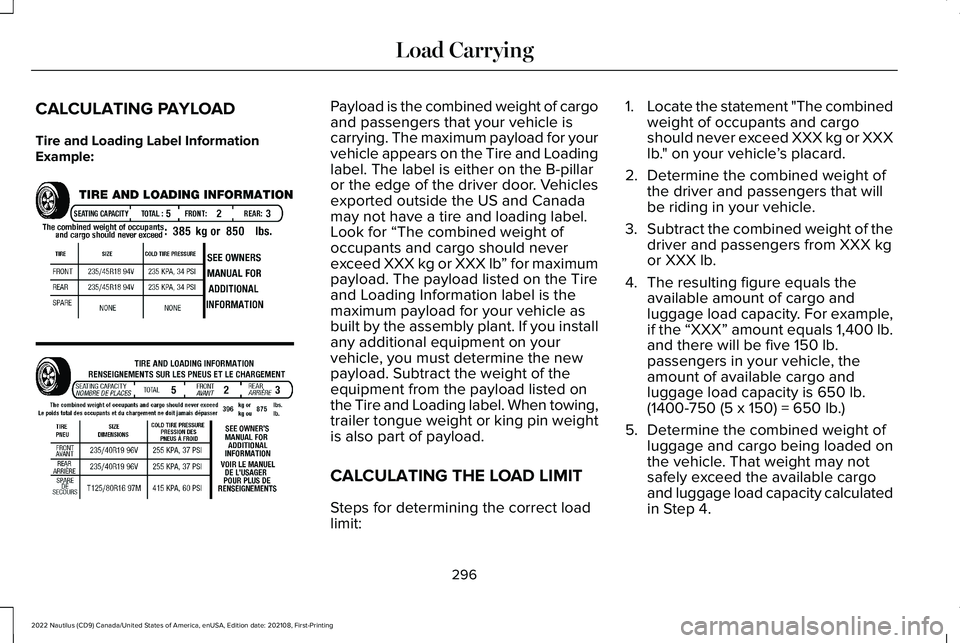
Tire and Loading Label InformationExample:
Payload is the combined weight of cargoand passengers that your vehicle iscarrying. The maximum payload for yourvehicle appears on the Tire and Loadinglabel. The label is either on the B-pillaror the edge of the driver door. Vehiclesexported outside the US and Canadamay not have a tire and loading label.Look for “The combined weight ofoccupants and cargo should neverexceed XXX kg or XXX lb” for maximumpayload. The payload listed on the Tireand Loading Information label is themaximum payload for your vehicle asbuilt by the assembly plant. If you installany additional equipment on yourvehicle, you must determine the newpayload. Subtract the weight of theequipment from the payload listed on
the Tire and Loading label. When towing,trailer tongue weight or king pin weightis also part of payload.
CALCULATING THE LOAD LIMIT
Steps for determining the correct loadlimit:
1.Locate the statement "The combinedweight of occupants and cargoshould never exceed XXX kg or XXXlb." on your vehicle’s placard.
2.Determine the combined weight ofthe driver and passengers that willbe riding in your vehicle.
3.Subtract the combined weight of thedriver and passengers from XXX kgor XXX lb.
4.The resulting figure equals theavailable amount of cargo andluggage load capacity. For example,if the “XXX” amount equals 1,400 lb.and there will be five 150 lb.passengers in your vehicle, theamount of available cargo andluggage load capacity is 650 lb.
(1400-750 (5 x 150) = 650 lb.)
5.Determine the combined weight ofluggage and cargo being loaded onthe vehicle. That weight may notsafely exceed the available cargoand luggage load capacity calculatedin Step 4.
296
2022 Nautilus (CD9) Canada/United States of America, enUSA, Edition date: 202108, First-PrintingLoad CarryingE198719