wipers LINCOLN NAUTILUS 2022 Owners Manual
[x] Cancel search | Manufacturer: LINCOLN, Model Year: 2022, Model line: NAUTILUS, Model: LINCOLN NAUTILUS 2022Pages: 586, PDF Size: 13.97 MB
Page 7 of 586
Liftgate
Liftgate Precautions....................................102
Opening the Liftgate...................................102
Setting the Liftgate Opening Height.......104
Closing the Liftgate.....................................105
Stopping the Liftgate Movement.............107
Liftgate Obstacle Detection......................107
Liftgate – Troubleshooting........................107
Security
Passive Anti-Theft System..........................110
Anti-Theft Alarm System.............................110
Anti-Theft Alarm System Settings..............111
Security – Troubleshooting........................112
Steering Wheel
Adjusting the Steering Wheel - VehiclesWith: Manual Adjustable SteeringColumn........................................................114
Adjusting the Steering Wheel - VehiclesWith: Power Adjustable Steering Column........................................................................114
Resetting the Stopping Position - VehiclesWith: Power Adjustable Steering Column........................................................................115
Horn..................................................................115
Switching the Heated Steering Wheel Onand Off.........................................................115
Wipers and Washers
Wipers..............................................................116
Autowipers......................................................116
Switching the Rear Window Wiper On andOff.................................................................117
Reverse Wipe.................................................117
Checking the Wiper Blades........................118
Replacing the Front Wiper Blades............118
Replacing the Rear Wiper Blades.............118
Washers...........................................................119
Wipers and Washers – Troubleshooting.......................................................................120
Exterior Lighting
Exterior Lighting Control.............................121
Headlamps......................................................121
Headlamps – Troubleshooting.................122
Autolamps......................................................122
Exterior Lamps..............................................123
Automatic High Beam Control..................124
Automatic High Beam Control –Troubleshooting.......................................127
Adaptive Front Lighting..............................127
Interior Lighting
Switching All of the Interior Lamps On andOff................................................................129
Switching the Front Interior Lamps On andOff................................................................129
Switching the Rear Interior Lamps On andOff................................................................129
Interior Lamp Function................................130
Adjusting the Instrument Panel LightingBrightness..................................................130
Ambient Lighting..........................................130
Interior Lighting – Troubleshooting.........130
Windows
Opening and Closing the Windows.........131
Global Opening and Closing.....................132
Window Bounce-Back................................132
3
2022 Nautilus (CD9) Canada/United States of America, enUSA, Edition date: 202108, First-PrintingTable of Contents
Page 120 of 586
WIPERS
WIPER PRECAUTIONS
Do not operate the wipers on a drywindshield. This could scratch the glass ordamage the wiper blades. Use thewindshield washers before wiping a drywindshield.
Fully defrost the windshield before youswitch the windshield wipers on.
Switch the windshield wipers off beforeentering a car wash.
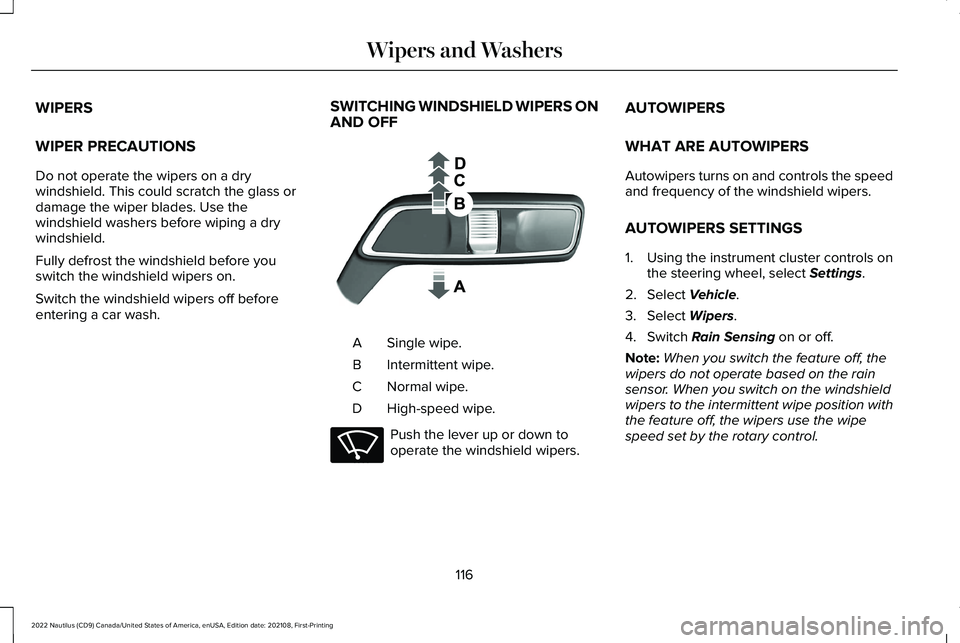
SWITCHING WINDSHIELD WIPERS ONAND OFF
Single wipe.A
Intermittent wipe.B
Normal wipe.C
High-speed wipe.D
Push the lever up or down tooperate the windshield wipers.
AUTOWIPERS
WHAT ARE AUTOWIPERS
Autowipers turns on and controls the speedand frequency of the windshield wipers.
AUTOWIPERS SETTINGS
1.Using the instrument cluster controls onthe steering wheel, select Settings.
2.Select Vehicle.
3.Select Wipers.
4.Switch Rain Sensing on or off.
Note:When you switch the feature off, thewipers do not operate based on the rainsensor. When you switch on the windshieldwipers to the intermittent wipe position withthe feature off, the wipers use the wipespeed set by the rotary control.
116
2022 Nautilus (CD9) Canada/United States of America, enUSA, Edition date: 202108, First-PrintingWipers and Washers E269410 E270969
Page 121 of 586
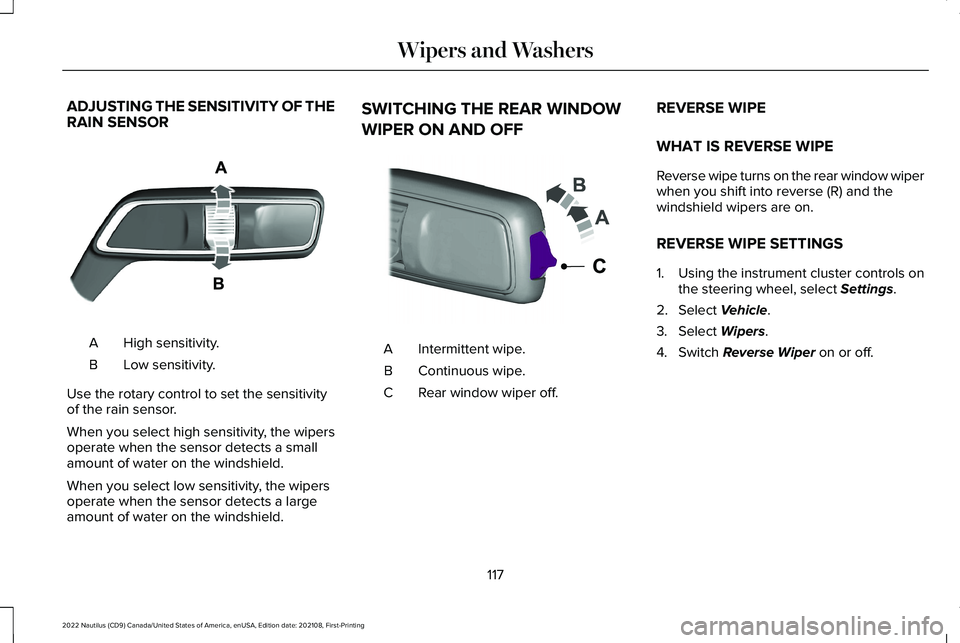
ADJUSTING THE SENSITIVITY OF THERAIN SENSOR
High sensitivity.A
Low sensitivity.B
Use the rotary control to set the sensitivityof the rain sensor.
When you select high sensitivity, the wipersoperate when the sensor detects a smallamount of water on the windshield.
When you select low sensitivity, the wipersoperate when the sensor detects a largeamount of water on the windshield.
SWITCHING THE REAR WINDOW
WIPER ON AND OFF
Intermittent wipe.A
Continuous wipe.B
Rear window wiper off.C
REVERSE WIPE
WHAT IS REVERSE WIPE
Reverse wipe turns on the rear window wiperwhen you shift into reverse (R) and thewindshield wipers are on.
REVERSE WIPE SETTINGS
1.Using the instrument cluster controls onthe steering wheel, select Settings.
2.Select Vehicle.
3.Select Wipers.
4.Switch Reverse Wiper on or off.
117
2022 Nautilus (CD9) Canada/United States of America, enUSA, Edition date: 202108, First-PrintingWipers and WashersE330179 E242324
Page 122 of 586
CHECKING THE WIPER BLADES
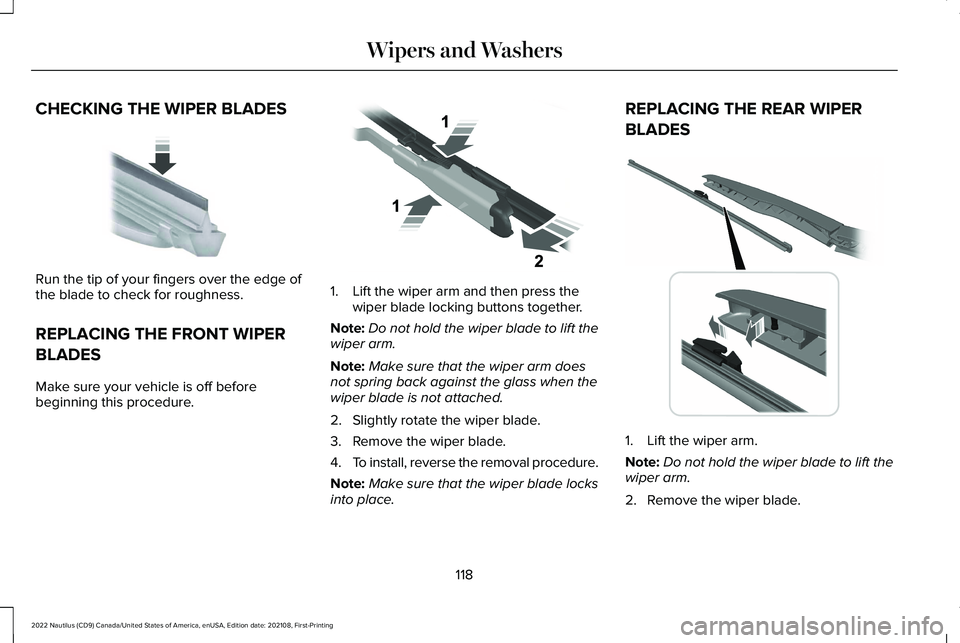
Run the tip of your fingers over the edge ofthe blade to check for roughness.
REPLACING THE FRONT WIPER
BLADES
Make sure your vehicle is off beforebeginning this procedure.
1.Lift the wiper arm and then press thewiper blade locking buttons together.
Note:Do not hold the wiper blade to lift thewiper arm.
Note:Make sure that the wiper arm doesnot spring back against the glass when thewiper blade is not attached.
2.Slightly rotate the wiper blade.
3.Remove the wiper blade.
4.To install, reverse the removal procedure.
Note:Make sure that the wiper blade locksinto place.
REPLACING THE REAR WIPER
BLADES
1.Lift the wiper arm.
Note:Do not hold the wiper blade to lift thewiper arm.
2.Remove the wiper blade.
118
2022 Nautilus (CD9) Canada/United States of America, enUSA, Edition date: 202108, First-PrintingWipers and WashersE142463 E129990 E271380
Page 123 of 586
Note:Make sure that the wiper arm doesnot spring back against the glass when thewiper blade is not attached.
3.To install, reverse the removal procedure.
Note:Make sure that the wiper blade locksinto place.
WASHERS
WASHER PRECAUTIONS
WARNING: If you operate yourvehicle in temperatures below 41°F (5°C),use washer fluid with antifreeze protection.Failure to use washer fluid with antifreezeprotection in cold weather could result inimpaired windshield vision and increasethe risk of injury or accident.
Do not operate the washers when thewasher reservoir is empty. This could causethe washer pump to overheat.
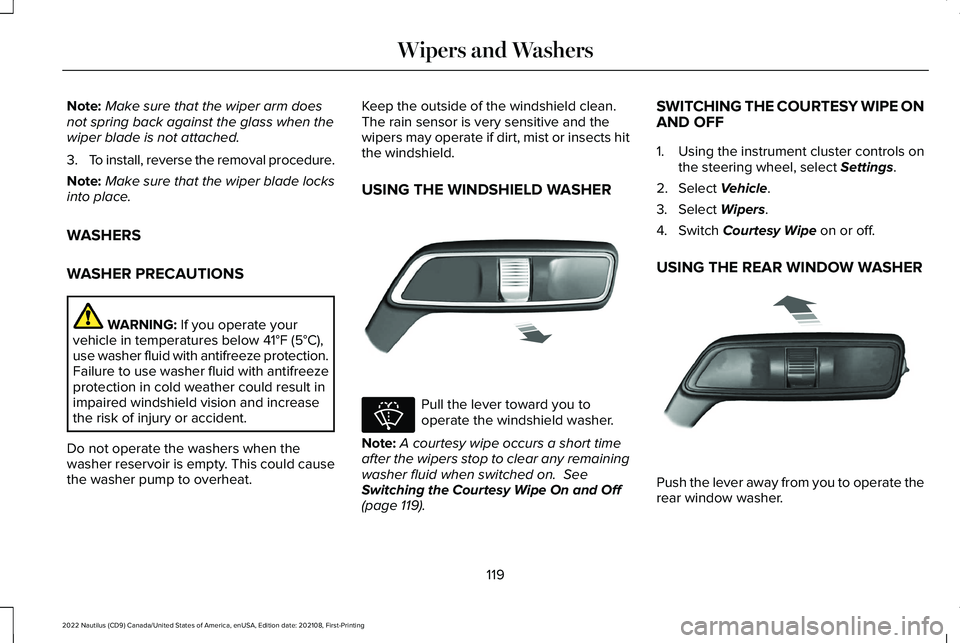
Keep the outside of the windshield clean. The rain sensor is very sensitive and thewipers may operate if dirt, mist or insects hitthe windshield.
USING THE WINDSHIELD WASHER
Pull the lever toward you tooperate the windshield washer.
Note:A courtesy wipe occurs a short timeafter the wipers stop to clear any remainingwasher fluid when switched on. SeeSwitching the Courtesy Wipe On and Off(page 119).
SWITCHING THE COURTESY WIPE ONAND OFF
1.Using the instrument cluster controls onthe steering wheel, select Settings.
2.Select Vehicle.
3.Select Wipers.
4.Switch Courtesy Wipe on or off.
USING THE REAR WINDOW WASHER
Push the lever away from you to operate therear window washer.
119
2022 Nautilus (CD9) Canada/United States of America, enUSA, Edition date: 202108, First-PrintingWipers and WashersE269412 E270967 E269727
Page 124 of 586
Note:A courtesy wipe occurs a short timeafter the wipers stop to clear any remainingwasher fluid when switched on. SeeSwitching the Courtesy Wipe On and Off(page 119).
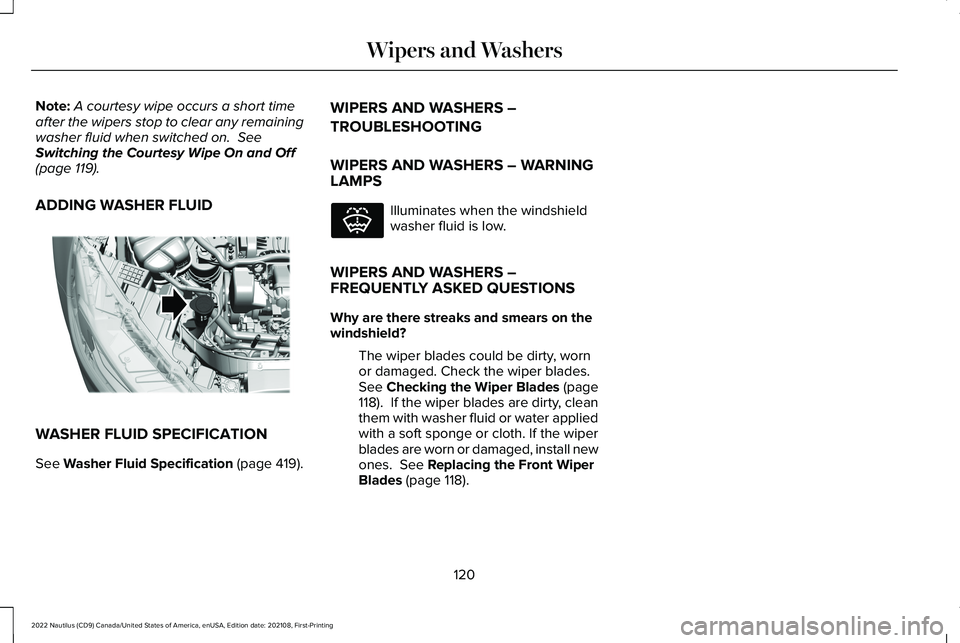
ADDING WASHER FLUID
WASHER FLUID SPECIFICATION
See Washer Fluid Specification (page 419).
WIPERS AND WASHERS –
TROUBLESHOOTING
WIPERS AND WASHERS – WARNINGLAMPS
Illuminates when the windshieldwasher fluid is low.
WIPERS AND WASHERS –FREQUENTLY ASKED QUESTIONS
Why are there streaks and smears on thewindshield?
The wiper blades could be dirty, wornor damaged. Check the wiper blades.See Checking the Wiper Blades (page118). If the wiper blades are dirty, cleanthem with washer fluid or water appliedwith a soft sponge or cloth. If the wiperblades are worn or damaged, install newones. See Replacing the Front WiperBlades (page 118).
120
2022 Nautilus (CD9) Canada/United States of America, enUSA, Edition date: 202108, First-PrintingWipers and WashersE330184 E132353
Page 126 of 586
HEADLAMPS – TROUBLESHOOTING
HEADLAMPS – FREQUENTLY ASKEDQUESTIONS
Why is there condensation in theheadlamps?
Headlamps have vents to accommodatenormal changes in air pressure.Condensation can be a naturalby-product of this design. When moistair enters the lamp assembly throughthe vents, there is a possibility thatcondensation can occur when thetemperature is cold. When normalcondensation occurs, a fine mist canform on the interior of the lens. The finemist eventually clears and exits throughthe vents during normal operation.
How much condensation is acceptable?
The presence of a fine mist, for exampleno streaks, drip marks or large droplets.A fine mist covers less than 50% of thelens.
How long may it take for the acceptablecondensation to be cleared?
Clearing time may take as long as 48hours under dry weather conditions.
How much condensation is unacceptable?
A water puddle inside the lamp. Streaks,drip marks or large droplets present onthe interior of the lens.
What should I do if unacceptablecondensation is present?
Have your vehicle checked as soon aspossible.
Why do my headlamps turn off when I havethem switched on when I switch my vehicleoff?
The battery saver turns the headlampsoff after a short period of time after youswitch your vehicle off.
AUTOLAMPS
WHAT ARE AUTOLAMPS
WARNING: The system does notrelieve you of your responsibility to drivewith due care and attention. You may needto override the system if it does not turnthe headlamps on in low visibilityconditions, for example daytime fog.
Autolamps turn the headlamps on in low lightsituations or when the windshield wipersoperate.
AUTOLAMP SETTINGS
1.Using the instrument cluster controls onthe steering wheel, select Settings.
2.Select Vehicle.
3.Select Lighting.
4.Select Autolamp Delay.
5.Select a setting and press the OK button.
122
2022 Nautilus (CD9) Canada/United States of America, enUSA, Edition date: 202108, First-PrintingExterior Lighting
Page 374 of 586
Hybrid Battery Systems
We recommend the following actions for yourvehicle:
•When storing your vehicle for greaterthan 30 days the state of charge shouldbe approximately 50%. Additionally werecommend disconnecting the 12Vbattery which will reduce system loadson the HV battery.
12 Volt Battery
•Check and recharge as necessary. Keepconnections clean.
Note:It is necessary to reset memoryfeatures if you disconnect the battery cables.
Brakes
Make sure the brakes and parking brakerelease fully.
Note:If you intend on parking your vehiclefor an extended period after cleaning thewheels with a wheel cleaner, drive yourvehicle for a few minutes before doing so toreduce the risk of increased corrosion of thebrake discs, brake pads and linings.
Tires
•Maintain recommended air pressure.
Note:If you intend on parking your vehiclefor an extended period after cleaning thewheels with a wheel cleaner, drive yourvehicle for a few minutes before doing so.This reduces the risk of corrosion of thebrake discs, brake pads and linings.
REMOVING YOUR VEHICLE FROM
STORAGE
When your vehicle is ready to come out ofstorage, do the following:
•We recommend that you change theengine oil before you use your vehicleagain.
•Wash your vehicle to remove any dirt orgrease film build-up on window surfaces.
•Check windshield wipers for anydeterioration.
•Check under the hood for any foreignmaterial that may have collected duringstorage such as mice or squirrel nests.
•Check the exhaust for any foreignmaterial that may have collected duringstorage.
•Check tire pressures and set tire inflationper the Tire Label.
•Check brake pedal operation. Drive yourvehicle 15 ft (4.5 m) back and forth toremove rust build-up.
•Check fluid levels (including coolant, oiland gas) to make sure there are no leaks,and fluids are at recommended levels.
•If you remove the battery, clean thebattery cable ends and check fordamage.
Contact an authorized dealer if you have anyconcerns or issues.
370
2022 Nautilus (CD9) Canada/United States of America, enUSA, Edition date: 202108, First-PrintingStoring Your Vehicle
Page 567 of 586
Switching Automatic Engine Stop On andOff.......................................................................194What Is Automatic Engine Stop.......................193
Automatic High Beam Control...................124Automatic High Beam ControlIndicators..........................................................126Automatic High Beam ControlLimitations........................................................126Automatic High Beam ControlPrecautions......................................................125Automatic High Beam ControlRequirements...................................................125How Does Automatic High Beam ControlWork...................................................................124Overriding Automatic High BeamControl...............................................................126Switching Automatic High Beam Control Onand Off...............................................................126
Automatic High Beam Control –Troubleshooting..........................................127Automatic High Beam Control – InformationMessages..........................................................127
Automatic Locking Mode.............................55Disengaging Automatic Locking Mode..........56Engaging Automatic Locking Mode................56What Is Automatic Locking Mode....................55
Automatic Return to Park (P)......................213Automatic Return to Park (P) Limitations.......213
How Does Automatic Return to Park (P)Work...................................................................213What Is Automatic Return to Park (P).............213
Automatic Transmission AudibleWarnings.......................................................216Automatic Transmission..............................210Automatic Return to Park (P)............................213Automatic Transmission Positions..................210Automatic Transmission –Troubleshooting..............................................216Manually Shifting Gears.....................................212Manual Park Release..........................................214Temporary Neutral Mode..................................212
Automatic Transmission PositionIndicators.......................................................211Automatic Transmission Positions............210Drive (D)..................................................................211Neutral (N)..............................................................211Park (P)...................................................................210Reverse (R).............................................................211Sport (S)..................................................................211
Automatic Transmission Precautions.......210Automatic Transmission –Troubleshooting..........................................216Automatic Transmission – InformationMessages..........................................................216
Auto Mode......................................................158Auto Mode Indicators.........................................158
Switching Auto Mode On and Off...................158
Auto-Start-Stop..............................................198Auto-Start-Stop – Troubleshooting.................199
Auto-Start-Stop Indicators...........................198Auto-Start-Stop Precautions.......................198Auto-Start-Stop – Troubleshooting..........199Auto-Start-Stop – Frequently AskedQuestions........................................................200Auto-Start-Stop – InformationMessages..........................................................199
Autounlock........................................................91Autounlock Requirements...................................91Switching Autounlock On and Off....................92What Is Autounlock...............................................91
Autowipers.......................................................116Adjusting the Sensitivity of the RainSensor.................................................................117Autowipers Settings............................................116What Are Autowipers..........................................116
AWDSee: All-Wheel Drive...........................................218
B
BatterySee: Changing the 12V Battery.......................353
Beginning a Voice Interaction...................440
563
2022 Nautilus (CD9) Canada/United States of America, enUSA, Edition date: 202108, First-PrintingIndex
Page 583 of 586
Vehicle Identification NumberOverview..........................................................422
Vehicle Identification...................................422Vehicle Identification Number........................422
Vehicle Interior................................................33Vehicle System Updates............................456Vehicle Wi-Fi Hotspot..................................427Ventilated Seats............................................166Switching the Ventilated Seats On andOff.......................................................................166
VentilationSee: Climate Control..........................................156
Venting the Moonroof..................................138Viewing the Tire Pressures........................394Visual Search...................................................27Voice Interaction Examples.......................440Voice Interaction..........................................440
W
Washer Fluid Specification.........................419Washers............................................................119Adding Washer Fluid..........................................120Switching the Courtesy Wipe On andOff........................................................................119Using the Rear Window Washer.......................119Using the Windshield Washer...........................119Washer Fluid Specification...............................120
Washer Precautions.............................................119
WashersSee: Wipers and Washers..................................116
Waxing............................................................365Waypoints.......................................................455Adding a Waypoint............................................455Editing Waypoints...............................................455
What Are the Instrument ClusterIndicators......................................................143What Are the Instrument Cluster WarningLamps.............................................................141What Is 911 Assist............................................74What Is a Connected Vehicle....................423What Is Active Park Assist..........................249What Is Auto-Start-Stop...............................198What Is Blind Spot InformationSystem..........................................................277What Is Cross Traffic Alert.........................280What Is Cruise Control................................254What Is Drive Mode Control......................268What Is Driver Alert.......................................291What Is Hill Start Assist...............................227What Is Lincoln Protect...............................460What Is Phone As a Key.................................81What Is Pre-Collision Assist.......................283What Is Remote Start....................................153What Is the 360 Degree Camera.............245What Is the Cabin Air Filter.........................160
What Is the Catalytic Converter...............208What Is the Electric Parking Brake..........223What Is the Garage Door Opener.............176What Is the Gross Axle WeightRating............................................................294What Is the Gross Combined WeightRating............................................................294What Is the Gross Vehicle WeightRating............................................................294What Is the Keyless Entry Keypad..............97What Is the Lane Keeping System...........269What Is the Maximum Loaded TrailerWeight..........................................................294What Is the Personal Safety System..........63What Is the Power Outlet............................183What is the Rear Occupant AlertSystem...........................................................172What Is the Rear View Camera.................242What Is the Tire Pressure MonitoringSystem..........................................................392What Is the Tire Sealant and InflatorKit...................................................................385What Is the Wireless AccessoryCharger.........................................................186What is Voice Interaction...........................440Wheel and Tire Information........................371Wheel Nuts....................................................402
579
2022 Nautilus (CD9) Canada/United States of America, enUSA, Edition date: 202108, First-PrintingIndex