phone LINCOLN NAUTILUS 2022 Owner's Manual
[x] Cancel search | Manufacturer: LINCOLN, Model Year: 2022, Model line: NAUTILUS, Model: LINCOLN NAUTILUS 2022Pages: 586, PDF Size: 13.97 MB
Page 208 of 586
6.Clean the fuel filler funnel and place itback in your vehicle or correctly disposeof it.
Note:If your vehicle runs out of fuel add aminimum of 1.3 gal (5 L) of fuel to restart theengine.
Note:You may need to switch the ignitionfrom off to on several times after refuelingto allow the fuel system to pump the fuelfrom the tank to the engine. When restarting,cranking time takes a few seconds longerthan normal.
Note:Extra funnels can be purchased froman authorized dealer if you choose todispose of the funnel.
REFUELING
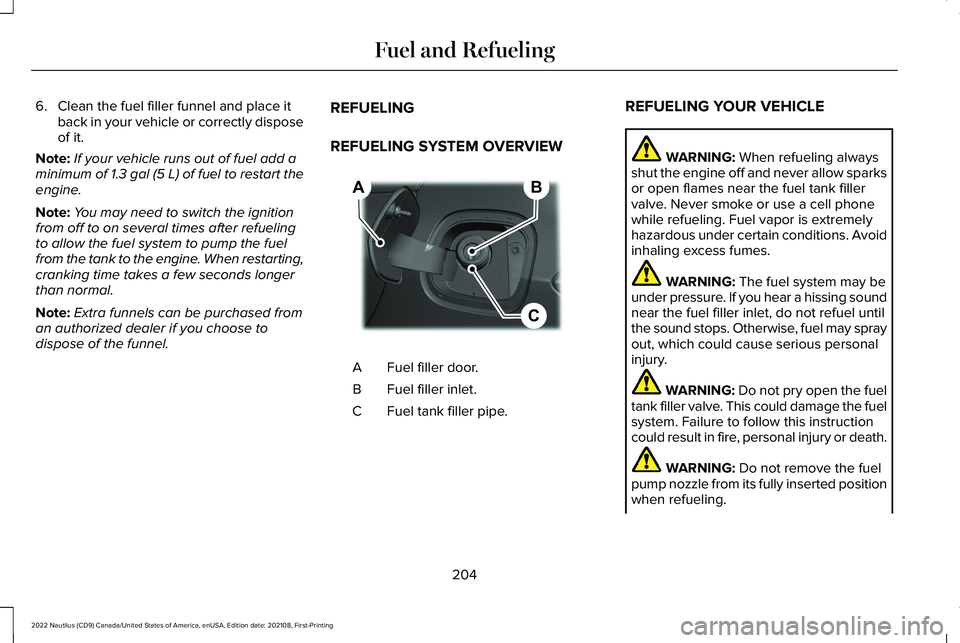
REFUELING SYSTEM OVERVIEW
Fuel filler door.A
Fuel filler inlet.B
Fuel tank filler pipe.C
REFUELING YOUR VEHICLE
WARNING: When refueling alwaysshut the engine off and never allow sparksor open flames near the fuel tank fillervalve. Never smoke or use a cell phonewhile refueling. Fuel vapor is extremelyhazardous under certain conditions. Avoidinhaling excess fumes.
WARNING: The fuel system may beunder pressure. If you hear a hissing soundnear the fuel filler inlet, do not refuel untilthe sound stops. Otherwise, fuel may sprayout, which could cause serious personalinjury.
WARNING: Do not pry open the fueltank filler valve. This could damage the fuelsystem. Failure to follow this instructioncould result in fire, personal injury or death.
WARNING: Do not remove the fuelpump nozzle from its fully inserted positionwhen refueling.
204
2022 Nautilus (CD9) Canada/United States of America, enUSA, Edition date: 202108, First-PrintingFuel and RefuelingBCA E267248
Page 430 of 586
Possible Cause and ResolutionSymptom
If your vehicle is in a garage and you have the garage door closed, open the garagedoor.•
I cannot see a network in the list of availablenetworks that I expect to see.–Hidden network.
•Make the network visible and try again.
I cannot see the Wi-Fi hotspot name when Isearch for Wi-Fi networks on my cell phoneor other device.
–System limitation.
•Make sure Wi-Fi hotspot visibility is on.
•The system does not provide a Wi-Fi hotspot at this time.
–Weak network signal.
•Move your vehicle closer to the Wi-Fi hotspot or to a place where the network signalis not obstructed.
–Wi-Fi hotspot in high demand or has a slow Internet connection.
•Use a more reliable Wi-Fi hotspot.
Software downloads take too long.
–No software update available.
–Wi-Fi network requires a subscription or acceptance of terms and conditions.
•Test the connection using another device. If the network requires a subscription oracceptance of terms and conditions, contact the network service provider.
The system seems to connect to a Wi-Finetwork and the signal strength is excellentbut the software does not update.
426
2022 Nautilus (CD9) Canada/United States of America, enUSA, Edition date: 202108, First-PrintingConnected Vehicle
Page 441 of 586
CENTER DISPLAY PRECAUTIONS
WARNING: Driving while distractedcan result in loss of vehicle control, crashand injury. We strongly recommend thatyou use extreme caution when using anydevice that may take your focus off theroad. Your primary responsibility is the safeoperation of your vehicle. We recommendagainst the use of any hand-held devicewhile driving and encourage the use ofvoice-operated systems when possible.Make sure you are aware of all applicablelocal laws that may affect the use ofelectronic devices while driving.
CENTER DISPLAY LIMITATIONS
Speed-restricted Features
For your safety, some features are notavailable while the vehicle is in motion at orabove 5 mph (8 km/h). Settings that are notcritical while driving your vehicle are shownas restricted on your display. Some of thesesettings include:
•System updates.
•Personal profiles setup.
•Valet mode setup.
•Driver assistance settings.
Vehicle Settings
•MyKey setup.
•Door keypad code setup.
•Backup start passcode setup.
These restricted features become availablewhen your vehicle is no longer in motion.
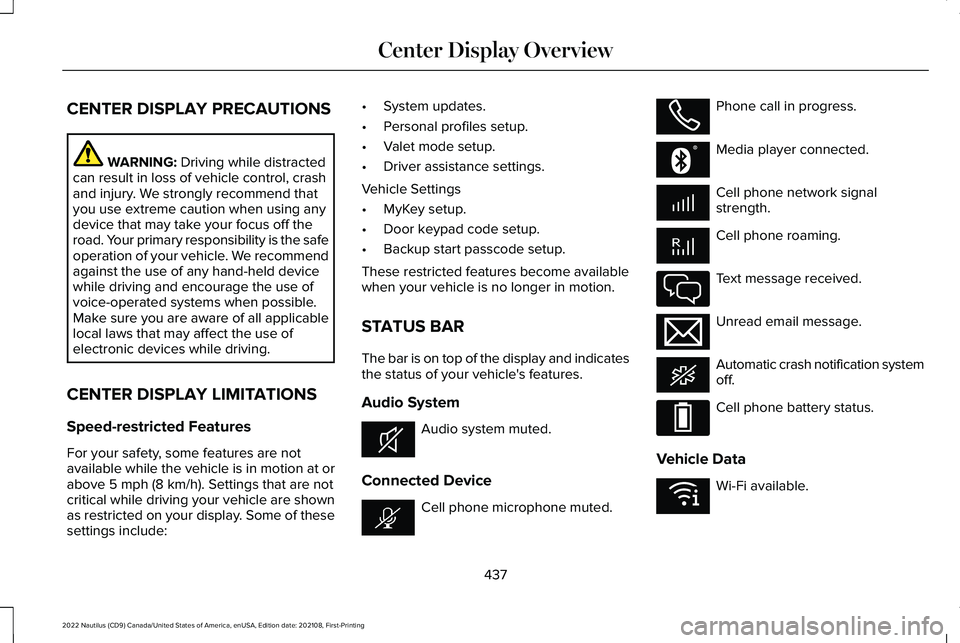
STATUS BAR
The bar is on top of the display and indicatesthe status of your vehicle's features.
Audio System
Audio system muted.
Connected Device
Cell phone microphone muted.
Phone call in progress.
Media player connected.
Cell phone network signalstrength.
Cell phone roaming.
Text message received.
Unread email message.
Automatic crash notification systemoff.
Cell phone battery status.
Vehicle Data
Wi-Fi available.
437
2022 Nautilus (CD9) Canada/United States of America, enUSA, Edition date: 202108, First-PrintingCenter Display OverviewE353221 E353213 E353208 E335295 E353216 E335293 E353219
Page 442 of 586
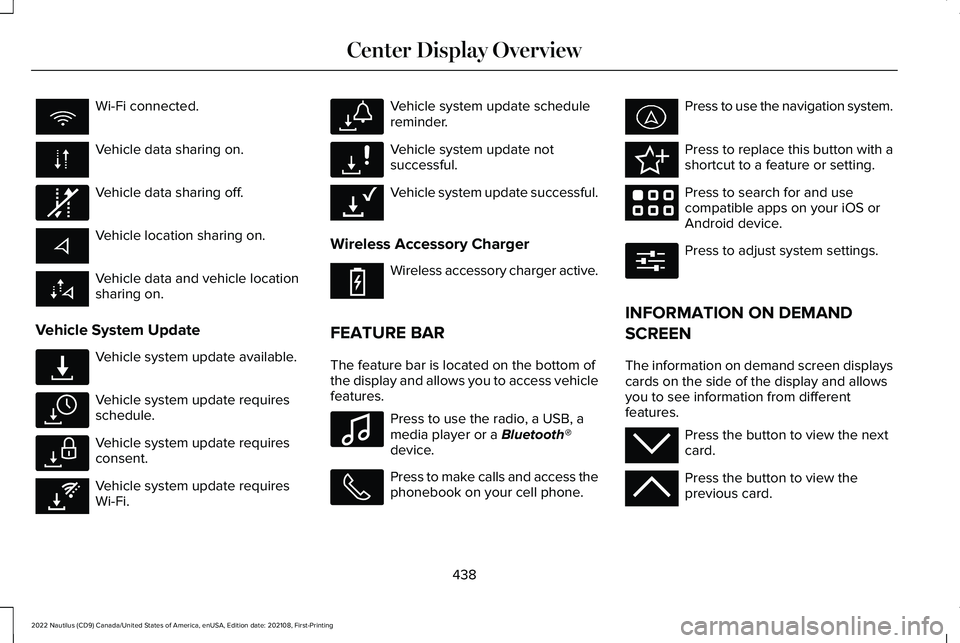
Wi-Fi connected.
Vehicle data sharing on.
Vehicle data sharing off.
Vehicle location sharing on.
Vehicle data and vehicle locationsharing on.
Vehicle System Update
Vehicle system update available.
Vehicle system update requiresschedule.
Vehicle system update requiresconsent.
Vehicle system update requiresWi-Fi.
Vehicle system update schedulereminder.
Vehicle system update notsuccessful.
Vehicle system update successful.
Wireless Accessory Charger
Wireless accessory charger active.
FEATURE BAR
The feature bar is located on the bottom ofthe display and allows you to access vehiclefeatures.
Press to use the radio, a USB, amedia player or a Bluetooth®device.
Press to make calls and access thephonebook on your cell phone.
Press to use the navigation system.
Press to replace this button with ashortcut to a feature or setting.
Press to search for and usecompatible apps on your iOS orAndroid device.
Press to adjust system settings.
INFORMATION ON DEMAND
SCREEN
The information on demand screen displayscards on the side of the display and allowsyou to see information from differentfeatures.
Press the button to view the nextcard.
Press the button to view theprevious card.
438
2022 Nautilus (CD9) Canada/United States of America, enUSA, Edition date: 202108, First-PrintingCenter Display Overview E335292 E327789 E327785 E327786 E353217 E327787 E327788 E353218 E353214 E100027 E358432 E353220 E280315 E353212 E353211
Page 445 of 586
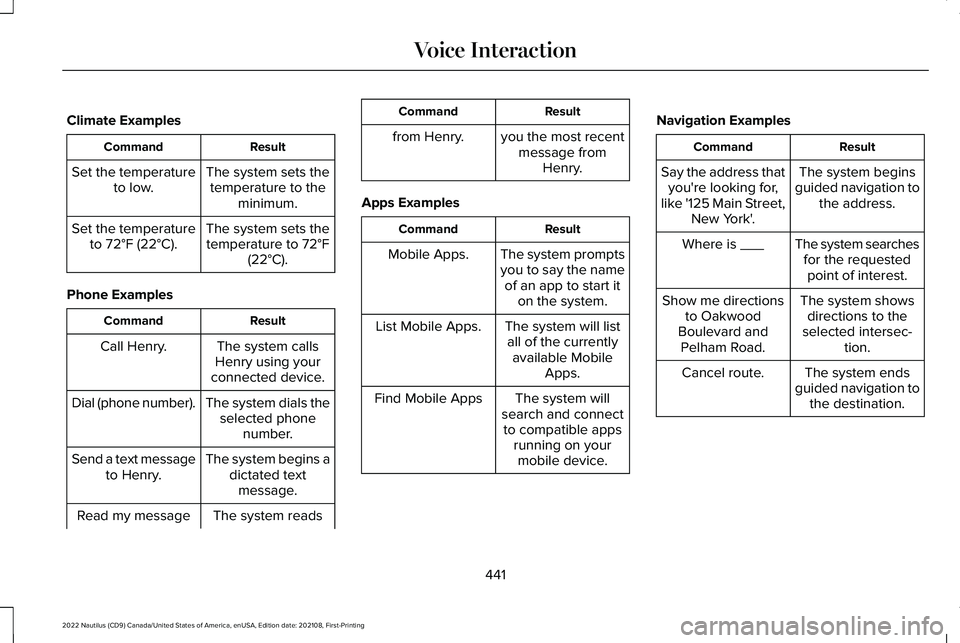
Climate Examples
ResultCommand
The system sets thetemperature to theminimum.
Set the temperatureto low.
The system sets thetemperature to 72°F(22°C).
Set the temperatureto 72°F (22°C).
Phone Examples
ResultCommand
The system callsHenry using yourconnected device.
Call Henry.
The system dials theselected phonenumber.
Dial (phone number).
The system begins adictated textmessage.
Send a text messageto Henry.
The system readsRead my message
ResultCommand
from Henry.you the most recentmessage fromHenry.
Apps Examples
ResultCommand
The system promptsyou to say the nameof an app to start iton the system.
Mobile Apps.
The system will listall of the currentlyavailable MobileApps.
List Mobile Apps.
The system willsearch and connectto compatible appsrunning on yourmobile device.
Find Mobile Apps
Navigation Examples
ResultCommand
The system beginsguided navigation tothe address.
Say the address thatyou're looking for,like '125 Main Street,New York'.
The system searchesfor the requestedpoint of interest.
Where is ___
The system showsdirections to theselected intersec-tion.
Show me directionsto OakwoodBoulevard andPelham Road.
The system endsguided navigation tothe destination.
Cancel route.
441
2022 Nautilus (CD9) Canada/United States of America, enUSA, Edition date: 202108, First-PrintingVoice Interaction
Page 446 of 586
PHONE PRECAUTIONS
WARNING: Driving while distractedcan result in loss of vehicle control, crashand injury. We strongly recommend thatyou use extreme caution when using anydevice that may take your focus off theroad. Your primary responsibility is the safeoperation of your vehicle. We recommendagainst the use of any hand-held devicewhile driving and encourage the use ofvoice-operated systems when possible.Make sure you are aware of all applicablelocal laws that may affect the use ofelectronic devices while driving.
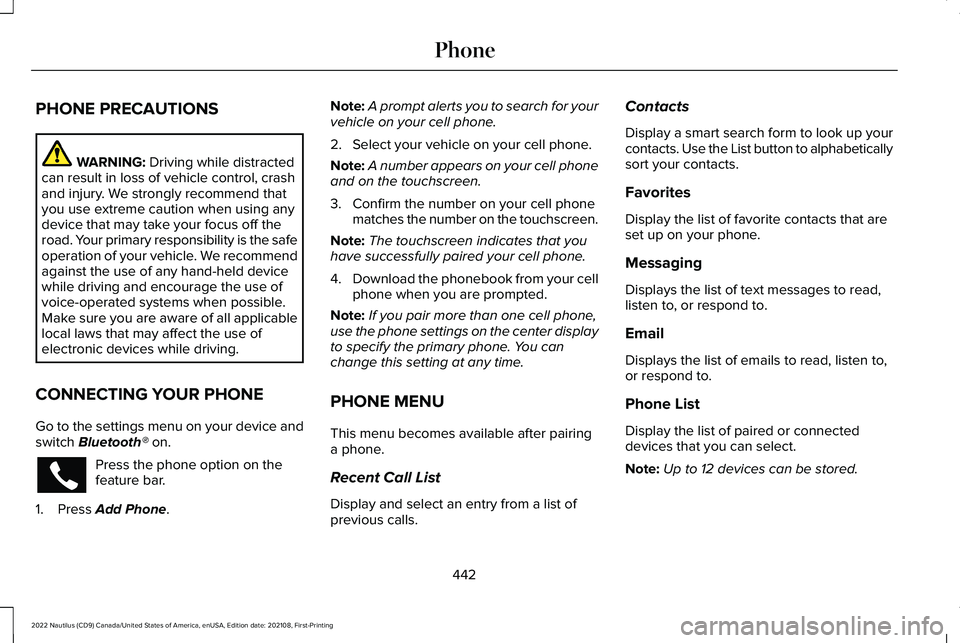
CONNECTING YOUR PHONE
Go to the settings menu on your device andswitch Bluetooth® on.
Press the phone option on thefeature bar.
1.Press Add Phone.
Note:A prompt alerts you to search for yourvehicle on your cell phone.
2.Select your vehicle on your cell phone.
Note:A number appears on your cell phoneand on the touchscreen.
3.Confirm the number on your cell phonematches the number on the touchscreen.
Note:The touchscreen indicates that youhave successfully paired your cell phone.
4.Download the phonebook from your cellphone when you are prompted.
Note:If you pair more than one cell phone,use the phone settings on the center displayto specify the primary phone. You canchange this setting at any time.
PHONE MENU
This menu becomes available after pairinga phone.
Recent Call List
Display and select an entry from a list ofprevious calls.
Contacts
Display a smart search form to look up yourcontacts. Use the List button to alphabeticallysort your contacts.
Favorites
Display the list of favorite contacts that areset up on your phone.
Messaging
Displays the list of text messages to read,listen to, or respond to.
Email
Displays the list of emails to read, listen to,or respond to.
Phone List
Display the list of paired or connecteddevices that you can select.
Note:Up to 12 devices can be stored.
442
2022 Nautilus (CD9) Canada/United States of America, enUSA, Edition date: 202108, First-PrintingPhone
Page 447 of 586
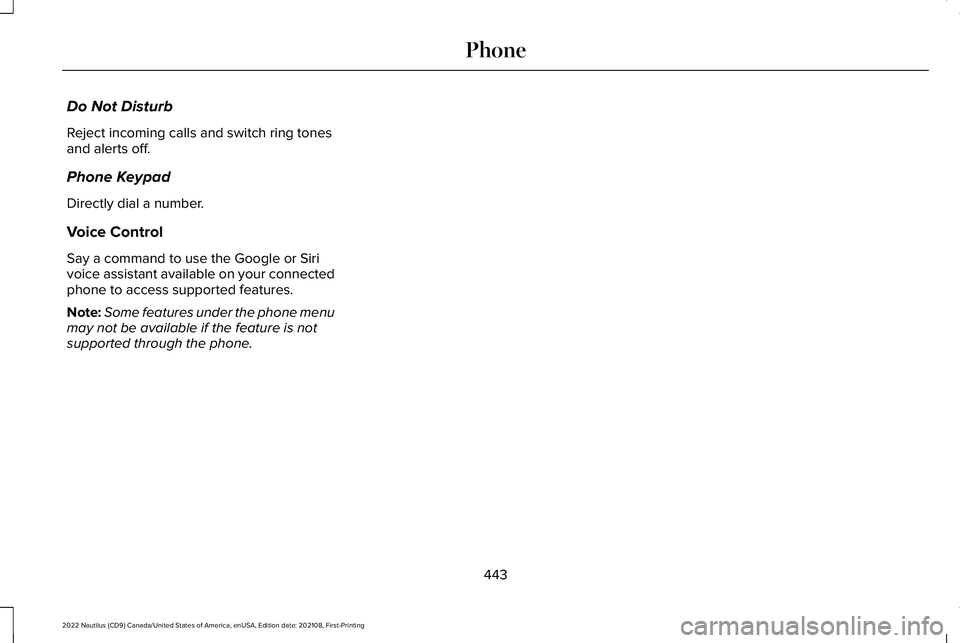
Do Not Disturb
Reject incoming calls and switch ring tonesand alerts off.
Phone Keypad
Directly dial a number.
Voice Control
Say a command to use the Google or Sirivoice assistant available on your connectedphone to access supported features.
Note:Some features under the phone menumay not be available if the feature is notsupported through the phone.
443
2022 Nautilus (CD9) Canada/United States of America, enUSA, Edition date: 202108, First-PrintingPhone
Page 448 of 586
MAKING AND RECEIVING A
PHONE CALL
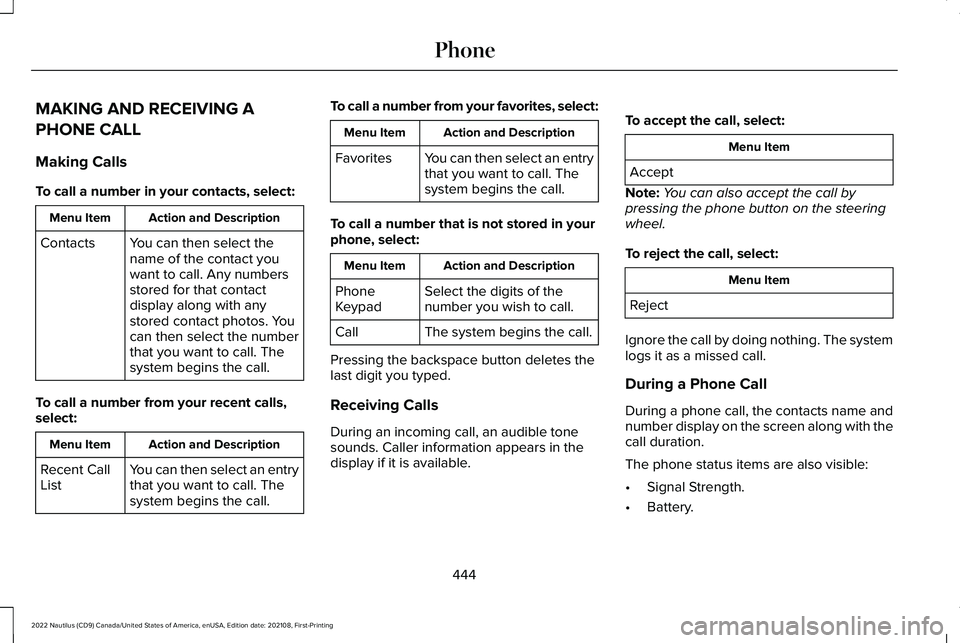
Making Calls
To call a number in your contacts, select:
Action and DescriptionMenu Item
You can then select thename of the contact youwant to call. Any numbersstored for that contactdisplay along with anystored contact photos. Youcan then select the numberthat you want to call. Thesystem begins the call.
Contacts
To call a number from your recent calls,select:
Action and DescriptionMenu Item
You can then select an entrythat you want to call. Thesystem begins the call.
Recent CallList
To call a number from your favorites, select:
Action and DescriptionMenu Item
You can then select an entrythat you want to call. Thesystem begins the call.
Favorites
To call a number that is not stored in yourphone, select:
Action and DescriptionMenu Item
Select the digits of thenumber you wish to call.PhoneKeypad
The system begins the call.Call
Pressing the backspace button deletes thelast digit you typed.
Receiving Calls
During an incoming call, an audible tonesounds. Caller information appears in thedisplay if it is available.
To accept the call, select:
Menu Item
Accept
Note:You can also accept the call bypressing the phone button on the steeringwheel.
To reject the call, select:
Menu Item
Reject
Ignore the call by doing nothing. The systemlogs it as a missed call.
During a Phone Call
During a phone call, the contacts name andnumber display on the screen along with thecall duration.
The phone status items are also visible:
•Signal Strength.
•Battery.
444
2022 Nautilus (CD9) Canada/United States of America, enUSA, Edition date: 202108, First-PrintingPhone
Page 449 of 586
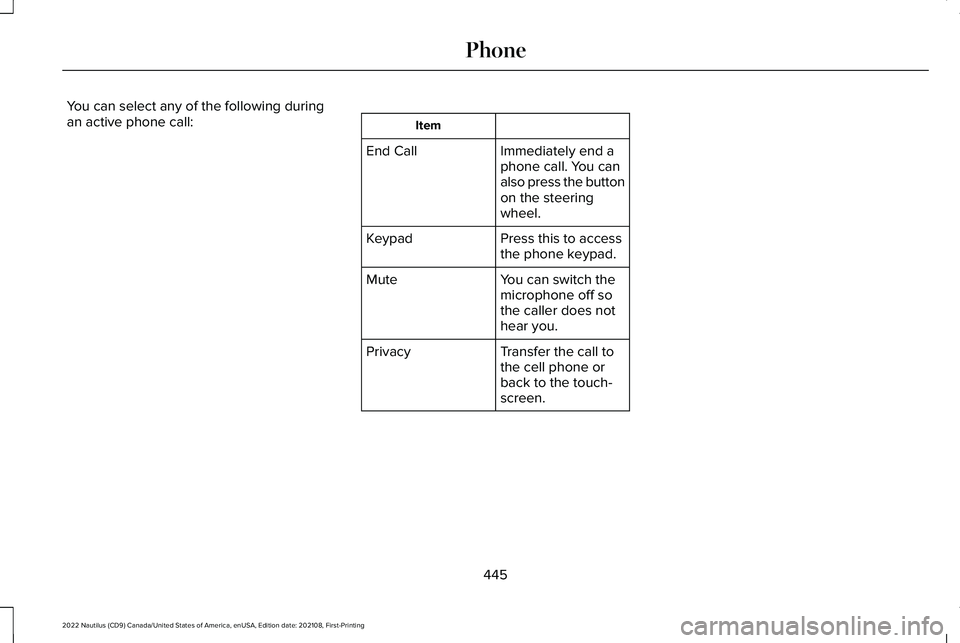
You can select any of the following duringan active phone call:Item
Immediately end aphone call. You canalso press the buttonon the steeringwheel.
End Call
Press this to accessthe phone keypad.Keypad
You can switch themicrophone off sothe caller does nothear you.
Mute
Transfer the call tothe cell phone orback to the touch-screen.
Privacy
445
2022 Nautilus (CD9) Canada/United States of America, enUSA, Edition date: 202108, First-PrintingPhone
Page 450 of 586
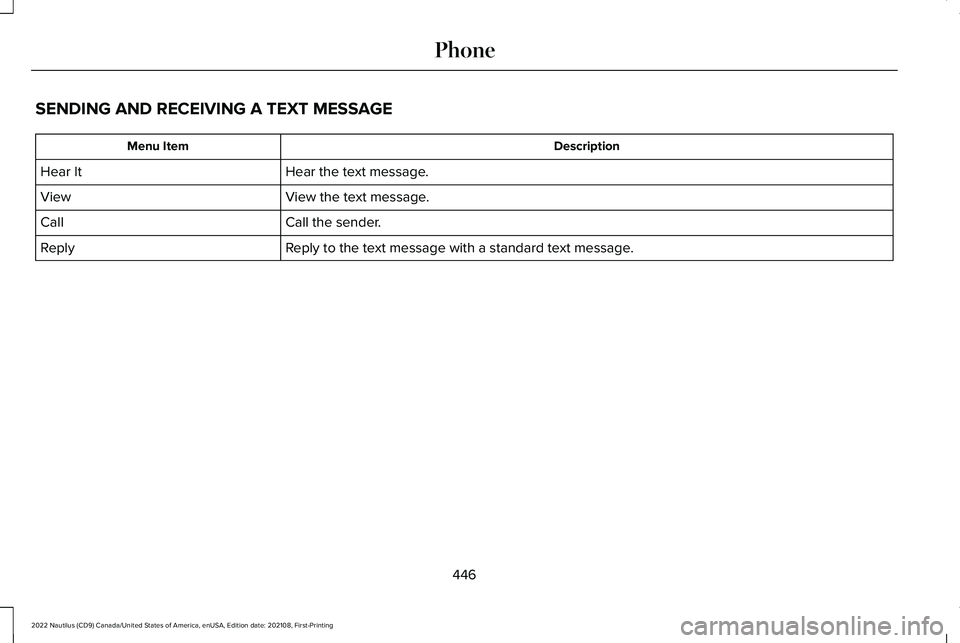
SENDING AND RECEIVING A TEXT MESSAGE
DescriptionMenu Item
Hear the text message.Hear It
View the text message.View
Call the sender.Call
Reply to the text message with a standard text message.Reply
446
2022 Nautilus (CD9) Canada/United States of America, enUSA, Edition date: 202108, First-PrintingPhone