service LINCOLN NAUTILUS 2022 Workshop Manual
[x] Cancel search | Manufacturer: LINCOLN, Model Year: 2022, Model line: NAUTILUS, Model: LINCOLN NAUTILUS 2022Pages: 586, PDF Size: 13.97 MB
Page 398 of 586
Note:Regularly checking the vehicle tirepressures can reduce the possibility for thewarning lamp to illuminate due to outsideair temperature changes.
Note:After you inflate the tires to therecommended pressure it could take up totwo minutes of driving over 20 mph (32 km/h)for the warning indicator to turn off.
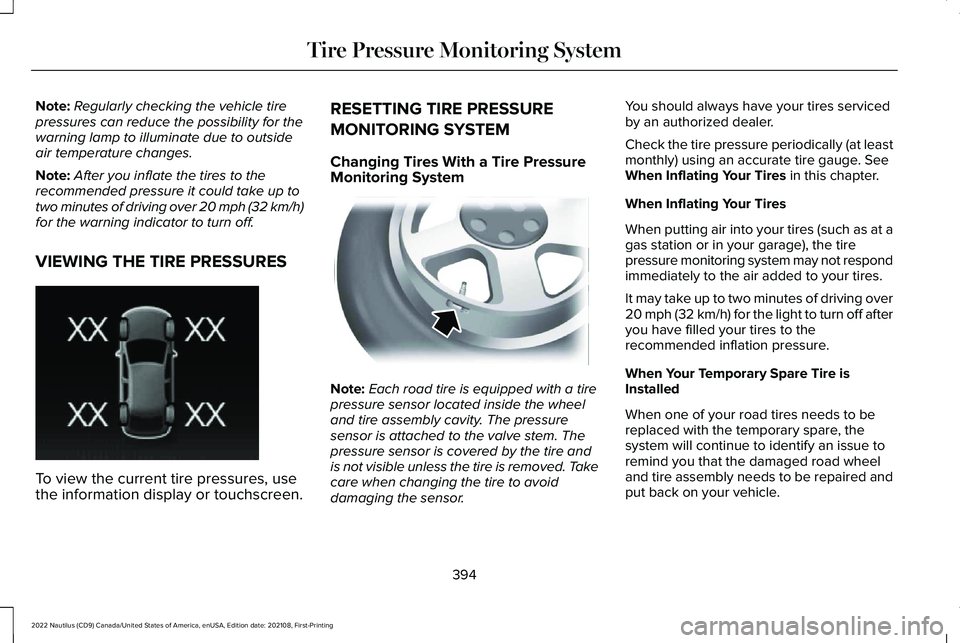
VIEWING THE TIRE PRESSURES
To view the current tire pressures, usethe information display or touchscreen.
RESETTING TIRE PRESSURE
MONITORING SYSTEM
Changing Tires With a Tire PressureMonitoring System
Note:Each road tire is equipped with a tirepressure sensor located inside the wheeland tire assembly cavity. The pressuresensor is attached to the valve stem. Thepressure sensor is covered by the tire andis not visible unless the tire is removed. Takecare when changing the tire to avoiddamaging the sensor.
You should always have your tires servicedby an authorized dealer.
Check the tire pressure periodically (at leastmonthly) using an accurate tire gauge. SeeWhen Inflating Your Tires in this chapter.
When Inflating Your Tires
When putting air into your tires (such as at agas station or in your garage), the tirepressure monitoring system may not respondimmediately to the air added to your tires.
It may take up to two minutes of driving over20 mph (32 km/h) for the light to turn off afteryou have filled your tires to therecommended inflation pressure.
When Your Temporary Spare Tire isInstalled
When one of your road tires needs to bereplaced with the temporary spare, thesystem will continue to identify an issue toremind you that the damaged road wheeland tire assembly needs to be repaired andput back on your vehicle.
394
2022 Nautilus (CD9) Canada/United States of America, enUSA, Edition date: 202108, First-PrintingTire Pressure Monitoring SystemE250820 E142549
Page 399 of 586
To restore the full function of the tirepressure monitoring system, have thedamaged road wheel and tire assemblyrepaired and remounted on your vehicle.
TIRE PRESSURE MONITORING
SYSTEM – TROUBLESHOOTING
TIRE PRESSURE MONITORINGSYSTEM – WARNING LAMPS
The low tire pressure warning lamphas combined functions, as itwarns you when your tires needair, and when the system is no longercapable of functioning as intended.
Action RequiredPossible CauseWarning Lamp
After inflating your tires to the manufacturer’s recommendedpressure as shown on the tire label, on the edge of driver dooror the B-pillar, drive your vehicle for at least two minutes over20 mph (32 km/h) before the light turns off.
One or more tires are significantly underinflatedSolid warning lamp
Repair the damaged road wheel and tire and refit it to your vehicleto restore operation of the system.Temporary spare wheel in useSolid warning lamp or flashingwarning lamp
If the tires are inflated to the recommended tire pressures andthe temporary spare wheel is not in use, the system detected afault that requires service. Have your vehicle checked as soonas possible.
Tire pressure monitoring systemmalfunction
395
2022 Nautilus (CD9) Canada/United States of America, enUSA, Edition date: 202108, First-PrintingTire Pressure Monitoring System
Page 400 of 586
TIRE PRESSURE MONITORING SYSTEM – INFORMATION MESSAGES
ActionMessage
After inflating your tires to the manufacturer’s recommended pressure as shown on the tire label,on the edge of the driver door or the B-pillar, drive your vehicle for at least two minutes over20 mph (32 km/h) before the light turns off.
Tire Pressure Low
The system has detected a fault that requires service. Have your vehicle checked as soon aspossible.Tire Pressure Monitor Fault
The system has detected a fault that requires service or a spare tire is in use. Have your vehiclechecked as soon as possible.Tire Pressure Sensor Fault
396
2022 Nautilus (CD9) Canada/United States of America, enUSA, Edition date: 202108, First-PrintingTire Pressure Monitoring System
Page 401 of 586
CHANGING A FLAT TIRE
WARNING: If the tire pressuremonitor sensor becomes damaged it maynot function.
If you get a flat tire while driving, do not applythe brake heavily. Instead, graduallydecrease your speed. Hold the steeringwheel firmly and slowly move to a safe placeon the side of the road.
Have a flat serviced by an authorized dealerin order to prevent damage to the tirepressure monitoring system sensors. SeeTire Pressure Monitoring System Overview(page 392). Replace the spare tire with a roadtire as soon as possible. During repairing orreplacing of the flat tire, have an authorizeddealer inspect the tire pressure monitoringsystem sensor for damage.
Note:The use of tire sealant could damageyour tire pressure monitoring sensor andshould only be used in roadsideemergencies. If you must use a sealant, usethe Tire Mobility Kit sealant. Replace the tirepressure monitoring system sensor andvalve stem on the wheel by an authorizeddealer after use of the sealant.
Note:The tire pressure monitoring systemindicator light will illuminate when the sparetire is in use. To restore the full function ofthe monitoring system, all road wheelsequipped with tire pressure monitoringsensors must be mounted on the vehicle.
Dissimilar Spare Wheel and TireAssembly Information
WARNING: Failure to follow theseguidelines could result in an increased riskof loss of vehicle control, injury or death.
If you have a dissimilar spare wheel and tire,then it is intended for temporary use only.This means that if you need to use it, youshould replace it as soon as possible with aroad wheel and tire assembly that is thesame size and type as the road tires andwheels that were originally provided on yourvehicle. If the dissimilar spare tire or wheelis damaged, replace it instead of repairingit.
A dissimilar spare wheel and tire assemblyis defined as a spare wheel and tire assemblythat is different in brand, size or appearancefrom the road tires and wheels and can beone of three types:
1. T-type mini-spare: This spare tire beginswith the letter T for tire size and could haveTemporary Use Only molded in the sidewall.
2. Full-size dissimilar spare with label onwheel: This spare tire has a label on thewheel that states: THIS WHEEL AND TIREASSEMBLY FOR TEMPORARY USE ONLY.
When driving with one of the dissimilar sparetires listed above, do not:
397
2022 Nautilus (CD9) Canada/United States of America, enUSA, Edition date: 202108, First-PrintingChanging a Road Wheel
Page 402 of 586
•Exceed 50 mph (80 km/h).
•Load the vehicle beyond maximumvehicle load rating listed on the SafetyCompliance Label.
•Tow a trailer.
•Use snow chains on the end of thevehicle with the dissimilar spare tire.
•Use more than one dissimilar spare tireat a time.
•Use commercial car washing equipment.
•Try to repair the dissimilar spare tire.
Use of one of the dissimilar spare tires listedabove at any one wheel location can lead toimpairment of the following:
•Handling, stability and brakingperformance.
•Comfort and noise.
•Ground clearance and parking at curbs.
•Winter weather driving capability.
•Wet weather driving capability.
•All-wheel driving capability, if applicable.
3. Full-size dissimilar spare without labelon wheel
When driving with the full-size dissimilarspare wheel and tire assembly, do not:
•Exceed 70 mph (113 km/h).
•Use more than one dissimilar sparewheel and tire assembly at a time.
•Use commercial car washing equipment.
•Use snow chains on the end of thevehicle with the dissimilar spare wheeland tire assembly.
The usage of a full-size dissimilar sparewheel and tire assembly can lead toimpairment of the following:
•Handling, stability and brakingperformance.
•Comfort and noise.
•Ground clearance and parking at curbs.
•Winter weather driving capability.
•Wet weather driving capability.
•All-wheel driving capability.
When driving with the full-size dissimilarspare wheel and tire assembly additionalcaution should be given to:
•Towing a trailer.
•Driving vehicles equipped with a camperbody.
•Driving vehicles with a load on the cargorack.
Drive cautiously when using a full-sizedissimilar spare wheel and tire assembly andseek service as soon as possible.
Tire Change Procedure
WARNING: The jack supplied withthis vehicle is only intended for changinga flat tire in an emergency. Do not attemptto do any other work on your vehicle whenit is supported by the jack, as your vehiclecould slip off the jack. Failure to follow thisinstruction could result in personal injuryor death.
398
2022 Nautilus (CD9) Canada/United States of America, enUSA, Edition date: 202108, First-PrintingChanging a Road Wheel
Page 403 of 586
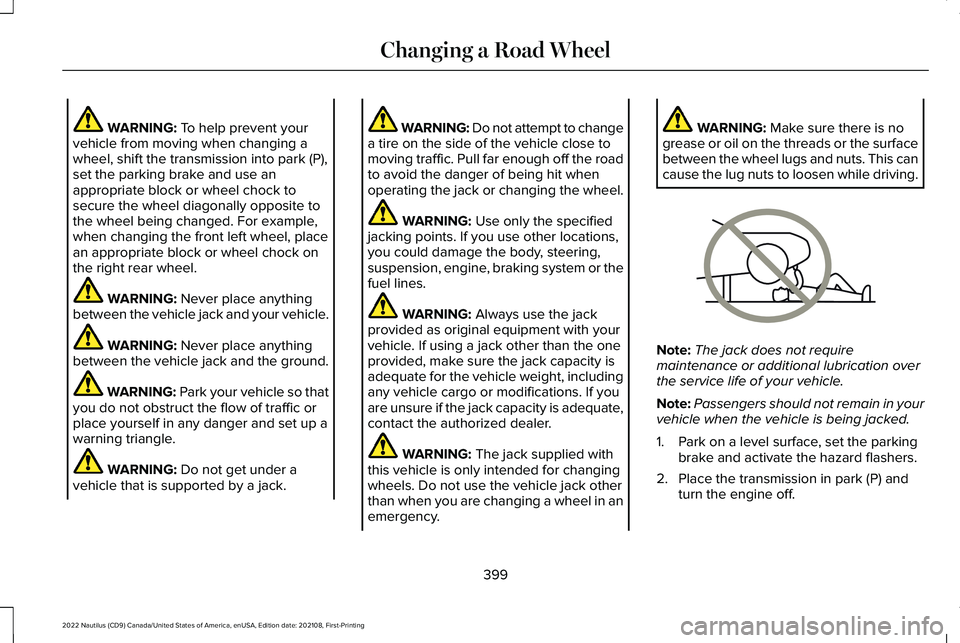
WARNING: To help prevent yourvehicle from moving when changing awheel, shift the transmission into park (P),set the parking brake and use anappropriate block or wheel chock tosecure the wheel diagonally opposite tothe wheel being changed. For example,when changing the front left wheel, placean appropriate block or wheel chock onthe right rear wheel.
WARNING: Never place anythingbetween the vehicle jack and your vehicle.
WARNING: Never place anythingbetween the vehicle jack and the ground.
WARNING: Park your vehicle so thatyou do not obstruct the flow of traffic orplace yourself in any danger and set up awarning triangle.
WARNING: Do not get under avehicle that is supported by a jack.
WARNING: Do not attempt to changea tire on the side of the vehicle close tomoving traffic. Pull far enough off the roadto avoid the danger of being hit whenoperating the jack or changing the wheel.
WARNING: Use only the specifiedjacking points. If you use other locations,you could damage the body, steering,suspension, engine, braking system or thefuel lines.
WARNING: Always use the jackprovided as original equipment with yourvehicle. If using a jack other than the oneprovided, make sure the jack capacity isadequate for the vehicle weight, includingany vehicle cargo or modifications. If youare unsure if the jack capacity is adequate,contact the authorized dealer.
WARNING: The jack supplied withthis vehicle is only intended for changingwheels. Do not use the vehicle jack otherthan when you are changing a wheel in anemergency.
WARNING: Make sure there is nogrease or oil on the threads or the surfacebetween the wheel lugs and nuts. This cancause the lug nuts to loosen while driving.
Note:The jack does not requiremaintenance or additional lubrication overthe service life of your vehicle.
Note:Passengers should not remain in yourvehicle when the vehicle is being jacked.
1.Park on a level surface, set the parkingbrake and activate the hazard flashers.
2.Place the transmission in park (P) andturn the engine off.
399
2022 Nautilus (CD9) Canada/United States of America, enUSA, Edition date: 202108, First-PrintingChanging a Road WheelE166722
Page 420 of 586
AIR CONDITIONING SYSTEM
CAPACITY AND SPECIFICATION -
2.0L
WARNING: The air conditioningrefrigerant system contains refrigerant
under high pressure. Only qualifiedpersonnel should service the airconditioning refrigerant system. Openingthe air conditioning refrigerant system cancause personal injury.
Use refrigerant and oil that meets the definedspecifications.
If you do not use refrigerant and oil thatmeets the defined specifications, it couldresult in:
•Component damage that your vehiclewarranty does not cover.
•Reduced vehicle performance.
Capacities
Refrigerant OilRefrigerantVariant
3.2 fl oz (95 ml)20.8 oz (0.59 kg)All.
416
2022 Nautilus (CD9) Canada/United States of America, enUSA, Edition date: 202108, First-PrintingCapacities and Specifications
Page 422 of 586
AIR CONDITIONING SYSTEM
CAPACITY AND SPECIFICATION -
2.7L
WARNING: The air conditioningrefrigerant system contains refrigerant
under high pressure. Only qualifiedpersonnel should service the airconditioning refrigerant system. Openingthe air conditioning refrigerant system cancause personal injury.
Use refrigerant and oil that meets the definedspecifications.
If you do not use refrigerant and oil thatmeets the defined specifications, it couldresult in:
•Component damage that your vehiclewarranty does not cover.
•Reduced vehicle performance.
Capacities
Refrigerant OilRefrigerantVariant
3.2 fl oz (95 ml)20.8 oz (0.59 kg)All.
418
2022 Nautilus (CD9) Canada/United States of America, enUSA, Edition date: 202108, First-PrintingCapacities and Specifications
Page 427 of 586
WHAT IS A CONNECTED VEHICLE
A connected vehicle has technology thatallows your vehicle to connect to a mobilenetwork and for you to access a range offeatures. When used in conjunction with theLincoln Way app, it could allow you tomonitor and control your vehicle further, forexample checking the tire pressures, andthe vehicle location. For additionalinformation, refer to the local Lincoln website.
CONNECTED VEHICLE
REQUIREMENTS
Connected service and related featurefunctionality requires a compatible vehiclenetwork.
Some remote features require a subscription.For additional information, see the LincolnWay app. Some restrictions, third party termsand message or data rates may apply.
CONNECTED VEHICLE
LIMITATIONS
Evolving technology, cellular networks, orregulations could affect functionality andavailability, or continued provision of somefeatures. These changes could even stopsome features from functioning.
CONNECTING THE VEHICLE TO A
MOBILE NETWORK
WHAT IS THE MODEM
The modem allows access to arange of features built into yourvehicle.
ENABLING AND DISABLING THEMODEM
1.Press Settings.
2.Press Lincoln Connect.
3.Press Connectivity Settings.
4.Switch connectivity features on or off.
CONNECTING LINCOLN WAY TO THEMODEM
1.Make sure that the modem is enabledusing the vehicle settings menu.
2.Open the Lincoln Way app on yourdevice and log in.
3.Add your vehicle or select your vehicleif already added.
4.Select the option for vehicle details.
5.Select the option to activate your vehicle.
6.Make sure that the name on the screenmatches the name shown in your LincolnWay account.
7.Confirm that your Lincoln Way accountis connected to the modem.
CONNECTING THE VEHICLE TO A
WI-FI NETWORK
1.Press Settings.
2.Press Wi-Fi.
423
2022 Nautilus (CD9) Canada/United States of America, enUSA, Edition date: 202108, First-PrintingConnected Vehicle
Page 430 of 586
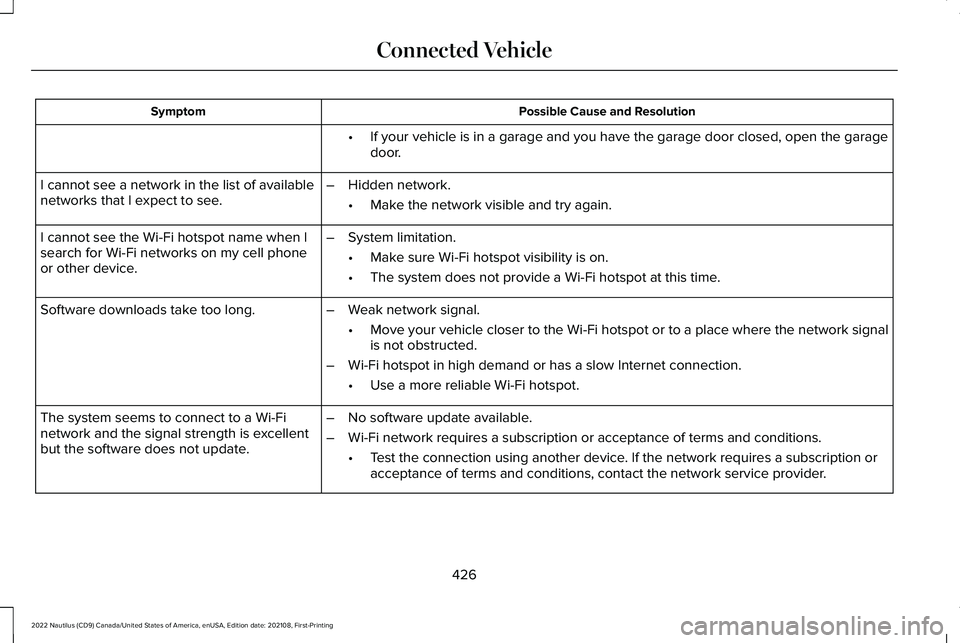
Possible Cause and ResolutionSymptom
If your vehicle is in a garage and you have the garage door closed, open the garagedoor.•
I cannot see a network in the list of availablenetworks that I expect to see.–Hidden network.
•Make the network visible and try again.
I cannot see the Wi-Fi hotspot name when Isearch for Wi-Fi networks on my cell phoneor other device.
–System limitation.
•Make sure Wi-Fi hotspot visibility is on.
•The system does not provide a Wi-Fi hotspot at this time.
–Weak network signal.
•Move your vehicle closer to the Wi-Fi hotspot or to a place where the network signalis not obstructed.
–Wi-Fi hotspot in high demand or has a slow Internet connection.
•Use a more reliable Wi-Fi hotspot.
Software downloads take too long.
–No software update available.
–Wi-Fi network requires a subscription or acceptance of terms and conditions.
•Test the connection using another device. If the network requires a subscription oracceptance of terms and conditions, contact the network service provider.
The system seems to connect to a Wi-Finetwork and the signal strength is excellentbut the software does not update.
426
2022 Nautilus (CD9) Canada/United States of America, enUSA, Edition date: 202108, First-PrintingConnected Vehicle