air conditioning LINCOLN NAUTILUS 2022 Owners Manual
[x] Cancel search | Manufacturer: LINCOLN, Model Year: 2022, Model line: NAUTILUS, Model: LINCOLN NAUTILUS 2022Pages: 586, PDF Size: 13.97 MB
Page 8 of 586
Locking the Rear Window Controls.........133
Interior Mirror
Interior Mirror Precautions.........................134
Auto-Dimming Interior Mirror....................134
Exterior Mirrors
Adjusting the Exterior Mirrors...................135
Folding the Exterior Mirrors - VehiclesWith: Manual Folding Mirrors................135
Folding the Exterior Mirrors - VehiclesWith: Power Folding Mirrors..................135
Auto-Dimming Exterior Mirror...................136
Moonroof
Opening and Closing the Sun Shade......137
Opening and Closing the Moonroof........137
Venting the Moonroof.................................138
Moonroof Bounce-Back.............................138
Instrument Cluster
Instrument Cluster Overview....................139
Tachometer....................................................140
Speedometer................................................140
Fuel Gauge....................................................140
Engine Coolant Temperature Gauge.......141
Engine Oil Pressure Gauge........................141
Transmission Fluid Temperature Gauge........................................................................141
12V Battery Gauge........................................141
What Are the Instrument Cluster WarningLamps...........................................................141
Instrument Cluster Warning Lamps..........141
What Are the Instrument Cluster Indicators.......................................................................143
Instrument Cluster Indicators....................143
Instrument Cluster Display
Using the Instrument Cluster DisplayControls......................................................145
Instrument Cluster Display Main Menu.......................................................................146
Trip Computer................................................147
Customizing the Instrument Cluster Display.......................................................................149
Personalized Settings.................................150
Remote Start
What Is Remote Start...................................153
Remote Start Precautions..........................153
Remote Start Limitations............................153
Enabling Remote Start................................153
Remotely Starting and Stopping theVehicle........................................................153
Extending the Remote Start Duration.......................................................................154
Remote Start Remote Control Indicators.......................................................................154
Remote Start Settings.................................154
Climate Control
Identifying the Climate Control Unit........156
Switching Climate Control On and Off.......................................................................156
Switching Recirculated Air On and Off.......................................................................156
Switching Air Conditioning On and Off.......................................................................156
Switching Maximum Defrost On and Off.......................................................................156
Switching Maximum Cooling On and Off.......................................................................156
4
2022 Nautilus (CD9) Canada/United States of America, enUSA, Edition date: 202108, First-PrintingTable of Contents
Page 16 of 586
Tire Sealant and Inflator Kit
What Is the Tire Sealant and Inflator Kit......................................................................385
Tire Sealant and Inflator Kit Precautions......................................................................385
Locating the Tire Sealant and Inflator Kit......................................................................385
Tire Sealant and Inflator Kit Components......................................................................386
Using the Tire Sealant and Inflator Kit......................................................................386
Tire Pressure Monitoring System
What Is the Tire Pressure MonitoringSystem.......................................................392
Tire Pressure Monitoring System Overview......................................................................392
Tire Pressure Monitoring SystemPrecautions...............................................393
Tire Pressure Monitoring SystemLimitations.................................................393
Viewing the Tire Pressures......................394
Resetting Tire Pressure Monitoring System......................................................................394
Tire Pressure Monitoring System –Troubleshooting......................................395
Changing a Road Wheel
Changing a Flat Tire...................................397
Wheel Nuts...................................................402
Capacities and Specifications
Engine Specifications - 2.0L.....................404
Engine Specifications - 2.7L.....................405
Motorcraft Parts - 2.0L...............................406
Motorcraft Parts - 2.7L................................407
Engine Oil Capacity and Specification -2.0L.............................................................408
Engine Oil Capacity and Specification -2.7L..............................................................410
Cooling System Capacity and Specification- 2.0L...........................................................413
Cooling System Capacity and Specification- 2.7L............................................................414
Fuel Tank Capacity......................................415
Air Conditioning System Capacity andSpecification - 2.0L..................................416
Air Conditioning System Capacity andSpecification - 2.7L..................................418
Washer Fluid Specification........................419
Brake Fluid Specification..........................420
Vehicle Identification
Vehicle Identification Number.................422
Connected Vehicle
What Is a Connected Vehicle...................423
Connected Vehicle Requirements..........423
Connected Vehicle Limitations................423
Connecting the Vehicle to a MobileNetwork.....................................................423
Connecting the Vehicle to a Wi-Fi Network......................................................................423
Connected Vehicle – Troubleshooting......................................................................424
Vehicle Wi-Fi Hotspot
Creating a Vehicle Wi-Fi Hotspot............427
Changing the Vehicle Wi-Fi Hotspot Nameor Password..............................................427
Audio System
Audio System Precautions.......................429
12
2022 Nautilus (CD9) Canada/United States of America, enUSA, Edition date: 202108, First-PrintingTable of Contents
Page 23 of 586
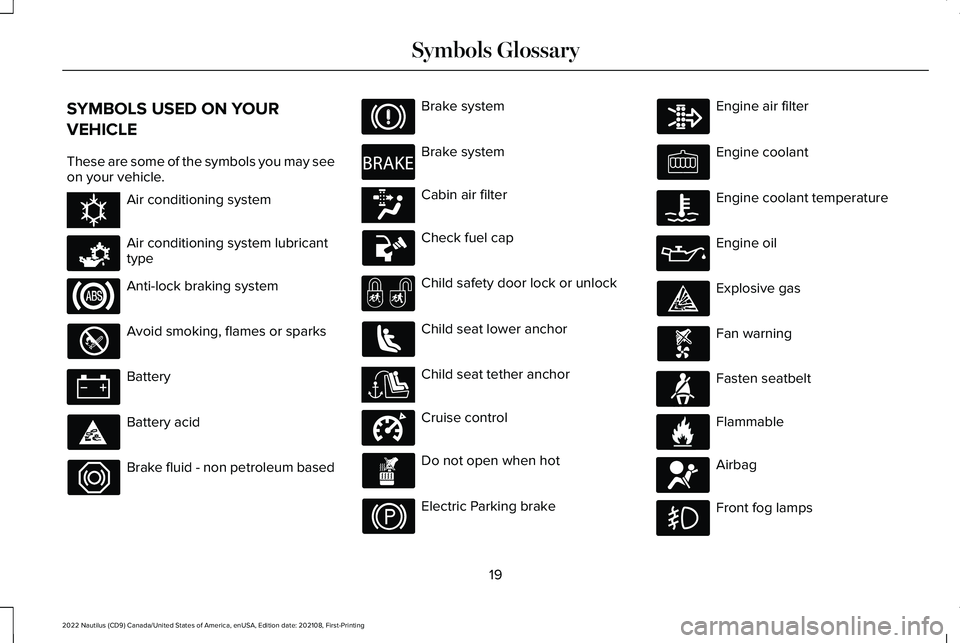
SYMBOLS USED ON YOUR
VEHICLE
These are some of the symbols you may seeon your vehicle.
Air conditioning system
Air conditioning system lubricanttype
Anti-lock braking system
Avoid smoking, flames or sparks
Battery
Battery acid
Brake fluid - non petroleum based
Brake system
Brake system
Cabin air filter
Check fuel cap
Child safety door lock or unlock
Child seat lower anchor
Child seat tether anchor
Cruise control
Do not open when hot
Electric Parking brake
Engine air filter
Engine coolant
Engine coolant temperature
Engine oil
Explosive gas
Fan warning
Fasten seatbelt
Flammable
Airbag
Front fog lamps
19
2022 Nautilus (CD9) Canada/United States of America, enUSA, Edition date: 202108, First-PrintingSymbols GlossaryE162384 E231157 E270480 E139223 E141128 E332905 E71880 E231160 E67017
Page 160 of 586
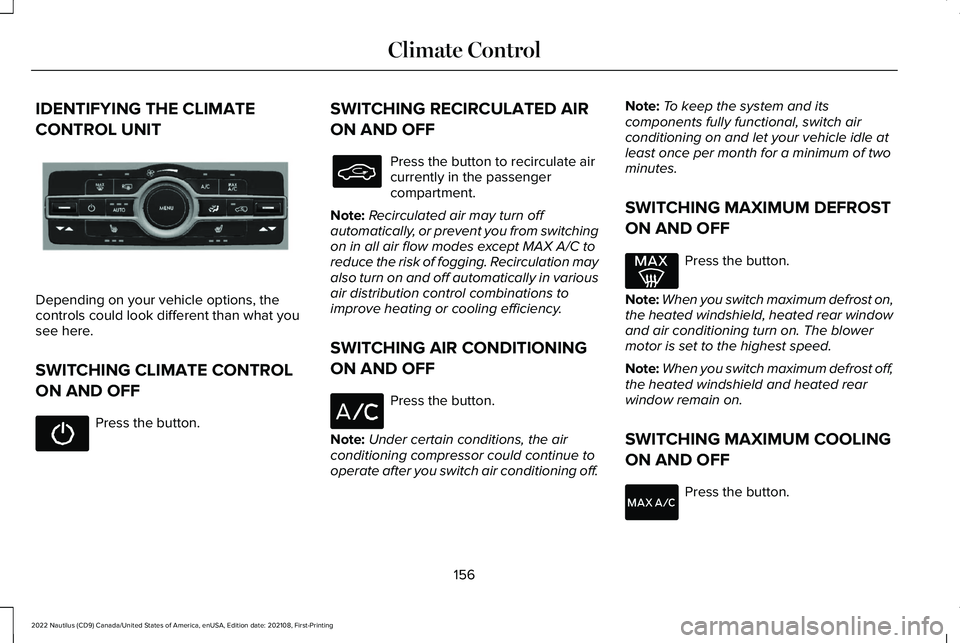
IDENTIFYING THE CLIMATE
CONTROL UNIT
Depending on your vehicle options, thecontrols could look different than what yousee here.
SWITCHING CLIMATE CONTROL
ON AND OFF
Press the button.
SWITCHING RECIRCULATED AIR
ON AND OFF
Press the button to recirculate aircurrently in the passengercompartment.
Note:Recirculated air may turn offautomatically, or prevent you from switchingon in all air flow modes except MAX A/C toreduce the risk of fogging. Recirculation mayalso turn on and off automatically in variousair distribution control combinations toimprove heating or cooling efficiency.
SWITCHING AIR CONDITIONING
ON AND OFF
Press the button.
Note:Under certain conditions, the airconditioning compressor could continue tooperate after you switch air conditioning off.
Note:To keep the system and itscomponents fully functional, switch airconditioning on and let your vehicle idle atleast once per month for a minimum of twominutes.
SWITCHING MAXIMUM DEFROST
ON AND OFF
Press the button.
Note:When you switch maximum defrost on,the heated windshield, heated rear windowand air conditioning turn on. The blowermotor is set to the highest speed.
Note:When you switch maximum defrost off,the heated windshield and heated rearwindow remain on.
SWITCHING MAXIMUM COOLING
ON AND OFF
Press the button.
156
2022 Nautilus (CD9) Canada/United States of America, enUSA, Edition date: 202108, First-PrintingClimate ControlE287616
Page 161 of 586
Note:When you switch maximum coolingoff, air conditioning remains on.
SWITCHING THE HEATED REAR
WINDOW ON AND OFF
Press the button to clear the rearwindow of thin ice and fog. Theheated rear window turns off aftera short period of time.
Note:Do not use harsh chemicals, razorblades or other sharp objects to clean orremove decals from the inside of the heatedrear window as this could cause damage tothe heated rear window grid lines notcovered by the vehicle warranty.
Note:Make sure the engine is on beforeoperating the heated windows.
SETTING THE BLOWER MOTOR
SPEED
Turn the control to adjust thevolume of air circulated in thevehicle.
SWITCHING THE HEATED
MIRRORS ON AND OFF
When you switch the heated rear windowon, the heated exterior mirrors turn on.
Note:Do not remove ice from the mirrorswith a scraper or adjust the mirror glasswhen it is frozen in place.
Note:Do not clean the mirror housing orglass with harsh abrasives, fuel or otherpetroleum-based cleaning products. Thevehicle warranty may not cover damagecaused to the mirror housing or glass.
SETTING THE TEMPERATURE
Press the toggle button on the left-hand sideof the climate control upward or downwardto set the left-hand temperature.
Note:This control also adjusts the right-handside temperature when you switch off dualzone mode.
Press the toggle button on the right-handside of the climate control upward ordownward to set the right-hand temperature.
DIRECTING THE FLOW OF AIR
Directing Air to the Windshield AirVents
Press the button to activate theselection screen.
Press the button on thetouchscreen.
Directing Air to the Instrument Panel
Air Vents
Press the button to activate theselection screen.
Press the button on thetouchscreen.
157
2022 Nautilus (CD9) Canada/United States of America, enUSA, Edition date: 202108, First-PrintingClimate Control E266187 E266186 E265283 E265283 E244097
Page 162 of 586
Directing Air to the Footwell Air Vents
Press the button to activate theselection screen.
Press the button on thetouchscreen.
AUTO MODE
SWITCHING AUTO MODE ON ANDOFF
Press the button to switch automode on. Repeatedly press thebutton to adjust auto mode.
The system adjusts the blower motor speed,air distribution, air conditioning operation,and outside or recirculated air to reach andmaintain the temperature you have set.
Adjust the blower motor control to switchauto mode off.
Note:The system starts at the previoussetting when you switch on auto mode.
AUTO MODE INDICATORS
The indicators are on the Auto Mode button.
DescriptionAuto Mode Indicator Status
The blower motor speed is reduced. Use this setting to minimize the amount of noise from theblower motor. This setting increases the time taken to cool the interior.One indicator illuminated.
The blower motor speed is moderate.Two indicators illuminated.
The blower motor speed is increased. Use this setting to reduce the time taken to cool the interior.This setting increases the amount of noise from the blower motor.Three indicators illuminated.
158
2022 Nautilus (CD9) Canada/United States of America, enUSA, Edition date: 202108, First-PrintingClimate ControlE265283
Page 314 of 586
REDUCED ENGINE PERFORMANCE
WARNING: If you continue to driveyour vehicle when the engine isoverheating, the engine could stop withoutwarning. Failure to follow this instructioncould result in the loss of control of yourvehicle.
If the engine coolant temperature gaugeneedle moves to the upper limit position, theengine is overheating. See Engine CoolantTemperature Gauge (page 141).
You must only drive your vehicle for a shortdistance if the engine overheats. Thedistance you can travel depends on ambienttemperature, vehicle load and terrain. Theengine continues to operate with limitedpower for a short period of time.
If the engine temperature continues to rise,the fuel supply to the engine reduces. Theair conditioning switches off and the enginecooling fan operates continually.
1.Gradually reduce your speed and stopyour vehicle as soon as it is safe to doso.
2.Immediately switch the engine off toprevent severe engine damage.
3.Wait for the engine to cool down.
4.Check the coolant level. See Checkingthe Coolant (page 347).
5.Have your vehicle checked as soon aspossible.
COLD WEATHER PRECAUTIONS
The functional operation of somecomponents and systems can be affected attemperatures below approximately -13°F(-25°C).
BREAKING-IN
You need to break in new tires forapproximately 300 mi (480 km). During thistime, your vehicle may exhibit some unusualdriving characteristics.
DRIVING ECONOMICALLY
The following helps to improve fuelconsumption:
•Drive smoothly, accelerate gently andanticipate the road ahead to avoid heavybraking.
•Regularly check your tire pressures andmake sure that they are inflated to thecorrect pressure.
•Follow the recommended maintenanceschedule and carry out therecommended checks.
•Plan your journey and check the trafficbefore you set off. It is more efficient tocombine errands into a single tripwhenever possible.
•Avoid idling the engine in cold weatheror for extended periods. Start the engineonly when you are ready to set off.
•Do not carry unnecessary weight in yourvehicle as extra weight wastes fuel.
310
2022 Nautilus (CD9) Canada/United States of America, enUSA, Edition date: 202108, First-PrintingDriving Hints
Page 315 of 586
•Do not add unnecessary accessories tothe exterior of your vehicle, for examplerunning boards. If you use a roof rack,remember to fold it down or remove itwhen not in use.
•Do not shift into neutral when you arebraking or when your vehicle is slowingdown.
•Shut all windows when driving at highspeeds.
•Switch off all electric systems when notin use, for example air conditioning. Makesure that you unplug any accessoriesfrom the auxiliary power points when notin use.
DRIVING IN SPECIAL CONDITIONS
EMERGENCY MANEUVERS
In an unavoidable emergency where youmust make a sudden sharp maneuver, turnthe steering wheel only as rapidly and as faras required to avoid the emergency. Applysmooth pressure to the accelerator pedal orbrake pedal as needed. Avoid abrupt
steering, acceleration and braking changes.Abrupt changes could increase the risk ofvehicle roll over, loss of vehicle control andpersonal injury. If possible, use any availableroad surfaces to bring your vehicle undercontrol.
DRIVING THROUGH MUD AND WATER
Mud
Be cautious of sudden changes in vehiclespeed or direction when you are driving inmud. Even all-wheel drive and four-wheeldrive vehicles can lose traction in mud. Ifyour vehicle slides, steer in the direction ofthe slide until you regain control of yourvehicle. After driving through mud, clean offresidue stuck to rotating driveshafts and tires.Excess residue can cause an imbalance thatcould damage drive components.
Note:If your vehicle gets stuck in mud, itcould be rocked out by shifting betweenforward and reverse gears, stoppingbetween shifts in a steady pattern. Presslightly on the accelerator in each gear.
Note:Do not rock your vehicle if the engineis not at normal operating temperature, asdamage to the transmission could occur.
Note:Do not rock your vehicle for more thana minute, as damage to the transmissionand tires could occur or the engine couldoverheat.
Water
If you must drive though deep water, driveslowly. The water could limit traction or brakecapability. See Driving Through ShallowWater (page 313).
When driving though water, determine thedepth and avoid water higher than the centerof the wheel.
Once through water, always try the brakes.Wet brakes do not stop your vehicle asquickly as dry brakes. Apply light pressureto the brake pedal while slowly moving thevehicle to dry the brakes.
311
2022 Nautilus (CD9) Canada/United States of America, enUSA, Edition date: 202108, First-PrintingDriving Hints
Page 353 of 586
Note:A coolant concentration of 40%provides improved overheat protection.Coolant concentrations below 40% decreasethe overheat and corrosion protectioncharacteristics of the coolant and couldcause engine damage.
Coolant Change
WARNING: Do not dispose of coolantin the household refuse or the publicsewage system. Use an authorized wastedisposal facility.
Change the coolant at specific mileageintervals. Refer to the scheduledmaintenance information. See NormalScheduled Maintenance (page 467).
Note:Dispose of used coolant in theappropriate manner.
Follow your community's regulations andstandards for recycling and disposing ofautomotive fluids.
Fail-Safe Cooling
Fail-safe cooling allows you to temporarilydrive your vehicle before any incrementalcomponent damage occurs. The fail-safedistance depends on ambient temperature,vehicle load and terrain.
How Fail-Safe Cooling Works
If the engine begins to overheat,the coolant temperature gaugemoves toward the red zone:
A warning lamp illuminates and amessage may appear in theinformation display.
If the engine reaches a presetover-temperature condition, the engineautomatically switches to alternating cylinderoperation. Each disabled cylinder acts as anair pump and cools the engine.
When this occurs, your vehicle still operates,however:
•Engine power is limited.
•The air conditioning system turns off.
Continued operation increases the enginetemperature, causing the engine tocompletely shut down. Your steering andbraking effort increases in this situation.
When the engine temperature cools, you canre-start the engine. Have your vehiclechecked as soon as possible to minimizeengine damage.
When Fail-Safe Mode Is Activated
WARNING: Fail-safe mode is for useduring emergencies only. Operate yourvehicle in fail-safe mode only as long asnecessary to bring your vehicle to rest ina safe location and seek immediate repairs.When in fail-safe mode, your vehicle willhave limited power, will not be able tomaintain high-speed operation, and maycompletely shut down without warning,potentially losing engine power, powersteering assist, and power brake assist,which may increase the possibility of acrash resulting in serious injury.
349
2022 Nautilus (CD9) Canada/United States of America, enUSA, Edition date: 202108, First-PrintingMaintenance
Page 354 of 586
WARNING: Do not remove thecoolant reservoir cap when the engine ison or the cooling system is hot. Wait 10minutes for the cooling system to cooldown. Cover the coolant reservoir cap witha thick cloth to prevent the possibility ofscalding and slowly remove the cap.Failure to follow this instruction could resultin personal injury.
Your vehicle has limited engine power whenin the fail-safe mode, drive your vehicle withcaution. Your vehicle does not maintainhigh-speed operation and the engine couldoperate poorly.
Remember that the engine is capable ofautomatically shutting down to preventengine damage. In this situation:
1.Pull off the road as soon as safelypossible and switch the engine off.
2.If you are a member of a roadsideassistance program, we recommend thatyou contact your roadside assistanceservice provider.
3.If this is not possible, wait for a shortperiod of time for the engine to cool.
4.Check the coolant level. If the coolantlevel is at or below the minimum mark,add prediluted coolant immediately.
5.When the engine temperature cools, youcan re-start the engine. Have your vehiclechecked as soon as possible to minimizeengine damage.
Note:Driving your vehicle without repairincreases the chance of engine damage.
Engine Coolant TemperatureManagement (If Equipped)
WARNING: To reduce the risk ofcrash and injury, be prepared that thevehicle speed may reduce and the vehiclemay not be able to accelerate with fullpower until the coolant temperaturereduces.
If you tow a trailer with your vehicle, theengine may temporarily reach a highertemperature during severe operatingconditions, for example ascending a long orsteep grade in high ambient temperatures.
At this time, you may notice the coolanttemperature gauge moves toward the redzone and a message may appear in theinformation display.
You may notice a reduction in vehicle speedcaused by reduced engine power in orderto manage the engine coolant temperature. Your vehicle may enter this mode if certainhigh-temperature and high-load conditionstake place. The amount of speed reductiondepends on vehicle loading, grade andambient temperature. If this occurs, there isno need to stop your vehicle. You cancontinue to drive.
The air conditioning may automatically turnon and off during severe operatingconditions to protect the engine fromoverheating. When the coolant temperaturedecreases to the normal operatingtemperature, the air conditioning turns on.
350
2022 Nautilus (CD9) Canada/United States of America, enUSA, Edition date: 202108, First-PrintingMaintenance