charging LINCOLN NAUTILUS 2022 Owners Manual
[x] Cancel search | Manufacturer: LINCOLN, Model Year: 2022, Model line: NAUTILUS, Model: LINCOLN NAUTILUS 2022Pages: 586, PDF Size: 13.97 MB
Page 10 of 586
Playing Media Using the USB Port...........181
Charging a Device........................................181
Power Outlet - Vehicles With:
110V Power Outlet
What Is the Power Outlet...........................183
Power Outlet Precautions..........................183
Locating the Power Outlets.......................183
Power Outlet Indicators..............................183
Power Outlet - Vehicles With: 12V
Power Outlet
What Is the Power Outlet...........................185
Power Outlet Precautions..........................185
Locating the Power Outlets.......................185
Wireless Accessory Charger
What Is the Wireless Accessory Charger.......................................................................186
Wireless Accessory Charger Precautions.......................................................................186
Locating the Wireless Accessory Charger.......................................................................186
Charging a Wireless Device......................186
Storage
Cup Holders..................................................188
Under Floor Storage....................................188
Glasses Holder.............................................189
Starting and Stopping the Engine
Starting and Stopping the Engine –Precautions...............................................190
Push Button Ignition Switch......................190
Starting the Engine.......................................191
Engine Block Heater...................................192
Stopping the Engine....................................193
Automatic Engine Stop...............................193
Accessing the Passive Key BackupPosition.......................................................194
Starting and Stopping the Engine –Troubleshooting.......................................195
Auto-Start-Stop
What Is Auto-Start-Stop..............................198
Auto-Start-Stop Precautions......................198
Switching Auto-Start-Stop On and Off.......................................................................198
Stopping the Engine....................................198
Restarting the Engine..................................198
Auto-Start-Stop Indicators.........................198
Auto-Start-Stop – Troubleshooting.........199
Fuel and Refueling
Fuel and Refueling Precautions...............201
Fuel Quality..................................................202
Locating the Fuel Filler Funnel................202
Running Out of Fuel...................................203
Refueling.......................................................204
Fuel Tank Capacity.....................................206
Fuel and Refueling – Troubleshooting......................................................................207
Catalytic Converter
What Is the Catalytic Converter..............208
Catalytic Converter Precautions.............208
Catalytic Converter – Troubleshooting......................................................................209
Automatic Transmission
Automatic Transmission Precautions......210
6
2022 Nautilus (CD9) Canada/United States of America, enUSA, Edition date: 202108, First-PrintingTable of Contents
Page 185 of 586
LOCATING THE USB PORTS
Data Transfer USB Ports
The USB ports could be in the followinglocations:
•On the lower instrument panel below theclimate control.
•Inside the center console.
Note: These USB ports can also chargedevices.
Note: Not all USB ports in your vehicle havedata transfer capabilities.
Note: We recommend using only USB-IFcertified cables and adapters. Non-certifiedcables and adapters may not work.
Charge Only USB Ports
The USB ports could be in the followinglocations:
•On the lower instrument panel.
•On the upper instrument panel.
•Inside the media bin.
•Inside the center console.
•On the rear of the center console.
•In the cargo area.
PLAYING MEDIA USING THE USB
PORT
WARNING: Driving while distractedcan result in loss of vehicle control, crashand injury. We strongly recommend thatyou use extreme caution when using anydevice that may take your focus off theroad. Your primary responsibility is the safeoperation of your vehicle. We recommendagainst the use of any hand-held devicewhile driving and encourage the use ofvoice-operated systems when possible.Make sure you are aware of all applicablelocal laws that may affect the use ofelectronic devices while driving.
Connect your device to the USB port.
Press the audio button on thefeature bar.
Select Sources.
Select the USB option.
Press the button to play a track.Press the button again to pausethe track.
Press the button to skip to the nexttrack.
Press and hold the button to fastforward through the track.
Press the button once to return tothe beginning of a track.Repeatedly press the button toreturn to previous tracks.
Press and hold the button to fast rewind.
CHARGING A DEVICE
Connect your device to the USB port.
181
2022 Nautilus (CD9) Canada/United States of America, enUSA, Edition date: 202108, First-PrintingUSB Ports E100027
Page 190 of 586
WHAT IS THE WIRELESS
ACCESSORY CHARGER
The wireless accessory charger allows youto charge one compatible Qi wirelesscharging device on the charging area.
WIRELESS ACCESSORY CHARGER
PRECAUTIONS
WARNING: Wireless chargingdevices can affect the operation ofimplanted medical devices, includingcardiac pacemakers. If you have anyimplanted medical devices, we recommendthat you consult with your physician.
Keep the charging area clean and removeforeign objects prior to charging a device.
Do not place items with a magnetic strip orradio-frequency identification chip, forexample passports, parking tickets,transportation passes or credit cards, nearthe charging area when charging a device.Damage could occur to the magnetic stripor radio-frequency identification chip.
Do not place metal objects, for exampleremote controls, coins and candy wrappers,on or near the charging area when charginga device. Metal objects may heat up anddegrade the charging performance, inaddition to causing interruptions in charging.
Charging could be interrupted, degraded, orcould stop if any of the following occur:
•The system detects a foreign object.
•The device is misaligned on the chargingarea.
•The device moves on the active chargingarea when the vehicle is in motion.
•The vehicle ambient temperature is toohigh.
•You attempt to charge a non-Qicompatible device on the wirelesscharger.
Note:During charging, the device and thecharger could heat up, this is normal. If thebattery gets hotter than usual, the devicemay stop charging.
LOCATING THE WIRELESS
ACCESSORY CHARGER
The charging area is on the centerconsole or in the media bin belowthe instrument panel.
CHARGING A WIRELESS DEVICE
Place the device on the center of thecharging surface with the charging sidedown. The charging stops after your devicereaches a full charge.
You can use the charger when the vehicleis in accessory mode, when the vehicle isrunning, or when SYNC is on.
Displays on the status bar whenwireless charging is in progress.
186
2022 Nautilus (CD9) Canada/United States of America, enUSA, Edition date: 202108, First-PrintingWireless Accessory Charger (If Equipped)E297549
Page 191 of 586
Note:The charging performance may beaffected if your device is in a case. It may benecessary to remove the case to wirelesslycharge your device.
Note:Software and firmware updates mayaffect device compatibility, including the useof unofficial software or firmware. You shouldverify charging functionality with yourspecific devices in-vehicle.
187
2022 Nautilus (CD9) Canada/United States of America, enUSA, Edition date: 202108, First-PrintingWireless Accessory Charger (If Equipped)
Page 339 of 586
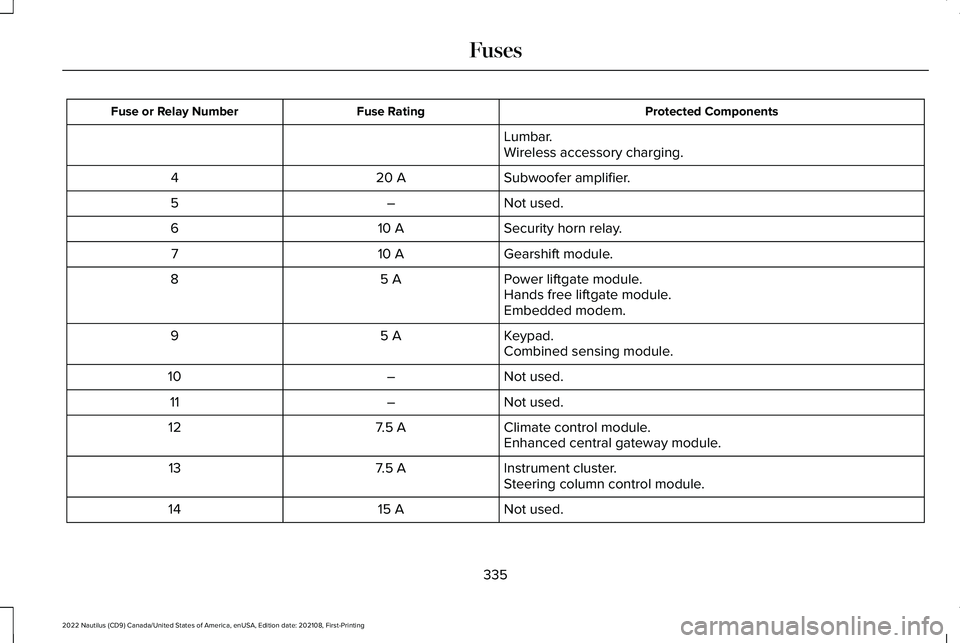
Protected ComponentsFuse RatingFuse or Relay Number
Lumbar.Wireless accessory charging.
Subwoofer amplifier.20 A4
Not used.–5
Security horn relay.10 A6
Gearshift module.10 A7
Power liftgate module.5 A8Hands free liftgate module.Embedded modem.
Keypad.5 A9Combined sensing module.
Not used.–10
Not used.–11
Climate control module.7.5 A12Enhanced central gateway module.
Instrument cluster.7.5 A13Steering column control module.
Not used.15 A14
335
2022 Nautilus (CD9) Canada/United States of America, enUSA, Edition date: 202108, First-PrintingFuses
Page 359 of 586
Note:To calibrate the steering angle sensor,drive the vehicle above 30 mph (50 km/h)for a minimum of 1.2 mi (2 km). Make sure todrive straight ahead for a minimum of 30seconds. Several vehicle functions aredisabled and a warning light could appearuntil the sensor is calibrated.
Note:The battery sensor must be reset whena new battery is installed. Install only abattery approved by Ford for use in thevehicle. Use the following procedure toperform the battery sensor reset:
1.1. Turn ignition to on and leave engineoff. Steps 2 and 3 must be completedwithin 10 seconds.
2.2. Flash the high beams 5 times, endingwith the high beams off.
3.3. Press and release the brake pedal 3times.
The battery warning light on the cluster willflash 3 times to confirm that the reset wassuccessful.
Battery Management System
The battery management system monitorsbattery conditions and takes actions toextend battery life. If excessive battery drainis detected, the system temporarily disablessome of the following features:
•Heated rear window.
•Heated seats.
•Climate control.
•Heated steering wheel.
•Audio unit.
•Navigation system.
A message may appear in the informationdisplay to alert you that battery protectionactions are active.
After battery replacement, or in some casesafter charging the battery with an externalcharger, the battery management systemrequires eight hours of vehicle sleep time torelearn the battery state of charge. Duringthis time your vehicle must remain fullylocked with the ignition off.
Note:If you add electrical accessories orcomponents to the vehicle, it may adverselyaffect battery performance and durability.This may also affect the performance ofother electrical systems in the vehicle.
Battery Disposal
Make sure that you dispose of oldbatteries in an environmentallyfriendly way. Seek advice fromyour local authority about recycling oldbatteries.
ADJUSTING THE HEADLAMPS
Vertical Aim Adjustment
The headlamps on your vehicle are properlyaimed at the assembly plant. If your vehiclehas been involved in a crash, have the aimof the headlamp beam checked by anauthorized dealer.
355
2022 Nautilus (CD9) Canada/United States of America, enUSA, Edition date: 202108, First-PrintingMaintenanceE107998
Page 461 of 586
Note:If your vehicle is plugged in, chargingwill stop during an update and resume whenthe update is complete.
Viewing Update Details
If an update is successful, the touchscreenwill provide additional details about theupdate. You can also access this informationunder the System Update tile.
If an update is not successful, follow theprompt that appears on the touchscreen.
PERFORMING A MASTER RESET
Press the settings option on thefeature bar.
1.Press the Reset tile.
2.Press Master Reset.
3.Follow the prompts on the screen tocomplete the reset.
457
2022 Nautilus (CD9) Canada/United States of America, enUSA, Edition date: 202108, First-PrintingVehicle System UpdatesE280315
Page 523 of 586
This device complies with Part 15 of the FCCRules and with Innovation, Science andEconomic Development Canada’slicence-exempt RSS(s). Operation is subjectto the following two conditions:
1.This device may not cause harmfulinterference, and
2.This device must accept any interferencereceived, including interference that maycause undesired operation.
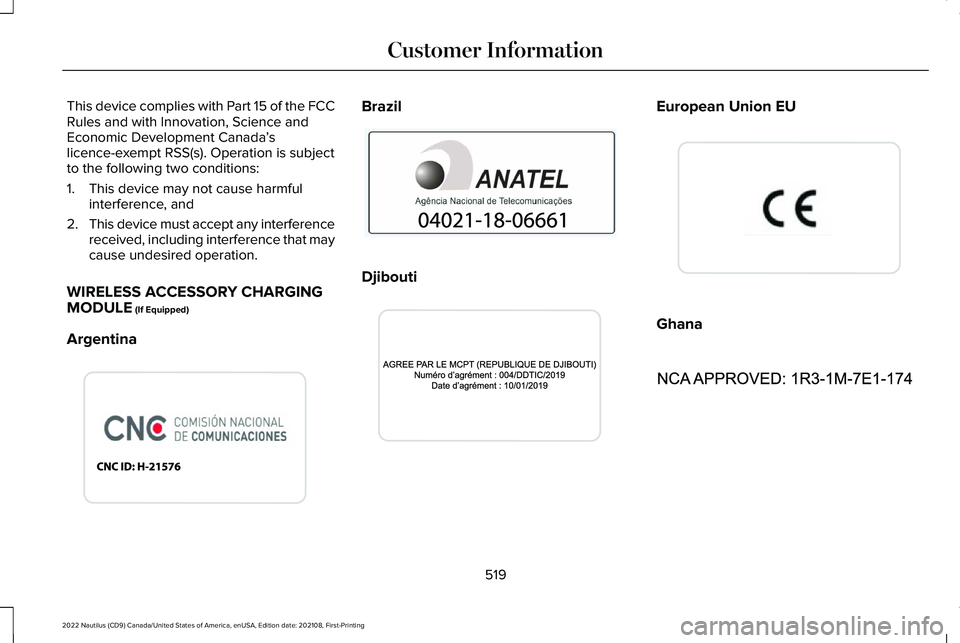
WIRELESS ACCESSORY CHARGINGMODULE (If Equipped)
Argentina
Brazil
Djibouti
European Union EU
Ghana
519
2022 Nautilus (CD9) Canada/United States of America, enUSA, Edition date: 202108, First-PrintingCustomer InformationE340521 E340824 E340823 E310043 E340522
Page 568 of 586
Blind Spot Information System..................277Blind Spot Information System –Troubleshooting.............................................279
Blind Spot Information SystemIndicators.....................................................279Blind Spot Information SystemLimitations....................................................277Blind Spot Information SystemPrecautions..................................................277Blind Spot Information SystemRequirements.............................................278Blind Spot Information System –Troubleshooting.........................................279Blind Spot Information System – InformationMessages.........................................................279
Bluetooth®......................................................448Body Control Module Fuse Box................333Accessing the Body Control Module FuseBox.....................................................................333Identifying the Fuses in the Body ControlModule Fuse Box...........................................334Locating the Body Control Module FuseBox.....................................................................333
Body Styling Kit Precautions.....................368Body Styling Kits...........................................368Bonnet LockSee: Opening and Closing the Hood............339
Booster Seats..................................................49
Brake Fluid Specification............................221Brake Over Accelerator.............................220Brake Precautions.......................................220Brakes.............................................................220Anti-Lock Braking System................................220Brakes – Troubleshooting.................................221
Brakes – Troubleshooting..........................221Brakes – Frequently Asked Questions........222Brakes – Information Messages....................222Brakes – Warning Lamps..................................221
Breaking-In......................................................310
C
Calculating Payload.....................................296Calculating the Load Limit.........................296Canceling the Set Speed...........................255Capacities and Specifications...................404Catalytic Converter......................................208Catalytic Converter – Troubleshooting........209
Catalytic Converter Precautions..............208Catalytic Converter –Troubleshooting........................................209Catalytic Converter – Warning Lamps..........209
Center Console................................................31Center Display Limitations.........................437Center Display Overview............................437Center Display Precautions.......................437
Changing a Flat Tire....................................397Changing a Road Wheel.............................397Changing the 12V Battery..........................353Changing the Engine Air Filter..................351Changing the Fuel Filter.............................352Changing the Remote Control Battery......77Changing the Vehicle Wi-Fi Hotspot Nameor Password................................................427Charging a Device.........................................181Charging a Wireless Device.......................186Checking MyKey System Status.................88Checking the Brake Fluid..........................220Checking the Coolant..................................347Checking the Seatbelts..................................61Checking the Tire Pressures.....................382Checking the Wiper Blades.........................118Children and Airbags.....................................68Child Restraint Anchor Points......................40Locating the Child Restraint Lower AnchorPoints....................................................................41Locating the Child Restraint Top TetherAnchor Points.....................................................41What Are the Child Restraint AnchorPoints...................................................................40
Child Restraints................................................41Child Restraint Position Information..................41Child Restraints Recommendation...................43
564
2022 Nautilus (CD9) Canada/United States of America, enUSA, Edition date: 202108, First-PrintingIndex
Page 578 of 586
R
Radio Frequency CertificationLabels............................................................481Blind Spot Information System Sensors........481Body Control Module........................................489Cruise Control Module......................................492Garage Door Opener........................................496Keys and Remote Controls..............................497Radio Transceiver Module................................501Remote Function Actuator...............................489SYNC.....................................................................504Telematics Control Unit....................................509Tire Pressure Monitoring SystemSensors.............................................................510Wireless Accessory Charging Module..........519
Rear Exterior.....................................................37Rear Occupant Alert System AudibleWarnings.......................................................173Rear Occupant Alert SystemIndicators......................................................173Rear Occupant Alert SystemLimitations....................................................172Rear Occupant Alert SystemPrecautions..................................................172Rear Occupant Alert System......................172Rear Parking Aid...........................................237Locating the Rear Parking Aid Sensors........237
Rear Parking Aid Audible Warnings..............238Rear Parking Aid Limitations............................237What is the Rear Parking Aid...........................237
Rear Seats.......................................................168Heated Seats........................................................170Manual Seats........................................................168Power Seats..........................................................170
Rear View Camera Guide Lines...............242Rear View Camera Object DistanceIndicators.....................................................243Rear View Camera Precautions...............242Rear View Camera.......................................242Rear View Camera Settings.............................243
Rear View Camera Settings.......................243Switching Rear View Camera Delay On andOff......................................................................244Zooming the Rear View Camera In andOut.....................................................................243
Recalling a Preset Position..........................174Recreationally Towing Your Vehicle - 2.0L,AWD...............................................................321Recreationally Towing Your Vehicle - 2.0L,FWD...............................................................321Recreationally Towing Your Vehicle -2.7L.................................................................321Reduced Engine Performance...................310Refueling........................................................204Manually Opening the Fuel Filler Door........206
Refueling System Overview............................204Refueling Your Vehicle......................................204
Releasing the Electric Parking Brake if theVehicle Battery Has Run Out ofCharge..........................................................224Remote Control Limitations..........................76Remotely Starting and Stopping theVehicle...........................................................153Remote Start Limitations.............................153Remote Start Precautions...........................153Remote Start Remote ControlIndicators......................................................154Remote Start...................................................153Remote Start Settings........................................154
Remote Start Settings..................................154Setting the Remote Start Duration..................155Switching Climate Control Last Settings Onand Off...............................................................154Switching the Heated Seat Settings On andOff.......................................................................154Switching the Heated Steering Wheel SettingsOn and Off........................................................155
Removing Your Vehicle FromStorage.........................................................370Repairing Minor Paint Damage.................367Replacement PartsRecommendation......................................523
574
2022 Nautilus (CD9) Canada/United States of America, enUSA, Edition date: 202108, First-PrintingIndex