wheel LINCOLN NAUTILUS 2023 Owners Manual
[x] Cancel search | Manufacturer: LINCOLN, Model Year: 2023, Model line: NAUTILUS, Model: LINCOLN NAUTILUS 2023Pages: 606, PDF Size: 13.57 MB
Page 406 of 606
•Exceed 50 mph (80 km/h).
•Load the vehicle beyond maximumvehicle load rating listed on the SafetyCompliance Label.
•Tow a trailer.
•Use snow chains on the end of thevehicle with the dissimilar spare tire.
•Use more than one dissimilar spare tireat a time.
•Use commercial car washing equipment.
•Try to repair the dissimilar spare tire.
Use of one of the dissimilar spare tires listedabove at any one wheel location can lead toimpairment of the following:
•Handling, stability and brakingperformance.
•Comfort and noise.
•Ground clearance and parking at curbs.
•Winter weather driving capability.
•Wet weather driving capability.
•All-wheel driving capability, if applicable.
3. Full-size dissimilar spare without labelon wheel
When driving with the full-size dissimilarspare wheel and tire assembly, do not:
•Exceed 70 mph (113 km/h).
•Use more than one dissimilar sparewheel and tire assembly at a time.
•Use commercial car washing equipment.
•Use snow chains on the end of thevehicle with the dissimilar spare wheeland tire assembly.
The usage of a full-size dissimilar sparewheel and tire assembly can lead toimpairment of the following:
•Handling, stability and brakingperformance.
•Comfort and noise.
•Ground clearance and parking at curbs.
•Winter weather driving capability.
•Wet weather driving capability.
•All-wheel driving capability.
When driving with the full-size dissimilarspare wheel and tire assembly additionalcaution should be given to:
•Towing a trailer.
•Driving vehicles equipped with a camperbody.
•Driving vehicles with a load on the cargorack.
Drive cautiously when using a full-sizedissimilar spare wheel and tire assembly andseek service as soon as possible.
Tire Change Procedure
WARNING: The jack supplied withthis vehicle is only intended for changinga flat tire in an emergency. Do not attemptto do any other work on your vehicle whenit is supported by the jack, as your vehiclecould slip off the jack. Failure to follow thisinstruction could result in personal injuryor death.
402
2023 Nautilus (CD9) Canada/United States of America, enUSA, Edition date: 202207, DOMChanging a Road Wheel (If Equipped)
Page 407 of 606
WARNING: To help prevent yourvehicle from moving when changing awheel, shift the transmission into park (P),set the parking brake and use anappropriate block or wheel chock tosecure the wheel diagonally opposite tothe wheel being changed. For example,when changing the front left wheel, placean appropriate block or wheel chock onthe right rear wheel.
WARNING: Never place anythingbetween the vehicle jack and your vehicle.
WARNING: Never place anythingbetween the vehicle jack and the ground.
WARNING: Park your vehicle so thatyou do not obstruct the flow of traffic orplace yourself in any danger and set up awarning triangle.
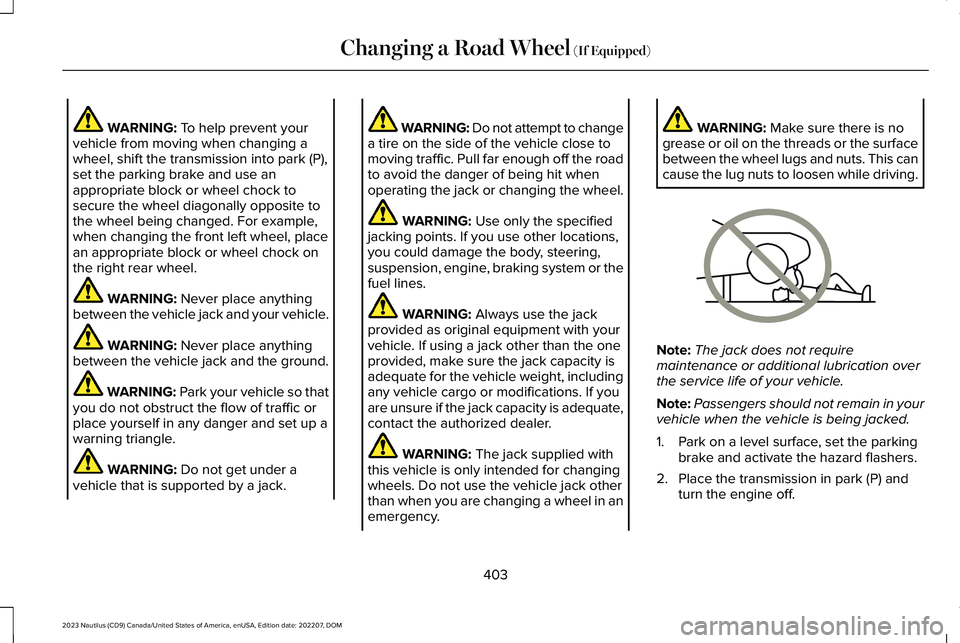
WARNING: Do not get under avehicle that is supported by a jack.
WARNING: Do not attempt to changea tire on the side of the vehicle close tomoving traffic. Pull far enough off the roadto avoid the danger of being hit whenoperating the jack or changing the wheel.
WARNING: Use only the specifiedjacking points. If you use other locations,you could damage the body, steering,suspension, engine, braking system or thefuel lines.
WARNING: Always use the jackprovided as original equipment with yourvehicle. If using a jack other than the oneprovided, make sure the jack capacity isadequate for the vehicle weight, includingany vehicle cargo or modifications. If youare unsure if the jack capacity is adequate,contact the authorized dealer.
WARNING: The jack supplied withthis vehicle is only intended for changingwheels. Do not use the vehicle jack otherthan when you are changing a wheel in anemergency.
WARNING: Make sure there is nogrease or oil on the threads or the surfacebetween the wheel lugs and nuts. This cancause the lug nuts to loosen while driving.
Note:The jack does not requiremaintenance or additional lubrication overthe service life of your vehicle.
Note:Passengers should not remain in yourvehicle when the vehicle is being jacked.
1.Park on a level surface, set the parkingbrake and activate the hazard flashers.
2.Place the transmission in park (P) andturn the engine off.
403
2023 Nautilus (CD9) Canada/United States of America, enUSA, Edition date: 202207, DOMChanging a Road Wheel (If Equipped)E166722
Page 408 of 606
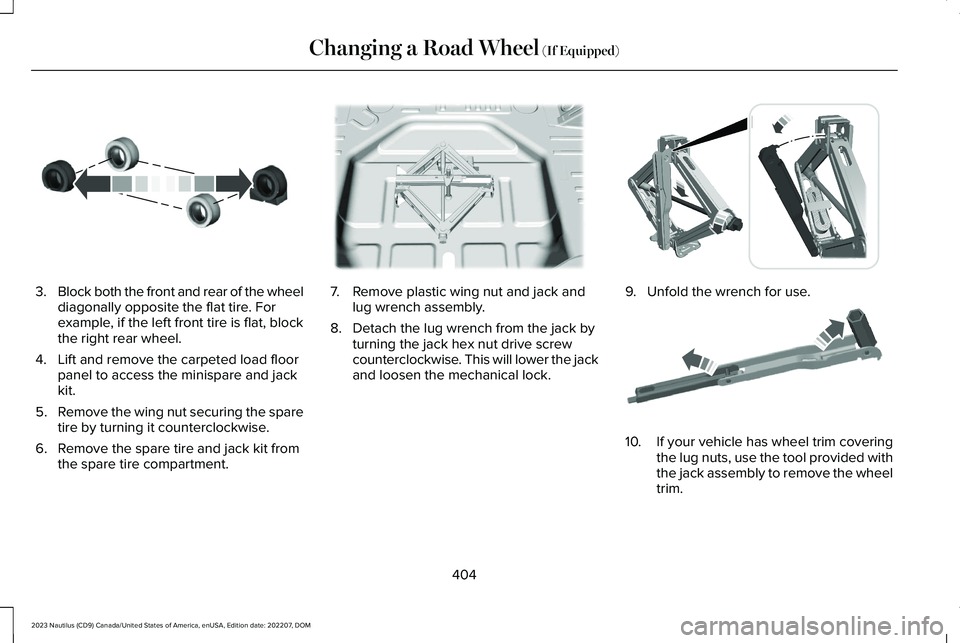
3.Block both the front and rear of the wheeldiagonally opposite the flat tire. Forexample, if the left front tire is flat, blockthe right rear wheel.
4.Lift and remove the carpeted load floorpanel to access the minispare and jackkit.
5.Remove the wing nut securing the sparetire by turning it counterclockwise.
6.Remove the spare tire and jack kit fromthe spare tire compartment.
7.Remove plastic wing nut and jack andlug wrench assembly.
8.Detach the lug wrench from the jack byturning the jack hex nut drive screwcounterclockwise. This will lower the jackand loosen the mechanical lock.
9.Unfold the wrench for use.
10.If your vehicle has wheel trim coveringthe lug nuts, use the tool provided withthe jack assembly to remove the wheeltrim.
404
2023 Nautilus (CD9) Canada/United States of America, enUSA, Edition date: 202207, DOMChanging a Road Wheel (If Equipped)E175447 E178186 E294117 E181744
Page 409 of 606
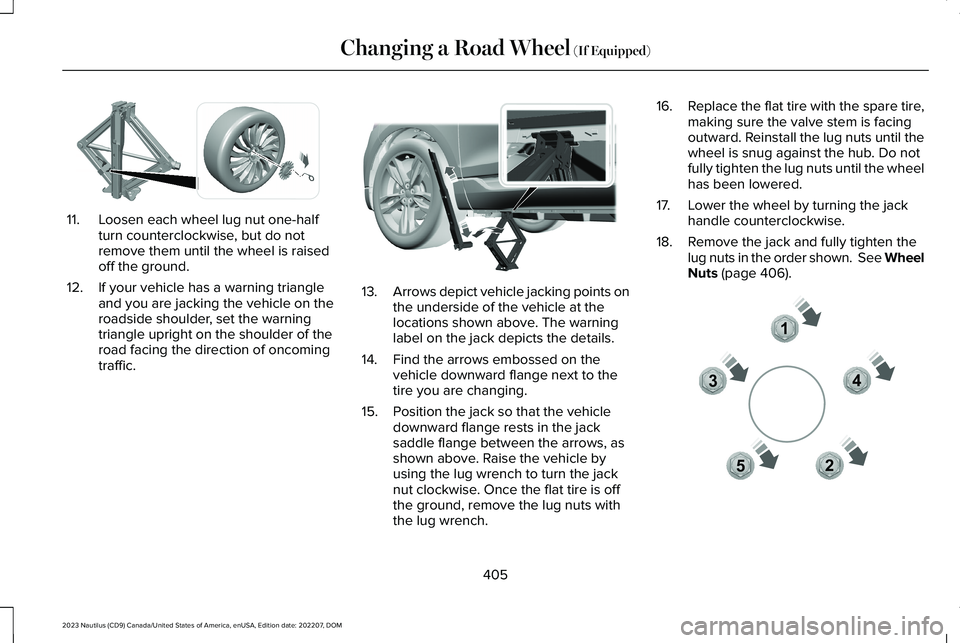
11.Loosen each wheel lug nut one-halfturn counterclockwise, but do notremove them until the wheel is raisedoff the ground.
12.If your vehicle has a warning triangleand you are jacking the vehicle on theroadside shoulder, set the warningtriangle upright on the shoulder of theroad facing the direction of oncomingtraffic.
13.Arrows depict vehicle jacking points onthe underside of the vehicle at thelocations shown above. The warninglabel on the jack depicts the details.
14.Find the arrows embossed on thevehicle downward flange next to thetire you are changing.
15.Position the jack so that the vehicledownward flange rests in the jacksaddle flange between the arrows, asshown above. Raise the vehicle byusing the lug wrench to turn the jacknut clockwise. Once the flat tire is offthe ground, remove the lug nuts withthe lug wrench.
16.Replace the flat tire with the spare tire,making sure the valve stem is facingoutward. Reinstall the lug nuts until thewheel is snug against the hub. Do notfully tighten the lug nuts until the wheelhas been lowered.
17.Lower the wheel by turning the jackhandle counterclockwise.
18.Remove the jack and fully tighten thelug nuts in the order shown. See WheelNuts (page 406).
405
2023 Nautilus (CD9) Canada/United States of America, enUSA, Edition date: 202207, DOMChanging a Road Wheel (If Equipped)E294584 E336095 12345E306781
Page 410 of 606
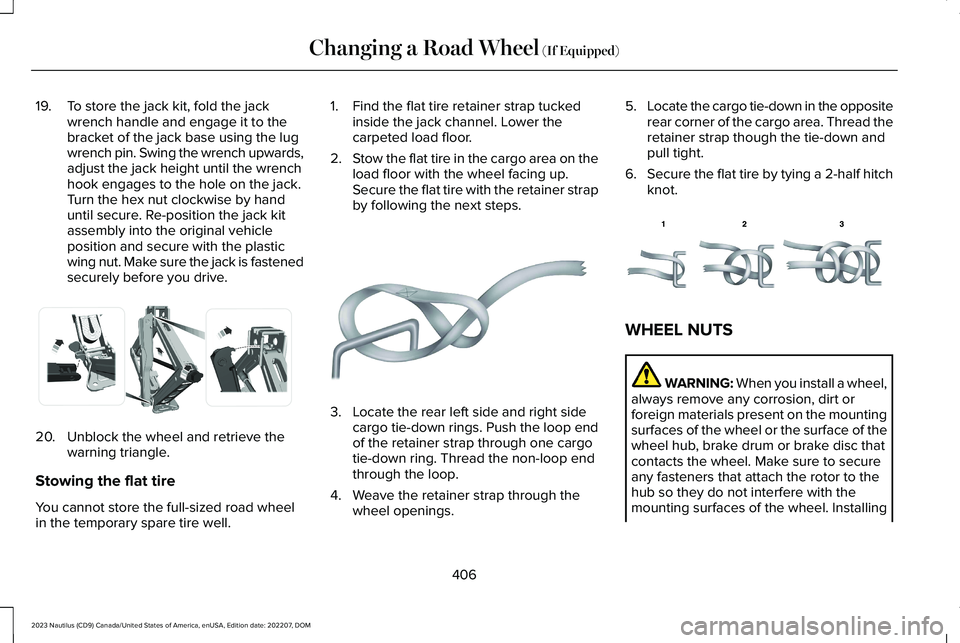
19.To store the jack kit, fold the jackwrench handle and engage it to thebracket of the jack base using the lugwrench pin. Swing the wrench upwards,adjust the jack height until the wrenchhook engages to the hole on the jack.Turn the hex nut clockwise by handuntil secure. Re-position the jack kitassembly into the original vehicleposition and secure with the plasticwing nut. Make sure the jack is fastenedsecurely before you drive.
20.Unblock the wheel and retrieve thewarning triangle.
Stowing the flat tire
You cannot store the full-sized road wheelin the temporary spare tire well.
1.Find the flat tire retainer strap tuckedinside the jack channel. Lower thecarpeted load floor.
2.Stow the flat tire in the cargo area on theload floor with the wheel facing up.Secure the flat tire with the retainer strapby following the next steps.
3.Locate the rear left side and right sidecargo tie-down rings. Push the loop endof the retainer strap through one cargotie-down ring. Thread the non-loop endthrough the loop.
4.Weave the retainer strap through thewheel openings.
5.Locate the cargo tie-down in the oppositerear corner of the cargo area. Thread theretainer strap though the tie-down andpull tight.
6.Secure the flat tire by tying a 2-half hitchknot.
WHEEL NUTS
WARNING: When you install a wheel,always remove any corrosion, dirt orforeign materials present on the mountingsurfaces of the wheel or the surface of thewheel hub, brake drum or brake disc thatcontacts the wheel. Make sure to secureany fasteners that attach the rotor to thehub so they do not interfere with themounting surfaces of the wheel. Installing
406
2023 Nautilus (CD9) Canada/United States of America, enUSA, Edition date: 202207, DOMChanging a Road Wheel (If Equipped)E294121 E142906 E143746
Page 411 of 606
wheels without correct metal-to-metalcontact at the wheel mounting surfacescan cause the wheel nuts to loosen andthe wheel to come off while your vehicleis in motion, resulting in loss of vehiclecontrol, personal injury or death.
lb.ft (Nm)1Bolt Size
162 lb.ft (220 Nm)M14 x 1.5
1 Torque specifications are for nut and boltthreads free of dirt and rust. Use only ourrecommended replacement wheel nuts andor wheel bolts.
Retighten the wheel nuts to the specifiedtorque within 100 mi (160 km) after any wheeldisturbance, such as tire rotation, changinga flat tire or wheel removal.
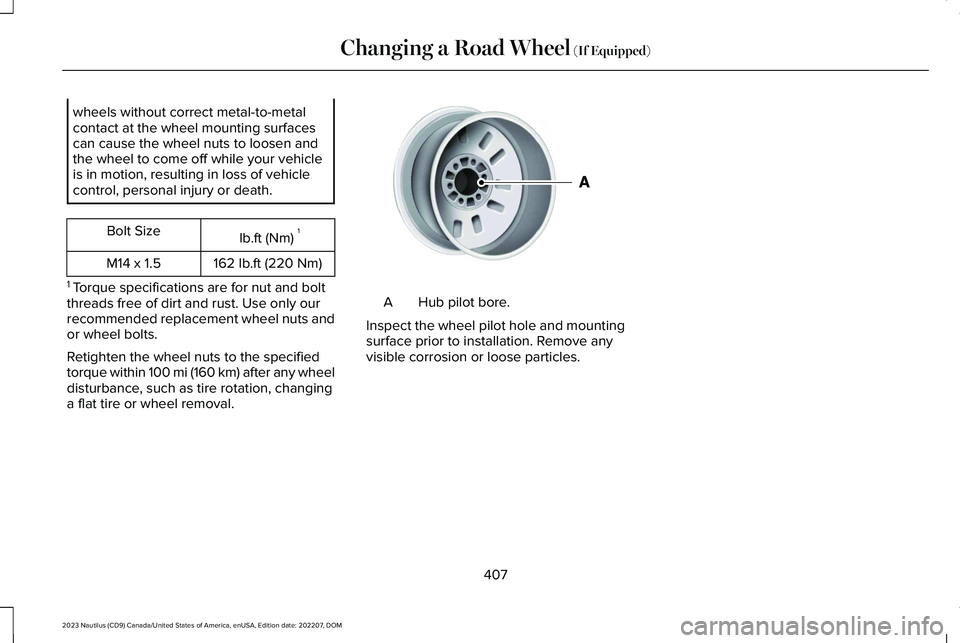
Hub pilot bore.A
Inspect the wheel pilot hole and mountingsurface prior to installation. Remove anyvisible corrosion or loose particles.
407
2023 Nautilus (CD9) Canada/United States of America, enUSA, Edition date: 202207, DOMChanging a Road Wheel (If Equipped)E145950
Page 423 of 606
FUEL TANK CAPACITY
Capacities
QuantityVariant
18.4 gal (69.7 L)Front-wheel drive.
18.5 gal (70 L)All-wheel drive.
419
2023 Nautilus (CD9) Canada/United States of America, enUSA, Edition date: 202207, DOMCapacities and Specifications
Page 438 of 606
ADJUSTING THE VOLUME
Turn to adjust the volume.
Some vehicles may be able to adjust thevolume using buttons on the steering wheel.
SWITCHING SHUFFLE MODE ON
AND OFF
Press the button on thetouchscreen to switch shufflemode on or off.
Note:Not all sources have shuffle mode.
SWITCHING REPEAT MODE ON
AND OFF
Press the button on thetouchscreen to switch repeat modeon or off.
Note:Not all sources have repeat mode.
SETTING A MEMORY PRESET
1.Select a station or channel.
2.Press and hold a memory preset buttonon the touchscreen.
Note:The audio mutes briefly while thesystem saves the preset and returns once itis stored.
Note:You can save presets from multiplesources to the memory preset bar.
MUTING THE AUDIO
Press the button on the steeringwheel to mute the audio.
Press to mute the signal. Pressagain to restore the signal.
ADJUSTING THE SOUND
SETTINGS
Balance and Fade (If Equipped)
1.Press Settings on the touchscreen.
2.Press Sound Settings.
3.Press Balance / Fade.
4.Press the arrows to adjust the settings.
Tone Settings
1.Press Settings on the touchscreen.
2.Press Sound Settings.
434
2023 Nautilus (CD9) Canada/United States of America, enUSA, Edition date: 202207, DOMAudio SystemE248939
Page 445 of 606
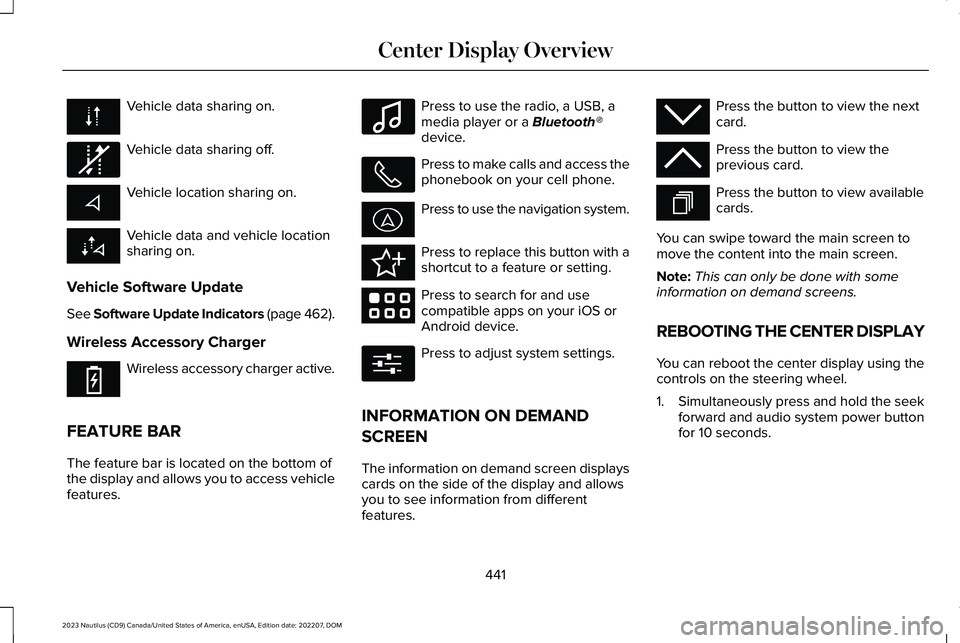
Vehicle data sharing on.
Vehicle data sharing off.
Vehicle location sharing on.
Vehicle data and vehicle locationsharing on.
Vehicle Software Update
See Software Update Indicators (page 462).
Wireless Accessory Charger
Wireless accessory charger active.
FEATURE BAR
The feature bar is located on the bottom ofthe display and allows you to access vehiclefeatures.
Press to use the radio, a USB, amedia player or a Bluetooth®device.
Press to make calls and access thephonebook on your cell phone.
Press to use the navigation system.
Press to replace this button with ashortcut to a feature or setting.
Press to search for and usecompatible apps on your iOS orAndroid device.
Press to adjust system settings.
INFORMATION ON DEMAND
SCREEN
The information on demand screen displayscards on the side of the display and allowsyou to see information from differentfeatures.
Press the button to view the nextcard.
Press the button to view theprevious card.
Press the button to view availablecards.
You can swipe toward the main screen tomove the content into the main screen.
Note:This can only be done with someinformation on demand screens.
REBOOTING THE CENTER DISPLAY
You can reboot the center display using thecontrols on the steering wheel.
1.Simultaneously press and hold the seekforward and audio system power buttonfor 10 seconds.
441
2023 Nautilus (CD9) Canada/United States of America, enUSA, Edition date: 202207, DOMCenter Display Overview E335292 E353214 E100027 E358432 E353220 E280315 E353212 E353211 E353209
Page 446 of 606
LINCOLN PERSONAL ASSISTANT
USING LINCOLN PERSONALASSISTANT
The digital assistant allows you to controlvehicle features using conversationalrequests.
To begin a voice interaction using the wakeword, say the selected wake word, then sayyour command.
Press the voice interaction buttonon the steering wheel. A tonesounds before you can say yourcommand.
Note:You may need to enable your vehicle'smodem to use certain voice commands. SeeEnabling and Disabling the Modem (page427).
Note:When you are not driving, additionalcommands are available by using popularchat applications. Use LincolnWay to setupa conversation with your Lincoln assistant.
Voice Command Examples
To see examples of what voice commandsyou can use with different features:
Press the button on thetouchscreen.
1.Press Lincoln Assistant.
2.Press Voice Command Help.
3.Select a feature.
LINCOLN PERSONAL ASSISTANTSETTINGS
To access the settings menu:
Press the button on thetouchscreen.
1.Press Lincoln Assistant.
From the settings menu you can do thefollowing:
•Switch listen for wake word on or off.
•Set the preferred wake word.
•Switch advance mode on or off.
•Switch phone confirmation on or off.
•Switch the commands list on or off.
•View the commands help menu.
Press the button next to a menuoption for more information.
LINCOLN PERSONAL ASSISTANT –FREQUENTLY ASKED QUESTIONS
Why does the system not understandwhat I am saying?
•You are speaking too soon. When usingthe button of the steering wheel, wait forthe tone before you speak.
442
2023 Nautilus (CD9) Canada/United States of America, enUSA, Edition date: 202207, DOMVoice InteractionE142599 E280315 E280315 E366956