fuel LINCOLN NAUTILUS 2023 User Guide
[x] Cancel search | Manufacturer: LINCOLN, Model Year: 2023, Model line: NAUTILUS, Model: LINCOLN NAUTILUS 2023Pages: 606, PDF Size: 13.57 MB
Page 138 of 606
INTERIOR MIRROR PRECAUTIONS
WARNING: Do not adjust the mirrorswhen your vehicle is moving. This couldresult in the loss of control of your vehicle,serious personal injury or death.
Note:Do not clean the mirror housing orglass with harsh abrasives, fuel or otherpetroleum-based cleaning products.
AUTO-DIMMING INTERIOR MIRROR
WHAT IS THE AUTO-DIMMINGINTERIOR MIRROR
The mirror dims to reduce the effect of brightlight from behind. It returns to normal whenthe bright light from behind is no longerpresent or if you shift into reverse (R).
AUTO-DIMMING INTERIOR MIRRORLIMITATIONS
Do not block the sensors on the front andback of the mirror.
Note:A rear center passenger or raised rearcenter head restraint could prevent light fromreaching the sensor.
134
2023 Nautilus (CD9) Canada/United States of America, enUSA, Edition date: 202207, DOMInterior Mirror
Page 145 of 606
Status bar.A
Speedometer.B
Right information group.C
Fuel gauge.D
Engine coolant temperature gauge.E
Left information group.F
TACHOMETER
Indicates the engine speed.
SPEEDOMETER
Indicates the vehicle speed.
FUEL GAUGE
WHAT IS THE FUEL GAUGE
Indicates approximately how much fuel is inthe fuel tank.
FUEL GAUGE LIMITATIONS
The fuel gauge may not provide an accuratereading when your vehicle is on an incline.
LOCATING THE FUEL FILLER DOOR
The arrow adjacent to the fuel pump symbolindicates on which side of your vehicle thefuel filler door is located.
WHAT IS THE LOW FUEL REMINDER
A low fuel level reminder displays andsounds when the distance to empty reaches75 mi (120 km) to empty for MyKey, and at50 mi (80 km), 25 mi (40 km), 12 mi (20 km)and 0 mi (0 km) for all vehicle keys.
Note:The low fuel reminder can appear atdifferent fuel gauge positions depending onfuel economy conditions. This variation isnormal.
141
2023 Nautilus (CD9) Canada/United States of America, enUSA, Edition date: 202207, DOMInstrument Cluster
Page 146 of 606
WHAT IS DISTANCE TO EMPTY
Indicates the approximate distance yourvehicle can travel on the fuel remaining inthe tank. Changes in driving pattern cancause the value to not only decrease but alsoincrease or stay constant for periods of time.
ENGINE COOLANT TEMPERATURE
GAUGE
Indicates the engine coolant temperature.
ENGINE OIL PRESSURE GAUGE
Indicates the engine oil pressure.
Note:This is a configurable gauge.
TRANSMISSION FLUID
TEMPERATURE GAUGE
Indicates the transmission fluid temperature.
Special operating conditions can causehigher than normal operating temperatures.See Special Operating ConditionsScheduled Maintenance (page 478).
Note:This is a configurable gauge.
12V BATTERY GAUGE
Indicates the power of the 12-volt battery.
WHAT ARE THE INSTRUMENT
CLUSTER WARNING LAMPS
Warning lamps alert you to a vehiclecondition that could become serious. Somelamps illuminate when you start your vehicleto make sure they work. If any lamps remainon after starting your vehicle, refer to therespective system warning lamp for furtherinformation.
INSTRUMENT CLUSTER WARNING
LAMPS
Anti-Lock Brake System
If it illuminates when you aredriving, this indicates that thesystem requires service. Yourvehicle continues to have normal brakingwithout the anti-lock brake system function. Have your vehicle checked as soon aspossible.
Battery
It illuminates when you switch theignition on.
If it illuminates when the engine isrunning, this indicates your vehicle requiresservice. Have your vehicle checked as soonas possible.
142
2023 Nautilus (CD9) Canada/United States of America, enUSA, Edition date: 202207, DOMInstrument ClusterE67020 E67021
Page 147 of 606
Brake System
It illuminates when you apply theparking brake and the ignition ison. If it illuminates when yourvehicle is moving, make sure theparking brake is released. If theparking brake is released, this indicates lowbrake fluid level or the brake system requiresservice. Have your vehicle checked as soonas possible.
Note:Indicators may vary depending onregion.
Door Ajar
It illuminates when you switch theignition on and remains on if anydoor is open.
Electric Parking Brake
It illuminates or flashes when theelectric parking brake requiresservice.
Engine Coolant Temperature
If it illuminates, safely stop yourvehicle and switch your vehicle off.
Fasten Seatbelt
It illuminates and a tone soundsuntil you fasten the seatbelts.
Hood Ajar
It illuminates when the ignition ison and the hood is not completelyclosed.
Liftgate Ajar
It illuminates when the ignition ison and the liftgate is notcompletely closed.
Low Beam Warning
It illuminates when the low beamheadlamp requires service. Havethe system checked as soon aspossible.
Low Fuel Level
It illuminates when the fuel level islow.
Low Tire Pressure
It illuminates when your tirepressure is low. If illuminated,check your tire pressure as soonas possible. If it begins to flash at anytime,have the system checked as soon aspossible.
Low Washer Fluid Level
It illuminates when the washer fluidis low.
143
2023 Nautilus (CD9) Canada/United States of America, enUSA, Edition date: 202207, DOMInstrument ClusterE270480 E67024 E146190 E103308 E71880 E246598 E162453 E181350 E139232 E132353
Page 152 of 606
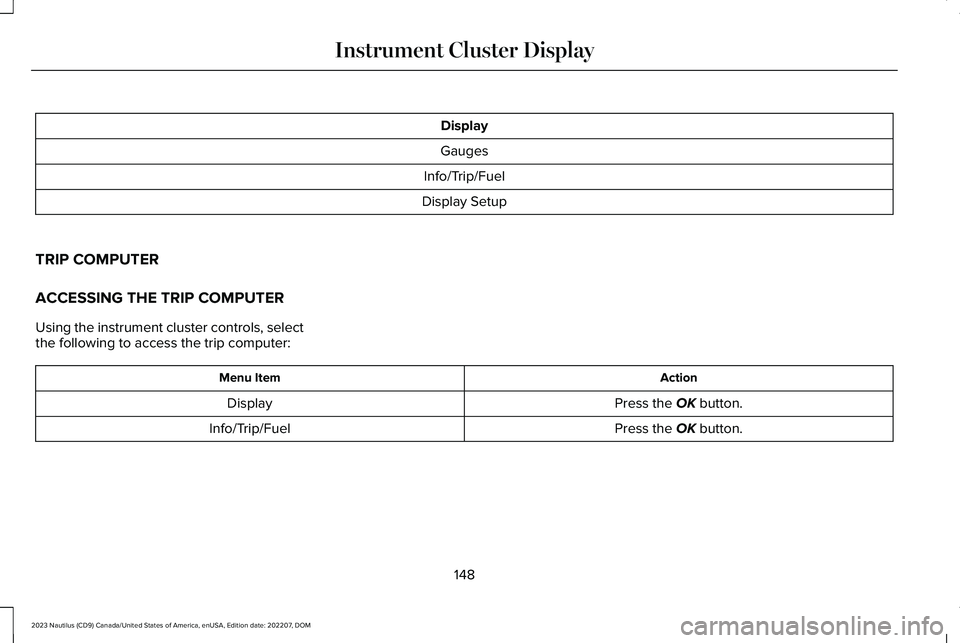
Display
Gauges
Info/Trip/Fuel
Display Setup
TRIP COMPUTER
ACCESSING THE TRIP COMPUTER
Using the instrument cluster controls, selectthe following to access the trip computer:
ActionMenu Item
Press the OK button.Display
Press the OK button.Info/Trip/Fuel
148
2023 Nautilus (CD9) Canada/United States of America, enUSA, Edition date: 202207, DOMInstrument Cluster Display
Page 153 of 606
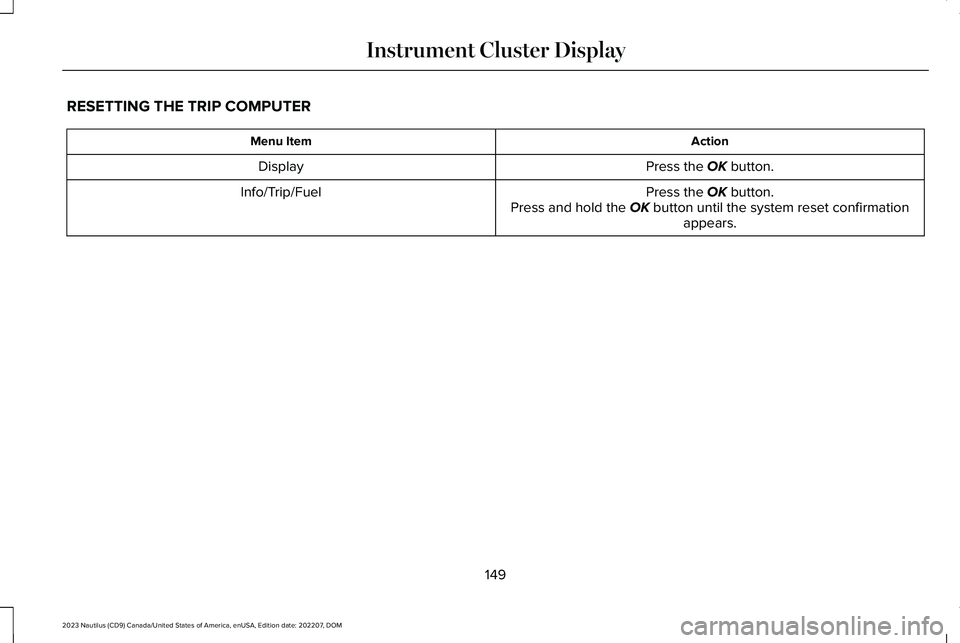
RESETTING THE TRIP COMPUTER
ActionMenu Item
Press the OK button.Display
Press the OK button.Press and hold the OK button until the system reset confirmationappears.
Info/Trip/Fuel
149
2023 Nautilus (CD9) Canada/United States of America, enUSA, Edition date: 202207, DOMInstrument Cluster Display
Page 154 of 606
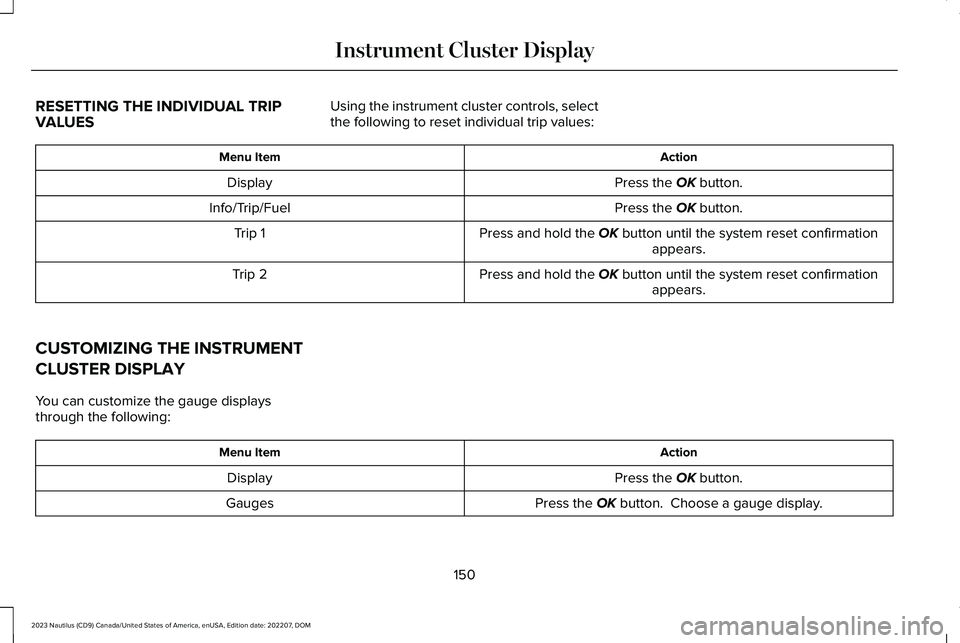
RESETTING THE INDIVIDUAL TRIPVALUES
Using the instrument cluster controls, selectthe following to reset individual trip values:
ActionMenu Item
Press the OK button.Display
Press the OK button.Info/Trip/Fuel
Press and hold the OK button until the system reset confirmationappears.Trip 1
Press and hold the OK button until the system reset confirmationappears.Trip 2
CUSTOMIZING THE INSTRUMENT
CLUSTER DISPLAY
You can customize the gauge displaysthrough the following:
ActionMenu Item
Press the OK button.Display
Press the OK button. Choose a gauge display.Gauges
150
2023 Nautilus (CD9) Canada/United States of America, enUSA, Edition date: 202207, DOMInstrument Cluster Display
Page 158 of 606
WHAT IS REMOTE START
The system allows you to remotely start yourvehicle and to adjust the interior temperatureaccording to the settings that you chose.
REMOTE START PRECAUTIONS
WARNING: Do not start the enginein a closed garage or in other enclosedareas. Exhaust fumes are toxic. Alwaysopen the garage door before you start theengine. Failure to follow this instructioncould result in personal injury or death.
REMOTE START LIMITATIONS
Remote start does not work under thefollowing conditions:
•The alarm horn is sounding.
•The hood is open.
•The transmission is not in park (P).
•The ignition is on.
•The battery voltage is below theminimum operating voltage.
Note:Do not use remote start if your fuellevel is low.
Note:To use remote start with Lincoln Wayor Phone as a Key, enable the modem. SeeConnecting Lincoln Way to the Modem(page 427).
ENABLING REMOTE START
1.Using the instrument cluster displaycontrols on the steering wheel, selectSettings.
2.Select Vehicle.
3.Select Remote Start.
4.Switch System on.
Note:To use remote start, make sure thatthe modem is enabled. See Enabling andDisabling the Modem (page 427).
REMOTELY STARTING AND
STOPPING THE VEHICLE
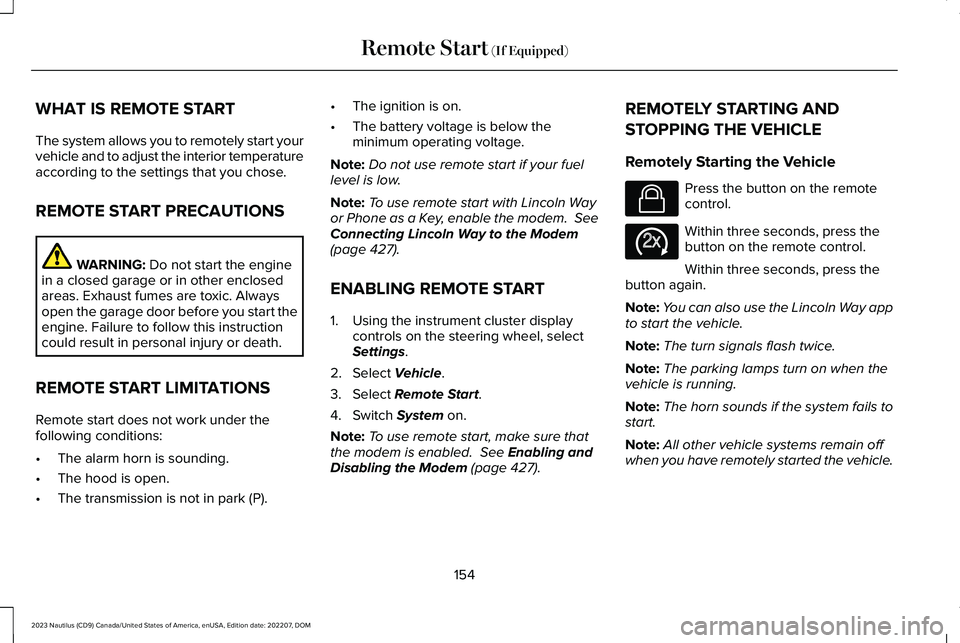
Remotely Starting the Vehicle
Press the button on the remotecontrol.
Within three seconds, press thebutton on the remote control.
Within three seconds, press thebutton again.
Note:You can also use the Lincoln Way appto start the vehicle.
Note:The turn signals flash twice.
Note:The parking lamps turn on when thevehicle is running.
Note:The horn sounds if the system fails tostart.
Note:All other vehicle systems remain offwhen you have remotely started the vehicle.
154
2023 Nautilus (CD9) Canada/United States of America, enUSA, Edition date: 202207, DOMRemote Start (If Equipped)E138623 E138625
Page 162 of 606
Note:When you switch maximum coolingoff, air conditioning remains on.
SWITCHING THE HEATED REAR
WINDOW ON AND OFF
Press the button to clear the rearwindow of thin ice and fog. Theheated rear window turns off aftera short period of time.
Note:Do not use harsh chemicals, razorblades or other sharp objects to clean orremove decals from the inside of the heatedrear window as this could cause damage tothe heated rear window grid lines notcovered by the vehicle warranty.
Note:Make sure the engine is on beforeoperating the heated windows.
SETTING THE BLOWER MOTOR
SPEED
Turn the control to adjust thevolume of air circulated in thevehicle.
SWITCHING THE HEATED
MIRRORS ON AND OFF
When you switch the heated rear windowon, the heated exterior mirrors turn on.
Note:Do not remove ice from the mirrorswith a scraper or adjust the mirror glasswhen it is frozen in place.
Note:Do not clean the mirror housing orglass with harsh abrasives, fuel or otherpetroleum-based cleaning products. Thevehicle warranty may not cover damagecaused to the mirror housing or glass.
SETTING THE TEMPERATURE
Press the toggle button on the left-hand sideof the climate control upward or downwardto set the left-hand temperature.
Note:This control also adjusts the right-handside temperature when you switch off dualzone mode.
Press the toggle button on the right-handside of the climate control upward ordownward to set the right-hand temperature.
DIRECTING THE FLOW OF AIR
Directing Air to the Windshield AirVents
Press the button to activate theselection screen.
Press the button on thetouchscreen.
Directing Air to the Instrument Panel
Air Vents
Press the button to activate theselection screen.
Press the button on thetouchscreen.
158
2023 Nautilus (CD9) Canada/United States of America, enUSA, Edition date: 202207, DOMClimate Control E266187 E266186 E265283 E265283 E244097
Page 200 of 606

AUTOMATIC ENGINE STOP (IF EQUIPPED)
WHAT IS AUTOMATIC ENGINE STOP
Automatic engine stop is a feature thatswitches the engine off if it has been idlingfor an extended period to help you save fuel.
HOW DOES AUTOMATIC ENGINESTOP WORK
Automatic engine stop turns the engine off.The ignition also turns off in order to savebattery power. Before the engine shutsdown, a message appears in the informationdisplay showing a timer counting down. Ifyou do not intervene within 30 seconds, theengine shuts down. Another messageappears in the information display to informyou that the engine has shut down in orderto save fuel. Start your vehicle as younormally do.
SWITCHING AUTOMATIC ENGINESTOP ON AND OFF
1.Press the menu button on the steeringwheel to enter the information displaymain menu.
2.Select Settings.
3.Switch Auto Engine Off or 30min MaxIdle on or off.
Note: You cannot permanently switch offthe automatic shutdown. If you switch it off,it turns on each time you switch the ignitionon.
OVERRIDING AUTOMATIC ENGINESTOP
You can stop the engine shutdown, or resetthe timer, at any point before the 30-secondcountdown has expired by doing any of thefollowing:
•Pressing the brake pedal or acceleratorpedal.
•Pressing the OK or RESET button duringthe countdown.
Note: You cannot permanently switch offthe automatic engine shutdown feature. When you switch it off temporarily, it turnson at the next ignition cycle.
ACCESSING THE PASSIVE KEY
BACKUP POSITION
If you are unable to start the engine, do thefollowing:
1.Open the floor console storagecompartment lid.
196
2023 Nautilus (CD9) Canada/United States of America, enUSA, Edition date: 202207, DOMStarting and Stopping the EngineE203693