roof LINCOLN NAUTILUS 2023 User Guide
[x] Cancel search | Manufacturer: LINCOLN, Model Year: 2023, Model line: NAUTILUS, Model: LINCOLN NAUTILUS 2023Pages: 606, PDF Size: 13.57 MB
Page 317 of 606
COLD WEATHER PRECAUTIONS
The functional operation of somecomponents and systems can be affected attemperatures below approximately -13°F(-25°C).
BREAKING-IN
You need to break in new tires forapproximately 300 mi (480 km). During thistime, your vehicle may exhibit some unusualdriving characteristics.
DRIVING ECONOMICALLY
The following helps to improve fuelconsumption:
•Drive smoothly, accelerate gently andanticipate the road ahead to avoid heavybraking.
•Regularly check your tire pressures andmake sure that they are inflated to thecorrect pressure.
•Follow the recommended maintenanceschedule and carry out therecommended checks.
•Plan your journey and check the trafficbefore you set off. It is more efficient tocombine errands into a single tripwhenever possible.
•Avoid idling the engine in cold weatheror for extended periods. Start the engineonly when you are ready to set off.
•Do not carry unnecessary weight in yourvehicle as extra weight wastes fuel.
•Do not add unnecessary accessories tothe exterior of your vehicle, for examplerunning boards. If you use a roof rack,remember to fold it down or remove itwhen not in use.
•Do not shift into neutral when you arebraking or when your vehicle is slowingdown.
•Shut all windows when driving at highspeeds.
•Switch off all electric systems when notin use, for example air conditioning. Makesure that you unplug any accessoriesfrom the auxiliary power points when notin use.
DRIVING IN SPECIAL CONDITIONS
DRIVING THROUGH MUD AND WATER
Mud
Be cautious of sudden changes in vehiclespeed or direction when you are driving inmud. Even all-wheel drive and four-wheeldrive vehicles can lose traction in mud. Ifyour vehicle slides, steer in the direction ofthe slide until you regain control of yourvehicle. After driving through mud, clean offresidue stuck to rotating driveshafts and tires.Excess residue can cause an imbalance thatcould damage drive components.
313
2023 Nautilus (CD9) Canada/United States of America, enUSA, Edition date: 202207, DOMDriving Hints
Page 340 of 606
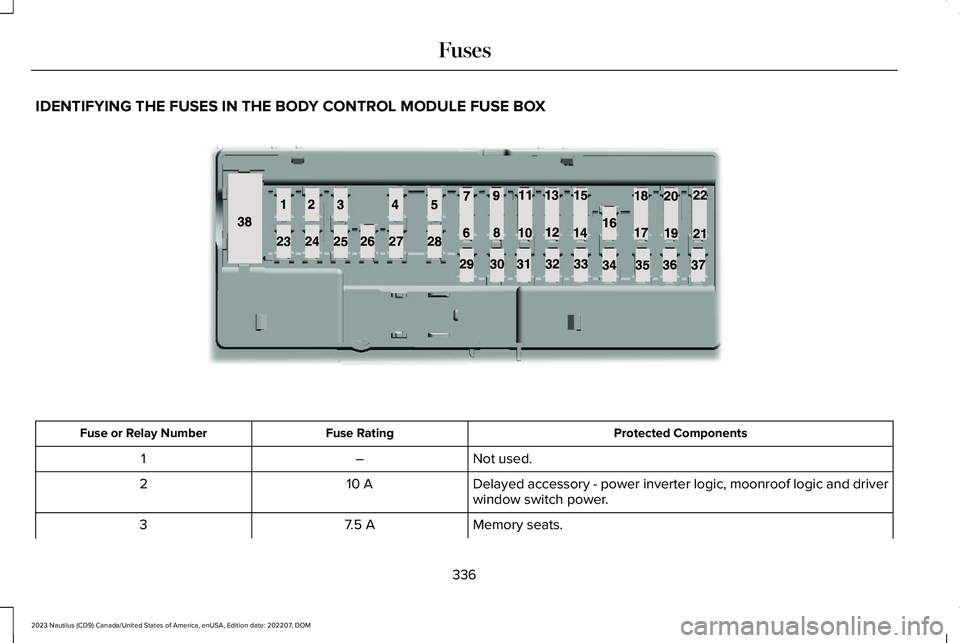
IDENTIFYING THE FUSES IN THE BODY CONTROL MODULE FUSE BOX
Protected ComponentsFuse RatingFuse or Relay Number
Not used.–1
Delayed accessory - power inverter logic, moonroof logic and driverwindow switch power.10 A2
Memory seats.7.5 A3
336
2023 Nautilus (CD9) Canada/United States of America, enUSA, Edition date: 202207, DOMFusesE145984
Page 342 of 606
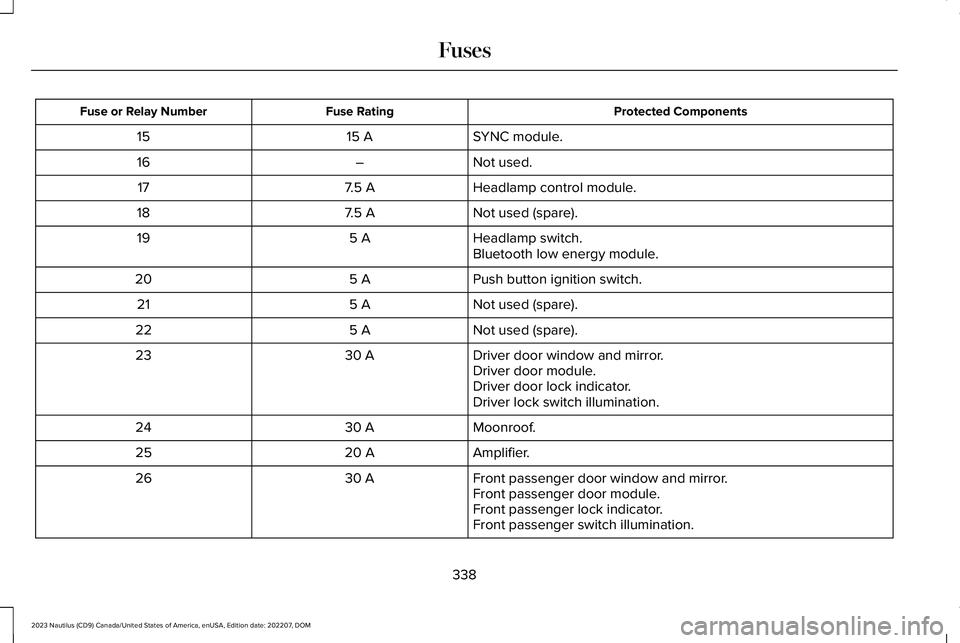
Protected ComponentsFuse RatingFuse or Relay Number
SYNC module.15 A15
Not used.–16
Headlamp control module.7.5 A17
Not used (spare).7.5 A18
Headlamp switch.5 A19Bluetooth low energy module.
Push button ignition switch.5 A20
Not used (spare).5 A21
Not used (spare).5 A22
Driver door window and mirror.30 A23Driver door module.Driver door lock indicator.Driver lock switch illumination.
Moonroof.30 A24
Amplifier.20 A25
Front passenger door window and mirror.30 A26Front passenger door module.Front passenger lock indicator.Front passenger switch illumination.
338
2023 Nautilus (CD9) Canada/United States of America, enUSA, Edition date: 202207, DOMFuses
Page 374 of 606
5.For additional information and assistance,we recommend that you contact anauthorized dealer.
CLEANING VINYL
WARNING: On vehicles equippedwith seat-mounted airbags, do not usechemical solvents or strong detergents.Such products could contaminate the sideairbag system and affect performance ofthe side airbag in a crash.
We recommend that you only clean vinylsurfaces in the following way:
1.Remove dust and loose dirt with avacuum cleaner.
2.Wipe the surface with a soft, damp clothand a mild soap and water solution. Drythe area with a clean, soft cloth.
3.For additional information and assistance,we recommend that you contact anauthorized dealer.
CLEANING CARPETS AND FLOORMATS
We recommend that you only clean yourcarpets in the following way:
1.Remove dust and loose dirt with avacuum cleaner.
2.Wipe the surface with a soft, damp clothand a mild soap and water solution. Drythe area with a clean, soft cloth.
3.For additional information and assistance,we recommend that you contact anauthorized dealer.
For heavy stains, spot clean the area. If a ringforms on the fabric, clean the entire areaimmediately, but do not oversaturate or thering could set.
We recommend that you only clean yourfloor mats in the following way:
1.Remove dust and loose dirt with avacuum cleaner.
2.Wash rubber floor mats using mild soapand lukewarm or cold water.
3.Completely dry the floor mat beforeplacing them back in your vehicle.
CLEANING SEATBELTS
WARNING: Do not use cleaningsolvents, bleach or dye on the vehicle'sseatbelts, as these actions may weakenthe belt webbing.
1.Wipe the surface with a soft, damp clothand a mild soap and water solution. Drythe area with a clean, soft cloth.
CLEANING STORAGECOMPARTMENTS
1.Remove dust and loose dirt with avacuum cleaner.
2.Wipe the surface with a soft, damp clothand a mild soap and water solution. Drythe area with a clean, soft cloth.
CLEANING MOONROOF TRACKS
1.Remove debris from the tracks with avacuum cleaner.
370
2023 Nautilus (CD9) Canada/United States of America, enUSA, Edition date: 202207, DOMVehicle Care
Page 375 of 606
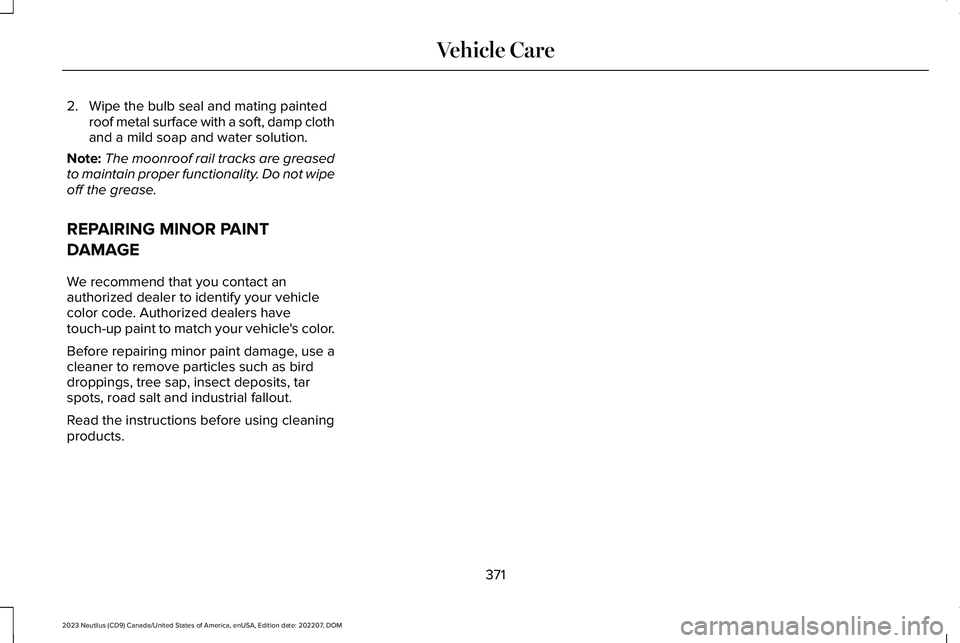
2.Wipe the bulb seal and mating paintedroof metal surface with a soft, damp clothand a mild soap and water solution.
Note:The moonroof rail tracks are greasedto maintain proper functionality. Do not wipeoff the grease.
REPAIRING MINOR PAINT
DAMAGE
We recommend that you contact anauthorized dealer to identify your vehiclecolor code. Authorized dealers havetouch-up paint to match your vehicle's color.
Before repairing minor paint damage, use acleaner to remove particles such as birddroppings, tree sap, insect deposits, tarspots, road salt and industrial fallout.
Read the instructions before using cleaningproducts.
371
2023 Nautilus (CD9) Canada/United States of America, enUSA, Edition date: 202207, DOMVehicle Care
Page 442 of 606
Gray indicates the system is acquiring adigital station.
Orange indicates digital audio is playing.
Multicast Indicator
The multicast indicator appears if the currentstation is broadcasting multiple digitalbroadcasts. The highlighted numbersindicate additional digital channels available.
Note:For stations that have more than oneHD multicast, the HD indicator and radio textappears as a button. Press the button tocycle through all of the HD stations on thatspecific frequency.
SATELLITE RADIO
WHAT IS SATELLITE RADIO
Lincoln SiriusXM with 360L Video Link
Your factory-installed SiriusXM radio systemincludes a limited subscription term, whichbegins on the date of sale or lease of yourvehicle. See an authorized dealer foravailability.
For additional information about extendedsubscription terms, visit www.SiriusXM.comin the United States, www.SiriusXM.ca inCanada, or call SiriusXM at 1-888-539-7474.
Note:SiriusXM reserves the unrestrictedright to change, rearrange, add or deleteprogramming including canceling, movingor adding particular channels, and its prices,at any time, with or without notice to you.Neither SiriusXM and its affiliates nor FordMotor Company and its affiliates will beliable to you or any third party for any suchmodification, suspension or termination.
SATELLITE RADIO LIMITATIONS
For optimal reception performance, keep theantenna clear of snow and ice build-up andkeep luggage and other material as far awayfrom the antenna as possible. Placingluggage over the antenna may reduceperformance. Factory-installed andaftermarket vehicle structures including, butnot limited to, roof racks and soft top roofsin a partially open position could reducereception performance.
Hills, mountains, tall buildings, bridges,tunnels, freeway overpasses, parkinggarages, dense tree foliage andthunderstorms can interfere with yourreception.
When you pass a ground-basedbroadcast-repeating tower, a stronger signalmay overtake a weaker one and could resultin the audio system muting. Your displaycould show an error message to indicate theinterference.
LOCATING THE SATELLITE RADIOIDENTIFICATION NUMBER
1.Select SiriusXM as the audio source.
2.Tune to channel 0.
SELECTING A CHANNEL
Manually Selecting a Channel
Press the button to find theprevious or next available radiochannel.
438
2023 Nautilus (CD9) Canada/United States of America, enUSA, Edition date: 202207, DOMAudio SystemE328569 E328570
Page 488 of 606
Disputes submitted to the BBB AUTO LINEprogram are usually decided within 40 daysafter you file your claim with the BBB. Youare not bound by the decision, and mayreject the decision and proceed to courtwhere all findings of the BBB Auto Linedispute, and decision, are admissible in thecourt action. Should you choose to acceptthe BBB AUTO LINE decision, Ford is thenbound by the decision, and must comply withthe decision within 30 days of receipt of youracceptance letter.
BBB AUTO LINE Application: Using theinformation that follows, call or write torequest a program application. You will beasked for your name and address, generalinformation about your new vehicle,information about your warranty concerns,and any steps you have already taken to tryto resolve them. A Customer Claim Form willbe mailed that needs to be completed,signed and returned to the BBB along withproof of ownership. Upon receipt, the BBBreviews the claim for eligibility under theProgram Summary Guidelines.
You can get more information by callingBBB AUTO LINE at 1-800-955-5100, orwriting to:
BBB AUTO LINE a Division of BBB NationalPrograms, Inc.1676 International Drive, Suite 550McLean, VA 22102
BBB AUTO LINE applications can also berequested by calling the Ford MotorCompany Customer Relationship Center at1-800-392-3673.
For additional information, refer to the BetterBusiness Bureau website.
Note:Ford Motor Company reserves theright to change eligibility limitations, modifyprocedures, or to discontinue this processat any time without notice and withoutobligation.
THE MEDIATION AND
ARBITRATION PROGRAM
For vehicles delivered to authorizedCanadian dealers. In those cases where youcontinue to feel that the efforts by Ford ofCanada and the authorized dealer to resolvea factory-related vehicle service concernhave been unsatisfactory, Ford of Canadaparticipates in an impartial third partymediation/arbitration program administeredby the Canadian Motor Vehicle ArbitrationPlan (CAMVAP).
The CAMVAP program is a straightforwardand relatively speedy alternative to resolvea disagreement when all other efforts toproduce a settlement have failed. Thisprocedure is without cost to you and isdesigned to eliminate the need for lengthyand expensive legal proceedings.
484
2023 Nautilus (CD9) Canada/United States of America, enUSA, Edition date: 202207, DOMCustomer Information
Page 571 of 606
it, and (ii) save it, provided that you do notremove any copyright notices that appearand do not modify the Data in any way. Youagree not to otherwise reproduce, copy,modify, decompile, disassemble or reverseengineer any portion of this Data, and maynot transfer or distribute it in any form, forany purpose, except to the extent permittedby mandatory laws.
Restrictions
Except where you have been specificallylicensed to do so by NAV2 , and withoutlimiting the preceding paragraph, you maynot (a) use this Data with any products,systems, or applications installed orotherwise connected to or in communicationwith vehicles, capable of vehicle navigation,positioning, dispatch, real time routeguidance, fleet management or similarapplications; or (b) with or in communicationwith any positioning devices or any mobileor wireless-connected electronic or computer
devices, including without limitation cellularphones, palmtop and handheld computers,pagers, and personal digital assistants orPDAs. You agree to cease using this Data ifyou fail to comply with these terms andconditions.
Limited Warranty
NAV2 warrants that (a) the Data will performsubstantially in accordance with theaccompanying written materials for a periodof ninety (90) days from the date of receipt,and (b) any support services provided byNAV2 shall be substantially as described inapplicable written materials provided to youby NAV2, and NAV2’s support engineers willmake commercially reasonable efforts tosolve any problem issues.
Customer Remedies
NAV2 and its suppliers’ entire liability andyour exclusive remedy shall be, at NAV2’ssole discretion, either (a) return of the pricepaid, if any, or (b) repair or replacement ofthe Data that do not meet NAV2’s LimitedWarranty and that are returned to NAV2 witha copy of your receipt. This Limited Warranty
is void if failure of the Data has resulted fromaccident, abuse, or misapplication. Anyreplacement Data will be warranted for theremainder of the original warranty period orthirty (30) days, whichever is longer. Neitherthese remedies nor any product supportservices offered by NAV2 are availablewithout proof of purchase from an authorizedinternational source.
No Other Warranty:
EXCEPT FOR THE LMITED WARRANTY SETFORTH ABOVE AND TO THE EXTENTPERMITTED BY APPLICABLE LAW, NAV2AND ITS LICENSORS (INCLUDING THEIRLICENSORS AND SUPPLIERS) DISCLAIMANY WARRANTIES, EXPRESS OR IMPLIED,OF QUALITY, PERFORMANCE,MERCHANTABILITY, FITNESS FOR APARTICULAR PURPOSE, OWNERSHIP ORNON-INFRINGEMENT. Certain warrantyexclusions may not be permitted underapplicable law, so to that extent the aboveexclusion may not apply to you.
567
2023 Nautilus (CD9) Canada/United States of America, enUSA, Edition date: 202207, DOMCustomer Information
Page 589 of 606
Child Restraints................................................41Child Restraint Position Information..................41Child Restraints Recommendation...................43
Child Safety......................................................39Child Restraint Anchor Points............................40Child Restraints.......................................................41Installing Child Restraints....................................44
Child Safety Locks..........................................52Child Safety Precautions...............................39Cleaning Products.......................................365Cleaning the Exterior..................................366Cleaning Camera Lenses and Sensors........368Cleaning Chrome, Aluminium or StainlessSteel...................................................................367Cleaning Headlamps and Rear Lamps.........366Cleaning Stripes or Graphics...........................367Cleaning the Engine Compartment...............367Cleaning the Exterior Precautions.................366Cleaning the Underbody..................................368Cleaning Wheels.................................................367Cleaning Windows and Wiper Blades..........366
Cleaning the Interior....................................368Cleaning Carpets and Floor Mats..................370Cleaning Displays and Screens......................369Cleaning Fabric...................................................369Cleaning Leather................................................369Cleaning Moonroof Tracks...............................370Cleaning Plastic..................................................369
Cleaning Seatbelts.............................................370Cleaning Storage Compartments...................370Cleaning the Instrument Panel.......................368Cleaning Vinyl.....................................................370
Clearing All MyKeys.......................................87Climate Control..............................................157Auto Mode............................................................159
Climate Control Hints...................................160Closing the Liftgate......................................104Closing the Hands-Free Liftgate.....................105Closing the Liftgate From Inside YourVehicle...............................................................104Closing the Liftgate From Outside YourVehicle...............................................................104Closing the Liftgate Using the RemoteControl...............................................................105
Cold Weather Precautions..........................313Connected Navigation................................458Connected Vehicle.......................................427Connected Vehicle – Troubleshooting.........428Connecting the Vehicle to a MobileNetwork............................................................427
Connected Vehicle Data...............................25Connected Vehicle Limitations.................427Connected Vehicle Requirements...........427
Connected Vehicle –Troubleshooting.........................................428Connected Vehicle – Frequently AskedQuestions.........................................................428
Connecting a Bluetooth® Device.............452Connecting a Trailer....................................305Connecting a Trailer Precautions.............305Connecting the Vehicle to a MobileNetwork........................................................427Connecting Lincoln Way to the Modem.......427Enabling and Disabling the Modem..............427What Is the Modem............................................427
Connecting the Vehicle to a Wi-FiNetwork........................................................427Connecting Your Phone..............................446Contacting Us...................................................15Cooling System Capacity and Specification- 2.0L..............................................................417Cooling System Capacity and Specification- 2.7L...............................................................418Crash and Breakdown Information...........317Automatic Crash Shutoff...................................321Jump Starting the Vehicle.................................318Post-Crash Alert System...................................320
Crash Sensors and Airbag Indicator..........72Creating a MyKey...........................................86Creating a Personal Profile........................456Creating a Vehicle Wi-Fi Hotspot..............431
585
2023 Nautilus (CD9) Canada/United States of America, enUSA, Edition date: 202207, DOMIndex
Page 595 of 606
Switching Lane Centering On and Off..........267
Lane Keeping System Indicators..............274Lane Keeping System..................................271Aid Mode..............................................................273Alert and Aid Mode............................................274Alert Mode............................................................273Lane Keeping System –Troubleshooting.............................................276
Lane Keeping System Limitations............272Lane Keeping System Precautions...........271Lane Keeping System Settings.................273Lane Keeping System –Troubleshooting.........................................276Lane Keeping System – Frequently AskedQuestions.........................................................277Lane Keeping System – InformationMessages.........................................................276
Launching or Retrieving a Boat or PersonalWatercraft....................................................309Liftgate..............................................................101Closing the Liftgate.............................................104Liftgate – Troubleshooting...............................106Opening the Liftgate...........................................101
Liftgate Obstacle Detection.......................106Liftgate Precautions.......................................101Liftgate – Troubleshooting.........................106Liftgate – Frequently Asked Questions........108Liftgate – Information Messages.....................107
Liftgate – Warning Lamps.................................106
Lincoln Personal Assistant.........................442Lincoln Personal Assistant – Frequently AskedQuestions.........................................................442Lincoln Personal Assistant Settings...............442Using Lincoln Personal Assistant...................442
Lincoln Protect..............................................467Linking or Unlinking a Personal Profile toa Device.......................................................457Linking or Unlinking a Personal Profile toa Remote Control.......................................457Live Traffic......................................................458Switching Live Traffic On and Off...................458What Is Live Traffic.............................................458
Load Carrying................................................296Roof Rack.............................................................300
Load Carrying Precautions........................296Loading Your Trailer.....................................308Locating the 360 Degree Cameras.........248Locating the Blind Spot Information SystemSensors........................................................280Locating the Brake Fluid Reservoir.........222Locating the Cross Traffic AlertSensors........................................................284Locating the Fuel Filler Funnel.................204Locating the Keyless Entry Keypad...........96Locating the Memory FunctionButtons..........................................................176
Locating the Power Outlets........................185Locating the Pre-Collision AssistSensors........................................................288Locating the Rear View Camera...............244Locating the Safety ComplianceCertification Labels...................................297Locating the Tire label................................375Locating the Tire Sealant and InflatorKit...................................................................389Locating the USB Ports................................183Locating the Wireless AccessoryCharger.........................................................188Locating Your Vehicle....................................77Locking the Rear Window Controls..........133Luggage Compartment..............................302Luggage Compartment Precautions.......302
M
Maintenance...................................................341Engine Air Filter..................................................353Engine Oil.............................................................347Exterior Bulbs.......................................................361Interior Bulbs.......................................................364
Maintenance Precautions...........................341Making and Receiving a Phone Call........448Manually Releasing the Electric ParkingBrake............................................................225
591
2023 Nautilus (CD9) Canada/United States of America, enUSA, Edition date: 202207, DOMIndex