transmission LINCOLN NAUTILUS 2023 Owner's Manual
[x] Cancel search | Manufacturer: LINCOLN, Model Year: 2023, Model line: NAUTILUS, Model: LINCOLN NAUTILUS 2023Pages: 606, PDF Size: 13.57 MB
Page 220 of 606
MANUAL PARK RELEASE
WHAT IS MANUAL PARK RELEASE
Manual park release allows you to shift yourvehicle out of park (P) in the event of anelectrical malfunction or emergency.
MANUAL PARK RELEASEPRECAUTIONS
WARNING: When doing thisprocedure, you need to take thetransmission out of park (P) which meansyour vehicle can roll freely. To avoidunwanted vehicle movement, apply theparking brake prior to doing thisprocedure. Use wheel chocks ifappropriate.
WARNING: Do not drive your vehicleuntil you verify that the stoplamps areworking.
USING MANUAL PARK RELEASE
Activating the Manual Park ReleaseCable
1.Apply the parking brake. See ElectricParking Brake (page 225).
Note:If the vehicle's battery has run out ofcharge, use an external power source toapply the parking brake.
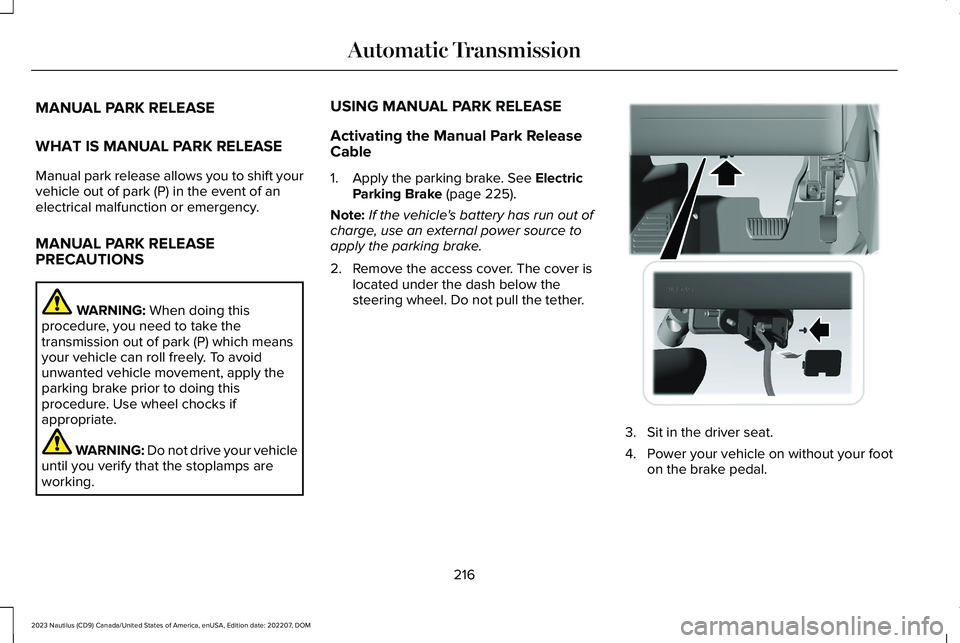
2.Remove the access cover. The cover islocated under the dash below thesteering wheel. Do not pull the tether.
3.Sit in the driver seat.
4.Power your vehicle on without your footon the brake pedal.
216
2023 Nautilus (CD9) Canada/United States of America, enUSA, Edition date: 202207, DOMAutomatic TransmissionE307294
Page 221 of 606
Note:Do not attempt this procedure whenthe engine is running. Failure to follow thisinstruction could result in vehicle damagenot covered by the vehicle warranty.
5.Press and hold the brake pedal.
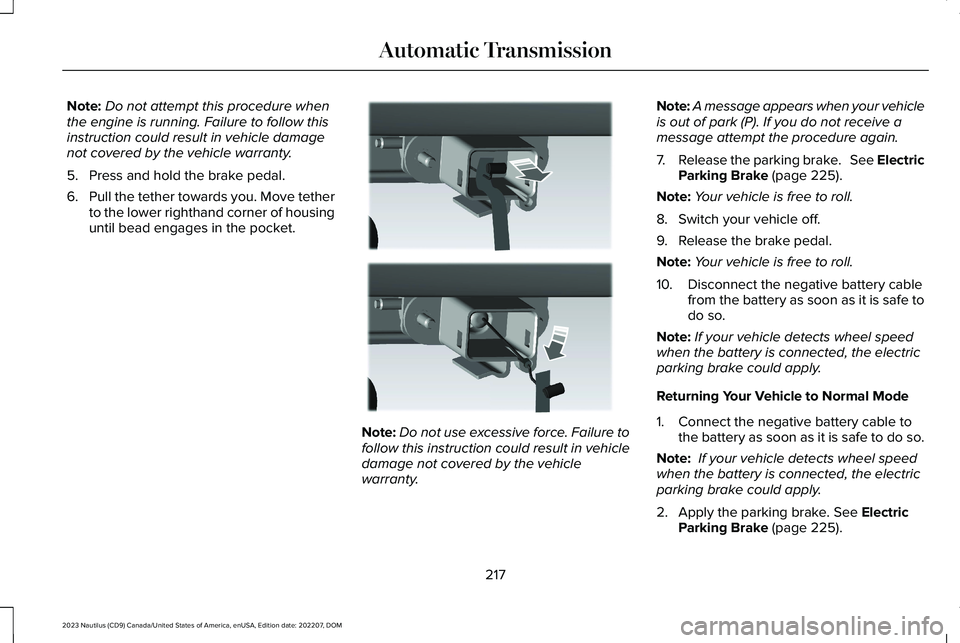
6.Pull the tether towards you. Move tetherto the lower righthand corner of housinguntil bead engages in the pocket.
Note:Do not use excessive force. Failure tofollow this instruction could result in vehicledamage not covered by the vehiclewarranty.
Note:A message appears when your vehicleis out of park (P). If you do not receive amessage attempt the procedure again.
7.Release the parking brake. See ElectricParking Brake (page 225).
Note:Your vehicle is free to roll.
8.Switch your vehicle off.
9.Release the brake pedal.
Note:Your vehicle is free to roll.
10.Disconnect the negative battery cablefrom the battery as soon as it is safe todo so.
Note:If your vehicle detects wheel speedwhen the battery is connected, the electricparking brake could apply.
Returning Your Vehicle to Normal Mode
1.Connect the negative battery cable tothe battery as soon as it is safe to do so.
Note: If your vehicle detects wheel speedwhen the battery is connected, the electricparking brake could apply.
2.Apply the parking brake. See ElectricParking Brake (page 225).
217
2023 Nautilus (CD9) Canada/United States of America, enUSA, Edition date: 202207, DOMAutomatic TransmissionE307295
Page 222 of 606
Note:If the vehicle's battery has run out ofcharge, use an external power source toapply the parking brake.
3.Sit in the driver seat.
4.Press and hold the brake pedal. Do notstart your vehicle.
5.Pull the tether towards you to release thebead. Maintain tension. Center the tetherwithin the housing. Release tension andreturn tether to the stowed position.
6.Start your vehicle.
7.Confirm the instrument cluster displayspark (P).
Note:If the instrument cluster does notdisplay park (P) or if Park Not Available,Transmission Not In Park or Shift SystemFault message persists, contact anauthorized dealer for service.
8.Switch your vehicle off.
9.Release the brake pedal.
10.Install the access cover.
AUTOMATIC TRANSMISSION
AUDIBLE WARNINGS
Transmission Not In Park (P) AudibleWarning
Sounds if you open the driver door beforeshifting into park (P).
Park (P) Selection Audible Warning
Sounds when you shift into park (P).
AUTOMATIC TRANSMISSION –
TROUBLESHOOTING
AUTOMATIC TRANSMISSION –INFORMATION MESSAGES
You switched theengine off and shiftselect lever is in anyposition other thanpark (P).
Shift to Park
Transmission is toocold. Wait for it towarm up before youdrive.
TransmissionWarming Up PleaseWait
The transmission isoverheating andneeds to cool. Stopin a safe place assoon as it’s possible.
Transmission OverTemperature StopSafely
Have systemchecked as soon aspossible.
TransmissionService Required
218
2023 Nautilus (CD9) Canada/United States of America, enUSA, Edition date: 202207, DOMAutomatic Transmission
Page 223 of 606
The transmission isoverheating andneeds to cool. Stopin a safe place assoon as it’s possible.
Transmission TooHot Press Brake
The transmission haslimited functionality. Have systemchecked as soon aspossible.
Transmission LimitedFunction See Manual
A reminder to shiftinto park. In addition,this message istypical after recon-necting or rechar-ging the battery untilyou cycle the igni-tion to the on mode.See Changing the12V Battery (page355).
Transmission Not inPark
Displays when thesystem requiresservice. Have yourvehicle checked assoon as possible.
SHIFT SYS FAULTConfirm Park BrakeApply Before Exitingthe Vehicle
Have systemchecked as soon aspossible.
SHIFT SYS FAULTService Required
Displays when thesystem requiresservice. Have yourvehicle checked assoon as possible.
SHIFT SYS FAULTVehicle is Shifting toPark
Displays when thesystem requiresservice. Have yourvehicle checked assoon as possible.
SHIFT SYS FAULTReverse UnavailableService Required
Have systemchecked as soon aspossible.
SHIFT SYS FAULTDrive UnavailableSelect S for DriveService Required
Have systemchecked as soon aspossible.
SHIFT SYS FAULTNeutral UnavailableService Required
Have systemchecked as soon aspossible.
SHIFT SYS FAULTSport UnavailableService Required
Displays when aninvalid gear hasbeen selected.
Invalid Gear Selec-tion
Displays when thebrake pedal needsto be depressed toenable the transmis-sion to shift frompark.
Depress Brake toShift from Park
Displays whenneutral hold isactive.
Stay in Neutral ModeEngaged
Displays when theneutral button Nneeds to be pressedagain to enterneutral hold.
To Stay in NeutralWhen ExitingVehicle Select NAgain
219
2023 Nautilus (CD9) Canada/United States of America, enUSA, Edition date: 202207, DOMAutomatic Transmission
Page 226 of 606
BRAKE PRECAUTIONS
Wet brakes result in reduced brakingefficiency. Gently press the brake pedal afew times when leaving a car wash or drivingfrom standing water to dry the brakes.
Note:Depending on applicable laws andregulations in the country where your vehiclewas originally built, the stoplamps could flashduring heavy braking. The hazard warningflashers could also turn on when your vehiclecomes to a stop.
ANTI-LOCK BRAKING SYSTEM
ANTI-LOCK BRAKING SYSTEMLIMITATIONS
The anti-lock braking system does noteliminate the risk of crash when:
•You drive too closely to the vehicle infront of you.
•Your vehicle is hydroplaning.
•You take corners too fast.
•The road surface is poor.
Note: If the system activates, the brakepedal could pulse and travel further. Maintain pressure on the brake pedal.
BRAKE OVER ACCELERATOR
In the event the accelerator pedal becomesstuck or entrapped, apply steady and firmpressure to the brake pedal to slow thevehicle and reduce engine power. If youexperience this condition, apply the brakesand bring your vehicle to a safe stop. Movethe transmission to park (P), switch theengine off and apply the parking brake.Inspect the accelerator pedal for anyinterference. If none are found and thecondition persists, have your vehicle towedto the nearest authorized dealer.
LOCATING THE BRAKE FLUID
RESERVOIR
See Under Hood Overview (page 343).
CHECKING THE BRAKE FLUID
WARNING: Do not use any fluid otherthan the recommended brake fluid as thiswill reduce brake efficiency. Use ofincorrect fluid could result in the loss ofvehicle control, serious personal injury ordeath.
WARNING: Only use brake fluid froma sealed container. Contamination with dirt,water, petroleum products or othermaterials may result in brake systemdamage or failure. Failure to adhere to thiswarning could result in the loss of vehiclecontrol, serious personal injury or death.
WARNING: Do not allow the fluid totouch your skin or eyes. If this happens,rinse the affected areas immediately withplenty of water and contact your physician.
WARNING: The brake system couldbe affected if the brake fluid level is belowthe MIN mark or above the MAX mark onthe brake fluid reservoir.
222
2023 Nautilus (CD9) Canada/United States of America, enUSA, Edition date: 202207, DOMBrakes
Page 238 of 606
Curve Control
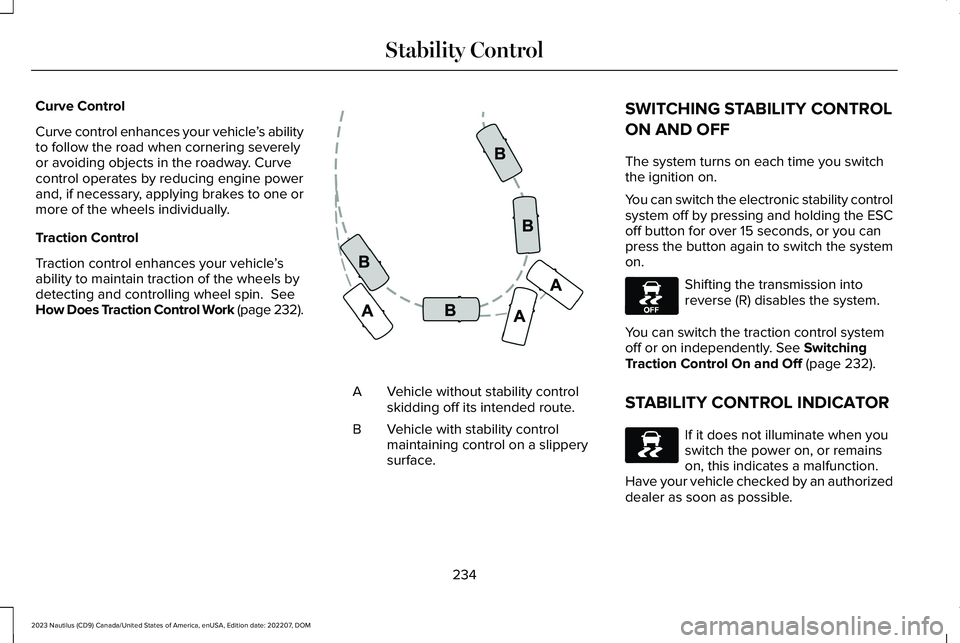
Curve control enhances your vehicle’s abilityto follow the road when cornering severelyor avoiding objects in the roadway. Curvecontrol operates by reducing engine powerand, if necessary, applying brakes to one ormore of the wheels individually.
Traction Control
Traction control enhances your vehicle’sability to maintain traction of the wheels bydetecting and controlling wheel spin. SeeHow Does Traction Control Work (page 232).
Vehicle without stability controlskidding off its intended route.A
Vehicle with stability controlmaintaining control on a slipperysurface.
B
SWITCHING STABILITY CONTROL
ON AND OFF
The system turns on each time you switchthe ignition on.
You can switch the electronic stability controlsystem off by pressing and holding the ESCoff button for over 15 seconds, or you canpress the button again to switch the systemon.
Shifting the transmission intoreverse (R) disables the system.
You can switch the traction control systemoff or on independently. See SwitchingTraction Control On and Off (page 232).
STABILITY CONTROL INDICATOR
If it does not illuminate when youswitch the power on, or remainson, this indicates a malfunction. Have your vehicle checked by an authorizeddealer as soon as possible.
234
2023 Nautilus (CD9) Canada/United States of America, enUSA, Edition date: 202207, DOMStability ControlE72903 E130458 E138639
Page 245 of 606
FRONT PARKING AID AUDIBLEWARNINGS
A warning tone sounds when there is anobject within 28 in (70 cm) from the frontbumper. As your vehicle moves closer to anobject, the rate of the tone increases.
The warning tone continuously sounds whenan object is 12 in (30 cm) or less from thefront bumper.
Note:If the detected object is 12 in (30 cm)or less from your vehicle, visual indicationremains on.
SIDE PARKING AID
WHAT IS THE SIDE PARKING AID
The front and rear outermost parking aidsensors map objects that are near to thesides of your vehicle.
SIDE PARKING AID LIMITATIONS
The sensor coverage is up to 24 in (60 cm)from the sides of your vehicle.
The side parking aid may not function if:
•Your vehicle remains stationary for overtwo minutes.
•The anti-lock brake system activates.
•The traction control system activates.
•Your vehicle is in park (P).
•The steering wheel angle information isnot available. You must drive at least492 ft (150 m) above 19 mph (30 km/h) toreset the steering wheel angleinformation.
Note:If you switch traction control off, theside sensing system also turns off.
To reinitialize the system, drive the length ofyour vehicle.
The side parking aid does not detect anobject that is moving toward the side of yourvehicle, for example another vehicle movingat a low speed, if it does not pass a front orrear parking aid sensor.
If the transmission is in reverse (R), the sidesensing system provides audible warnings.When your vehicle is moving slowly,obstacles are detected within 24 in (60 cm)and are inside the driving path of yourvehicle. If your vehicle remains stationary fora few seconds, the audible warning turns off.Visual indication is always present in reverse(R).
If your vehicle is in neutral (N), the sidesensing system provides visual indicationonly when your vehicle is moving slowly andthere is a front or rear parking aid obstacledetected, and the side obstacle is within24 in (60 cm) from the side of your vehicle.If your vehicle remains stationary for a fewseconds, the visual indication turns off.
If the transmission is in drive (D) or any otherforward gear, the side sensing systemprovides audible and visual warnings. Whenyour vehicle is moving slowly, obstacles aredetected within 24 in (60 cm) and are insidethe driving path of your vehicle. If yourvehicle remains stationary for a few seconds,the visual indication and audible warningturns off.
241
2023 Nautilus (CD9) Canada/United States of America, enUSA, Edition date: 202207, DOMParking Aids
Page 248 of 606
WHAT IS THE REAR VIEW CAMERA
The rear view camera provides a videoimage of the area behind your vehicle whenthe transmission is in reverse (R).
REAR VIEW CAMERA
PRECAUTIONS
WARNING: The rear view camerasystem is a reverse aid supplement devicethat still requires the driver to use it inconjunction with the interior and exteriormirrors for maximum coverage.
WARNING: Objects that are close toeither corner of the bumper or under thebumper, might not be seen on the screendue to the limited coverage of the camerasystem.
WARNING: Reverse your vehicleslowly. Failure to follow this instructioncould result in the loss of control of yourvehicle, personal injury or death.
WARNING: Use caution when therear cargo door is ajar. If the rear cargodoor is ajar, the camera will be out ofposition and the video image could beincorrect. All guide lines disappear whenthe rear cargo door is ajar. Failure to followthis instruction could result in personalinjury.
WARNING: Do not switch the camerafeatures on or off when your vehicle ismoving.
Note: When towing, the camera only seeswhat you are towing. This might not provideadequate coverage and you might not seesome objects. In some vehicles, the guidelines may disappear when you connect thetrailer tow connector.
LOCATING THE REAR VIEW
CAMERA
The rear view camera is located on the cargodoor. It provides a video image of the areabehind your vehicle.
REAR VIEW CAMERA GUIDE LINES
Note:Active guide lines and fixed guide linesare only available when the transmission isin reverse (R).
Note:The centerline is only available if theactive or fixed guide lines are on.
244
2023 Nautilus (CD9) Canada/United States of America, enUSA, Edition date: 202207, DOMRear View Camera
Page 250 of 606
This allows you to get a closer view of anobject behind your vehicle. The zoomedimage keeps the bumper in the image toprovide a reference. The zoom is only activewhile the transmission is in reverse (R).
Note:Manual zoom is only available whenthe transmission is in reverse (R).
Note:Only the centerline shows when youenable manual zoom.
SWITCHING REAR VIEW CAMERADELAY ON AND OFF
1.Press Settings.
2.Press Vehicle Settings.
3.Press Rear View Camera.
4.Switch Rear View Camera Delay on oroff.
When shifting the transmission out of reverse(R) and into any gear other than park (P), thecamera image remains in the display until:
•Your vehicle speed reachesapproximately 5 mph (8 km/h).
•You shift your vehicle into park (P).
246
2023 Nautilus (CD9) Canada/United States of America, enUSA, Edition date: 202207, DOMRear View Camera
Page 251 of 606
WHAT IS THE 360 DEGREE
CAMERA
The 360 degree camera system consists offront, side and rear cameras which providevisibility around your vehicle.
HOW DOES THE 360 DEGREE
CAMERA WORK
The 360 Degree Camera system:
•Allows you to see what is directly in frontof or behind your vehicle.
•Provides a cross traffic view in front ofand behind your vehicle.
•Allows you to see a top-down view of thearea outside your vehicle, including theblind spots and obstacles near yourvehicle.
360 DEGREE CAMERA
PRECAUTIONS
WARNING: The 360 degree camerasystem still requires the driver to use it inconjunction with looking out of thewindows, and checking the interior andexterior mirrors for maximum coverage.
WARNING: Objects that are close toeither corner of the bumper or under thebumper, might not be seen on the screendue to the limited coverage of the camerasystem.
WARNING: Use caution when turningcamera features on or off when thetransmission is not in park (P). Make sureyour vehicle is not moving.
WARNING: You are responsible forcontrolling your vehicle at all times. Thesystem is designed to be an aid and doesnot relieve you of your responsibility todrive with due care and attention. Failureto follow this instruction could result in theloss of control of your vehicle, personalinjury or death.
WARNING: Use caution when therear cargo door is ajar. If the rear cargodoor is ajar, the camera will be out ofposition and the video image could beincorrect. All guide lines disappear whenthe rear cargo door is ajar. Failure to followthis instruction could result in personalinjury.
WARNING: When manual zoom ison, the full area behind your vehicle maynot show. Be aware of your surroundingswhen using the manual zoom feature.
247
2023 Nautilus (CD9) Canada/United States of America, enUSA, Edition date: 202207, DOM360 Degree Camera (If Equipped)