steering wheel LINCOLN NAVIGATOR 2004 Owners Manual
[x] Cancel search | Manufacturer: LINCOLN, Model Year: 2004, Model line: NAVIGATOR, Model: LINCOLN NAVIGATOR 2004Pages: 368, PDF Size: 8.21 MB
Page 114 of 368
TILT STEERING
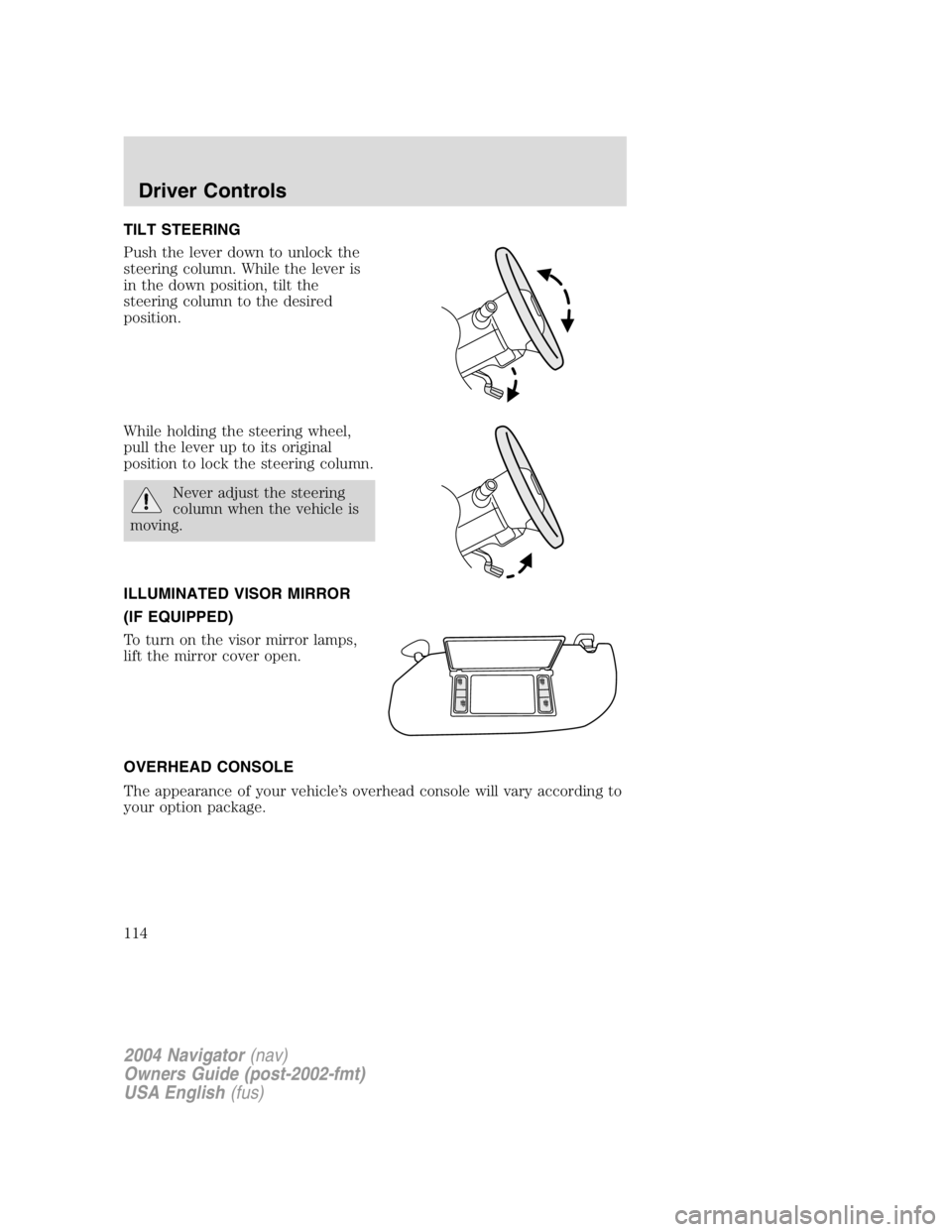
Push the lever down to unlock the
steering column. While the lever is
in the down position, tilt the
steering column to the desired
position.
While holding the steering wheel,
pull the lever up to its original
position to lock the steering column.
Never adjust the steering
column when the vehicle is
moving.
ILLUMINATED VISOR MIRROR
(IF EQUIPPED)
To turn on the visor mirror lamps,
lift the mirror cover open.
OVERHEAD CONSOLE
The appearance of your vehicle ’ s overhead console will vary according to
your option package.
2004 Navigator (nav)
Owners Guide (post-2002-fmt)
USA English (fus)Driver Controls
114
Page 127 of 368
Setting speed control
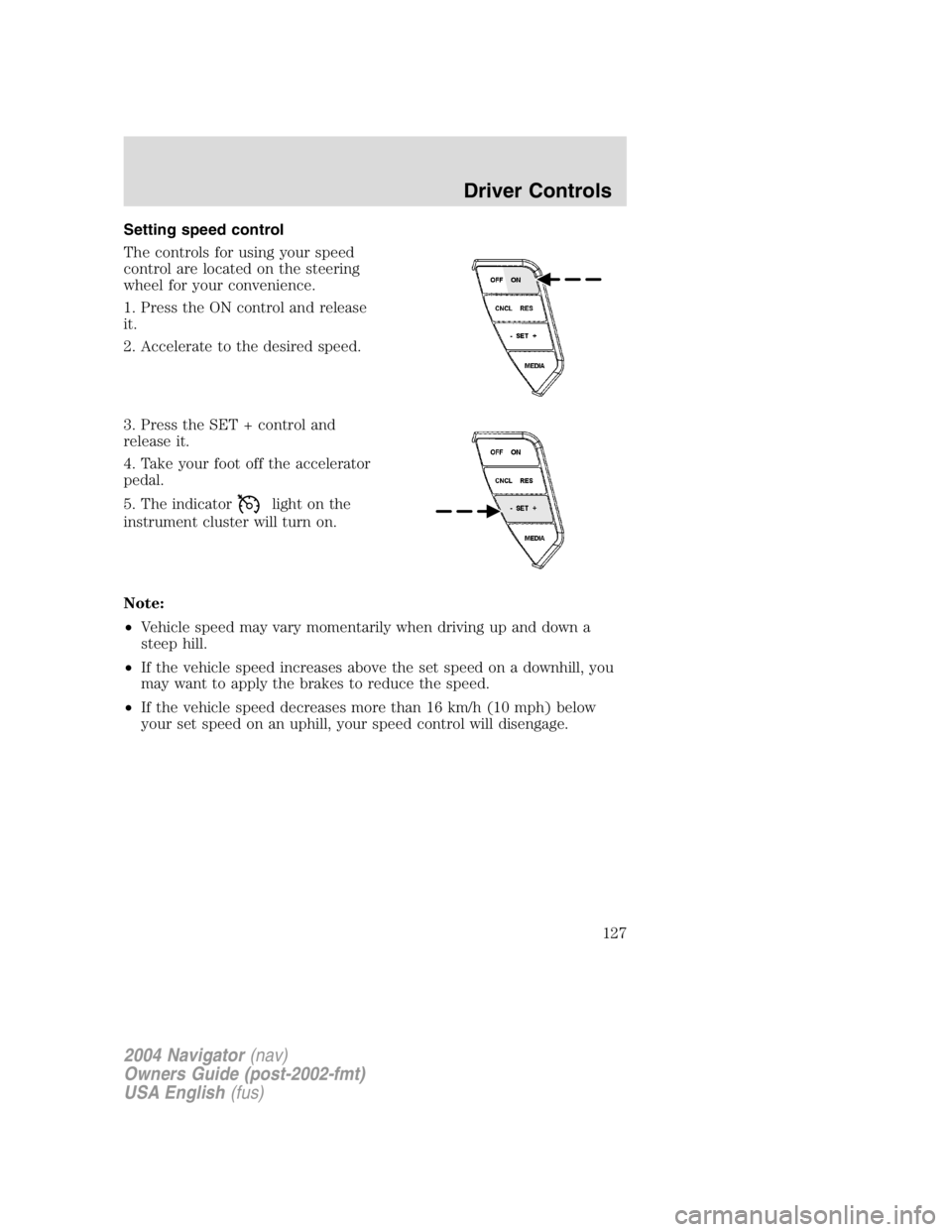
The controls for using your speed
control are located on the steering
wheel for your convenience.
1. Press the ON control and release
it.
2. Accelerate to the desired speed.
3. Press the SET + control and
release it.
4. Take your foot off the accelerator
pedal.
5. The indicator light on the
instrument cluster will turn on.
Note:
• Vehicle speed may vary momentarily when driving up and down a
steep hill.
• If the vehicle speed increases above the set speed on a downhill, you
may want to apply the brakes to reduce the speed.
• If the vehicle speed decreases more than 16 km/h (10 mph) below
your set speed on an uphill, your speed control will disengage.
2004 Navigator (nav)
Owners Guide (post-2002-fmt)
USA English (fus) Driver Controls
127
Page 129 of 368
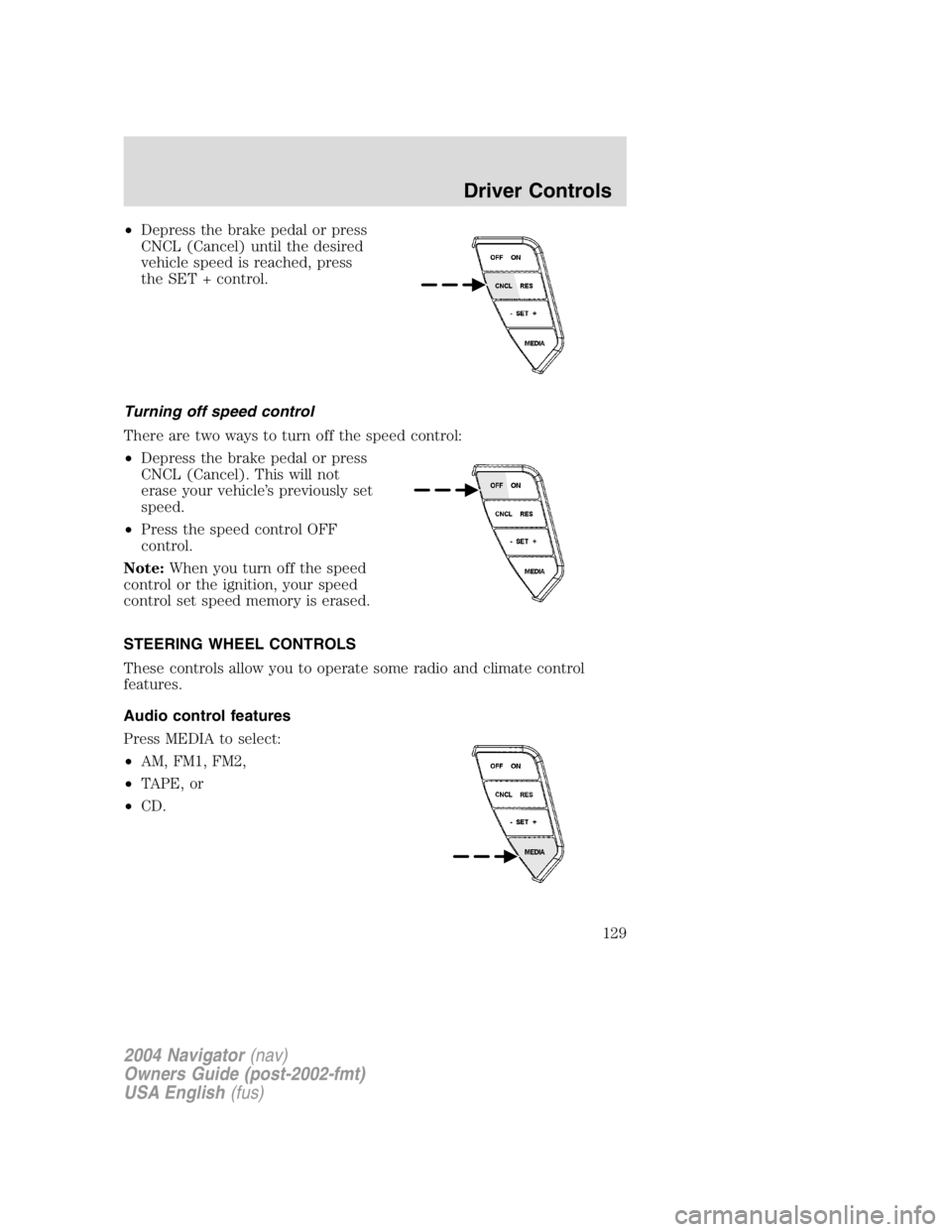
• Depress the brake pedal or press
CNCL (Cancel) until the desired
vehicle speed is reached, press
the SET + control.
Turning off speed control
There are two ways to turn off the speed control:
• Depress the brake pedal or press
CNCL (Cancel). This will not
erase your vehicle ’ s previously set
speed.
• Press the speed control OFF
control.
Note: When you turn off the speed
control or the ignition, your speed
control set speed memory is erased.
STEERING WHEEL CONTROLS
These controls allow you to operate some radio and climate control
features.
Audio control features
Press MEDIA to select:
• AM, FM1, FM2,
• TAPE, or
• CD.
2004 Navigator (nav)
Owners Guide (post-2002-fmt)
USA English (fus) Driver Controls
129
Page 131 of 368

Press FAN + or - to adjust fan
speed.
Navigation steering wheel controls (if equipped)
These controls allow you to operate some audio and navigation control
features when the vehicle is equipped with the navigation feature.
Audio control features
Press to select:
• AM, FM1, FM2, or
• CD.
In AM, FM1, or FM2 mode:
• Press NEXT to select preset
stations within the selected radio
band.
In CD mode:
• Press NEXT to select the next
track on the CD.
In any mode:
• Press VOL + or to adjust
volume.
2004 Navigator (nav)
Owners Guide (post-2002-fmt)
USA English (fus) Driver Controls
131
Page 217 of 368
STARTING
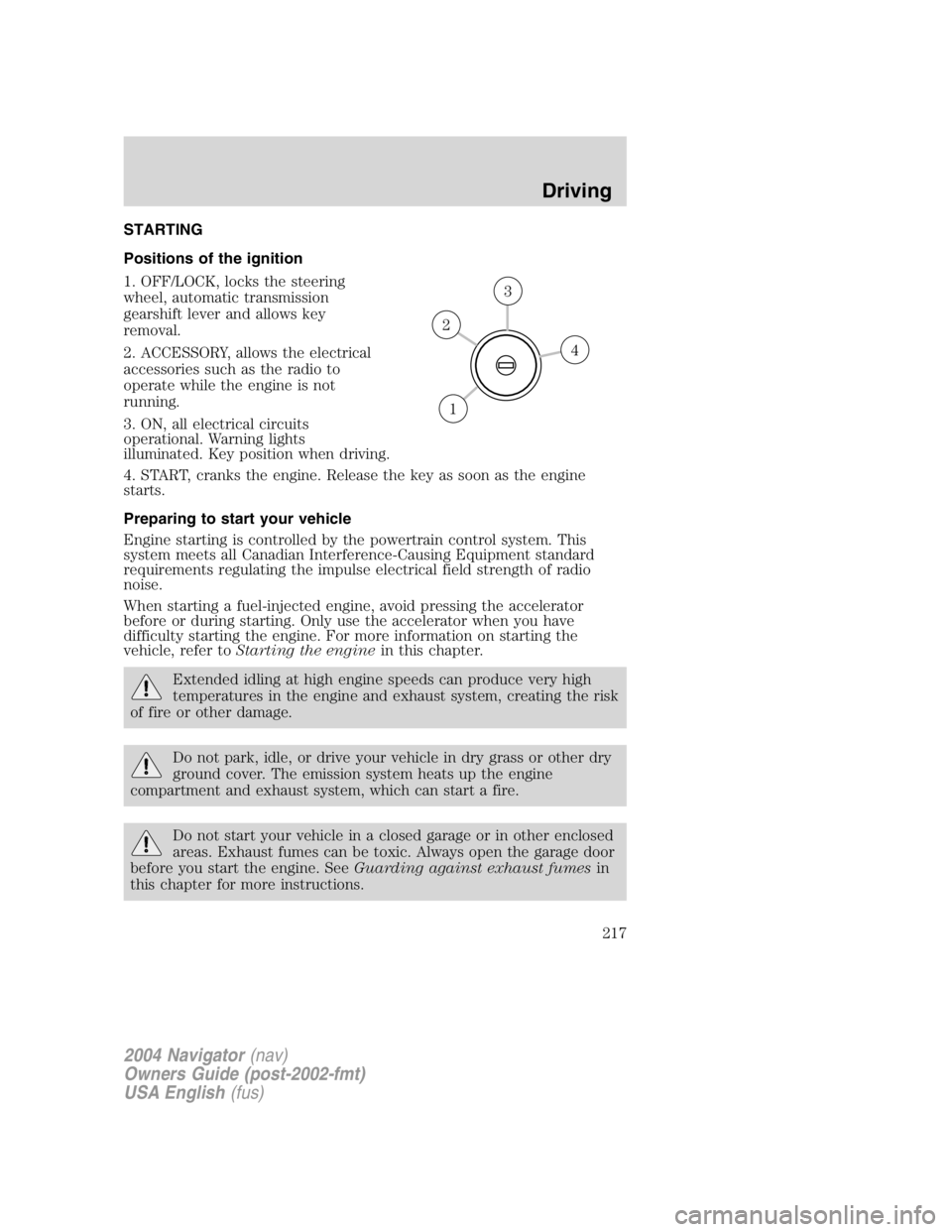
Positions of the ignition
1. OFF/LOCK, locks the steering
wheel, automatic transmission
gearshift lever and allows key
removal.
2. ACCESSORY, allows the electrical
accessories such as the radio to
operate while the engine is not
running.
3. ON, all electrical circuits
operational. Warning lights
illuminated. Key position when driving.
4. START, cranks the engine. Release the key as soon as the engine
starts.
Preparing to start your vehicle
Engine starting is controlled by the powertrain control system. This
system meets all Canadian Interference-Causing Equipment standard
requirements regulating the impulse electrical field strength of radio
noise.
When starting a fuel-injected engine, avoid pressing the accelerator
before or during starting. Only use the accelerator when you have
difficulty starting the engine. For more information on starting the
vehicle, refer to Starting the engine in this chapter.
Extended idling at high engine speeds can produce very high
temperatures in the engine and exhaust system, creating the risk
of fire or other damage.
Do not park, idle, or drive your vehicle in dry grass or other dry
ground cover. The emission system heats up the engine
compartment and exhaust system, which can start a fire.
Do not start your vehicle in a closed garage or in other enclosed
areas. Exhaust fumes can be toxic. Always open the garage door
before you start the engine. See Guarding against exhaust fumes in
this chapter for more instructions. 43
2
1
2004 Navigator (nav)
Owners Guide (post-2002-fmt)
USA English (fus)Driving
Driving
217
Page 221 of 368
If you smell exhaust fumes inside your vehicle, have your dealer
inspect your vehicle immediately. Do not drive if you smell
exhaust fumes.
Important ventilating information
If the engine is idling while the vehicle is stopped for a long period of
time, open the windows at least 2.5 cm (one inch) or adjust the heating
or air conditioning to bring in fresh air.
BRAKES
Your service brakes are self-adjusting. Refer to the scheduled
maintenance guide for scheduled maintenance.
Occasional brake noise is normal and often does not indicate a
performance concern with the vehicle ’ s brake system. In normal
operation, automotive brake systems may emit occasional or intermittent
squeal or groan noises when the brakes are applied. Such noises are
usually heard during the first few brake applications in the morning;
however, they may be heard at any time while braking and can be
aggravated by environmental conditions such as cold, heat, moisture,
road dust, salt or mud. If a “ metal-to-metal, ”“ continuous grinding ” or
“ continuous squeal ” sound is present while braking, the brake linings
may be worn-out and should be inspected by a qualified service
technician.
If you are driving down a long or steep hill, shift to a lower gear.
Do not apply your brakes continuously, as they may overheat
and become less effective.
Anti-lock brake system (ABS)
On ABS-equipped vehicles, a noise from the hydraulic pump motor and
pulsation in the pedal may be observed during ABS braking events. Pedal
pulsation coupled with noise while braking under panic conditions or on
loose gravel, bumps, wet or snowy roads is normal and indicates proper
functioning of the vehicle ’ s anti-lock brake system. The ABS performs a
self-check after you start the engine and begin to drive away. A brief
mechanical noise may be heard during this test. This is normal. If a
malfunction is found, the ABS warning light will come on. If the vehicle
has continuous vibration or shudder in the steering wheel while braking,
the vehicle should be inspected by a qualified service technician.
2004 Navigator (nav)
Owners Guide (post-2002-fmt)
USA English (fus) Driving
221
Page 222 of 368

The ABS operates by detecting the onset of wheel lockup during brake
applications and compensates for this tendency. The wheels are
prevented from locking even when the brakes are firmly applied.
Using ABS
• In an emergency or when maximum efficiency from the four-wheel
ABS is required, apply continuous force on the brake. The four wheel
ABS will be activated immediately, thus allowing you to retain steering
control of your vehicle and, providing there is sufficient space, will
enable you to avoid obstacles and bring the vehicle to a controlled
stop.
• The anti-lock system does not always reduce stopping distance.
Always leave enough room between your vehicle and the vehicle in
front of you to stop.
• We recommend that you familiarize yourself with this braking
technique. However, avoid taking any unnecessary risks.
ABS warning lamp ABS
The ABS
warning lamp in the instrument cluster momentarily illuminates
when the ignition is turned to the ON position. If the light does not
illuminate momentarily at start up, remains on or continues to flash, the
ABS needs to be serviced.
With the ABS light on, the anti-lock
brake system is disabled and normal
braking is still effective unless the
brake warning light also remains
illuminated with parking brake
released. (If your brake warning lamp illuminates, have your vehicle
serviced immediately.)
Brake Assist (if equipped)
The Brake Assist system provides full braking force during panic braking
situations. It detects a rapid application of the brake pedal and
maximizes the amount of brake booster assist, helping the driver to
achieve maximum braking pressure. Once a panic brake application is
detected, the system will remain activated as long as the brake pedal is
depressed. The system is deactivated by releasing the brake pedal.
When the system activates, the brake pedal will travel with very little
effort; this is normal. P!BRAKE
2004 Navigator (nav)
Owners Guide (post-2002-fmt)
USA English (fus)Driving
222
Page 224 of 368
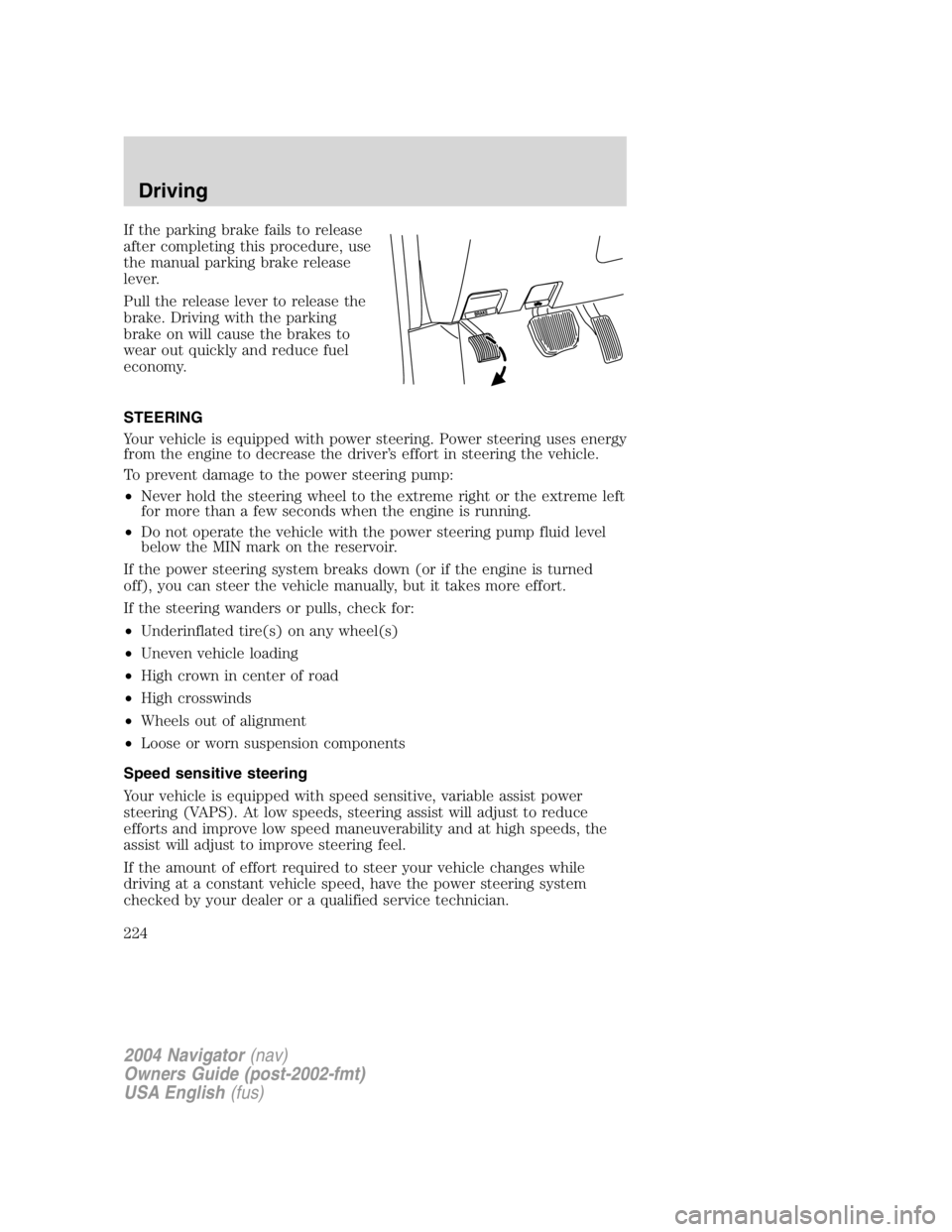
If the parking brake fails to release
after completing this procedure, use
the manual parking brake release
lever.
Pull the release lever to release the
brake. Driving with the parking
brake on will cause the brakes to
wear out quickly and reduce fuel
economy.
STEERING
Your vehicle is equipped with power steering. Power steering uses energy
from the engine to decrease the driver ’ s effort in steering the vehicle.
To prevent damage to the power steering pump:
• Never hold the steering wheel to the extreme right or the extreme left
for more than a few seconds when the engine is running.
• Do not operate the vehicle with the power steering pump fluid level
below the MIN mark on the reservoir.
If the power steering system breaks down (or if the engine is turned
off), you can steer the vehicle manually, but it takes more effort.
If the steering wanders or pulls, check for:
• Underinflated tire(s) on any wheel(s)
• Uneven vehicle loading
• High crown in center of road
• High crosswinds
• Wheels out of alignment
• Loose or worn suspension components
Speed sensitive steering
Your vehicle is equipped with speed sensitive, variable assist power
steering (VAPS). At low speeds, steering assist will adjust to reduce
efforts and improve low speed maneuverability and at high speeds, the
assist will adjust to improve steering feel.
If the amount of effort required to steer your vehicle changes while
driving at a constant vehicle speed, have the power steering system
checked by your dealer or a qualified service technician.
2004 Navigator (nav)
Owners Guide (post-2002-fmt)
USA English (fus)Driving
224
Page 229 of 368

Roll Stability Control enhances your vehicle ’ s stability during maneuvers
that require all available tire traction, like in wet/snowy/icy road
conditions and/or when performing emergency maneuvers. In an
emergency lane-change, the driver will experience better overall vehicle
traction, and have better control of the vehicle.
The Roll Stability Control system helps the driver maintain steering
control if the vehicle begins to slide excessively left or right or spin out.
Roll Stability Control will attempt to correct the sliding motion by
applying brake force at individual tires and, if necessary, by reducing
engine power.
Driving conditions which may activate Roll Stability Control include:
• Taking a turn too fast
• Maneuvering quickly to avoid an accident, pedestrian or obstacle
• Hitting a patch of ice
• Changing lanes on a snow-rutted road
• Entering a snow-free road from a snow-covered side street, or vice
versa
• Entering a paved road from a gravel road, or vice versa
• Hitting a curb while turning
• Driving on slick surfaces
• Cornering while towing a heavily loaded trailer (refer to Trailer
Towing in this chapter)
The Roll Stability Control (RSC) system works in to further enhance the
vehicle ’ s overall stability during aggressive maneuvers. The system helps
maintain roll stability of the vehicle during aggressive maneuvers by
applying brake force to one or more wheels.
Driving conditions that may activate Roll Stability Control include:
• Emergency lane-change
• Taking a turn too fast
• Quick maneuvering to avoid an accident, pedestrian or obstacle
• Hitting a curb while turning
The Roll Stability Control system automatically turns on when the engine
is started. However, the system does not function when the vehicle is
traveling in R (Reverse) or, if equipped with four-wheel drive, in 4L (4X4
LOW). In R (Reverse) or in 4L (4X4 LOW), ABS and the traction
enhancement feature will continue to function.
2004 Navigator (nav)
Owners Guide (post-2002-fmt)
USA English (fus) Driving
229
Page 244 of 368

The differences that make your vehicle so versatile also make it handle
differently than an ordinary passenger car.
Maintain steering wheel control at all times, especially in rough terrain.
Since sudden changes in terrain can result in abrupt steering wheel
motion, make sure you grip the steering wheel from the outside. Do not
grip the spokes.
Drive cautiously to avoid vehicle damage from concealed objects such as
rocks and stumps.
You should either know the terrain or examine maps of the area before
driving. Map out your route before driving in the area. To maintain
steering and braking control of your vehicle, you must have all four
wheels on the ground and they must be rolling, not sliding or spinning.
Basic operating principles
• Do not use 4H (4x4 HIGH) or 4L (4x4 LOW) on dry, hard surfaced
roads. This may damage the drivelines and axles.
• Drive slower in strong crosswinds which can affect the normal steering
characteristics of your vehicle.
• Be extremely careful when driving on pavement made slippery by
loose sand, water, gravel, snow or ice.
If your vehicle goes off the edge of the pavement
• If your vehicle goes off the edge of the pavement, slow down, but
avoid severe brake application. Ease the vehicle back onto the
pavement only after reducing your speed. Do not turn the steering
wheel too sharply while returning to the road surface.
• It may be safer to stay on the apron or shoulder of the road and slow
down gradually before returning to the pavement. You may lose
control if you do not slow down or if you turn the steering wheel too
sharply or abruptly.
• It often may be less risky to strike small objects, such as highway
reflectors, with minor damage to your vehicle rather than attempt a
sudden return to the pavement which could cause the vehicle to slide
sideways out of control or roll over. Remember, your safety and the
safety of others should be your primary concern.
2004 Navigator (nav)
Owners Guide (post-2002-fmt)
USA English (fus)Driving
244