fuel LINCOLN NAVIGATOR 2007 Owner's Manual
[x] Cancel search | Manufacturer: LINCOLN, Model Year: 2007, Model line: NAVIGATOR, Model: LINCOLN NAVIGATOR 2007Pages: 312, PDF Size: 2.74 MB
Page 208 of 312
N (Neutral)
With the gearshift lever in N (Neutral), the vehicle can be started and is
free to roll. Hold the brake pedal down while in this position.
D (Drive) with Overdrive
The normal driving position for the best fuel economy. Transmission
operates in gears one through six except in 4X4 where transmission
operates in gears two through six.
D (Drive) without Overdrive
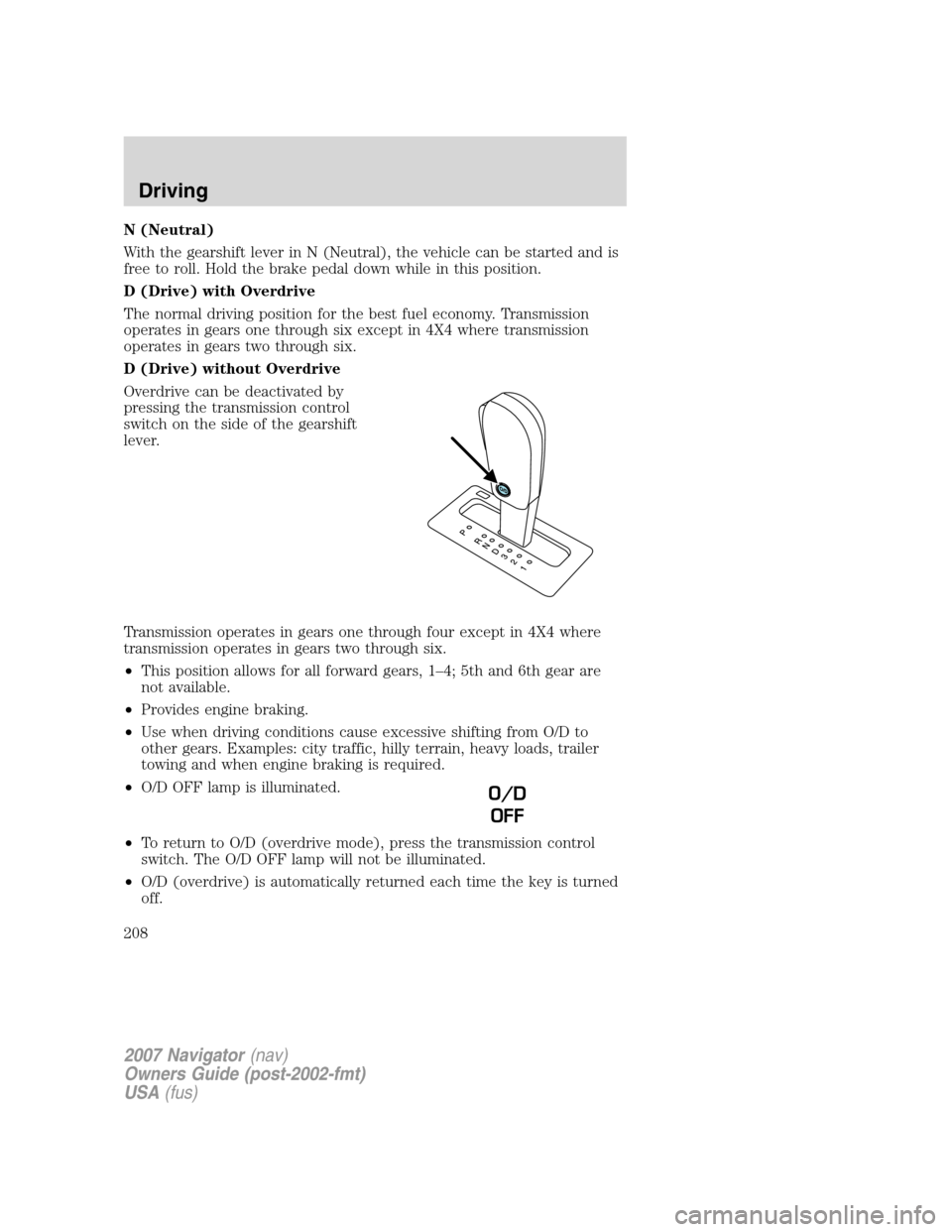
Overdrive can be deactivated by
pressing the transmission control
switch on the side of the gearshift
lever.
Transmission operates in gears one through four except in 4X4 where
transmission operates in gears two through six.
•This position allows for all forward gears, 1–4; 5th and 6th gear are
not available.
•Provides engine braking.
•Use when driving conditions cause excessive shifting from O/D to
other gears. Examples: city traffic, hilly terrain, heavy loads, trailer
towing and when engine braking is required.
•O/D OFF lamp is illuminated.
•To return to O/D (overdrive mode), press the transmission control
switch. The O/D OFF lamp will not be illuminated.
•O/D (overdrive) is automatically returned each time the key is turned
off.
O/D
OFF
2007 Navigator(nav)
Owners Guide (post-2002-fmt)
USA(fus)
Driving
208
Page 221 of 312
ROADSIDE ASSISTANCE
Getting roadside assistance
To fully assist you should you have a vehicle concern, Ford Motor Company
offers a complimentary roadside assistance program. This program is
separate from the New Vehicle Limited Warranty. The service is available:
•24–hours, seven days a week
•
for the New Vehicle Limited Warranty period of three years or
36,000 miles (60,000 km), whichever occurs first on Ford and Mercury
vehicles, and four years or 50,000 miles (80,000 km) on Lincoln vehicles.
Roadside assistance will cover:
•a flat tire change with a good spare (except Ford GT which has a tire
inflation kit)
•battery jump start
•lock-out assistance (key replacement cost is the customer’s
responsibility)
•fuel delivery – Independent Service Contractors, if not prohibited by
state, local or municipal law shall deliver up to 2.0 gallons (7.5L) of
gasoline or 5 gallons (18.9L) of diesel fuel to a disabled vehicle. Fuel
delivery service is limited to two no-charge occurrences within a
12-month period.
•winch out – available within 100 feet (30.5 meters) of a paved or
county maintained road, no recoveries.
•towing – Ford/Mercury/Lincoln eligible vehicle towed to an authorized
dealer within 35 miles (56.3 km) of the disablement location or to the
nearest authorized dealer. If a member requests to be towed to an
authorized dealer more than 35 miles (56.3 km) from the disablement
location, the member shall be responsible for any mileage costs in
excess of 35 miles (56.3 km).
Trailers shall be covered up to $100 if the disabled eligible vehicle
requires service at the nearest authorized dealer. If the trailer is disabled,
but the towing vehicle is operational, the trailer does not qualify for any
roadside services.
Canadian customers refer to your Owner Information Guide for
information on:
•coverage period
•exact fuel amounts
•towing of your disabled vehicle
2007 Navigator(nav)
Owners Guide (post-2002-fmt)
USA(fus)
Roadside Emergencies
221
Page 223 of 312
FUEL PUMP SHUT-OFF SWITCHFUEL
RESET
The fuel pump shut-off switch is a device intended to stop the electric
fuel pump when your vehicle has been involved in a substantial jolt.
After a collision, if the engine cranks but does not start, the fuel pump
shut-off switch may have been activated.
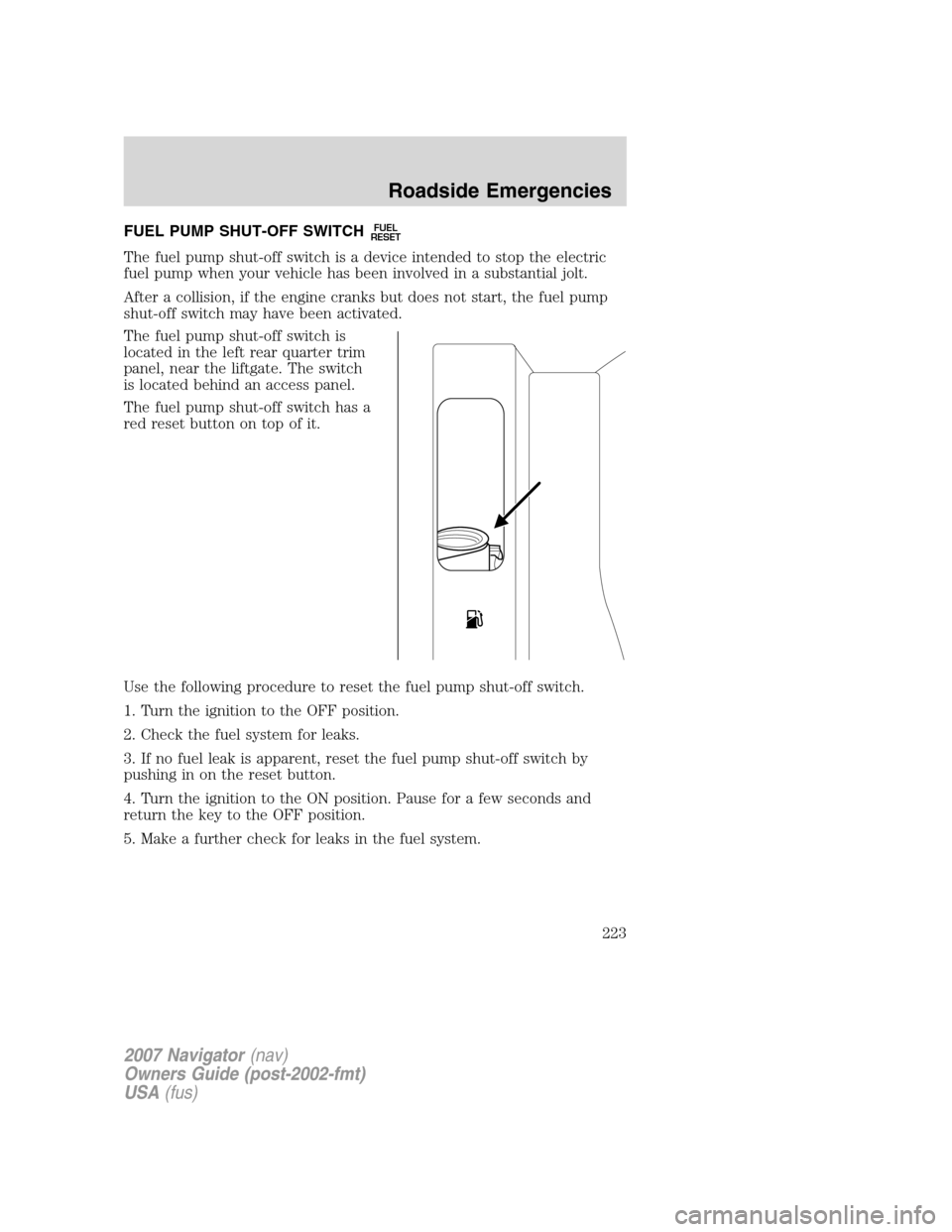
The fuel pump shut-off switch is
located in the left rear quarter trim
panel, near the liftgate. The switch
is located behind an access panel.
The fuel pump shut-off switch has a
red reset button on top of it.
Use the following procedure to reset the fuel pump shut-off switch.
1. Turn the ignition to the OFF position.
2. Check the fuel system for leaks.
3. If no fuel leak is apparent, reset the fuel pump shut-off switch by
pushing in on the reset button.
4. Turn the ignition to the ON position. Pause for a few seconds and
return the key to the OFF position.
5. Make a further check for leaks in the fuel system.
2007 Navigator(nav)
Owners Guide (post-2002-fmt)
USA(fus)
Roadside Emergencies
223
Page 229 of 312
Fuse/Relay
LocationFuse Amp
RatingPower Distribution Box
Description
7 40A** Power running boards
8 40A** Heated/cooled seats
9 60A** ABS (pump)
10 20A** Rear console power point
11 30A** Auxiliary blower
12 25A* Trailer tow connector (park
lamps)
13 30A* Trailer tow connector (battery
charge)
14 — Not used
15 — Not used
16 — A/C clutch relay
17 — Driver side HID low beam
headlamp relay
18 — Fuel pump relay
19 — Back-up relay
20 — Trailer tow connector relay (left
turn signal)
21 — Trailer tow connector relay (right
turn signal)
22 — Passenger side HID low beam
headlamp relay
23 15A* Heated mirrors
24 40A** Blower motor
25 — Not used
26 — Not used
27 30A** Power liftgate
28 40A** Rear window defroster, Heated
mirror
29 30A** Passenger seat
30 10A* A/C clutch
31 15A* Brake lamps
2007 Navigator(nav)
Owners Guide (post-2002-fmt)
USA(fus)
Roadside Emergencies
229
Page 230 of 312
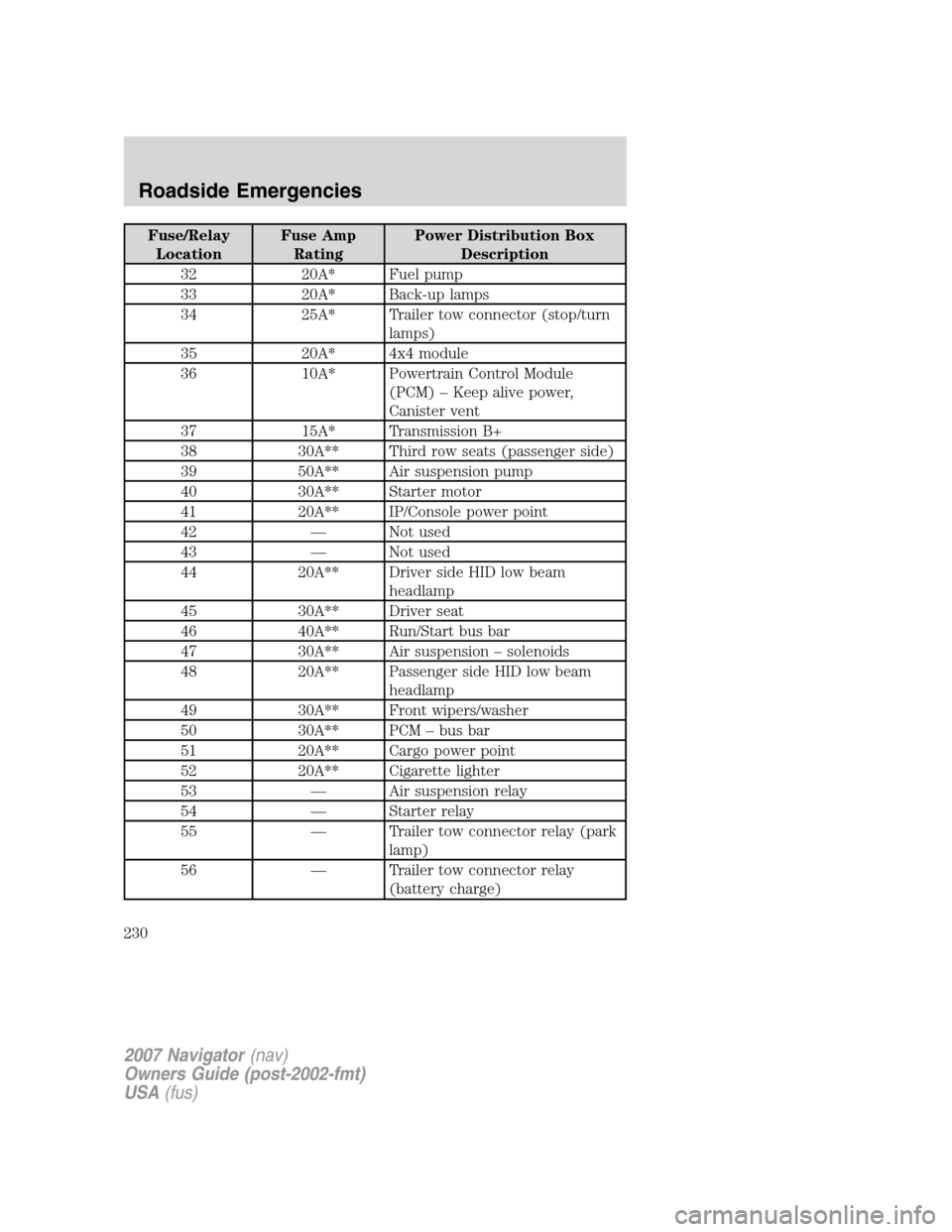
Fuse/Relay
LocationFuse Amp
RatingPower Distribution Box
Description
32 20A* Fuel pump
33 20A* Back-up lamps
34 25A* Trailer tow connector (stop/turn
lamps)
35 20A* 4x4 module
36 10A* Powertrain Control Module
(PCM) – Keep alive power,
Canister vent
37 15A* Transmission B+
38 30A** Third row seats (passenger side)
39 50A** Air suspension pump
40 30A** Starter motor
41 20A** IP/Console power point
42 — Not used
43 — Not used
44 20A** Driver side HID low beam
headlamp
45 30A** Driver seat
46 40A** Run/Start bus bar
47 30A** Air suspension – solenoids
48 20A** Passenger side HID low beam
headlamp
49 30A** Front wipers/washer
50 30A** PCM – bus bar
51 20A** Cargo power point
52 20A** Cigarette lighter
53 — Air suspension relay
54 — Starter relay
55 — Trailer tow connector relay (park
lamp)
56 — Trailer tow connector relay
(battery charge)
2007 Navigator(nav)
Owners Guide (post-2002-fmt)
USA(fus)
Roadside Emergencies
230
Page 231 of 312
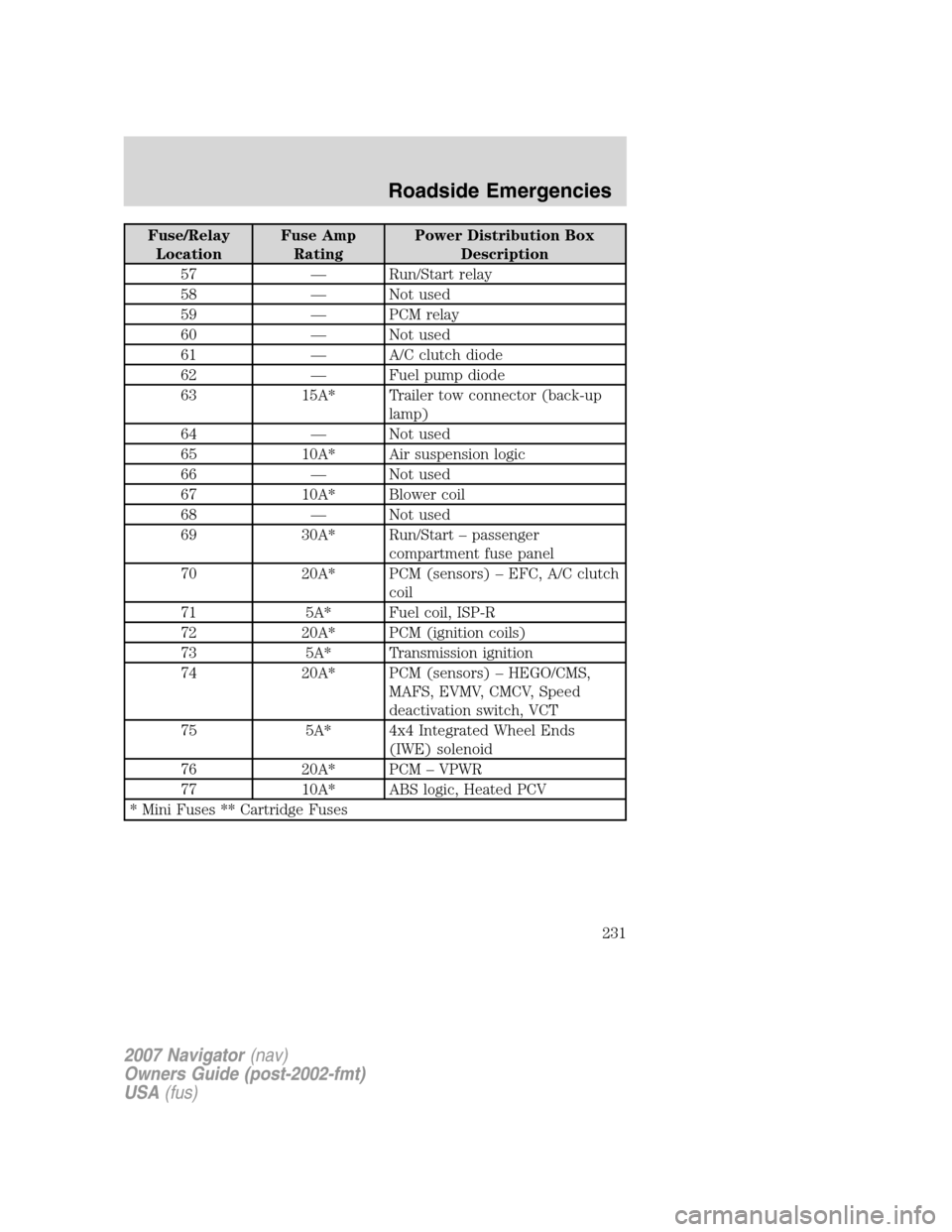
Fuse/Relay
LocationFuse Amp
RatingPower Distribution Box
Description
57 — Run/Start relay
58 — Not used
59 — PCM relay
60 — Not used
61 — A/C clutch diode
62 — Fuel pump diode
63 15A* Trailer tow connector (back-up
lamp)
64 — Not used
65 10A* Air suspension logic
66 — Not used
67 10A* Blower coil
68 — Not used
69 30A* Run/Start – passenger
compartment fuse panel
70 20A* PCM (sensors) – EFC, A/C clutch
coil
71 5A* Fuel coil, ISP-R
72 20A* PCM (ignition coils)
73 5A* Transmission ignition
74 20A* PCM (sensors) – HEGO/CMS,
MAFS, EVMV, CMCV, Speed
deactivation switch, VCT
75 5A* 4x4 Integrated Wheel Ends
(IWE) solenoid
76 20A* PCM – VPWR
77 10A* ABS logic, Heated PCV
* Mini Fuses ** Cartridge Fuses
2007 Navigator(nav)
Owners Guide (post-2002-fmt)
USA(fus)
Roadside Emergencies
231
Page 244 of 312
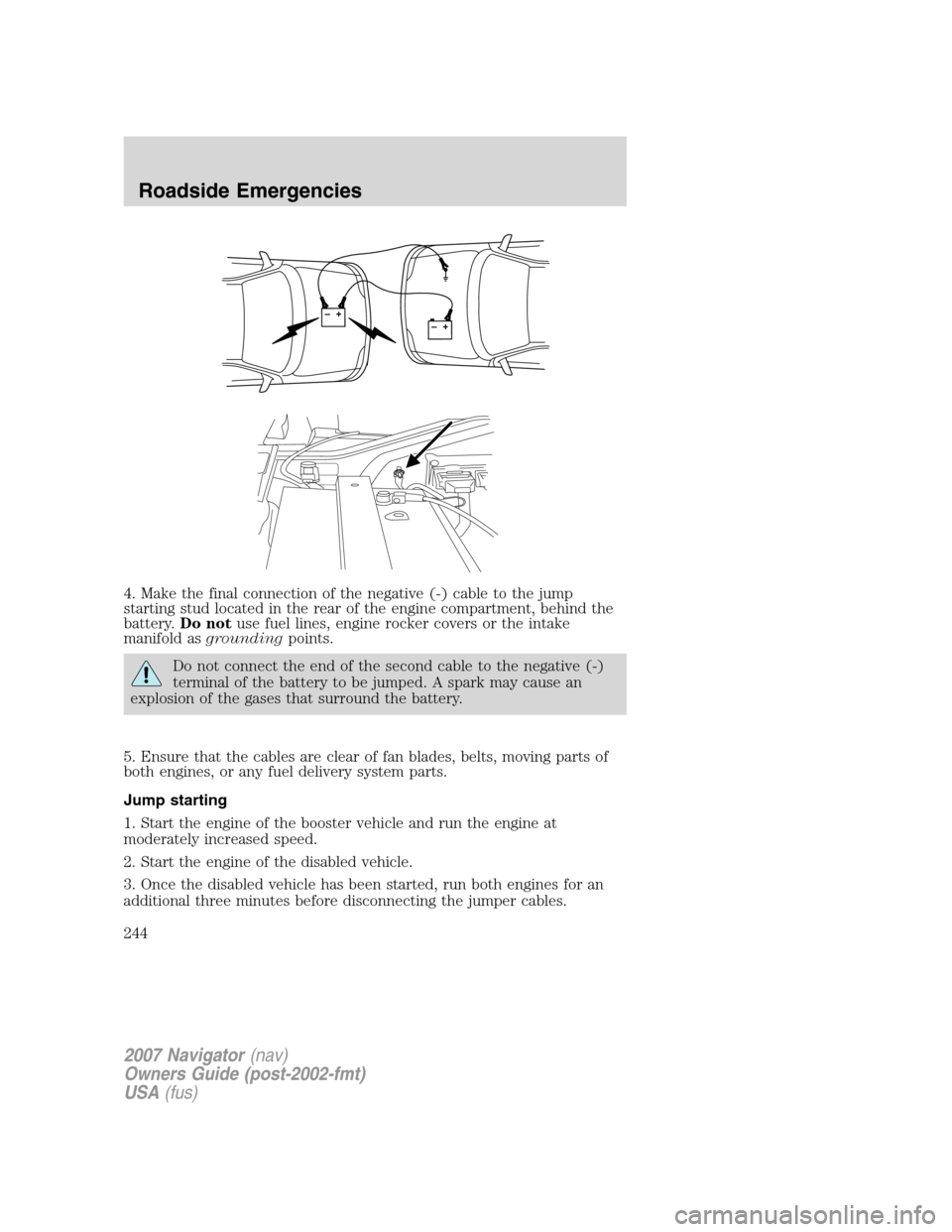
4. Make the final connection of the negative (-) cable to the jump
starting stud located in the rear of the engine compartment, behind the
battery.Do notuse fuel lines, engine rocker covers or the intake
manifold asgroundingpoints.
Do not connect the end of the second cable to the negative (-)
terminal of the battery to be jumped. A spark may cause an
explosion of the gases that surround the battery.
5. Ensure that the cables are clear of fan blades, belts, moving parts of
both engines, or any fuel delivery system parts.
Jump starting
1. Start the engine of the booster vehicle and run the engine at
moderately increased speed.
2. Start the engine of the disabled vehicle.
3. Once the disabled vehicle has been started, run both engines for an
additional three minutes before disconnecting the jumper cables.
+–+–
2007 Navigator(nav)
Owners Guide (post-2002-fmt)
USA(fus)
Roadside Emergencies
244
Page 255 of 312
If you did not take advantage of the Ford Extended Service Plan at the
time of purchasing your vehicle, you may still be eligible. Since this
information is subject to change, please ask your authorized dealer for
complete details about Ford Extended Service Plan coverage options, or
visit the Ford ESP website at www.ford-esp.com.
GETTING ASSISTANCE OUTSIDE THE U.S. AND CANADA
Before exporting your vehicle to a foreign country, contact the
appropriate foreign embassy or consulate. These officials can inform you
of local vehicle registration regulations and where to find unleaded fuel.
If you cannot find unleaded fuel or can only get fuel with an anti-knock
index lower than is recommended for your vehicle, contact a regional
office or owner relations/customer relationship office.
The use of leaded fuel in your vehicle without proper conversion may
damage the effectiveness of your emission control system and may cause
engine knocking or serious engine damage. Ford Motor Company/Ford of
Canada is not responsible for any damage caused by use of improper
fuel. Using leaded fuel may also result in difficulty importing your vehicle
back into the U.S.
If your vehicle must be serviced while you are traveling or living in
Central America, the Caribbean, or the Middle East, contact the nearest
authorized dealer. If the authorized dealer cannot help you, write or call:
FORD MOTOR COMPANY
FORD EXPORT OPERATIONS
1555 Fairlane Drive
Fairlane Business Park #3
Allen Park, Michigan 48101
U.S.A.
Telephone: (313) 594-4857
FAX: (313) 390-0804
If you are in another foreign country, contact the nearest authorized
dealer. If the authorized dealer employees cannot help you, they can
direct you to the nearest Ford affiliate office.
If you buy your vehicle in North America and then relocate outside of
the U.S. or Canada, register your vehicle identification number (VIN) and
new address with Ford Motor Company Export Operations.
Customers in the U.S. should call 1–800–392–3673.
2007 Navigator(nav)
Owners Guide (post-2002-fmt)
USA(fus)
Customer Assistance
255
Page 258 of 312
WASHING THE EXTERIOR
Wash your vehicle regularly with cool or lukewarm water and a neutral
pH shampoo, such as Motorcraft Detail Wash (ZC-3–A), which is
available from your authorized dealer.
•
Never use strong household detergents or soap, such as dish washing or
laundry liquid. These products can discolor and spot painted surfaces.
•Never wash a vehicle that is “hot to the touch” or during exposure to
strong, direct sunlight.
•Always use a clean sponge or car wash mitt with plenty of water for
best results.
•Dry the vehicle with a chamois or soft terry cloth towel in order to
eliminate water spotting.
•It is especially important to wash the vehicle regularly during the
winter months, as dirt and road salt are difficult to remove and cause
damage to the vehicle.
•Immediately remove items such as gasoline, diesel fuel, bird droppings
and insect deposits because they can cause damage to the vehicle’s
paintwork and trim over time.
•Remove any exterior accessories, such as antennas, before entering a
car wash.
•Suntan lotions and insect repellents can damage any painted
surface; if these substances come in contact with your vehicle,
wash off as soon as possible.
•If your vehicle is equipped with running boards, do not use
rubber, plastic and vinyl protectant products on the running
board surface, as the area may become slippery.
•If your vehicle is equipped with power deployable running
boards, you may experience noise while deploying the system
due to excessive grit and grime buildup. While the system is
unaffected by this buildup, it is important to wash the area
regularly in order to maintain the system’s optimal operation.
Exterior chrome
•Wash the vehicle first, using cool or lukewarm water and a neutral pH
shampoo, such as Motorcraft Detail Wash (ZC-3–A).
•Use Custom Brite Metal Cleaner (ZC-15), available from your
authorized dealer. Apply the product as you would a wax to clean
bumpers and other chrome parts; allow the cleaner to dry for a few
minutes, then wipe off the haze with a clean, dry rag.
2007 Navigator(nav)
Owners Guide (post-2002-fmt)
USA(fus)
Cleaning
258
Page 259 of 312
•Never use abrasive materials such as steel wool or plastic pads
as they can scratch the chrome surface.
WAXING
Applying Motorcraft Paint Sealant (ZC-45) to your vehicle every six
months will assist in reducing minor scratches and paint damage.
•Wash the vehicle first.
•Do not use waxes that contain abrasives; use Motorcraft Premium
Liquid Wax (ZC-53-A), which is available from your authorized dealer,
or an equivalent quality product.
•Do not allow paint sealant to come in contact with any non-body
(low-gloss black) colored trim, such as grained door handles, roof
racks, bumpers, side moldings, mirror housings or the windshield cowl
area. The paint sealant will “gray” or stain the parts over time.
PAINT CHIPS
Your authorized dealer has touch-up paint and sprays to match your
vehicle’s color. Take your color code (printed on a sticker in the driver’s
door jamb) to your authorized dealer to ensure you get the correct color.
•Remove particles such as bird droppings, tree sap, insect deposits, tar
spots, road salt and industrial fallout before repairing paint chips.
•Always read the instructions before using the products.
ALUMINUM WHEELS AND WHEEL COVERS
Aluminum wheels and wheel covers are coated with a clearcoat paint
finish. In order to maintain their shine:
•Clean weekly with Motorcraft Wheel and Tire Cleaner (ZC-37–A),
which is available from your authorized dealer. Heavy dirt and brake
dust accumulation may require agitation with a sponge. Rinse
thoroughly with a strong stream of water.
•
Never apply any cleaning chemical to hot or warm wheel rims or covers.
•Some automatic car washes may cause damage to the finish on your
wheel rims or covers. Chemical-strength cleaners, or cleaning
chemicals, in combination with brush agitation to remove brake dust
and dirt, could wear away the clearcoat finish over time.
•Do not use hydrofluoric acid-based or high caustic-based wheel
cleaners, steel wool, fuels or strong household detergent.
•To remove tar and grease, use Motorcraft Bug and Tar Remover
(ZC-42), available from your authorized dealer.
2007 Navigator(nav)
Owners Guide (post-2002-fmt)
USA(fus)
Cleaning
259