Radio settings LINCOLN NAVIGATOR 2008 Owners Manual
[x] Cancel search | Manufacturer: LINCOLN, Model Year: 2008, Model line: NAVIGATOR, Model: LINCOLN NAVIGATOR 2008Pages: 352, PDF Size: 3.01 MB
Page 24 of 352
Treble:Press/to adjust the treble setting. Press OK to close and
return to the main menu.
Balance:Press
/to adjust the audio between the right and left
speakers. Press OK to close and return to the main menu.
Fade:Press
/to adjust the audio between the front and rear
speakers. Press OK to close and return to the main menu.
Speed sensitive volume:Radio volume automatically changes slightly
with vehicle speed to compensate for road and wind noise. Use
/
to adjust. Recommended level is 1–3. Level 7 is the maximum setting.
Press OK to close and return to the main menu.
Occupancy mode:Use
/to select and optimize sound for ALL
SEATS, DRIVERS SEAT or REAR SEATS. Press OK to close and return
to the main menu.
Compression:Available in CD mode, this feature brings soft and loud
CD passages together for a more consistent listening level. Press MENU
until compression status is displayed. Press
/to turn the feature
on/off. Press OK to close and return to the main menu.
5.Select:These controls are used
in Menu mode to select various
settings/options.
6.Play/Pause/OK: In radio mode,
press to mute the playing media.
AUDIO MUTE will appear in the
display. Press again to return to the playing media.
In CD/MP3 mode,press to pause the playing media. CDX PAUSE will
appear in the display. Press again to return to the playing media.
OK:Use in various menu selections.
7.SEEK
:In radio or CD/MP3
mode,press to access the next
strong station or track.
In satellite radio mode,press SEEK
to seek to the next channel.
Press and hold SEEK
to fast seek through the next channels.
In CATEGORY MODE,press
/to select a category.
In TEXT MODE,press TEXT and then SEEK
to view the additional
2008 Navigator(nav)
Owners Guide (post-2002-fmt)
USA(fus)
Entertainment Systems
24
Page 28 of 352
6. Press AUX on the vehicle radio repeatedly until LINE IN appears in
the display.
You should hear audio from your portable music player although it may
be low.
7. Adjust the sound on your portable music player until it reaches the
level of the FM station or CD by switching back and forth between the
AUX and FM or CD controls.
Troubleshooting:
1. Do not connect the audio input jack to a line level output. Line level
outputs are intended for connection to a home stereo and are not
compatible with the AIJ. The AIJ will only work correctly with devices
that have a headphone output with a volume control.
2. Do not set the portable music player’s volume level higher than is
necessary to match the volume of the CD or FM radio in your audio
system as this will cause distortion and will reduce sound quality. Many
portable music players have different output levels, so not all players
should be set at the same levels. Some players will sound best at full
volume and others will need to be set at a lower volume.
3. If the music sounds distorted at lower listening levels, turn the
portable music player volume down. If the problems persists, replace or
recharge the batteries in the portable music player.
4. The portable music player must be controlled in the same way manner
when it is used with headphones as the AIJ does not provide control
(play, pause, etc.) over the attached portable music player.
5. For safety reasons, connecting or adjusting the settings on your
portable music player should not be attempted while the vehicle is
moving. Also, the portable music player should be stored in a secure
location, such as the center console or the glove box, when the vehicle is
in motion. The audio extension cable must be long enough to allow the
portable music player to be safely stored while the vehicle is in motion.
Rear seat radio controls (if equipped)
Your vehicle is equipped with rear seat radio controls. This feature allows
front and middle seat passengers to listen to different media sources
(radio, CD or DVD) simultaneously. (However, the front and middle-seat
passengers cannot listen to two different radio stations at the same
time.)
2008 Navigator(nav)
Owners Guide (post-2002-fmt)
USA(fus)
Entertainment Systems
28
Page 29 of 352
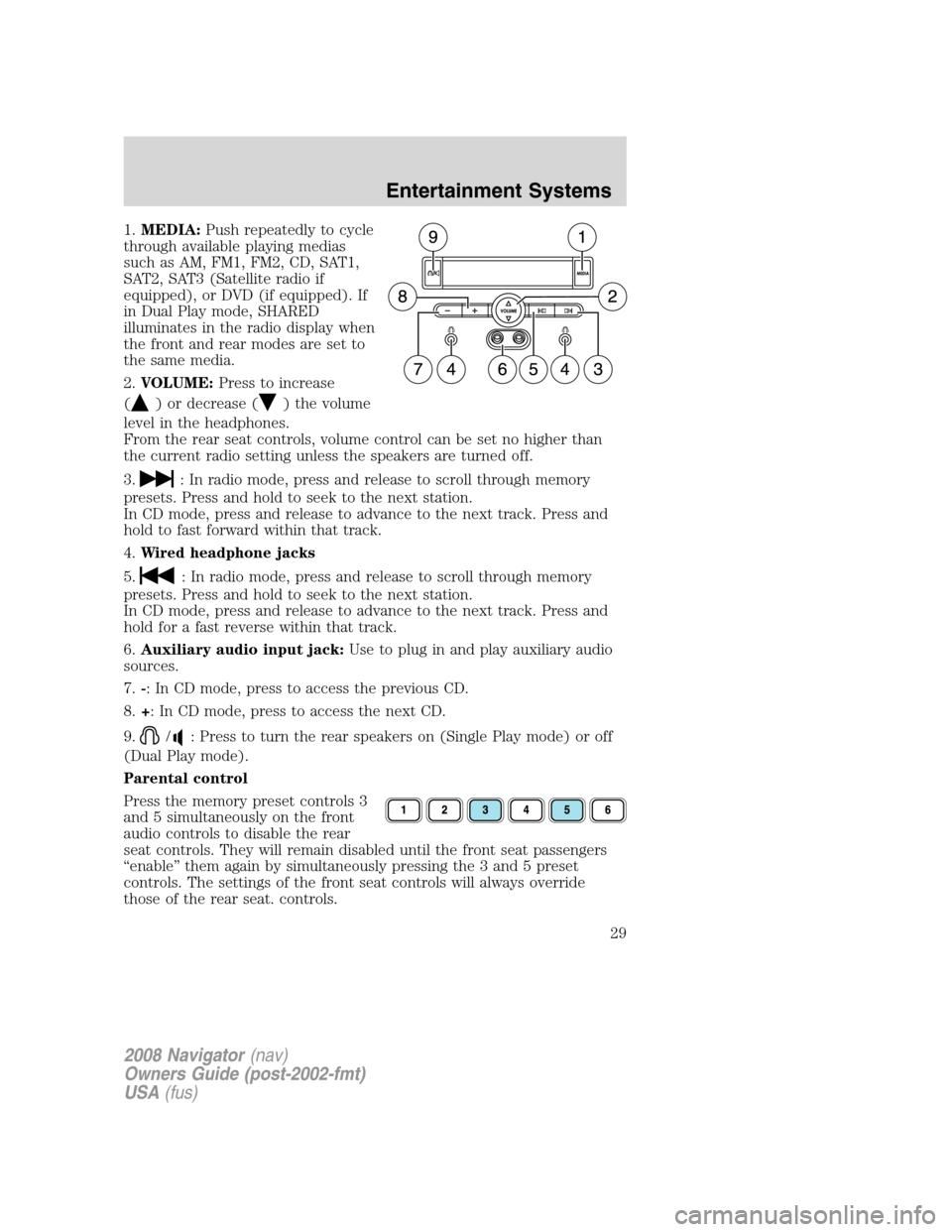
1.MEDIA:Push repeatedly to cycle
through available playing medias
such as AM, FM1, FM2, CD, SAT1,
SAT2, SAT3 (Satellite radio if
equipped), or DVD (if equipped). If
in Dual Play mode, SHARED
illuminates in the radio display when
the front and rear modes are set to
the same media.
2.VOLUME:Press to increase
(
) or decrease () the volume
level in the headphones.
From the rear seat controls, volume control can be set no higher than
the current radio setting unless the speakers are turned off.
3.
: In radio mode, press and release to scroll through memory
presets. Press and hold to seek to the next station.
In CD mode, press and release to advance to the next track. Press and
hold to fast forward within that track.
4.Wired headphone jacks
5.
: In radio mode, press and release to scroll through memory
presets. Press and hold to seek to the next station.
In CD mode, press and release to advance to the next track. Press and
hold for a fast reverse within that track.
6.Auxiliary audio input jack:Use to plug in and play auxiliary audio
sources.
7.-: In CD mode, press to access the previous CD.
8.+: In CD mode, press to access the next CD.
9.
/: Press to turn the rear speakers on (Single Play mode) or off
(Dual Play mode).
Parental control
Press the memory preset controls 3
and 5 simultaneously on the front
audio controls to disable the rear
seat controls. They will remain disabled until the front seat passengers
“enable” them again by simultaneously pressing the 3 and 5 preset
controls. The settings of the front seat controls will always override
those of the rear seat. controls.
2008 Navigator(nav)
Owners Guide (post-2002-fmt)
USA(fus)
Entertainment Systems
29
Page 316 of 352
Keep batteries out of reach of children. Batteries contain sulfuric
acid. Avoid contact with skin, eyes or clothing. Shield your eyes
when working near the battery to protect against possible splashing of
acid solution. In case of acid contact with skin or eyes, flush
immediately with water for a minimum of 15 minutes and get prompt
medical attention. If acid is swallowed, call a physician immediately.
Battery posts, terminals and related accessories contain lead and
lead compounds.Wash hands after handling.
Because your vehicle’s engine is electronically controlled by a computer,
some control conditions are maintained by power from the battery. When
the battery is disconnected or a new battery is installed, the engine must
relearn its idle and fuel trim strategy for optimum driveability and
performance. To begin this process:
1. With the vehicle at a complete stop, set the parking brake.
2. Put the gearshift in P (Park), turn off all accessories and start the
engine.
3. Run the engine until it reaches normal operating temperature.
4. Allow the engine to idle for at least one minute.
5. Turn the A/C on and allow the engine to idle for at least one minute.
6. Release the parking brake. With your foot on the brake pedal and with
the A/C on, put the vehicle in D (Drive) and allow the engine to idle for
at least one minute.
7. Drive the vehicle to complete the relearning process.
•The vehicle may need to be driven 10 miles (16 km) or more to
relearn the idle and fuel trim strategy.
•If you do not allow the engine to relearn its idle trim, the idle
quality of your vehicle may be adversely affected until the idle
trim is eventually relearned.
If the battery has been disconnected or a new battery has been installed,
the clock and radio settings must be reset once the battery is
reconnected.
2008 Navigator(nav)
Owners Guide (post-2002-fmt)
USA(fus)
Maintenance and Specifications
316