wheel LINCOLN NAVIGATOR 2010 Owners Manual
[x] Cancel search | Manufacturer: LINCOLN, Model Year: 2010, Model line: NAVIGATOR, Model: LINCOLN NAVIGATOR 2010Pages: 385, PDF Size: 2.96 MB
Page 332 of 385
INSTRUMENT PANEL/INTERIOR TRIM AND CLUSTER LENS
Clean the instrument panel, interior trim areas and cluster lens with a
clean, damp, white cotton cloth, then use a clean and dry white cotton
cloth to dry these areas.
•Avoid cleaners or polishes that increase the gloss of the upper portion
of the instrument panel. The dull finish in this area helps protect the
driver from undesirable windshield reflection.
•Be certain to wash or wipe your hands clean if you have been in
contact with certain products such as insect repellent and suntan
lotion in order to avoid possible damage to the interior painted
surfaces.
•Do not use household or glass cleaners as these may damage the
finish of the instrument panel, interior trim and cluster lens.
WARNING:Do not use chemical solvents or strong detergents
when cleaning the steering wheel or instrument panel to avoid
contamination of the airbag system.
If a staining liquid like coffee/juice has been spilled on the instrument
panel or on interior trim surfaces, clean as follows:
1. Wipe up spilled liquid using a clean, white, cotton cloth.
2. Wipe the surface with a damp, clean, white cotton cloth. For more
thorough cleaning, use a mild soap and water solution. If the spot cannot
be completely cleaned by this method, the area may be cleaned using a
commercially available cleaning product designed for automotive
interiors.
3. If necessary, apply more soap and water solution or cleaning product
to a clean, white, cotton cloth and press the cloth onto the soiled
area–allow this to set at room temperature for 30 minutes.
4. Remove the soaked cloth, and if it is not soiled badly, use this cloth to
clean the area by using a rubbing motion for 60 seconds.
5. Following this, wipe area dry with a clean, white, cotton cloth.
INTERIOR
For fabric, carpets, cloth seats, safety belts and seats equipped with side
airbags:
•Remove dust and loose dirt with a vacuum cleaner.
•Remove light stains and soil with Motorcraft Professional Strength
Carpet & Upholstery Cleaner (ZC-54).
Cleaning
332
2010 Navigator(nav)
Owners Guide(own2002), 1st Printing
USA(fus)
Page 334 of 385
UNDERBODY
Flush the complete underside of your vehicle frequently. Keep body and
door drain holes free from packed dirt.
FORD AND LINCOLN MERCURY CAR CARE PRODUCTS
Your Ford or Lincoln Mercury authorized dealer has many quality
products available to clean your vehicle and protect its finishes. These
quality products have been specifically engineered to fulfill your
automotive needs; they are custom designed to complement the style
and appearance of your vehicle. Each product is made from high quality
materials that meet or exceed rigid specifications. For best results, use
the following products or products of equivalent quality:
Motorcraft Bug and Tar Remover (ZC-42)
Motorcraft Custom Bright Metal Cleaner (ZC-15)
Motorcraft Custom Clear Coat Polish (ZC-8-A)
Motorcraft Detail Wash (ZC-3-A)
Motorcraft Dusting Cloth (ZC-24)
Motorcraft Engine Shampoo and Degreaser (U.S. only) (ZC-20)
Motorcraft Engine Shampoo (Canada only) (CXC-66-A)
Motorcraft Multi-Purpose Cleaner (Canada only) (CXC-101)
Motorcraft Premium Glass Cleaner (Canada only) (CXC-100)
Motorcraft Premium Liquid Wax (ZC-53-A)
Motorcraft Premium Windshield Washer Concentrate (U.S. only)
(ZC-32-A)
Motorcraft Professional Strength Carpet & Upholstery Cleaner (ZC-54)
Motorcraft Spot and Stain Remover (U.S. only) (ZC-14)
Motorcraft Tire Clean and Shine (ZC-28)
Motorcraft Ultra-Clear Spray Glass Cleaner (ZC-23)
Motorcraft Vinyl Cleaner (Canada only) (CXC-93)
Motorcraft Wheel and Tire Cleaner (ZC-37-A)
Cleaning
334
2010 Navigator(nav)
Owners Guide(own2002), 1st Printing
USA(fus)
Page 335 of 385
SERVICE RECOMMENDATIONS
To help you service your vehicle, we providescheduled maintenance
informationwhich makes tracking routine service easy.
If your vehicle requires professional service, your authorized dealer can
provide the necessary parts and service. Check yourWarranty
Guide/Customer Information Guideto find out which parts and
services are covered.
Use only recommended fuels, lubricants, fluids and service parts
conforming to specifications. Motorcraft parts are designed and built to
provide the best performance in your vehicle.
PRECAUTIONS WHEN SERVICING YOUR VEHICLE
•Do not work on a hot engine.
•Make sure that nothing gets caught in moving parts.
•Do not work on a vehicle with the engine running in an enclosed
space, unless you are sure you have enough ventilation.
•Keep all open flames and other lit material away from the battery and
all fuel related parts.
WARNING:Turn off the power running boards, if equipped,
before working under the vehicle, jacking or placing any object
under the vehicle. Never place your hand between the extended
running board and the vehicle. A moving running board may cause
injury.
Working with the engine off
1. Set the parking brake and ensure the gearshift is securely latched in P
(Park).
2. Turn off the engine and remove the key.
3. Block the wheels to prevent the vehicle from moving unexpectedly.
Maintenance and Specifications
335
2010 Navigator(nav)
Owners Guide(own2002), 1st Printing
USA(fus)
Page 336 of 385
Working with the engine on
1. Set the parking brake and shift to P (Park).
2. Block the wheels.
WARNING:To reduce the risk of vehicle damage and/or
personal burn injuries, do not start your engine with the air
cleaner removed and do not remove it while the engine is running.
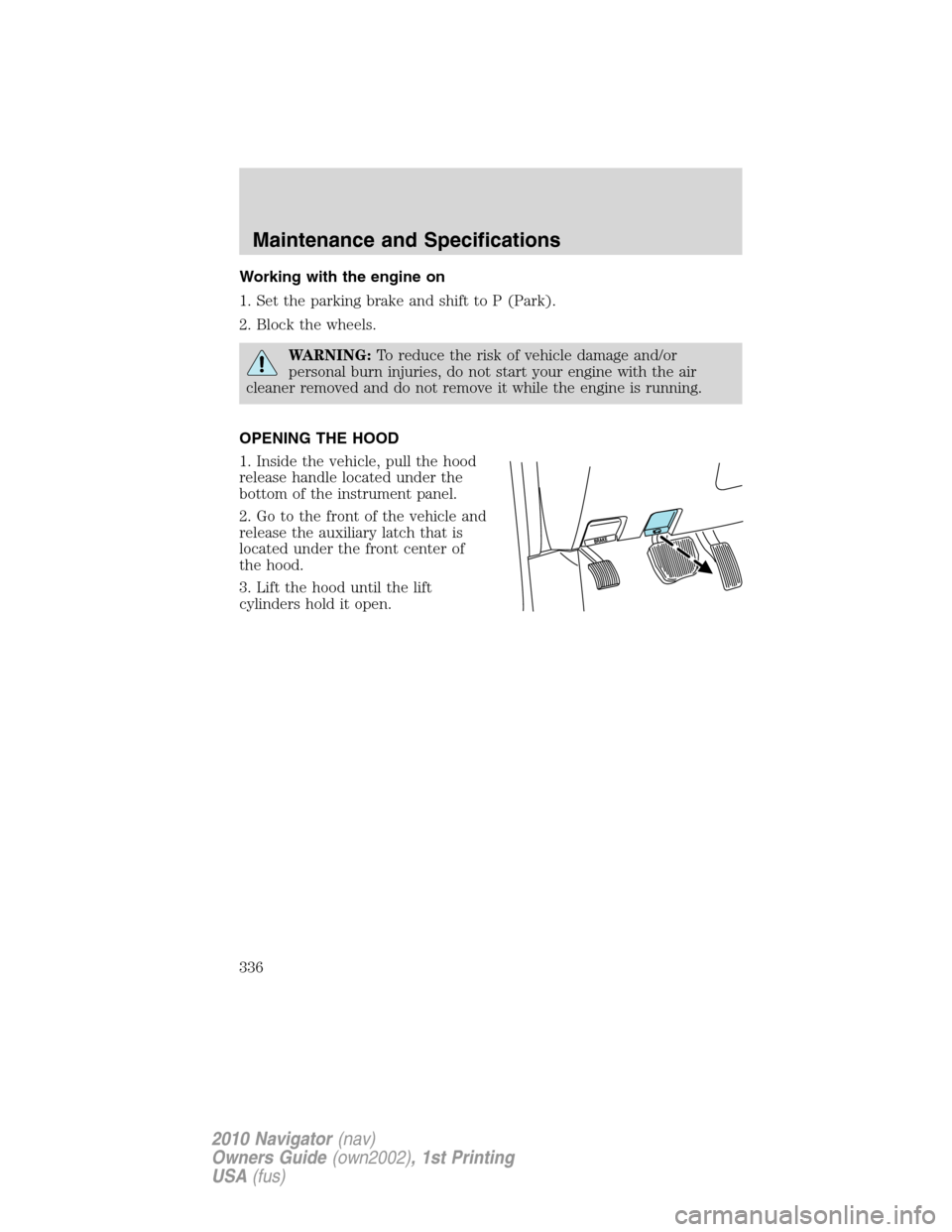
OPENING THE HOOD
1. Inside the vehicle, pull the hood
release handle located under the
bottom of the instrument panel.
2. Go to the front of the vehicle and
release the auxiliary latch that is
located under the front center of
the hood.
3. Lift the hood until the lift
cylinders hold it open.
Maintenance and Specifications
336
2010 Navigator(nav)
Owners Guide(own2002), 1st Printing
USA(fus)
Page 359 of 385
Keep a record for at least one month and record the type of driving (city
or highway). This will provide an accurate estimate of the vehicle’s fuel
economy under current driving conditions. Additionally, keeping records
during summer and winter will show how temperature impacts fuel
economy. In general, lower temperatures give lower fuel economy.
Driving style — good driving and fuel economy habits
Give consideration to the lists that follow and you may be able to change
a number of variables and improve your fuel economy.
Habits
•Smooth, moderate operation can yield up to 10% savings in fuel.
•Steady speeds without stopping will usually give the best fuel
economy.
•Idling for long periods of time (greater than one minute) may waste
fuel.
•Anticipate stopping; slowing down may eliminate the need to stop.
•Sudden or hard accelerations may reduce fuel economy.
•Slow down gradually.
•Driving at reasonable speeds (traveling at 55 mph [88 km/h] uses 15%
less fuel than traveling at 65 mph [105 km/h]).
•Revving the engine before turning it off may reduce fuel economy.
•Using the air conditioner or defroster may reduce fuel economy.
•You may want to turn off the speed control in hilly terrain if
unnecessary shifting between the top gears occurs. Unnecessary
shifting of this type could result in reduced fuel economy.
•Warming up a vehicle on cold mornings is not required and may
reduce fuel economy.
•Resting your foot on the brake pedal while driving may reduce fuel
economy.
•Combine errands and minimize stop-and-go driving.
Maintenance
•Keep tires properly inflated and use only recommended size.
•Operating a vehicle with the wheels out of alignment will reduce fuel
economy.
•Use recommended engine oil. Refer toMaintenance product
specifications and capacitiesin this chapter.
Maintenance and Specifications
359
2010 Navigator(nav)
Owners Guide(own2002), 1st Printing
USA(fus)
Page 360 of 385
•Perform all regularly scheduled maintenance items. Follow the
recommended maintenance schedule and owner maintenance checks
found inscheduled maintenance information.
Conditions
•Heavily loading a vehicle or towing a trailer may reduce fuel economy
at any speed.
•Carrying unnecessary weight may reduce fuel economy (as much as
1 mpg [0.4 km/L] is lost for every 400 lb [180 kg] of weight carried).
•Adding certain accessories to your vehicle (for example; bug
deflectors, rollbars/light bars, running boards, ski/luggage racks) may
reduce fuel economy.
•Using fuel blended with alcohol may lower fuel economy.
•Fuel economy may decrease with lower temperatures during the first
8–10 miles (12–16 km) of driving.
•Driving on flat terrain offers improved fuel economy as compared to
driving on hilly terrain.
•Transmissions give their best fuel economy when operated in the top
cruise gear and with steady pressure on the gas pedal.
•Four-wheel-drive operation (if equipped) is less fuel efficient than
two-wheel-drive operation.
•Close windows for high speed driving.
EPA fuel economy estimates
Every new vehicle should have a sticker on the window called the
Monroney Label which contains EPA fuel economy estimates. Contact
your authorized dealer if the Monroney label is not supplied with your
vehicle. The EPA fuel economy estimates should be your guide for the
fuel economy comparisons with other vehicles. Your fuel economy may
vary depending upon the method of operation and conditions.
EMISSION CONTROL SYSTEM
Your vehicle is equipped with various emission control components and a
catalytic converter which will enable your vehicle to comply with
applicable exhaust emission standards. To make sure that the catalytic
converter and other emission control components continue to work
properly:
•Use only the specified fuel listed.
•Avoid running out of fuel.
Maintenance and Specifications
360
2010 Navigator(nav)
Owners Guide(own2002), 1st Printing
USA(fus)
Page 363 of 385
If the service engine soonindicator is on or the bulb does not
work, the vehicle may need to be serviced. Refer to the On board
diagnostics (OBD-II) description in this chapter.
If the vehicle’s engine or transmission has just been serviced, or the
battery has recently run down or been replaced, the OBD-II system may
indicate that the vehicle is not ready for I/M testing. To determine if the
vehicle is ready for I/M testing, turn the ignition key to the on position
for 15 seconds without cranking the engine. If the service engine
soon
indicator blinks eight times, it means that the vehicle is not
ready for I/M testing; if the service engine soon
indicator stays on
solid, it means that the vehicle is ready for I/M testing.
The OBD-II system is designed to check the emission control system
during normal driving. A complete check may take several days. If the
vehicle is not ready for I/M testing, the following driving cycle consisting
of mixed city and highway driving may be performed:
15 minutes of steady driving on an expressway/highway followed by
20 minutes of stop-and-go driving with at least four 30-second idle
periods.
Allow the vehicle to sit for at least eight hours without starting the
engine. Then, start the engine and complete the above driving cycle. The
engine must warm up to its normal operating temperature. Once started,
do not turn off the engine until the above driving cycle is complete. If
the vehicle is still not ready for I/M testing, the above driving cycle will
have to be repeated.
POWER STEERING FLUID
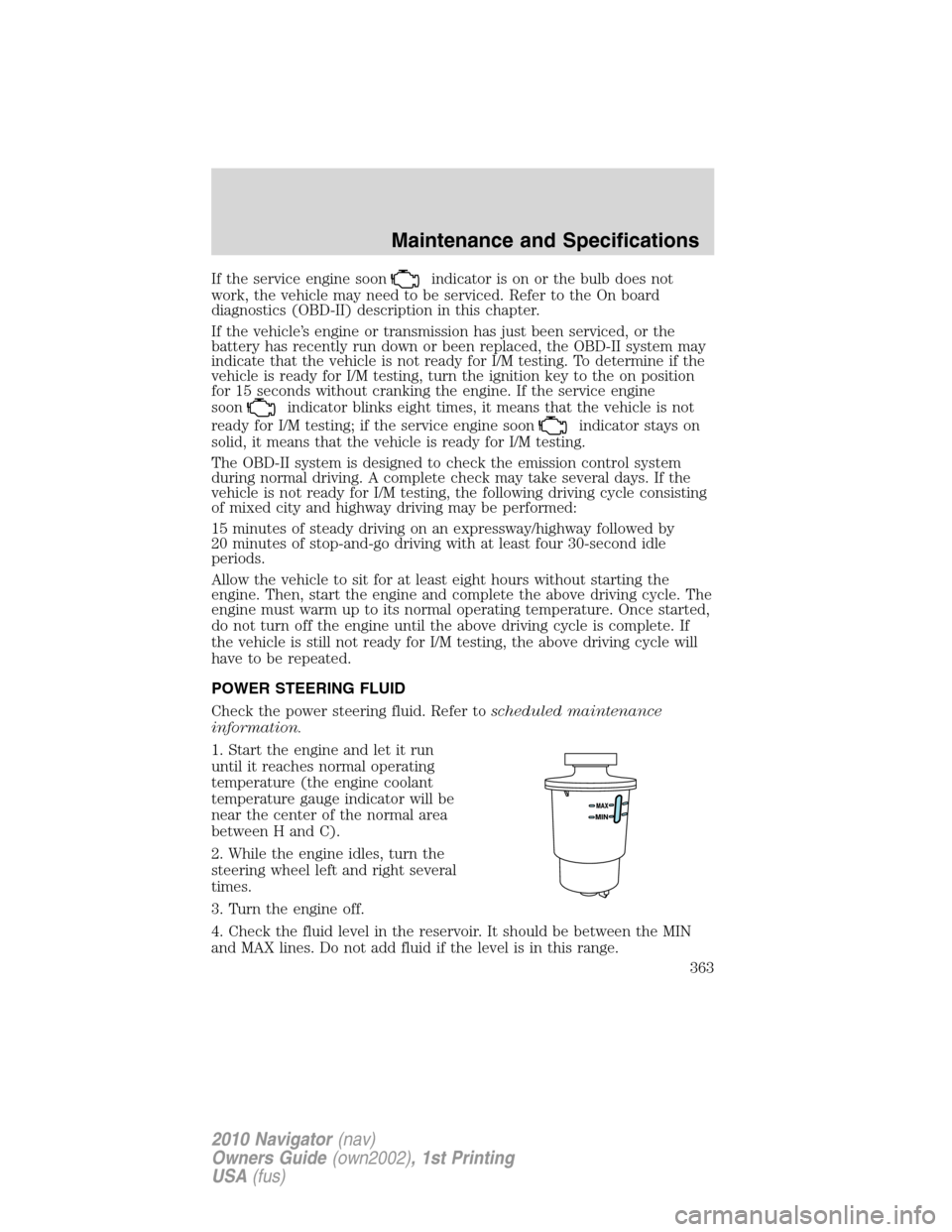
Check the power steering fluid. Refer toscheduled maintenance
information.
1. Start the engine and let it run
until it reaches normal operating
temperature (the engine coolant
temperature gauge indicator will be
near the center of the normal area
between H and C).
2. While the engine idles, turn the
steering wheel left and right several
times.
3. Turn the engine off.
4. Check the fluid level in the reservoir. It should be between the MIN
and MAX lines. Do not add fluid if the level is in this range.
Maintenance and Specifications
363
2010 Navigator(nav)
Owners Guide(own2002), 1st Printing
USA(fus)
Page 376 of 385
Locking gas plug for capless fuel system
Wheel locks
For maximum vehicle performance, keep the following information in
mind when adding accessories or equipment to your vehicle:
•When adding accessories, equipment, passengers and luggage to your
vehicle, do not exceed the total weight capacity of the vehicle or of
the front or rear axle (GVWR or GAWR as indicated on the Safety
Compliance Certification label). Consult your authorized dealer for
specific weight information.
•The Federal Communications Commission (FCC) and Canadian Radio
Telecommunications Commission (CRTC) regulate the use of mobile
communications systems — such as two-way radios, telephones and
theft alarms - that are equipped with radio transmitters. Any such
equipment installed in your vehicle should comply with FCC or CRTC
regulations and should be installed only by a qualified service
technician.
•Mobile communications systems may harm the operation of your
vehicle, particularly if they are not properly designed for automotive
use.
•To avoid interference with other vehicle functions, such as anti-lock
braking systems, amateur radio users who install radios and antennas
onto their vehicle should not locate the Amateur Radio Antennas in
the area of the driver’s side hood.
•Electrical or electronic accessories or components that are added to
the vehicle by the authorized dealer or the owner may adversely affect
battery performance and durability.
Accessories
376
2010 Navigator(nav)
Owners Guide(own2002), 1st Printing
USA(fus)
Page 381 of 385
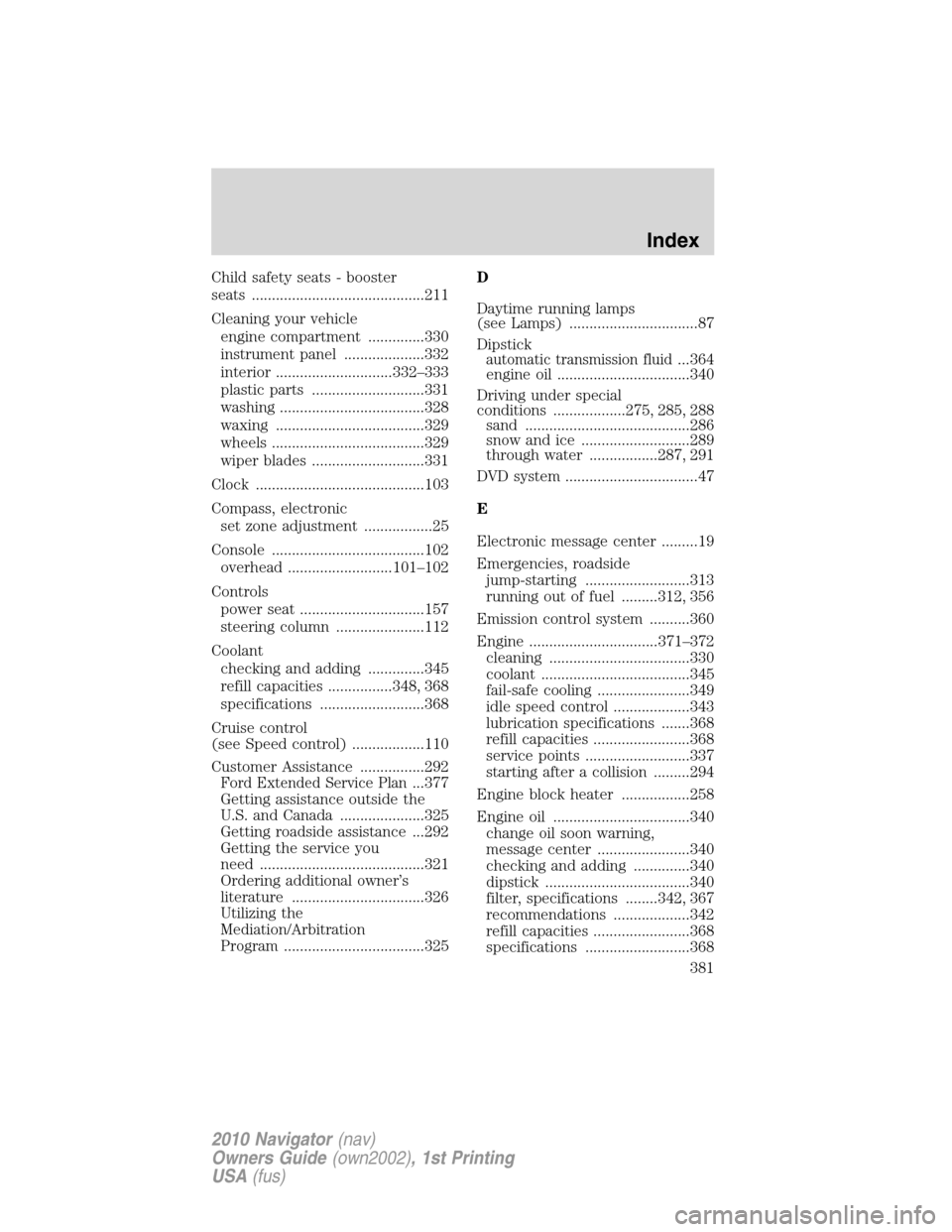
Child safety seats - booster
seats ...........................................211
Cleaning your vehicle
engine compartment ..............330
instrument panel ....................332
interior .............................332–333
plastic parts ............................331
washing ....................................328
waxing .....................................329
wheels ......................................329
wiper blades ............................331
Clock ..........................................103
Compass, electronic
set zone adjustment .................25
Console ......................................102
overhead ..........................101–102
Controls
power seat ...............................157
steering column ......................112
Coolant
checking and adding ..............345
refill capacities ................348, 368
specifications ..........................368
Cruise control
(see Speed control) ..................110
Customer Assistance ................292
Ford Extended Service Plan...377
Getting assistance outside the
U.S. and Canada .....................325
Getting roadside assistance ...292
Getting the service you
need .........................................321
Ordering additional owner’s
literature .................................326
Utilizing the
Mediation/Arbitration
Program ...................................325D
Daytime running lamps
(see Lamps) ................................87
Dipstick
automatic transmission fluid...364
engine oil .................................340
Driving under special
conditions ..................275, 285, 288
sand .........................................286
snow and ice ...........................289
through water .................287, 291
DVD system .................................47
E
Electronic message center .........19
Emergencies, roadside
jump-starting ..........................313
running out of fuel .........312, 356
Emission control system ..........360
Engine ................................371–372
cleaning ...................................330
coolant .....................................345
fail-safe cooling .......................349
idle speed control ...................343
lubrication specifications .......368
refill capacities ........................368
service points ..........................337
starting after a collision .........294
Engine block heater .................258
Engine oil ..................................340
change oil soon warning,
message center .......................340
checking and adding ..............340
dipstick ....................................340
filter, specifications ........342, 367
recommendations ...................342
refill capacities ........................368
specifications ..........................368
Index
381
2010 Navigator(nav)
Owners Guide(own2002), 1st Printing
USA(fus)
Page 382 of 385
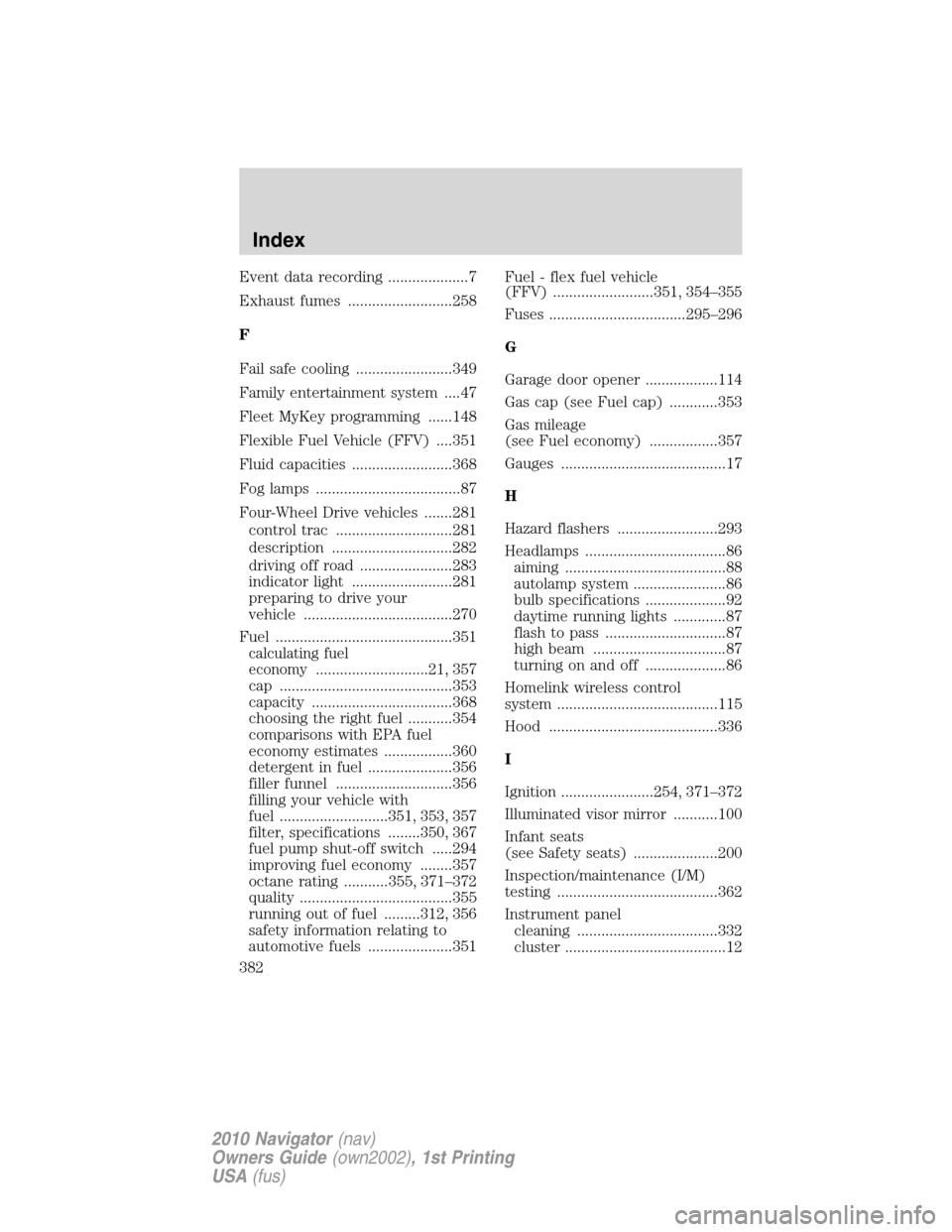
Event data recording ....................7
Exhaust fumes ..........................258
F
Fail safe cooling ........................349
Family entertainment system ....47
Fleet MyKey programming ......148
Flexible Fuel Vehicle (FFV) ....351
Fluid capacities .........................368
Fog lamps ....................................87
Four-Wheel Drive vehicles .......281
control trac .............................281
description ..............................282
driving off road .......................283
indicator light .........................281
preparing to drive your
vehicle .....................................270
Fuel ............................................351
calculating fuel
economy
............................21, 357
cap ...........................................353
capacity ...................................368
choosing the right fuel ...........354
comparisons with EPA fuel
economy estimates .................360
detergent in fuel .....................356
filler funnel .............................356
filling your vehicle with
fuel ...........................351, 353, 357
filter, specifications ........350, 367
fuel pump shut-off switch .....294
improving fuel economy ........357
octane rating ...........355, 371–372
quality ......................................355
running out of fuel .........312, 356
safety information relating to
automotive fuels .....................351Fuel - flex fuel vehicle
(FFV) .........................351, 354–355
Fuses ..................................295–296
G
Garage door opener ..................114
Gas cap (see Fuel cap) ............353
Gas mileage
(see Fuel economy) .................357
Gauges .........................................17
H
Hazard flashers .........................293
Headlamps ...................................86
aiming ........................................88
autolamp system .......................86
bulb specifications ....................92
daytime running lights .............87
flash to pass ..............................87
high beam .................................87
turning on and off ....................86
Homelink wireless control
system ........................................115
Hood ..........................................336
I
Ignition .......................254, 371–372
Illuminated visor mirror ...........100
Infant seats
(see Safety seats) .....................200
Inspection/maintenance (I/M)
testing ........................................362
Instrument panel
cleaning ...................................332
cluster ........................................12
Index
382
2010 Navigator(nav)
Owners Guide(own2002), 1st Printing
USA(fus)