Instrument cluster LINCOLN NAVIGATOR 2010 Service Manual
[x] Cancel search | Manufacturer: LINCOLN, Model Year: 2010, Model line: NAVIGATOR, Model: LINCOLN NAVIGATOR 2010Pages: 385, PDF Size: 2.96 MB
Page 269 of 385
If the power steering system breaks down (or if the engine is turned
off), you can steer the vehicle manually, but it takes more effort.
If the steering wanders or pulls, check for:
•Underinflated tire(s) on any wheel(s)
•Uneven vehicle loading
•High crown in center of road
•High crosswinds
•Wheels out of alignment
•Loose or worn suspension components
Variable assist steering
Your vehicle is equipped with variable assist power steering. At low
engine RPM, steering assist will adjust to reduce efforts and improve low
speed maneuverability. At high engine RPM, the assist will adjust to
improve steering feel at high speeds.
If the amount of effort required to steer your vehicle changes while
driving at a constant engine RPM, have the power steering system
checked by your authorized dealer.
AIR SUSPENSION SYSTEM
The air suspension system is designed to improve ride, handling and
general vehicle performance during:
•Certain road conditions
•Steering maneuvers
•Braking
•Acceleration
This system keeps the rear of your vehicle at a constant level by
automatically adding air or releasing air from the springs. If you exceed
the load limit, the rear air suspension may not operate. The air
suspension system will stay active for 40 minutes after the ignition is
turned off to accommodate any load changes. (The air compressor may
run when the vehicle is off; this is normal.)
The air suspension system can be enabled or disabled through the
message center. Refer toMessage centerin theInstrument cluster
chapter.
If the system is off, the rear air suspension will not operate and will not
raise (pump) or lower (vent) while the vehicle is not moving. However, if
Driving
269
2010 Navigator(nav)
Owners Guide(own2002), 1st Printing
USA(fus)
Page 274 of 385
D (Overdrive) with Tow/Haul On
The Tow/Haul feature improves
transmission operation when towing
a trailer or a heavy load. All
transmission gear ranges are
available when using Tow/Haul.
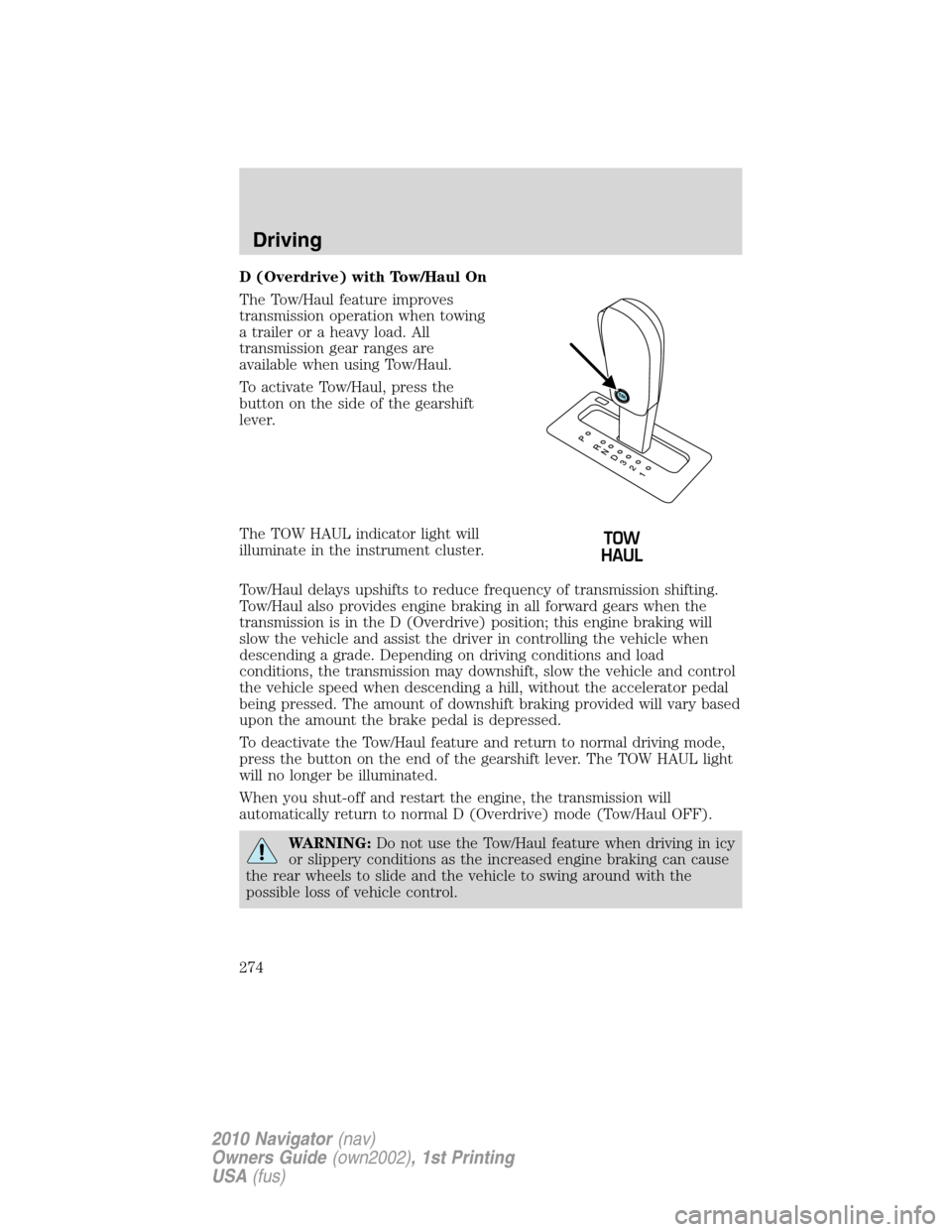
To activate Tow/Haul, press the
button on the side of the gearshift
lever.
The TOW HAUL indicator light will
illuminate in the instrument cluster.
Tow/Haul delays upshifts to reduce frequency of transmission shifting.
Tow/Haul also provides engine braking in all forward gears when the
transmission is in the D (Overdrive) position; this engine braking will
slow the vehicle and assist the driver in controlling the vehicle when
descending a grade. Depending on driving conditions and load
conditions, the transmission may downshift, slow the vehicle and control
the vehicle speed when descending a hill, without the accelerator pedal
being pressed. The amount of downshift braking provided will vary based
upon the amount the brake pedal is depressed.
To deactivate the Tow/Haul feature and return to normal driving mode,
press the button on the end of the gearshift lever. The TOW HAUL light
will no longer be illuminated.
When you shut-off and restart the engine, the transmission will
automatically return to normal D (Overdrive) mode (Tow/Haul OFF).
WARNING:Do not use the Tow/Haul feature when driving in icy
or slippery conditions as the increased engine braking can cause
the rear wheels to slide and the vehicle to swing around with the
possible loss of vehicle control.
Driving
274
2010 Navigator(nav)
Owners Guide(own2002), 1st Printing
USA(fus)
Page 278 of 385
WARNING:This system is not designed to prevent contact with
small or moving objects. The system is designed to provide a
warning to assist the driver in detecting large stationary objects to
avoid damaging the vehicle. The system may not detect smaller
objects, particularly those close to the ground.
WARNING:Certain add-on devices such as large trailer hitches,
bike or surfboard racks and any device that may block the
normal detection zone of the forward and reverse sensing system may
create false beeps.
The system will sound a tone to warn the driver of obstacles near either
bumper in the following manner:
•The front sensors will sound a high pitched tone which will appear to
come from the dashboard
•The rear sensors will sound a lower pitched tone which will appear to
come from the rear interior of the vehicle
•The sensing system will report the obstacle which is closest to the
front or rear of the vehicle. For example, if an obstacle is 12 inches
(30 cm) from the front of the vehicle and, at the same time, an
obstacle is only six inches (15 cm) from the rear of the vehicle, the
lower pitched tone will sound.
The reverse sensing portion of the system will assist the driver in
detecting certain objects while:
•the vehicle is in R (Reverse) and moving toward a stationary object at
a speed of 3 mph (5 km/h) or less.
•the vehicle is in R (Reverse) but not moving, and a moving object is
approaching the front or rear of the vehicle at a speed of 3 mph
(5 km/h) or less.
•the vehicle is in R (Reverse) and moving at a speed of less than
3 mph (5 km/h) and a moving object is approaching the rear of the
vehicle at a speed of less than 3 mph (5 km/h).
The system is automatically enabled when the gearshift lever is placed in
D (Drive) or R (Reverse) and the ignition is on. A control in the message
center allows the driver to disable the forward (if equipped) and/or
reverse system. Refer toMessage centerin theInstrument Cluster
chapter for more information. The message center will indicate a failure
in the forward or reverse system and will not allow the driver to switch
the faulted system on.
Driving
278
2010 Navigator(nav)
Owners Guide(own2002), 1st Printing
USA(fus)
Page 281 of 385
WARNING:Do not use the camera system with the liftgate
open.
If the back end of the vehicle is hit or damaged, then check with your
authorized dealer to have your rear video system checked for proper
coverage and operation.
Night time and dark area use
At night time or in dark areas, the reverse camera system relies on the
reverse lamp lighting to produce an image. Therefore it is necessary that
both reverse lamps are operating in order to get a clear image in the
dark. If either of the lamps are not operating, stop using the camera
system, at least in the dark, until the lamp(s) are replaced and
functioning.
Servicing
•If the image comes on while the vehicle is not in R (Reverse), have
the system inspected by your authorized dealer.
•If the image is not clear, then check if there is anything covering the
lens such as dirt, mud, ice, snow, etc. If the image is still not clear
after cleaning, have your system inspected by your authorized dealer.
CONTROL TRAC FOUR-WHEEL DRIVE (4X4) OPERATION
(IF EQUIPPED)
WARNING:For important information regarding safe operation
of this type of vehicle, seePreparing to drive your vehiclein
this chapter.
Do not use 4X4 mode on dry, hard surfaced roads. Doing so will produce
excessive noise, increase tire wear and may damage drive components.
4X4 mode is only intended for consistently slippery or loose surfaces.
Use of 4X4 mode on these surfaces may produce some noise (such as
occasional clunks) but will not damage drive components.
Your 4x4 features the heavy-duty Control Trac system which includes a
computer-operated transfer case. This unique system is interactive with
the road, continually monitoring and adjusting torque delivery to the
front and rear wheels to optimize vehicle control.
4WD indicator lights
The indicator lights illuminate in the message center in the
reconfigurable telltale (RTT) location under the following conditions.
Refer toWarning lights and chimesin theInstrument Clusterchapter.
Driving
281
2010 Navigator(nav)
Owners Guide(own2002), 1st Printing
USA(fus)
Page 298 of 385
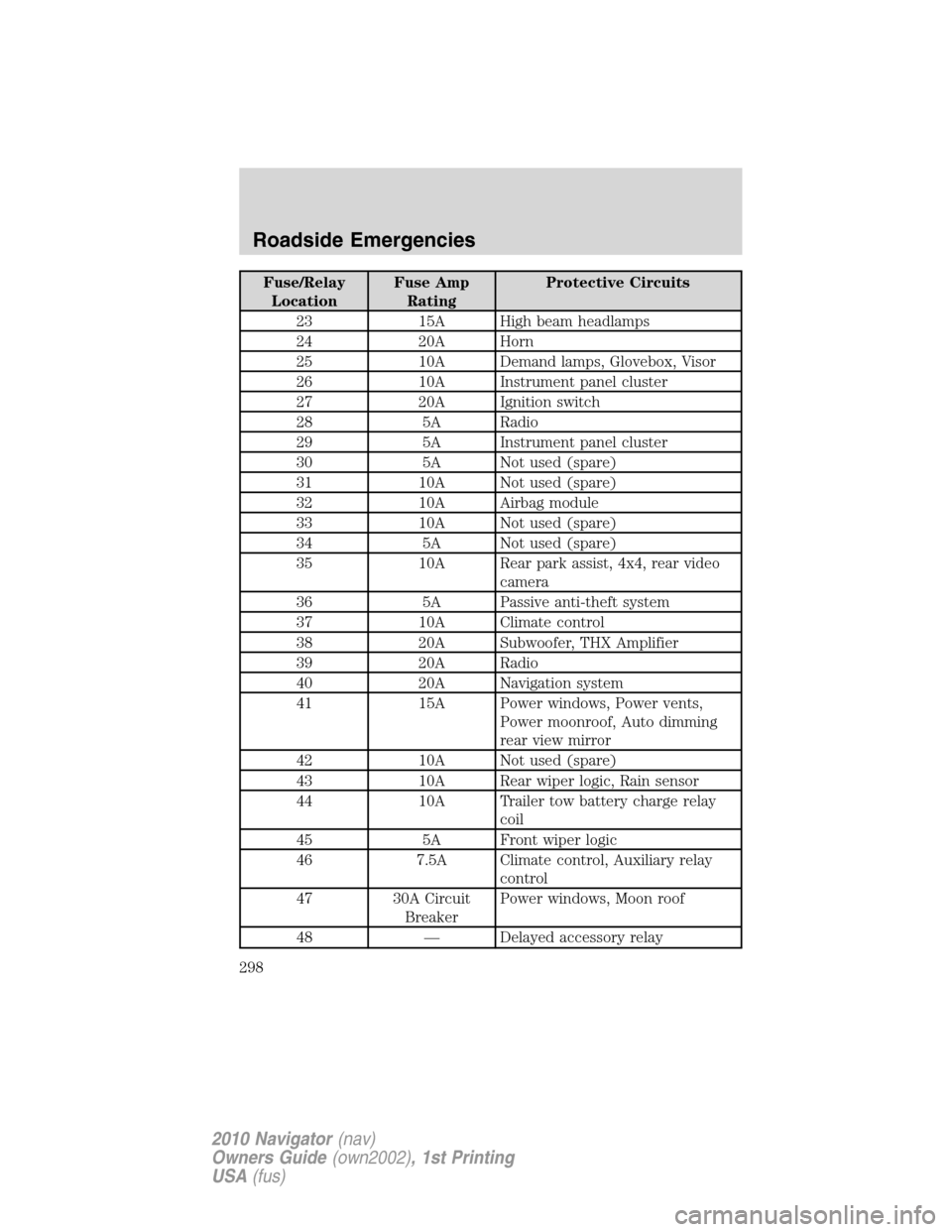
Fuse/Relay
LocationFuse Amp
RatingProtective Circuits
23 15A High beam headlamps
24 20A Horn
25 10A Demand lamps, Glovebox, Visor
26 10A Instrument panel cluster
27 20A Ignition switch
28 5A Radio
29 5A Instrument panel cluster
30 5A Not used (spare)
31 10A Not used (spare)
32 10A Airbag module
33 10A Not used (spare)
34 5A Not used (spare)
35 10A Rear park assist, 4x4, rear video
camera
36 5A Passive anti-theft system
37 10A Climate control
38 20A Subwoofer, THX Amplifier
39 20A Radio
40 20A Navigation system
41 15A Power windows, Power vents,
Power moonroof, Auto dimming
rear view mirror
42 10A Not used (spare)
43 10A Rear wiper logic, Rain sensor
44 10A Trailer tow battery charge relay
coil
45 5A Front wiper logic
46 7.5A Climate control, Auxiliary relay
control
47 30A Circuit
BreakerPower windows, Moon roof
48 — Delayed accessory relay
Roadside Emergencies
298
2010 Navigator(nav)
Owners Guide(own2002), 1st Printing
USA(fus)
Page 307 of 385
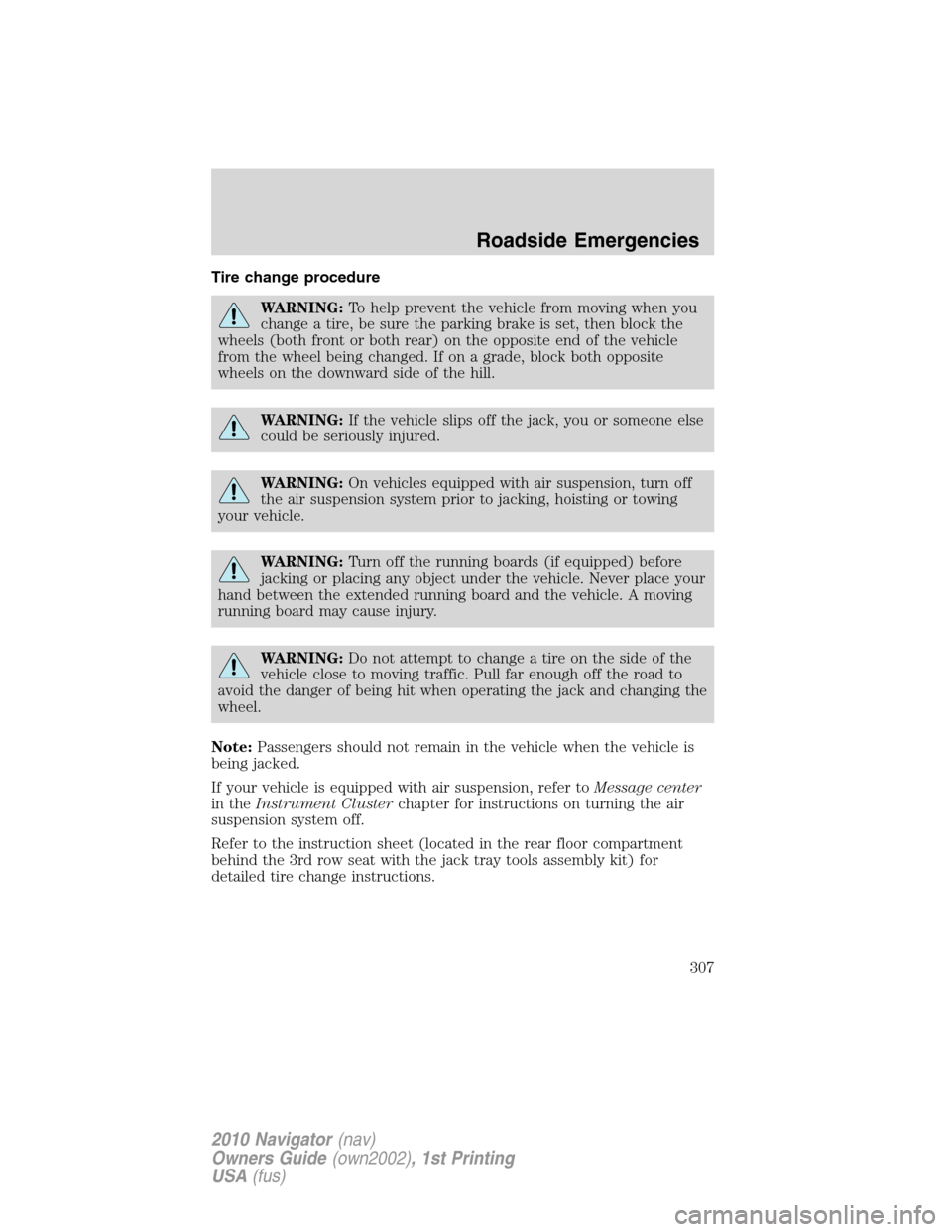
Tire change procedure
WARNING:To help prevent the vehicle from moving when you
change a tire, be sure the parking brake is set, then block the
wheels (both front or both rear) on the opposite end of the vehicle
from the wheel being changed. If on a grade, block both opposite
wheels on the downward side of the hill.
WARNING:If the vehicle slips off the jack, you or someone else
could be seriously injured.
WARNING:On vehicles equipped with air suspension, turn off
the air suspension system prior to jacking, hoisting or towing
your vehicle.
WARNING:Turn off the running boards (if equipped) before
jacking or placing any object under the vehicle. Never place your
hand between the extended running board and the vehicle. A moving
running board may cause injury.
WARNING:Do not attempt to change a tire on the side of the
vehicle close to moving traffic. Pull far enough off the road to
avoid the danger of being hit when operating the jack and changing the
wheel.
Note:Passengers should not remain in the vehicle when the vehicle is
being jacked.
If your vehicle is equipped with air suspension, refer toMessage center
in theInstrument Clusterchapter for instructions on turning the air
suspension system off.
Refer to the instruction sheet (located in the rear floor compartment
behind the 3rd row seat with the jack tray tools assembly kit) for
detailed tire change instructions.
Roadside Emergencies
307
2010 Navigator(nav)
Owners Guide(own2002), 1st Printing
USA(fus)
Page 308 of 385
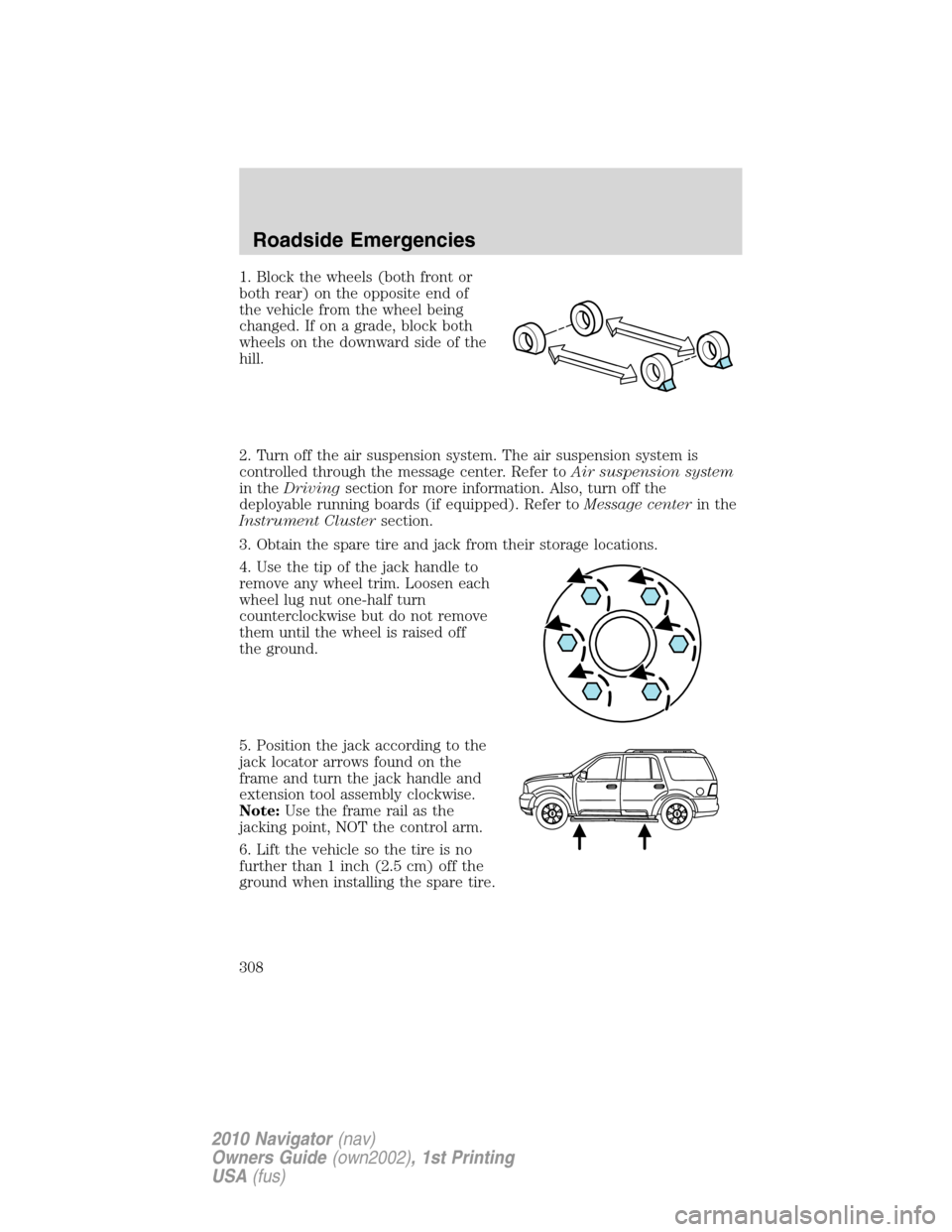
1. Block the wheels (both front or
both rear) on the opposite end of
the vehicle from the wheel being
changed. If on a grade, block both
wheels on the downward side of the
hill.
2. Turn off the air suspension system. The air suspension system is
controlled through the message center. Refer toAir suspension system
in theDrivingsection for more information. Also, turn off the
deployable running boards (if equipped). Refer toMessage centerin the
Instrument Clustersection.
3. Obtain the spare tire and jack from their storage locations.
4. Use the tip of the jack handle to
remove any wheel trim. Loosen each
wheel lug nut one-half turn
counterclockwise but do not remove
them until the wheel is raised off
the ground.
5. Position the jack according to the
jack locator arrows found on the
frame and turn the jack handle and
extension tool assembly clockwise.
Note:Use the frame rail as the
jacking point, NOT the control arm.
6. Lift the vehicle so the tire is no
further than 1 inch (2.5 cm) off the
ground when installing the spare tire.
Roadside Emergencies
308
2010 Navigator(nav)
Owners Guide(own2002), 1st Printing
USA(fus)
Page 310 of 385
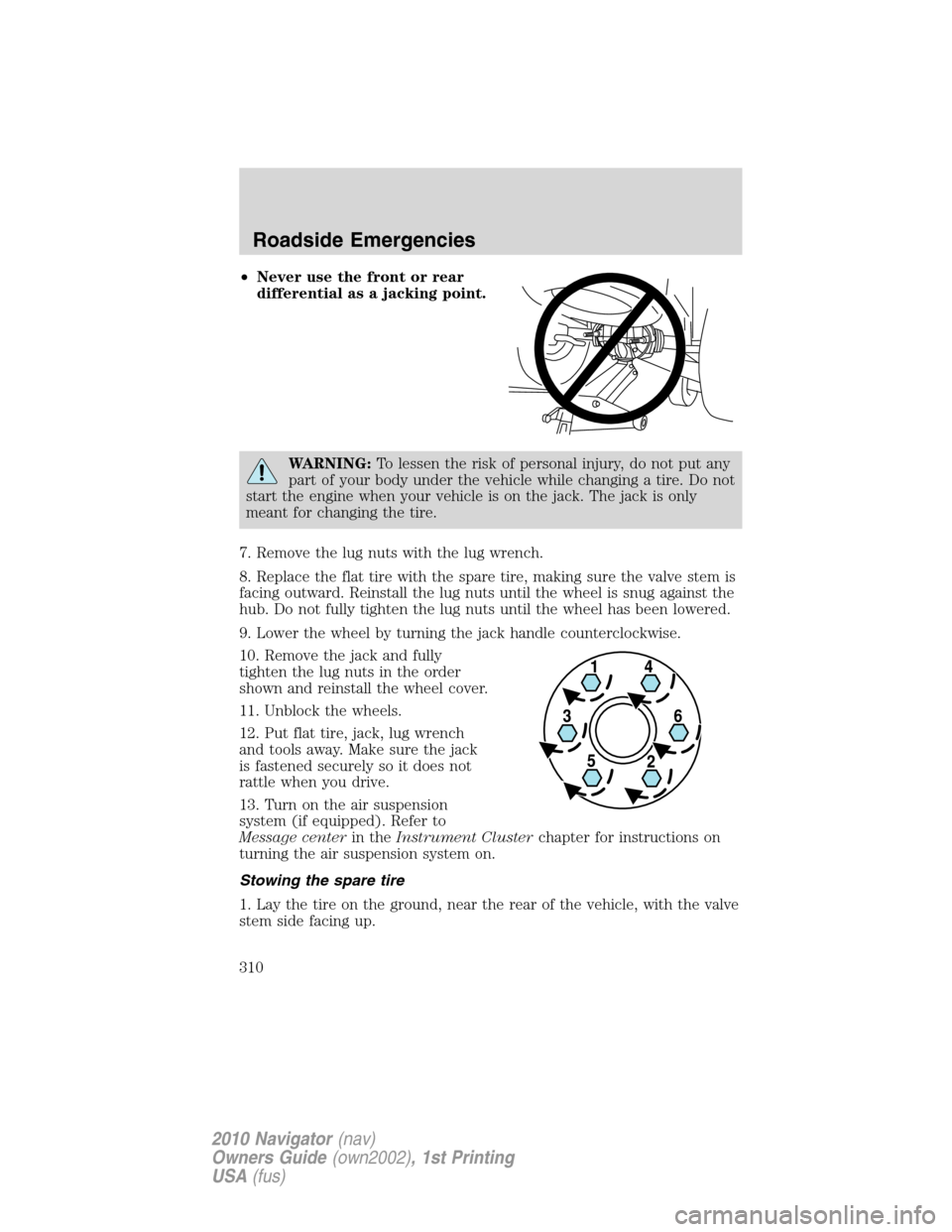
•Never use the front or rear
differential as a jacking point.
WARNING:To lessen the risk of personal injury, do not put any
part of your body under the vehicle while changing a tire. Do not
start the engine when your vehicle is on the jack. The jack is only
meant for changing the tire.
7. Remove the lug nuts with the lug wrench.
8. Replace the flat tire with the spare tire, making sure the valve stem is
facing outward. Reinstall the lug nuts until the wheel is snug against the
hub. Do not fully tighten the lug nuts until the wheel has been lowered.
9. Lower the wheel by turning the jack handle counterclockwise.
10. Remove the jack and fully
tighten the lug nuts in the order
shown and reinstall the wheel cover.
11. Unblock the wheels.
12. Put flat tire, jack, lug wrench
and tools away. Make sure the jack
is fastened securely so it does not
rattle when you drive.
13. Turn on the air suspension
system (if equipped). Refer to
Message centerin theInstrument Clusterchapter for instructions on
turning the air suspension system on.
Stowing the spare tire
1. Lay the tire on the ground, near the rear of the vehicle, with the valve
stem side facing up.
Roadside Emergencies
310
2010 Navigator(nav)
Owners Guide(own2002), 1st Printing
USA(fus)
Page 332 of 385
INSTRUMENT PANEL/INTERIOR TRIM AND CLUSTER LENS
Clean the instrument panel, interior trim areas and cluster lens with a
clean, damp, white cotton cloth, then use a clean and dry white cotton
cloth to dry these areas.
•Avoid cleaners or polishes that increase the gloss of the upper portion
of the instrument panel. The dull finish in this area helps protect the
driver from undesirable windshield reflection.
•Be certain to wash or wipe your hands clean if you have been in
contact with certain products such as insect repellent and suntan
lotion in order to avoid possible damage to the interior painted
surfaces.
•Do not use household or glass cleaners as these may damage the
finish of the instrument panel, interior trim and cluster lens.
WARNING:Do not use chemical solvents or strong detergents
when cleaning the steering wheel or instrument panel to avoid
contamination of the airbag system.
If a staining liquid like coffee/juice has been spilled on the instrument
panel or on interior trim surfaces, clean as follows:
1. Wipe up spilled liquid using a clean, white, cotton cloth.
2. Wipe the surface with a damp, clean, white cotton cloth. For more
thorough cleaning, use a mild soap and water solution. If the spot cannot
be completely cleaned by this method, the area may be cleaned using a
commercially available cleaning product designed for automotive
interiors.
3. If necessary, apply more soap and water solution or cleaning product
to a clean, white, cotton cloth and press the cloth onto the soiled
area–allow this to set at room temperature for 30 minutes.
4. Remove the soaked cloth, and if it is not soiled badly, use this cloth to
clean the area by using a rubbing motion for 60 seconds.
5. Following this, wipe area dry with a clean, white, cotton cloth.
INTERIOR
For fabric, carpets, cloth seats, safety belts and seats equipped with side
airbags:
•Remove dust and loose dirt with a vacuum cleaner.
•Remove light stains and soil with Motorcraft Professional Strength
Carpet & Upholstery Cleaner (ZC-54).
Cleaning
332
2010 Navigator(nav)
Owners Guide(own2002), 1st Printing
USA(fus)
Page 356 of 385
tank if you continue to use high quality fuel of the recommended octane
rating. These products have not been approved for your engine and
could cause damage to the fuel system. Repairs to correct the effects of
using an aftermarket product in your fuel may not be covered by your
warranty.
Many of the world’s automakers approved the World-Wide Fuel Charter
that recommends gasoline specifications to provide improved
performance and emission control system protection for your vehicle.
Gasolines that meet the World-Wide Fuel Charter should be used when
available. Ask your fuel supplier about gasolines that meet the
World-Wide Fuel Charter.
Cleaner air
Ford endorses the use of reformulated “cleaner-burning” gasolines to
improve air quality, per the recommendations in theChoosing the right
fuelsection.
Running out of fuel
Avoid running out of fuel because this situation may have an adverse
effect on powertrain components.
If you have run out of fuel:
•You may need to cycle the ignition from off to on several times after
refueling to allow the fuel system to pump the fuel from the tank to
the engine. On restarting, cranking time will take a few seconds longer
than normal.
•Normally, adding 1 gallon (3.8L) of fuel is enough to restart the
engine. If the vehicle is out of fuel and on a steep grade, more than
1 gallon (3.8L) may be required.
•The service engine soon
indicator may come on. For more
information on the service engine soon indicator, refer toWarning
lights and chimesin theInstrument Clusterchapter.
Refilling with a portable fuel container
With the Easy Fuel™ “no cap” fuel system, use the following directions
when filling from a portable fuel container:
WARNING:Do not insert the nozzle of portable fuel containers
or aftermarket funnels into the Easy Fuel™ system. This could
damage the fuel system and its seal, and may cause fuel to run onto
the ground instead of filling the tank, which could result in serious
personal injury.
Maintenance and Specifications
356
2010 Navigator(nav)
Owners Guide(own2002), 1st Printing
USA(fus)