clock LINCOLN NAVIGATOR 2015 User Guide
[x] Cancel search | Manufacturer: LINCOLN, Model Year: 2015, Model line: NAVIGATOR, Model: LINCOLN NAVIGATOR 2015Pages: 475, PDF Size: 5.13 MB
Page 325 of 475
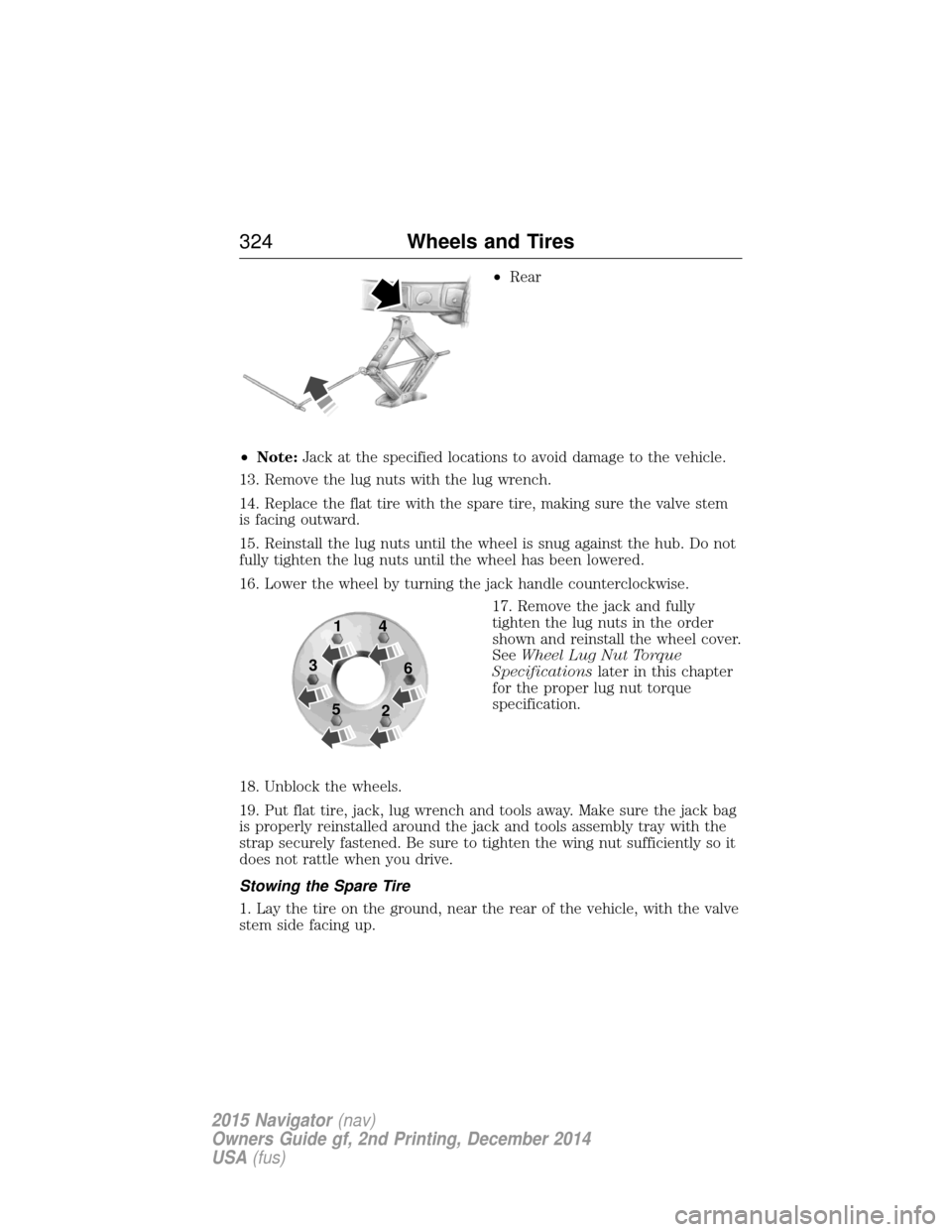
•Rear
• Note: Jack at the specified locations to avoid damage to the vehicle.
13. Remove the lug nuts with the lug wrench.
14. Replace the flat tire with the spare tire, making sure the valve stem
is facing outward.
15. Reinstall the lug nuts until the wheel is snug against the hub. Do not
fully tighten the lug nuts until the wheel has been lowered.
16. Lower the wheel by turning the jack handle counterclockwise. 17. Remove the jack and fully
tighten the lug nuts in the order
shown and reinstall the wheel cover.
SeeWheel Lug Nut Torque
Specifications later in this chapter
for the proper lug nut torque
specification.
18. Unblock the wheels.
19. Put flat tire, jack, lug wrench and tools away. Make sure the jack bag
is properly reinstalled around the jack and tools assembly tray with the
strap securely fastened. Be sure to tighten the wing nut sufficiently so it
does not rattle when you drive.
Stowing the Spare Tire
1. Lay the tire on the ground, near the rear of the vehicle, with the valve
stem side facing up.
1
3
5 4
6
2
324 Wheels and Tires
2015 Navigator(nav)
Owners Guide gf, 2nd Printing, December 2014
USA (fus)
Page 326 of 475
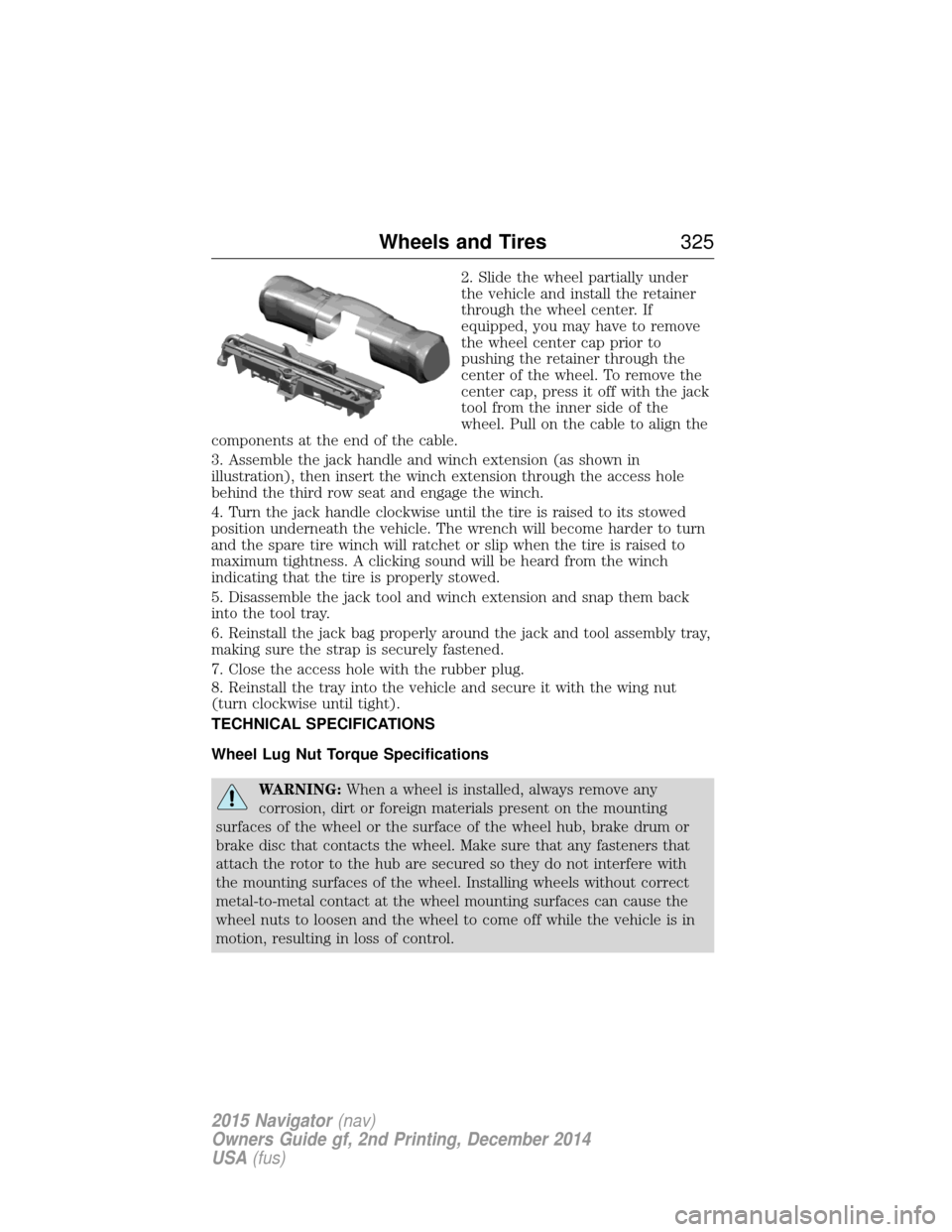
2. Slide the wheel partially under
the vehicle and install the retainer
through the wheel center. If
equipped, you may have to remove
the wheel center cap prior to
pushing the retainer through the
center of the wheel. To remove the
center cap, press it off with the jack
tool from the inner side of the
wheel. Pull on the cable to align the
components at the end of the cable.
3. Assemble the jack handle and winch extension (as shown in
illustration), then insert the winch extension through the access hole
behind the third row seat and engage the winch.
4. Turn the jack handle clockwise until the tire is raised to its stowed
position underneath the vehicle. The wrench will become harder to turn
and the spare tire winch will ratchet or slip when the tire is raised to
maximum tightness. A clicking sound will be heard from the winch
indicating that the tire is properly stowed.
5. Disassemble the jack tool and winch extension and snap them back
into the tool tray.
6. Reinstall the jack bag properly around the jack and tool assembly tray,
making sure the strap is securely fastened.
7. Close the access hole with the rubber plug.
8. Reinstall the tray into the vehicle and secure it with the wing nut
(turn clockwise until tight).
TECHNICAL SPECIFICATIONS
Wheel Lug Nut Torque Specifications
WARNING: When a wheel is installed, always remove any
corrosion, dirt or foreign materials present on the mounting
surfaces of the wheel or the surface of the wheel hub, brake drum or
brake disc that contacts the wheel. Make sure that any fasteners that
attach the rotor to the hub are secured so they do not interfere with
the mounting surfaces of the wheel. Installing wheels without correct
metal-to-metal contact at the wheel mounting surfaces can cause the
wheel nuts to loosen and the wheel to come off while the vehicle is in
motion, resulting in loss of control.
Wheels and Tires 325
2015 Navigator(nav)
Owners Guide gf, 2nd Printing, December 2014
USA (fus)
Page 345 of 475
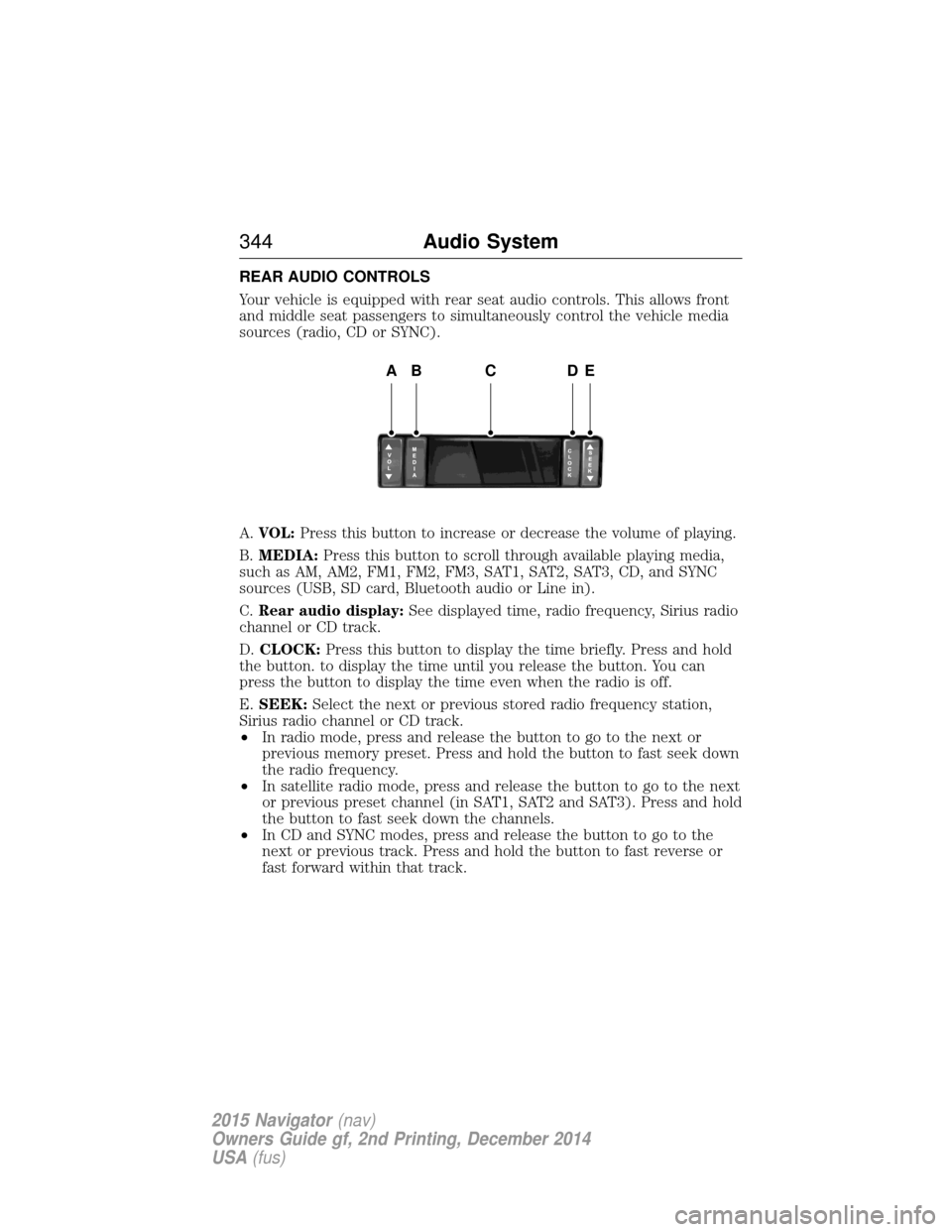
REAR AUDIO CONTROLS
Your vehicle is equipped with rear seat audio controls. This allows front
and middle seat passengers to simultaneously control the vehicle media
sources (radio, CD or SYNC).
A.VOL: Press this button to increase or decrease the volume of playing.
B. MEDIA: Press this button to scroll through available playing media,
such as AM, AM2, FM1, FM2, FM3, SAT1, SAT2, SAT3, CD, and SYNC
sources (USB, SD card, Bluetooth audio or Line in).
C. Rear audio display: See displayed time, radio frequency, Sirius radio
channel or CD track.
D. CLOCK: Press this button to display the time briefly. Press and hold
the button. to display the time until you release the button. You can
press the button to display the time even when the radio is off.
E. SEEK: Select the next or previous stored radio frequency station,
Sirius radio channel or CD track.
• In radio mode, press and release the button to go to the next or
previous memory preset. Press and hold the button to fast seek down
the radio frequency.
• In satellite radio mode, press and release the button to go to the next
or previous preset channel (in SAT1, SAT2 and SAT3). Press and hold
the button to fast seek down the channels.
• In CD and SYNC modes, press and release the button to go to the
next or previous track. Press and hold the button to fast reverse or
fast forward within that track.
ABCDE
344 Audio System
2015 Navigator(nav)
Owners Guide gf, 2nd Printing, December 2014
USA (fus)
Page 355 of 475
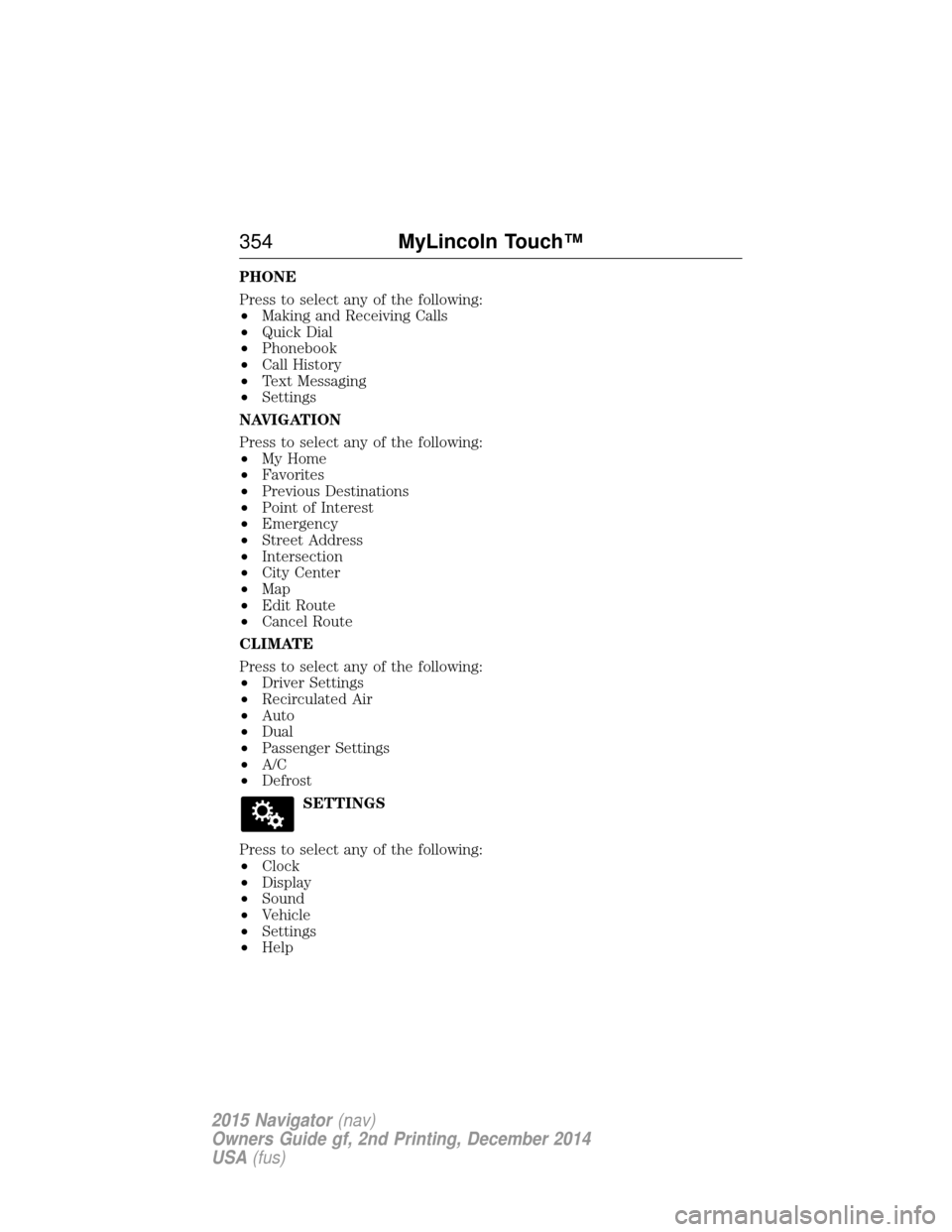
PHONE
Press to select any of the following:
•Making and Receiving Calls
• Quick Dial
• Phonebook
• Call History
• Text Messaging
• Settings
NAVIGATION
Press to select any of the following:
• My Home
• Favorites
• Previous Destinations
• Point of Interest
• Emergency
• Street Address
• Intersection
• City Center
• Map
• Edit Route
• Cancel Route
CLIMATE
Press to select any of the following:
• Driver Settings
• Recirculated Air
• Auto
• Dual
• Passenger Settings
• A/C
• Defrost
SETTINGS
Press to select any of the following:
• Clock
• Display
• Sound
• Vehicle
• Settings
• Help
354 MyLincoln Touch™
2015 Navigator(nav)
Owners Guide gf, 2nd Printing, December 2014
USA (fus)
Page 404 of 475
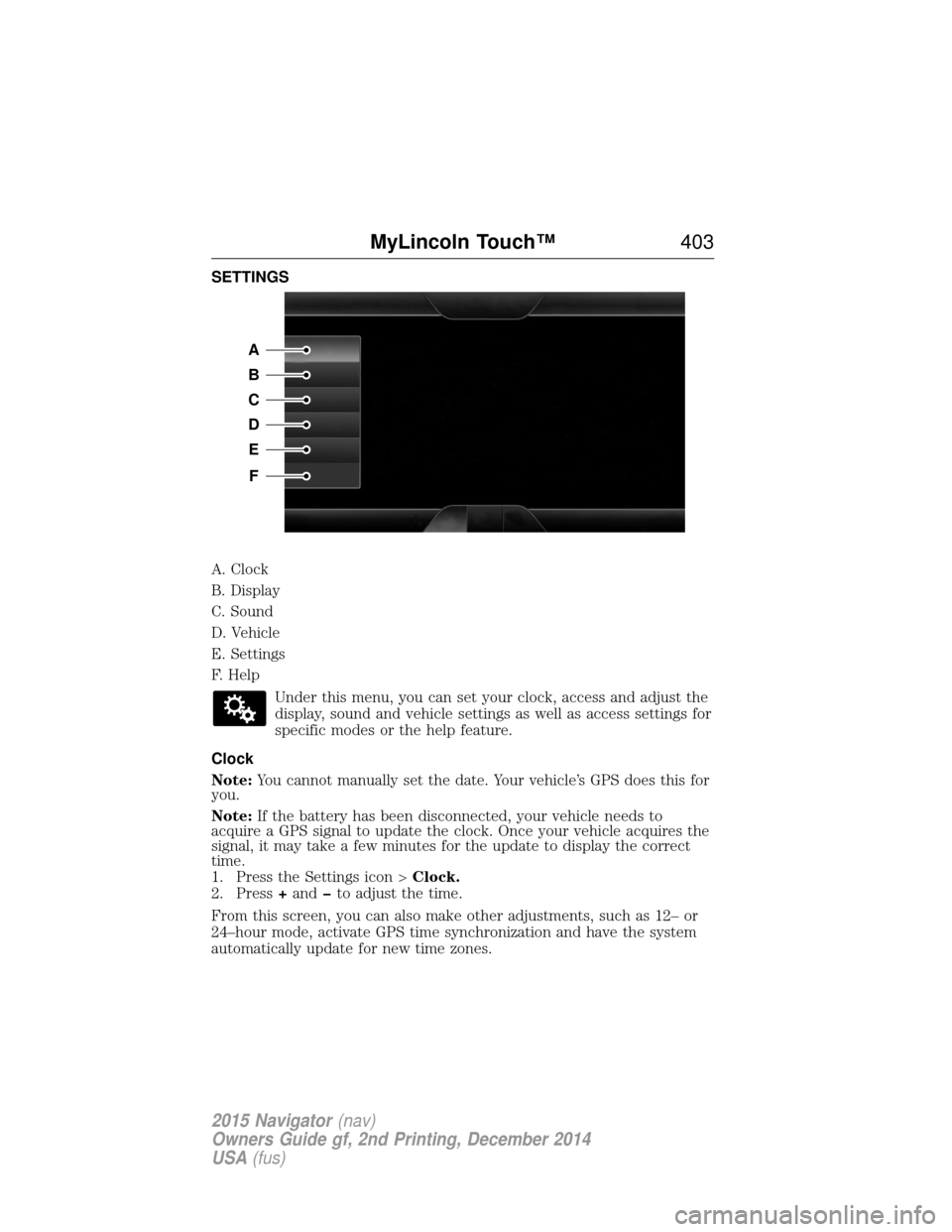
SETTINGS
A. Clock
B. Display
C. Sound
D. Vehicle
E. Settings
F. HelpUnder this menu, you can set your clock, access and adjust the
display, sound and vehicle settings as well as access settings for
specific modes or the help feature.
Clock
Note: You cannot manually set the date. Your vehicle’s GPS does this for
you.
Note: If the battery has been disconnected, your vehicle needs to
acquire a GPS signal to update the clock. Once your vehicle acquires the
signal, it may take a few minutes for the update to display the correct
time.
1. Press the Settings icon > Clock.
2. Press +and to adjust the time.
From this screen, you can also make other adjustments, such as 12– or
24–hour mode, activate GPS time synchronization and have the system
automatically update for new time zones.
A
B
C
D
E
F
MyLincoln Touch™ 403
2015 Navigator(nav)
Owners Guide gf, 2nd Printing, December 2014
USA (fus)
Page 418 of 475
J.Defrost: Touch the button to distribute air to the windshield vents
and de-mister. Air distribution to instrument panel and footwell vents
turn off. You can use this setting to defog and clear the windshield of a
thin covering of ice.
K. Manual controls: Touch these buttons to switch airflow from the
windshield, instrument panel, or footwell vents on or off. The system can
distribute air through any combination of these vents.
L. Driver settings: Depending on your vehicle and option package, you
may have the following features:
• Touch the +or –to increase or decrease the air temperature on the
passenger side of the vehicle.
• Touch the heated seat icon to switch the heated seat off and on (if
equipped).
• Touch the climate-controlled seat icon to switch the
climate-controlled seat off and on (if equipped).
• Touch MyTemp to select your preset temperature setpoint. Touch
and hold MyTemp to save a new preset temperature setpoint.
• If your vehicle is equipped with a heated steering wheel, touch the
heated steering wheel icon to warm the steering wheel.
Note: If your vehicle is equipped with a wood-trimmed steering wheel, it
does not heat between the 10 o’clock and 2 o’clock positions.
Climate Control Voice Commands
The following voice commands are available at the main menu
level of a voice session. For example, press the voice button
and after the prompt, “Say a command”; say any of the
following commands:
Climate control voice commands
“Climate automatic”
“Climate my temperature” “Climate off”“Climate on”
“Climate temperature <15.5–29.5> degrees” “Climate temperature <60–85> degrees” “Help”
MyLincoln Touch™ 417
2015 Navigator(nav)
Owners Guide gf, 2nd Printing, December 2014
USA (fus)
Page 470 of 475
C
Capacities for refilling fluids ....328
Cargo management system ......220
CD ..............................................343
CD player ..........................341, 377
CD voice commands .................377
Cell phone use ............................14
Changing a tire .........................318
Changing the air filter ..............277
Child safety seatsautomatic locking mode
(retractor) .................................37
LATCH .......................................22
Child safety seats - booster
seats .............................................30
Cleaning the touchscreen ........356
Cleaning your vehicle ...............284 engine compartment ..............286
instrument panel ....................289
interior .............................288–289
plastic parts ............................285
washing ....................................284
waxing .....................................286
wheels ......................................291
wiper blades ............................287
Climate voice commands .........417
Clock ..........................................403
Console overhead ......................96–97, 155
Controls power seat ...............................131
Coolant ......................................267 checking and adding ..............267
refill capacities ........................328
specifications ..........................328
Cross Traffic Alert ....................205 Cruise control ...........................203
Customer Assistance ................241
Ford Extended Service
Plan ..........................................338
Getting roadside assistance ...241
Getting the service you
need .........................................247
Ordering additional owner’s
literature .................................253
Utilizing the
Mediation/Arbitration
Program ...................................251
D
Daytime running lamps
(see Lamps) ................................89
Defrost .......................................122 rear window ............................126
Dipstick automatic transmission
fluid ..........................................271
engine oil .................................266
Display settings .........................404
Driving under special
conditions ..................178, 182, 184 sand .........................................183
snow and ice ...........................185
through water .................183, 238
Dual automatic temperature
control (DATC) .........................122
E
Electronic stability control ......192
Emergencies, roadside jump-starting ..........................244
running out of fuel .................164
Emission control system ..........169
End user license agreement ....431
Index 469
2015 Navigator(nav)
Owners Guide gf, 2nd Printing, December 2014
USA (fus)
Page 474 of 475
Safety belts (see Safety
restraints) ....................................36
Safety defects, reporting ..........254
Safety information ....................357
Safety restraints ..............36–37, 39Belt-Minder® ............................40
extension assembly ..................38
for adults .............................36–37
for children ...............................18
safety belt maintenance ...........42
seat belt maintenance ..............42
warning light and chime ..........40
Safety restraints - LATCH
anchors ........................................22
Safety seats for children ............18
Safety Compliance
Certification Label ....................334
Satellite Radio ...........................372
Scheduled Maintenance Guide Normal Scheduled
Maintenance and Log .............455
SD card ......................351, 378, 418
Seat belts
(see Safety restraints) ...............36
Seats child safety seats ......................18
climate control ........................135
filter .........................................333
heated ......................................143
memory seat .....................55, 132
SecuriCode keyless entry
system ..........................................73
SecuriLock passive anti-theft
system ..........................................76
Sending new text messages .....388
Setting a destination ................418 Setting a destination by
voice ...........................................419
Settings ......................................403
Setting the clock .......................403
Side air curtain ...........................48
Side-curtain airbags system .......48
SIRIUS® satellite radio ............372
SIRIUS satellite radio voice
commands .................................373
SIRIUS Travel Link ...................395
SIRIUS Travel Link voice
commands .................................396
Snowplowing ...............................14
SOS Post Crash Alert .................45
Spark plugs,
specifications .....................327, 333
Special notice
ambulance conversions ............14
Specification chart,
lubricants ...................................328
Stability system .........................192
Starting your vehicle ................157 jump starting ..........................244
push button start system .......156
Steering wheel ............................79 controls ......................................80
tilting .........................................79
Sun visor ......................................98
Supplemental Restraint System
(SRS) (see airbags) ....................45
Supported media file types ......381
Supported player, media
formats and metadata
information ................................381
Suspension ................................212
Index 473
2015 Navigator(nav)
Owners Guide gf, 2nd Printing, December 2014
USA (fus)