navigation LINCOLN NAVIGATOR 2015 Owner's Manual
[x] Cancel search | Manufacturer: LINCOLN, Model Year: 2015, Model line: NAVIGATOR, Model: LINCOLN NAVIGATOR 2015Pages: 475, PDF Size: 5.13 MB
Page 407 of 475
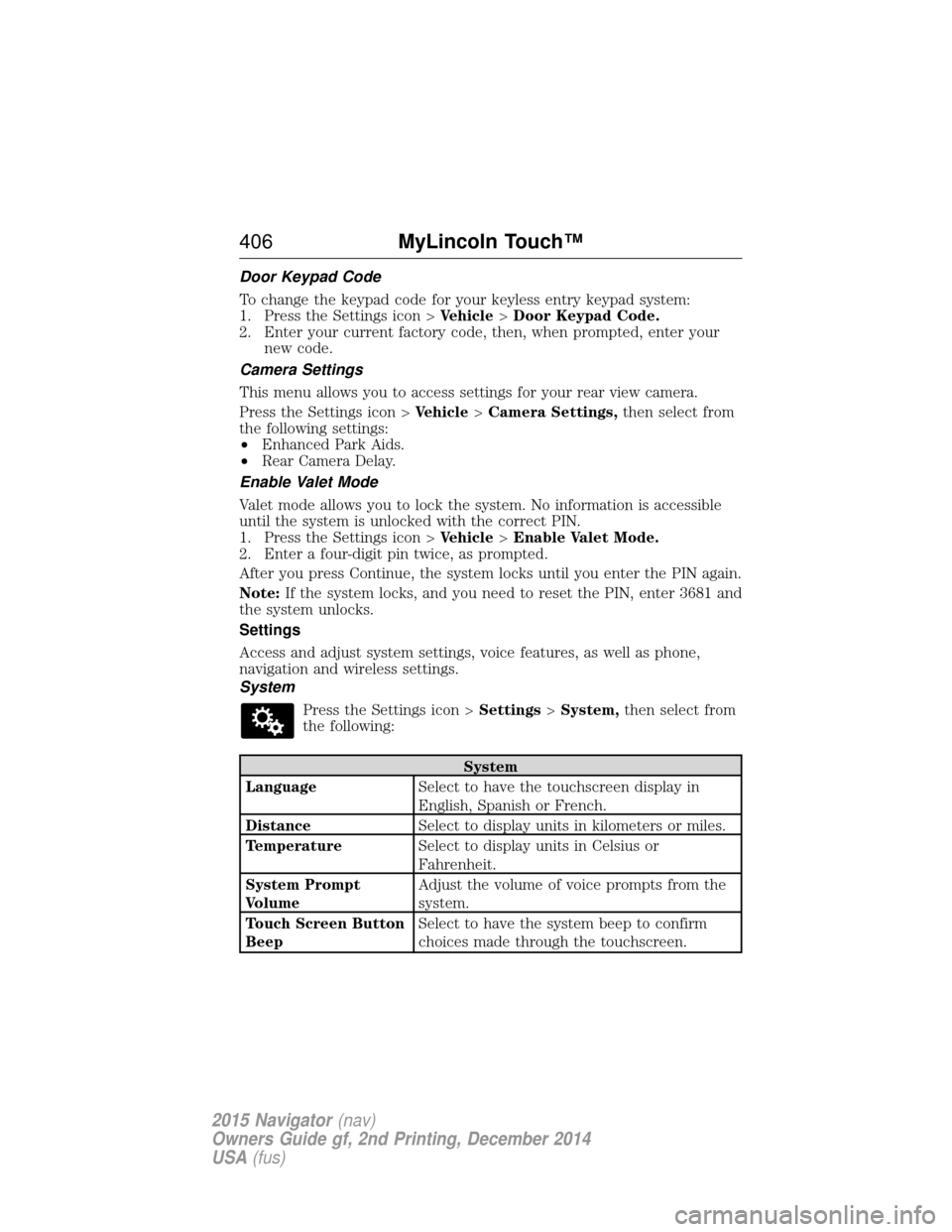
Door Keypad Code
To change the keypad code for your keyless entry keypad system:
1. Press the Settings icon >Vehicle>Door Keypad Code.
2. Enter your current factory code, then, when prompted, enter your new code.
Camera Settings
This menu allows you to access settings for your rear view camera.
Press the Settings icon > Vehicle>Camera Settings, then select from
the following settings:
• Enhanced Park Aids.
• Rear Camera Delay.
Enable Valet Mode
Valet mode allows you to lock the system. No information is accessible
until the system is unlocked with the correct PIN.
1. Press the Settings icon > Vehicle>Enable Valet Mode.
2. Enter a four-digit pin twice, as prompted.
After you press Continue, the system locks until you enter the PIN again.
Note: If the system locks, and you need to reset the PIN, enter 3681 and
the system unlocks.
Settings
Access and adjust system settings, voice features, as well as phone,
navigation and wireless settings.
System
Press the Settings icon > Settings>System, then select from
the following:
System
Language Select to have the touchscreen display in
English, Spanish or French.
Distance Select to display units in kilometers or miles.
Temperature Select to display units in Celsius or
Fahrenheit.
System Prompt
Volume Adjust the volume of voice prompts from the
system.
Touch Screen Button
Beep Select to have the system beep to confirm
choices made through the touchscreen.
406
MyLincoln Touch™
2015 Navigator(nav)
Owners Guide gf, 2nd Printing, December 2014
USA (fus)
Page 410 of 475
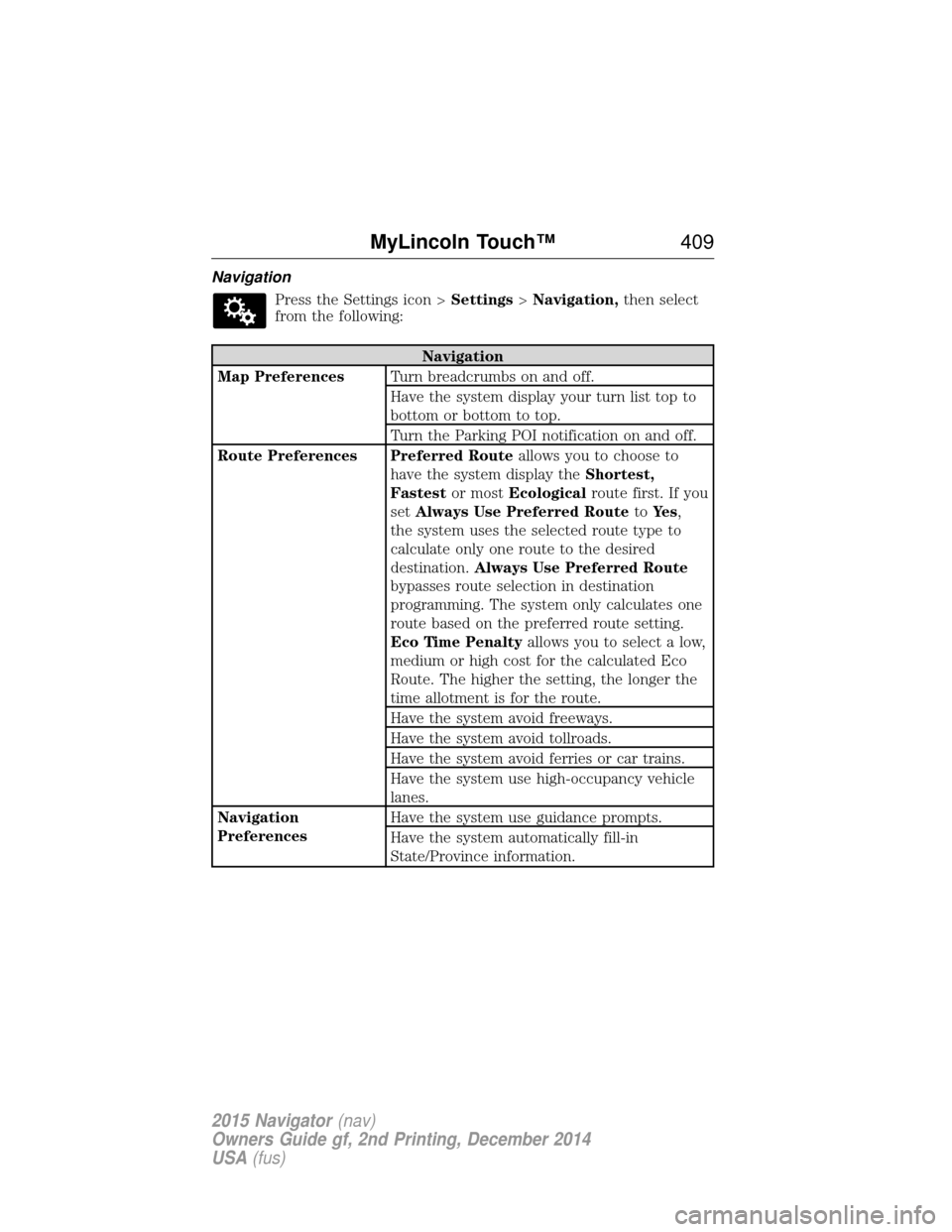
NavigationPress the Settings icon > Settings>Navigation, then select
from the following:
Navigation
Map Preferences Turn breadcrumbs on and off.
Have the system display your turn list top to
bottom or bottom to top.
Turn the Parking POI notification on and off.
Route Preferences Preferred Route allows you to choose to
have the system display the Shortest,
Fastest or mostEcological route first. If you
set Always Use Preferred Route toYe s ,
the system uses the selected route type to
calculate only one route to the desired
destination. Always Use Preferred Route
bypasses route selection in destination
programming. The system only calculates one
route based on the preferred route setting.
Eco Time Penalty allows you to select a low,
medium or high cost for the calculated Eco
Route. The higher the setting, the longer the
time allotment is for the route.
Have the system avoid freeways.
Have the system avoid tollroads.
Have the system avoid ferries or car trains.
Have the system use high-occupancy vehicle
lanes.
Navigation
Preferences Have the system use guidance prompts.
Have the system automatically fill-in
State/Province information.
MyLincoln Touch™
409
2015 Navigator(nav)
Owners Guide gf, 2nd Printing, December 2014
USA (fus)
Page 411 of 475
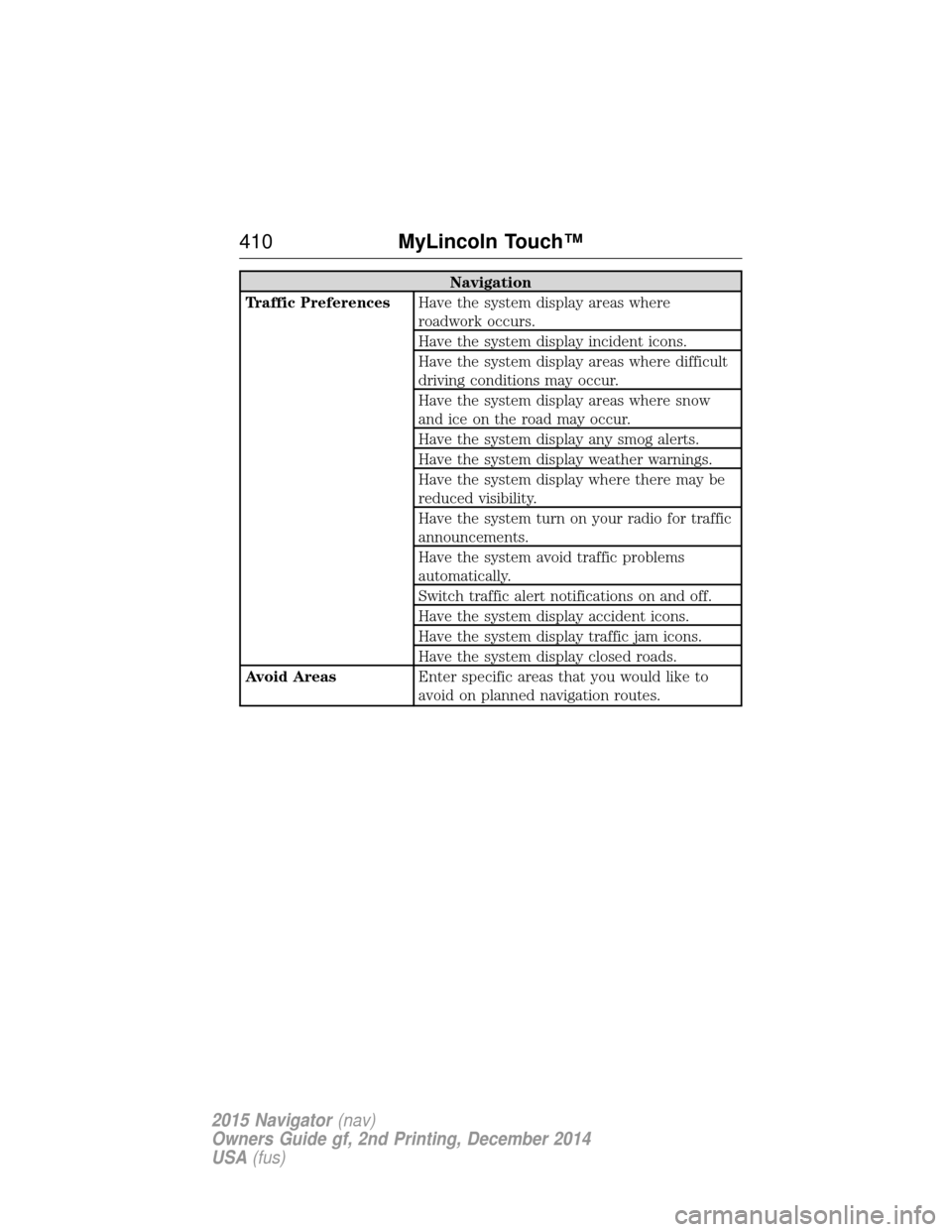
Navigation
Traffic Preferences Have the system display areas where
roadwork occurs.
Have the system display incident icons.
Have the system display areas where difficult
driving conditions may occur.
Have the system display areas where snow
and ice on the road may occur.
Have the system display any smog alerts.
Have the system display weather warnings.
Have the system display where there may be
reduced visibility.
Have the system turn on your radio for traffic
announcements.
Have the system avoid traffic problems
automatically.
Switch traffic alert notifications on and off.
Have the system display accident icons.
Have the system display traffic jam icons.
Have the system display closed roads.
Avoid Areas Enter specific areas that you would like to
avoid on planned navigation routes.
410MyLincoln Touch™
2015 Navigator(nav)
Owners Guide gf, 2nd Printing, December 2014
USA (fus)
Page 415 of 475
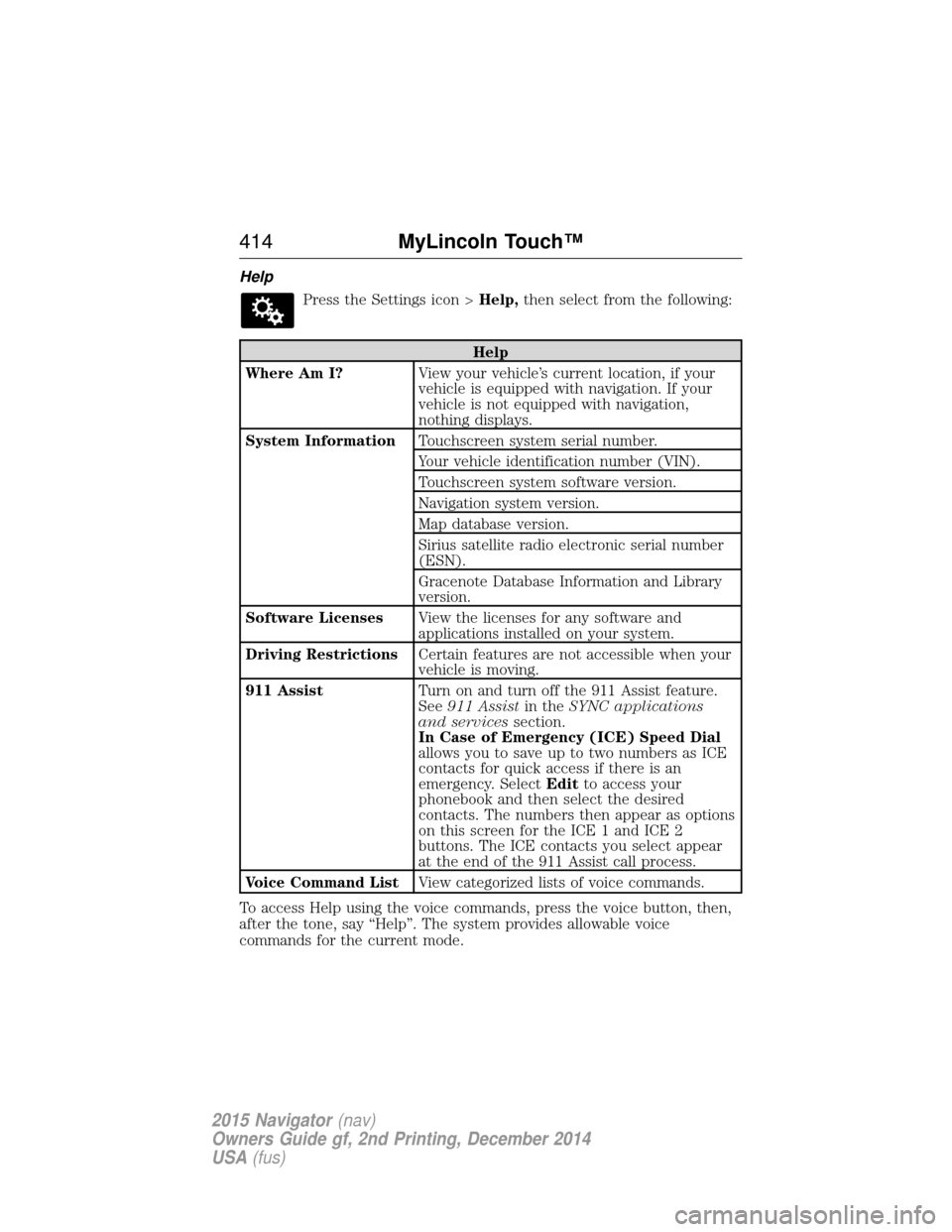
HelpPress the Settings icon > Help,then select from the following:
Help
Where Am I? View your vehicle’s current location, if your
vehicle is equipped with navigation. If your
vehicle is not equipped with navigation,
nothing displays.
System Information Touchscreen system serial number.
Your vehicle identification number (VIN).
Touchscreen system software version.
Navigation system version.
Map database version.
Sirius satellite radio electronic serial number
(ESN).
Gracenote Database Information and Library
version.
Software Licenses View the licenses for any software and
applications installed on your system.
Driving Restrictions Certain features are not accessible when your
vehicle is moving.
911 Assist Turn on and turn off the 911 Assist feature.
See911 Assist in theSYNC applications
and services section.
In Case of Emergency (ICE) Speed Dial
allows you to save up to two numbers as ICE
contacts for quick access if there is an
emergency. Select Editto access your
phonebook and then select the desired
contacts. The numbers then appear as options
on this screen for the ICE 1 and ICE 2
buttons. The ICE contacts you select appear
at the end of the 911 Assist call process.
Voice Command List View categorized lists of voice commands.
To access Help using the voice commands, press the voice button, then,
after the tone, say “Help”. The system provides allowable voice
commands for the current mode.
414 MyLincoln Touch™
2015 Navigator(nav)
Owners Guide gf, 2nd Printing, December 2014
USA (fus)
Page 419 of 475
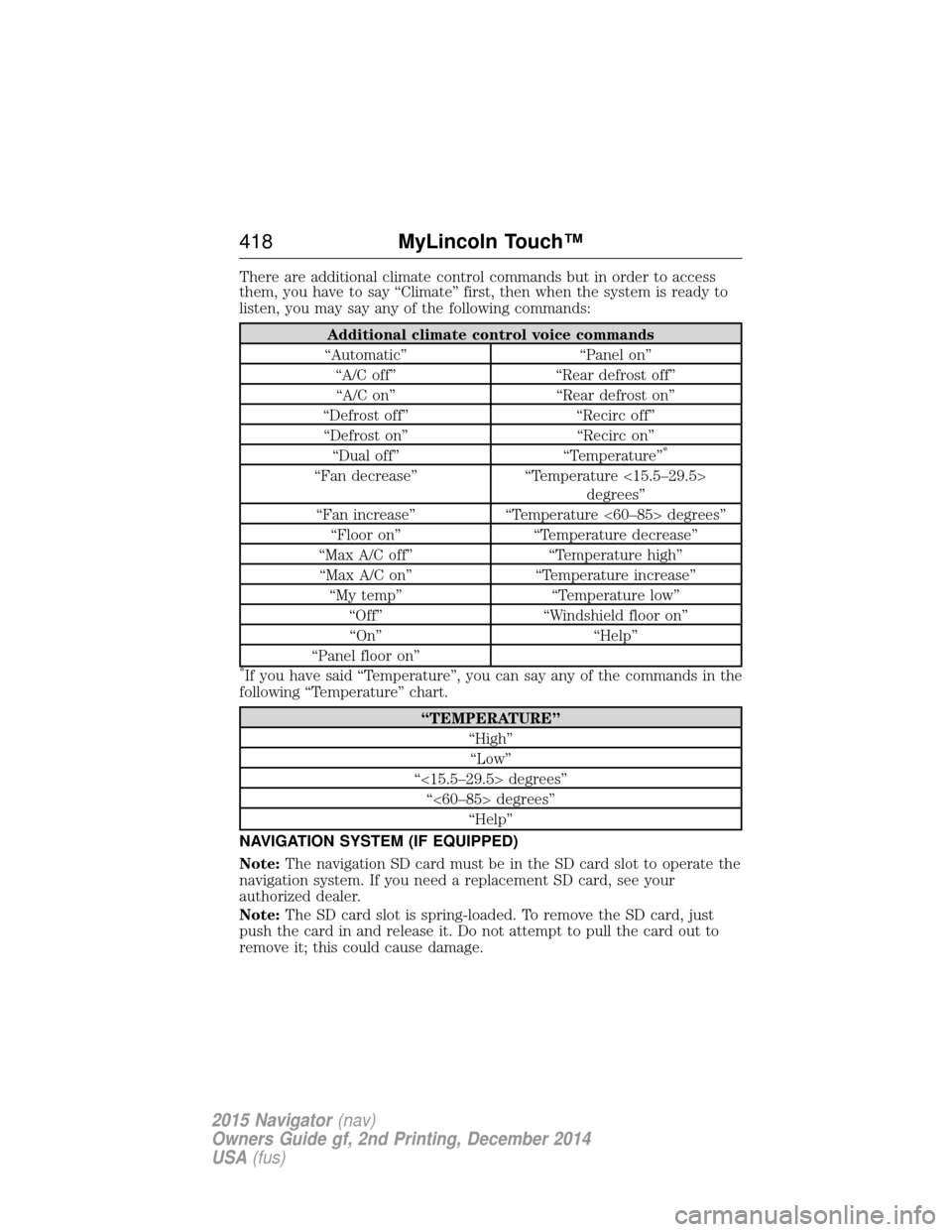
There are additional climate control commands but in order to access
them, you have to say “Climate” first, then when the system is ready to
listen, you may say any of the following commands:
Additional climate control voice commands
“Automatic” “Panel on” “A/C off” “Rear defrost off”“A/C on” “Rear defrost on”
“Defrost off” “Recirc off” “Defrost on” “Recirc on” “Dual off” “Temperature”
*
“Fan decrease” “Temperature <15.5–29.5>
degrees”
“Fan increase” “Temperature <60–85> degrees”
“Floor on” “Temperature decrease”
“Max A/C off” “Temperature high”
“Max A/C on” “Temperature increase”
“My temp” “Temperature low”
“Off” “Windshield floor on”
“On” “Help”
“Panel floor on”
*If you have said “Temperature”, you can say any of the commands in the
following “Temperature” chart.
“TEMPERATURE”
“High”“Low”
“<15.5–29.5> degrees” “<60–85> degrees” “Help”
NAVIGATION SYSTEM (IF EQUIPPED)
Note: The navigation SD card must be in the SD card slot to operate the
navigation system. If you need a replacement SD card, see your
authorized dealer.
Note: The SD card slot is spring-loaded. To remove the SD card, just
push the card in and release it. Do not attempt to pull the card out to
remove it; this could cause damage.
418 MyLincoln Touch™
2015 Navigator(nav)
Owners Guide gf, 2nd Printing, December 2014
USA (fus)
Page 420 of 475
Your navigation system is comprised of two main features, destination
mode and map mode.
To set a destination, press the green corner of your touchscreen, then
Destwhen it appears. See Setting a destination later in this chapter.
To view the navigation map and your vehicle’s current location, touch the
green bar in the upper right hand corner of the touchscreen, or, press
Dest >Map. SeeMap mode later in this chapter.
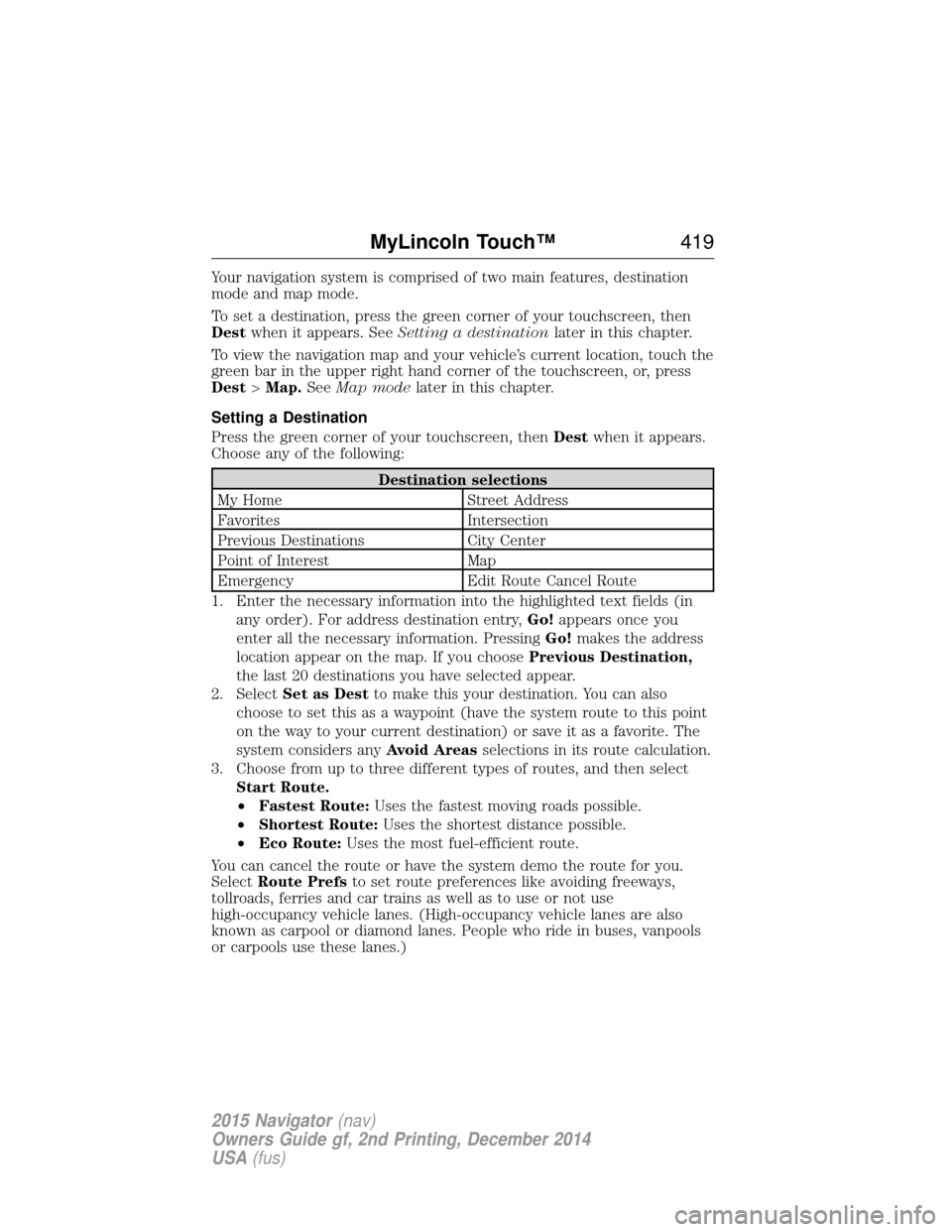
Setting a Destination
Press the green corner of your touchscreen, then Destwhen it appears.
Choose any of the following:
Destination selections
My Home Street Address
Favorites Intersection
Previous Destinations City Center
Point of Interest Map
Emergency Edit Route Cancel Route
1. Enter the necessary information into the highlighted text fields (in any order). For address destination entry, Go!appears once you
enter all the necessary information. Pressing Go!makes the address
location appear on the map. If you choose Previous Destination,
the last 20 destinations you have selected appear.
2. Select Set as Dest to make this your destination. You can also
choose to set this as a waypoint (have the system route to this point
on the way to your current destination) or save it as a favorite. The
system considers any Avoid Areasselections in its route calculation.
3. Choose from up to three different types of routes, and then select Start Route.
•Fastest Route: Uses the fastest moving roads possible.
• Shortest Route: Uses the shortest distance possible.
• Eco Route: Uses the most fuel-efficient route.
You can cancel the route or have the system demo the route for you.
Select Route Prefs to set route preferences like avoiding freeways,
tollroads, ferries and car trains as well as to use or not use
high-occupancy vehicle lanes. (High-occupancy vehicle lanes are also
known as carpool or diamond lanes. People who ride in buses, vanpools
or carpools use these lanes.)
MyLincoln Touch™ 419
2015 Navigator(nav)
Owners Guide gf, 2nd Printing, December 2014
USA (fus)
Page 421 of 475
Note:If your vehicle is on a recognized road and you do not press the
Start Route button, the system defaults to the Fastest Routeoption
and begins guidance.
During route guidance, you can press the talking bubble icon that
appears in the upper right navigation corner (green bar) if you want the
system to repeat route guidance information. When the system repeats
the last guidance instruction, it updates the distance to the next
guidance instruction, since it detects when the vehicle is moving.
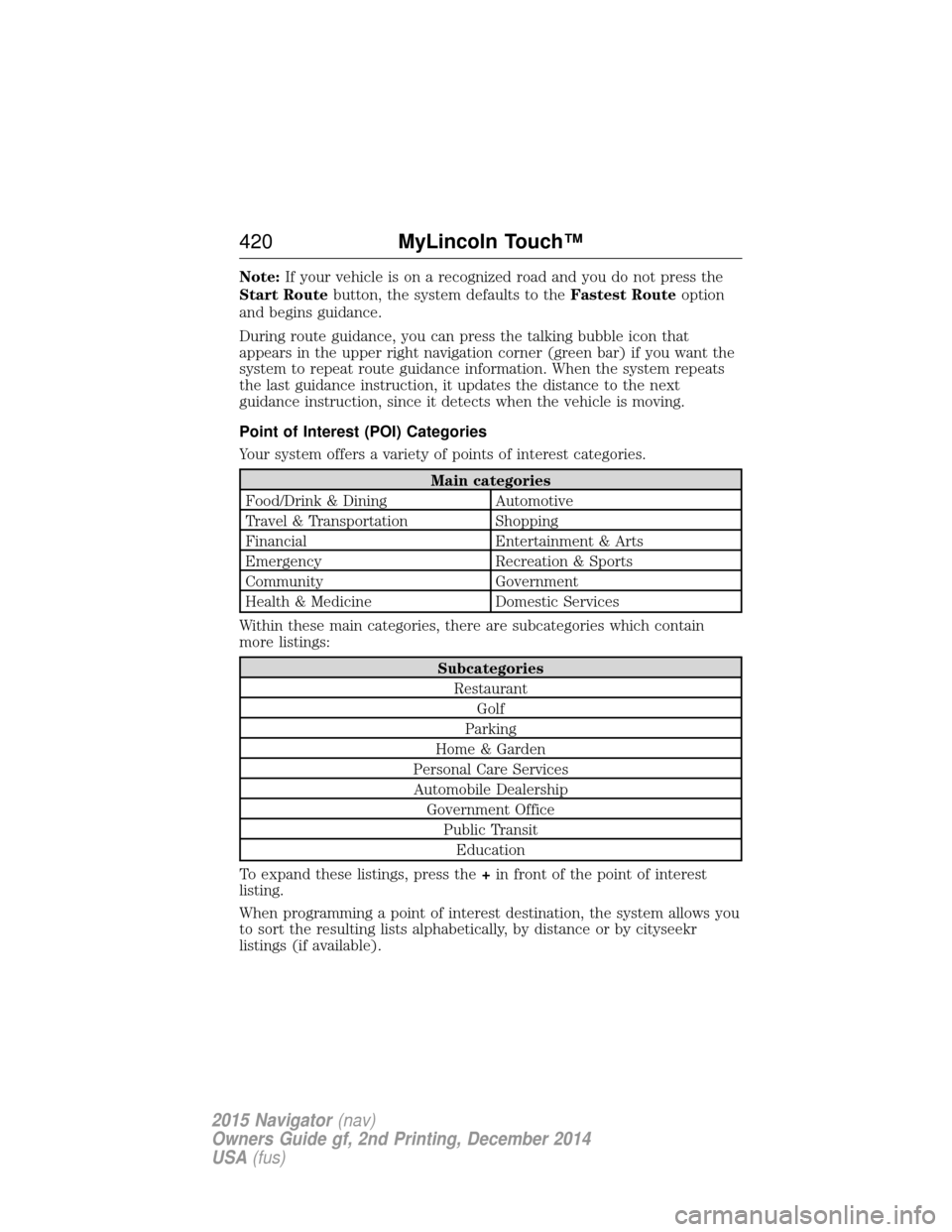
Point of Interest (POI) Categories
Your system offers a variety of points of interest categories.
Main categories
Food/Drink & Dining Automotive
Travel & Transportation Shopping
Financial Entertainment & Arts
Emergency Recreation & Sports
Community Government
Health & Medicine Domestic Services
Within these main categories, there are subcategories which contain
more listings:
Subcategories Restaurant Golf
Parking
Home & Garden
Personal Care Services Automobile Dealership Government Office Public TransitEducation
To expand these listings, press the +in front of the point of interest
listing.
When programming a point of interest destination, the system allows you
to sort the resulting lists alphabetically, by distance or by cityseekr
listings (if available).
420 MyLincoln Touch™
2015 Navigator(nav)
Owners Guide gf, 2nd Printing, December 2014
USA (fus)
Page 423 of 475
NightlifeAttractionThis icon appears when your selection exists in multiple
categories within the system.
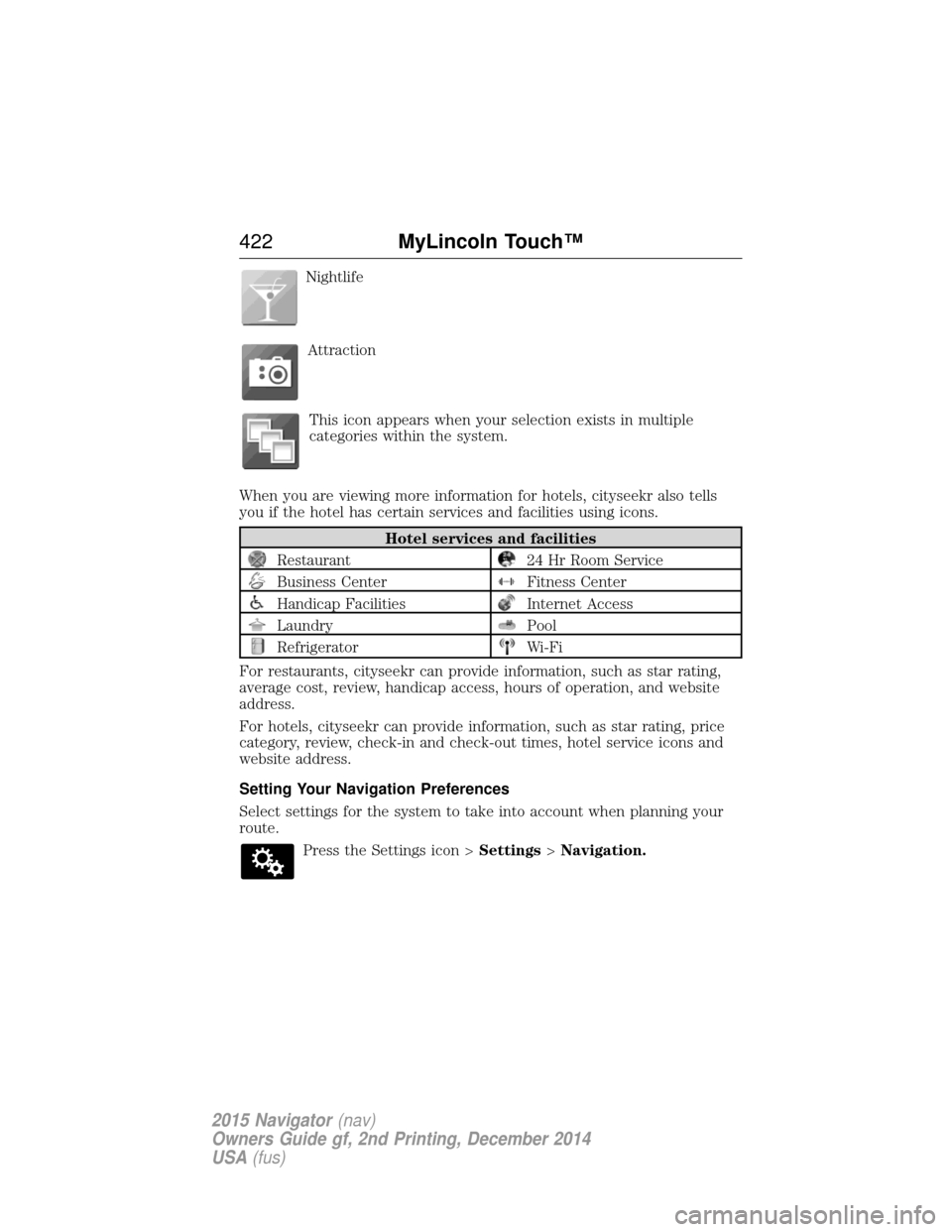
When you are viewing more information for hotels, cityseekr also tells
you if the hotel has certain services and facilities using icons.
Hotel services and facilities
Restaurant24 Hr Room Service
Business CenterFitness Center
Handicap FacilitiesInternet Access
LaundryPool
RefrigeratorWi-Fi
For restaurants, cityseekr can provide information, such as star rating,
average cost, review, handicap access, hours of operation, and website
address.
For hotels, cityseekr can provide information, such as star rating, price
category, review, check-in and check-out times, hotel service icons and
website address.
Setting Your Navigation Preferences
Select settings for the system to take into account when planning your
route. Press the Settings icon > Settings>Navigation.
422 MyLincoln Touch™
2015 Navigator(nav)
Owners Guide gf, 2nd Printing, December 2014
USA (fus)
Page 424 of 475
Map Preferences
Breadcrumbsdisplays your vehicle’s previously traveled route with
white dots. Turn this feature ONorOFF.
Turn List Format allows you to choose to have the system display your
turn list Top to Bottom orBottom to Top.
Parking POI Notification sets the automatic parking points of interest
notification. Turn this feature ONorOFF. When parking points of
interest notification is on, the icons display on the map when you get
close to your destination. This may not be very useful in dense areas,
and may clutter the map when other points of interest display.
Route Preferences
Preferred Route allows you to choose to have the system display the
Shortest, Fastest or mostEcological route first. If you set Always
Use Preferred Route toYe s , the system uses the selected route type
to calculate only one route to the desired destination.
Always Use Preferred Route bypasses route selection in destination
programming. The system only calculates one route based on the
preferred route setting.
Eco Time Penalty allows you to select a low, medium or high cost for
the calculated Eco Route. The higher the setting, the longer the time
allotment is for the route.
Avoid features allows you to choose to have the system avoid freeways,
toll roads, ferries and car trains when planning your route. Turn these
features ONorOFF.
Use HOV Lanes allows you to choose to have the system use
high-occupancy vehicle lanes, if available, when planning your route.
Navigation Preferences
Guidance Prompts allows you to choose to have the system use Voice
& Tones orTone Only on your programmed route.
Auto - Fill State/Province allows you have the system automatically fill
in the state and province based on the information already entered into
the system. Turn this feature ONorOFF.
MyLincoln Touch™ 423
2015 Navigator(nav)
Owners Guide gf, 2nd Printing, December 2014
USA (fus)
Page 426 of 475
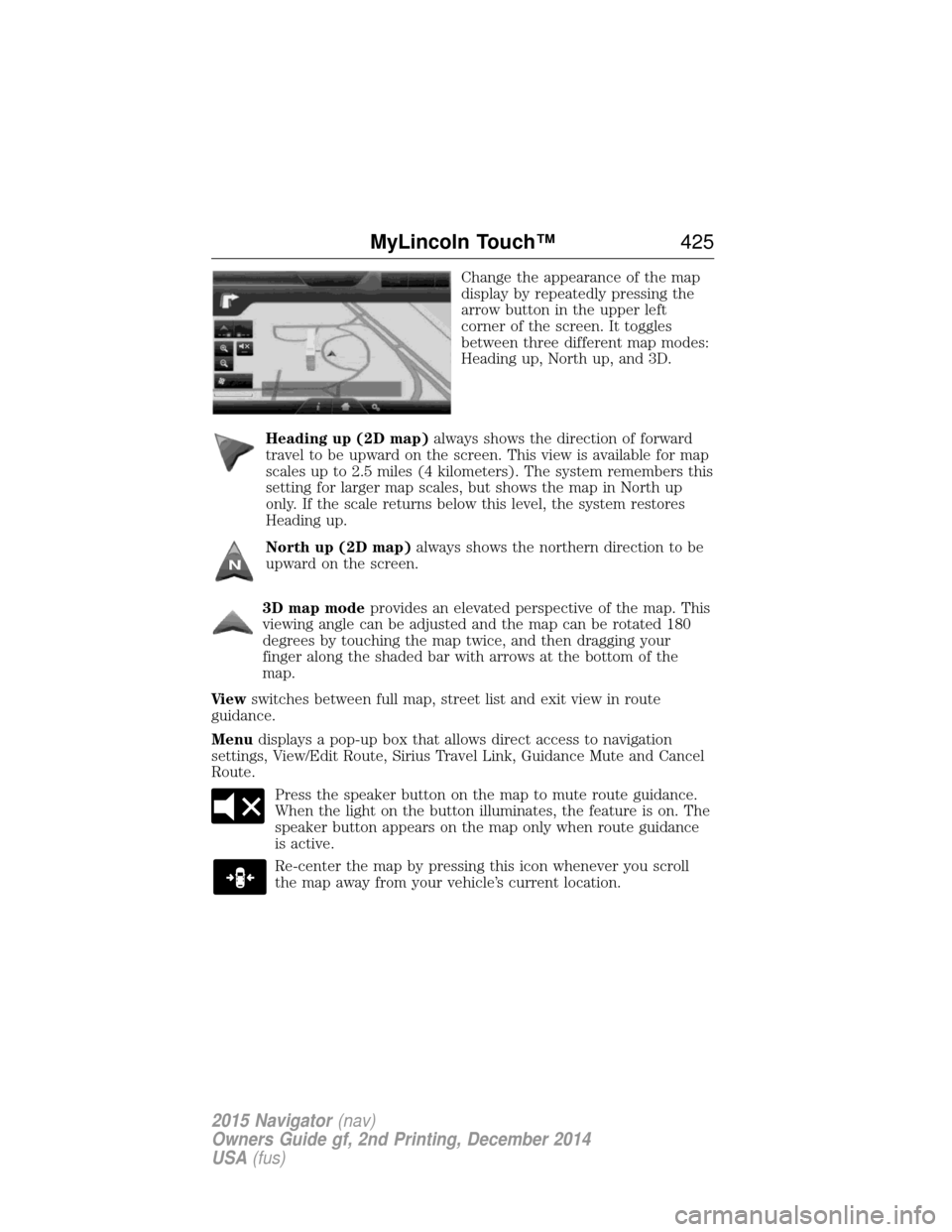
Change the appearance of the map
display by repeatedly pressing the
arrow button in the upper left
corner of the screen. It toggles
between three different map modes:
Heading up, North up, and 3D.
Heading up (2D map) always shows the direction of forward
travel to be upward on the screen. This view is available for map
scales up to 2.5 miles (4 kilometers). The system remembers this
setting for larger map scales, but shows the map in North up
only. If the scale returns below this level, the system restores
Heading up.
North up (2D map) always shows the northern direction to be
upward on the screen.
3D map mode provides an elevated perspective of the map. This
viewing angle can be adjusted and the map can be rotated 180
degrees by touching the map twice, and then dragging your
finger along the shaded bar with arrows at the bottom of the
map.
Vi e w switches between full map, street list and exit view in route
guidance.
Menu displays a pop-up box that allows direct access to navigation
settings, View/Edit Route, Sirius Travel Link, Guidance Mute and Cancel
Route.
Press the speaker button on the map to mute route guidance.
When the light on the button illuminates, the feature is on. The
speaker button appears on the map only when route guidance
is active.
Re-center the map by pressing this icon whenever you scroll
the map away from your vehicle’s current location.
MyLincoln Touch™ 425
2015 Navigator(nav)
Owners Guide gf, 2nd Printing, December 2014
USA (fus)