display LINCOLN NAVIGATOR 2015 Manual Online
[x] Cancel search | Manufacturer: LINCOLN, Model Year: 2015, Model line: NAVIGATOR, Model: LINCOLN NAVIGATOR 2015Pages: 475, PDF Size: 5.13 MB
Page 406 of 475
Only the photograph(s), which meets the following conditions, display:
•Compatible file formats are as follows: .jpg, .gif, .png, .bmp.
• Each file must be 1.5 MB or less.
• Recommended dimensions: 800 x 384.
Sound Press the Settings icon > Sound,then select from the
following:
Sound Settings
Bass DSP*
Midrange Occupancy Mode*
TrebleSpeed Compensated Volume
Set Balance and Fade
*If equipped.
Vehicle Press the Settings icon > Vehicle,then select from the
following:
• Ambient Lighting.
• Vehicle Health Report.
• Door Keypad Code.
• Camera Settings.
• Enable Valet Mode.
Ambient Lighting (If Equipped)
When activated, ambient lighting illuminates footwells and cupholders
with a choice of colors. To access and make adjustments:
1. Press the Settings icon > Vehicle>Ambient Lighting.
2. Touch the desired color.
3. Use the scroll bar to increase or decrease the intensity.
To turn the feature on or off, press the power button.
Vehicle Health Report
Turn Automatic Reminders on and off and set the mileage interval at
which you would like to receive the reports. Press ?for more information
on these selections.
When done making your selections, press Run Vehicle Health Report
Now if you want your report.
MyLincoln Touch™ 405
2015 Navigator(nav)
Owners Guide gf, 2nd Printing, December 2014
USA (fus)
Page 407 of 475
Door Keypad Code
To change the keypad code for your keyless entry keypad system:
1. Press the Settings icon >Vehicle>Door Keypad Code.
2. Enter your current factory code, then, when prompted, enter your new code.
Camera Settings
This menu allows you to access settings for your rear view camera.
Press the Settings icon > Vehicle>Camera Settings, then select from
the following settings:
• Enhanced Park Aids.
• Rear Camera Delay.
Enable Valet Mode
Valet mode allows you to lock the system. No information is accessible
until the system is unlocked with the correct PIN.
1. Press the Settings icon > Vehicle>Enable Valet Mode.
2. Enter a four-digit pin twice, as prompted.
After you press Continue, the system locks until you enter the PIN again.
Note: If the system locks, and you need to reset the PIN, enter 3681 and
the system unlocks.
Settings
Access and adjust system settings, voice features, as well as phone,
navigation and wireless settings.
System
Press the Settings icon > Settings>System, then select from
the following:
System
Language Select to have the touchscreen display in
English, Spanish or French.
Distance Select to display units in kilometers or miles.
Temperature Select to display units in Celsius or
Fahrenheit.
System Prompt
Volume Adjust the volume of voice prompts from the
system.
Touch Screen Button
Beep Select to have the system beep to confirm
choices made through the touchscreen.
406
MyLincoln Touch™
2015 Navigator(nav)
Owners Guide gf, 2nd Printing, December 2014
USA (fus)
Page 408 of 475
System
Touch Panel Button
Beep Select to have the system beep to confirm
button choices made through the climate or
audio system.
Keyboard Layout Have the touchscreen keyboard display in
QWERTY or ABC format.
Install Applications Install any downloaded applications or view
the current software licenses.
Master Reset Select to restore factory defaults. This erases
all personal settings and personal data.
Voice Control Press the Settings icon > Settings>Voice Control, then
select from the following:
Voice control
Interaction Mode Standard interaction mode provides more
detailed interaction and guidance. Advanced
mode has less audible interaction and more
tone prompts.
Confirmation
Prompts Have the system ask you short questions if it
has not clearly heard or understood your
request.
Note:
Even with confirmation prompts turned
off, the system may occasionally ask you to
confirm settings.
Media Candidate
Lists Candidate lists are possible results from your
voice commands. The system simply makes a
best guess at your request with these turned
off.
Phone Candidate
Lists Candidate lists are possible results from your
voice commands. The system simply makes a
best guess at your request with these turned
off.
Voice Control Volume This allows you to adjust the system’s voice
volume level.
MyLincoln Touch™ 407
2015 Navigator(nav)
Owners Guide gf, 2nd Printing, December 2014
USA (fus)
Page 410 of 475
NavigationPress the Settings icon > Settings>Navigation, then select
from the following:
Navigation
Map Preferences Turn breadcrumbs on and off.
Have the system display your turn list top to
bottom or bottom to top.
Turn the Parking POI notification on and off.
Route Preferences Preferred Route allows you to choose to
have the system display the Shortest,
Fastest or mostEcological route first. If you
set Always Use Preferred Route toYe s ,
the system uses the selected route type to
calculate only one route to the desired
destination. Always Use Preferred Route
bypasses route selection in destination
programming. The system only calculates one
route based on the preferred route setting.
Eco Time Penalty allows you to select a low,
medium or high cost for the calculated Eco
Route. The higher the setting, the longer the
time allotment is for the route.
Have the system avoid freeways.
Have the system avoid tollroads.
Have the system avoid ferries or car trains.
Have the system use high-occupancy vehicle
lanes.
Navigation
Preferences Have the system use guidance prompts.
Have the system automatically fill-in
State/Province information.
MyLincoln Touch™
409
2015 Navigator(nav)
Owners Guide gf, 2nd Printing, December 2014
USA (fus)
Page 411 of 475
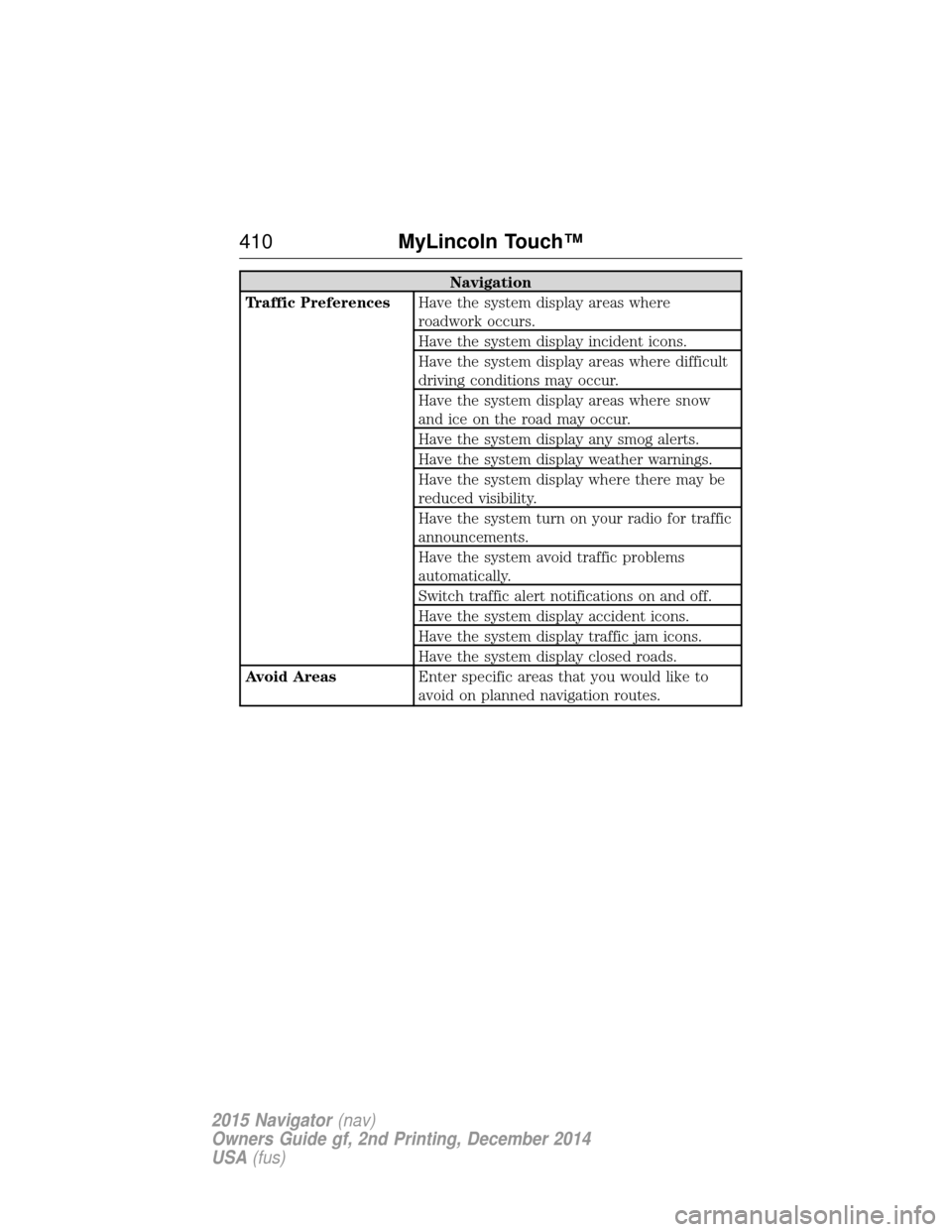
Navigation
Traffic Preferences Have the system display areas where
roadwork occurs.
Have the system display incident icons.
Have the system display areas where difficult
driving conditions may occur.
Have the system display areas where snow
and ice on the road may occur.
Have the system display any smog alerts.
Have the system display weather warnings.
Have the system display where there may be
reduced visibility.
Have the system turn on your radio for traffic
announcements.
Have the system avoid traffic problems
automatically.
Switch traffic alert notifications on and off.
Have the system display accident icons.
Have the system display traffic jam icons.
Have the system display closed roads.
Avoid Areas Enter specific areas that you would like to
avoid on planned navigation routes.
410MyLincoln Touch™
2015 Navigator(nav)
Owners Guide gf, 2nd Printing, December 2014
USA (fus)
Page 414 of 475
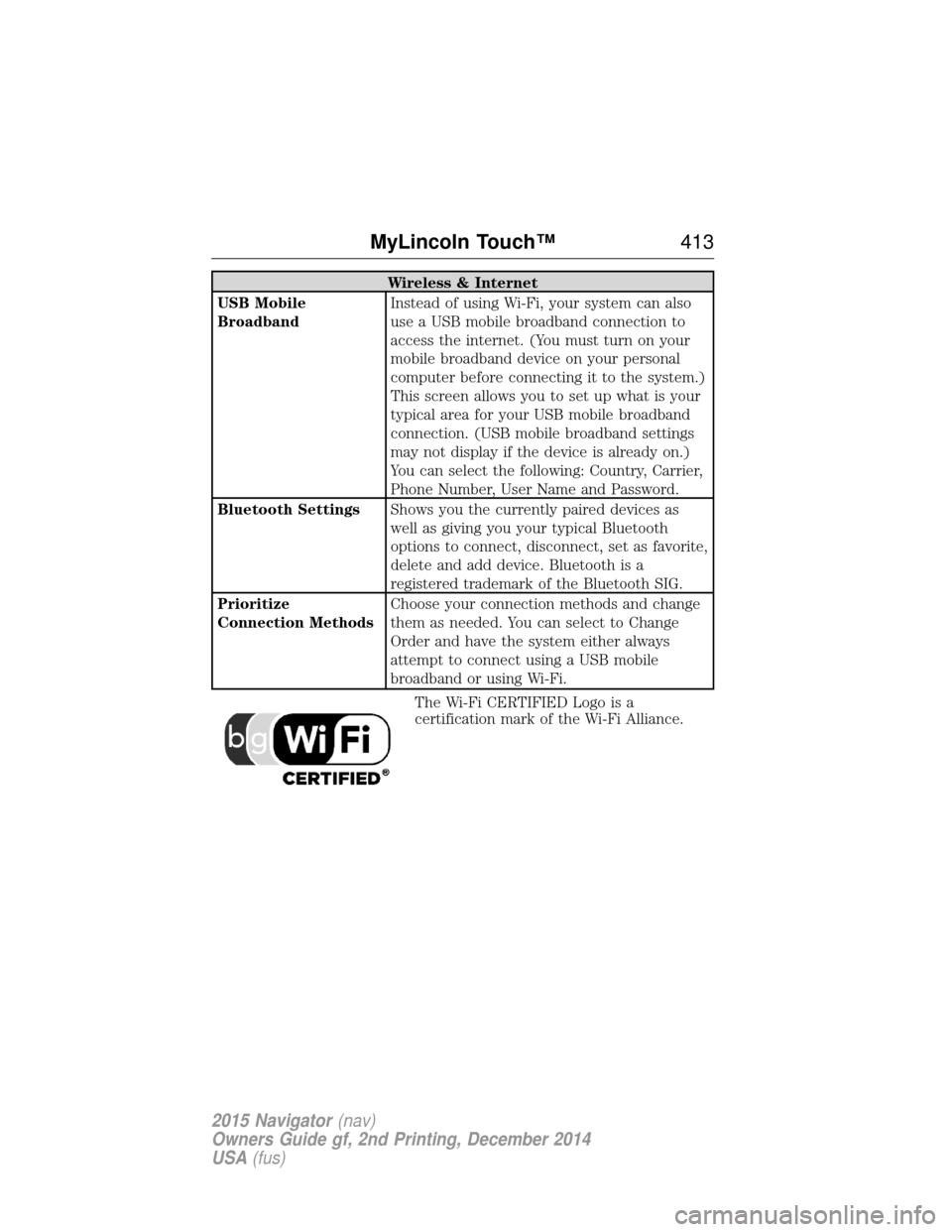
Wireless & Internet
USB Mobile
Broadband Instead of using Wi-Fi, your system can also
use a USB mobile broadband connection to
access the internet. (You must turn on your
mobile broadband device on your personal
computer before connecting it to the system.)
This screen allows you to set up what is your
typical area for your USB mobile broadband
connection. (USB mobile broadband settings
may not display if the device is already on.)
You can select the following: Country, Carrier,
Phone Number, User Name and Password.
Bluetooth Settings Shows you the currently paired devices as
well as giving you your typical Bluetooth
options to connect, disconnect, set as favorite,
delete and add device. Bluetooth is a
registered trademark of the Bluetooth SIG.
Prioritize
Connection Methods Choose your connection methods and change
them as needed. You can select to Change
Order and have the system either always
attempt to connect using a USB mobile
broadband or using Wi-Fi.
The Wi-Fi CERTIFIED Logo is a
certification mark of the Wi-Fi Alliance.
MyLincoln Touch™ 413
2015 Navigator(nav)
Owners Guide gf, 2nd Printing, December 2014
USA (fus)
Page 415 of 475
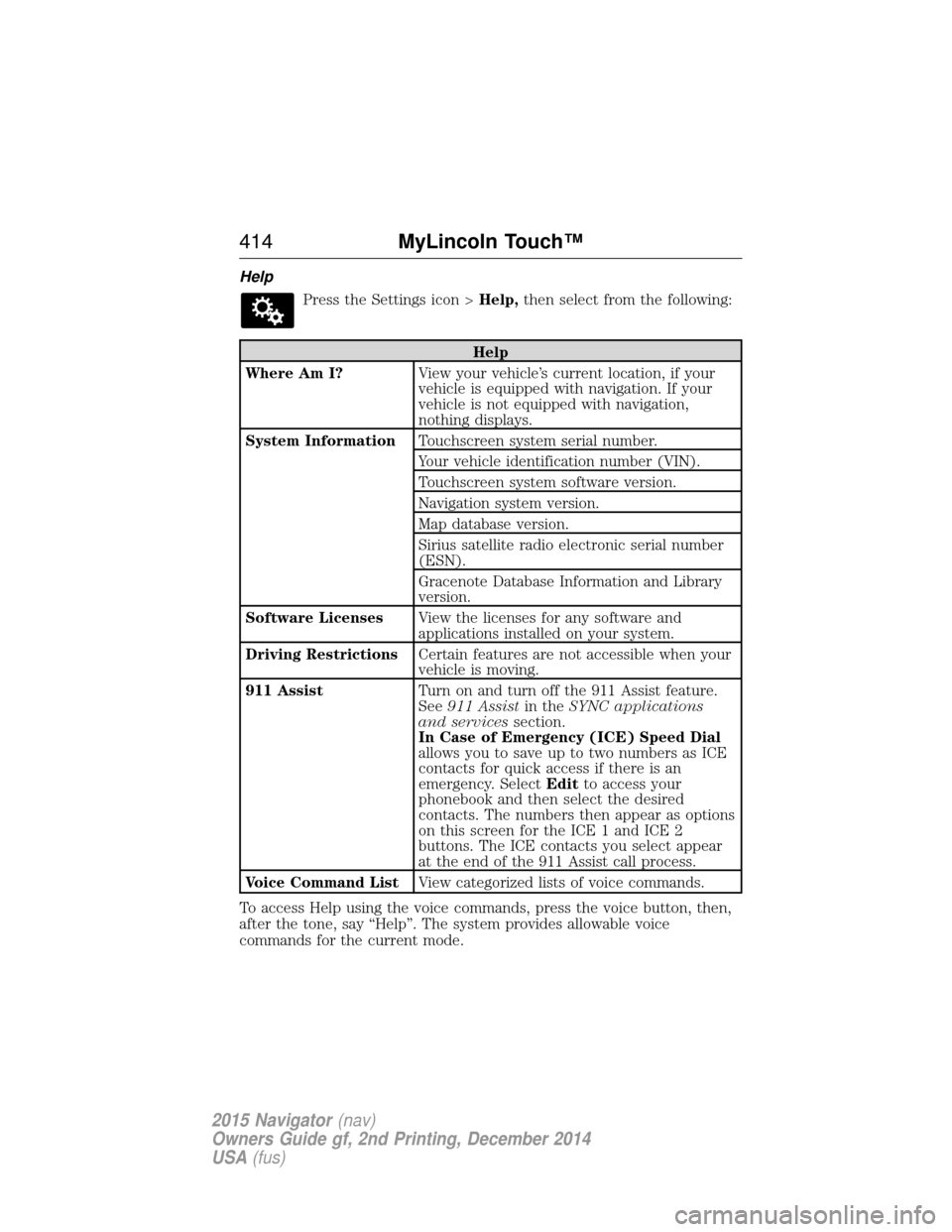
HelpPress the Settings icon > Help,then select from the following:
Help
Where Am I? View your vehicle’s current location, if your
vehicle is equipped with navigation. If your
vehicle is not equipped with navigation,
nothing displays.
System Information Touchscreen system serial number.
Your vehicle identification number (VIN).
Touchscreen system software version.
Navigation system version.
Map database version.
Sirius satellite radio electronic serial number
(ESN).
Gracenote Database Information and Library
version.
Software Licenses View the licenses for any software and
applications installed on your system.
Driving Restrictions Certain features are not accessible when your
vehicle is moving.
911 Assist Turn on and turn off the 911 Assist feature.
See911 Assist in theSYNC applications
and services section.
In Case of Emergency (ICE) Speed Dial
allows you to save up to two numbers as ICE
contacts for quick access if there is an
emergency. Select Editto access your
phonebook and then select the desired
contacts. The numbers then appear as options
on this screen for the ICE 1 and ICE 2
buttons. The ICE contacts you select appear
at the end of the 911 Assist call process.
Voice Command List View categorized lists of voice commands.
To access Help using the voice commands, press the voice button, then,
after the tone, say “Help”. The system provides allowable voice
commands for the current mode.
414 MyLincoln Touch™
2015 Navigator(nav)
Owners Guide gf, 2nd Printing, December 2014
USA (fus)
Page 422 of 475
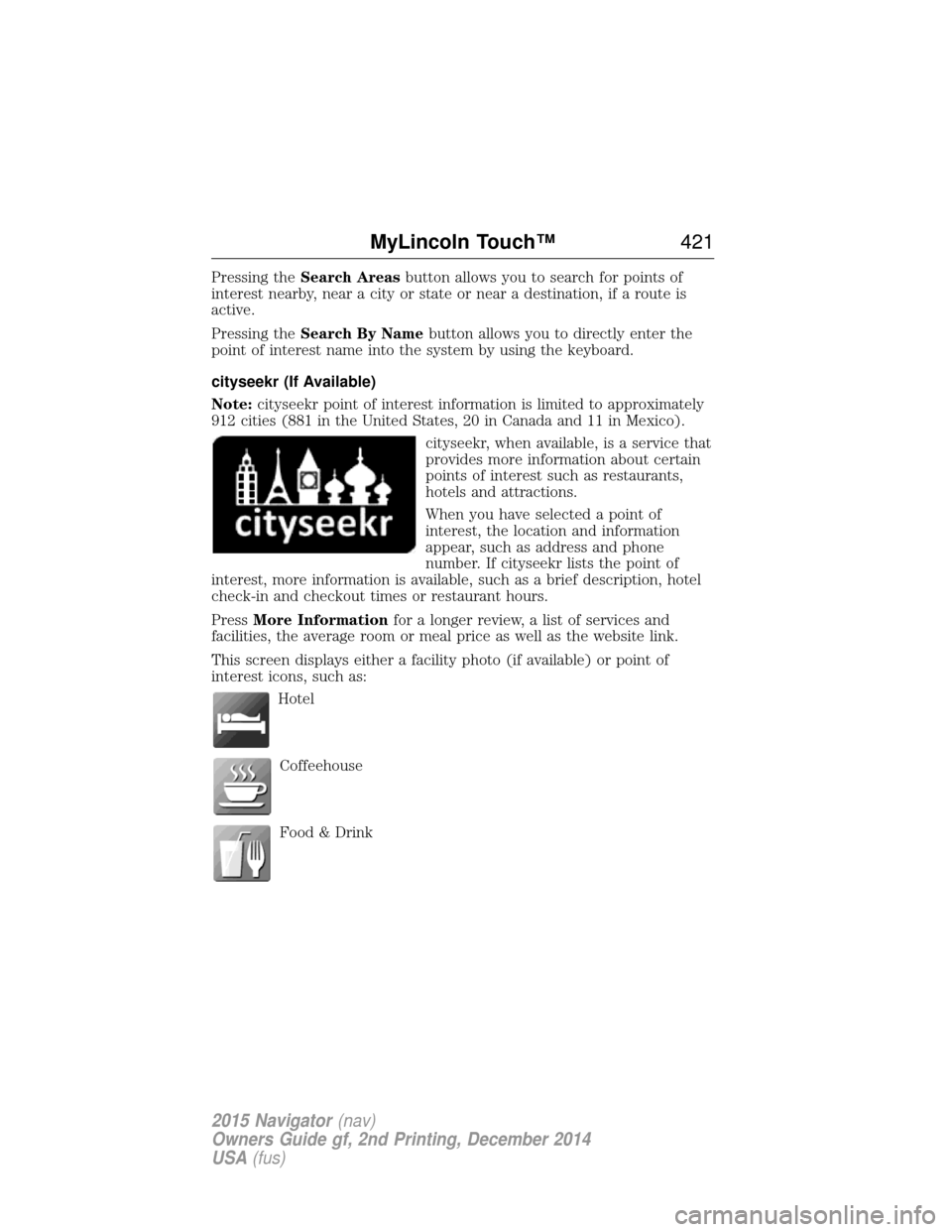
Pressing theSearch Areas button allows you to search for points of
interest nearby, near a city or state or near a destination, if a route is
active.
Pressing the Search By Name button allows you to directly enter the
point of interest name into the system by using the keyboard.
cityseekr (If Available)
Note: cityseekr point of interest information is limited to approximately
912 cities (881 in the United States, 20 in Canada and 11 in Mexico).
cityseekr, when available, is a service that
provides more information about certain
points of interest such as restaurants,
hotels and attractions.
When you have selected a point of
interest, the location and information
appear, such as address and phone
number. If cityseekr lists the point of
interest, more information is available, such as a brief description, hotel
check-in and checkout times or restaurant hours.
Press More Information for a longer review, a list of services and
facilities, the average room or meal price as well as the website link.
This screen displays either a facility photo (if available) or point of
interest icons, such as:
Hotel
Coffeehouse
Food & Drink
MyLincoln Touch™ 421
2015 Navigator(nav)
Owners Guide gf, 2nd Printing, December 2014
USA (fus)
Page 424 of 475
Map Preferences
Breadcrumbsdisplays your vehicle’s previously traveled route with
white dots. Turn this feature ONorOFF.
Turn List Format allows you to choose to have the system display your
turn list Top to Bottom orBottom to Top.
Parking POI Notification sets the automatic parking points of interest
notification. Turn this feature ONorOFF. When parking points of
interest notification is on, the icons display on the map when you get
close to your destination. This may not be very useful in dense areas,
and may clutter the map when other points of interest display.
Route Preferences
Preferred Route allows you to choose to have the system display the
Shortest, Fastest or mostEcological route first. If you set Always
Use Preferred Route toYe s , the system uses the selected route type
to calculate only one route to the desired destination.
Always Use Preferred Route bypasses route selection in destination
programming. The system only calculates one route based on the
preferred route setting.
Eco Time Penalty allows you to select a low, medium or high cost for
the calculated Eco Route. The higher the setting, the longer the time
allotment is for the route.
Avoid features allows you to choose to have the system avoid freeways,
toll roads, ferries and car trains when planning your route. Turn these
features ONorOFF.
Use HOV Lanes allows you to choose to have the system use
high-occupancy vehicle lanes, if available, when planning your route.
Navigation Preferences
Guidance Prompts allows you to choose to have the system use Voice
& Tones orTone Only on your programmed route.
Auto - Fill State/Province allows you have the system automatically fill
in the state and province based on the information already entered into
the system. Turn this feature ONorOFF.
MyLincoln Touch™ 423
2015 Navigator(nav)
Owners Guide gf, 2nd Printing, December 2014
USA (fus)
Page 425 of 475
Traffic Preferences
Avoid Traffic Problemsallows you to choose how you want the system
to handle traffic problems along your route.
• Automatic: Have the system reroute you to avoid traffic incidents
that develop and impact the current route. The system does not
provide a traffic alert notification.
• Manual: Have the system always provide a traffic alert notification
for traffic incidents along the planned route. You have a choice to
accept or ignore the notification before making the route deviation.
Traffic Alert Notification allows you to choose have the system
display traffic alert notifications.
Other traffic alert features allows you to turn on certain, or all, traffic
icons on the map such as road work, incident, accidents and closed
roads. Scroll down to view all the different types of alerts. Turn these
features ONorOFF.
Avoid Areas
Avoid Areas allows you to choose areas which you want the system to
avoid when calculating a route for you.
Press Addto program an entry. Once you make a selection, the system
tries to avoid the area(s) if possible for all routes. To delete a selection,
choose the listing on the screen. When the screen changes to Avoid
Areas Edit, you can press Deleteat the bottom right of the screen.
Map Mode
Press the green bar in the upper right area of the touchscreen to view
map mode. Map mode shows advanced viewing comprised of both 2D
city maps as well as 3D landmarks (when available).
2D city maps show detailed outlines of buildings, visible land use and
land elements and detailed railway infrastructure for the most essential
cities around the globe. These maps also contain features, such as town
blocks, building footprints, and railways.
3D landmarks appear as clear, visible objects that are typically
recognizable and have a certain tourist value. The 3D landmarks appear
in 3D map mode only. Coverage varies, and improves with updated map
releases.
424 MyLincoln Touch™
2015 Navigator(nav)
Owners Guide gf, 2nd Printing, December 2014
USA (fus)