wheel LINCOLN NAVIGATOR 2015 Manual Online
[x] Cancel search | Manufacturer: LINCOLN, Model Year: 2015, Model line: NAVIGATOR, Model: LINCOLN NAVIGATOR 2015Pages: 475, PDF Size: 5.13 MB
Page 324 of 475
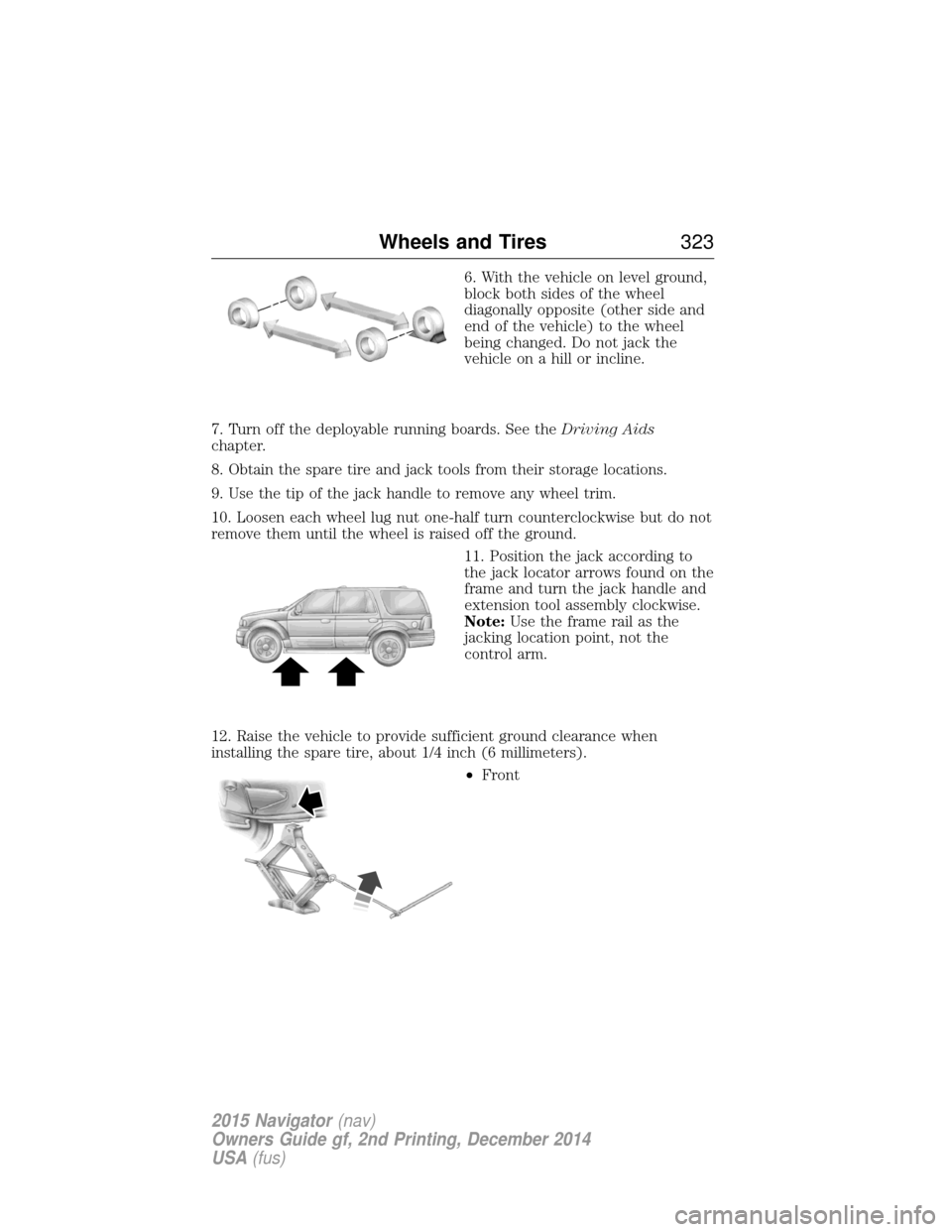
6. With the vehicle on level ground,
block both sides of the wheel
diagonally opposite (other side and
end of the vehicle) to the wheel
being changed. Do not jack the
vehicle on a hill or incline.
7. Turn off the deployable running boards. See the Driving Aids
chapter.
8. Obtain the spare tire and jack tools from their storage locations.
9. Use the tip of the jack handle to remove any wheel trim.
10. Loosen each wheel lug nut one-half turn counterclockwise but do not
remove them until the wheel is raised off the ground.
11. Position the jack according to
the jack locator arrows found on the
frame and turn the jack handle and
extension tool assembly clockwise.
Note:Use the frame rail as the
jacking location point, not the
control arm.
12. Raise the vehicle to provide sufficient ground clearance when
installing the spare tire, about 1/4 inch (6 millimeters). •Front
Wheels and Tires 323
2015 Navigator(nav)
Owners Guide gf, 2nd Printing, December 2014
USA (fus)
Page 325 of 475
•Rear
• Note: Jack at the specified locations to avoid damage to the vehicle.
13. Remove the lug nuts with the lug wrench.
14. Replace the flat tire with the spare tire, making sure the valve stem
is facing outward.
15. Reinstall the lug nuts until the wheel is snug against the hub. Do not
fully tighten the lug nuts until the wheel has been lowered.
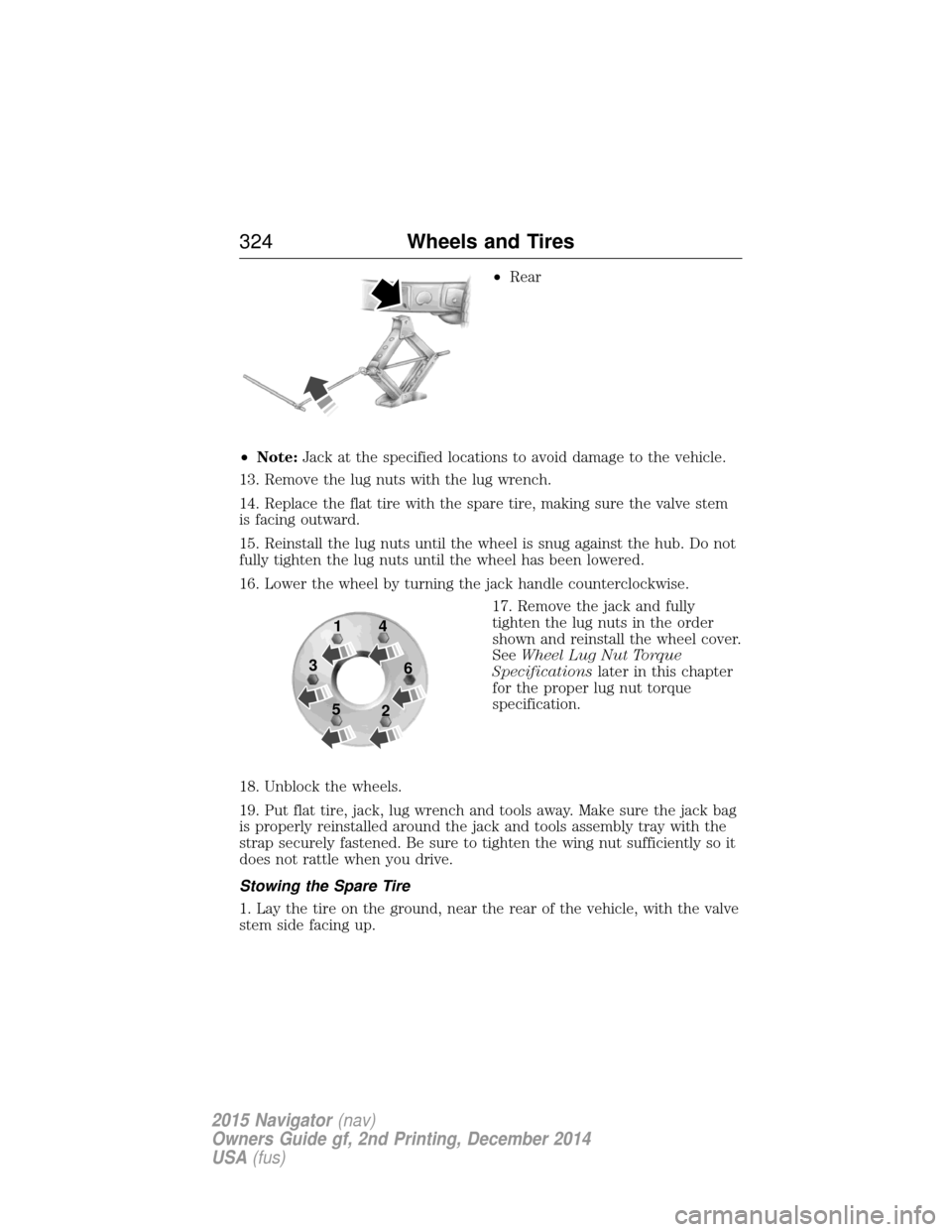
16. Lower the wheel by turning the jack handle counterclockwise. 17. Remove the jack and fully
tighten the lug nuts in the order
shown and reinstall the wheel cover.
SeeWheel Lug Nut Torque
Specifications later in this chapter
for the proper lug nut torque
specification.
18. Unblock the wheels.
19. Put flat tire, jack, lug wrench and tools away. Make sure the jack bag
is properly reinstalled around the jack and tools assembly tray with the
strap securely fastened. Be sure to tighten the wing nut sufficiently so it
does not rattle when you drive.
Stowing the Spare Tire
1. Lay the tire on the ground, near the rear of the vehicle, with the valve
stem side facing up.
1
3
5 4
6
2
324 Wheels and Tires
2015 Navigator(nav)
Owners Guide gf, 2nd Printing, December 2014
USA (fus)
Page 326 of 475
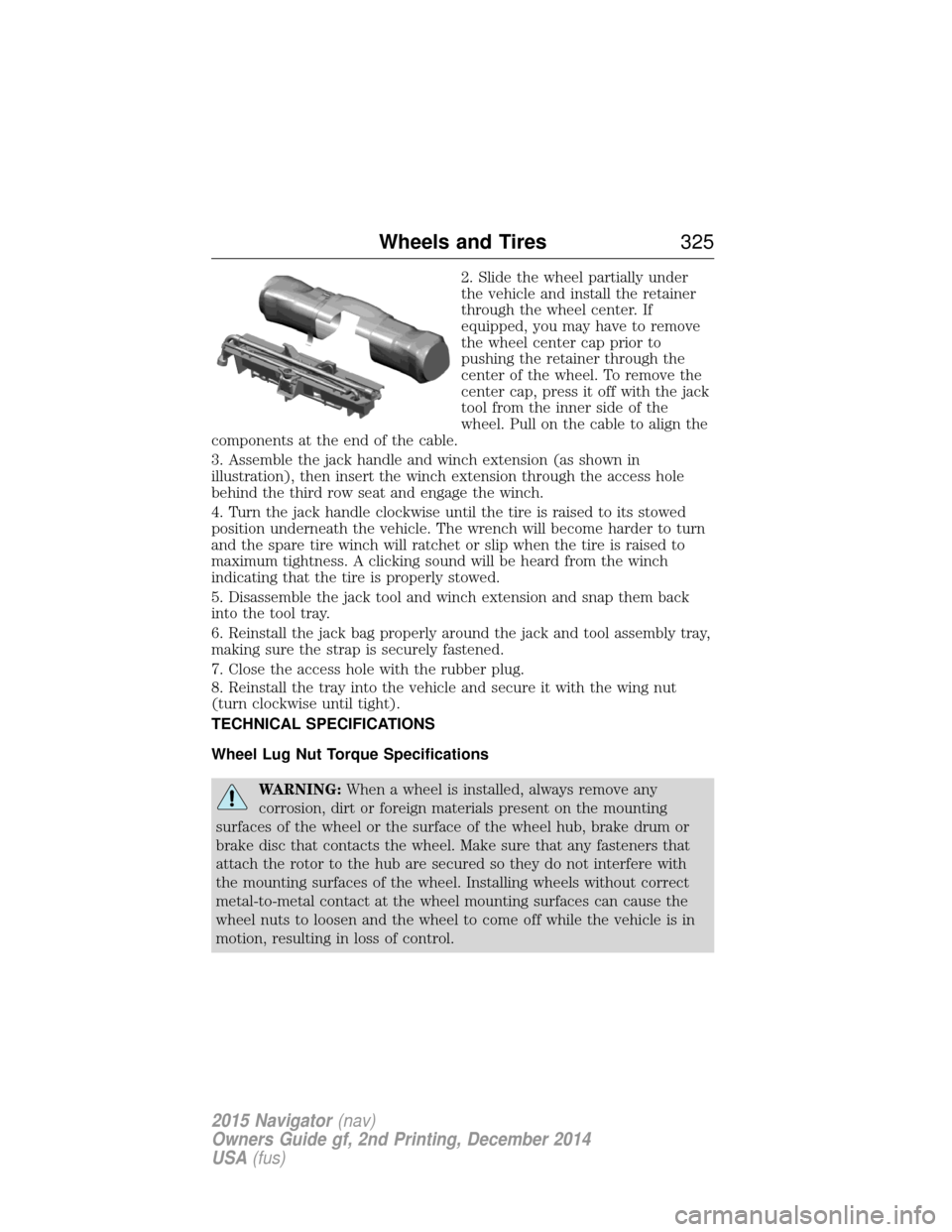
2. Slide the wheel partially under
the vehicle and install the retainer
through the wheel center. If
equipped, you may have to remove
the wheel center cap prior to
pushing the retainer through the
center of the wheel. To remove the
center cap, press it off with the jack
tool from the inner side of the
wheel. Pull on the cable to align the
components at the end of the cable.
3. Assemble the jack handle and winch extension (as shown in
illustration), then insert the winch extension through the access hole
behind the third row seat and engage the winch.
4. Turn the jack handle clockwise until the tire is raised to its stowed
position underneath the vehicle. The wrench will become harder to turn
and the spare tire winch will ratchet or slip when the tire is raised to
maximum tightness. A clicking sound will be heard from the winch
indicating that the tire is properly stowed.
5. Disassemble the jack tool and winch extension and snap them back
into the tool tray.
6. Reinstall the jack bag properly around the jack and tool assembly tray,
making sure the strap is securely fastened.
7. Close the access hole with the rubber plug.
8. Reinstall the tray into the vehicle and secure it with the wing nut
(turn clockwise until tight).
TECHNICAL SPECIFICATIONS
Wheel Lug Nut Torque Specifications
WARNING: When a wheel is installed, always remove any
corrosion, dirt or foreign materials present on the mounting
surfaces of the wheel or the surface of the wheel hub, brake drum or
brake disc that contacts the wheel. Make sure that any fasteners that
attach the rotor to the hub are secured so they do not interfere with
the mounting surfaces of the wheel. Installing wheels without correct
metal-to-metal contact at the wheel mounting surfaces can cause the
wheel nuts to loosen and the wheel to come off while the vehicle is in
motion, resulting in loss of control.
Wheels and Tires 325
2015 Navigator(nav)
Owners Guide gf, 2nd Printing, December 2014
USA (fus)
Page 327 of 475
Retighten the lug nuts to the specified torque within 100 miles
(160 kilometers) after any wheel disturbance (such as rotation, flat tire,
wheel removal).
Bolt sizeWheel lug nut torque*
ft-lb N•m
M14 x 1.5 150200
* Torque specifications are for nut and bolt threads free of dirt and
rust. Use only Ford recommended replacement fasteners.
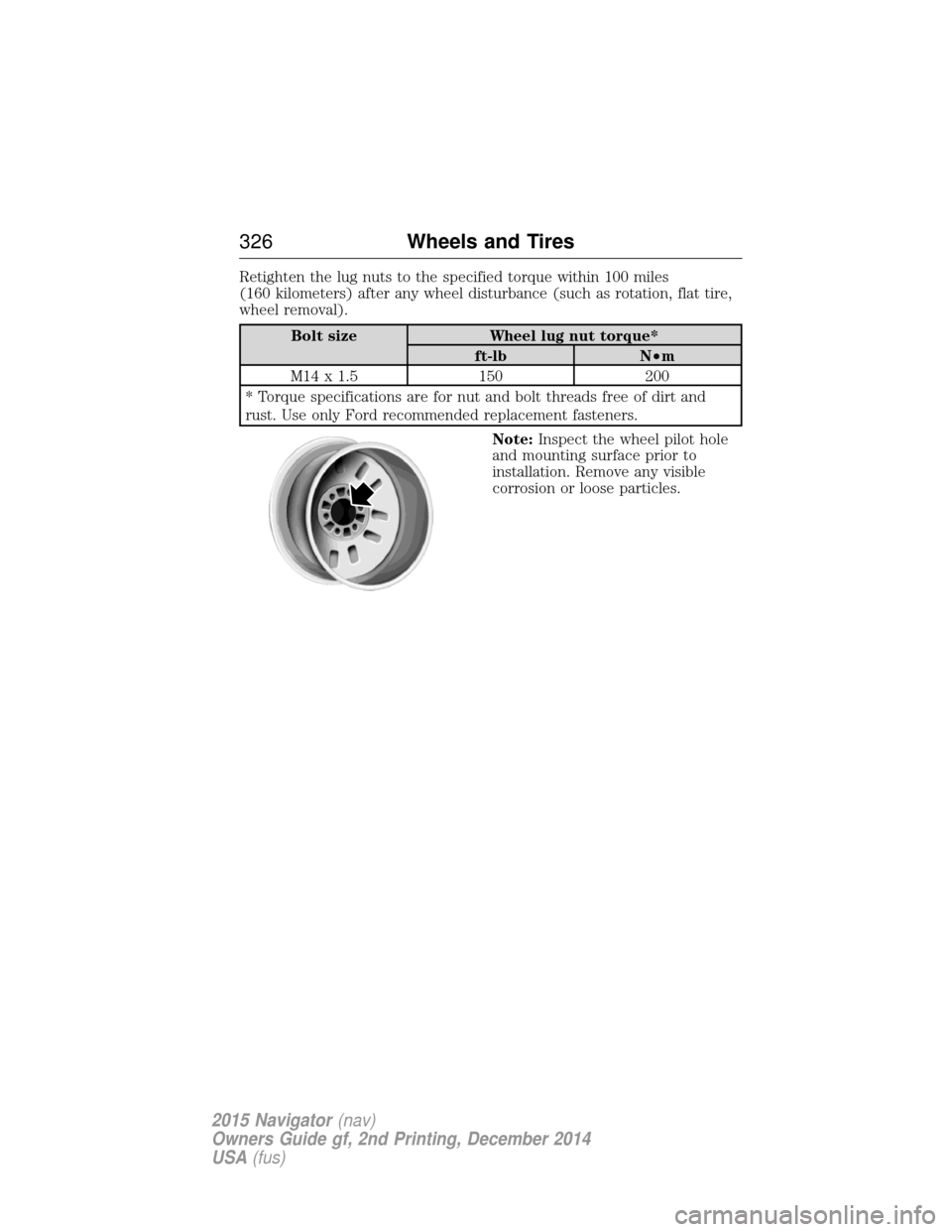
Note:Inspect the wheel pilot hole
and mounting surface prior to
installation. Remove any visible
corrosion or loose particles.
326 Wheels and Tires
2015 Navigator(nav)
Owners Guide gf, 2nd Printing, December 2014
USA (fus)
Page 330 of 475
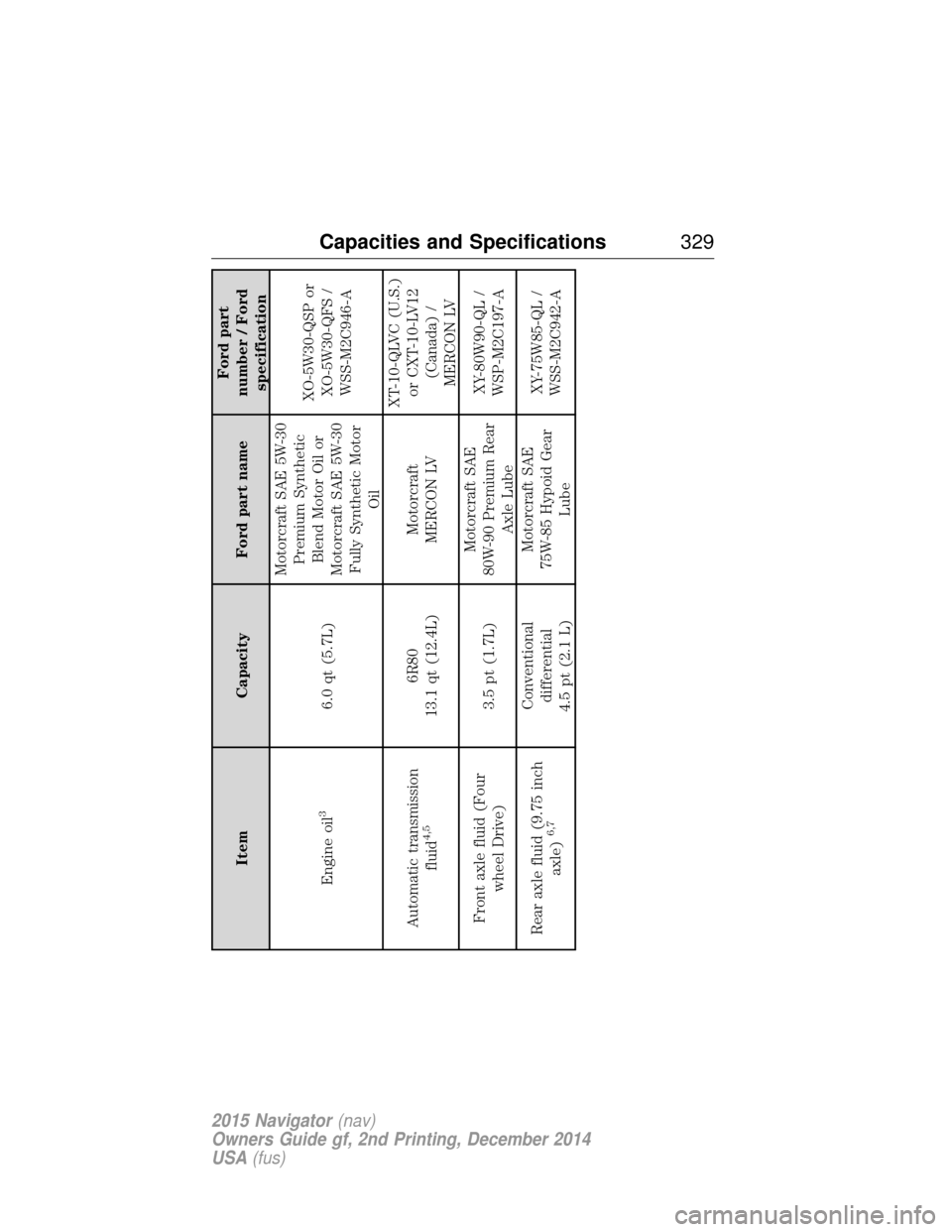
ItemCapacity Ford part name Ford part
number / Ford specification
Engine oil
3
6.0 qt (5.7L) Motorcraft SAE 5W-30
Premium SyntheticBlend Motor Oil or
Motorcraft SAE 5W-30 Fully Synthetic Motor Oil XO-5W30-QSP or
XO-5W30-QFS /WSS-M2C946-A
Automatic transmission fluid
4,5
6R80
13.1 qt (12.4L) Motorcraft
MERCON LV XT-10-QLVC (U.S.)
or CXT-10-LV12 (Canada) /
MERCON LV
Front axle fluid (Four wheel Drive) 3.5 pt (1.7L)Motorcraft SAE
80W-90 Premium Rear Axle Lube XY-80W90-QL /
WSP-M2C197-A
Rear axle fluid (9.75 inch axle)
6,7
Conventionaldifferential
4.5 pt (2.1 L) Motorcraft SAE
75W-85 Hypoid Gear Lube XY-75W85-QL /
WSS-M2C942-A
Capacities and Specifications 329
2015 Navigator(nav)
Owners Guide gf, 2nd Printing, December 2014
USA (fus)
Page 331 of 475
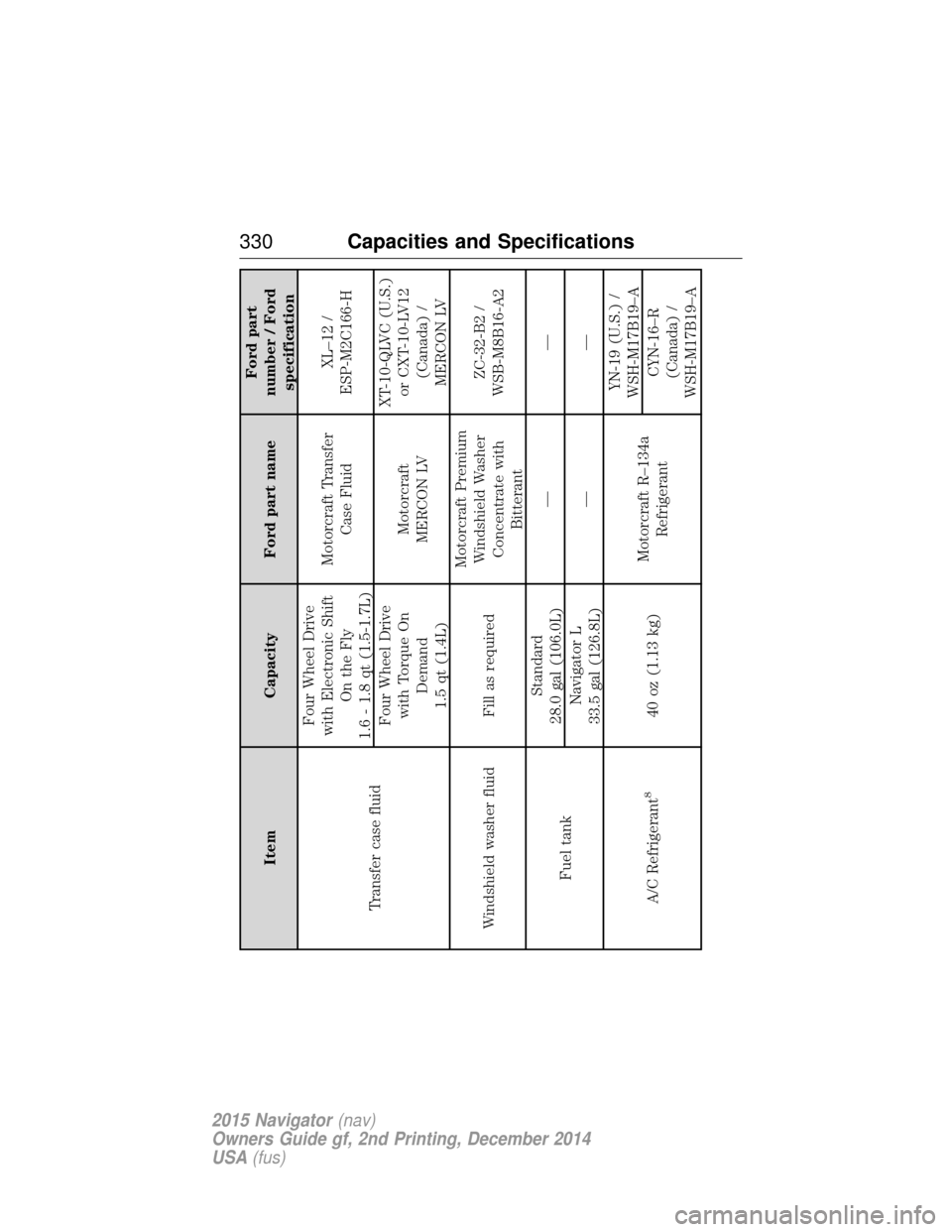
ItemCapacity Ford part name Ford part
number / Ford specification
Transfer case fluid Four Wheel Drive
with Electronic Shift On the Fly
1.6 - 1.8 qt (1.5-1.7L) Motorcraft Transfer
Case Fluid XL–12 /
ESP-M2C166-H
Four Wheel Drive with Torque On Demand
1.5 qt (1.4L) Motorcraft
MERCON LV XT-10-QLVC (U.S.)
or CXT-10-LV12 (Canada) /
MERCON LV
Windshield washer fluid Fill as required Motorcraft Premium
Windshield Washer Concentrate with Bitterant ZC-32-B2 /
WSB-M8B16-A2
Fuel tank Standard
28.0 gal (106.0L) ——
Navigator L
33.5 gal (126.8L) ——
A/C Refrigerant
8
40 oz (1.13 kg) Motorcraft R–134a
Refrigerant YN-19 (U.S.) /
WSH-M17B19–A
CYN-16–R
(Canada) /
WSH-M17B19–A
330 Capacities and Specifications
2015 Navigator (nav)
Owners Guide gf, 2nd Printing, December 2014
USA (fus)
Page 337 of 475
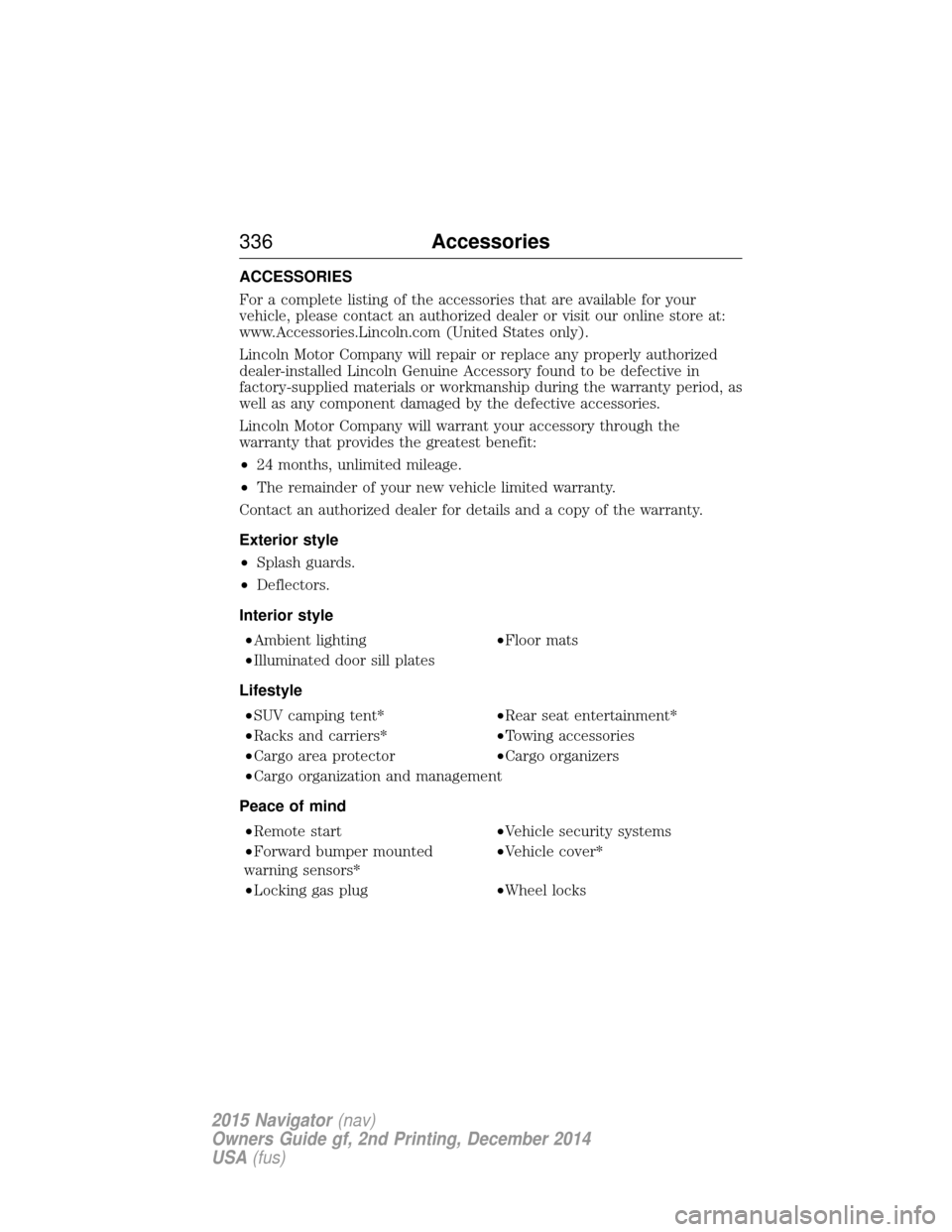
ACCESSORIES
For a complete listing of the accessories that are available for your
vehicle, please contact an authorized dealer or visit our online store at:
www.Accessories.Lincoln.com (United States only).
Lincoln Motor Company will repair or replace any properly authorized
dealer-installed Lincoln Genuine Accessory found to be defective in
factory-supplied materials or workmanship during the warranty period, as
well as any component damaged by the defective accessories.
Lincoln Motor Company will warrant your accessory through the
warranty that provides the greatest benefit:
•24 months, unlimited mileage.
• The remainder of your new vehicle limited warranty.
Contact an authorized dealer for details and a copy of the warranty.
Exterior style
• Splash guards.
• Deflectors.
Interior style •Ambient lighting •Floor mats
•Illuminated door sill plates
Lifestyle •SUV camping tent* •Rear seat entertainment*
•Racks and carriers* •Towing accessories
•Cargo area protector •Cargo organizers
•Cargo organization and management
Peace of mind •Remote start •Vehicle security systems
•Forward bumper mounted
warning sensors* •Vehicle cover*
•Locking gas plug •Wheel locks
336Accessories
2015 Navigator(nav)
Owners Guide gf, 2nd Printing, December 2014
USA (fus)
Page 357 of 475
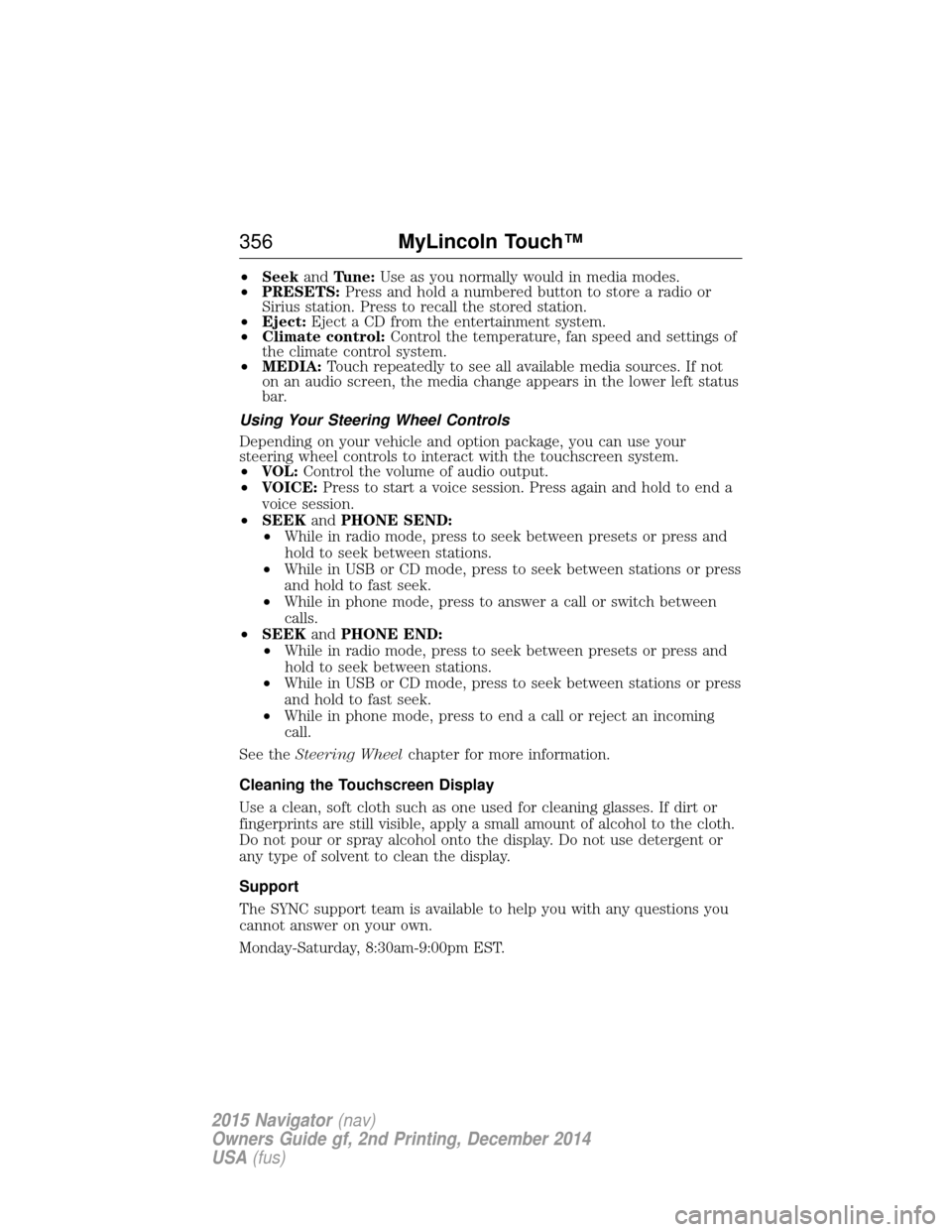
•Seek andTune: Use as you normally would in media modes.
• PRESETS: Press and hold a numbered button to store a radio or
Sirius station. Press to recall the stored station.
• Eject: Eject a CD from the entertainment system.
• Climate control: Control the temperature, fan speed and settings of
the climate control system.
• MEDIA: Touch repeatedly to see all available media sources. If not
on an audio screen, the media change appears in the lower left status
bar.
Using Your Steering Wheel Controls
Depending on your vehicle and option package, you can use your
steering wheel controls to interact with the touchscreen system.
• VOL: Control the volume of audio output.
• VOICE: Press to start a voice session. Press again and hold to end a
voice session.
• SEEK andPHONE SEND:
• While in radio mode, press to seek between presets or press and
hold to seek between stations.
• While in USB or CD mode, press to seek between stations or press
and hold to fast seek.
• While in phone mode, press to answer a call or switch between
calls.
• SEEK andPHONE END:
• While in radio mode, press to seek between presets or press and
hold to seek between stations.
• While in USB or CD mode, press to seek between stations or press
and hold to fast seek.
• While in phone mode, press to end a call or reject an incoming
call.
See the Steering Wheel chapter for more information.
Cleaning the Touchscreen Display
Use a clean, soft cloth such as one used for cleaning glasses. If dirt or
fingerprints are still visible, apply a small amount of alcohol to the cloth.
Do not pour or spray alcohol onto the display. Do not use detergent or
any type of solvent to clean the display.
Support
The SYNC support team is available to help you with any questions you
cannot answer on your own.
Monday-Saturday, 8:30am-9:00pm EST.
356 MyLincoln Touch™
2015 Navigator(nav)
Owners Guide gf, 2nd Printing, December 2014
USA (fus)
Page 361 of 475
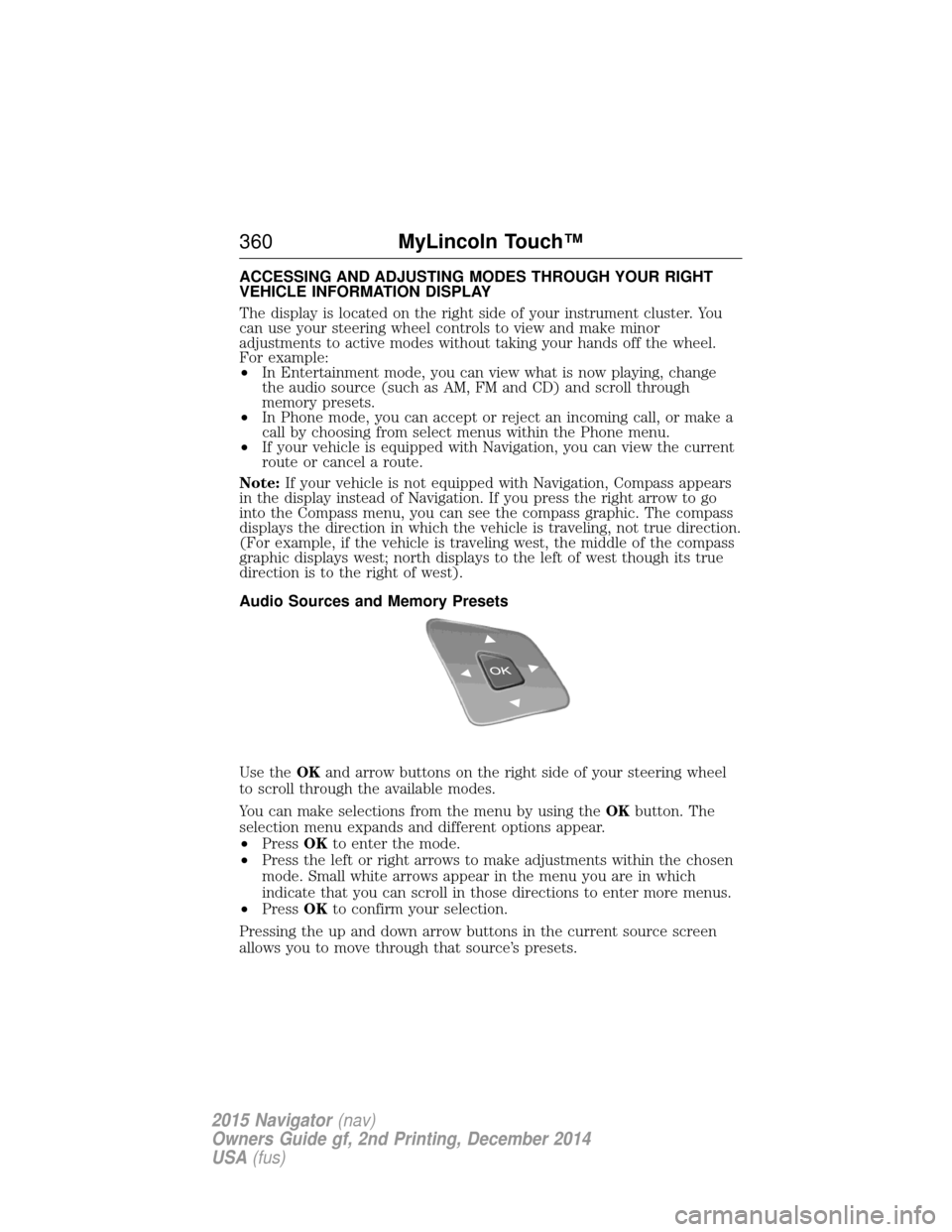
ACCESSING AND ADJUSTING MODES THROUGH YOUR RIGHT
VEHICLE INFORMATION DISPLAY
The display is located on the right side of your instrument cluster. You
can use your steering wheel controls to view and make minor
adjustments to active modes without taking your hands off the wheel.
For example:
•In Entertainment mode, you can view what is now playing, change
the audio source (such as AM, FM and CD) and scroll through
memory presets.
• In Phone mode, you can accept or reject an incoming call, or make a
call by choosing from select menus within the Phone menu.
• If your vehicle is equipped with Navigation, you can view the current
route or cancel a route.
Note: If your vehicle is not equipped with Navigation, Compass appears
in the display instead of Navigation. If you press the right arrow to go
into the Compass menu, you can see the compass graphic. The compass
displays the direction in which the vehicle is traveling, not true direction.
(For example, if the vehicle is traveling west, the middle of the compass
graphic displays west; north displays to the left of west though its true
direction is to the right of west).
Audio Sources and Memory Presets
Use the OKand arrow buttons on the right side of your steering wheel
to scroll through the available modes.
You can make selections from the menu by using the OKbutton. The
selection menu expands and different options appear.
• Press OKto enter the mode.
• Press the left or right arrows to make adjustments within the chosen
mode. Small white arrows appear in the menu you are in which
indicate that you can scroll in those directions to enter more menus.
• Press OKto confirm your selection.
Pressing the up and down arrow buttons in the current source screen
allows you to move through that source’s presets.
360 MyLincoln Touch™
2015 Navigator(nav)
Owners Guide gf, 2nd Printing, December 2014
USA (fus)
Page 362 of 475

USING VOICE RECOGNITION
This system helps you control many features using voice commands. This
allows you to keep your hands on the wheel and focus on what is in
front of you. The system provides feedback through audible tones,
prompts, questions and spoken confirmations depending on the situation
and the chosen level of interaction (voice settings).
The system also asks short questions (confirmation prompts) when it is
not sure of your request or when there are multiple possible responses
to your request.
When using voice commands, words and icons may appear in the lower
left status bar indicating the status of the voice session (such as
Listening, Success, Failed, Paused or Try Again).
How to Use Voice Commands with Your SystemPress the voice icon. After the tone, speak your command
clearly.
These commands can be said at any time. “Cancel”“Exit”
“Go back”
“List of commands” “Main menu”“Next page”
“Previous page”
“What can I say?” “Help”
What Can I Say?
To access the available voice commands for the current session, do one
of the following:
• During a voice session, press the Help icon ( ?) in the lower left status
bar of the screen.
• Say, “What can I say?” for an on-screen listing of the possible voice
commands associated with your current voice session.
• Press the voice icon. After the tone, say, “Help” to hear a list of
possible voice commands.
MyLincoln Touch™ 361
2015 Navigator(nav)
Owners Guide gf, 2nd Printing, December 2014
USA (fus)