engine oil LINCOLN NAVIGATOR 2015 Owners Manual
[x] Cancel search | Manufacturer: LINCOLN, Model Year: 2015, Model line: NAVIGATOR, Model: LINCOLN NAVIGATOR 2015Pages: 475, PDF Size: 5.13 MB
Page 6 of 475
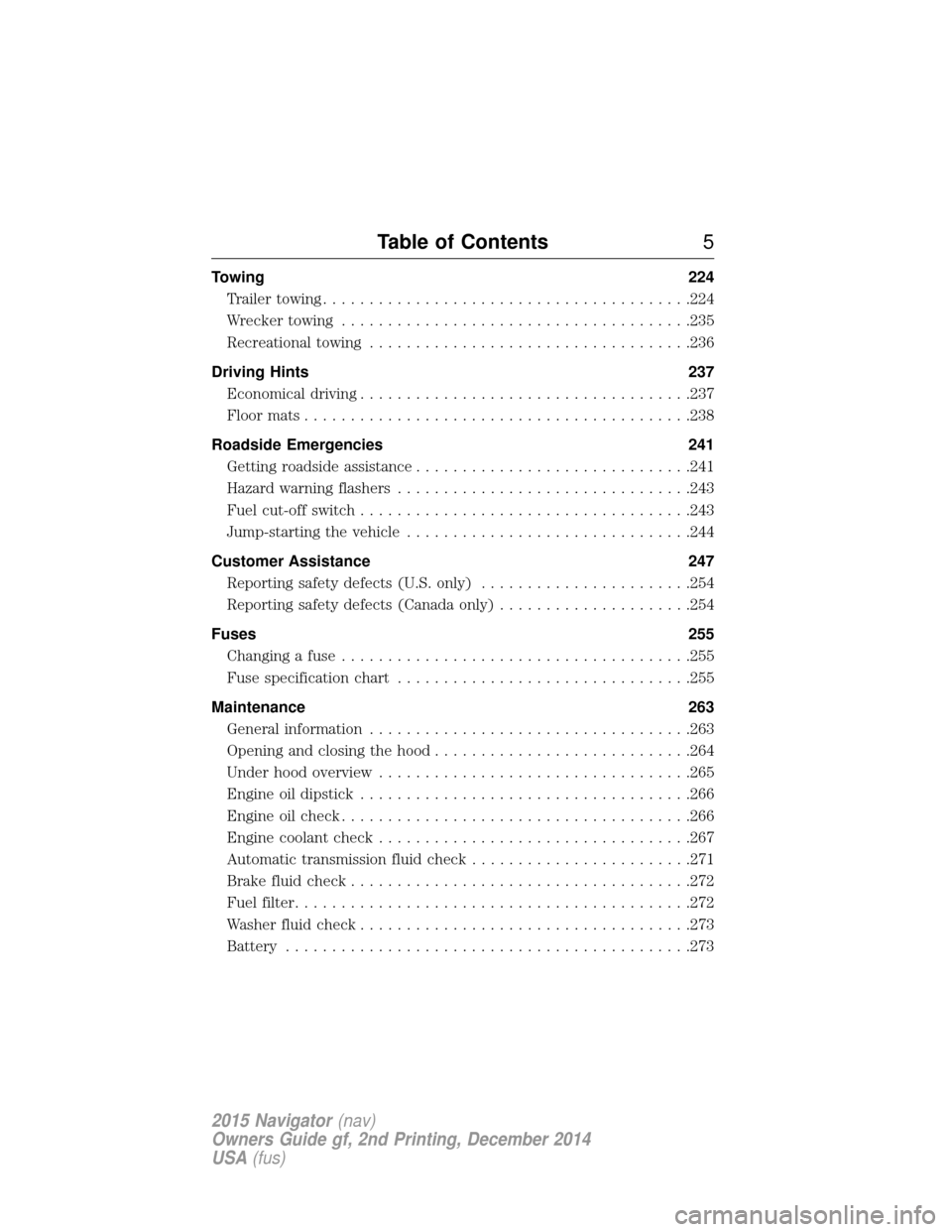
Towing224
Trailertowing........................................224
Wrecker towing ......................................235
Recreational towing ...................................236
Driving Hints 237
Economical driving ....................................237
Floormats..........................................238
Roadside Emergencies 241
Getting roadside assistance ..............................241
Hazard warning flashers ................................243
Fuel cut-off switch ....................................243
Jump-starting the vehicle ...............................244
Customer Assistance 247
Reporting safety defects (U.S. only) .......................254
Reporting safety defects (Canada only) .....................254
Fuses 255
Changing a fuse ......................................255
Fuse specification chart ................................255
Maintenance 263
General information ...................................263
Opening and closing the hood ............................264
Under hood overview ..................................265
Engine oil dipstick ....................................266
Engine oil check ......................................266
Engine coolant check ..................................267
Automatic transmission fluid check ........................271
Brake fluid check .....................................272
Fuel filter ...........................................272
Washer fluid check ....................................273
Battery ............................................273
Table of Contents 5
2015 Navigator(nav)
Owners Guide gf, 2nd Printing, December 2014
USA (fus)
Page 10 of 475
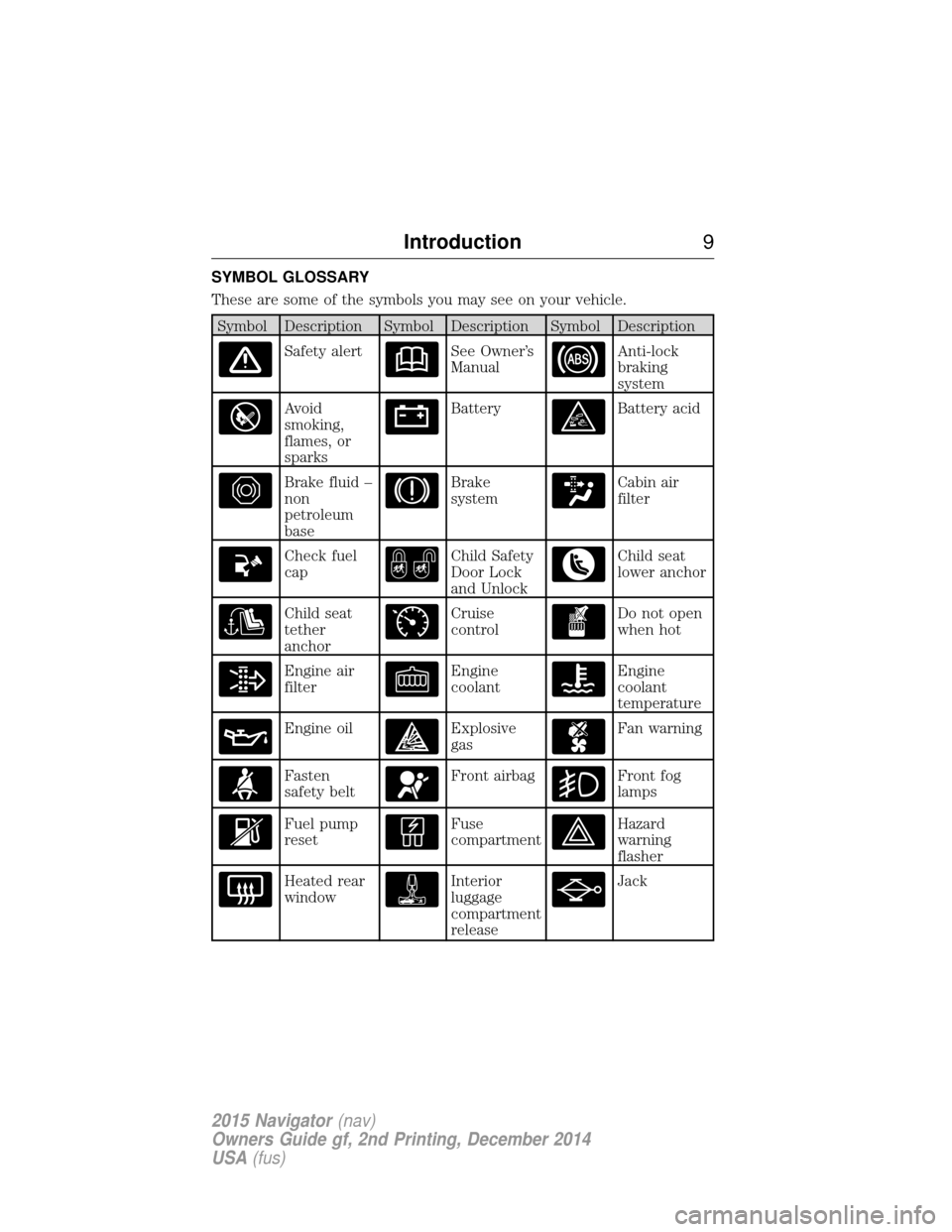
SYMBOL GLOSSARY
These are some of the symbols you may see on your vehicle.
Symbol Description Symbol Description Symbol Description
Safety alertSee Owner’s
ManualAnti-lock
braking
system
Avoid
smoking,
flames, or
sparksBatteryBattery acid
Brake fluid –
non
petroleum
baseBrake
systemCabin air
filter
Check fuel
capChild Safety
Door Lock
and UnlockChild seat
lower anchor
Child seat
tether
anchorCruise
controlDo not open
when hot
Engine air
filterEngine
coolantEngine
coolant
temperature
Engine oilExplosive
gasFan warning
Fasten
safety beltFront airbagFront fog
lamps
Fuel pump
resetFuse
compartmentHazard
warning
flasher
Heated rear
windowInterior
luggage
compartment
releaseJack
Introduction9
2015 Navigator(nav)
Owners Guide gf, 2nd Printing, December 2014
USA (fus)
Page 103 of 475
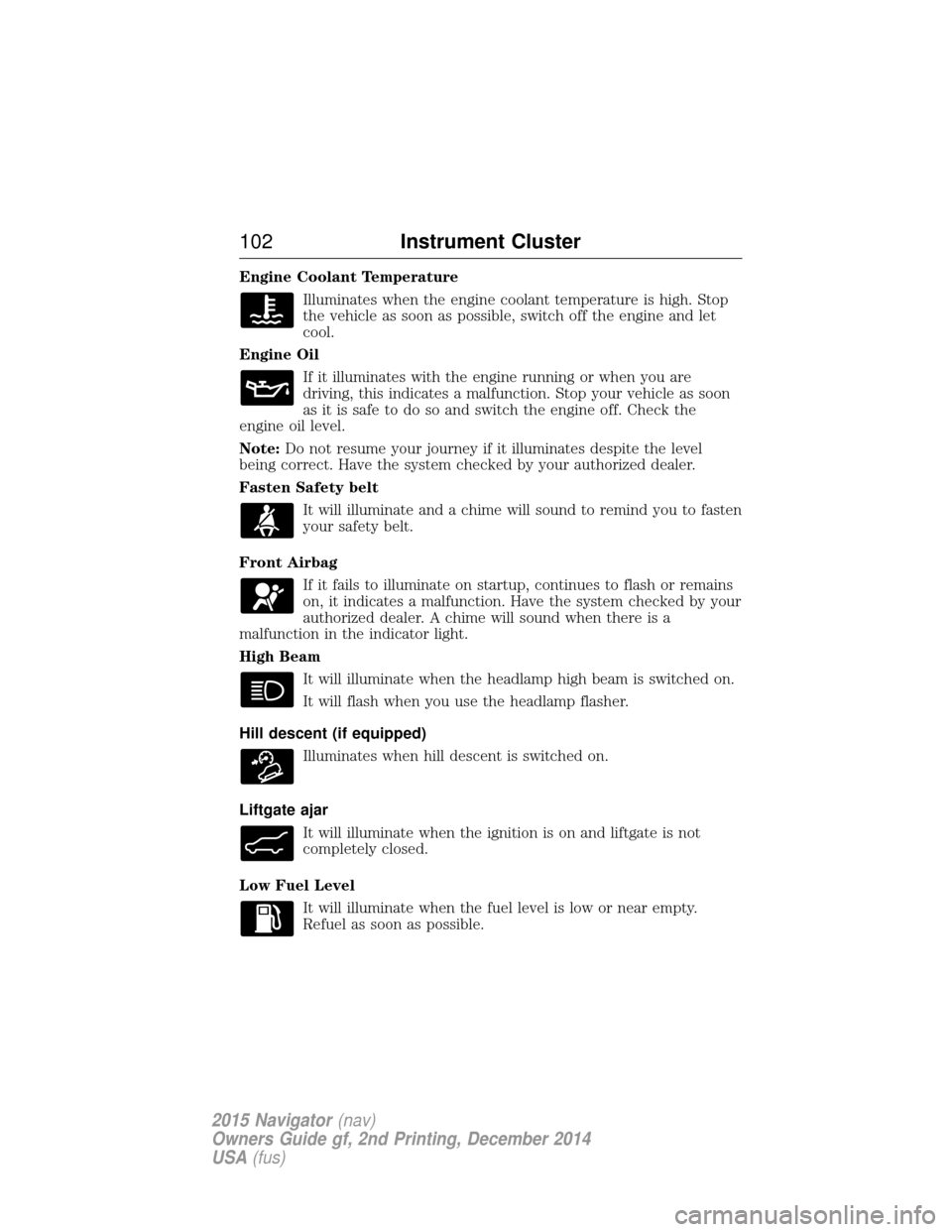
Engine Coolant TemperatureIlluminates when the engine coolant temperature is high. Stop
the vehicle as soon as possible, switch off the engine and let
cool.
Engine Oil If it illuminates with the engine running or when you are
driving, this indicates a malfunction. Stop your vehicle as soon
as it is safe to do so and switch the engine off. Check the
engine oil level.
Note: Do not resume your journey if it illuminates despite the level
being correct. Have the system checked by your authorized dealer.
Fasten Safety belt
It will illuminate and a chime will sound to remind you to fasten
your safety belt.
Front Airbag If it fails to illuminate on startup, continues to flash or remains
on, it indicates a malfunction. Have the system checked by your
authorized dealer. A chime will sound when there is a
malfunction in the indicator light.
High Beam
It will illuminate when the headlamp high beam is switched on.
It will flash when you use the headlamp flasher.
Hill descent (if equipped) Illuminates when hill descent is switched on.
Liftgate ajar It will illuminate when the ignition is on and liftgate is not
completely closed.
Low Fuel Level It will illuminate when the fuel level is low or near empty.
Refuel as soon as possible.
102 Instrument Cluster
2015 Navigator(nav)
Owners Guide gf, 2nd Printing, December 2014
USA (fus)
Page 108 of 475
Scroll up/down to highlight one of the categories, then press the right
arrow key orOKto enter into that category. Press the left arrow key as
needed to exit back to the main menu.
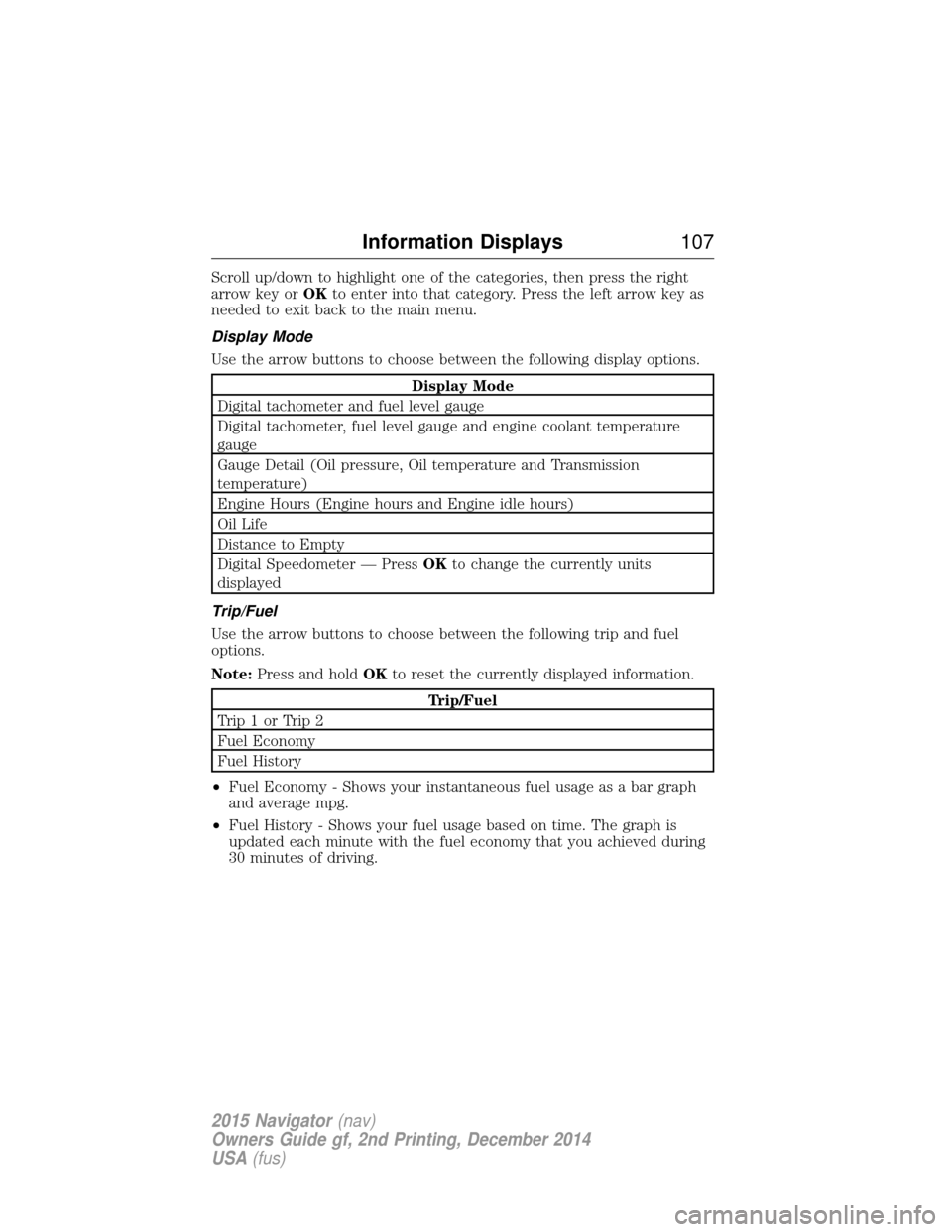
Display Mode
Use the arrow buttons to choose between the following display options.
Display Mode
Digital tachometer and fuel level gauge
Digital tachometer, fuel level gauge and engine coolant temperature
gauge
Gauge Detail (Oil pressure, Oil temperature and Transmission
temperature)
Engine Hours (Engine hours and Engine idle hours)
Oil Life
Distance to Empty
Digital Speedometer — Press OKto change the currently units
displayed
Trip/Fuel
Use the arrow buttons to choose between the following trip and fuel
options.
Note: Press and hold OKto reset the currently displayed information.
Trip/Fuel
Trip1orTrip2
Fuel Economy
Fuel History
• Fuel Economy - Shows your instantaneous fuel usage as a bar graph
and average mpg.
• Fuel History - Shows your fuel usage based on time. The graph is
updated each minute with the fuel economy that you achieved during
30 minutes of driving.
Information Displays 107
2015 Navigator(nav)
Owners Guide gf, 2nd Printing, December 2014
USA (fus)
Page 116 of 475
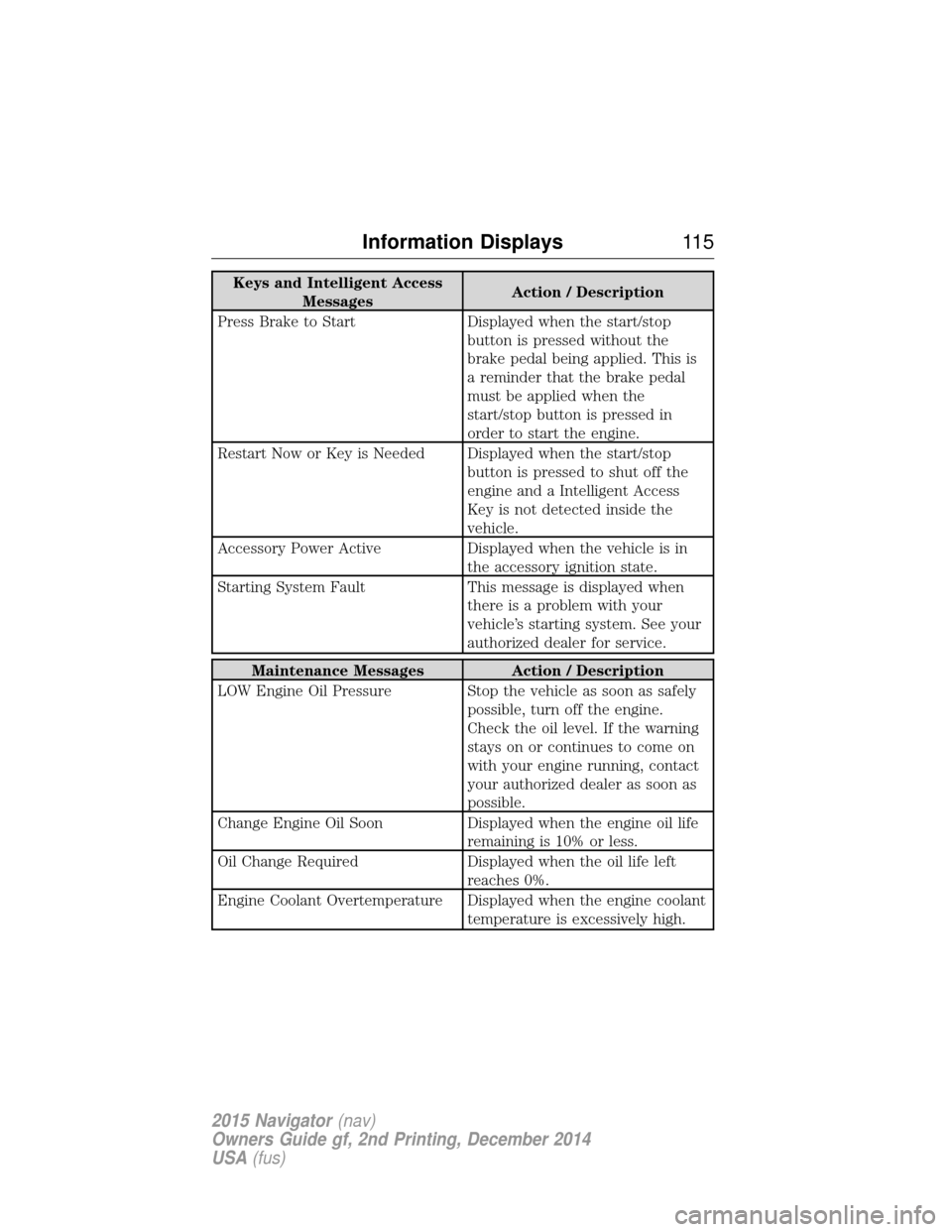
Keys and Intelligent AccessMessages Action / Description
Press Brake to Start Displayed when the start/stop button is pressed without the
brake pedal being applied. This is
a reminder that the brake pedal
must be applied when the
start/stop button is pressed in
order to start the engine.
Restart Now or Key is Needed Displayed when the start/stop button is pressed to shut off the
engine and a Intelligent Access
Key is not detected inside the
vehicle.
Accessory Power Active Displayed when the vehicle is in the accessory ignition state.
Starting System Fault This message is displayed when there is a problem with your
vehicle’s starting system. See your
authorized dealer for service.
Maintenance Messages Action / Description
LOW Engine Oil Pressure Stop the vehicle as soon as safely possible, turn off the engine.
Check the oil level. If the warning
stays on or continues to come on
with your engine running, contact
your authorized dealer as soon as
possible.
Change Engine Oil Soon Displayed when the engine oil life
remaining is 10% or less.
Oil Change Required Displayed when the oil life left
reaches 0%.
Engine Coolant Overtemperature Displayed when the engine coolant temperature is excessively high.
Information Displays11 5
2015 Navigator(nav)
Owners Guide gf, 2nd Printing, December 2014
USA (fus)
Page 238 of 475
BREAKING-IN
You need to break in new tires for approximately 300 miles
(480 kilometers). During this time, your vehicle may exhibit some unique
driving characteristics. Avoid driving too fast during the first 1000 miles
(1600 kilometers). Vary your speed frequently and change up through
the gears early. Do not labor the engine. Do not tow during the first
1000 miles (1600 kilometers).
ECONOMICAL DRIVING
Fuel economy is affected by several things, such as how you drive, the
conditions you drive under and how you maintain your vehicle.
There are some things to keep in mind that may improve your fuel
economy:
•Accelerate and slow down in a smooth, moderate fashion.
• Drive at steady speeds without stopping.
• Anticipate stops; slowing down may eliminate the need to stop.
• Combine errands and minimize stop-and-go driving.
• Close the windows for high-speed driving.
• Drive at reasonable speeds (traveling at 55 mph [88 km/h] uses 15%
less fuel than traveling at 65 mph [105 km/h]).
• Keep the tires properly inflated and use only the recommended size.
• Use the recommended engine oil.
• Perform all regularly scheduled maintenance.
There are also some things you may not want to do because they may
reduce your fuel economy:
• Sudden or hard accelerations.
• Rev the engine before turning it off.
• Idle for periods longer than one minute.
• Warm up your vehicle on cold mornings.
• Use the air conditioner or front defroster.
• Use the speed control in hilly terrain.
• Rest your foot on the brake pedal while driving.
• Drive a heavily loaded vehicle or tow a trailer.
• Carry unnecessary weight (approximately 1 mpg [0.4 km/L] is lost for
every 400 pounds [180 kilograms] of weight carried).
Driving Hints 237
2015 Navigator(nav)
Owners Guide gf, 2nd Printing, December 2014
USA (fus)
Page 266 of 475
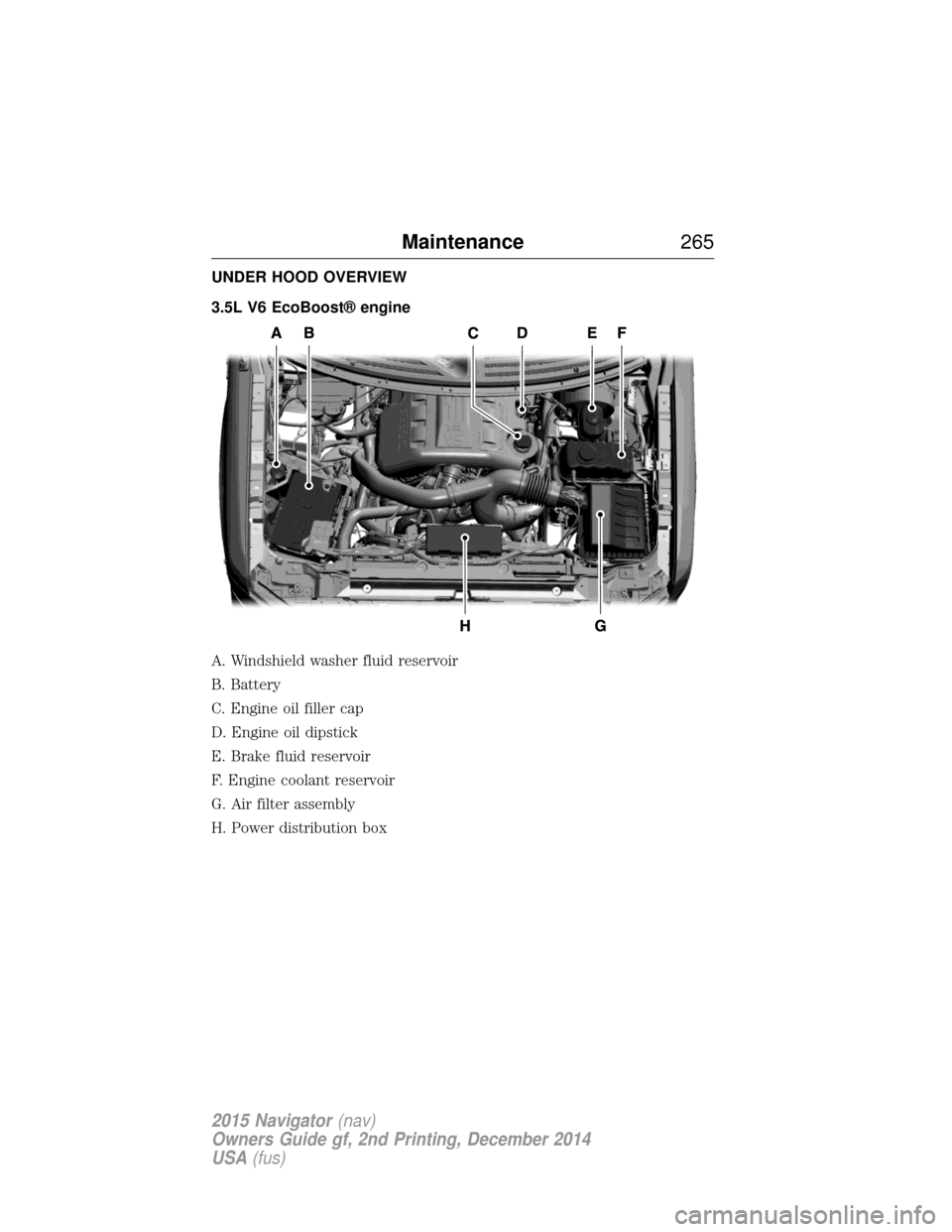
UNDER HOOD OVERVIEW
3.5L V6 EcoBoost® engine
A. Windshield washer fluid reservoir
B. Battery
C. Engine oil filler cap
D. Engine oil dipstick
E. Brake fluid reservoir
F. Engine coolant reservoir
G. Air filter assembly
H. Power distribution box
Maintenance265
2015 Navigator(nav)
Owners Guide gf, 2nd Printing, December 2014
USA (fus)
Page 267 of 475
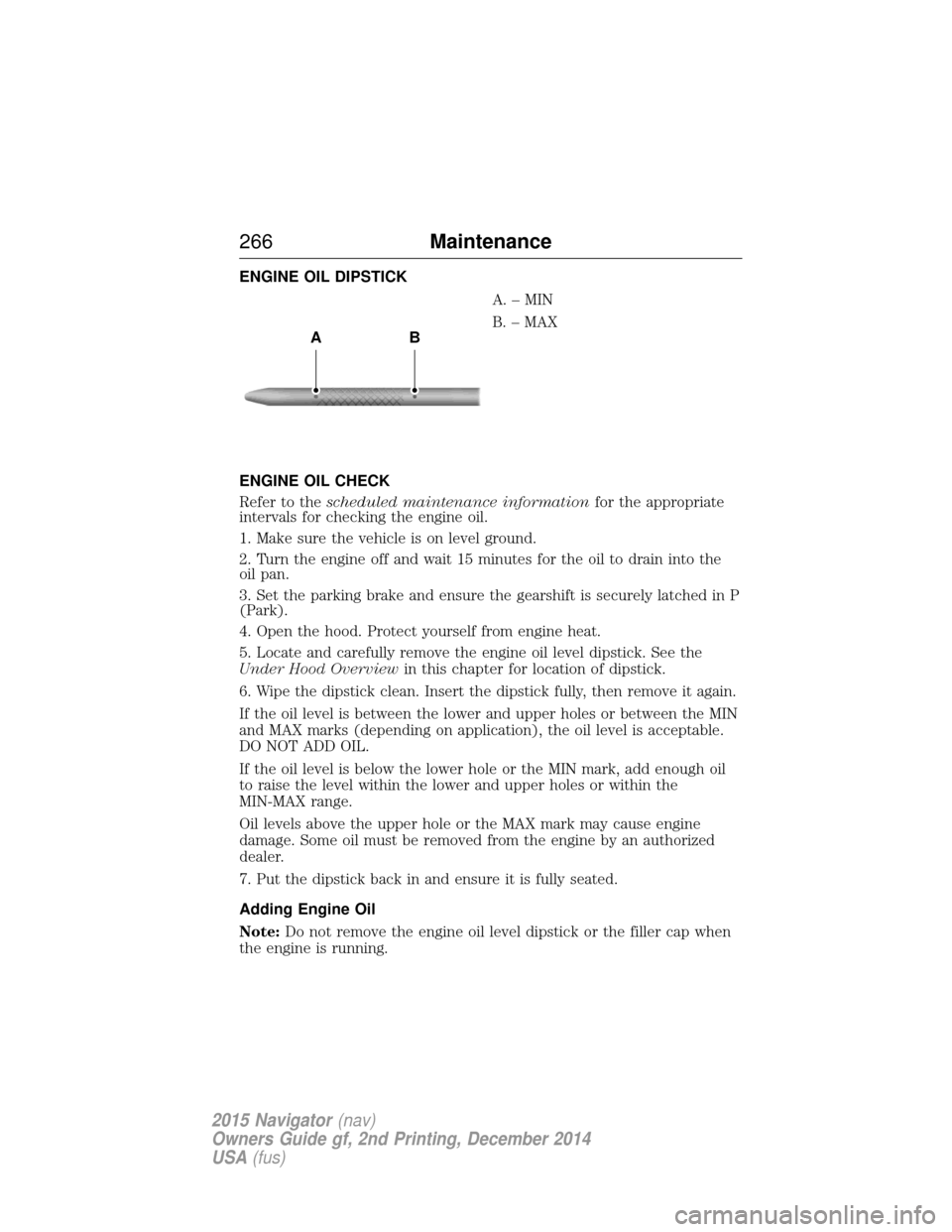
ENGINE OIL DIPSTICKA.–MIN
B. – MAX
ENGINE OIL CHECK
Refer to the scheduled maintenance information for the appropriate
intervals for checking the engine oil.
1. Make sure the vehicle is on level ground.
2. Turn the engine off and wait 15 minutes for the oil to drain into the
oil pan.
3. Set the parking brake and ensure the gearshift is securely latched in P
(Park).
4. Open the hood. Protect yourself from engine heat.
5. Locate and carefully remove the engine oil level dipstick. See the
Under Hood Overview in this chapter for location of dipstick.
6. Wipe the dipstick clean. Insert the dipstick fully, then remove it again.
If the oil level is between the lower and upper holes or between the MIN
and MAX marks (depending on application), the oil level is acceptable.
DO NOT ADD OIL.
If the oil level is below the lower hole or the MIN mark, add enough oil
to raise the level within the lower and upper holes or within the
MIN-MAX range.
Oil levels above the upper hole or the MAX mark may cause engine
damage. Some oil must be removed from the engine by an authorized
dealer.
7. Put the dipstick back in and ensure it is fully seated.
Adding Engine Oil
Note: Do not remove the engine oil level dipstick or the filler cap when
the engine is running.
AB
266 Maintenance
2015 Navigator(nav)
Owners Guide gf, 2nd Printing, December 2014
USA (fus)
Page 268 of 475
Note:Do not add engine oil further than the MAX mark. Oil levels above
the MAX mark may cause engine damage.
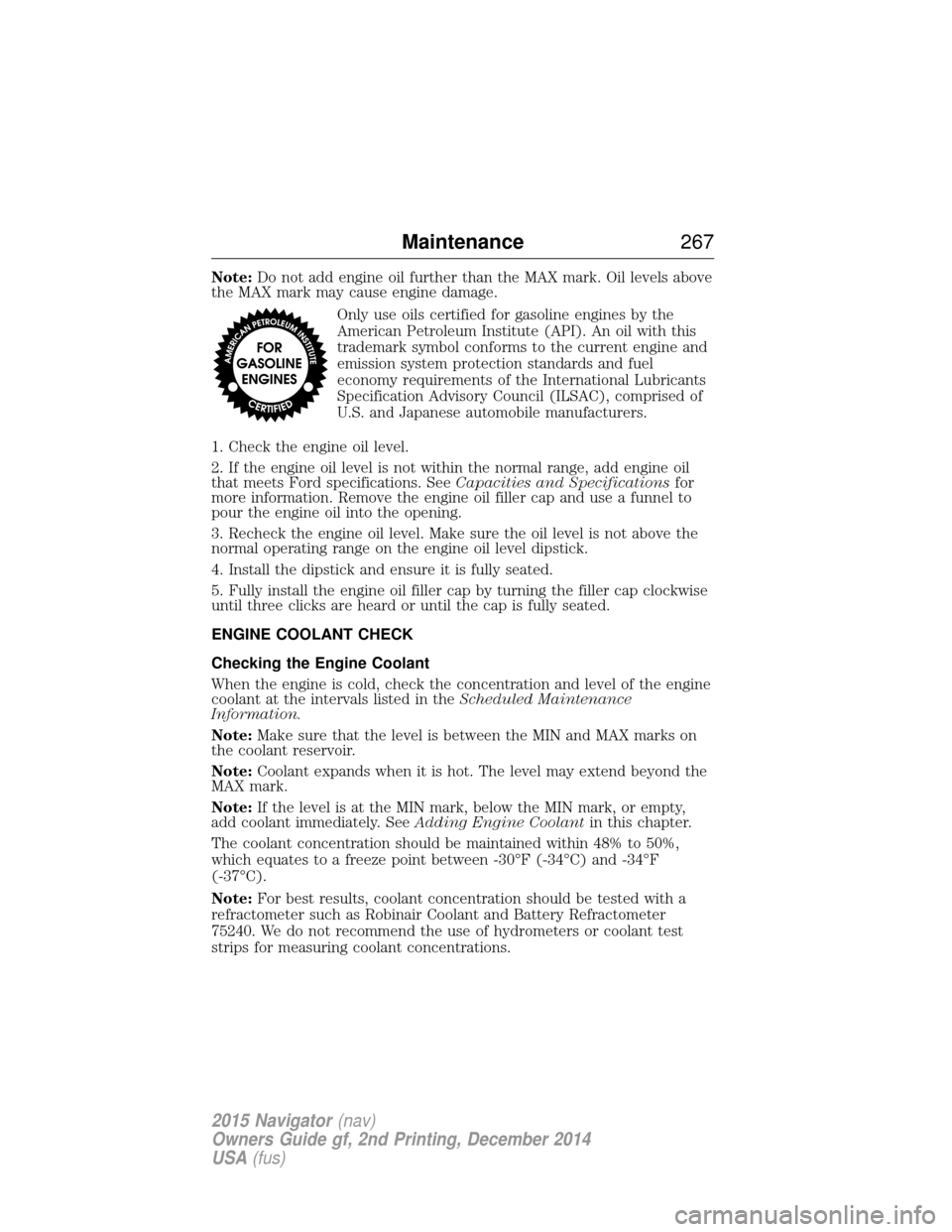
Only use oils certified for gasoline engines by the
American Petroleum Institute (API). An oil with this
trademark symbol conforms to the current engine and
emission system protection standards and fuel
economy requirements of the International Lubricants
Specification Advisory Council (ILSAC), comprised of
U.S. and Japanese automobile manufacturers.
1. Check the engine oil level.
2. If the engine oil level is not within the normal range, add engine oil
that meets Ford specifications. See Capacities and Specificationsfor
more information. Remove the engine oil filler cap and use a funnel to
pour the engine oil into the opening.
3. Recheck the engine oil level. Make sure the oil level is not above the
normal operating range on the engine oil level dipstick.
4. Install the dipstick and ensure it is fully seated.
5. Fully install the engine oil filler cap by turning the filler cap clockwise
until three clicks are heard or until the cap is fully seated.
ENGINE COOLANT CHECK
Checking the Engine Coolant
When the engine is cold, check the concentration and level of the engine
coolant at the intervals listed in the Scheduled Maintenance
Information.
Note: Make sure that the level is between the MIN and MAX marks on
the coolant reservoir.
Note: Coolant expands when it is hot. The level may extend beyond the
MAX mark.
Note: If the level is at the MIN mark, below the MIN mark, or empty,
add coolant immediately. See Adding Engine Coolantin this chapter.
The coolant concentration should be maintained within 48% to 50%,
which equates to a freeze point between -30°F (-34°C) and -34°F
(-37°C).
Note: For best results, coolant concentration should be tested with a
refractometer such as Robinair Coolant and Battery Refractometer
75240. We do not recommend the use of hydrometers or coolant test
strips for measuring coolant concentrations.
Maintenance 267
2015 Navigator(nav)
Owners Guide gf, 2nd Printing, December 2014
USA (fus)
Page 288 of 475
•Spray Motorcraft Engine Shampoo and Degreaser on all parts that
require cleaning and pressure rinse clean. In Canada, use Motorcraft
Engine Shampoo.
• Never wash or rinse the engine while it is hot or running; water in the
running engine may cause internal damage.
• Never wash or rinse any ignition coil, spark plug wire or spark plug
well, or the area in and around these locations.
• Cover the battery, power distribution box, and air filter assembly to
prevent water damage when cleaning the engine.
CLEANING THE WINDOWS AND WIPER BLADES
The windows and wiper blades should be cleaned regularly. If the wipers
do not wipe properly, substances on the vehicle’s glass or the wiper
blades may cause squeaking or chatter noise from the blades, and
streaking and smearing of the windshield. To clean these items, follow
these tips:
• The windows may be cleaned with a non-abrasive cleaner such as
Motorcraft® Ultra-Clear Spray Glass Cleaner (U.S.) or Motorcraft
Premium Glass Cleaner (Canada).
• The wiper blades can be cleaned with isopropyl (rubbing) alcohol or
Motorcraft Premium Windshield Washer Concentrates in the U.S., or
Motorcraft Premium Quality Windshield Washer Fluid in Canada.
Replace your wiper blades when they appear worn or do not function
properly.
• Do not use abrasive materials, as they may cause scratches.
• Do not use fuel, kerosene, or paint thinner to clean any parts.
If you cannot remove those streaks after cleaning with the glass cleaner
or if the wipers chatter and move in a jerky motion, clean the outer
surface of the windshield and the wiper blades using a sponge or soft
cloth with a neutral detergent or mild-abrasive cleaning solution. After
cleaning, rinse the windshield and wiper blades with clean water. The
windshield is clean if beads do not form when you rinse the windshield
with water.
Note: Do not use sharp objects, such as a razor blade, to clean the
inside of the rear window or to remove decals, as it may cause damage
to the rear window defroster’s heated grid lines.
Vehicle Care 287
2015 Navigator(nav)
Owners Guide gf, 2nd Printing, December 2014
USA (fus)