warning LINCOLN NAVIGATOR 2016 Owners Manual
[x] Cancel search | Manufacturer: LINCOLN, Model Year: 2016, Model line: NAVIGATOR, Model: LINCOLN NAVIGATOR 2016Pages: 419, PDF Size: 3.59 MB
Page 199 of 419
REAR PARKING AID
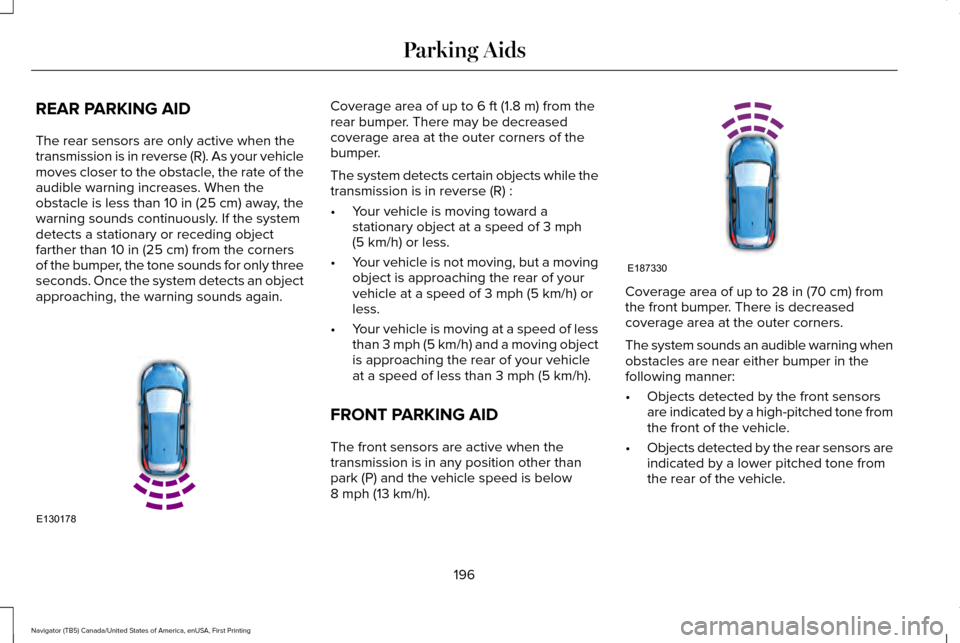
The rear sensors are only active when the
transmission is in reverse (R). As your vehicle
moves closer to the obstacle, the rate of the
audible warning increases. When the
obstacle is less than 10 in (25 cm) away, the
warning sounds continuously. If the system
detects a stationary or receding object
farther than
10 in (25 cm) from the corners
of the bumper, the tone sounds for only three
seconds. Once the system detects an object
approaching, the warning sounds again. Coverage area of up to
6 ft (1.8 m) from the
rear bumper. There may be decreased
coverage area at the outer corners of the
bumper.
The system detects certain objects while the
transmission is in reverse (R) :
• Your vehicle is moving toward a
stationary object at a speed of
3 mph
(5 km/h) or less.
• Your vehicle is not moving, but a moving
object is approaching the rear of your
vehicle at a speed of
3 mph (5 km/h) or
less.
• Your vehicle is moving at a speed of less
than 3 mph (5 km/h) and a moving object
is approaching the rear of your vehicle
at a speed of less than
3 mph (5 km/h).
FRONT PARKING AID
The front sensors are active when the
transmission is in any position other than
park (P) and the vehicle speed is below
8 mph (13 km/h)
. Coverage area of up to
28 in (70 cm) from
the front bumper. There is decreased
coverage area at the outer corners.
The system sounds an audible warning when
obstacles are near either bumper in the
following manner:
• Objects detected by the front sensors
are indicated by a high-pitched tone from
the front of the vehicle.
• Objects detected by the rear sensors are
indicated by a lower pitched tone from
the rear of the vehicle.
196
Navigator (TB5) Canada/United States of America, enUSA, First Printing Parking AidsE130178 E187330
Page 200 of 419
•
The sensing system reports the obstacle
which is closest to the front or rear of the
vehicle. For example, if an obstacle is
12 in (30 cm) from the front of the vehicle
and, at the same time, an obstacle is only
6 in (15 cm) from the rear of the vehicle,
the lower pitched tone sounds.
• An alternating warning sounds from the
front and rear if there are objects at both
bumpers that are closer than
10 in
(25 cm).
REAR VIEW CAMERA WARNINGS
The rear view camera system is a
reverse aid supplement device that still
requires the driver to use it in conjunction
with the interior and exterior mirrors for
maximum coverage. Objects that are close to either corner
of the bumper or under the bumper,
might not be seen on the screen due to the
limited coverage of the camera system. WARNINGS
Back up as slow as possible since
higher speeds might limit your reaction
time to stop your vehicle. Use caution when using the rear video
camera and the luggage compartment
door is ajar. If the luggage compartment door
is ajar, the camera will be out of position and
the video image may be incorrect. All
guidelines disappear when the luggage
compartment door is ajar. Use caution when turning camera
features on or off. Make sure your
vehicle is not moving. The rear view camera system provides a
video image of the area behind your vehicle.
During operation, lines appear in the display
which represent your vehicle
’s path and
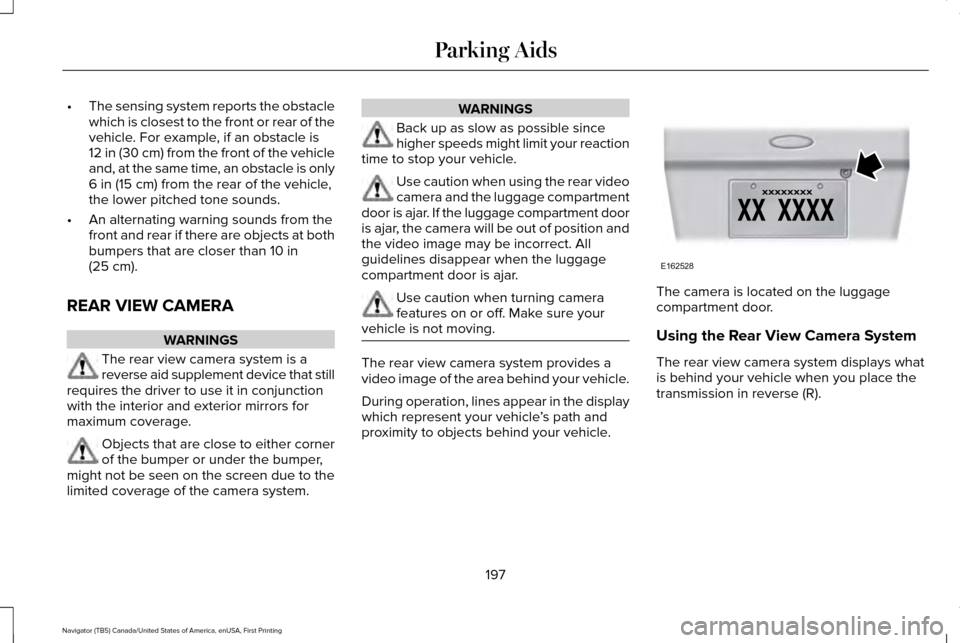
proximity to objects behind your vehicle. The camera is located on the luggage
compartment door.
Using the Rear View Camera System
The rear view camera system displays what
is behind your vehicle when you place the
transmission in reverse (R).
197
Navigator (TB5) Canada/United States of America, enUSA, First Printing Parking AidsE162528
Page 202 of 419
Always use caution while reversing. Objects
in the red zone are closest to your vehicle
and objects in the green zone are farther
away. Objects are getting closer to your
vehicle as they move from the green zone
to the yellow or red zones. Use the side view
mirrors and rear view mirror to get better
coverage on both sides and rear of the
vehicle.
Camera System Settings
Rear view camera system settings can be
accessed through the multifunctional display.
See General Information (page 105).
Enhanced Park Aids or Park Pilot
Selectable settings for this feature are ON
and OFF.
The system uses red, yellow and green
highlights which appear on top of the video
image when an object is detected by the
reverse sensing system. The alert highlights
the closest object detected. The reverse
sensing alert can be disabled and if visual
park aid alert is enabled, highlighted areas
are still displayed. Manual Zoom WARNING
When manual zoom is on, the full area
behind your vehicle is not shown. Be
aware of your surroundings when using the
manual zoom feature. Note:
Manual zoom is only available when
the transmission is in reverse (R).
Note: Only the centerline shows when you
enable manual zoom.
Selectable settings for this feature are Zoom
in (+) and Zoom out (-). Press the symbol on
the camera screen to change the view. The
default setting is Zoom OFF.
This allows you to get a closer view of an
object behind your vehicle. The zoomed
image keeps the bumper in the image to
provide a reference. The zoom is only active
while the transmission is in reverse (R).
Rear Camera Delay
Selectable settings for this feature are ON
and OFF. The default setting for the rear
camera delay is OFF. When shifting the transmission out of reverse
(R) and into any gear other than park (P), the
camera image remains in the display until:
•
Your vehicle speed sufficiently increases.
• You shift your vehicle into park (P).
199
Navigator (TB5) Canada/United States of America, enUSA, First Printing Parking Aids
Page 203 of 419
PRINCIPLE OF OPERATION
Cruise control lets you maintain a set speed
without keeping your foot on the accelerator
pedal. You can use cruise control when your
vehicle speed is greater than 20 mph
(30 km/h).
USING CRUISE CONTROL WARNINGS
Do not use cruise control on winding
roads, in heavy traffic or when the road
surface is slippery. This could result in loss
of vehicle control, serious injury or death. When you are going downhill, your
vehicle speed may increase above the
set speed. The system will not apply the
brakes but a warning displays. Failure to
follow this warning could result in serious
personal injury or death. Note:
Cruise control will disengage if the
vehicle speed decreases more than 10 mph
(16 km/h)
below the set speed while driving
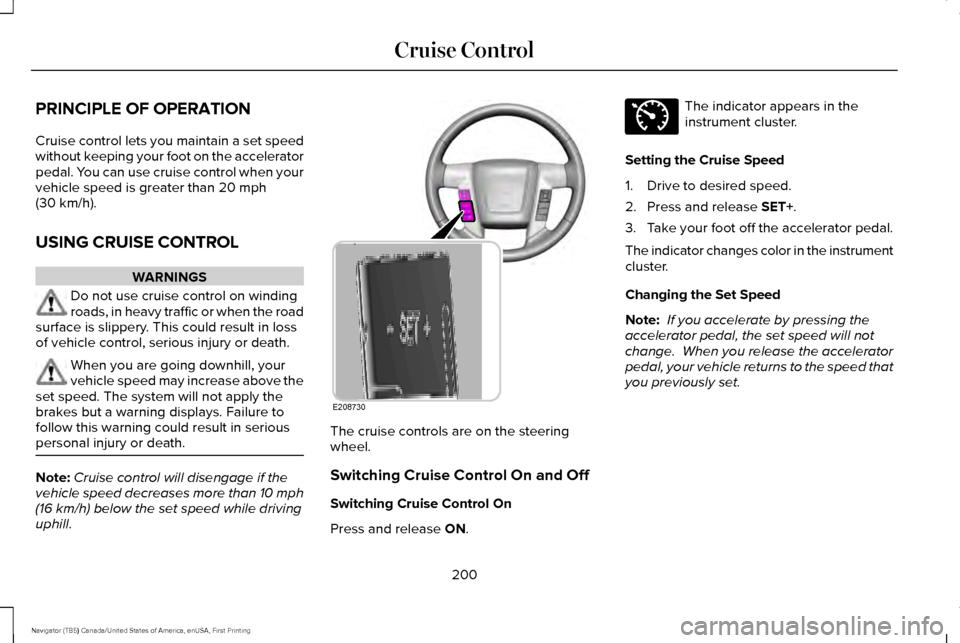
uphill. The cruise controls are on the steering
wheel.
Switching Cruise Control On and Off
Switching Cruise Control On
Press and release
ON. The indicator appears in the
instrument cluster.
Setting the Cruise Speed
1. Drive to desired speed.
2. Press and release
SET+.
3. Take your foot off the accelerator pedal.
The indicator changes color in the instrument
cluster.
Changing the Set Speed
Note: If you accelerate by pressing the
accelerator pedal, the set speed will not
change. When you release the accelerator
pedal, your vehicle returns to the speed that
you previously set.
200
Navigator (TB5) Canada/United States of America, enUSA, First Printing Cruise ControlE208730 E71340
Page 205 of 419
BLIND SPOT INFORMATION
SYSTEM
WARNING
To help avoid injuries, NEVER use the
Blind Spot Information System as a
replacement for using the interior and
exterior mirrors or looking over your shoulder
before changing lanes. The Blind Spot
Information System is not a replacement for
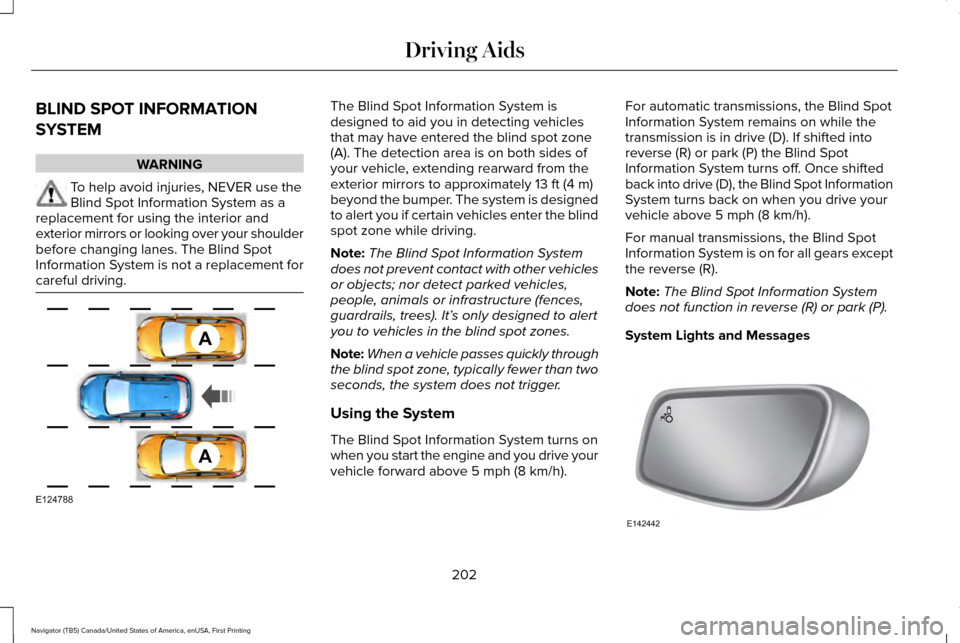
careful driving. The Blind Spot Information System is
designed to aid you in detecting vehicles
that may have entered the blind spot zone
(A). The detection area is on both sides of
your vehicle, extending rearward from the
exterior mirrors to approximately 13 ft (4 m)
beyond the bumper. The system is designed
to alert you if certain vehicles enter the blind
spot zone while driving.
Note: The Blind Spot Information System
does not prevent contact with other vehicles
or objects; nor detect parked vehicles,
people, animals or infrastructure (fences,
guardrails, trees). It’ s only designed to alert
you to vehicles in the blind spot zones.
Note: When a vehicle passes quickly through
the blind spot zone, typically fewer than two
seconds, the system does not trigger.
Using the System
The Blind Spot Information System turns on
when you start the engine and you drive your
vehicle forward above
5 mph (8 km/h). For automatic transmissions, the Blind Spot
Information System remains on while the
transmission is in drive (D). If shifted into
reverse (R) or park (P) the Blind Spot
Information System turns off. Once shifted
back into drive (D), the Blind Spot Information
System turns back on when you drive your
vehicle above
5 mph (8 km/h).
For manual transmissions, the Blind Spot
Information System is on for all gears except
the reverse (R).
Note: The Blind Spot Information System
does not function in reverse (R) or park (P).
System Lights and Messages 202
Navigator (TB5) Canada/United States of America, enUSA, First Printing Driving AidsA
A
E124788 E142442
Page 206 of 419
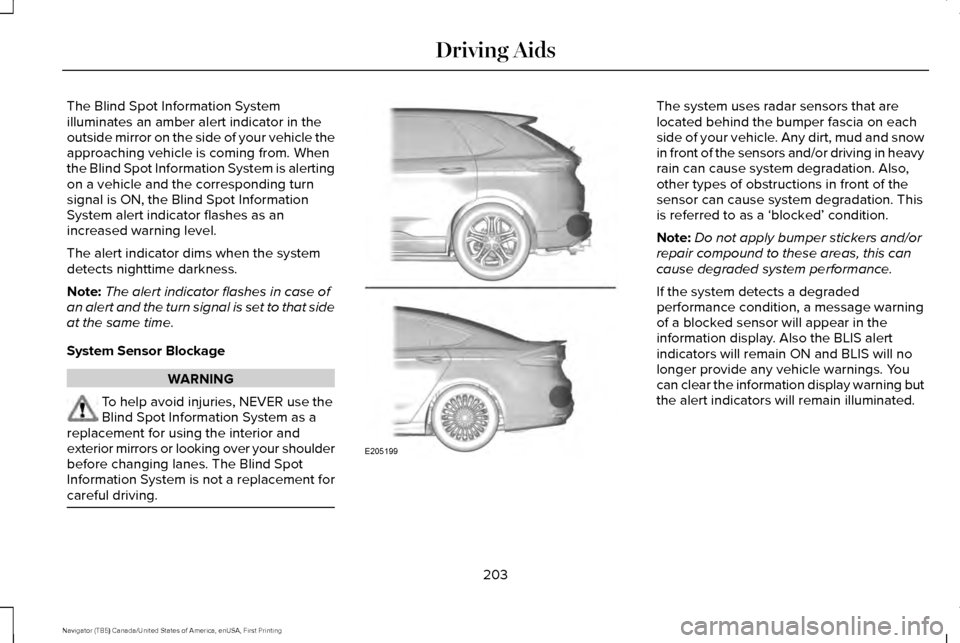
The Blind Spot Information System
illuminates an amber alert indicator in the
outside mirror on the side of your vehicle the
approaching vehicle is coming from. When
the Blind Spot Information System is alerting
on a vehicle and the corresponding turn
signal is ON, the Blind Spot Information
System alert indicator flashes as an
increased warning level.
The alert indicator dims when the system
detects nighttime darkness.
Note:
The alert indicator flashes in case of
an alert and the turn signal is set to that side
at the same time.
System Sensor Blockage WARNING
To help avoid injuries, NEVER use the
Blind Spot Information System as a
replacement for using the interior and
exterior mirrors or looking over your shoulder
before changing lanes. The Blind Spot
Information System is not a replacement for
careful driving. The system uses radar sensors that are
located behind the bumper fascia on each
side of your vehicle. Any dirt, mud and snow
in front of the sensors and/or driving in heavy
rain can cause system degradation. Also,
other types of obstructions in front of the
sensor can cause system degradation. This
is referred to as a ‘blocked’ condition.
Note:
Do not apply bumper stickers and/or
repair compound to these areas, this can
cause degraded system performance.
If the system detects a degraded
performance condition, a message warning
of a blocked sensor will appear in the
information display. Also the BLIS alert
indicators will remain ON and BLIS will no
longer provide any vehicle warnings. You
can clear the information display warning but
the alert indicators will remain illuminated.
203
Navigator (TB5) Canada/United States of America, enUSA, First Printing Driving AidsE205199
Page 207 of 419
A "blocked" condition can be cleared in two
ways:
•
After the blockage in front of the sensors
is removed or the rainfall/snowfall rate
decreases or stops, drive for a few
minutes in traffic to allow the sensors to
detect passing vehicles.
• By cycling the ignition from ON to OFF
and then back ON.
Note: If your vehicle has a tow bar with a
factory equipped trailer tow module and it
is towing a trailer, the sensors will
automatically turn the Blind Spot Information
System off. If your vehicle has a tow bar but
no factory equipped trailer tow module, it is
recommended to turn the Blind Spot
Information System off manually. Operating
the Blind Spot Information System with a
trailer attached will cause poor system
performance. System Errors
If the system senses a problem with the left
or right sensor, the telltale will illuminate and
a message will appear in the information
display. See Information Messages (page
111).
Switching the System Off and On
You can temporarily switch the Blind Spot
Information System off in the information
display. See General Information (page 105).
When the Blind Spot Information System
switches off, you will not receive alerts and
the information display shows a system off
message. The telltale in the cluster also
illuminates. When you switch the Blind Spot
Information System on or off, the alert
indicators flash twice.
Note: The Blind Spot Information System
remembers the last selected on or off setting.
You can also have the Blind Spot Information
System switched off permanently at an
authorized dealer. Once switched off
permanently, the system can only be
switched back on at an authorized dealer. CROSS TRAFFIC ALERT WARNING
To help avoid personal injury, NEVER
use the Cross Traffic Alert system as a
replacement for using the interior and
exterior mirrors and looking over your
shoulder before backing out of a parking
space. Cross Traffic Alert is not a
replacement for careful driving. Cross Traffic Alert is designed to warn you
of vehicles approaching from the sides when
the transmission is in reverse (R).
Using the System
Cross Traffic Alert turns on when you start
the engine and you shift into reverse (R).
Once shifted out of reverse (R), Cross Traffic
Alert turns off.
Note:
Cross Traffic Alert only functions while
your transmission is in reverse (R).
204
Navigator (TB5) Canada/United States of America, enUSA, First Printing Driving Aids
Page 211 of 419
•
Driving in reverse faster than 7 mph
(12 km/h).
• Backing out of an angled parking spot.
False Alerts
Note: If your vehicle has a tow bar with a
factory equipped trailer tow module and it
is towing a trailer, the sensors will
automatically turn the Cross Traffic Alert off.
If your vehicle has a tow bar but no factory
equipped trailer tow module, it is
recommended to turn the Cross Traffic Alert
off manually. Operating Cross Traffic Alert
with a trailer attached will cause poor Cross
Traffic Alert performance.
There may be certain instances when there
is a false alert by the Cross Traffic Alert
system that illuminates the alert indicator
with no vehicle in the coverage zone. Some
amount of false alerts are normal; they are
temporary and self-correct. System Errors
If Cross Traffic Alert senses a problem with
the left or right sensor a message will appear
in the information display.
See Information
Messages (page 111).
Switching the System Off and On
You can temporarily switch Cross Traffic Alert
off in the information display.
See General
Information (page 105). When you switch
Cross Traffic Alert off, you will not receive
alerts and the information display will display
a system off message.
Note: The Cross Traffic Alert switches on
whenever the ignition is switched on and
ready to provide appropriate alerts when
the transmission is in reverse (R). Cross
Traffic Alert will not remember the last
selected on or off setting.
You can also have Cross Traffic Alert
switched off permanently at an authorized
dealer. Once switched off permanently, the
system can only be switched back on at an
authorized dealer. STEERING
Electric Power Steering WARNINGS
The electric power steering system has
diagnostic checks that continuously
monitor the system. If a fault is detected, a
message displays in the information display.
Stop your vehicle as soon as it is safe to do
so. Switch the ignition off. After at least 10
seconds, switch the ignition on and watch
the information display for a steering system
warning message. If a steering system
warning message returns, have the system
checked by an authorized dealer. If the system detects an error, you may
not feel a difference in the steering,
however a serious condition may exist.
Obtain immediate service from an authorized
dealer, failure to do so may result in loss of
steering control. Your vehicle has an electric power steering
system. There is no fluid reservoir. No
maintenance is required.
208
Navigator (TB5) Canada/United States of America, enUSA, First Printing Driving Aids
Page 215 of 419
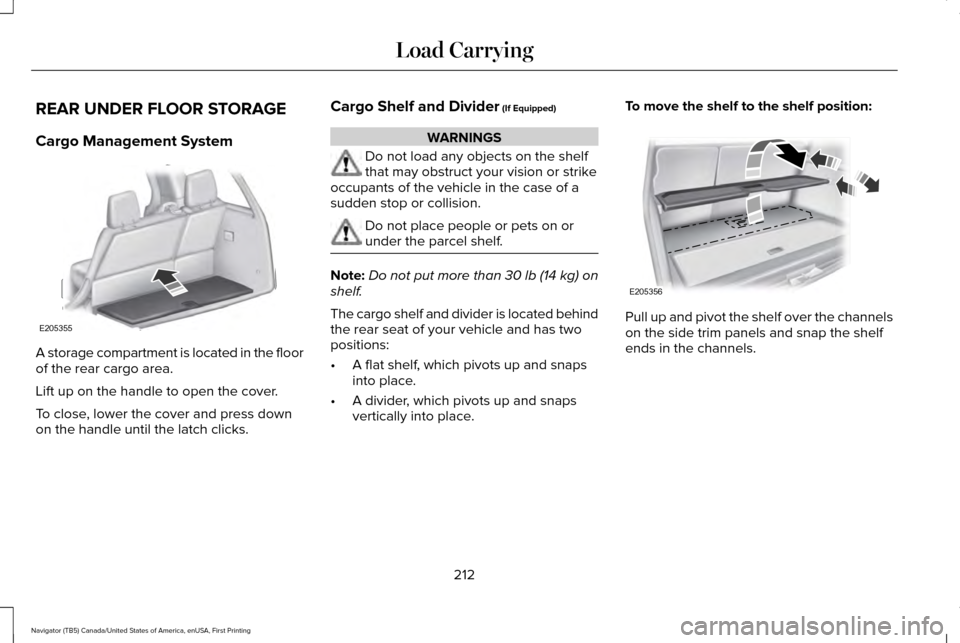
REAR UNDER FLOOR STORAGE
Cargo Management System
A storage compartment is located in the floor
of the rear cargo area.
Lift up on the handle to open the cover.
To close, lower the cover and press down
on the handle until the latch clicks. Cargo Shelf and Divider (If Equipped) WARNINGS
Do not load any objects on the shelf
that may obstruct your vision or strike
occupants of the vehicle in the case of a
sudden stop or collision. Do not place people or pets on or
under the parcel shelf.
Note:
Do not put more than
30 lb (14 kg) on
shelf.
The cargo shelf and divider is located behind
the rear seat of your vehicle and has two
positions:
• A flat shelf, which pivots up and snaps
into place.
• A divider, which pivots up and snaps
vertically into place. To move the shelf to the shelf position:
Pull up and pivot the shelf over the channels
on the side trim panels and snap the shelf
ends in the channels.
212
Navigator (TB5) Canada/United States of America, enUSA, First Printing Load CarryingE205355 E205356
Page 216 of 419
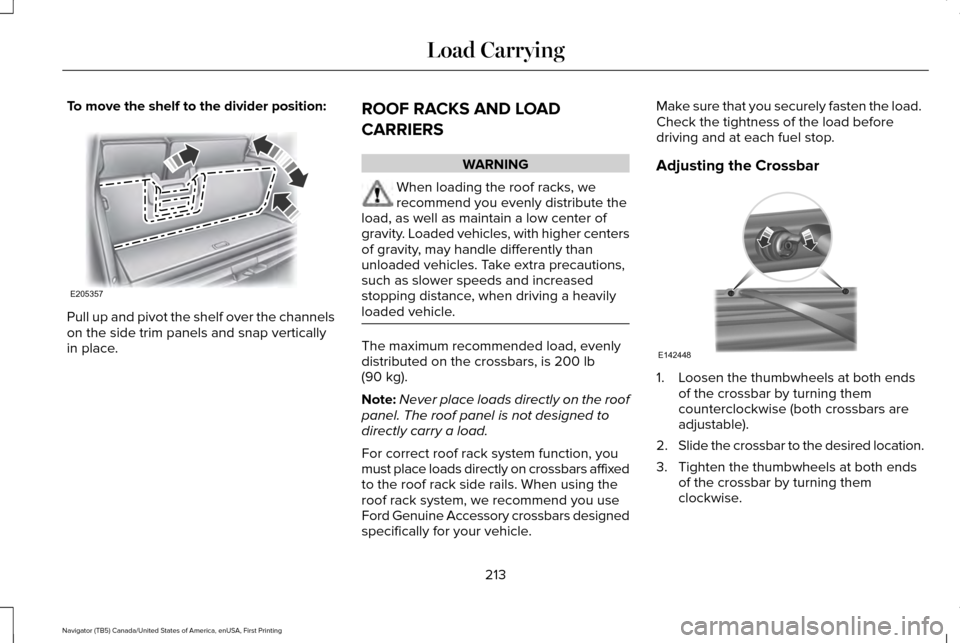
To move the shelf to the divider position:
Pull up and pivot the shelf over the channels
on the side trim panels and snap vertically
in place.
ROOF RACKS AND LOAD
CARRIERS WARNING
When loading the roof racks, we
recommend you evenly distribute the
load, as well as maintain a low center of
gravity. Loaded vehicles, with higher centers
of gravity, may handle differently than
unloaded vehicles. Take extra precautions,
such as slower speeds and increased
stopping distance, when driving a heavily
loaded vehicle. The maximum recommended load, evenly
distributed on the crossbars, is 200 lb
(90 kg).
Note: Never place loads directly on the roof
panel. The roof panel is not designed to
directly carry a load.
For correct roof rack system function, you
must place loads directly on crossbars affixed
to the roof rack side rails. When using the
roof rack system, we recommend you use
Ford Genuine Accessory crossbars designed
specifically for your vehicle. Make sure that you securely fasten the load.
Check the tightness of the load before
driving and at each fuel stop.
Adjusting the Crossbar
1. Loosen the thumbwheels at both ends
of the crossbar by turning them
counterclockwise (both crossbars are
adjustable).
2. Slide the crossbar to the desired location.
3. Tighten the thumbwheels at both ends of the crossbar by turning them
clockwise.
213
Navigator (TB5) Canada/United States of America, enUSA, First Printing Load CarryingE205357 E142448