ABS LINCOLN NAVIGATOR 2016 User Guide
[x] Cancel search | Manufacturer: LINCOLN, Model Year: 2016, Model line: NAVIGATOR, Model: LINCOLN NAVIGATOR 2016Pages: 419, PDF Size: 3.59 MB
Page 260 of 419
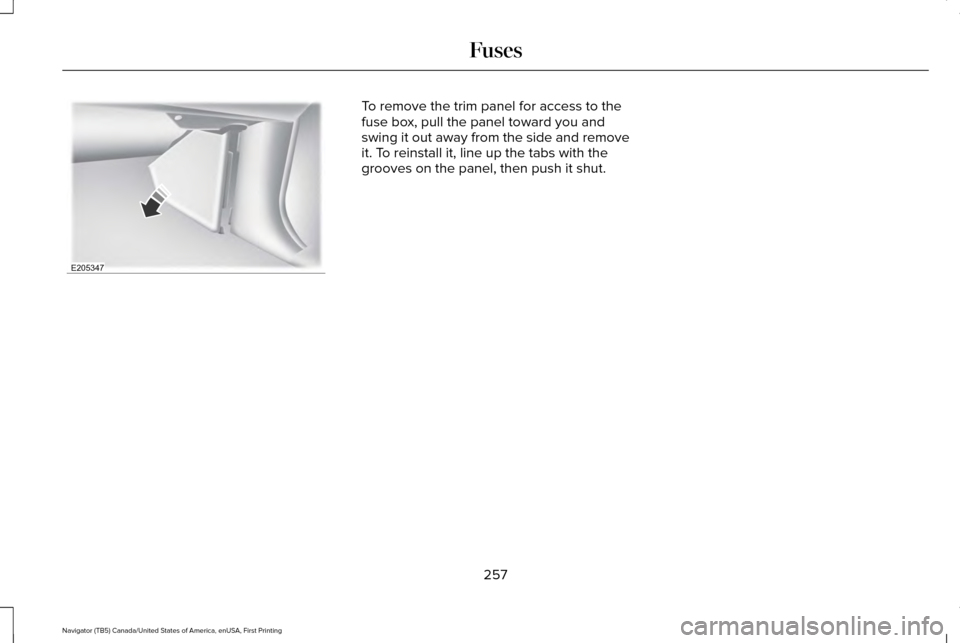
To remove the trim panel for access to the
fuse box, pull the panel toward you and
swing it out away from the side and remove
it. To reinstall it, line up the tabs with the
grooves on the panel, then push it shut.
257
Navigator (TB5) Canada/United States of America, enUSA, First Printing FusesE205347
Page 288 of 419
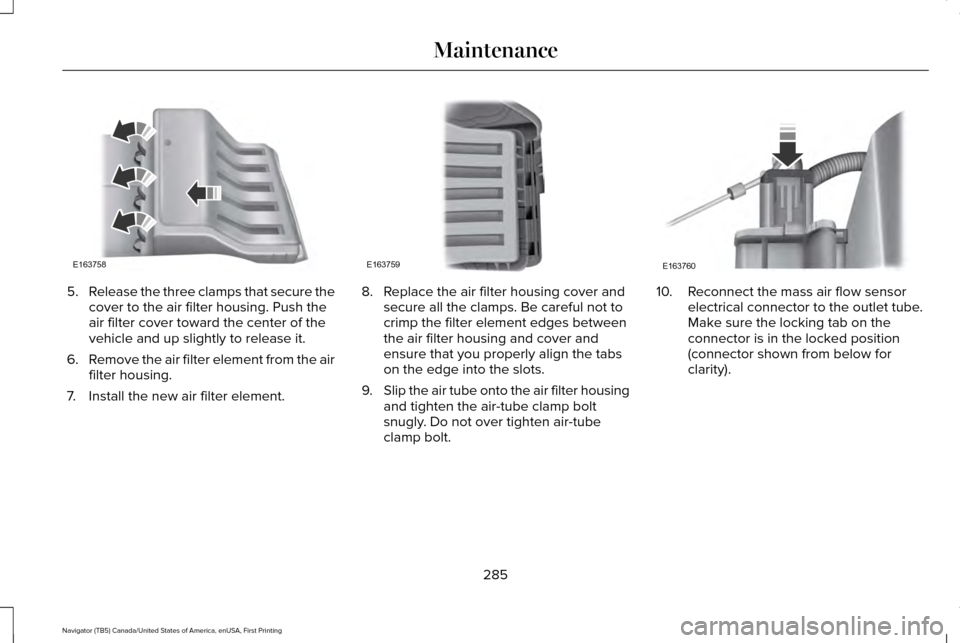
5.
Release the three clamps that secure the
cover to the air filter housing. Push the
air filter cover toward the center of the
vehicle and up slightly to release it.
6. Remove the air filter element from the air
filter housing.
7. Install the new air filter element. 8. Replace the air filter housing cover and
secure all the clamps. Be careful not to
crimp the filter element edges between
the air filter housing and cover and
ensure that you properly align the tabs
on the edge into the slots.
9. Slip the air tube onto the air filter housing
and tighten the air-tube clamp bolt
snugly. Do not over tighten air-tube
clamp bolt. 10. Reconnect the mass air flow sensor
electrical connector to the outlet tube.
Make sure the locking tab on the
connector is in the locked position
(connector shown from below for
clarity).
285
Navigator (TB5) Canada/United States of America, enUSA, First Printing MaintenanceE163758 E163759 E163760
Page 354 of 419
Transferable Coverage
If you sell your vehicle before your Lincoln
Extended Service Plan coverage expires,
you can transfer any remaining coverage to
the new owner. Whenever you sell your
vehicle, prospective buyers may have a
higher degree of confidence that vehicle was
properly maintained with Lincoln ESP,
thereby improving resale value.
Avoid the Rising Cost of Properly
Maintaining Your Vehicle!
Lincoln Extended Service Plan also offers a
Premium Maintenance Plan that covers all
scheduled maintenance, and select items
that routinely wear out. The coverage is
prepaid, so you never have to worry about
affording your vehicle maintenance. It covers
regular checkups, routine inspections,
preventive care and replacement of select
items that require periodic attention for
normal wear:
•
Windshield wiper blades.
• Spark plugs.
• The clutch disc. •
Brake pads and linings.
• Shock absorbers and struts.
• Engine cooling hoses, clamps and
o-rings.
• Engine belts.
• Diesel exhaust fluid replenishment.
Interest Free Finance Options Available
Take advantage of our interest free
installment payment plan. Just a 10% down
payment will provide you with an affordable,
no interest, no fee payment program allowing
you all the security and benefits Lincoln ESP
has to offer while paying over time. You are
pre-approved with no credit checks, no
hassles! To learn more, call our Lincoln ESP
specialists at 800-367-3377.
Complete the information below and mail to:
Ford ESP
P.O. Box 321067
Detroit, MI 48232 SERVICE PLANS (CANADA ONLY)
You can get more protection for your vehicle
by purchasing a Lincoln Extended Service
Plan. Lincoln Extended Service Plan is the
only service contract backed by Lincoln
Motor Company of Canada, Limited.
Depending on the plan you purchase, Lincoln
Extended Service Plan provides benefits
such as:
•
Rental reimbursement.
• Coverage for certain maintenance and
wear items.
• Protection against repair costs after your
New Vehicle Limited Warranty Coverage
expires.
• Roadside Assistance benefits.
351
Navigator (TB5) Canada/United States of America, enUSA, First Printing Extended Service Plan (ESP)
Page 359 of 419
Check every six months
Safety belts and seat latches for wear and function.
Safety warning lamps (brake, ABS, airbag and safety belt) for operation.
Washer spray and wiper operation. Clean or replace blades as necessary.
Multi-Point Inspection
In order to keep your vehicle running right,
it is important to have the systems on your
vehicle checked regularly. This can help
identify potential issues and prevent major
problems. We recommend having the
following multi-point inspection performed
at every scheduled maintenance interval to
help make sure your vehicle keeps running
great. Multi-Point inspection
Hazard warning system operation
Accessory drive belt(s)
Horn operation
Battery performance
Radiator, cooler, heater and air conditioning hoses
Engine air filter
Suspension components for leaks or damage
Exhaust system
356
Navigator (TB5) Canada/United States of America, enUSA, First Printing Scheduled Maintenance
Page 408 of 419
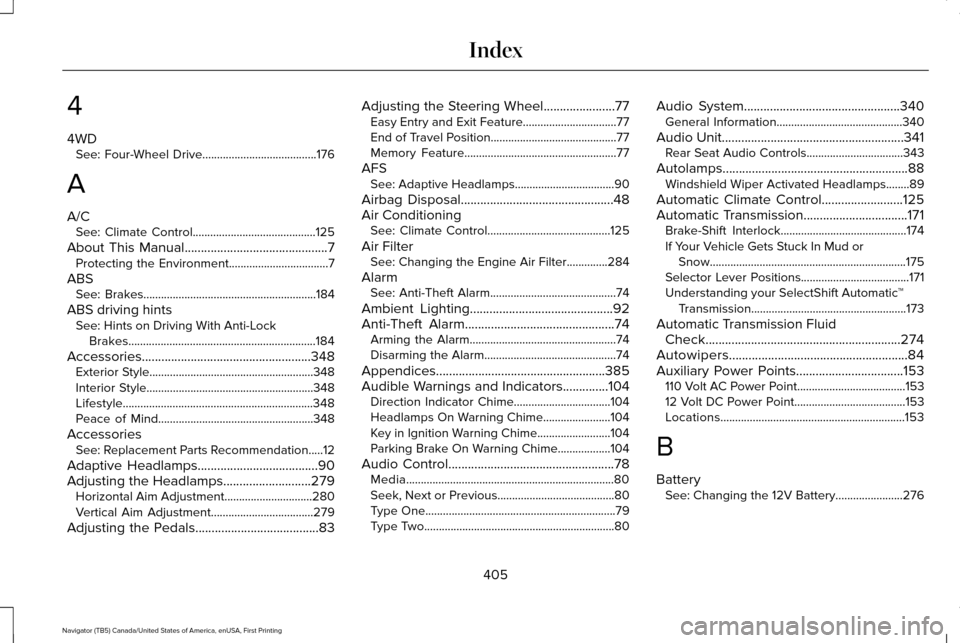
4
4WD
See: Four-Wheel Drive.......................................176
A
A/C See: Climate Control..........................................125
About This Manual............................................7
Protecting the Environment..................................7
ABS See: Brakes...........................................................184
ABS driving hints See: Hints on Driving With Anti-Lock
Brakes................................................................184
Accessories....................................................348 Exterior Style........................................................348
Interior Style.........................................................348
Lifestyle.................................................................348
Peace of Mind.....................................................348
Accessories See: Replacement Parts Recommendation.....12
Adaptive Headlamps
.....................................90
Adjusting the Headlamps...........................279 Horizontal Aim Adjustment..............................280
Vertical Aim Adjustment...................................279
Adjusting the Pedals
......................................83 Adjusting the Steering Wheel......................77
Easy Entry and Exit Feature................................77
End of Travel Position...........................................77
Memory Feature....................................................77
AFS See: Adaptive Headlamps..................................90
Airbag Disposal...............................................48
Air Conditioning See: Climate Control..........................................125
Air Filter See: Changing the Engine Air Filter..............284
Alarm See: Anti-Theft Alarm...........................................74
Ambient Lighting
............................................92
Anti-Theft Alarm..............................................74 Arming the Alarm..................................................74
Disarming the Alarm.............................................74
Appendices....................................................385
Audible Warnings and Indicators
..............104
Direction Indicator Chime.................................104
Headlamps On Warning Chime.......................104
Key in Ignition Warning Chime.........................104
Parking Brake On Warning Chime..................104
Audio Control
...................................................78
Media.......................................................................80
Seek, Next or Previous........................................80
Type One.................................................................79
Type Two.................................................................80 Audio System................................................340
General Information...........................................340
Audio Unit........................................................341 Rear Seat Audio Controls.................................343
Autolamps.........................................................88 Windshield Wiper Activated Headlamps........89
Automatic Climate Control
.........................125
Automatic Transmission................................171 Brake-Shift Interlock...........................................174
If Your Vehicle Gets Stuck In Mud or
Snow...................................................................175
Selector Lever Positions.....................................171
Understanding your SelectShift Automatic ™
Transmission.....................................................173
Automatic Transmission Fluid Check............................................................274
Autowipers.......................................................84
Auxiliary Power Points.................................153 110 Volt AC Power Point.....................................153
12 Volt DC Power Point......................................153
Locations...............................................................153
B
Battery See: Changing the 12V Battery.......................276
405
Navigator (TB5) Canada/United States of America, enUSA, First Printing Index