instrument panel LINCOLN NAVIGATOR 2017 User Guide
[x] Cancel search | Manufacturer: LINCOLN, Model Year: 2017, Model line: NAVIGATOR, Model: LINCOLN NAVIGATOR 2017Pages: 532, PDF Size: 3.9 MB
Page 153 of 532
12 Volt DC Power Point
WARNINGS
Do not plug optional electrical
accessories into the cigar lighter
socket. Incorrect use of the cigar lighter can
cause damage not covered by the vehicle
warranty, and can result in fire or serious
injury. Do not use a power point for operating
a cigar lighter. Incorrect use of the
power points can cause damage not covered
by the vehicle warranty, and can result in fire
or serious injury. Note:
When you switch the ignition on, you
can use the socket to power 12 volt
appliances with a maximum current rating
of 15 amps.
If the power supply does not work after you
switch the ignition off, switch the ignition on.
Note: Do not hang any accessory from the
accessory plug.
Note: Do not use the power point over the
vehicle capacity of 12 volt DC 180 watts or
a fuse may blow. Note:
Always keep the power point caps
closed when not in use.
Do not insert objects other than an accessory
plug into the power point. This will damage
the power point and blow the fuse.
Run the vehicle for full capacity use of the
power point.
To prevent the battery from running out of
charge:
• Do not use the power point longer than
necessary when the vehicle is not
running.
• Do not leave devices plugged in
overnight or when you park your vehicle
for extended periods.
Locations
Power points may be in the following
locations:
• On the lower instrument panel.
• Inside the center console.
• On the rear of the center console.
• In the rear cargo area.
• On the passenger side floor panel. 110 Volt AC Power Point (If Equipped) WARNING
Do not keep electrical devices plugged
in the power point whenever the
device is not in use. Do not use any
extension cord with the 110 volt AC power
point, since it will defeat the safety protection
design. Doing so may cause the power point
to overload due to powering multiple devices
that can reach beyond the 150 watt load limit
and could result in fire or serious injury. Note:
The power point will turn off when the
ignition is switched off or the battery voltage
drops below 11 volts.
Use the power point for powering electric
devices that require up to 150 watts. It is on
the rear of the center console.
150
Navigator (TB5) Canada/United States of America, enUSA, First Printing Auxiliary Power Points
Page 157 of 532
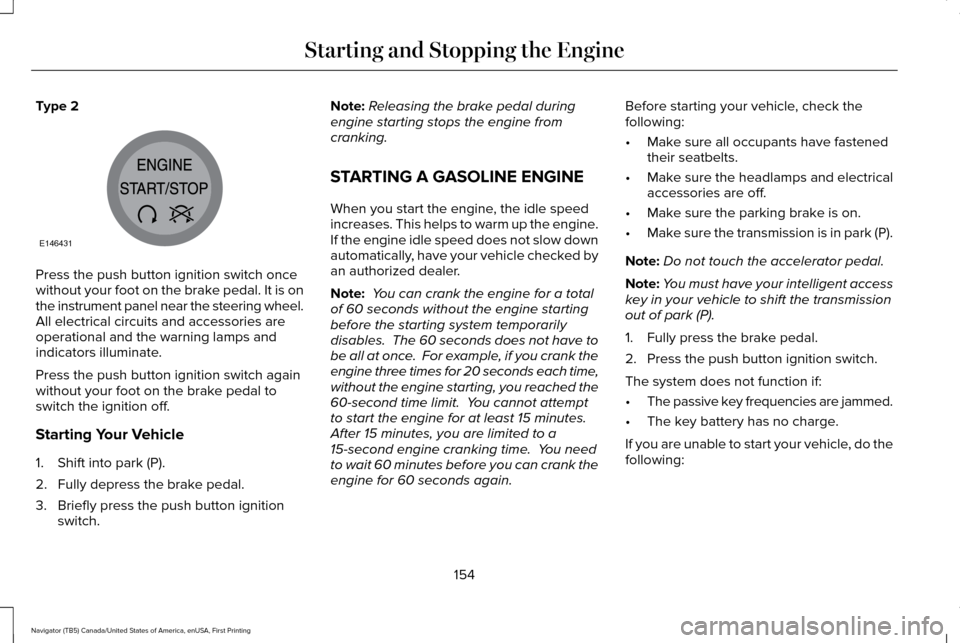
Type 2
Press the push button ignition switch once
without your foot on the brake pedal. It is on
the instrument panel near the steering wheel.
All electrical circuits and accessories are
operational and the warning lamps and
indicators illuminate.
Press the push button ignition switch again
without your foot on the brake pedal to
switch the ignition off.
Starting Your Vehicle
1. Shift into park (P).
2. Fully depress the brake pedal.
3. Briefly press the push button ignition
switch. Note:
Releasing the brake pedal during
engine starting stops the engine from
cranking.
STARTING A GASOLINE ENGINE
When you start the engine, the idle speed
increases. This helps to warm up the engine.
If the engine idle speed does not slow down
automatically, have your vehicle checked by
an authorized dealer.
Note: You can crank the engine for a total
of 60 seconds without the engine starting
before the starting system temporarily
disables. The 60 seconds does not have to
be all at once. For example, if you crank the
engine three times for 20 seconds each time,
without the engine starting, you reached the
60-second time limit. You cannot attempt
to start the engine for at least 15 minutes.
After 15 minutes, you are limited to a
15-second engine cranking time. You need
to wait 60 minutes before you can crank the
engine for 60 seconds again. Before starting your vehicle, check the
following:
•
Make sure all occupants have fastened
their seatbelts.
• Make sure the headlamps and electrical
accessories are off.
• Make sure the parking brake is on.
• Make sure the transmission is in park (P).
Note: Do not touch the accelerator pedal.
Note: You must have your intelligent access
key in your vehicle to shift the transmission
out of park (P).
1. Fully press the brake pedal.
2. Press the push button ignition switch.
The system does not function if:
• The passive key frequencies are jammed.
• The key battery has no charge.
If you are unable to start your vehicle, do the
following:
154
Navigator (TB5) Canada/United States of America, enUSA, First Printing Starting and Stopping the EngineE146431
Page 186 of 532
The anti-lock braking system will not
eliminate the risks when:
•
You drive too closely to the vehicle in
front of you.
• Your vehicle is hydroplaning.
• You take corners too fast.
• The road surface is poor.
PARKING BRAKE WARNING
Always set the parking brake fully and
make sure the transmission is placed
in park (P). Failure to set the parking brake
and engage park could result in vehicle
roll-away, property damage or bodily injury.
Turn the ignition to the lock position and
remove the key whenever you leave your
vehicle. Apply the parking brake whenever your
vehicle is parked. Press the pedal downward
to set the parking brake. The brake warning
lamp in the instrument cluster will illuminate
and remains illuminated until the parking
brake is released.
To release, pull the brake release lever
located at the lower left side of the
instrument panel.
If you are parking your vehicle on a grade or
with a trailer, press and hold the brake pedal
down, then set the parking brake. There may
be a little vehicle movement as the parking
brake sets to hold the vehicle's weight. This
is normal and should be no reason for
concern. If needed, press and hold the
service brake pedal down, then try
reapplying the parking brake. Chock the
wheels if required. If the parking brake
cannot hold the weight of the vehicle, the
parking brake may need to be serviced or
the vehicle may be overloaded.
HILL START ASSIST WARNINGS
The system does not replace the
parking brake. When you leave your
vehicle, always apply the parking brake and
shift the transmission into park (P) (automatic
transmission) or first gear (1) (manual
transmission). You must remain in your vehicle once
you have activated the system.
During all times, you are responsible
for controlling your vehicle, supervising
the system and intervening, if required. If the engine is revved excessively, or
if a malfunction is detected, the system
will be deactivated. The system makes it easier to pull away
when your vehicle is on a slope without the
need to use the parking brake.
183
Navigator (TB5) Canada/United States of America, enUSA, First Printing Brakes
Page 188 of 532
PRINCIPLE OF OPERATION
The traction control system helps avoid drive
wheel spin and loss of traction.
If your vehicle begins to slide, the system
applies the brakes to individual wheels and,
when needed, reduces engine power at the
same time. If the wheels spin when
accelerating on slippery or loose surfaces,
the system reduces engine power in order
to increase traction.
USING TRACTION CONTROL WARNING
The stability and traction control light
illuminates steadily if the system
detects a failure. Make sure you did not
manually disable the traction control system
using the switch. If the stability control and
traction control light is still illuminating
steadily, have the system serviced by an
authorized dealer immediately. Operating
your vehicle with traction control disabled
could lead to an increased risk of loss of
vehicle control, vehicle rollover, personal
injury and death. The system automatically turns on each time
you switch the ignition on.
If your vehicle is stuck in mud or snow,
switching traction control off may be
beneficial as this allows the wheels to spin.
Note:
When you switch traction control off,
stability control remains fully active. Switching the System Off
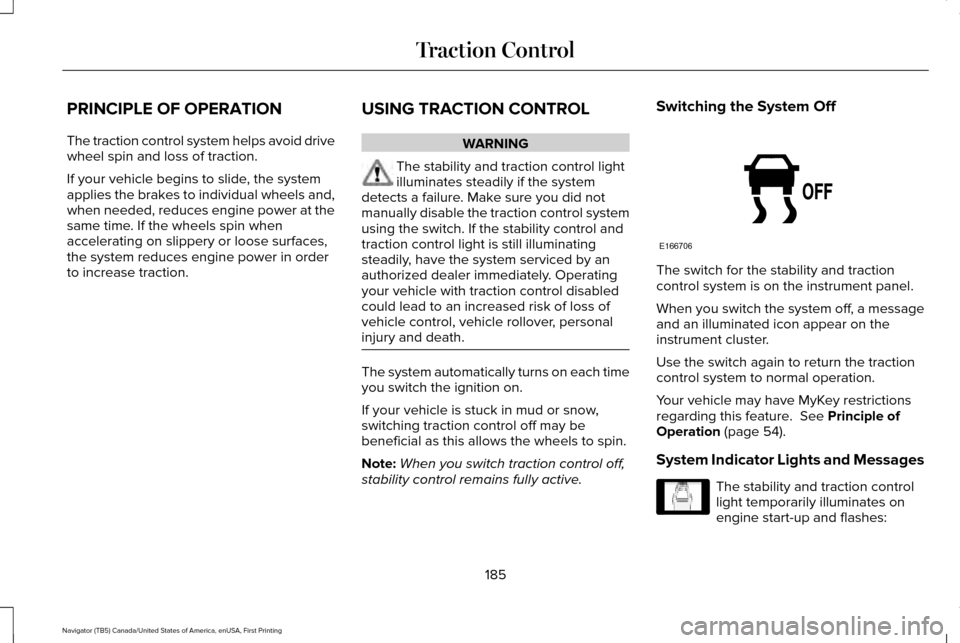
The switch for the stability and traction
control system is on the instrument panel.
When you switch the system off, a message
and an illuminated icon appear on the
instrument cluster.
Use the switch again to return the traction
control system to normal operation.
Your vehicle may have MyKey restrictions
regarding this feature. See Principle of
Operation (page 54).
System Indicator Lights and Messages The stability and traction control
light temporarily illuminates on
engine start-up and flashes:
185
Navigator (TB5) Canada/United States of America, enUSA, First Printing Traction ControlE166706 E138639
Page 235 of 532
Vehicles Sold in Canada: Getting
Roadside Assistance
To fully assist you should you have a vehicle
concern, Lincoln Motor Company offers a
complimentary roadside assistance program.
This program is eligible within Canada or the
continental United States.
This program is separate from the New
Vehicle Limited Warranty, but the coverage
is concurrent with the powertrain coverage
period of your vehicle.
Canadian customers who require roadside
assistance, call 1-800-387-5333.
Vehicles Sold in Canada: Using
Roadside Assistance
Complete the roadside assistance
identification card and place it in your wallet
for quick reference.
In Canada, this card is found in the Warranty
Guide in the glove compartment of your
vehicle.
Vehicles Sold in Canada: Roadside
Assistance Program Coverage
The service is available 24 hours a day,
seven days a week.
Canadian roadside coverage and benefits
may differ from the U.S. coverage.
For complete program coverage details
review your warranty guide, contact your
dealer, call us in Canada at 1-800-387-9333,
or visit our website at
www.lincolncanada.com.
HAZARD WARNING FLASHERS
Note:
If used when the vehicle is not running,
the battery will lose charge. There may be
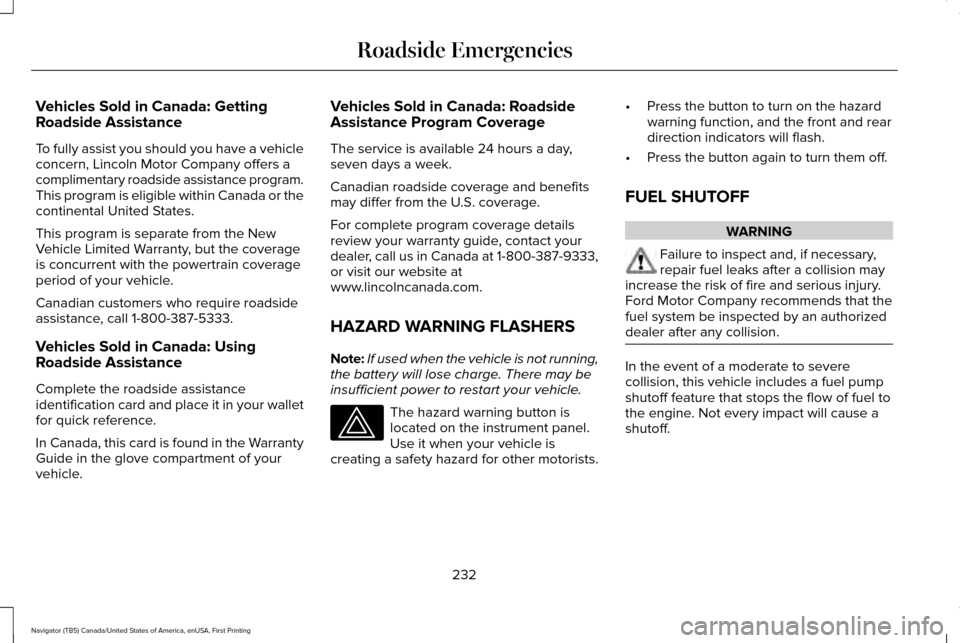
insufficient power to restart your vehicle. The hazard warning button is
located on the instrument panel.
Use it when your vehicle is
creating a safety hazard for other motorists. •
Press the button to turn on the hazard
warning function, and the front and rear
direction indicators will flash.
• Press the button again to turn them off.
FUEL SHUTOFF WARNING
Failure to inspect and, if necessary,
repair fuel leaks after a collision may
increase the risk of fire and serious injury.
Ford Motor Company recommends that the
fuel system be inspected by an authorized
dealer after any collision. In the event of a moderate to severe
collision, this vehicle includes a fuel pump
shutoff feature that stops the flow of fuel to
the engine. Not every impact will cause a
shutoff.
232
Navigator (TB5) Canada/United States of America, enUSA, First Printing Roadside Emergencies
Page 254 of 532
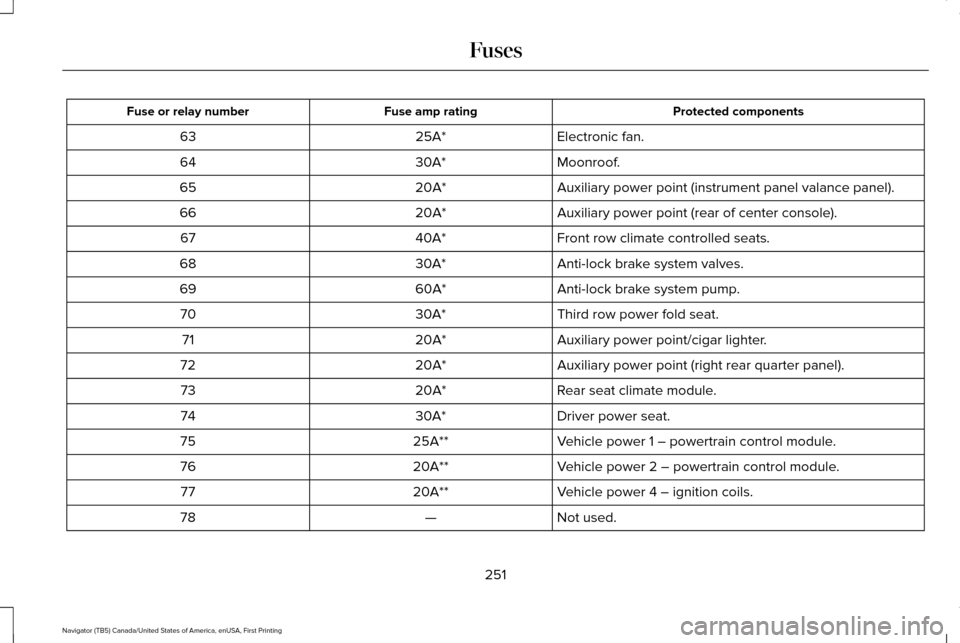
Protected components
Fuse amp rating
Fuse or relay number
Electronic fan.
25A*
63
Moonroof.
30A*
64
Auxiliary power point (instrument panel valance panel).
20A*
65
Auxiliary power point (rear of center console).
20A*
66
Front row climate controlled seats.
40A*
67
Anti-lock brake system valves.
30A*
68
Anti-lock brake system pump.
60A*
69
Third row power fold seat.
30A*
70
Auxiliary power point/cigar lighter.
20A*
71
Auxiliary power point (right rear quarter panel).
20A*
72
Rear seat climate module.
20A*
73
Driver power seat.
30A*
74
Vehicle power 1 – powertrain control module.
25A**
75
Vehicle power 2 – powertrain control module.
20A**
76
Vehicle power 4 – ignition coils.
20A**
77
Not used.
—
78
251
Navigator (TB5) Canada/United States of America, enUSA, First Printing Fuses
Page 255 of 532
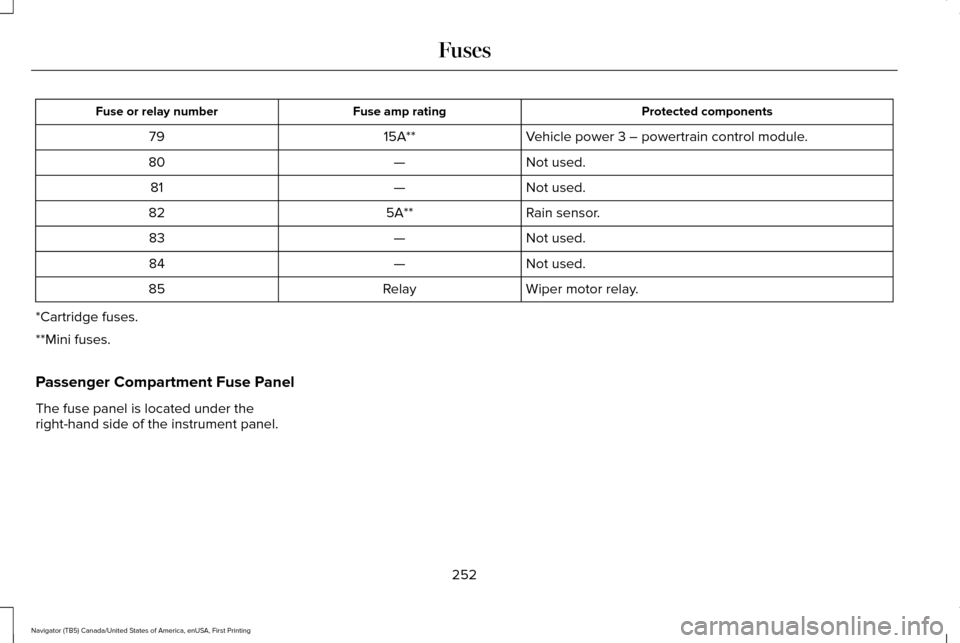
Protected components
Fuse amp rating
Fuse or relay number
Vehicle power 3 – powertrain control module.
15A**
79
Not used.
—
80
Not used.
—
81
Rain sensor.
5A**
82
Not used.
—
83
Not used.
—
84
Wiper motor relay.
Relay
85
*Cartridge fuses.
**Mini fuses.
Passenger Compartment Fuse Panel
The fuse panel is located under the
right-hand side of the instrument panel.
252
Navigator (TB5) Canada/United States of America, enUSA, First Printing Fuses
Page 265 of 532
GENERAL INFORMATION
Have your vehicle serviced regularly to help
maintain its roadworthiness and resale value.
There is a large network of authorized
dealers that are there to help you with their
professional servicing expertise. We believe
that their specially trained technicians are
best qualified to service your vehicle properly
and expertly. They are supported by a wide
range of highly specialized tools developed
specifically for servicing your vehicle.
If your vehicle requires professional service,
an authorized dealer can provide the
necessary parts and service. Check your
warranty information to find out which parts
and services are covered.
Use only recommended fuels, lubricants,
fluids and service parts conforming to
specifications. Motorcraft® parts are
designed and built to provide the best
performance in your vehicle.
Precautions
•
Do not work on a hot engine.
• Make sure that nothing gets caught in
moving parts.
• Do not work on a vehicle with the engine
running in an enclosed space, unless you
are sure you have enough ventilation.
• Keep all open flames and other burning
material (such as cigarettes) away from
the battery and all fuel related parts.
Working with the Engine Off
1. Set the parking brake and shift to park (P).
2. Switch off the engine.
3. Block the wheels.
Working with the Engine On WARNING
To reduce the risk of vehicle damage
and/or personal burn injuries, do not
start your engine with the air cleaner
removed and do not remove it while the
engine is running. 1. Set the parking brake and shift to park
(P).
2. Block the wheels.
OPENING AND CLOSING THE
HOOD
1. Inside the vehicle, pull the hood release handle located under the left-hand side
of the instrument panel.
262
Navigator (TB5) Canada/United States of America, enUSA, First Printing Maintenance
Page 292 of 532
CLEANING THE WINDOWS AND
WIPER BLADES
Car wash chemicals and environmental
fallout can result in windshield and wiper
blade contamination. Dirty windshield and
wipers will result in poor windshield wiper
operation. Keep the windshield and wiper
blades clean to maintain windshield wiper
performance.
To clean the windshield and wiper blades:
•
Clean the windshield with a non-abrasive
glass cleaner. When cleaning the interior
of the windshield, avoid getting any glass
cleaner on the instrument panel or door
panels. Wipe any glass cleaner off these
surfaces immediately.
• For windshields contaminated with tree
sap, chemicals, wax or bugs, clean the
entire windshield using steel wool (no
greater than 0000 grade) in a circular
motion and rinse with water.
• Clean the wiper blades with isopropyl
rubbing alcohol or windshield washer
concentrate. Note:
Do not use razor blades or other
sharp objects to clean or remove decals from
the inside of the heated rear window. The
vehicle warranty does not cover damage
caused to the heated rear window grid lines.
CLEANING THE INTERIOR WARNINGS
Do not use cleaning solvents, bleach
or dye on the vehicle
’s safety belts, as
these actions may weaken the belt webbing. On vehicles equipped with
seat-mounted airbags, do not use
chemical solvents or strong detergents. Such
products could contaminate the side airbag
system and affect performance of the side
airbag in a collision. Note:
Follow the same procedure for
cleaning leather seats when cleaning leather
interior. See Cleaning Leather Seats (page
291). Note:
Do not use household cleaning
products or glass cleaners, which can stain
and discolor the fabric and affect the flame
retardant abilities of the seat materials.
For fabric, carpets, cloth seats, safety belts
and seats equipped with side airbags:
• Remove dust and loose dirt with a
vacuum cleaner.
• Remove light stains and soil with
Motorcraft Professional Strength Carpet
& Upholstery Cleaner.
For grease or tar stains:
• Spot clean the area with Motorcraft Spot
and Stain Remover (Motorcraft
Multi-Purpose Cleaner in Canada).
• If a ring forms on the fabric after spot
cleaning, clean the entire area
immediately (but do not oversaturate) or
the ring will set.
289
Navigator (TB5) Canada/United States of America, enUSA, First Printing Vehicle Care
Page 294 of 532
CLEANING THE INSTRUMENT
PANEL AND INSTRUMENT
CLUSTER LENS
WARNING
Do not use chemical solvents or strong
detergents when cleaning the steering
wheel or instrument panel to avoid
contamination of the airbag system. Note:
Follow the same procedure as
cleaning leather seats for cleaning leather
instrument panels and leather interior trim
surfaces. See Cleaning Leather Seats (page
291).
Clean the instrument panel and cluster lens
with a clean, damp and soft cloth, then use
a clean, dry and soft cloth to dry these areas. •
Avoid cleaners or polishes that increase
the gloss of the upper portion of the
instrument panel. The dull finish in this
area helps protect you from undesirable
windshield reflection.
• Do not use any household cleaning
products or glass cleaners as these may
damage the finish of the instrument
panel, interior trim and cluster lens.
• Wash or wipe your hands clean if you
have been in contact with certain
products such as insect repellent and
suntan lotion to avoid possible damage
to the interior painted surfaces.
• Do not allow air fresheners and hand
sanitizers to spill onto interior surfaces.
If a spill occurs, wipe off immediately.
Your warranty may not cover these
damages.
If a staining liquid like coffee or juice has
been spilled on the instrument panel or on
interior trim surfaces:
1. Wipe up spilled liquid using a clean, soft
cloth as quickly as possible. 2. Use Motorcraft Premium Leather and
Vinyl Cleaner or a commercially available
leather cleaning product for automotive
interiors. Test any cleaner or stain
remover on an inconspicuous area.
3. Alternatively, wipe the surface with a clean, soft cloth and a mild soap and
water solution. Dry the area with a clean,
soft cloth.
4. If necessary, apply more soap and water
solution or cleaning product to a clean,
soft cloth and press it onto the soiled
area. Allow this to set at room
temperature for 30 minutes.
5. Remove the soaked cloth, then with a clean, damp cloth, use a rubbing motion
for 60 seconds on the soiled area.
6. Dry the area with a clean, soft cloth.
CLEANING LEATHER SEATS
Note: Follow the same procedure as
cleaning leather seats for cleaning leather
instrument panels and leather interior trim
surfaces.
291
Navigator (TB5) Canada/United States of America, enUSA, First Printing Vehicle Care