wheel LINCOLN NAVIGATOR 2017 User Guide
[x] Cancel search | Manufacturer: LINCOLN, Model Year: 2017, Model line: NAVIGATOR, Model: LINCOLN NAVIGATOR 2017Pages: 532, PDF Size: 3.9 MB
Page 80 of 532
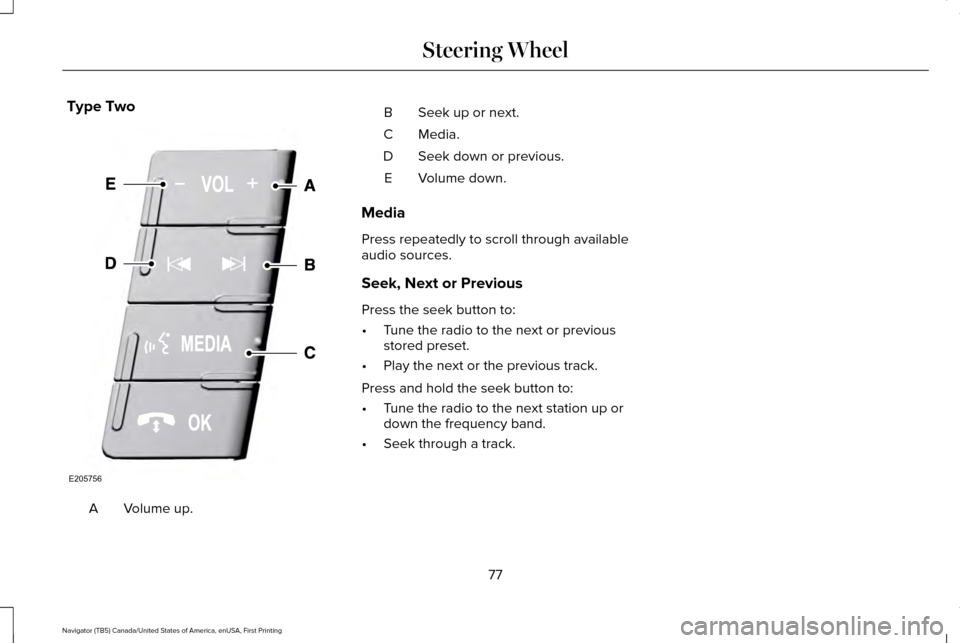
Type Two
Volume up.
A B Seek up or next.
Media.
C
Seek down or previous.
D
Volume down.
E
Media
Press repeatedly to scroll through available
audio sources.
Seek, Next or Previous
Press the seek button to:
• Tune the radio to the next or previous
stored preset.
• Play the next or the previous track.
Press and hold the seek button to:
• Tune the radio to the next station up or
down the frequency band.
• Seek through a track.
77
Navigator (TB5) Canada/United States of America, enUSA, First Printing Steering WheelE205756
Page 81 of 532
VOICE CONTROL
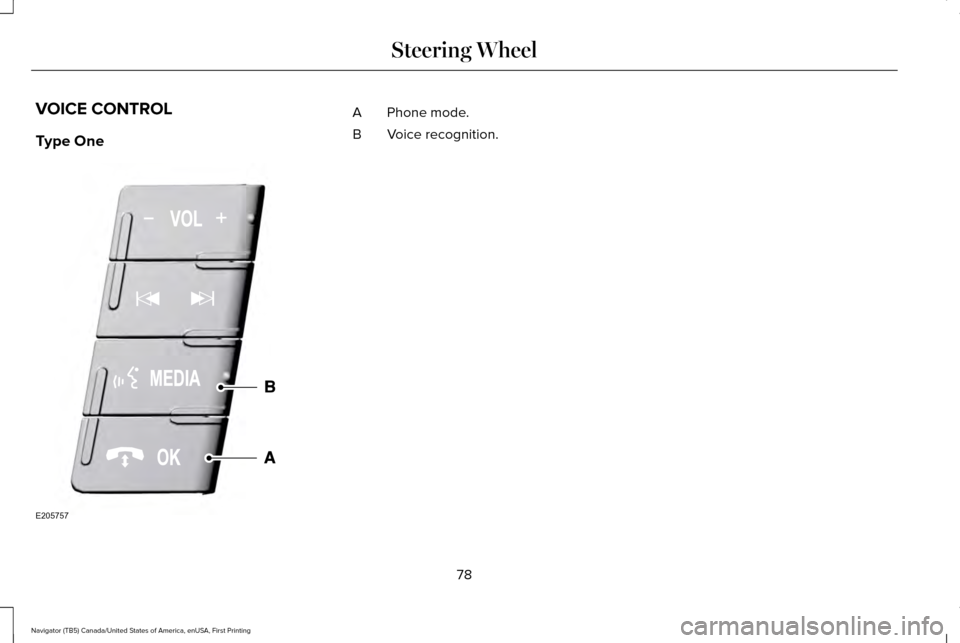
Type One
Phone mode.
A
Voice recognition.
B
78
Navigator (TB5) Canada/United States of America, enUSA, First Printing Steering WheelE205757
Page 82 of 532
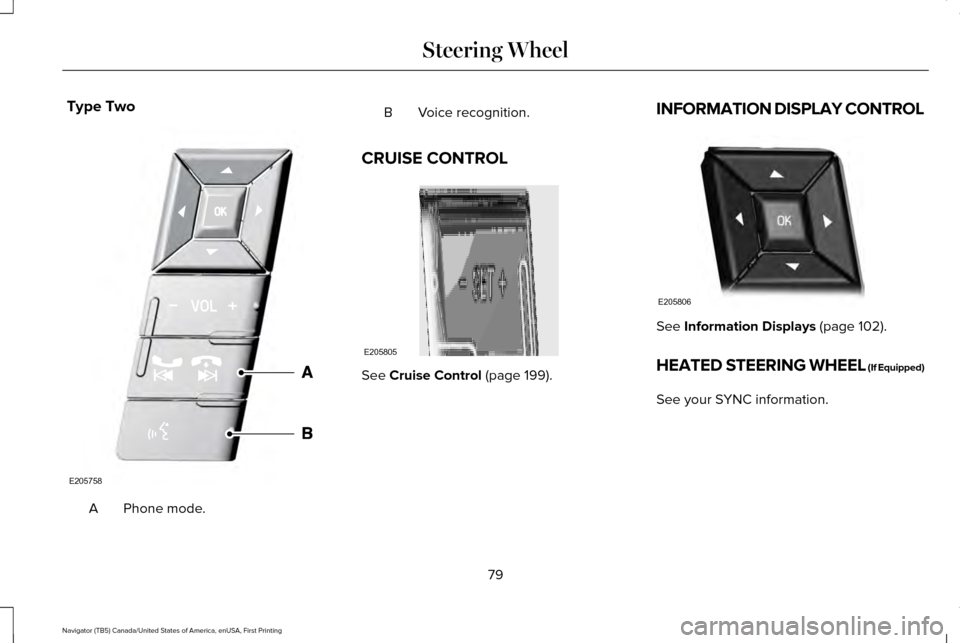
Type Two
Phone mode.
A B Voice recognition.
CRUISE CONTROL See Cruise Control (page 199).INFORMATION DISPLAY CONTROL See
Information Displays (page 102).
HEATED STEERING WHEEL (If Equipped)
See your SYNC information.
79
Navigator (TB5) Canada/United States of America, enUSA, First Printing Steering WheelE205758 E205805 E205806
Page 90 of 532
Type 1 - Conventional (Non-
Configurable)
The daytime running lamps turn on when:
1. The ignition is switched to the on
position.
2. The transmission is not in park (P) for vehicles with automatic transmissions or
the parking brake is released for vehicles
with manual transmissions.
3. The lighting control is in the off, parking lamp or autolamps positions.
4. The headlamps are off.
Type 2 - Configurable
Switch the daytime running lamps on or off
using the information display controls. See
Information Displays (page 102).
The daytime running lamps turn on when:
1. They are switched on in the information display. See Information Displays (page
102
).
2. The ignition is switched to the on position. 3. The transmission is not in park (P) for
vehicles with automatic transmissions or
the parking brake is released for vehicles
with manual transmissions.
4. The lighting control is in the autolamps position.
5. The headlamps are off.
The other lighting control switch positions
do not activate the daytime running lamps,
and you can use them to temporarily override
autolamp control.
When switched off in the information display,
the daytime running lamps are off in all
lighting control switch positions.
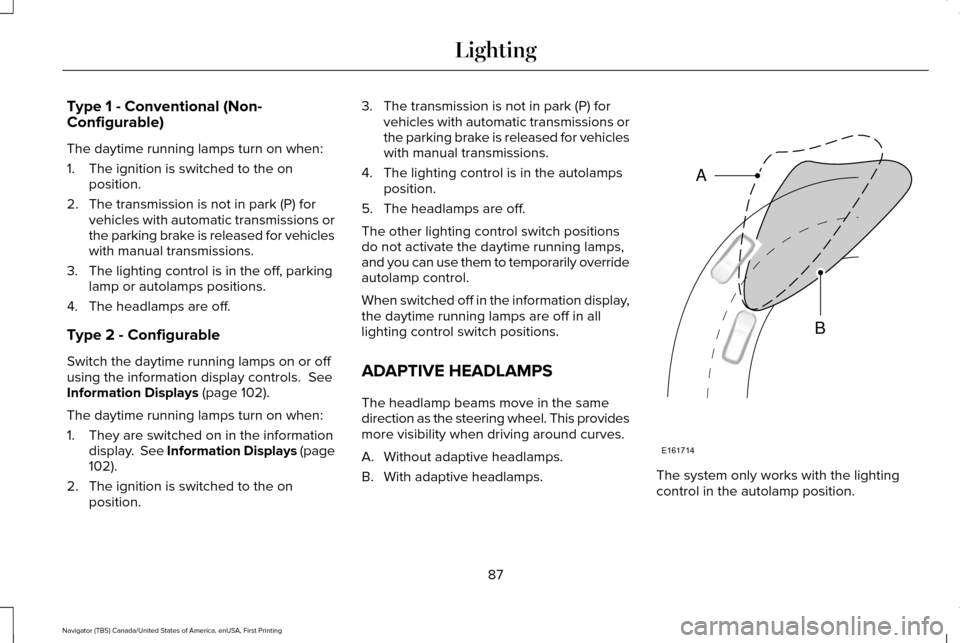
ADAPTIVE HEADLAMPS
The headlamp beams move in the same
direction as the steering wheel. This provides
more visibility when driving around curves.
A. Without adaptive headlamps.
B. With adaptive headlamps. The system only works with the lighting
control in the autolamp position.
87
Navigator (TB5) Canada/United States of America, enUSA, First Printing LightingE161714
B
A
Page 104 of 532
Transmission Tow/Haul (If Equipped)
Illuminates when you activate the
tow/haul feature. If the light flashes
steadily, have the system serviced
immediately. Damage to the transmission
could occur.
See Automatic Transmission
(page 169).
4X2 Illuminates momentarily when you
engage two-wheel drive high. If the
light fails to display or remains on
when the ignition is on, have the system
serviced immediately by an authorized
dealer.
4X4 Auto Illuminates when you engage the
four-wheel drive system. If the light
fails to display or remains on when
the ignition is on, have the system serviced
immediately by an authorized dealer. 4X4 HIGH Illuminates when you engage
four-wheel drive high. If the light
fails to display or remains on when
the ignition is on, have the system serviced
immediately by an authorized dealer.
AUDIBLE WARNINGS AND
INDICATORS
Key in Ignition Warning Chime
Sounds when you leave the key in the
ignition and the driver door open.
Headlamps On Warning Chime
Sounds when the headlamps or parking
lamps are on, the ignition is off (the key is
not in the ignition) and the driver door is
open. Parking Brake On Warning Chime
Sounds when you have left the parking brake
on and drive your vehicle. If the warning
chime remains on after you have released
the parking brake, have the system checked
by an authorized dealer immediately.
Direction Indicator Chime
Sounds when you leave the direction
indicator on after signaling a turn and driving
the vehicle more than 1.5 miles (2.4 km).
101
Navigator (TB5) Canada/United States of America, enUSA, First Printing Instrument ClusterE161509 E163173 E181781 E207351
Page 105 of 532
GENERAL INFORMATION
WARNING
Driving while distracted can result in
loss of vehicle control, crash and injury.
We strongly recommend that you use
extreme caution when using any device that
may take your focus off the road. Your
primary responsibility is the safe operation
of your vehicle. We recommend against the
use of any handheld device while driving and
encourage the use of voice-operated
systems when possible. Make sure you are
aware of all applicable local laws that may
affect the use of electronic devices while
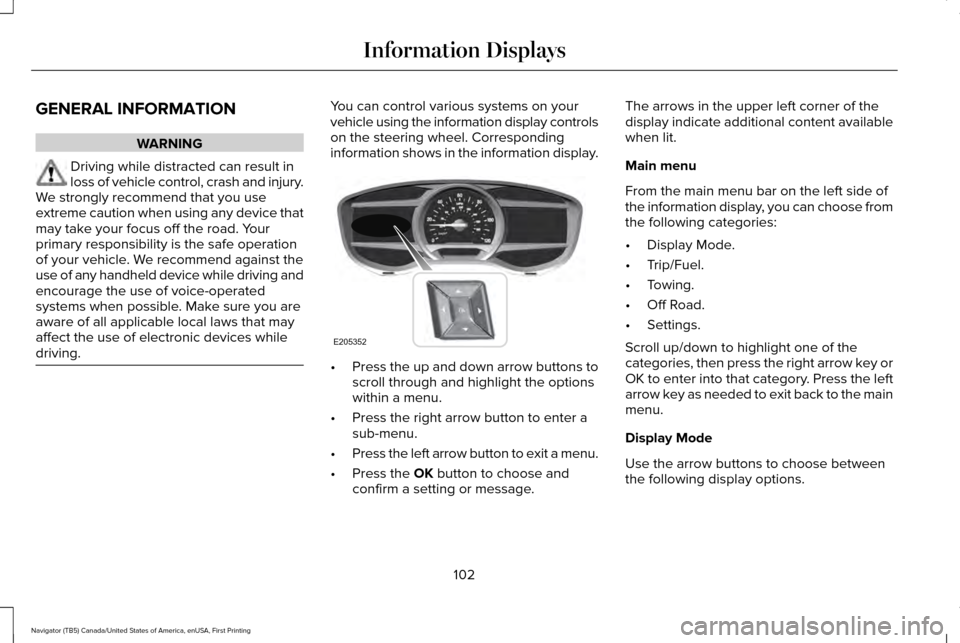
driving. You can control various systems on your
vehicle using the information display controls
on the steering wheel. Corresponding
information shows in the information display.
•
Press the up and down arrow buttons to
scroll through and highlight the options
within a menu.
• Press the right arrow button to enter a
sub-menu.
• Press the left arrow button to exit a menu.
• Press the OK button to choose and
confirm a setting or message. The arrows in the upper left corner of the
display indicate additional content available
when lit.
Main menu
From the main menu bar on the left side of
the information display, you can choose from
the following categories:
•
Display Mode.
• Trip/Fuel.
• Towing.
• Off Road.
• Settings.
Scroll up/down to highlight one of the
categories, then press the right arrow key or
OK to enter into that category. Press the left
arrow key as needed to exit back to the main
menu.
Display Mode
Use the arrow buttons to choose between
the following display options.
102
Navigator (TB5) Canada/United States of America, enUSA, First Printing Information DisplaysE205352
Page 109 of 532

Power Distribution Gauge – Displays the power distribution to the front and rear axles. The displa\
y varies based on 4x4 configuration and
drivin")
Off Road
Off Road Status (Pitch, Roll, Wheel Angle)
Power Distribution Gauge – Displays the power distribution to the front and rear axles. The displa\
y varies based on 4x4 configuration and
driving conditions.
Settings
In this mode, you can configure different
driver setting choices. Note:
Some items are optional and may not
appear. Blindspot - check enabled or uncheck disabled
Cross Traffic Alert - check enabled or uncheck disabled
Sport, Normal or Comfort
Drive Control
Normal or Towing
DTE Calculation
Front Park Aid - check enabled or uncheck disabled
Rear Park Aid - check enabled or uncheck disabled
Easy Entry / Exit - check enabled or uncheck disabled
Vehicle
Advanced Settings
Select time interval
Autolamp Delay
Lighting
Autolock - check enabled or uncheck disabled
Locks
106
Navigator (TB5) Canada/United States of America, enUSA, First Printing Information Displays
Page 123 of 532

Tire Messages
Action
Message
Displays when one or more tires on your vehicle have low tire pressure.
Tire Pressure LOW
Displays when the tire pressure monitoring system is malfunctioning. If \
the warning stays on orcontinues to come on, contact an authorized dealer.
Tire Pressure Monitor Fault
Displays when a tire pressure sensor is malfunctioning or your spare tir\
e is in use. See Wheelsand Tires (page 295). If the warning stays on or continues to come on, contact an authorized dealer.
Tire Pressure Sensor Fault
Trailer Messages Action
Message
Displays the current gain setting for the trailer brake when a trailer is notconnected.
Trailer Brake Gain: XX.X No Trailer
Displays and a chime sounds in response to faults sensed by the TBC.
Trailer Brake Module Fault
Displays when a correct trailer connection is sensed during a given igni\
tion cycle.
Trailer Connected
Displays when a trailer connection becomes disconnected, either intentio\
nallyor unintentionally, and the system senses it during a given ignition cycle.
Disregard this status if your vehicle is not equipped with a factory ins\
talled trailer brake controller. This message may appear when an aftermarket TBC is used even when the trailer is connected.
Trailer Disconnected
120
Navigator (TB5) Canada/United States of America, enUSA, First Printing Information Displays
Page 130 of 532
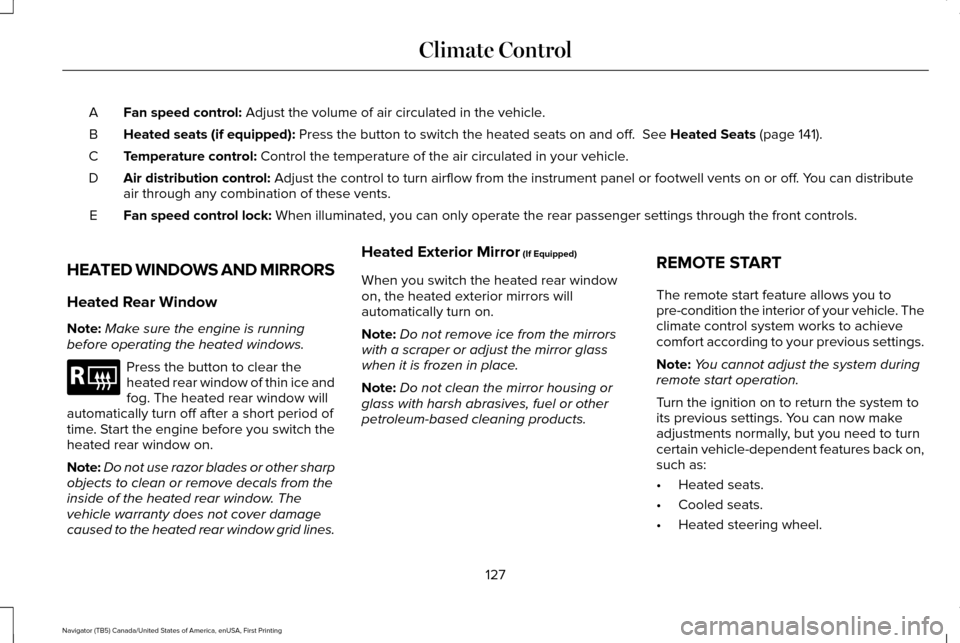
Fan speed control: Adjust the volume of air circulated in the vehicle.
A
Heated seats (if equipped):
Press the button to switch the heated seats on and off. See Heated Seats (page 141).
B
Temperature control:
Control the temperature of the air circulated in your vehicle.
C
Air distribution control:
Adjust the control to turn airflow from the instrument panel or footwel\
l vents on or off. You can distribute
air through any combination of these vents.
D
Fan speed control lock:
When illuminated, you can only operate the rear passenger settings thro\
ugh the front controls.
E
HEATED WINDOWS AND MIRRORS
Heated Rear Window
Note: Make sure the engine is running
before operating the heated windows. Press the button to clear the
heated rear window of thin ice and
fog. The heated rear window will
automatically turn off after a short period of
time. Start the engine before you switch the
heated rear window on.
Note: Do not use razor blades or other sharp
objects to clean or remove decals from the
inside of the heated rear window. The
vehicle warranty does not cover damage
caused to the heated rear window grid lines. Heated Exterior Mirror
(If Equipped)
When you switch the heated rear window
on, the heated exterior mirrors will
automatically turn on.
Note: Do not remove ice from the mirrors
with a scraper or adjust the mirror glass
when it is frozen in place.
Note: Do not clean the mirror housing or
glass with harsh abrasives, fuel or other
petroleum-based cleaning products. REMOTE START
The remote start feature allows you to
pre-condition the interior of your vehicle. The
climate control system works to achieve
comfort according to your previous settings.
Note:
You cannot adjust the system during
remote start operation.
Turn the ignition on to return the system to
its previous settings. You can now make
adjustments normally, but you need to turn
certain vehicle-dependent features back on,
such as:
• Heated seats.
• Cooled seats.
• Heated steering wheel.
127
Navigator (TB5) Canada/United States of America, enUSA, First Printing Climate ControlE184884
Page 132 of 532
SITTING IN THE CORRECT
POSITION
WARNINGS
Sitting improperly, out of position or
with the seatback reclined too far can
take weight off the seat cushion and affect
the decision of the passenger sensing
system, resulting in serious injury or death
in the event of a crash. Always sit upright
against your seat back, with your feet on the
floor. Do not recline the seatback as this can
cause the occupant to slide under the
safety belt, resulting in serious injury in the
event of a crash. Do not place objects higher than the
seatback to reduce the risk of serious
injury in the event of a crash or during heavy
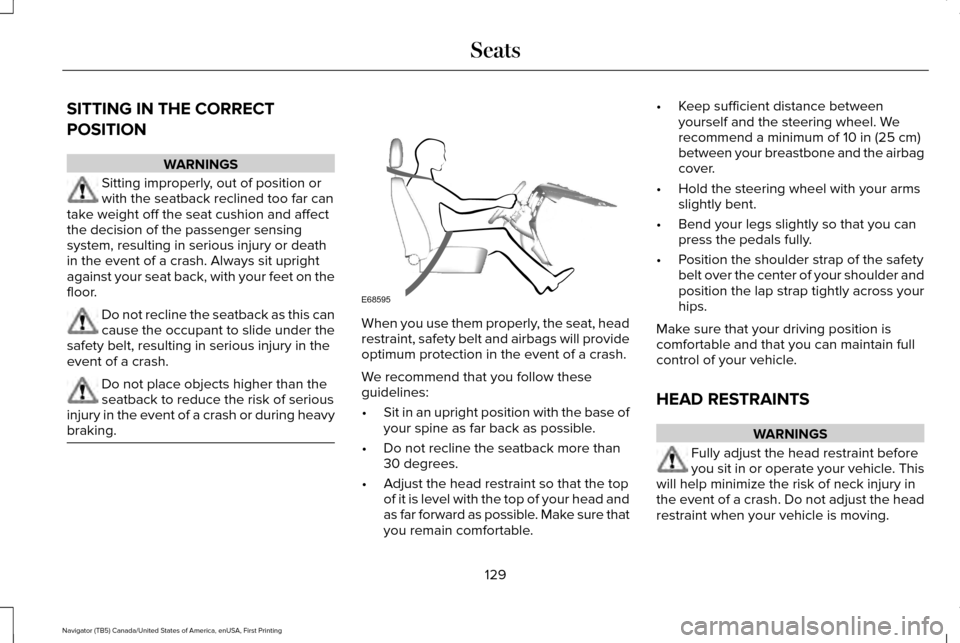
braking. When you use them properly, the seat, head
restraint, safety belt and airbags will provide
optimum protection in the event of a crash.
We recommend that you follow these
guidelines:
•
Sit in an upright position with the base of
your spine as far back as possible.
• Do not recline the seatback more than
30 degrees.
• Adjust the head restraint so that the top
of it is level with the top of your head and
as far forward as possible. Make sure that
you remain comfortable. •
Keep sufficient distance between
yourself and the steering wheel. We
recommend a minimum of 10 in (25 cm)
between your breastbone and the airbag
cover.
• Hold the steering wheel with your arms
slightly bent.
• Bend your legs slightly so that you can
press the pedals fully.
• Position the shoulder strap of the safety
belt over the center of your shoulder and
position the lap strap tightly across your
hips.
Make sure that your driving position is
comfortable and that you can maintain full
control of your vehicle.
HEAD RESTRAINTS WARNINGS
Fully adjust the head restraint before
you sit in or operate your vehicle. This
will help minimize the risk of neck injury in
the event of a crash. Do not adjust the head
restraint when your vehicle is moving.
129
Navigator (TB5) Canada/United States of America, enUSA, First Printing SeatsE68595