wheel LINCOLN NAVIGATOR 2017 Service Manual
[x] Cancel search | Manufacturer: LINCOLN, Model Year: 2017, Model line: NAVIGATOR, Model: LINCOLN NAVIGATOR 2017Pages: 532, PDF Size: 3.9 MB
Page 213 of 532
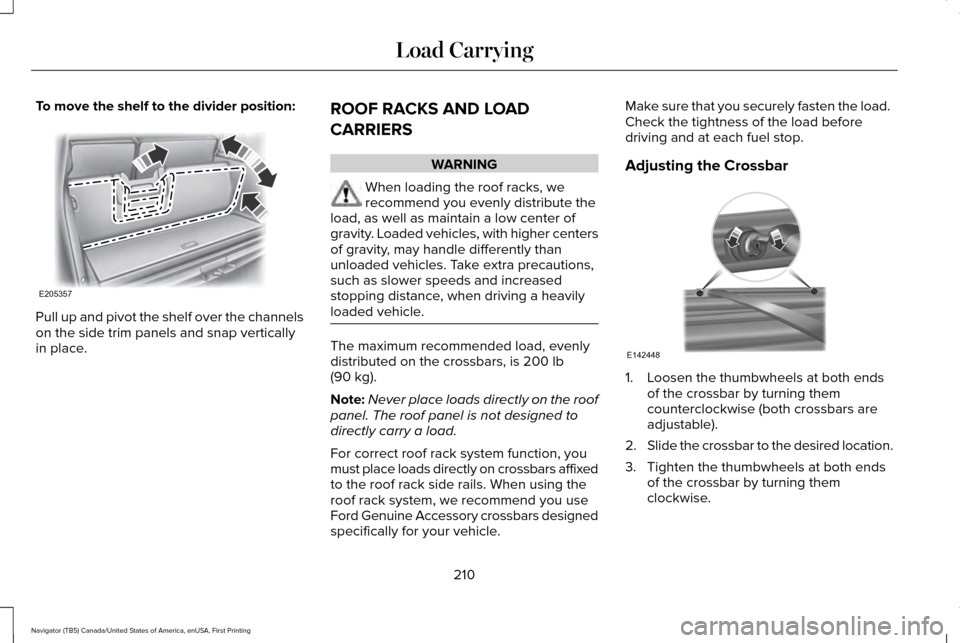
To move the shelf to the divider position:
Pull up and pivot the shelf over the channels
on the side trim panels and snap vertically
in place.
ROOF RACKS AND LOAD
CARRIERS WARNING
When loading the roof racks, we
recommend you evenly distribute the
load, as well as maintain a low center of
gravity. Loaded vehicles, with higher centers
of gravity, may handle differently than
unloaded vehicles. Take extra precautions,
such as slower speeds and increased
stopping distance, when driving a heavily
loaded vehicle. The maximum recommended load, evenly
distributed on the crossbars, is 200 lb
(90 kg).
Note: Never place loads directly on the roof
panel. The roof panel is not designed to
directly carry a load.
For correct roof rack system function, you
must place loads directly on crossbars affixed
to the roof rack side rails. When using the
roof rack system, we recommend you use
Ford Genuine Accessory crossbars designed
specifically for your vehicle. Make sure that you securely fasten the load.
Check the tightness of the load before
driving and at each fuel stop.
Adjusting the Crossbar
1. Loosen the thumbwheels at both ends
of the crossbar by turning them
counterclockwise (both crossbars are
adjustable).
2. Slide the crossbar to the desired location.
3. Tighten the thumbwheels at both ends of the crossbar by turning them
clockwise.
210
Navigator (TB5) Canada/United States of America, enUSA, First Printing Load CarryingE205357 E142448
Page 214 of 532
Make sure to check that the thumbwheels
are tight each time you add or remove load
from the roof rack, and periodically while
traveling. Make sure that the load is secure
before traveling.
LOAD LIMIT
Vehicle Loading - with and without a
Trailer
This section guides you in the proper
loading of your vehicle, trailer, or both.
Keep your loaded vehicle weight within
its design rating capability, with or
without a trailer. Properly loading your
vehicle provides maximum return of
vehicle design performance. Before you
load your vehicle, become familiar with
the following terms for determining your
vehicle
’s weight rating, with or without
a trailer, from the vehicle ’s Tire and
Loading Information label or Safety
Compliance Certification label. Tire and Loading Label Information
Example:
211
Navigator (TB5) Canada/United States of America, enUSA, First Printing Load CarryingE198719
Page 220 of 532
RV & Trailer Towing Guide Online
http://www.fleet.ford.com/towing-guides/
Website
TRAILER SWAY CONTROL WARNING
Turning off trailer sway control
increases the risk of loss of vehicle
control, serious injury or death. Ford does
not recommend disabling this feature except
in situations where speed reduction may be
detrimental (such as hill climbing), the driver
has significant trailer towing experience, and
can control trailer sway and maintain safe
operation. Note:
This feature does not prevent trailer
sway, but reduces it once it begins.
Note: This feature cannot stop all trailers
from swaying. Note:
In some cases, if vehicle speed is too
high, the system may activate multiple times,
gradually reducing vehicle speed.
This feature applies your vehicle brakes at
individual wheels and, if necessary, reduces
engine power. If the trailer begins to sway,
the stability control light flashes and the
message TRAILER SWAY REDUCE SPEED
appears in the information display. The first
thing to do is slow your vehicle down, then
pull safely to the side of the road and check
for proper tongue load and trailer load
distribution.
See Load Carrying (page 209).
RECOMMENDED TOWING
WEIGHTS
Note: Do not exceed the trailer weight
for your vehicle configuration listed in
the chart below. Note:
Make sure to take into
consideration trailer frontal area. Do not
exceed 36.5 feet² (3.39 meters²) if your
vehicle is equipped with the standard
towing package, or 60 feet² (5.57
meters²) if your vehicle is equipped with
the optional heavy duty package.
Note: Exceeding this limitation may
significantly reduce the performance of
your towing vehicle. Selecting a trailer
with a low aerodynamic drag and
rounded front design helps optimize
performance and fuel economy.
Note: For high altitude operation,
reduce the gross combined weight by
2% per 1000 feet (300 meters) starting
at the 1000 foot (300 meter) elevation
point.
217
Navigator (TB5) Canada/United States of America, enUSA, First Printing Towing
Page 222 of 532
Maximum GCWR
Towing Package
Vehicle Type
12300 lb (5579 kg)
Standard
Two-wheel drive (except L)
12600 lb (5715 kg)
Two-wheel drive L
12500 lb (5669 kg)
Four-wheel drive (except L)
12800 lb (5806 kg)
Four-wheel drive L
15100 lb (6849 kg)
Optional Heavy Duty
Two-wheel drive (except L)
14900 lb (6758 kg)
Two-wheel drive L
15100 lb (6849 kg)
Four-wheel drive (except L)
14900 lb (6758 kg)
Four-wheel drive L
219
Navigator (TB5) Canada/United States of America, enUSA, First Printing Towing
Page 225 of 532
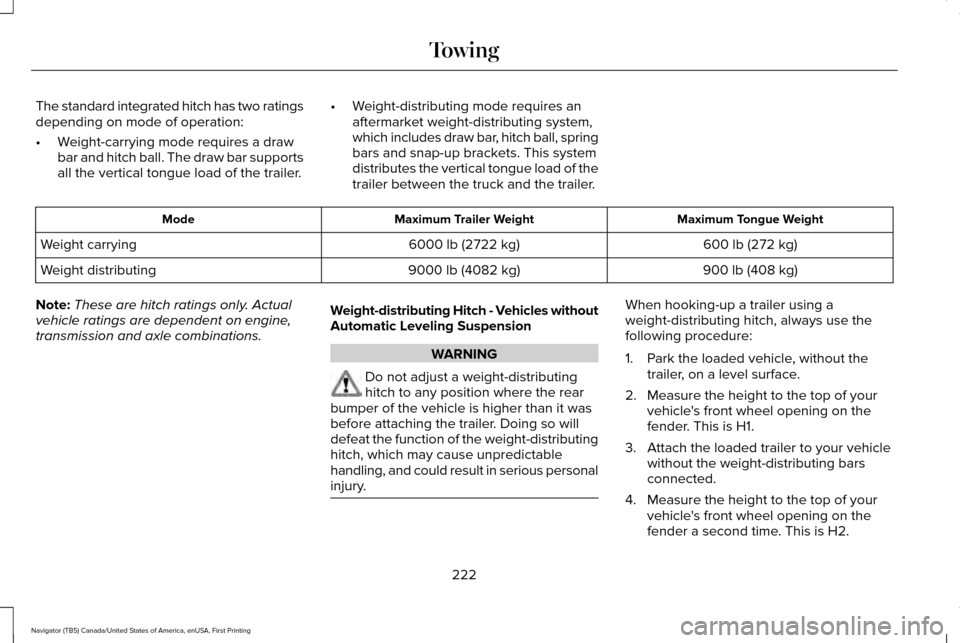
The standard integrated hitch has two ratings
depending on mode of operation:
•
Weight-carrying mode requires a draw
bar and hitch ball. The draw bar supports
all the vertical tongue load of the trailer. •
Weight-distributing mode requires an
aftermarket weight-distributing system,
which includes draw bar, hitch ball, spring
bars and snap-up brackets. This system
distributes the vertical tongue load of the
trailer between the truck and the trailer. Maximum Tongue Weight
Maximum Trailer Weight
Mode
600 lb (272 kg)
6000 lb (2722 kg)
Weight carrying
900 lb (408 kg)
9000 lb (4082 kg)
Weight distributing
Note: These are hitch ratings only. Actual
vehicle ratings are dependent on engine,
transmission and axle combinations. Weight-distributing Hitch - Vehicles without
Automatic Leveling Suspension WARNING
Do not adjust a weight-distributing
hitch to any position where the rear
bumper of the vehicle is higher than it was
before attaching the trailer. Doing so will
defeat the function of the weight-distributing
hitch, which may cause unpredictable
handling, and could result in serious personal
injury. When hooking-up a trailer using a
weight-distributing hitch, always use the
following procedure:
1. Park the loaded vehicle, without the
trailer, on a level surface.
2. Measure the height to the top of your vehicle's front wheel opening on the
fender. This is H1.
3. Attach the loaded trailer to your vehicle without the weight-distributing bars
connected.
4. Measure the height to the top of your vehicle's front wheel opening on the
fender a second time. This is H2.
222
Navigator (TB5) Canada/United States of America, enUSA, First Printing Towing
Page 226 of 532
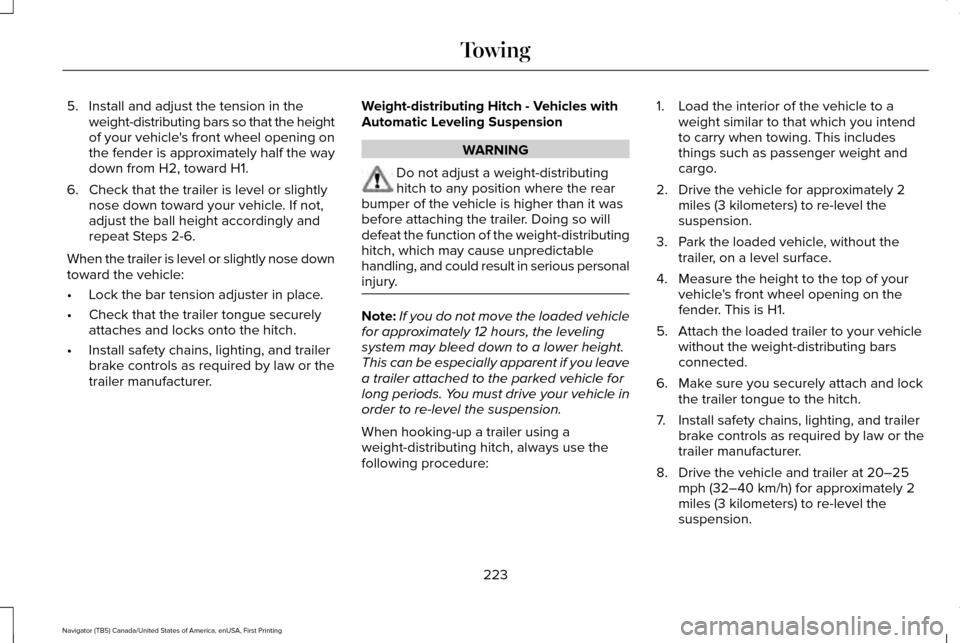
5. Install and adjust the tension in the
weight-distributing bars so that the height
of your vehicle's front wheel opening on
the fender is approximately half the way
down from H2, toward H1.
6. Check that the trailer is level or slightly nose down toward your vehicle. If not,
adjust the ball height accordingly and
repeat Steps 2-6.
When the trailer is level or slightly nose down
toward the vehicle:
• Lock the bar tension adjuster in place.
• Check that the trailer tongue securely
attaches and locks onto the hitch.
• Install safety chains, lighting, and trailer
brake controls as required by law or the
trailer manufacturer. Weight-distributing Hitch - Vehicles with
Automatic Leveling Suspension WARNING
Do not adjust a weight-distributing
hitch to any position where the rear
bumper of the vehicle is higher than it was
before attaching the trailer. Doing so will
defeat the function of the weight-distributing
hitch, which may cause unpredictable
handling, and could result in serious personal
injury. Note:
If you do not move the loaded vehicle
for approximately 12 hours, the leveling
system may bleed down to a lower height.
This can be especially apparent if you leave
a trailer attached to the parked vehicle for
long periods. You must drive your vehicle in
order to re-level the suspension.
When hooking-up a trailer using a
weight-distributing hitch, always use the
following procedure: 1. Load the interior of the vehicle to a
weight similar to that which you intend
to carry when towing. This includes
things such as passenger weight and
cargo.
2. Drive the vehicle for approximately 2 miles (3 kilometers) to re-level the
suspension.
3. Park the loaded vehicle, without the trailer, on a level surface.
4. Measure the height to the top of your vehicle's front wheel opening on the
fender. This is H1.
5. Attach the loaded trailer to your vehicle without the weight-distributing bars
connected.
6. Make sure you securely attach and lock the trailer tongue to the hitch.
7. Install safety chains, lighting, and trailer brake controls as required by law or the
trailer manufacturer.
8. Drive the vehicle and trailer at 20–25 mph (32–40 km/h) for approximately 2
miles (3 kilometers) to re-level the
suspension.
223
Navigator (TB5) Canada/United States of America, enUSA, First Printing Towing
Page 227 of 532
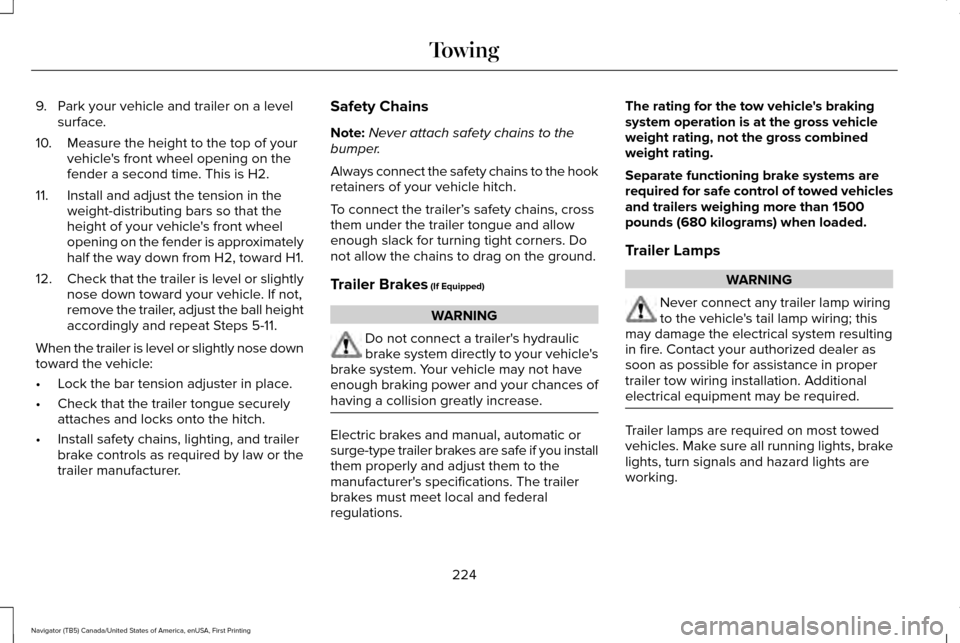
9. Park your vehicle and trailer on a level
surface.
10. Measure the height to the top of your vehicle's front wheel opening on the
fender a second time. This is H2.
11. Install and adjust the tension in the weight-distributing bars so that the
height of your vehicle's front wheel
opening on the fender is approximately
half the way down from H2, toward H1.
12. Check that the trailer is level or slightly
nose down toward your vehicle. If not,
remove the trailer, adjust the ball height
accordingly and repeat Steps 5-11.
When the trailer is level or slightly nose down
toward the vehicle:
• Lock the bar tension adjuster in place.
• Check that the trailer tongue securely
attaches and locks onto the hitch.
• Install safety chains, lighting, and trailer
brake controls as required by law or the
trailer manufacturer. Safety Chains
Note:
Never attach safety chains to the
bumper.
Always connect the safety chains to the hook
retainers of your vehicle hitch.
To connect the trailer’ s safety chains, cross
them under the trailer tongue and allow
enough slack for turning tight corners. Do
not allow the chains to drag on the ground.
Trailer Brakes (If Equipped) WARNING
Do not connect a trailer's hydraulic
brake system directly to your vehicle's
brake system. Your vehicle may not have
enough braking power and your chances of
having a collision greatly increase. Electric brakes and manual, automatic or
surge-type trailer brakes are safe if you install
them properly and adjust them to the
manufacturer's specifications. The trailer
brakes must meet local and federal
regulations.The rating for the tow vehicle's braking
system operation is at the gross vehicle
weight rating, not the gross combined
weight rating.
Separate functioning brake systems are
required for safe control of towed vehicles
and trailers weighing more than 1500
pounds (680 kilograms) when loaded.
Trailer Lamps
WARNING
Never connect any trailer lamp wiring
to the vehicle's tail lamp wiring; this
may damage the electrical system resulting
in fire. Contact your authorized dealer as
soon as possible for assistance in proper
trailer tow wiring installation. Additional
electrical equipment may be required. Trailer lamps are required on most towed
vehicles. Make sure all running lights, brake
lights, turn signals and hazard lights are
working.
224
Navigator (TB5) Canada/United States of America, enUSA, First Printing Towing
Page 228 of 532
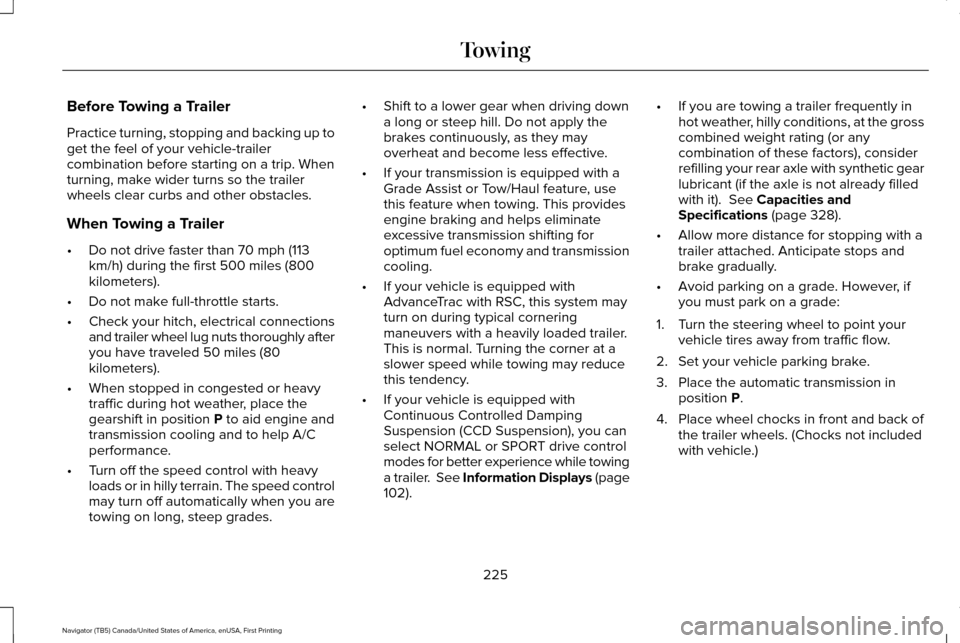
Before Towing a Trailer
Practice turning, stopping and backing up to
get the feel of your vehicle-trailer
combination before starting on a trip. When
turning, make wider turns so the trailer
wheels clear curbs and other obstacles.
When Towing a Trailer
•
Do not drive faster than 70 mph (113
km/h) during the first 500 miles (800
kilometers).
• Do not make full-throttle starts.
• Check your hitch, electrical connections
and trailer wheel lug nuts thoroughly after
you have traveled 50 miles (80
kilometers).
• When stopped in congested or heavy
traffic during hot weather, place the
gearshift in position P to aid engine and
transmission cooling and to help A/C
performance.
• Turn off the speed control with heavy
loads or in hilly terrain. The speed control
may turn off automatically when you are
towing on long, steep grades. •
Shift to a lower gear when driving down
a long or steep hill. Do not apply the
brakes continuously, as they may
overheat and become less effective.
• If your transmission is equipped with a
Grade Assist or Tow/Haul feature, use
this feature when towing. This provides
engine braking and helps eliminate
excessive transmission shifting for
optimum fuel economy and transmission
cooling.
• If your vehicle is equipped with
AdvanceTrac with RSC, this system may
turn on during typical cornering
maneuvers with a heavily loaded trailer.
This is normal. Turning the corner at a
slower speed while towing may reduce
this tendency.
• If your vehicle is equipped with
Continuous Controlled Damping
Suspension (CCD Suspension), you can
select NORMAL or SPORT drive control
modes for better experience while towing
a trailer. See Information Displays (page
102
). •
If you are towing a trailer frequently in
hot weather, hilly conditions, at the gross
combined weight rating (or any
combination of these factors), consider
refilling your rear axle with synthetic gear
lubricant (if the axle is not already filled
with it).
See Capacities and
Specifications (page 328).
• Allow more distance for stopping with a
trailer attached. Anticipate stops and
brake gradually.
• Avoid parking on a grade. However, if
you must park on a grade:
1. Turn the steering wheel to point your vehicle tires away from traffic flow.
2. Set your vehicle parking brake.
3. Place the automatic transmission in position
P.
4. Place wheel chocks in front and back of the trailer wheels. (Chocks not included
with vehicle.)
225
Navigator (TB5) Canada/United States of America, enUSA, First Printing Towing
Page 230 of 532
•
Only use recovery straps that have a
minimum breaking strength two to three
times the gross vehicle weight of the
stuck vehicle.
• Make sure the recovery strap is in good
condition and free of visible cuts, tears
or damage.
• Use a damper device such as a tarp,
heavy blanket or piece of carpet draped
over the recovery strap to help absorb
the energy in the event the strap breaks.
• Make sure the stuck vehicle is not loaded
heavier than its gross vehicle weight
rating specified on the certification label.
• Always align the tow vehicle and stuck
vehicle in a straight line (within 10
degrees).
• Keep bystanders to the sides of the
vehicle, at a distance of at least twice the
length of the recovery strap. This helps
avoid injury from the hazard of a recovery
hook or strap breaking, or a vehicle
lurching into their path. TOWING THE VEHICLE ON FOUR
WHEELS WARNING
If your vehicle has a steering wheel
lock make sure the ignition is in the
accessory or on position when being towed. Emergency Towing
If your vehicle becomes inoperable (without
access to wheel dollies, car-hauling trailer,
or flatbed transport vehicle), it can be
flat-towed (all wheels on the ground,
regardless of the powertrain and
transmission configuration) under the
following conditions:
•
Your vehicle is facing forward for towing
in a forward direction.
• Place the transmission in position
N. If
you cannot move the transmission into
N
, you may need to override it. See
Transmission (page 169).
• Maximum speed is
35 mph (56 km/h).
• Maximum distance is
50 mi (80 km).
227
Navigator (TB5) Canada/United States of America, enUSA, First Printing Towing
Page 232 of 532
There are also some things you may want to
avoid doing because they reduce your fuel
economy:
•
Avoid sudden or hard accelerations.
• Avoid revving the engine before turning
off the car.
• Avoid long idle periods.
• Do not warm up your vehicle on cold
mornings.
• Reduce the use of air conditioning and
heat.
• Avoid using speed control in hilly terrain.
• Do not rest your foot on the brake pedal
while driving.
• Avoid carrying unnecessary weight.
• Avoid adding particular accessories to
your vehicle (e.g. bug deflectors,
rollbars/light bars, running boards, ski
racks).
• Avoid driving with the wheels out of
alignment. DRIVING THROUGH WATER WARNING
Do not drive through flowing or deep
water as you may lose control of your
vehicle. Note:
Driving through standing water can
cause vehicle damage.
Note: Engine damage can occur if water
enters the air filter.
Before driving through standing water, check
the depth. Never drive through water that is
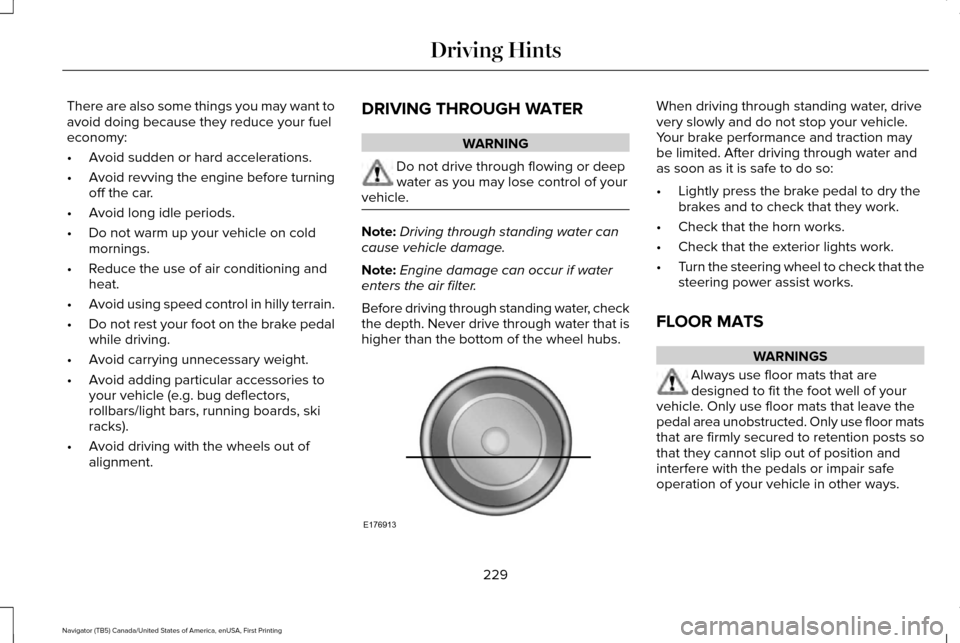
higher than the bottom of the wheel hubs. When driving through standing water, drive
very slowly and do not stop your vehicle.
Your brake performance and traction may
be limited. After driving through water and
as soon as it is safe to do so:
•
Lightly press the brake pedal to dry the
brakes and to check that they work.
• Check that the horn works.
• Check that the exterior lights work.
• Turn the steering wheel to check that the
steering power assist works.
FLOOR MATS WARNINGS
Always use floor mats that are
designed to fit the foot well of your
vehicle. Only use floor mats that leave the
pedal area unobstructed. Only use floor mats
that are firmly secured to retention posts so
that they cannot slip out of position and
interfere with the pedals or impair safe
operation of your vehicle in other ways.
229
Navigator (TB5) Canada/United States of America, enUSA, First Printing Driving HintsE176913