ECO mode LINCOLN NAVIGATOR 2017 Owner's Manual
[x] Cancel search | Manufacturer: LINCOLN, Model Year: 2017, Model line: NAVIGATOR, Model: LINCOLN NAVIGATOR 2017Pages: 532, PDF Size: 3.9 MB
Page 152 of 532
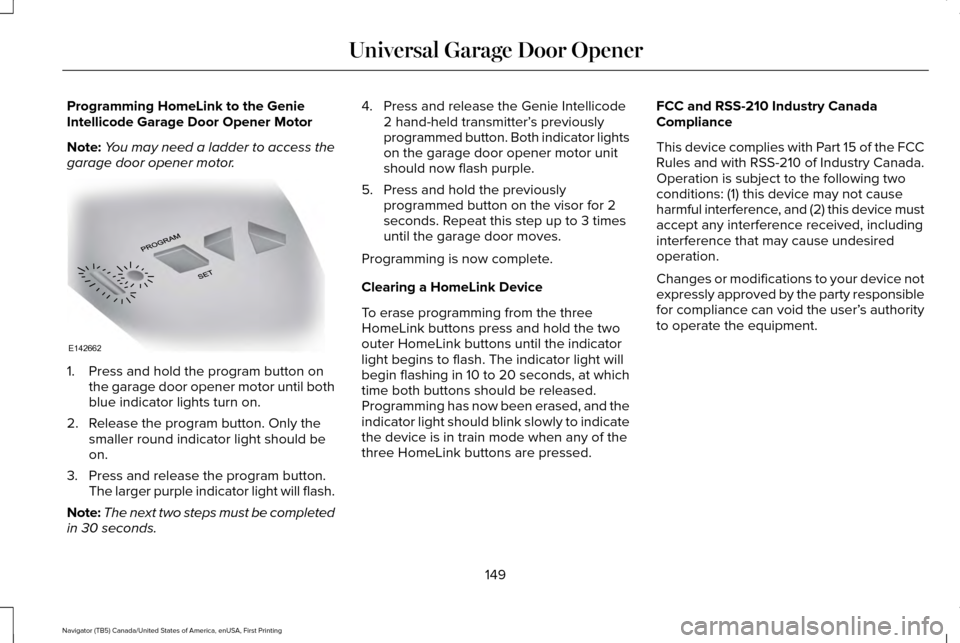
Programming HomeLink to the Genie
Intellicode Garage Door Opener Motor
Note:
You may need a ladder to access the
garage door opener motor. 1. Press and hold the program button on
the garage door opener motor until both
blue indicator lights turn on.
2. Release the program button. Only the smaller round indicator light should be
on.
3. Press and release the program button. The larger purple indicator light will flash.
Note: The next two steps must be completed
in 30 seconds. 4. Press and release the Genie Intellicode
2 hand-held transmitter’ s previously
programmed button. Both indicator lights
on the garage door opener motor unit
should now flash purple.
5. Press and hold the previously programmed button on the visor for 2
seconds. Repeat this step up to 3 times
until the garage door moves.
Programming is now complete.
Clearing a HomeLink Device
To erase programming from the three
HomeLink buttons press and hold the two
outer HomeLink buttons until the indicator
light begins to flash. The indicator light will
begin flashing in 10 to 20 seconds, at which
time both buttons should be released.
Programming has now been erased, and the
indicator light should blink slowly to indicate
the device is in train mode when any of the
three HomeLink buttons are pressed. FCC and RSS-210 Industry Canada
Compliance
This device complies with Part 15 of the FCC
Rules and with RSS-210 of Industry Canada.
Operation is subject to the following two
conditions: (1) this device may not cause
harmful interference, and (2) this device must
accept any interference received, including
interference that may cause undesired
operation.
Changes or modifications to your device not
expressly approved by the party responsible
for compliance can void the user’
s authority
to operate the equipment.
149
Navigator (TB5) Canada/United States of America, enUSA, First Printing Universal Garage Door OpenerE142662
Page 173 of 532
Second (2)
Transmission operates in second (2) gear
only. Use second (2) gear to start-up on
slippery roads.
First (1)
•
Transmission operates in first (1) gear
only.
• Provides maximum engine braking.
• Allows upshifts by moving gearshift lever.
• Will not downshift into first (1) gear at high
speeds; allows for first (1) gear when
vehicle reaches slower speeds.
Tow/Haul Mode WARNING
Do not use the tow/haul feature when
driving in icy or slippery conditions as
the increased engine braking can cause the
rear wheels to slide and your vehicle to
swing around with the possible loss of
vehicle control. To activate tow/haul, press the
button on the gearshift lever once.
The TOW HAUL indicator light will
illuminate in the instrument cluster.
The tow/haul feature:
• Delays upshifts to reduce the frequency
of transmission shifting.
• Provides engine braking in all forward
gears, which will slow your vehicle and
assist you in controlling your vehicle
when descending a grade.
• Depending on driving conditions and
load conditions, may downshift the
transmission, slow your vehicle and
control your vehicle speed when
descending a hill, without pressing the
accelerator pedal. The amount of
downshift braking provided will vary
based upon the amount the brake pedal
is pressed.
The tow/haul feature improves transmission
operation when towing a trailer or a heavy
load. All transmission gear ranges are
available when using tow/haul. To deactivate the tow/haul feature and return
to normal driving mode, press the button on
the gearshift lever twice. The TOW HAUL
light will deactivate. Tow/haul will also
deactivate when you power down your
vehicle.
Forced Downshifts
•
Allowed in drive (D) with the tow/haul
feature on or off.
• Press the accelerator to the floor.
• Allows transmission to select an
appropriate gear.
Automatic Transmission Adaptive Learning
This feature may increase durability and
provide consistent shift feel over the life of
your vehicle. A new vehicle or transmission
may have firm shifts, soft shifts or both. This
operation is considered normal and will not
affect function or durability of the
transmission. Over time, the adaptive
learning process will fully update
transmission operation.
170
Navigator (TB5) Canada/United States of America, enUSA, First Printing TransmissionE161509
Page 174 of 532
SelectShift™ Automatic Transmission (If
Equipped)
This feature gives you the ability to change
gears up or down as desired.
As long as the engine speed does not
exceed the maximum allowable limit you can
downshift. SelectShift automatically
downshifts at low engine speeds in order to
prevent engine stalls.
Note: Engine damage may occur if you
maintain excessive engine revving without
shifting.
SelectShift does not automatically upshift,
even if the engine is approaching the RPM
limit, unless the accelerator pedal is at full
travel. Take notice of the shift indicator lamp,
which alerts you when to shift to make sure
you achieve the highest level of efficiency
and fuel economy.
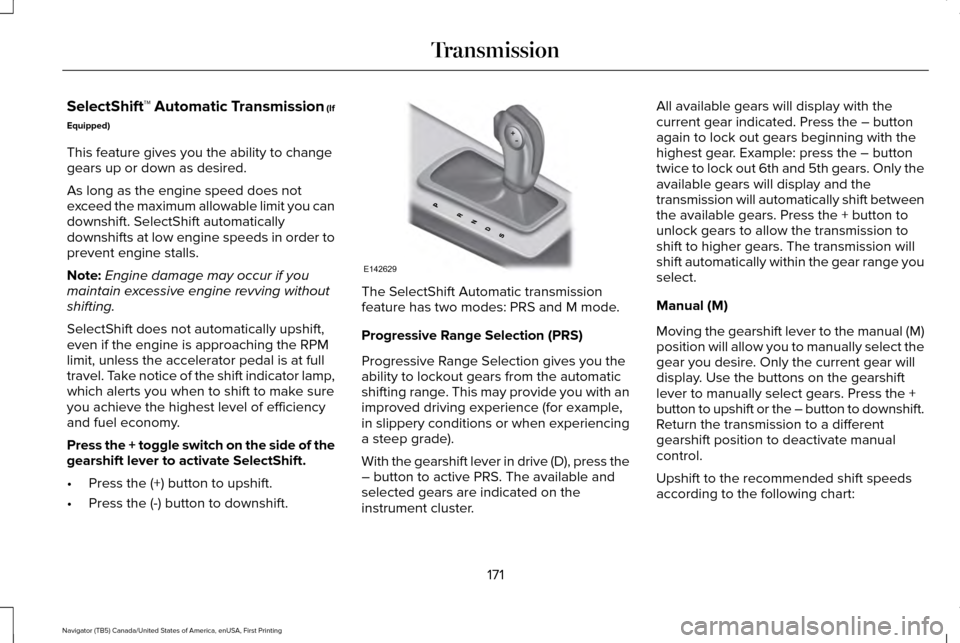
Press the + toggle switch on the side of the
gearshift lever to activate SelectShift.
• Press the (+) button to upshift.
• Press the (-) button to downshift. The SelectShift Automatic transmission
feature has two modes: PRS and M mode.
Progressive Range Selection (PRS)
Progressive Range Selection gives you the
ability to lockout gears from the automatic
shifting range. This may provide you with an
improved driving experience (for example,
in slippery conditions or when experiencing
a steep grade).
With the gearshift lever in drive (D), press the
– button to active PRS. The available and
selected gears are indicated on the
instrument cluster.All available gears will display with the
current gear indicated. Press the – button
again to lock out gears beginning with the
highest gear. Example: press the – button
twice to lock out 6th and 5th gears. Only the
available gears will display and the
transmission will automatically shift between
the available gears. Press the + button to
unlock gears to allow the transmission to
shift to higher gears. The transmission will
shift automatically within the gear range you
select.
Manual (M)
Moving the gearshift lever to the manual (M)
position will allow you to manually select the
gear you desire. Only the current gear will
display. Use the buttons on the gearshift
lever to manually select gears. Press the +
button to upshift or the – button to downshift.
Return the transmission to a different
gearshift position to deactivate manual
control.
Upshift to the recommended shift speeds
according to the following chart:
171
Navigator (TB5) Canada/United States of America, enUSA, First Printing TransmissionE142629
Page 177 of 532
USING FOUR-WHEEL DRIVE
WARNING
For important information regarding
safe operation of this type of vehicle,
see General Information in the Wheels and
Tires chapter. Note:
Do not use 4X4 mode on dry, hard
surfaced roads. Doing so will produce
excessive noise, increase tire wear and may
damage drive components. 4X4 mode is
only intended for consistently slippery or
loose surfaces.
Your four-wheel drive vehicle features the
heavy-duty Control Trac® 4WD system. This
unique system is interactive with the road,
continually monitoring and adjusting torque
delivery to the front and rear wheels to
optimize vehicle control. 4WD Indicator Lights
The indicator lights illuminate in the
information display in the reconfigurable
telltale (RTT) location under the following
conditions. See Warning Lamps and
Indicators (page 98).
Note: When a 4X4 system fault is present,
the system will typically remain in whichever
4X4 mode was selected prior to the fault
condition occurring. It will not default to 4X2
in all circumstances. When this warning is
displayed, have your vehicle serviced by an
authorized dealer.
4X2 Momentarily illuminates when 4X2
is selected.
4X4 AUTO Continuously illuminates when 4X4
AUTO is selected.4X4 Continuously illuminates when 4X4
is selected.
CHECK 4X4 Displays when a 4X4 fault is
present.
4WD Switch Positions WARNING
Utility and four-wheel drive vehicles
are not designed for cornering at
speeds as high as passenger cars any more
than low-slung sports cars are designed to
perform satisfactorily under off-road
conditions. Avoid sharp turns or abrupt
maneuvers in these vehicles. 174
Navigator (TB5) Canada/United States of America, enUSA, First Printing Four-Wheel Drive
(If Equipped)E163173 E181781 E207351
Page 178 of 532
Note:
The AdvanceTrac® with RSC® stability
enhancement system can be turned off
manually by pressing the AdvanceTrac
button. See Using Traction Control (page
185). This will disable the engine
management feature, allowing the vehicle
to maintain full power and enhanced
momentum through the obstacle.
Note: The Control Trac® selector switch
should not be changed while the rear wheels
are slipping. The Control Trac® system functions in three
modes:
•
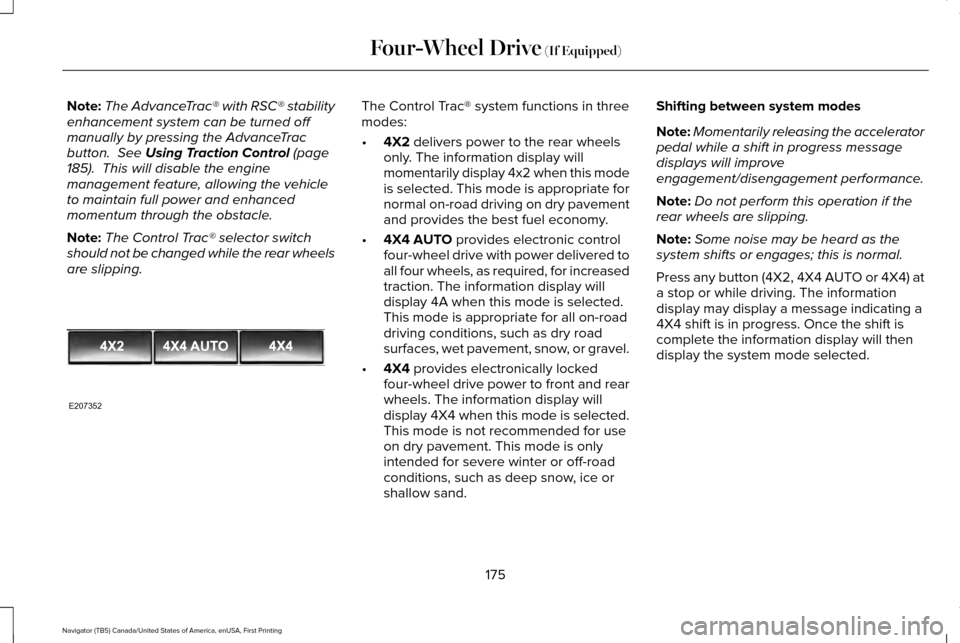
4X2
delivers power to the rear wheels
only. The information display will
momentarily display 4x2 when this mode
is selected. This mode is appropriate for
normal on-road driving on dry pavement
and provides the best fuel economy.
• 4X4 AUTO
provides electronic control
four-wheel drive with power delivered to
all four wheels, as required, for increased
traction. The information display will
display 4A when this mode is selected.
This mode is appropriate for all on-road
driving conditions, such as dry road
surfaces, wet pavement, snow, or gravel.
• 4X4
provides electronically locked
four-wheel drive power to front and rear
wheels. The information display will
display 4X4 when this mode is selected.
This mode is not recommended for use
on dry pavement. This mode is only
intended for severe winter or off-road
conditions, such as deep snow, ice or
shallow sand. Shifting between system modes
Note:
Momentarily releasing the accelerator
pedal while a shift in progress message
displays will improve
engagement/disengagement performance.
Note: Do not perform this operation if the
rear wheels are slipping.
Note: Some noise may be heard as the
system shifts or engages; this is normal.
Press any button (4X2, 4X4 AUTO or 4X4) at
a stop or while driving. The information
display may display a message indicating a
4X4 shift is in progress. Once the shift is
complete the information display will then
display the system mode selected.
175
Navigator (TB5) Canada/United States of America, enUSA, First Printing Four-Wheel Drive
(If Equipped)E207352
Page 179 of 532
How Your Vehicle Differs From Other
Vehicles
WARNING
Vehicles with a higher center of gravity
such as utility and four-wheel drive
vehicles handle differently than vehicles with
a lower center of gravity. Utility and
four-wheel drive vehicles are not designed
for cornering at speeds as high as passenger
cars any more than low-slung sports cars are
designed to perform satisfactorily under
off-road conditions. Avoid sharp turns,
excessive speed and abrupt maneuvers in
these vehicles. Failure to drive cautiously
could result in an increased risk of loss of
vehicle control, vehicle rollover, personal
injury and death. Truck and utility vehicles can differ from
some other vehicles. Your vehicle may be
higher to allow it to travel over rough terrain
without getting hung up or damaging
underbody components.
The differences that make your vehicle so
versatile also make it handle differently than
an ordinary passenger car. Maintain steering wheel control at all times,
especially in rough terrain. Since sudden
changes in terrain can result in abrupt
steering wheel motion, make sure you grip
the steering wheel from the outside. Do not
grip the spokes.
Drive cautiously to avoid vehicle damage
from concealed objects such as rocks and
stumps.
You should either know the terrain or
examine maps of the area before driving.
Map out your route before driving in the area.
To maintain steering and braking control of
your vehicle, you must have all four wheels
on the ground and they must be rolling, not
sliding or spinning.
Driving Off-Road With Truck and Utility
Vehicles
Note:
On some models, the initial shift from
two-wheel drive to four-wheel drive while
the vehicle is moving can cause some
momentary clunk and ratcheting sounds.
This is the front drivetrain coming up to
speed and the automatic locking hubs
engaging and is not cause for concern. Note:
Your vehicle may be equipped with a
front air dam that can become damaged
(due to reduced ground clearance) when
taking your vehicle off-road. This air dam
can be taken off by removing two bolts.
Four-wheel drive vehicles are specially
equipped for driving on sand, snow, mud and
rough terrain and have operating
characteristics that are somewhat different
from conventional vehicles, both on and off
the road.
Power is supplied to all four wheels through
a transfer case. On Four-wheel drive
vehicles, the transfer case allows you to
select different 4WD modes when necessary.
Information on transfer case operation and
shifting procedures can be found in this
chapter. Information on transfer case
maintenance can be found in the
Maintenance chapter. You should become
thoroughly familiar with this information
before you operate your vehicle.
176
Navigator (TB5) Canada/United States of America, enUSA, First Printing Four-Wheel Drive (If Equipped)
Page 204 of 532
BLIND SPOT INFORMATION
SYSTEM
WARNING
Never use the Blind Spot Information
System as a replacement for using the
interior and exterior mirrors or looking over
your shoulder before changing lanes. The
Blind Spot Information System is not a
replacement for careful driving. The Blind Spot Information System is
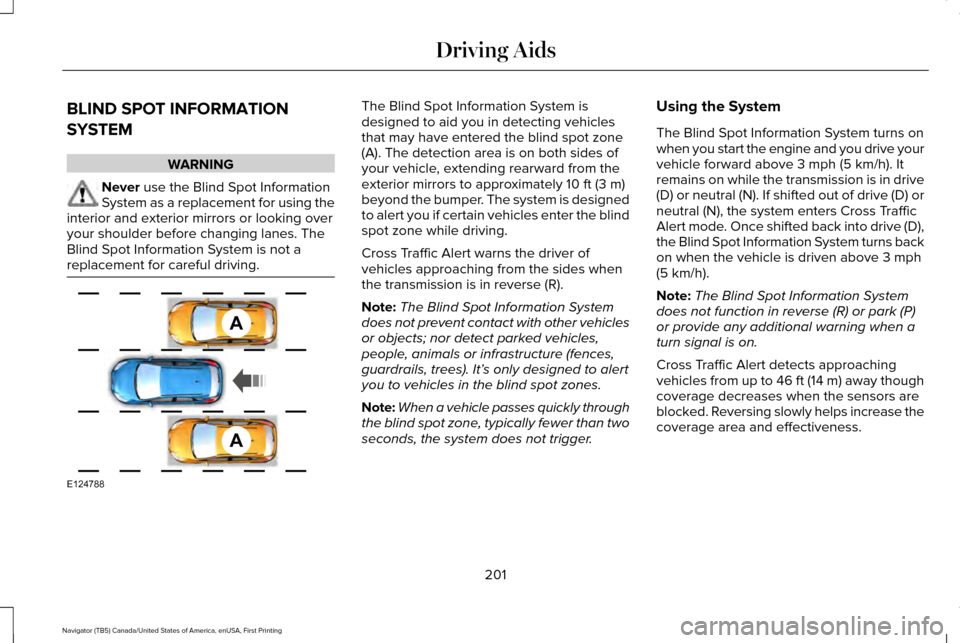
designed to aid you in detecting vehicles
that may have entered the blind spot zone
(A). The detection area is on both sides of
your vehicle, extending rearward from the
exterior mirrors to approximately 10 ft (3 m)
beyond the bumper. The system is designed
to alert you if certain vehicles enter the blind
spot zone while driving.
Cross Traffic Alert warns the driver of
vehicles approaching from the sides when
the transmission is in reverse (R).
Note: The Blind Spot Information System
does not prevent contact with other vehicles
or objects; nor detect parked vehicles,
people, animals or infrastructure (fences,
guardrails, trees). It’ s only designed to alert
you to vehicles in the blind spot zones.
Note: When a vehicle passes quickly through
the blind spot zone, typically fewer than two
seconds, the system does not trigger. Using the System
The Blind Spot Information System turns on
when you start the engine and you drive your
vehicle forward above
3 mph (5 km/h). It
remains on while the transmission is in drive
(D) or neutral (N). If shifted out of drive (D) or
neutral (N), the system enters Cross Traffic
Alert mode. Once shifted back into drive (D),
the Blind Spot Information System turns back
on when the vehicle is driven above
3 mph
(5 km/h).
Note: The Blind Spot Information System
does not function in reverse (R) or park (P)
or provide any additional warning when a
turn signal is on.
Cross Traffic Alert detects approaching
vehicles from up to 46 ft (14 m) away though
coverage decreases when the sensors are
blocked. Reversing slowly helps increase the
coverage area and effectiveness.
201
Navigator (TB5) Canada/United States of America, enUSA, First Printing Driving AidsA
A
E124788
Page 225 of 532
The standard integrated hitch has two ratings
depending on mode of operation:
•
Weight-carrying mode requires a draw
bar and hitch ball. The draw bar supports
all the vertical tongue load of the trailer. •
Weight-distributing mode requires an
aftermarket weight-distributing system,
which includes draw bar, hitch ball, spring
bars and snap-up brackets. This system
distributes the vertical tongue load of the
trailer between the truck and the trailer. Maximum Tongue Weight
Maximum Trailer Weight
Mode
600 lb (272 kg)
6000 lb (2722 kg)
Weight carrying
900 lb (408 kg)
9000 lb (4082 kg)
Weight distributing
Note: These are hitch ratings only. Actual
vehicle ratings are dependent on engine,
transmission and axle combinations. Weight-distributing Hitch - Vehicles without
Automatic Leveling Suspension WARNING
Do not adjust a weight-distributing
hitch to any position where the rear
bumper of the vehicle is higher than it was
before attaching the trailer. Doing so will
defeat the function of the weight-distributing
hitch, which may cause unpredictable
handling, and could result in serious personal
injury. When hooking-up a trailer using a
weight-distributing hitch, always use the
following procedure:
1. Park the loaded vehicle, without the
trailer, on a level surface.
2. Measure the height to the top of your vehicle's front wheel opening on the
fender. This is H1.
3. Attach the loaded trailer to your vehicle without the weight-distributing bars
connected.
4. Measure the height to the top of your vehicle's front wheel opening on the
fender a second time. This is H2.
222
Navigator (TB5) Canada/United States of America, enUSA, First Printing Towing
Page 228 of 532
Before Towing a Trailer
Practice turning, stopping and backing up to
get the feel of your vehicle-trailer
combination before starting on a trip. When
turning, make wider turns so the trailer
wheels clear curbs and other obstacles.
When Towing a Trailer
•
Do not drive faster than 70 mph (113
km/h) during the first 500 miles (800
kilometers).
• Do not make full-throttle starts.
• Check your hitch, electrical connections
and trailer wheel lug nuts thoroughly after
you have traveled 50 miles (80
kilometers).
• When stopped in congested or heavy
traffic during hot weather, place the
gearshift in position P to aid engine and
transmission cooling and to help A/C
performance.
• Turn off the speed control with heavy
loads or in hilly terrain. The speed control
may turn off automatically when you are
towing on long, steep grades. •
Shift to a lower gear when driving down
a long or steep hill. Do not apply the
brakes continuously, as they may
overheat and become less effective.
• If your transmission is equipped with a
Grade Assist or Tow/Haul feature, use
this feature when towing. This provides
engine braking and helps eliminate
excessive transmission shifting for
optimum fuel economy and transmission
cooling.
• If your vehicle is equipped with
AdvanceTrac with RSC, this system may
turn on during typical cornering
maneuvers with a heavily loaded trailer.
This is normal. Turning the corner at a
slower speed while towing may reduce
this tendency.
• If your vehicle is equipped with
Continuous Controlled Damping
Suspension (CCD Suspension), you can
select NORMAL or SPORT drive control
modes for better experience while towing
a trailer. See Information Displays (page
102
). •
If you are towing a trailer frequently in
hot weather, hilly conditions, at the gross
combined weight rating (or any
combination of these factors), consider
refilling your rear axle with synthetic gear
lubricant (if the axle is not already filled
with it).
See Capacities and
Specifications (page 328).
• Allow more distance for stopping with a
trailer attached. Anticipate stops and
brake gradually.
• Avoid parking on a grade. However, if
you must park on a grade:
1. Turn the steering wheel to point your vehicle tires away from traffic flow.
2. Set your vehicle parking brake.
3. Place the automatic transmission in position
P.
4. Place wheel chocks in front and back of the trailer wheels. (Chocks not included
with vehicle.)
225
Navigator (TB5) Canada/United States of America, enUSA, First Printing Towing
Page 231 of 532
BREAKING-IN
You need to break in new tires for
approximately 300 miles (480 kilometers).
During this time, your vehicle may exhibit
some unusual driving characteristics.
Avoid driving too fast during the first 1000
miles (1600 kilometers). Vary your speed
frequently and change up through the gears
early. Do not labor the engine.
Do not tow during the first 1000 miles (1600
kilometers).
REDUCED ENGINE PERFORMANCE
WARNING
Continued operation will increase the
engine temperature and cause the
engine to shut down completely. If the engine coolant temperature gauge
needle moves to the upper limit position, the
engine is overheating. See Gauges (page
96). You must only drive your vehicle for a short
distance if the engine overheats. The
distance you can travel depends on ambient
temperature, vehicle load and terrain. The
engine will continue to operate with limited
power for a short time.
If the engine temperature continues to rise,
the fuel supply to the engine will reduce. The
air conditioning will switch off and the engine
cooling fan will operate continually.
1. Reduce your speed gradually and stop
your vehicle as soon as it is safe to do
so.
2. Switch the engine off immediately to prevent severe engine damage.
3. Wait for the engine to cool down.
4. Check the coolant level.
See Engine
Coolant Check (page 268).
5. Have your vehicle checked by an authorized dealer as soon as possible. ECONOMICAL DRIVING
Fuel economy is affected by several things
such as how you drive, the conditions you
drive under and how you maintain your
vehicle.
There are some things to keep in mind that
may improve your fuel economy:
•
Accelerate and slow down in a smooth,
moderate fashion.
• Drive at steady speeds.
• Anticipate stops; slowing down may
eliminate the need to stop.
• Combine errands and minimize
stop-and-go driving (When running
errands, go to the furthest destination
first and then work your way back home).
• Close the windows for high-speed
driving.
• Drive at reasonable speeds.
• Keep the tires properly inflated and use
only the recommended size.
• Use the recommended engine oil.
• Perform all regularly scheduled
maintenance.
228
Navigator (TB5) Canada/United States of America, enUSA, First Printing Driving Hints