ECO mode LINCOLN NAVIGATOR 2017 User Guide
[x] Cancel search | Manufacturer: LINCOLN, Model Year: 2017, Model line: NAVIGATOR, Model: LINCOLN NAVIGATOR 2017Pages: 532, PDF Size: 3.9 MB
Page 89 of 532
The headlamps remain on for a period of
time after you switch the ignition off. Use the
information display controls to adjust the
period of time that the headlamps remain
on. See Information Displays (page 102).
Note: With the headlamps in the autolamps
position, you cannot switch the high beam
headlamps on until the autolamps system
turns the low beam headlamps on.
Windshield Wiper Activated Headlamps
The windshield wiper activated headlamps
turn on within 10 seconds when you switch
the windshield wipers on and the lighting
control is in the autolamps position. They
turn off approximately 60 seconds after you
switch the windshield wipers off.
The headlamps do not turn on by wiper
activation:
• During a mist wipe.
• When the wipers are on to clear washer
fluid during a wash condition.
• If the wipers are in intermittent mode. Note:
If you switch autolamps and
autowipers on, the headlamps will
automatically turn on when the windshield
wipers continuously operate.
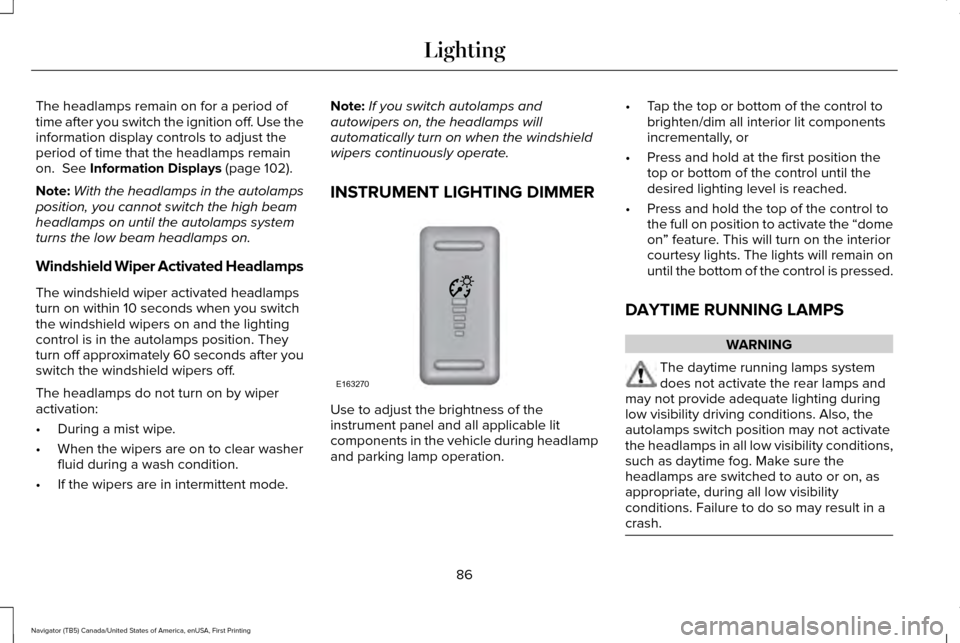
INSTRUMENT LIGHTING DIMMER Use to adjust the brightness of the
instrument panel and all applicable lit
components in the vehicle during headlamp
and parking lamp operation.•
Tap the top or bottom of the control to
brighten/dim all interior lit components
incrementally, or
• Press and hold at the first position the
top or bottom of the control until the
desired lighting level is reached.
• Press and hold the top of the control to
the full on position to activate the “dome
on” feature. This will turn on the interior
courtesy lights. The lights will remain on
until the bottom of the control is pressed.
DAYTIME RUNNING LAMPS WARNING
The daytime running lamps system
does not activate the rear lamps and
may not provide adequate lighting during
low visibility driving conditions. Also, the
autolamps switch position may not activate
the headlamps in all low visibility conditions,
such as daytime fog. Make sure the
headlamps are switched to auto or on, as
appropriate, during all low visibility
conditions. Failure to do so may result in a
crash. 86
Navigator (TB5) Canada/United States of America, enUSA, First Printing LightingE163270
Page 103 of 532
Low Washer Fluid
It illuminates when the windshield
washer fluid is low.
Parking Lamps It illuminates when you switch the
parking lamps on.
Powertrain Fault Illuminates when a powertrain fault
has been detected. Contact an
authorized dealer as soon as
possible. Service Engine Soon If the service engine soon indicator
light stays illuminated after you
start the engine, it indicates that
the On Board Diagnostics system (OBD) has
detected a malfunction of the vehicle
emissions control system. Refer to On Board
Diagnostics (OBD) in the Fuel and Refueling
chapter for more information about having
your vehicle serviced. See Emission Control
System (page 166).
If the light is blinking, engine misfire is
occurring which could damage your catalytic
converter. Drive in a moderate fashion (avoid
heavy acceleration and deceleration) and
have your vehicle serviced immediately. WARNING
Under engine misfire conditions,
excessive exhaust temperatures could
damage the catalytic converter, the fuel
system, interior floor coverings or other
vehicle components, possibly causing a fire.
Have your vehicle checked as soon as
possible. The service engine soon indicator light
illuminates when you first switch on the
ignition before engine start to check the bulb
and to indicate whether the vehicle is ready
for Inspection/Maintenance (I/M) testing.
Normally, the service engine soon light stays
on until you crank the engine, then turns
itself off if no malfunctions are present.
However, if after 15 seconds the service
engine soon light blinks eight times, it means
that the vehicle is not ready for I/M testing.
See Emission Control System (page 166).
Stability Control System Displays when the
AdvanceTrac®/Traction control is
active. If the light remains on, have
the system serviced immediately. See Using
Stability Control
(page 188).
Stability Control System Off Illuminates when you disable
AdvanceTrac
™/Traction control.
See
Using Stability Control (page
188).
100
Navigator (TB5) Canada/United States of America, enUSA, First Printing Instrument ClusterE132353 E138639 E130458
Page 105 of 532
GENERAL INFORMATION
WARNING
Driving while distracted can result in
loss of vehicle control, crash and injury.
We strongly recommend that you use
extreme caution when using any device that
may take your focus off the road. Your
primary responsibility is the safe operation
of your vehicle. We recommend against the
use of any handheld device while driving and
encourage the use of voice-operated
systems when possible. Make sure you are
aware of all applicable local laws that may
affect the use of electronic devices while
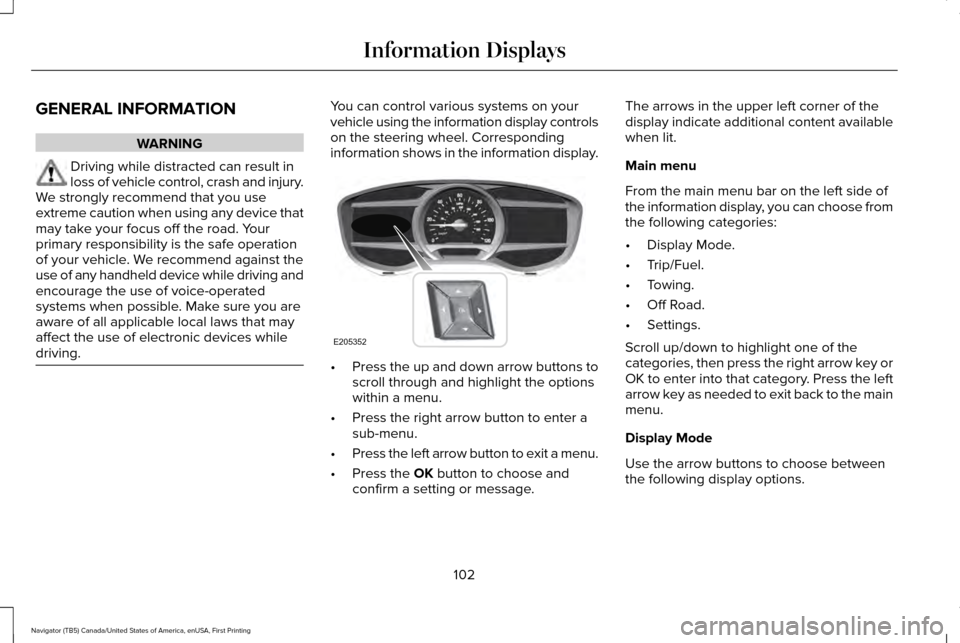
driving. You can control various systems on your
vehicle using the information display controls
on the steering wheel. Corresponding
information shows in the information display.
•
Press the up and down arrow buttons to
scroll through and highlight the options
within a menu.
• Press the right arrow button to enter a
sub-menu.
• Press the left arrow button to exit a menu.
• Press the OK button to choose and
confirm a setting or message. The arrows in the upper left corner of the
display indicate additional content available
when lit.
Main menu
From the main menu bar on the left side of
the information display, you can choose from
the following categories:
•
Display Mode.
• Trip/Fuel.
• Towing.
• Off Road.
• Settings.
Scroll up/down to highlight one of the
categories, then press the right arrow key or
OK to enter into that category. Press the left
arrow key as needed to exit back to the main
menu.
Display Mode
Use the arrow buttons to choose between
the following display options.
102
Navigator (TB5) Canada/United States of America, enUSA, First Printing Information DisplaysE205352
Page 106 of 532
Display Mode
Digital tachometer and fuel level gauge
Digital tachometer, fuel level gauge and engine coolant temperature gauge
Gauge Detail (Oil pressure, Oil temperature and Transmission temperature)
Engine Hours (Engine hours and Engine idle hours)
Oil Life
Distance to Empty
Digital Speedometer - Press OK to change the currently units displayed
Trip/Fuel
Use the arrow buttons to choose between
the following trip and fuel options. Note:
Press and hold OK to reset the
currently displayed information. Trip/Fuel
Trip 1 or Trip 2
Fuel Economy
Fuel History
103
Navigator (TB5) Canada/United States of America, enUSA, First Printing Information Displays
Page 107 of 532
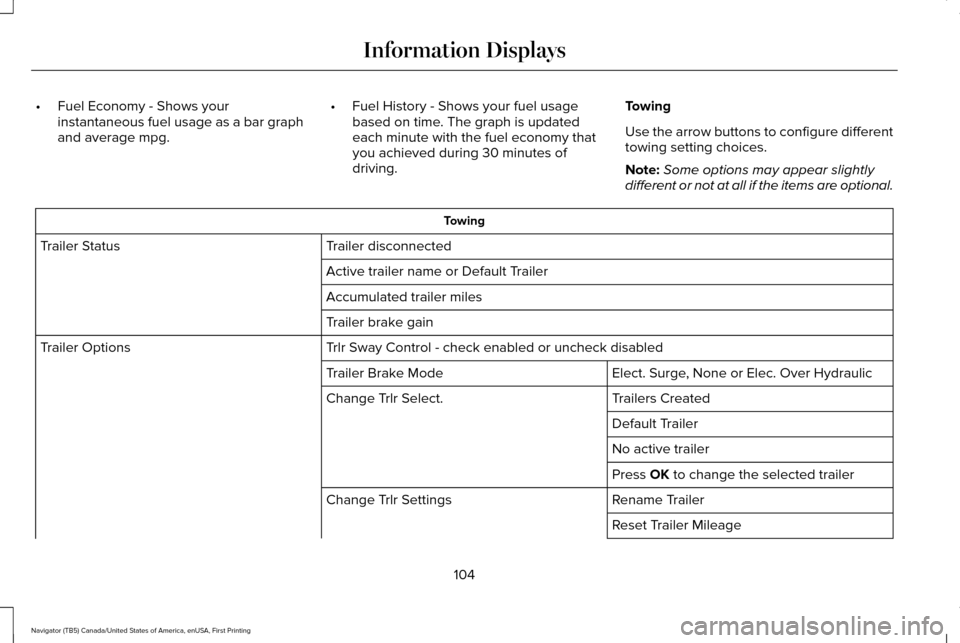
•
Fuel Economy - Shows your
instantaneous fuel usage as a bar graph
and average mpg. •
Fuel History - Shows your fuel usage
based on time. The graph is updated
each minute with the fuel economy that
you achieved during 30 minutes of
driving. Towing
Use the arrow buttons to configure different
towing setting choices.
Note:
Some options may appear slightly
different or not at all if the items are optional. Towing
Trailer disconnected
Trailer Status
Active trailer name or Default Trailer
Accumulated trailer miles
Trailer brake gain
Trlr Sway Control - check enabled or uncheck disabled
Trailer Options
Elect. Surge, None or Elec. Over Hydraulic
Trailer Brake Mode
Trailers Created
Change Trlr Select.
Default Trailer
No active trailer
Press OK to change the selected trailer
Rename Trailer
Change Trlr Settings
Reset Trailer Mileage
104
Navigator (TB5) Canada/United States of America, enUSA, First Printing Information Displays
Page 120 of 532

Off Road Messages
Action
Message
Displays when your vehicle speed requirement for off road mode entry has\
notbeen met.
For Off Road Slow to 5MPH
Displays when off road mode becomes active.
Enter Off Road Mode Enabled
Displays when off road mode becomes inactive.
Exiting Off Road Mode
Displays when hill descent control mode deactivates.
Hill Descent Control Off
Displays when hill descent speed exceeds 20 MPH (32 KM/H).
For Hill Descent Reduce Speed
Displays when hill descent control mode requires driver shift transmissi\
on intogear.
For Hill Descent Select Gear
Displays when the hill control mode requires the driver to resume contro\
l.
Hill Descent Driver Resume Control
Displays when a hill descent system fault is present.
Hill Descent Control FAULT
Displays when hill descent control mode disables to cool the brake system.
Hill Descent Control OFF System Cooling
Displays when hill descent control mode activates.
Hill Descent Control Ready
117
Navigator (TB5) Canada/United States of America, enUSA, First Printing Information Displays
Page 126 of 532
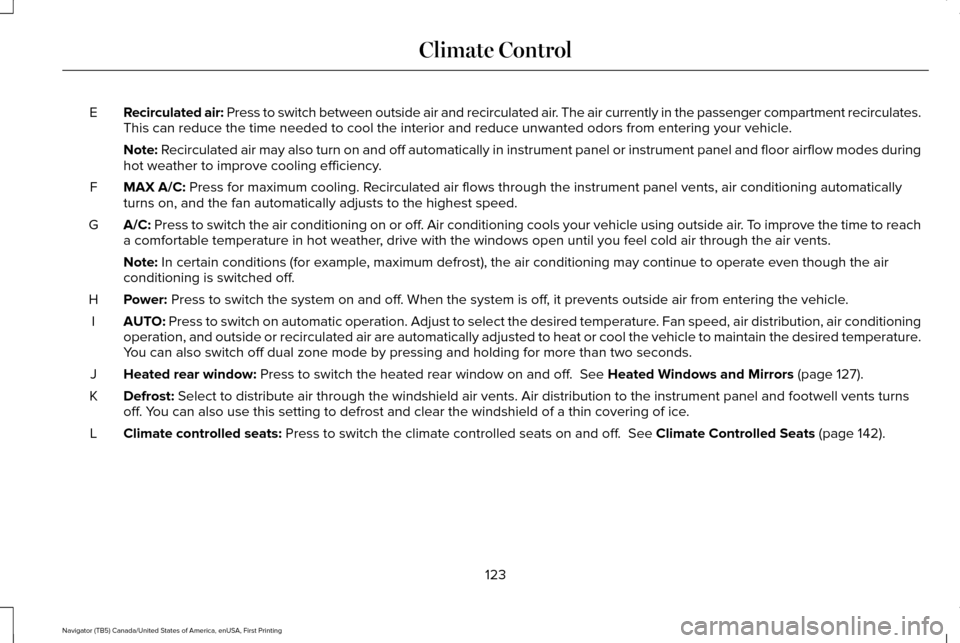
Recirculated air: Press to switch between outside air and recirculated air. The air currently in the passenger compartment recirculates.
This can reduce the time needed to cool the interior and reduce unwanted\
odors from entering your vehicle.
E
Note: Recirculated air may also turn on and off automatically in instrument pan\
el or instrument panel and floor airflow modes during
hot weather to improve cooling efficiency.
MAX A/C:
Press for maximum cooling. Recirculated air flows through the instrument panel vents, air conditioni\
ng automatically
turns on, and the fan automatically adjusts to the highest speed.
F
A/C:
Press to switch the air conditioning on or off. Air conditioning cools your vehicle using outside air. To improve the time to reach
a comfortable temperature in hot weather, drive with the windows open until you feel cold air through the air ve\
nts.
G
Note:
In certain conditions (for example, maximum defrost), the air conditioning may continue to operate even t\
hough the air
conditioning is switched off.
Power:
Press to switch the system on and off. When the system is off, it prevents outside air from entering the vehicle.
H
AUTO:
Press to switch on automatic operation. Adjust to select the desired te\
mperature. Fan speed, air distribution, air conditioning
operation, and outside or recirculated air are automatically adjusted to\
heat or cool the vehicle to maintain the desired temperature .
You can also switch off dual zone mode by pressing and holding for more t\
han two seconds.
I
Heated rear window:
Press to switch the heated rear window on and off. See Heated Windows and Mirrors (page 127).
J
Defrost:
Select to distribute air through the windshield air vents. Air distribu\
tion to the instrument panel and footwell vents turns
off. You can also use this setting to defrost and clear the windshield of a th\
in covering of ice.
K
Climate controlled seats:
Press to switch the climate controlled seats on and off. See Climate Controlled Seats (page 142).
L
123
Navigator (TB5) Canada/United States of America, enUSA, First Printing Climate Control
Page 138 of 532
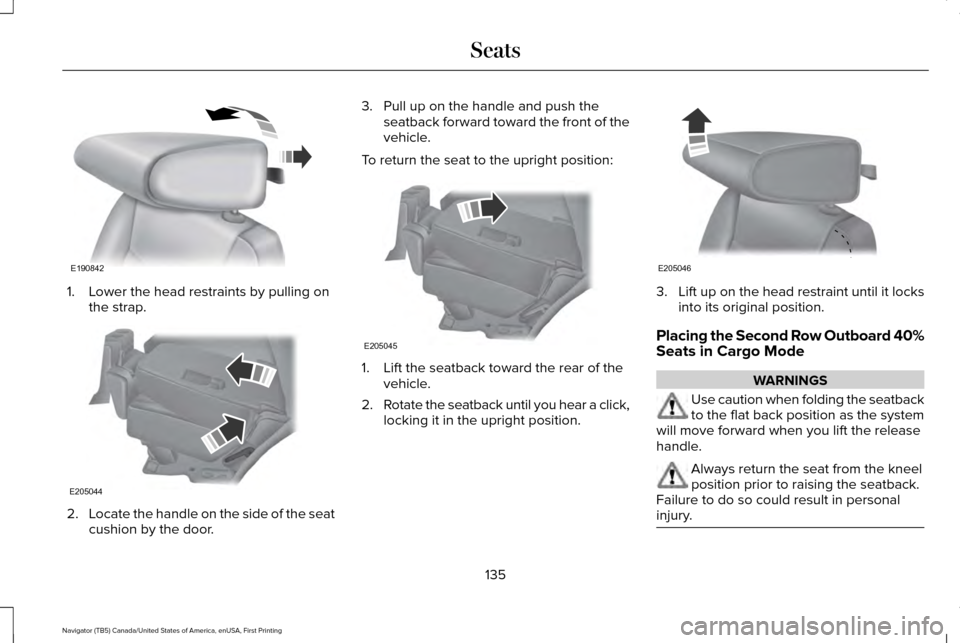
1. Lower the head restraints by pulling on
the strap. 2.
Locate the handle on the side of the seat
cushion by the door. 3. Pull up on the handle and push the
seatback forward toward the front of the
vehicle.
To return the seat to the upright position: 1. Lift the seatback toward the rear of the
vehicle.
2. Rotate the seatback until you hear a click,
locking it in the upright position. 3.
Lift up on the head restraint until it locks
into its original position.
Placing the Second Row Outboard 40%
Seats in Cargo Mode WARNINGS
Use caution when folding the seatback
to the flat back position as the system
will move forward when you lift the release
handle. Always return the seat from the kneel
position prior to raising the seatback.
Failure to do so could result in personal
injury. 135
Navigator (TB5) Canada/United States of America, enUSA, First Printing SeatsE190842 E205044 E205045 E205046
Page 139 of 532
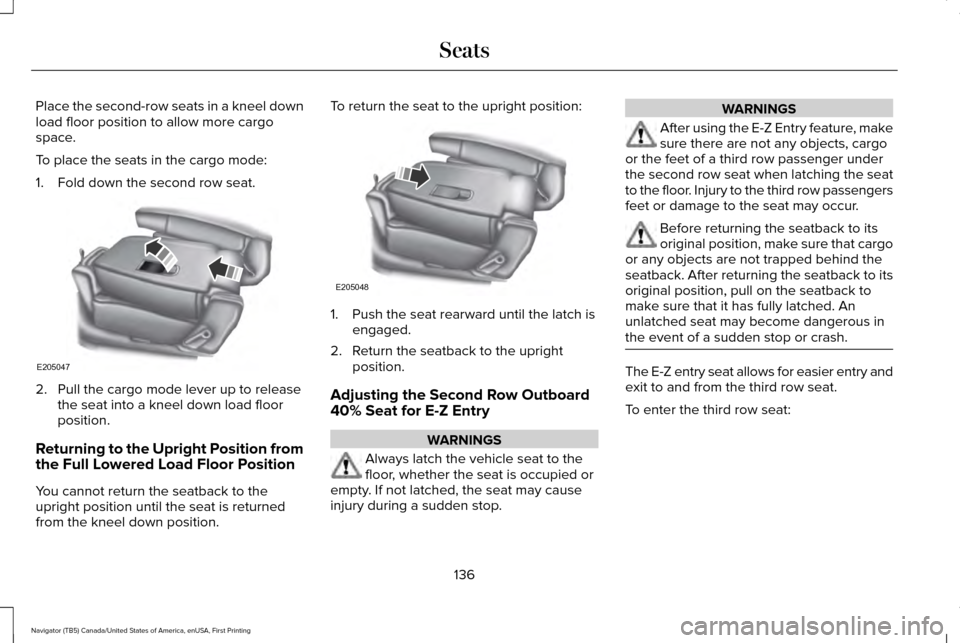
Place the second-row seats in a kneel down
load floor position to allow more cargo
space.
To place the seats in the cargo mode:
1. Fold down the second row seat.
2. Pull the cargo mode lever up to release
the seat into a kneel down load floor
position.
Returning to the Upright Position from
the Full Lowered Load Floor Position
You cannot return the seatback to the
upright position until the seat is returned
from the kneel down position. To return the seat to the upright position:
1. Push the seat rearward until the latch is
engaged.
2. Return the seatback to the upright position.
Adjusting the Second Row Outboard
40% Seat for E-Z Entry WARNINGS
Always latch the vehicle seat to the
floor, whether the seat is occupied or
empty. If not latched, the seat may cause
injury during a sudden stop. WARNINGS
After using the E-Z Entry feature, make
sure there are not any objects, cargo
or the feet of a third row passenger under
the second row seat when latching the seat
to the floor. Injury to the third row passengers
feet or damage to the seat may occur. Before returning the seatback to its
original position, make sure that cargo
or any objects are not trapped behind the
seatback. After returning the seatback to its
original position, pull on the seatback to
make sure that it has fully latched. An
unlatched seat may become dangerous in
the event of a sudden stop or crash. The E-Z entry seat allows for easier entry and
exit to and from the third row seat.
To enter the third row seat:
136
Navigator (TB5) Canada/United States of America, enUSA, First Printing SeatsE205047 E205048
Page 151 of 532
2.
The indicator light will begin to flash after
20 seconds. Without releasing the
button, follow Step 1 in the Programming
section.
For questions or comments, contact
HomeLink at www.homelink.com,
www.youtube.com/HomeLinkGentex or
1-800-355-3515.
Programming to a Genie Intellicode 2
Garage Door Opener
Note: The Genie Intellicode 2 transmitter
must already be programmed to operate
with the garage door opener.
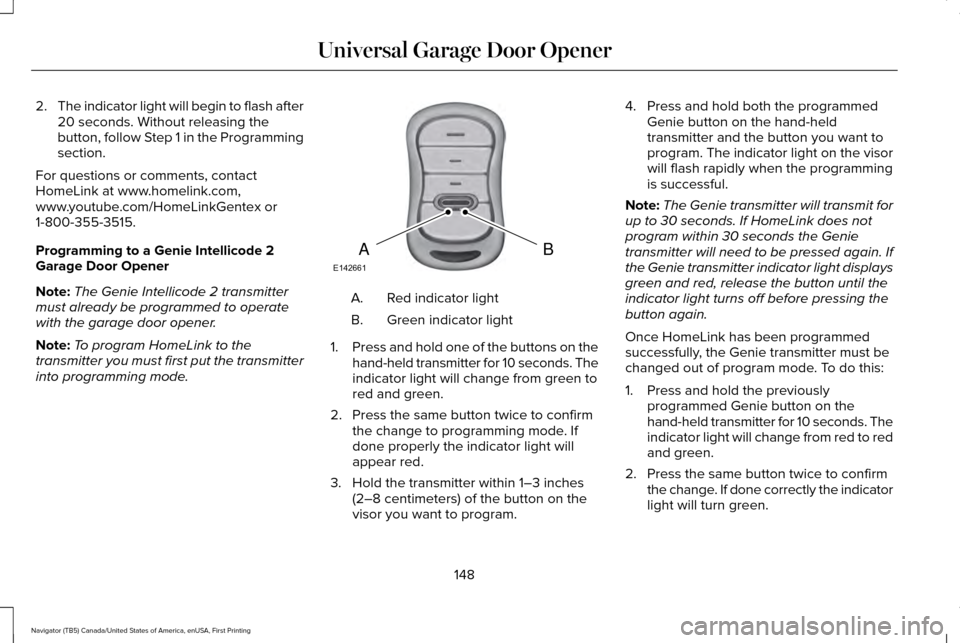
Note: To program HomeLink to the
transmitter you must first put the transmitter
into programming mode. Red indicator light
A.
Green indicator light
B.
1. Press and hold one of the buttons on the
hand-held transmitter for 10 seconds. The
indicator light will change from green to
red and green.
2. Press the same button twice to confirm the change to programming mode. If
done properly the indicator light will
appear red.
3. Hold the transmitter within 1–3 inches (2–8 centimeters) of the button on the
visor you want to program. 4. Press and hold both the programmed
Genie button on the hand-held
transmitter and the button you want to
program. The indicator light on the visor
will flash rapidly when the programming
is successful.
Note: The Genie transmitter will transmit for
up to 30 seconds. If HomeLink does not
program within 30 seconds the Genie
transmitter will need to be pressed again. If
the Genie transmitter indicator light displays
green and red, release the button until the
indicator light turns off before pressing the
button again.
Once HomeLink has been programmed
successfully, the Genie transmitter must be
changed out of program mode. To do this:
1. Press and hold the previously programmed Genie button on the
hand-held transmitter for 10 seconds. The
indicator light will change from red to red
and green.
2. Press the same button twice to confirm the change. If done correctly the indicator
light will turn green.
148
Navigator (TB5) Canada/United States of America, enUSA, First Printing Universal Garage Door OpenerBAE142661